June 13, 2017 at 10:01
Create a third-person VR game
- Transfer
1. Introduction
Forge Reply is a Milan-based gaming studio. Our most important project to date is the hybrid game-book / JRPG Joe Dever's Lone Wolf . The game in four acts was released on mobile devices in 2013-2014. Then it was ported to other platforms (PC, PlayStation 4 and Xbox One).
Joe Dever's Lone Wolf was created at the dawn of high-quality mobile games, but after its release, the gaming industry has made another major transition. Games began to appear in virtual reality, and we also wanted to participate in this.
Theseus is our first VR game in which we are faced with completely new issues. In this post I will talk about the problems that we encountered when creating the design of the game and UI.
Create third-party gameplay in VR
How did we get to VR and why the third-person view?
When creating theseus vision as a game in virtual reality, of course, the first thing that occurred to us was the first-person view. However, when we made the first prototypes, we realized that for the embodiment of the alchemy we need, first-person perspective will not be the best choice.
Therefore, we considered different options and decided to switch to a third-person game. We perceived it almost as an out-of-body experience (or sensations of Lakitu with a camera in Super Mario 64). Our main starting sources were such old masterpieces of survival horror as Resident Evil and Alone in the Dark. In these games, the camera is fixed and its position changes depending on the player’s movement (usually when changing a room or zone).
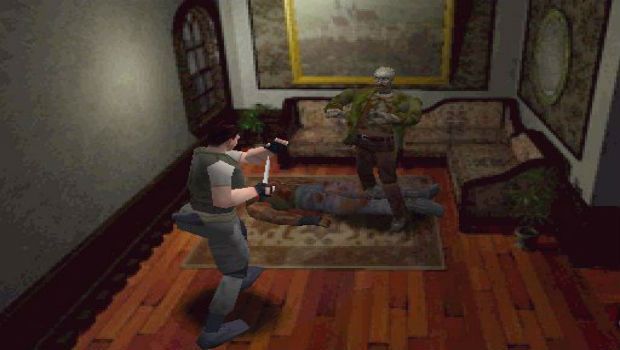
But Theseus was supposed to be both an emotional and cinematic experience. How to convey these feelings using only fixed cameras? This is impossible, so we decided to add another system of cameras following the character, copied from more modern games (for example, from The Last of Us), but adapt it for VR.
That's how we created our Mixed-Camera System , which allows us to switch from fixed to tracking cameras and vice versa, depending on the gameplay. Moreover, switching occurs without any problems with motion sickness. If we take recent VR games as an example, we can describe this system as switching between Chronos and Edge of Nowhere cameras.
3. Camera system
As we moved on to the development of the camera
system The mixed camera system provided us with great flexibility, which allowed level designers to choose the best camera option depending on the gameplay situation.
Security cameras, for example, turned out to be the best choice for all situations in which we wanted to enhance the feeling of immersion in the game and increase tension. On the other hand, fixed cameras were better suited to battles or situations in which a player might experience motion sickness from VR.
Fixed cameras
A wider viewing angle of the fixed camera gives in battles a more complete understanding of the structure of the battlefield, helps the player correctly move Theseus in a three-dimensional environment. As a result, it becomes easier to predict and avoid enemy attacks. On the other hand, a fixed camera enhances the sense of grandeur of architecture, allowing us to create impressive, unique angles of the maze.
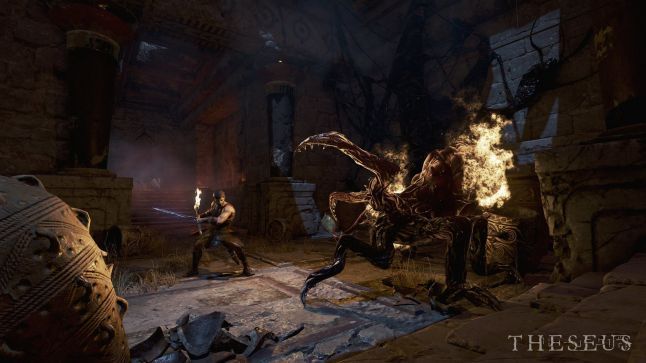
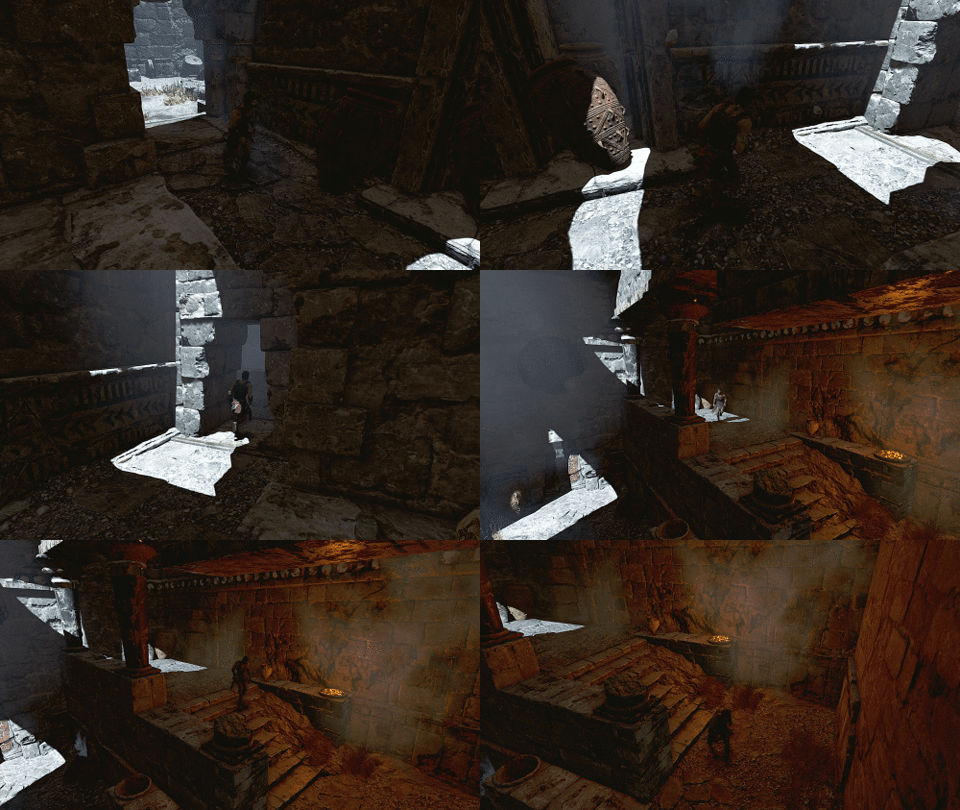
While our level designers planned the levels, we realized that the location of these fixed cameras should meet much more stringent requirements compared to traditional games in which the camera always follows the player (for example, with Resident Evil). In games in virtual reality, the player controls the camera by turning his head, so it is impossible to "force" to make a sharp transition from one room to another. On the contrary, it was necessary to create a “flow” of rooms, structured with the help of reverse plans, and always take into account the rotation of the player’s head (see examples).
Correct design

Correct camera layout. When switching from A to B and vice versa, the camera takes into account the position of the player’s head.
Result in the game
Incorrect design
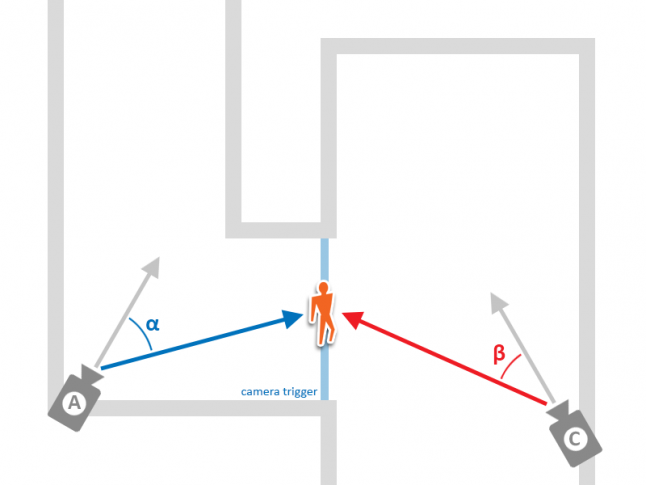
Incorrect camera location. When switching from A to C, the player cannot see the character.
TRACKING CAMERAS
The sensation of immersion made by the tracking camera is like riding an attraction in which the user moves on rails and looks around. Such cameras are less suitable for gameplay situations, and more suitable for narrative moments. The use of tracking cameras led us to the implementation of a separate mechanics:
- The risk of motion sickness increases when the camera follows the character’s movements and the character moves too fast. For this reason, in the tracking camera mode, we tried to limit the player’s speed.
- To reduce lateral movement, which can lead to motion sickness, we have implemented motion curves for some "narrative moments" in which the character moves very long distances. In these situations, the character is connected to the curve and can only follow it, controlled by an analog joystick.
- As an additional measure, we decided to restrict or block the character’s movement when the player looks the other way. We made this decision because the game has many moments that make a strong impression and the player will consider the environment.
CAMERA TRANSITIONS
Also, our level designer has taken care of switching between fixed and tracking cameras. This type of transition is actually quite critical, and we had to establish the following rules:
- We tried to tie any transition to an architectural element, for example, to a door or entrance to a huge corridor, so that the user “expected” the camera to switch.
- When making transitions, we reduce the character’s speed to prevent the character from quickly moving in the tracking camera.
- Before switching to the tracking camera, we create a level diagram in such a way that the player is motivated to move his head and return to a neutral stationary position (see example).
Proper design
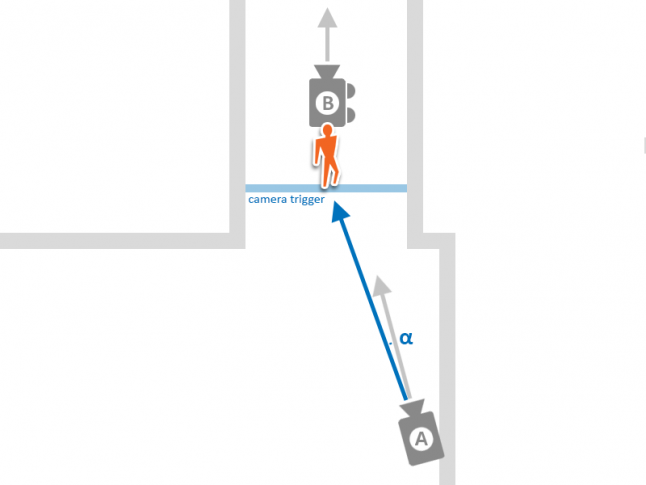
A is a fixed camera, B is a tracking camera. A is in the correct position.

Result in the game (transition from fixed to tracking camera)
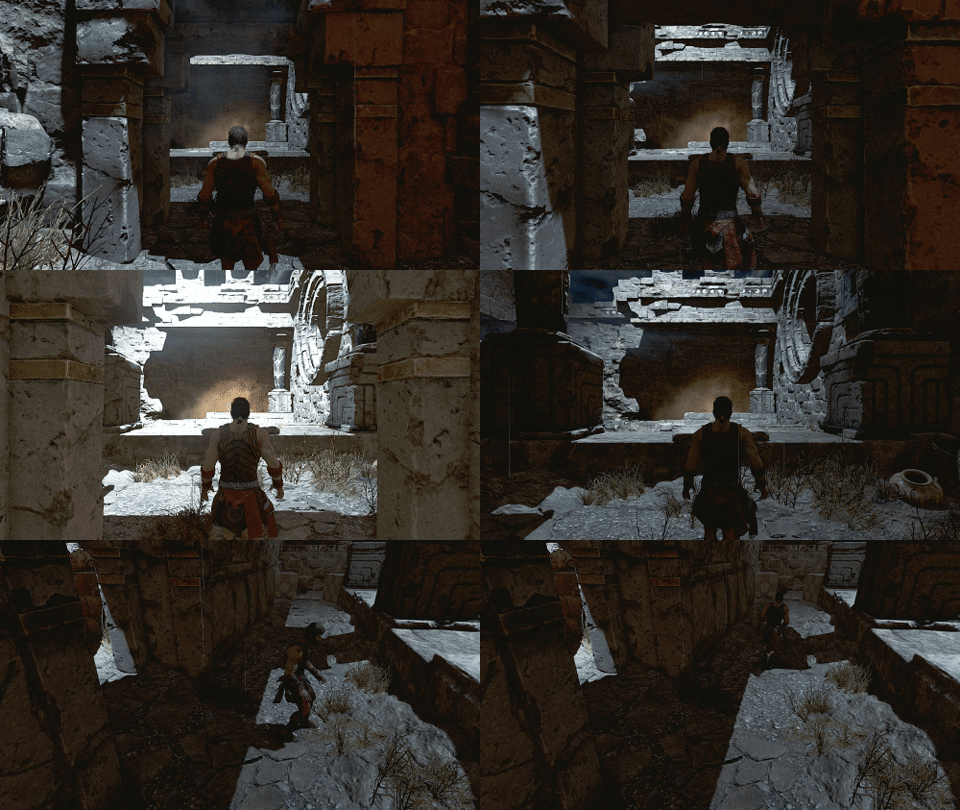
Result in the game (transition from tracking to fixed camera)
Improper design

C - fixed camera, B - tracking camera. C is in the wrong position.
4. UI in the space of the world
The restriction becomes an opportunity.
From the very beginning of the development of Theseus, we decided that the narrator will speak the ancient Greek language, and localization will affect only subtitles. We believed that the atmosphere of the game would benefit from this, but, in addition, there were significant side effects of budget savings. In addition to these lines of history dialogs, we wanted to use text to leave “clues” where contextual icons are not enough.
We had to decide how these texts should look, because in VR there are two possible options, and each has its own advantages and disadvantages:
- In the "head space" - the text is always in front of the player, even when he turns his head;
- In the "space of the world" - the text is located in a three-dimensional environment.
In the early stages of development, we mainly worked on the UI in head space. We did not want to block the view of the player, so we tried not to place the text in the middle of the screen. As a result, the only logical place was the area directly under the field of view. But when the player looked down to read the subtitles, the head display also moved, creating a kind of “usage cycle”. Having assessed the situation, we came to four important conclusions:
- You cannot display too much text at the same time;
- Reading two lines (one below the other) may be inconvenient;
- The need to look at the text distracts the player from other ongoing activities, which destroys the feeling of immersion;
- On the other hand, a player can easily skip subtitles if his attention is distracted by something else.
The text of the “space of the world” has shown itself in a much better way: it seems more holistic, less distracting and more convenient to read, even when there are several sentences in it.

However, there are some subtleties: each line must be individually placed in a suitable position, which can be a rather long operation with a large amount of text. In addition, the font size should be large enough to avoid artifacts. And the last: you need to be very careful when localizing. English is pretty “concise," and sentences in other languages usually take up more space.
In the end, we decided to use a combination of both approaches: the text in the "space of the world" is used to present the story, and in the "space of the head" - to display game prompts. Such a scheme gives advantages in ease of use, because the player quickly understands what type of text he will read, and there is no need to resort to other highlighting elements, for example, to change the font or color of words.
5. Conclusion
In conclusion, I want to say that the creation of Theseus as a game in virtual reality required a lot of effort, but it also gave us a lot. The main reason was problems that we had never encountered before, such as motion sickness when moving or the readability of in-game texts. Virtual reality forced us to make non-trivial decisions.
We hope this post helps or inspires the development process for VR. Thank you for reading!
If you are interested in seeing the preliminary results of our work, then see the teaser for the game.