We make preview pictures of WebRTC video stream in PNG images
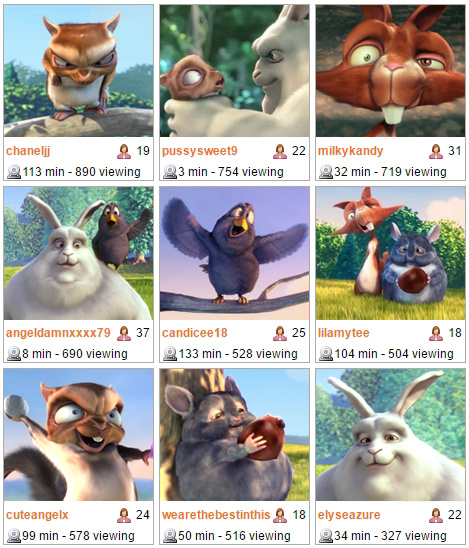
There are 10 users who stream webcam video via WebRTC. You need to display the snapshots (thumbnails) of their streams on one web page to look something like this:
You can just play the video instead of pictures, but let's calculate what the bit rate will be if each of the streams takes 1 Mbps band. If you play all ten, you get 10 Mbps. Not too much for previews?
It would be much better to request a frame from the video stream from the server, get it in the form of PNG and show the image in the browser.

First, we implemented the loading of PNG-images on request:
This option worked, but we didn’t like something. It is possible that you would have to store the pictures on your server or invent them to be uploaded to Nginx or Apache for subsequent static distribution.
As a result, we decided to wrap PNG in Base64 and send the client a snapshot in this form. With this approach, files are not distributed from the server via http. PNG file content is generated and transmitted to the client via Websockets at the time of the request.
A step-by-step description of the process with pieces of JavaScript code:
1. Alice sends the video stream from the webcam to the server via WebRTC and names the stream stream1.
2. Bob, knowing the name of the stream, can request a snapshot in the following way:
In order to get a snapshot, Bob hangs up the STREAM_STATUS.SNAPSHOT_COMPLETE listener, which inserts a Base64 image into the element located on the page:
The full snapshot example code is available here .
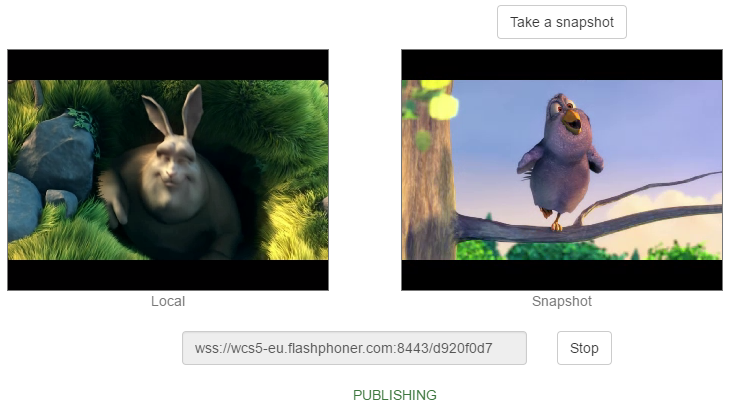
In this example, you can send a video stream to the server, and then take snapshots from this video stream by periodically clicking on the Take button . Of course, if you wish, you can automate this by writing an appropriate script that will remove snapshots from streams, for example, once a minute.
On the server side, to receive a snapshot, decoding the video stream is required. The incoming WebRTC stream is depacketized, decoded, and at this point it becomes possible to take pictures of it. A scheme with decoding and normal playback looks like this:

For normal playback, the streams are not decoded and get to the viewer as is. If a snapshot is required, it is taken from the branch of the video stream that went to decoding.
When working with snapshots, the WebRTC server Web Call Server 5 and the Web SDK are used , which provides a JavaScript API for working with snapshots of online broadcasts.
You can just play the video instead of pictures, but let's calculate what the bit rate will be if each of the streams takes 1 Mbps band. If you play all ten, you get 10 Mbps. Not too much for previews?
It would be much better to request a frame from the video stream from the server, get it in the form of PNG and show the image in the browser.
First, we implemented the loading of PNG-images on request:
- We make an asynchronous request:
stream.snapshot(); - The server saves the picture in the file system.
- The user who requested the snapshot receives the URL of the picture and can insert the picture with the HTML tag:
This option worked, but we didn’t like something. It is possible that you would have to store the pictures on your server or invent them to be uploaded to Nginx or Apache for subsequent static distribution.
As a result, we decided to wrap PNG in Base64 and send the client a snapshot in this form. With this approach, files are not distributed from the server via http. PNG file content is generated and transmitted to the client via Websockets at the time of the request.
A step-by-step description of the process with pieces of JavaScript code:
1. Alice sends the video stream from the webcam to the server via WebRTC and names the stream stream1.
session.createStream({name:"stream1"}).publish()2. Bob, knowing the name of the stream, can request a snapshot in the following way:
var stream = session.createStream({name:"stream1"});
stream.snapshot();
In order to get a snapshot, Bob hangs up the STREAM_STATUS.SNAPSHOT_COMPLETE listener, which inserts a Base64 image into the element located on the page:
stream.on(STREAM_STATUS.SNAPSHOT_COMPLETE, function(stream){
	snapshotImg.src = "data:image/png;base64,"+stream.getInfo();
}
The full snapshot example code is available here .
In this example, you can send a video stream to the server, and then take snapshots from this video stream by periodically clicking on the Take button . Of course, if you wish, you can automate this by writing an appropriate script that will remove snapshots from streams, for example, once a minute.
On the server side, to receive a snapshot, decoding the video stream is required. The incoming WebRTC stream is depacketized, decoded, and at this point it becomes possible to take pictures of it. A scheme with decoding and normal playback looks like this:
For normal playback, the streams are not decoded and get to the viewer as is. If a snapshot is required, it is taken from the branch of the video stream that went to decoding.
When working with snapshots, the WebRTC server Web Call Server 5 and the Web SDK are used , which provides a JavaScript API for working with snapshots of online broadcasts.