A bug in NTFS, or how to suspend the entire system
Not so long ago, when developing a file system filter, a problem arose that led to the suspension of the entire system. It would seem that the filter performed very simple actions and was very primitive itself. To find out the reason, I had to go down to debugging and reverse engineering the NTFS driver. The analysis revealed a very interesting effect. If you compile and execute a very simple program, shown in the figure below, then access to the corresponding volume will freeze.
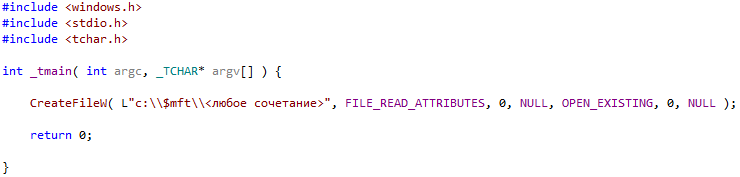
Those. in this example, if you try to open any file relative to the $ mft file, access to all volume “C” will hang, and since this volume is a system volume, the entire system will hang. In this case, you do not need to have any rights. If the volume was not a system volume, then only access to that volume will hang, but if you reboot, the system will hang on it.
Before describing the essence of the problem, it is worth considering the basic principles of building file systems. When a process opens a file, besides the HANDLE received on it, structures are also formed in the kernel space, both by the kernel itself and by the file system, which, in essence, represent the volume file in memory. The figure below shows these structures.
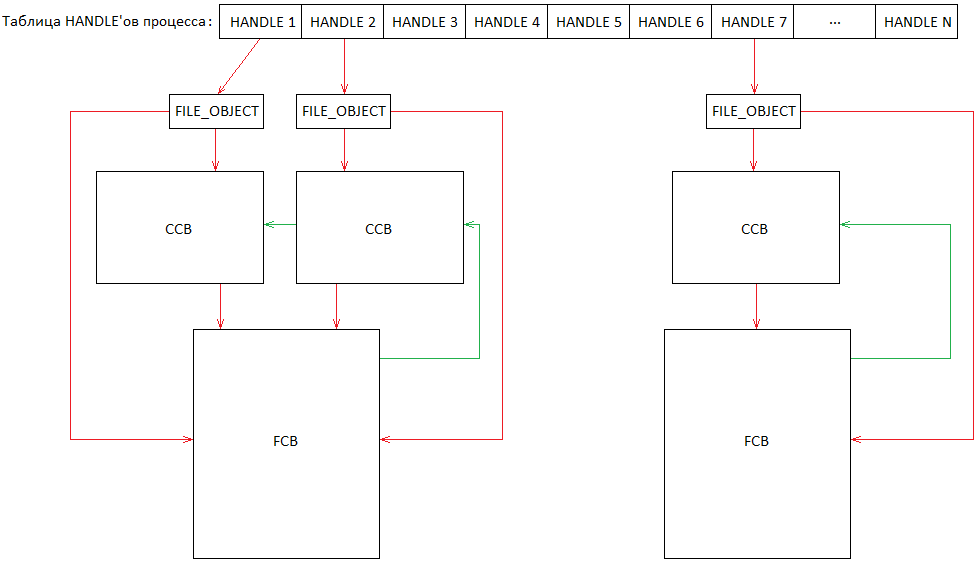
A HANDLE file always refers to the kernel structure of FILE_OBJECT. This structure is formed by the kernel before sending a request to the file system. The file system, in turn, initializes the fields of this structure. Thus, the FILE_OBJECT structure will contain pointers to the file system structures: FCB (File control block, contains all the necessary data for managing the file) and CCB (Context Control Block, contains data unique to a specific open instance). It is also possible that two different HANDLEs will refer to the same volume file, as reflected on the left. The FCB structure contains a list of all CCB structures. The CCB structure contains a pointer to the corresponding FCB. Those. for each open volume file in memory there will be exactly one FCB structure. If the file is opened several times, then exactly so many CCB structures will be generated,
Since file access can be performed simultaneously by different or the same process, these parallel operations must be serialized. At the same time, it is permissible that some operations will be performed simultaneously (for example, reading), however, there are situations when access should be performed exclusively (for example, writing). For this, the kernel provides a serialization mechanism - ERESOURCE. This object can be captured both monopoly and shared. If an object is captured exclusively, then any attempts to capture it will be put on the waiting list. If an object is captured in a shared manner, then attempts to also capture it in a shared manner will be satisfied immediately. If the object is captured in a shared manner and the wait queue is not empty (that is, there was an attempt to exclusively capture it), then any attempts to capture it will be put on the wait queue.
The FCB file system structures for access serialization contain these mechanisms and actively use them during file access. This ensures file integrity both in memory and on the volume.
The $ mft file of the NTFS file system is a system file. This file describes the location of all files on the volume. NTFS, when mounted, opens it for personal use. If you try to read the contents of the directory or while opening the NTFS file, it will read the $ mft file. If you try to delete a file or create a file, NTFS will write to this file. Therefore, before any such operation, the ERESOURCE mechanism of this file will also be captured, then the operation itself will be performed, after which the mechanism will be released.
To understand the essence of the problem, you need to understand how the NtfsCommonCreate function of the NTFS file system works. A very simplified pseudo-code is shown in the figure below. Only those parts of the function that are directly related to the problem are listed.

The NTFS file system stores a tree of already open files / directories. Therefore, in order to improve performance, it is advisable to find the target file in this tree instead of reading the volume repeatedly. Therefore, the function will try to find it through the NtfsFindStartingNode function. If the file could not be found, then the function will try to find the directory in which it is located. This attempt will be performed right down to the root of the file system. The NtfsFindStartingNode function returns a pointer to the FCB structure of either the file itself or the directory that is closest in depth to the target file. The function will also return part of the raw path relative to the found directory. Also, the function pre-captures the ERESOURCE of the found directory or file shared.
Next, the NtfsCommonCreate function checks if there is a part of the raw path, if not, then the NtfsFindStartingNode function found the file itself, and in this case, the NtfsCommonCreate function ends. Otherwise, the function continues to search for the file, but already on the volume.
As you can see from the pseudocode, the function contains a loop in which the directories leading to the file are opened sequentially. At the beginning of the loop, it is checked whether the file is a directory, and if not, then the function finishes with an error. Otherwise, the next name in the path is retrieved and an attempt is made to open a file / directory with that name using the NtfsOpenSubdirectory function. The NtfsOpenSubdirectory function also captures an open file / directory exclusively. Before calling the NtfsOpenSubdirectory function, the previous open directory is also freed by the NtfsOpenSubdirectory function. The loop will continue to the directory in which the intended file will be located.
At the end of its work, in case of unsuccessful completion, the NtfsCommonCreate function closes the last directory found using the NtfsTeardownStructures function. Also this function will free the ERESOURCE directory / file, if possible. Those. if this directory / file is not open. Because this directory / file has just been opened by the file system, most likely their ERESOURCE will be released and the FCB file will be closed.
When an attempt is made to open a file relative to the $ mft file, the NtfsFindStartingNode function will not find it, because this function searches a bit differently, unlike the NtfsOpenSubdirectory function, which always finds this file. Therefore, the loop starts, starting at the root of the file system. Next, the NtfsOpenSubdirectory function will open this file and capture it ERESOURCE exclusively. At the next iteration, the loop will detect that the file is not a directory, and therefore will interrupt its operation with an error. And at the end of its work, the NtfsCommonCreate function, through the NtfsTeardownStructures function, will try to close it. The function NtfsTeardownStructures, in turn, will encounter the fact that it will not be able to close the file, because it is opened by the file system itself when mounted. At the same time, contrary to the expectations of the NtfsCommonCreate function, the NtfsTeardownStructures function will not release the ERESOURCE $ mft file. Thus, he will remain captured forever. Therefore, for example, when trying to create a file or read volume files, the NTFS file system will try to capture the ERESOURCE $ mft file and freeze at this point forever.
This problem cannot be called a vulnerability, but having remote access to the machine, it is possible to disrupt its operation. This error persists until the latest versions of Windows, with the exception of the latest updates, starting at least with Windows Vista. As already mentioned, the description of the NTFS file system in this case is very simplified and reflects only the essence of the problem. In fact, the implementation is much more complicated than the description given.
Those. in this example, if you try to open any file relative to the $ mft file, access to all volume “C” will hang, and since this volume is a system volume, the entire system will hang. In this case, you do not need to have any rights. If the volume was not a system volume, then only access to that volume will hang, but if you reboot, the system will hang on it.
Bit of theory
Before describing the essence of the problem, it is worth considering the basic principles of building file systems. When a process opens a file, besides the HANDLE received on it, structures are also formed in the kernel space, both by the kernel itself and by the file system, which, in essence, represent the volume file in memory. The figure below shows these structures.
A HANDLE file always refers to the kernel structure of FILE_OBJECT. This structure is formed by the kernel before sending a request to the file system. The file system, in turn, initializes the fields of this structure. Thus, the FILE_OBJECT structure will contain pointers to the file system structures: FCB (File control block, contains all the necessary data for managing the file) and CCB (Context Control Block, contains data unique to a specific open instance). It is also possible that two different HANDLEs will refer to the same volume file, as reflected on the left. The FCB structure contains a list of all CCB structures. The CCB structure contains a pointer to the corresponding FCB. Those. for each open volume file in memory there will be exactly one FCB structure. If the file is opened several times, then exactly so many CCB structures will be generated,
Since file access can be performed simultaneously by different or the same process, these parallel operations must be serialized. At the same time, it is permissible that some operations will be performed simultaneously (for example, reading), however, there are situations when access should be performed exclusively (for example, writing). For this, the kernel provides a serialization mechanism - ERESOURCE. This object can be captured both monopoly and shared. If an object is captured exclusively, then any attempts to capture it will be put on the waiting list. If an object is captured in a shared manner, then attempts to also capture it in a shared manner will be satisfied immediately. If the object is captured in a shared manner and the wait queue is not empty (that is, there was an attempt to exclusively capture it), then any attempts to capture it will be put on the wait queue.
The FCB file system structures for access serialization contain these mechanisms and actively use them during file access. This ensures file integrity both in memory and on the volume.
The $ mft file of the NTFS file system is a system file. This file describes the location of all files on the volume. NTFS, when mounted, opens it for personal use. If you try to read the contents of the directory or while opening the NTFS file, it will read the $ mft file. If you try to delete a file or create a file, NTFS will write to this file. Therefore, before any such operation, the ERESOURCE mechanism of this file will also be captured, then the operation itself will be performed, after which the mechanism will be released.
NtfsCommonCreate Function
To understand the essence of the problem, you need to understand how the NtfsCommonCreate function of the NTFS file system works. A very simplified pseudo-code is shown in the figure below. Only those parts of the function that are directly related to the problem are listed.
The NTFS file system stores a tree of already open files / directories. Therefore, in order to improve performance, it is advisable to find the target file in this tree instead of reading the volume repeatedly. Therefore, the function will try to find it through the NtfsFindStartingNode function. If the file could not be found, then the function will try to find the directory in which it is located. This attempt will be performed right down to the root of the file system. The NtfsFindStartingNode function returns a pointer to the FCB structure of either the file itself or the directory that is closest in depth to the target file. The function will also return part of the raw path relative to the found directory. Also, the function pre-captures the ERESOURCE of the found directory or file shared.
Next, the NtfsCommonCreate function checks if there is a part of the raw path, if not, then the NtfsFindStartingNode function found the file itself, and in this case, the NtfsCommonCreate function ends. Otherwise, the function continues to search for the file, but already on the volume.
As you can see from the pseudocode, the function contains a loop in which the directories leading to the file are opened sequentially. At the beginning of the loop, it is checked whether the file is a directory, and if not, then the function finishes with an error. Otherwise, the next name in the path is retrieved and an attempt is made to open a file / directory with that name using the NtfsOpenSubdirectory function. The NtfsOpenSubdirectory function also captures an open file / directory exclusively. Before calling the NtfsOpenSubdirectory function, the previous open directory is also freed by the NtfsOpenSubdirectory function. The loop will continue to the directory in which the intended file will be located.
At the end of its work, in case of unsuccessful completion, the NtfsCommonCreate function closes the last directory found using the NtfsTeardownStructures function. Also this function will free the ERESOURCE directory / file, if possible. Those. if this directory / file is not open. Because this directory / file has just been opened by the file system, most likely their ERESOURCE will be released and the FCB file will be closed.
The essence of the problem
When an attempt is made to open a file relative to the $ mft file, the NtfsFindStartingNode function will not find it, because this function searches a bit differently, unlike the NtfsOpenSubdirectory function, which always finds this file. Therefore, the loop starts, starting at the root of the file system. Next, the NtfsOpenSubdirectory function will open this file and capture it ERESOURCE exclusively. At the next iteration, the loop will detect that the file is not a directory, and therefore will interrupt its operation with an error. And at the end of its work, the NtfsCommonCreate function, through the NtfsTeardownStructures function, will try to close it. The function NtfsTeardownStructures, in turn, will encounter the fact that it will not be able to close the file, because it is opened by the file system itself when mounted. At the same time, contrary to the expectations of the NtfsCommonCreate function, the NtfsTeardownStructures function will not release the ERESOURCE $ mft file. Thus, he will remain captured forever. Therefore, for example, when trying to create a file or read volume files, the NTFS file system will try to capture the ERESOURCE $ mft file and freeze at this point forever.
Conclusion
This problem cannot be called a vulnerability, but having remote access to the machine, it is possible to disrupt its operation. This error persists until the latest versions of Windows, with the exception of the latest updates, starting at least with Windows Vista. As already mentioned, the description of the NTFS file system in this case is very simplified and reflects only the essence of the problem. In fact, the implementation is much more complicated than the description given.









