
Discipline, Precision, Attention to detail
Introduction:
This article will talk about working with Microsoft Analysis Services and a little about storage on Microsoft SQL Server that SSAS works with. I had to face not quite trivial things and sometimes I had to “jump over my head” in order to do what they wanted from me. Had to work in between meetings. Sometimes new functionality was discussed longer than it was developed. Often at meetings, several times, I had to tell the same thing. When I said that it was difficult for me to confer for more than one hour, they looked at me with surprise and misunderstanding. In many respects, thanks to such an atmosphere, these not quite trivial things appeared that I decided to write about.
Period average
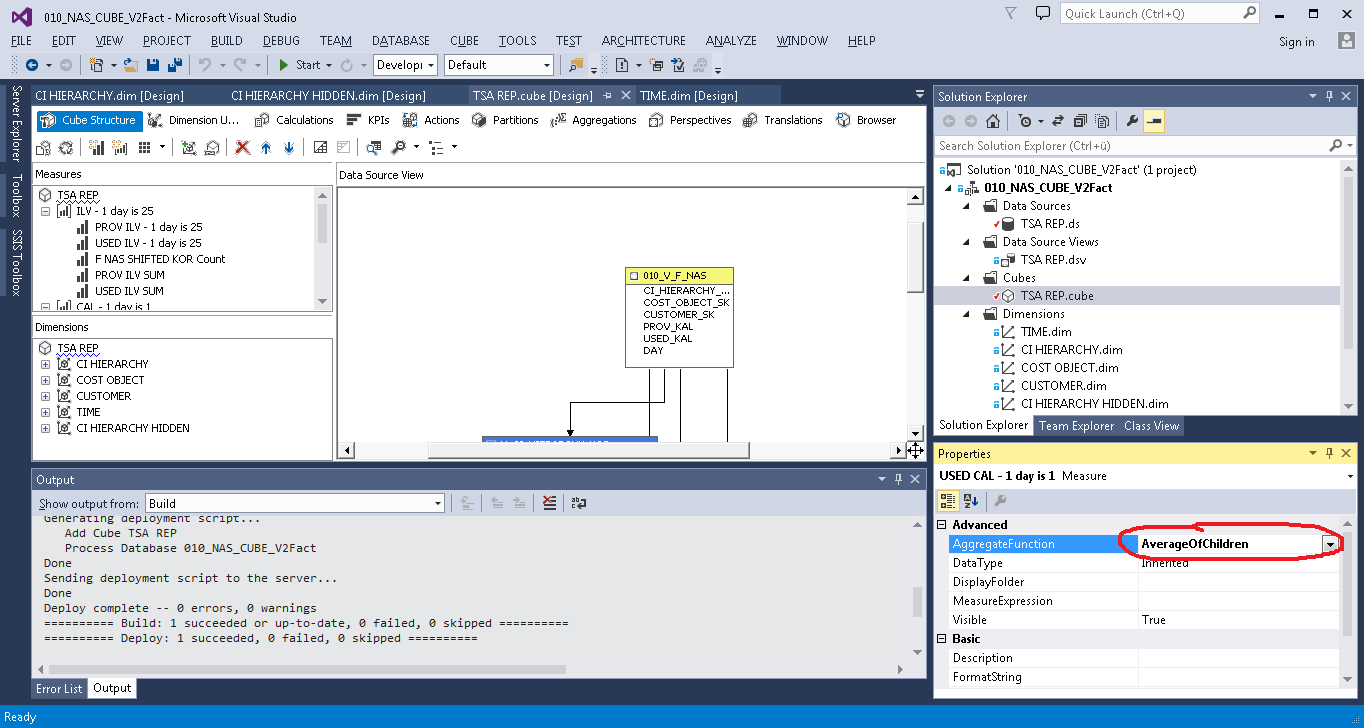
It was required to calculate the average value for the period. In MS Analysis Services there is for this function Average of Children, which calculates the average of all non-empty values for the selected period.
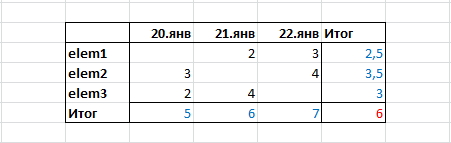
But after a meticulous study of the results, did the customer have questions? He showed me the following sample, and said that it was not correct:
Since, in his opinion, it should be like this:
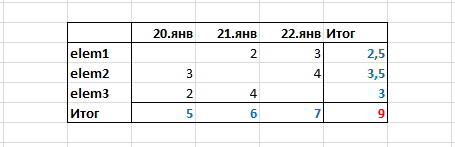
To my question: Why? He replied that he needed not the average value for the period, but the sum of the average values for each element for the period, that is,
NOT SO:
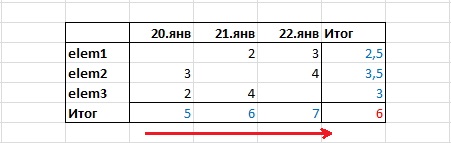
(5 + 6 + 7) / 3 = 6
A HERE SO:
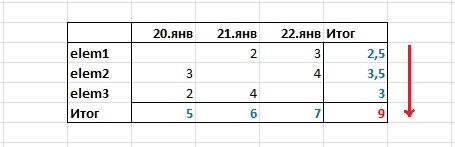
(2.5 + 3.5 + 3) = 9
This desire made me go through all the stages of accepting the inevitable:
- Denial (This is anything, but not the average for the period);
- Anger (Who taught him math?);
- Bargaining (Let's leave it this way and ask those who will use it?);
- Depression (And they said that everyone here is very kind and good ...);
- Acceptance (You can also teach a rabbit to smoke. It must be so, I will do as asked).
The decision was not entirely obvious. In the Calculations section, I created a Calculated Member and wrote an expression using the iif, isleaf and sum functions.
First option:
iif (
not isleaf([ELEM].[ELEM SK].currentmember),
sum(EXISTING [ELEM].[ELEM SK].currentmember.Children,[Measures].[FCT VAL]),
[Measures].[FCT VAL]
)
where [ELEM] is the dimension, and [ELEM SK] is its key.
The result was unexpected:
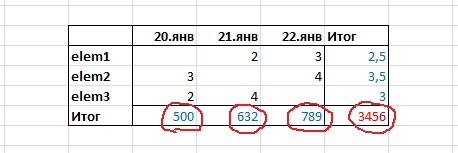
The strange numbers in the Results turned out to be the sums of all the values of the elements in the dimension, regardless of what values I selected in the filter. That is, in the end there was always the sum of all the elements, not just the selected ones.
The problem was not resolved immediately. The first solution was the option with an additional hidden dimension. I made a copy of the [ELEM] dimension, changed the Visible property to False, and wrote this:
 iif (
not isleaf([ELEM].[ELEM SK].currentmember),
sum(EXISTING [ELEM COPY].[ELEM SK].currentmember.Children,[Measures].[FCT VAL]),
[Measures].[FCT VAL]
)
It turned out as the customer wanted.
A little later I found a “more correct” solution. I created a Named Set.
CREATE DYNAMIC SET CURRENTCUBE.[Controller Set]
 AS  {
EXISTING [ELEM].[ELEM SK].currentmember.Children
};
a Calculated Member rewrote to this:
iif (
not isleaf([ELEM].[ELEM SK].currentmember),
sum([Controller Set],[Measures].[FCT VAL]),
[Measures].[FCT VAL]
)
Thus, a copy of the [ELEM COPY] dimension is no longer needed.
I presented this solution to the customer and took up other tasks. After some time, I received a new technical task in which the concept of “statistical average” appeared. To my question - What is it? He said that users do not need the sum of the average values for each element for the period, but the average for the period, that is, the usual Average of Children, but he asked to save my decision.
He also asked to add the average for the period, taking into account all the days, and not just those in which there are values.
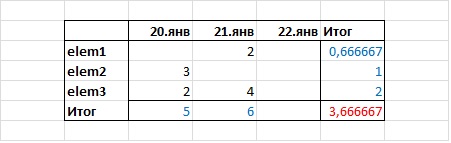
(5 + 6) / 3 = 3,666667
I solved the problem with the help of an additional fact, which simply counted the number of lines in the table for Time Dimension (in this solution, there is always one record in this table for every day). Further, he added facts with aggregation - the sum (AggregateFunction = Sum) and added the Calculated Member, in which he divided the Sum, by the number of days.
[Measures].[Sum DATA]/[Measures].[TIME Count]
Storage
The client we work for was not so simple. About him we can say - "Monsieur knows a lot about perversions." After we dealt with Cuba, we were faced with a more global task. Design a Data Vault, but not easy. The first thing we were told is that our Bible is now “Building a Scalable Data Warehouse with Data Vault 2.0” , written by Daniel Linstedt and, in addition, insisted on introducing “Bitemporal Database Table Design” there . Based on the constructed storage, it was required to build a cube with historicity. Such a cube has two time dimensions, one shows a business date, the other a transaction date. If we talk about the development process, it was painful, even now it hurts, but something happened.
The essence of “Bitemporal Database Table Design” is that each record has 4 additional fields:
- Business_date_ from
- Business_date_to
- Transaction_date_from
- Transaction_date_to
The first 2 contain the interval of business dates - from which date and to what date the value remained unchanged. The second 2 fields contain the interval of transaction dates. This interval stores the period during which no one adjusted the value (as an option retroactively).
One of the problems in solving this problem was the source data, or rather the form in which we received it. Data came in the form of daily slices. That is, there was a Date field in which the date on which the data was taken was stored, the next day in the Date field there was a new value and the data either changed on this day or not. It was required to combine data in periods. Those. if, for example, the value has not changed for 3 consecutive days, then instead of 3 lines you need to save one in which instead of the DATA column there would be two columns BEGIN and END.
Data before conversion:
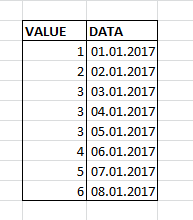
Data after conversion:
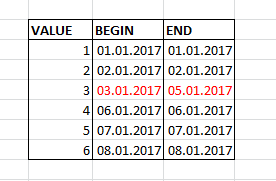
I solved this problem through the LAG and LEAD functions. The essence of the solution is that if the value does not change for 3 days in a row, then the date from the current line, minus the date from the previous one, will be 1:
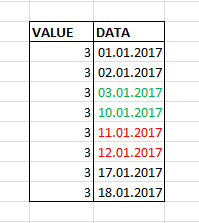
- If the data goes in a row, then 01/12/2017 - 01/11/2017 = 1
- If there is a gap between the data, then January 10, 2017 - January 3, 2017 = 7
From here:
SELECT * FROM ( SELECT Volume ,[Date] dt ,DATEDIFF(day, LAG([Date], 1) OVER (PARTITIONBY Volume ORDERBY [Date]), [Date]) difLag ,DATEDIFF(day, [Date], LEAD([Date], 1) OVER (PARTITIONBY Volume ORDERBY [Date])) difLead FROM dbo.Test n ) m WHERE ( difLag > 1OR difLag ISNULL ) OR ( difLead > 1OR difLead ISNULL )- Next, you need to somehow group this result, combine the pairs for those periods that lasted more than one day and leave those whose period lasted one day. I did the grouping by numbering the lines and combining the evens with the odd ones.
So the whole query:WITH se AS ( SELECT * FROM ( SELECT Volume ,[Date] dt ,DATEDIFF(day, LAG([Date], 1) OVER (PARTITIONBY Volume ORDERBY [Date]), [Date]) difLag ,DATEDIFF(day, [Date], LEAD([Date], 1) OVER (PARTITIONBY Volume ORDERBY [Date])) difLead FROMTest n ) m WHERE (difLag > 1OR difLag ISNULL) OR (difLead > 1OR difLead ISNULL) ) ,p1 AS--choose only one day periods (be careful) ( SELECT Volume ,dt AS VT_BEG ,dt AS VT_END FROM se WHERENOT (isnull(difLag, - 1) = 1ORisnull(difLead, - 1) = 1) ) ,p2 AS ( SELECT Volume ,CASEWHEN difLead ISNOTNULLAND (difLag ISNULLOR difLag > 1) THEN dt ENDAS VT_BEG ,CASEWHEN difLag ISNOTNULLAND (difLead ISNULLOR difLead > 1) THEN dt ENDAS VT_END ,row_number() OVER (ORDERBY Volume,dt) AS rn FROM se WHEREisnull(difLag, - 1) = 1ORisnull(difLead, - 1) = 1 ) SELECT * FROM ( SELECTmin(Volume) ASdata ,min(VT_BEG) AS VT_BEG ,min(VT_END) AS VT_END FROM p2 GROUPBY (CASEWHEN rn % 2 = 0THEN rn ELSE rn + 1END) UNION ALL SELECT Volume,VT_BEG,VT_END FROM p1 ) g ORDERBY VT_BEG ,data
Total:
In the client’s office I work for, there is a poster with a slogan. I decided to call this article this article, because, in my opinion, it partially explains the reason for the difficulties that I have to deal with. The project is not finished yet and I think that all the most interesting is yet to come. I have already come to terms with the meetings and when they ask me something, sometimes the phrase from KVN comes to mind: “Well done, ask smart questions, get stupid answers ...”, which helps me to get together and try to answer something intelligible.
In this article, I talked only about the most, in my opinion, interesting things that were in the project. In addition to them, there was a lot of routine, debate and other, not so original, solutions. I hope that what I wrote about will be interesting and useful.