
 March 5, 2017 at 18:41
Motion Detection in FPGA Video Stream
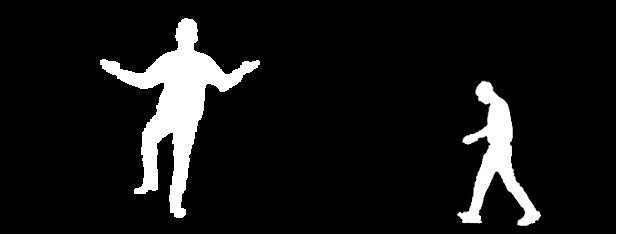
Foreword
I have been interested in the topic of video processing for a long time, only on debug boards of the 7th and 9th ARMs it turned out very slowly and it became not interesting from this.
Currently, it is full of powerful multi-core hardware and many libraries for working with video have been created, but my choice fell on FPGAs.
This project originates 5 or 6 years ago, at a time when there were no Aliexpress stores and similar stores where you can buy a digital camera module or a debug board with FPGA for ridiculous money. The first version of the project was started using the HV7131GP camera from a mobile phone on a makeshift board, a display from Siemens S65, and a Terasic DE2 debug board. Then about 5 years the project was gathering dust on a shelf and on a disk.
It looked like this:
Subsequently, an Altera Cyclone II EP2C8F256 FPGA board and an OV7670 camera module specifically for this project were purchased. After buying the board, it turned out that there was no documentation for it and the seller did not respond to a request. After a long digging in the network, I found a project made on this board and borrowed assignments from it.
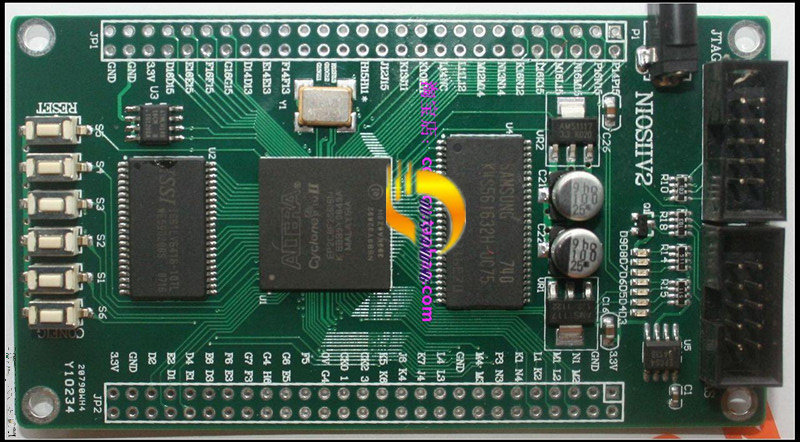
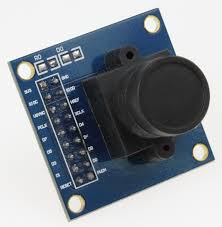
In this article I want to introduce the reader to the methods of capturing an image from a camera, converting color space, zooming, displaying an image via an HDMI interface and detecting the movement of objects in a video stream using Altera FPGAs.
I want to immediately note that FPGA programming is not my main specialization, but, more, a hobby in my spare time. Therefore, I may be mistaken in the conclusions made and my decisions may be far from optimal. In pursuit of Fmax, many sections of the code were written in such a way that they may seem redundant, strange, meaningless and suboptimal.
Tools
As the main development environment, I chose HDL Designer from Mentor Graphics. It contains all the graphic blocks and the bundles between them. Altera Quartus II is used for synthesis and tracing.
Project structure
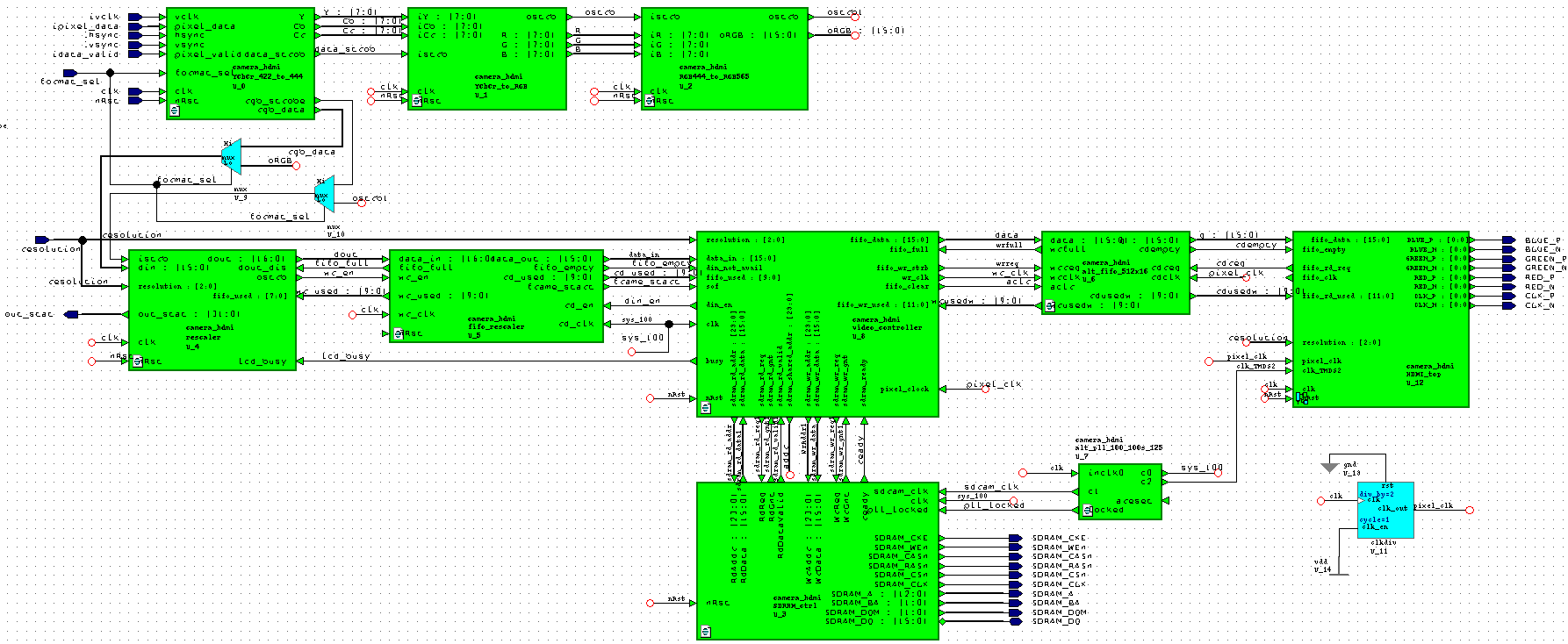
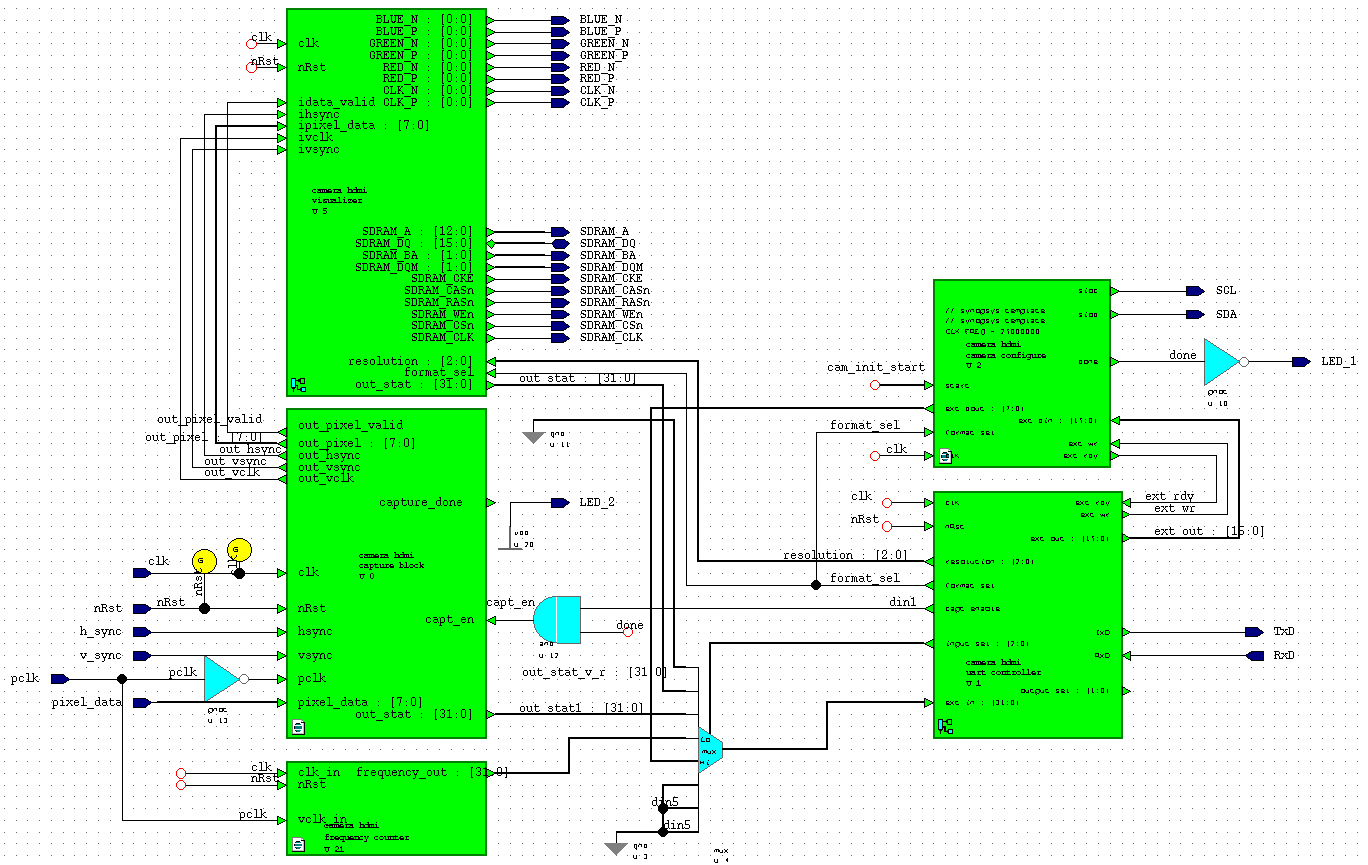
The structural diagram of the project is shown in the figure below. It reflects only the main functional units, which will be discussed in detail below.
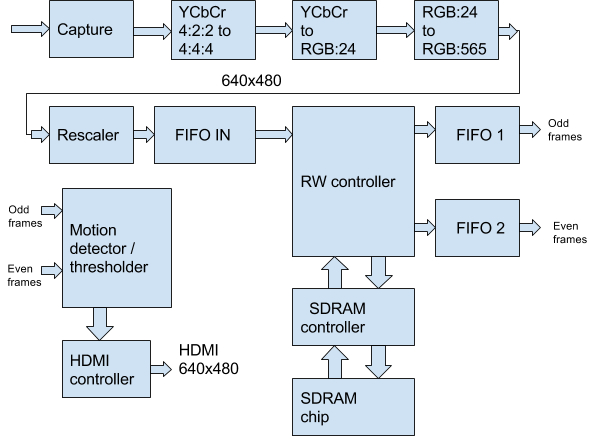
In the HDL Designer editor, it looks like this: Not all project blocks are displayed on the diagram since they are at a higher level.
Capture module
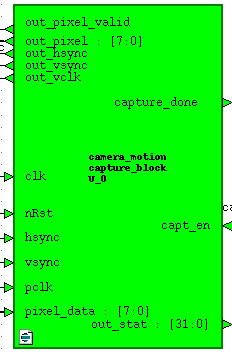 The video capture module receives input from the pixel_data camera in YCbCr 4: 2: 2 or RGB: 565 format and hsync, vsync frame and line scan control signals, transfers them to the clk domain (50 MHz), generates a control signal out_pixel_valid and out_vclk and passes them to the data format conversion module. Also, this module generates out_stat statistics on the amount of received data per 1 frame. Statistics can be read via UART. The module is controlled by an external capt_en data capture enable signal. This signal is set by the camera settings module upon completion of the settings. Verilog Code:
Capture
always @(posedge clk) begin
    hs_sync_1 <= hsync;hs_sync_2 <= hs_sync_1;
    vs_sync_1 <= vsync;vs_sync_2 <= vs_sync_1;
    vclk_sync_1 <= pclk;vclk_sync_2 <= vclk_sync_1;
    pixdata_sync_1 <= pixel_data;pixdata_sync_2 <= pixdata_sync_1;
end
reg vclk_old;
always @(posedge clk)vclk_old <= vclk_sync_2;
wire vclk_posedge = (vclk_old == 1'b0) && (vclk_sync_2 == 1'b1);
reg sample_new,sample_hsync,sample_vsync;
reg [7:0] sample_pixel;
always @(posedge clk) begin
    sample_new <= vclk_posedge;
    if (vclk_posedge) begin
        sample_hsync <= hs_sync_2;
        sample_vsync <= vs_sync_2;
        sample_pixel <= pixdata_sync_2;
    end
End
reg last_vsync_sample,P2_vsync_triggered,P2_vsync_end_triggered;
reg P2_sample_vsync,P2_sample_new,P2_sample_hsync;
reg [7:0] P2_sample_pixel;
reg P2_new_frame,capt_done,capt_enable;
always @(posedge clk) begin
    if (capt_en == 1'b1 || P2_vsync_triggered == 1'b1) capt_enable <= 1'b1;
    else capt_enable <= 1'b0;
end
 always @(posedge clk)
 if (!nRst) begin
    last_vsync_sample <= 1'b0,P2_vsync_triggered <= 1'b0;
    P2_vsync_end_triggered <= 1'b0,P2_new_frame <= 1'b0;
    capt_done <= 1'b0;
 end else begin
    if (capt_enable) begin
        if (sample_new) begin
            last_vsync_sample <= (sample_vsync/* && capt_en*/);
            P2_sample_pixel <= sample_pixel;
            P2_sample_hsync <= sample_hsync;
            P2_sample_vsync <= sample_vsync;
        end
        // Pipeline Step
        P2_sample_new <= sample_new;
        if (!P2_vsync_end_triggered) begin
            if ((last_vsync_sample == 1'b1) && (sample_vsync == 1'b0)) begin
                P2_vsync_triggered <= 1'b1; P2_new_frame <= 1'b1;
            end
            if (P2_vsync_triggered && sample_vsync) begin
                P2_vsync_end_triggered <= 1'b1; P2_vsync_triggered <= 1'b0;
                capt_done <= ~capt_done;
            end
        end else begin
            P2_vsync_end_triggered <= 1'b0; P2_vsync_triggered <= 1'b0;
        end
        if (P2_new_frame) P2_new_frame <= 1'b0;
    end else begin
        last_vsync_sample <= 1'b0;P2_vsync_triggered <= 1'b0;
        P2_vsync_end_triggered <= 1'b0;P2_new_frame <= 1'b0;capt_done <= 1'b0;
    end
 end
Format conversion module
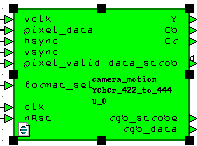 The YCbCr 4: 2: 2 format is not very convenient for further work. the data follows in this sequence: Y0 Cb0 Y1 Cr1 Y2 Cb2 Y3 Cr3 ... Therefore, we will convert it to the YCbCr 4: 4: 4 format. In fact, the whole conversion comes down to outputting Y Cb Cr data per 1 clock cycle of the data_strob signal. In Verilog, it looks like this:
YCbCr 4: 2: 2 => 4: 4: 4
always @(posedge clk)
if (!nRst) pix_ctr <= 2'b0;
else begin
    if (pixel_valid) begin
        if (vclk) pix_ctr <= pix_ctr + 1'b1;
    end  else pix_ctr <= 2'd0;
end
always @(posedge clk)
case (pix_ctr)
       2'd0:begin YYY  <= pixel_data; CCr <= Crr; CCb <= Cbb; Ypix_clock <= 1'b1;end
       2'd1:begin Cbb <= pixel_data; YY <= YYY;   end
       2'd2:begin YYY  <= pixel_data; CCr <= Crr; CCb <= Cbb; Ypix_clock <= 1'b1;end
       2'd3:begin Crr <= pixel_data;  YY <= YYY;  end
endcase
assign data_strob = Ypix_clock;
assign Y  = YY;
assign Cb = CCb;
assign Cr = CCr;
Color Space Conversion Module
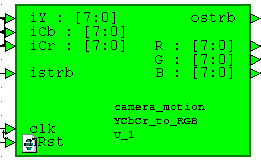 In the end, we always work with data in RGB format, so we need to get it from YCbCr. This is done according to the formula from the datasheet per camera:
 R = Y + 1.402 (Cr - 128)
G = Y - 0.714 (Cr - 128) - 0.344 (Cb - 128)
B = Y + 1.772 (Cb - 128)
In Verilog, it looks So:
YCbCr => RGB
parameter PRECISION    = 11;
parameter OUTPUT        = 8;
parameter INPUT        = 8;
parameter OUT_SIZE    = PRECISION + OUTPUT;
parameter BUS_MSB    = OUT_SIZE + 2;
always @ (posedge clk)
if (!nRst) begin
   R_int <= 22'd0; G_int <= 22'd0; B_int <= 22'd0;
end else begin
    if (istrb) begin
        //R = Y + 1.371(Cr - 128)
        R_int <=  (Y_reg << PRECISION)+(C1*(Cr_reg-8'd128));
        //G = Y - 0.698(Cr-128)-0.336(Cb-128)
        G_int <= (Y_reg << PRECISION)-(C2*(Cr_reg-8'd128))-(C3*(Cb_reg-8'd128));
        //B = Y + 1.732(Cb-128)
        B_int <= (Y_reg << PRECISION)+(C4*(Cb_reg-8'd128));
    end
end
assign R = (R_int[BUS_MSB]) ? 8'd16 : (R_int[OUT_SIZE+1:OUT_SIZE] == 2'b00) ? R_int[OUT_SIZE-1:PRECISION] : 8'd240;
assign G = (G_int[BUS_MSB]) ? 8'd16 : (G_int[OUT_SIZE+1:OUT_SIZE] == 2'b00) ? G_int[OUT_SIZE-1:PRECISION] : 8'd240;
assign B = (B_int[BUS_MSB]) ? 8'd16 : (B_int[OUT_SIZE+1:OUT_SIZE] == 2'b00) ? B_int[OUT_SIZE-1:PRECISION] : 8'd240;
RGB: 24 to RGB: 565 conversion module
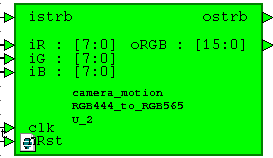 This module makes us 16-bit from 24-bit RGB format. It’s convenient for us because It takes up less memory space, reduces bitrate, has a color rendering acceptable for our purposes and, most importantly, fits into one word of SDRAM data, which greatly simplifies the work. The data strobe signal is simply transmitted from the previous module.
 The module code is very simple:
assign oRGB = {iR[7:3], iG[7:2], iB[7:3]};
assign ostrb = istrb;
Rescaler
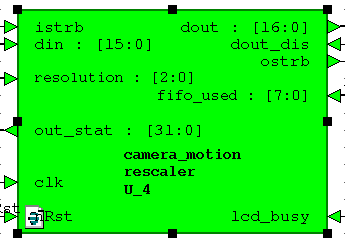 This module came to the project from the very beginning. Its goal is to convert the input stream of 640x480 pixels to a stream of 320x240, 160x120, 128x120, 80x60 and 320x480. These formats were needed to work with the LCD display from Siemens S65, the TFT display for the Arduino board and to implement image rotation in the FPGA and SDRAM block memory using the CORDIC algorithm. In other words, this is a legacy of other projects. In this project, it is possible to change the screen resolution on the fly, and this module plays the first violin here. The module also generates statistics of the amount of data per frame for debugging. The module was created for a long time and its code should be sanitized, but while it works, we won’t touch it.
 The module code is quite capacious and in this article I will give only the main part of it:
Rescaler
always @(posedge clk)
if (!nRst) begin
    w_ctr <= 16'd0;h_ctr <= 16'd0;frame_start <= 1'b0;
    rsmp_w <= 8'd0;rsmp_h <= 8'd0;
end else begin
    if (resampler_init) begin
        w_ctr <= 16'd0;h_ctr <= 16'd0;frame_start <= 1'b0;
        rsmp_w <= 8'd0;rsmp_h <= 8'd0;
    end else begin
        /* This case works ONLY if the input strobe is valid */
        if (istrb) begin
            if (w_ctr == I_WIDTH-1'b1) begin
                w_ctr <= 16'd0;
                if (h_ctr == I_HEIGHT-1'b1) begin
                    h_ctr <= 16'd0;
                    frame_start <= 1'b1;
                end else begin
                    h_ctr <= h_ctr + 1'b1;frame_start <= 1'b0;
                end
                if (rsmp_h == H_FACT-1'b1) begin
                    rsmp_h <= 8'd0;
                end else begin
                    rsmp_h <= rsmp_h + 1'b1;
                end
            end else begin
                w_ctr <= w_ctr + 1'b1; frame_start <= 1'b0;
            end
            if (rsmp_w == W_FACT-1'b1) begin
                rsmp_w <= 8'd0;
            end else begin
                rsmp_w <= rsmp_w + 1'b1;
            end
        end
    end
end
reg pix_valid;
always @(rsmp_w or rsmp_h or wh_multiply or H_FACT) begin
    if (wh_multiply == 1'b1) begin
        pix_valid = ((rsmp_w == 8'd0) && (rsmp_h == 8'd0))?1'b1:1'b0;
    end else begin
        pix_valid = ((rsmp_w == 8'd0) && (rsmp_h != 8'd0 ))?1'b1:1'b0;
    end
end
assign pixel_valid = pix_valid;
always @(posedge clk)
if (!nRst) begin
    frame_enable <= 1'b0;
end else begin
    if (resampler_init) begin
        frame_enable <= 1'b0;
    end else begin
        if (frame_start) begin
            if (!lcd_busy)
                frame_enable <= 1'b1;
            else
                frame_enable <= 1'b0;
        end
    end
end
reg local_frame_start = 1'b0;
always @(posedge clk)
if (!nRst) begin
    ostrb_port <= 1'b0;
    dout_port <= 17'd0;
    local_frame_start <= 1'b0;
end else begin
    local_frame_start <= frame_start ? 1'b1: local_frame_start;
    if (istrb && !resampler_init && !lcd_busy) begin
        if (pixel_valid) begin
        // if our column and our row
            if (frame_enable && !dout_dis) begin
                dout_port[16:0] <= {local_frame_start, din[15:0]};
                ostrb_port <= 1'b1;
                local_frame_start <= 1'b0;
            end else begin
                ostrb_port <= 1'b0;
            end
        end else
            ostrb_port <= 1'b0;
    end else
        ostrb_port <= 1'b0;
end
FIFO IN
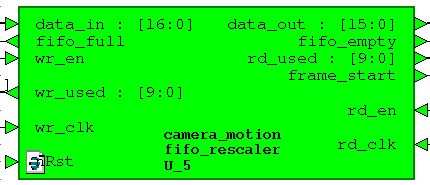 This is a two-clad FIFO dcfifo, Altera 256x17 megafunction. Sixteenth bit - the frame_start signal is added for the convenience of indicating the start of a new frame after rescaler.
 The recording cloc is 50 MHz, the reading cloc is 100 MHz, it is also the SDRAM cloc of the controller.
Read / write controller
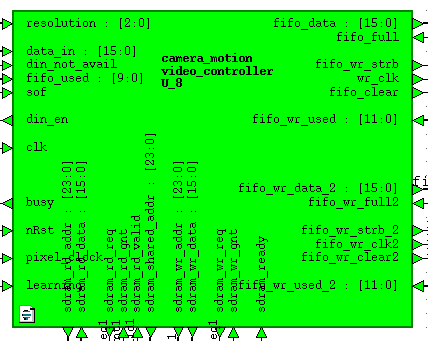 This bulky module is one writer who takes data from the FIFO IN module and writes it to SDRAM alternately in different memory areas for even and odd frames and two readers who read data from SDRAM, each from its own memory area and write it to the weekend FIFO The priority is given to readers, since they work on an HDMI controller with a frequency of 25 MHz (640x480), and it does not endure delay, there should always be data in FIFO for processing and display. The time remaining to fill the output FIFO time is the time of the inactive area of the screen plus the time to empty the FIFO, the writer works.
When developing this module, I ran into a problem: if you use FIFO signals full and empty, then FIFO starts to crash and break data. This does not happen for FIFO IN since the frequency of the write block in it is significantly lower than the frequency of reading from it. This bug manifests itself at the weekend of FIFO. The 100 MHz write block is 4 times higher than the 25 MHz read block, which, according to my guesses, causes the write pointer to catch up with and overtake the read pointer. I found references on the network about a certain bug of Alter FIFOs, I don’t know if it is related to my problem or not. The problem itself was solved not using the wr_full and rd_empty signals, but using the wrusedw and rdusedw signals. I made a FIFO state controller along the fifo_almost_full and fifo_almost_empty chains. It looks like this:
// FIFO 1
wire out_fifo_almost_full  = &fifo_wr_used[9:4];
wire out_fifo_almost_empty = !(|fifo_wr_used[10:8]);
// FIFO 2
wire out_fifo_almost_full_2  = &fifo_wr_used_2[9:4];
wire out_fifo_almost_empty_2 = !(|fifo_wr_used_2[10:8]);
Also, the module implements a change of operating modes: Background Subtraction or Frame Difference. This is achieved by the learning signal, which is connected to the clock button on the board.
I won’t give the entire code of the module, it is quite a lot and there is no know-how there. This module operates at a frequency of SDRAM 100 MHz.
Sdram controller
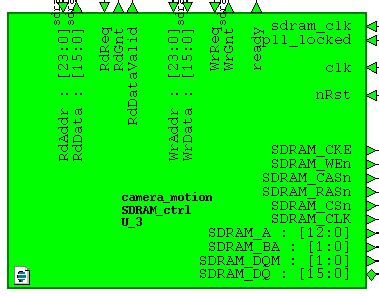 The module from the site fpga4fun.com was taken as a basis and was slightly redone for our type of SDRAM chip K4S561632 with the addition of chip initialization and additional delays for observance of temporary clock:
 Row active to row active delay: tRRD 15 n sec and
Row precharge time: tRP 20 n sec
The module code can be downloaded from the site at the link above. The main problem was writing the timeQuest constant for the correct operation of our SDRAM and selecting the phase shift of the lock to pin SDRAM_CLK with PLL. Otherwise, everything worked right away. Writing and reading is done by bursts, only one active bank is used for 4 megaswords, no refreshes are used.
FIFO OUT
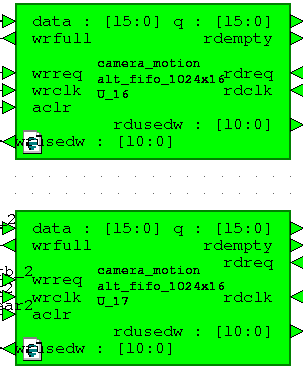 As with FIFO IN, these FIFOs are two-block 1024x16 dcfifo megafunctions.
 The write clock is 100 MHz, the read clock is 25 MHz.
Motion Detector
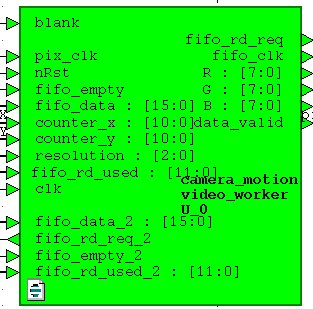 So we got to the module, which is the salt of the earth of this project. As you can see, it receives data and control signals from both output FIFOs, a 25 MHz HDMI controller clock pixel_clock, counter counters pixel counter_x, counter_y and the signal of the active display area is blank. RGB signals come out of it, ready for display.
 It also implements FIFO occupancy chains:
// FIFO 1
wire in_fifo_data_avail   = |fifo_rd_used[10:4];
wire in_fifo_almost_empty  = !(|fifo_rd_used[10:4]);
// FIFO 2
wire in_fifo_data_avail_2   = |fifo_rd_used_2[10:4];
wire in_fifo_almost_empty_2  = !(|fifo_rd_used_2[10:4]);
wire fifos_available = in_fifo_data_avail & in_fifo_data_avail_2;
wire fifos_almost_empty = in_fifo_almost_empty | in_fifo_almost_empty_2;
We need to control the area of the screen into which we display the image from the camera:
wire in_frame = ((counter_x < RES_X) && (counter_y < RES_Y))?1'b1:1'b0;
wire frame_start = ((counter_x == 0) && (counter_y == 0))?1'b1:1'b0;
Both FIFOs are read at the same time by the flag of data availability in both of them:
// Reader FIFO 1 & 2
always @(posedge pix_clk or negedge nRst)
    if (!nRst) begin
        fifo_rd_req <= 1'b0;
        fifo_rd_req_2 <= 1'b0;
        pixel_data <= 16'h0000;
        worker_state <= 2'h1;
    end else begin
        case (worker_state)
        2'h0: begin
            if (in_frame) begin
                if (fifos_almost_empty) begin
                    //worker_state <= 2'h1;
                    fifo_rd_req <= 1'b0;
                    fifo_rd_req_2 <= 1'b0;
                end else begin
                    pixel_data <= fifo_data;
                    pixel_data_2 <= fifo_data_2;
                    fifo_rd_req <= 1'b1;
                    fifo_rd_req_2 <= 1'b1;
                end
            end else begin
                fifo_rd_req <= 1'b0;
                fifo_rd_req_2 <= 1'b0;
            end
        end
        2'h1: begin
            if (blank) begin
                worker_state <= 2'h2;
            end
        end
        2'h2: begin
            // start reading if more than 16 words are already in the fifo
            if (fifos_available && frame_start) begin
                fifo_rd_req <= 1'b1;
                fifo_rd_req_2 <= 1'b1;
                worker_state <= 2'h0;
            еnd
        end
        endcase
    end
The data read from FIFO is in RGB: 565 format, for our purposes it must be converted to black and white. It is done like this:
// Convert to grayscale frame 1
wire [7:0] R1 = {pixel_data[15 : 11], pixel_data[15 : 13]};
wire [7:0] G1 = {pixel_data[10 : 5],  pixel_data[10 : 9]};
wire [7:0] B1 = {pixel_data[4 : 0],   pixel_data[4 : 2]};
wire [7:0] GS1 = (R1 >> 2)+(R1 >> 5)+(G1 >> 1)+(G1 >> 4)+(B1 >> 4)+(B1 >> 5);
// Convert to grayscale frame 2
wire [7:0] R2 = {pixel_data_2[15 : 11], pixel_data_2[15 : 13]};
wire [7:0] G2 = {pixel_data_2[10 : 5],  pixel_data_2[10 : 9]};
wire [7:0] B2 = {pixel_data_2[4 : 0],   pixel_data_2[4 : 2]};
wire [7:0] GS2 = (R2 >> 2)+(R2 >> 5)+(G2 >> 1)+(G2 >> 4)+(B2 >> 4)+(B2 >> 5);
The GS1 and GS2 signals are our black and white performance.
Now a little about the algorithms. There are many ways to detect motion. In this article I will consider only two of them, in my opinion, the simplest and most easily implemented within the framework of this project.
The first way. Background subtraction.
The idea is that subtraction is used to find the movement or object in the video stream:
P [F (t)] = P [I (t)] - P [B]
P [F (t)] - resulting difference,
P [ I (t)] - current frame from the camera,
P [B] - reference frame or background
The reference frame or background is usually taken when there is no movement. For example, if we want to detect movement in one corner of the room, then before that we need to take and remember a picture of this corner when there is no movement, and then subtract this very background from all subsequent pictures. Everything is very simple. However, due to noise in the image, automatic white balance in the camera, and other factors, we need to apply the detector threshold. This threshold is applied to the frame difference. If the difference is greater than the threshold, then there is movement; otherwise, no.
P [F (t)]> Threshold
The disadvantages of this method are more than advantages, however, it is used for motion detection because of the ease of implementation. The disadvantages are:
- Light Dependence
- Camera Offset
- Weather dependent
- The effect of automatic white balance
Any change in external factors will lead to the detection of motion and false detection of the detector.
Figuratively, the detector circuit looks like this:
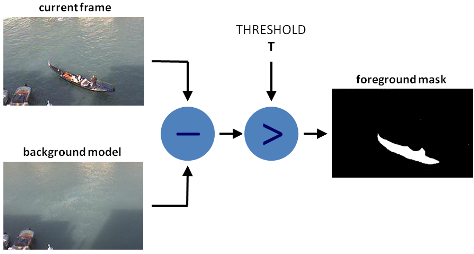
The second way. Frame difference
This implementation method is not much different from the previous one. All the differences are that instead of the background, the previous one is subtracted from the current frame and the difference is compared with the Threshold threshold.
The mathematical representation is as follows:
P [F (t)] = P [I (t)] - P [I (t - 1)]> Threshold The
advantage of this method is its relative resistance to external factors. Even with a change in camera position or illumination, this will not cause a long-term false response, but only a short one within two consecutive frames.
The disadvantages are:
- Frame rate dependent
- Impossibility of detecting immovable objects
- Weak detection of objects with low speed
Due to the above disadvantages, this method has not found widespread use in its pure form.
Verilog implementation.
In our case, no matter which frame we subtract from, the absolute difference between them is important to us.
reg [7:0] difference = 0;
wire [7:0] max_val = (GS1 > GS2) ? GS1 : GS2;
wire [7:0] min_val = (GS1 < GS2) ? GS1 : GS2;
always @(posedge pix_clk) begin
    if (in_frame) begin
        difference <= max_val - min_val;
    end else
        difference <= 8'h00;
end
wire [15:0] out_val = in_frame ? (difference > `BS_THRESHOLD) ? 16'hF1_00 : pixel_data_2 : in_frame2 ? pixel_data_diff : 16'h00_00;
As you can see from the code, we replace the pixel with a red color (16'hF1_00) if the difference is greater than the BS_THRESHOLD threshold .
To display on the screen, we need to convert the data from the RGB: 565 format to the RGB: 24 format
// VGA 24 bit
assign R = {out_val[15 : 11], out_val[15 : 13]};
assign G = {out_val[10 : 5], out_val[10 : 9]};
assign B = {out_val[4 : 0], out_val[4 : 2]};
HDMI controller
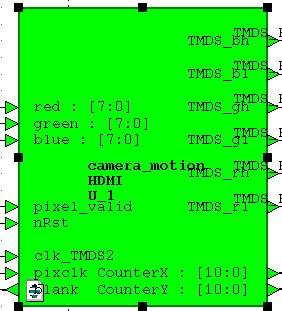
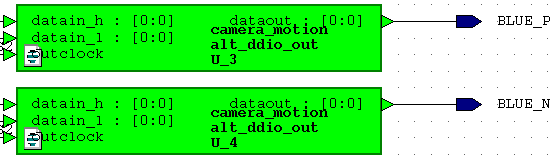
In part, this module was taken from the same site fpga4fun.com and redone according to an article from marsohod.org . Instead of using differential. LVDS pairs I used the DDIO megafunction. Why this is done can be found by reading the article at the link above.
Shreds
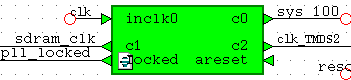
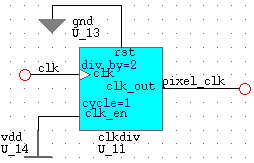
A 50 MHz block was taken from the generator on the board as a system one. It made cloaks for the SDRAM controller and SDRAM chip. These shreds have the same frequency of 100 MHz, but are 90 degrees out of phase. For this, the PLL megafunction is used.
Clok 125 MHz (clk_TMDS2) is used for DDIO, after which it turns into 250 MHz. Such a trick.
The pixel_clock video data block is 25 MHz; it is made by dividing 50 MHz into 2 system blocks.
OV7670 Camera Setup
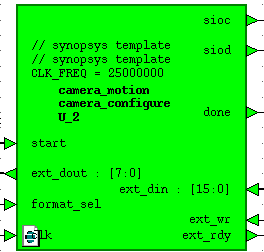 To configure the camera, a third-party SCCB interface module is used . It is slightly redone for the needs of the project and is able to record the values of camera registers on the fly on command from the UART interface.
UART
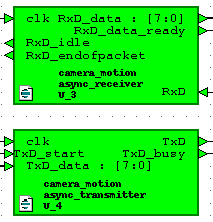 The module consists of a UART receiver and transmitter and an io_controller module.
 The code of the receiver and transmitter modules was taken from the Internet. The modules operate at 115200 baud with 8N1 settings.
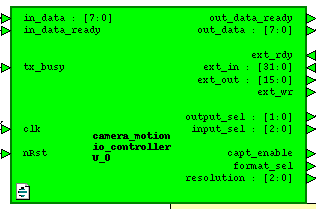
This module (io_controller) is the link between the UART transceiver and the external modules of the project. It provides statistics output in UART, receiving and processing commands. With it, you can change the display resolution, change the format for outputting data from the camera (YCbCr or RGB), write down any register and display any requested statistics.
Video showing the result
Video quality
I apologize for the quality of the video, I have such a phone.
Video 1. Frame Difference
The image from the camera in 320x240 format is displayed on the left side of the screen, and the threshold frame difference is on the right. The left image is tinted red in the places where we detected the movement.
The video shows that when the object is stopped, movement is not detected, and when the speed of the object decreases, the detection is noticeably worse.
Video 2. Background Subtraction
You may notice that when an object approaches the camera, the white balance changes and we get a false response from the detector. Such phenomena can be filtered or compensated. One of the compensation methods is training with averaging the reference image (Approximate Median Filter).
conclusions
This development can and should be improved by complicating the detection algorithms. It would also be nice to implement tracking of moving objects by drawing a rectangular frame around the object.
Horizontal rectangles are visible in the video. This phenomenon is due to a reading bug from the SDRAM controller, which I have not yet been able to completely overcome.
Related Materials
→ Article about a motion detector on OpenCV
→ Yet another detector on OpenCV
→ Background subtraction
→ Methods for improving detection
UPD
As promised, I publish the project. Available on Yandex disk. This is a copy of the project made in Quartus, while I will not post it in HDL Designer, it is unlikely that it will start with anyone even if I post it.
project link