 October 21, 2016 at 09:53
HPE Synergy Pro - Part IV. Our networks
Part I (Introduction)
Part II (Chassis and Servers)
Part III - D3940 Disk Storage and SAS Switches
It is logical to divide this part into two pieces - network cards in servers and switches in the chassis. We talked about cards in the second part, but it’s interesting to discuss the details separately. In addition, it should be noted that the SY Composer, Image Streamer and FLM modules have their own backplane, separate from the general, and there is no information on this backplane.
There are not so many cards for servers - 5 pieces, but in general - enough. Three cards - Eth + FCoE, two cards - pure Fiber Chanel. As I wrote earlier, just Ethernet cards as a class do not exist. All cards with PxE, that is, servers with them, can be downloaded over the network. And they will be loaded, for this there Image Streamers.
- SY 2820C can - QLogic controller, two 10 Gb / s ports; not cheap, but already angry. It does not support RDMA (remote direct memory access) - this is not a frequent guest in IT infrastructures, although advanced - it allows you to directly address the processor memory of one server through the network to the processor of another server. It is very demanding on server resources: one card eats up 2 GB of RAM from the server, although the card itself costs 1 GB, of which 900 MB is available for operations. Supports 9K Jumbo frames. Since there are 4 tracks to the switches from each mezzanine slot, when aggregating ports, you can squeeze 40 Gbit / s Ethernet;
- SY 3820C 10 / 20Gb CNA - a relative of the previous card; QLogic controller, two ports of 10/20 Gbit / s (that is, a symmetric dozen - 10 uplink, 10 downlink) - "pass, do not push". Also requires 2 GB of RAM per card. With aggregation, you can already squeeze 80 Gbit / s. The difference between the high and low cards in the GPL is approximately 200 USD.
- SY 3520C 10 / 20Gb CNA - here is the controller from Emulex, in other characteristics, like the previous card. An interesting point was in the HPE configurator, but now it is no longer mentioned in the articles, but, for example, it cannot be found on the HPE website, it is also not in the HPE Product Bulletin, while Google or Yandex finds it on the same site without any problems HPE But there are 4 topics about the problems that occurred when using it - maybe the dog is buried here?
Supported Operating Systems:
Microsoft:
- Microsoft Windows Server 2012 and 2012 R2;
- Microsoft Hyper-V Server 2012 and 2012 R2.
Linux:
- Red Hat Enterprise Linux x64 6.7, 6.8;
- Red Hat Enterprise Linux x64 7.2;
- SUSE Linux Enterprise Server 11SP4 x64;
- SUSE Linux Enterprise Server 12 & 12SP1 x64.
Virtualization:
VMware ESXi 5.5 U3, 6.0 U2 (vSphere 6.0 U2 is the minimum version of VMware for UEFI FCoE Boot from SAN support. Boot from SAN via the iSCSI offload path is not supported for VMware).
Also in all servers there are 1 pc. 1 Gb / s network card for iLO (remote control).
An interesting feature of all cards is support for HPE Sea of Sensors 3D; Each blade server has 32 temperature sensors that send their data via a network card (and not through iLO) to the chassis control unit, which estimates the temperature distribution in the volume model.
Below is a comparative plate, apparently a bit outdated, as SY 620 Gen9 servers are also supported.
Network Card Features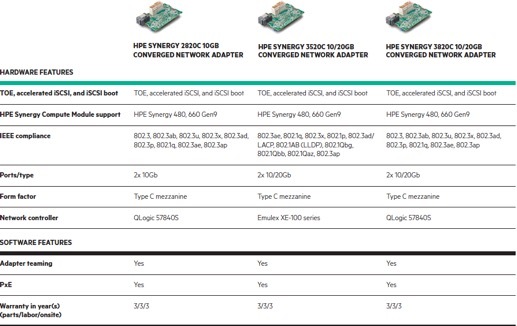
Storage Network Cards:
- SY 3530C 16 Gb FC - backward compatible with 8 Gb FC, capable of handling up to 600,000 IOPS on each port or 1.2 million on one if the second is disabled. Emulex controller
- SY 3830C 16 Gb FC - all the same, only the controller from QLogic (apparently for those who do not like Emulex).
At the cost of a GPL, a card from Emulex is 400 bucks cheaper - that's not enough. In addition, the table below indicates that the warranty period on the cards is 1 year, not 3 years, I have not found any mention of this wonderful fact anywhere, so in the future it is worth keeping this moment in mind.
SAN HBA Features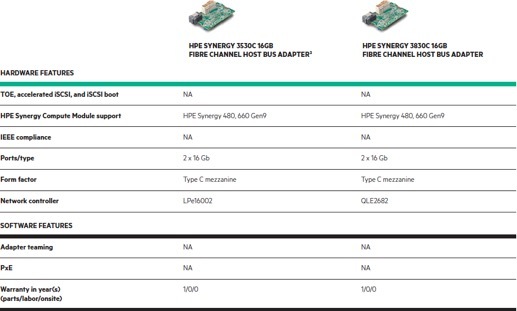
We pass to the switches, in which are written:
- HPE Virtual Connect SE 40 Gb F8 (master module, i.e. main);
- HPE SY 40 Gb F8 switch module;
- HPE Virtual Connect 20 Gb interconnect link module;
- HPE Virtual Connect 10 Gb interconnect link module;
- Brocade 16 Gb Fiber Channel SAN switch module;
- HPE SY 10 Gb pass-thru module.
The HPE Virtual Connect SE 40 Gb F8 Switch is one of the key elements of Synergy, which contains a considerable part of the new functionality (and in small print - a competitor to Cisco UCS Director). A pair of switches operates in active-passive mode.
Each pair of switches provides 16 downlinks for each server bay (14 Ethernet and 2 FC), if 10/20 Gb CNA cards are installed in the servers. If 2820C is delivered, then options are possible - or 6 pcs. Ethernet, or 4 pcs. Ethernet plus 2 pcs. FC. Using Virtual Connect technology, these links can be further cut into FlexNIC 'and FlexHBA's.

The RJ-45 port, in the center, is the most interesting because it is signed as "for future use". Two ports on the right (L1 and L2) and two ports on the left (L3 and L4) are the communication ports between the switch and Interconnect Link modules (about them below). G7 and G8 ports are clustering ports between switches in the chassis. The remaining ports (G1 - G6) are 40 Gbps QSFP + uplinks.
Buying such a switch in each chassis is not necessary, up to three (or five, but more on that below) the chassis can be deployed using a pair of VC SE 40 Gb F8, and then installing HPE 10/20 Gb ILM modules (Interconnect Link Module).
You can read about HPE Virtual Connect technology here - the HP Virtual Connect FlexFabric Cookbook (313 pages) - the topic is very voluminous, and its disclosure is not the purpose of this article. Or, if you are interested in the basics, here you can download for freeVirtual Connect for Dummies - checked before publication - they sent me =)
Next - HPE Synergy 40 Gb Switch Module.
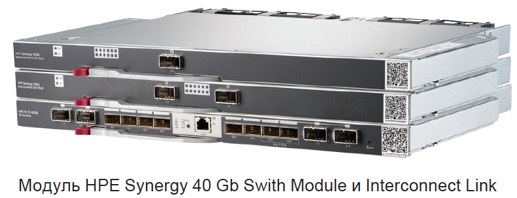
The main difference between the HPE Virtual Connect SE 40Gb F8 modules and the HPE Synergy 40 Gb Switch Module is, in fact, support for the first Virtual Connect technology module and the presence of the first licensed FC support function. Of the interesting features - device support for Super Jumbo frames - 12 Kb, which do not yet support CNA - wait-wait.
Switch Specifications
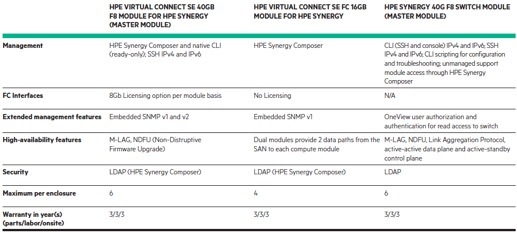
HPE Synergy Interconnect Link 10G and 20 G Modules - Optional Modules in Optional Chassis.
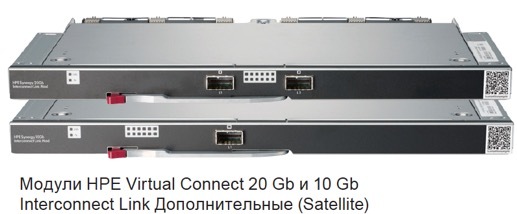
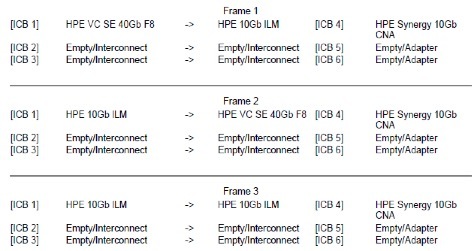
They are connected to two left and / or two right ports on the HPE Virtual Connect SE 40Gb F8. What is the peculiarity: the module with one “hole” (10G) allows you to connect up to 4 additional chassis to the SY 12000 head chassis (that is, there will be 5 SY 1200 Frame in one entity), and with two holes “20G "(That is, there will be 3 pieces of SY 1200 Frame in just one entity) - up to 2 additional chassis, but at a higher speed. If additional chassis are connected to the main chassis, there is a special feature - HPE Virtual Connect SE 40Gb F8 switches are not installed in pairs in the main chassis, but are distributed 1 pc. between the main (first) and additional (second) module. An example of connecting from the 5 chassis is shown in the picture:

What else can be noted? The architecture is non-blocking, without oversubscription; the table below says that RTT (round trip time latency) is less than 8 nanoseconds, more recent documentation (July 29, 2016) already writes about “less than 5 nanoseconds”. In order for such a miracle to work, they connect the modules with special cables: either copper - a direct connection cable (DAC - Direct Attach Copper Cable) with a maximum length of 2.1 meters (i.e. only inside the rack), or with active optical cables, the maximum length - up to 15 meters. According to the GPL price tag, the longest optical cable is about 6 times more expensive than the longest copper cable.
Characteristics ILM 10/20 G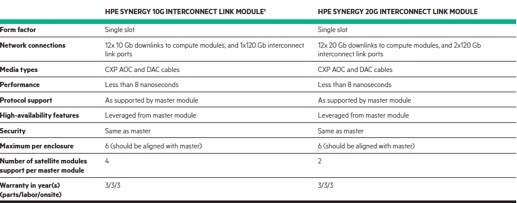
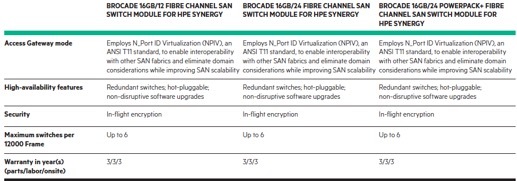
The storage network switch is non-blocking, currently the only one available. The reputable company Brocade launches the switch, the switch has 48 ports with auto-detection of 4, 8 or 16 Gb / s FC (by the way, you can plug 8 Gb / s SFP + modules into ports 25-31), some of the ports are aggregated. 12 ports to server bays, 8 external ports, and 4 groups of QSFP (Quad Small Form-factor Pluggable) uplinks.
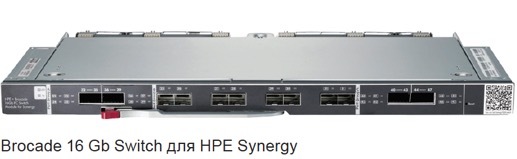
There is the option POD (ports on demand, licensing of open ports as the need arises) - a tricky function to extract money from the user - "pay for the iron, and then for it to work entirely." That is, you can buy with 12 “open” licensed ports (in any combination of external and internal ports), and if you need more, then buy a key for another 12 ports or PowerPack (licenses for additional functionality). Two left and two right port groups allow you to install QSFP - 4x16 Gb / s FC in them. These ports can be used as individual 16 Gbit / s ports, as 64 Gbit / s FC ISL, or as a 128 Gbit / s trunk for connecting to a SAN director. For virtual environments, supports NPIV.
The minimum version of FabricOS that comes with the switch is FOS 7.2.0a.
What can be connected.
16 Gbps FC switches and SAN directors:
- SN8000B Director Switch (Enterprise);
- SN6500B Fiber Channel SAN Switch;
- Brocade 16Gb SAN Switch for HPE BladeSystem c-Class;
- SN6000B Fiber Channel Switch (Midmarket);
- SN3000B Fiber Channel Switch (Entry);
- Brocade 16 Gb SAN Switch for HPE c-Class BladeSystem;
- Brocade 16Gb Fiber Channel SAN Switch Module for HPE Synergy (to the same switches in other chassis).
8 Gbps FC switches:
- 8/24 SAN Switch;
- 8/8 SAN Switch;
- Brocade 8 Gb SAN Switch for HPE c-Class BladeSystem.
Virtual Connect Switches:
- HPE Virtual Connect 8Gb 24-port Fiber Channel Module;
- HPE Virtual Connect 8Gb 20-port Fiber Channel Module;
- HPE Virtual Connect 16 Gb 24-port Fiber Channel Module;
- Virtual Connect FlexFabric 10Gb / 24-Port Module for c-Class Blade System;
- HPE Virtual Connect FlexFabric-20/40 F8 Module for c-Class Blade System.
Multiprotocol routers and gateways:
- Multi-protocol Extension Blade;
- SN4000B FC SAN Extension Switch;
- 1606 SAN Extension Switch.
Below is a table with possible options for purchasing a switch:
SAN Switch Features
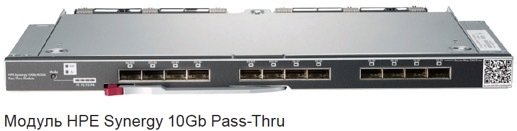
And finally - the favorite module of security. It transfers data from 12 compartments with blade servers, auto-detection of speed, maximum - 10 Gb / s. There are no brains, auto-detected, diagnosed, monitored and everything else through Composer.
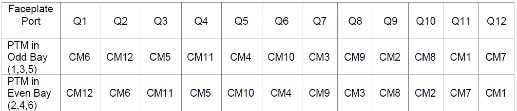
Correspondence table of connection ports and compartments where PTM is installed (PTM - Pass-thru Module, CM - Compute Module):
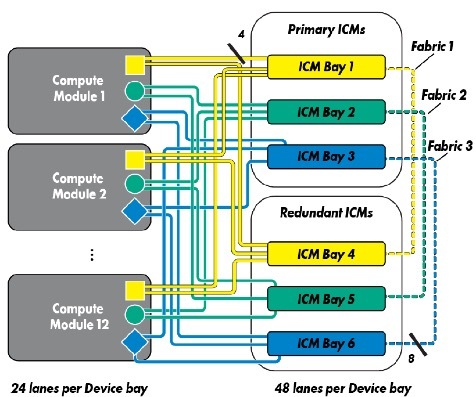
To refresh your memory:
Of some nuances, one can note the originality of support - there is no separate support for the module, only as part of the SY 12000 chassis.
On this, the description of the “Calculation-Storage-Transfer of Information” block can be considered complete, the next article will be devoted to Composer and Image Streamer ' at. Separately, I want to convey my regards to the Russian marketing of the manufacturer - Composer - it means “composer”, not “linker”, but it’s scary to talk about Image Streamer translation in general.









