
 August 1, 2016 at 17:15
Deanonymize Windows users and get Microsoft credentials and VPN accounts

If you do not see this picture, then your Windows account information is already compromised.
Introduction
Once upon a time, when computers were single-core and worked perfectly with 256 MB RAM, and Windows networks were already used very widely, Microsoft guys thought it would be convenient to authenticate only once when the computer started, and access to internal resources took place would automatically, without entering a password, and made the so-called technology of single sign-on. Single sign-on works very simply: when a user tries to access a resource with NTLM authentication (the standard authentication method in Windows networks), the OS immediately transmits the domain name, account name and password hash of the current user, and if you enter under this data failed, shows a dialog for entering a username and password. Years passed, security problems with the implementation of single sign-on technology made themselves felt, some of which were successfully corrected, others were corrected less successfully, and for some reason they completely forgot about the third. So they forgot about the problem of transferring credentials for single sign-on to SMB resources (network resources: files and folders, printers, etc.) via the Internet, which can be used in all modern operating systems, including Windows 10 with all the latest updates. This feature of the authentication stack is remembered every 1-2 years, the last time they talked about it atBlackhat US 2015 , but Microsoft is in no hurry to change anything.How it works?
As soon as you try to open a link to an SMB resource in a standard browser (Internet Explorer, Edge) or any application that works through standard Windows API calls or uses Internet Explorer as an engine for displaying HTML (Outlook, Windows Explorer), the SMB resource immediately gets your account information before you see the login and password dialog. For an attacker it’s enough, for example, to add a link to a picture from the SMB server to the page of the site, or send you an email that will be easy to open, and - boom! - Your account information is in the hands of the attacker. Until recently, it was believed that it wasn’t too bad that someone would find out your account name and the password hash of your home computer would not happen (if this is not a targeted attack), because the name is often written nonsense,The situation changes dramatically in the case of a corporate computer that is entered into the domain. From the domain name it is usually easy to understand which organization the account belongs to, and then, in case of successful password guessing, you can try to authenticate with corporate resources available from the Internet (mail, VPN).
But the password is not always necessary to select. If you know in advance some resource where you can log in using NTLM authentication, you can proxy requests from the client to the remote server and from the server to the client in real time, as soon as the client connects to your SMB server, and successfully authenticate on it! If you are lucky and you are on the same network segment as the domain administrator and know the IP of the domain controller, you can easily take control of it, which was shownIntercepter two years ago :
Windows 8 and Microsoft Account
Modern Microsoft operating systems are tightly integrated with the Internet and practically force you to create a Microsoft account rather than a local account for logging in. Without an MS account, you will not be able to use, for example, the application store, OneDrive and Cortana, and other software will constantly tell you how good it would be for you to synchronize files, settings and mail if you register it for yourself.All early serious studies of the discussed feature were carried out before Windows 8, and even in the presentation with Blackhat the Microsoft account is mentioned only in passing, and in vain - when using Microsoft Account on computers running Windows 8, 8.1 and 10, your OS will transfer the attacker to the SMB server on the Internet, the data is not your local account, with which almost nothing can be done, but it directly compromises your Microsoft account, with which you can do much more fun things. Thus, the old attack, which all these years posed a threat only to the corporate sector, can now be applied to home users as well.
New Details
When testing credential transfer under different versions of Windows, I found that 3 Windows 10 machines that were installed relatively long ago successfully communicate with simplified SMB implementations ( Responder , Impacket), and a computer with a freshly installed OS almost immediately after connecting disconnects, not having time to transfer login information, although it works fine with full Samba. A few days of debugging revealed an interesting feature of the Windows account stack: if the NetBIOS and Workstation names of the SMB server match, then Windows uses the current account (local or Microsoft) to log into the resource, but if the names do not match, and you are connected to the VPN with authentication using MSCHAPv2, the OS sends the login and password hash of this VPN connection! I suggested that this feature is inherent in MSCHAPv2 authentication in general, but no, with Wi-Fi WPA-Enterprise (PEAP / MSCHAPv2) this trick does not work.How to use it?
So, we found out that anyone who tries to open a file or directory from our SMB server from under Windows will automatically send their data to either a local account or a Microsoft account, or the username and password hash from the VPN. What can we do about it?The easiest way to operate is to simply configure the SMB server and keep track of who will try to log into it. You won’t have to wait long, because the entire routable range of IPv4 addresses is constantly scanned for profit. Scanners often run on Windows computers; many of them are authenticated by default with the current account. So we can find out the computer name, username and password hash of the machine with which we are scanned. It’s fun, but it’s not very productive, because something sane in the username is written not so often, MS accounts on scanners are practically not used, and access to the local account is hardly possible anywhere. The easiest way to collect hashes is to use Responder, I added a setting to it so that you can collect several hashes, if any, by manipulating the NetBIOS name (
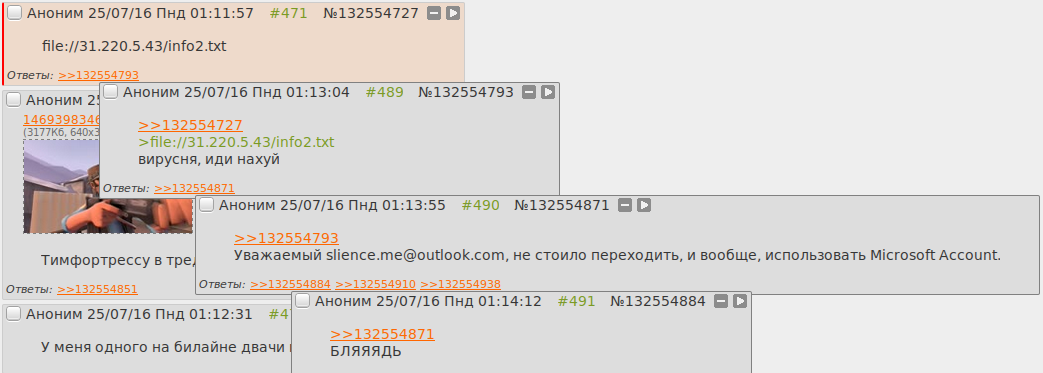
CaptureMultipleCredentials = Onin the configuration file). Exploitation for the purpose of deanonymization is more interesting. Accounting will be sent from the site if the victim uses Internet Explorer, or when clicking inside the message, in the case of Outlook. Almost all web-based interfaces of the postal services filter images with the file: // scheme when outputting a message (the file: // scheme is analogous to the \\ scheme), but not Yandex, which does not consider this to be its vulnerability (which, in general, is correct ) Mail deanonymization is more dangerous since gives you a connection not only IP addresses with your Windows account, but also with mail.
In Chrome, the file: // scheme also works, but only from the address bar, as in Firefox (but, on the contrary, it only works \\, but not file: //). Uploading anything with an SMB image or clicking the link will fail. Since Chrome and Firefox are much more popular than Internet Explorer, you will have to use social engineering.
You can steal accounts for your own good. Some VPN providers use the same usernames and passwords for both logging in to your account and for VPN authentication. Account belonging to a particular service can be determined by the IP address of the user's incoming connection. And if you got a Microsoft Account, and you found the password from the hash, then congratulations - you have access to files in the OneDrive cloud, Outlook mail, Skype account, if it is linked to a Microsoft account, and even more.

Of course, old well-known attacks like SMB Relay also continue to work.
How to protect yourself?
You should not think that you are completely safe if you do not use Internet Explorer and do not manually open links with the file: // scheme. It is enough to install a not-so-reliable application that will try to download some data from the SMB server through the standard Windows API functions, for example, URLDownloadToFile () . Thus, an application that does not have privileges to receive the password for your account will steal it through the Internet.If you do not need access to SMB resources on the Internet, it is most reliable to restrict access to the 445, 137 and 139 TCP ports for all address ranges with the standard Windows firewall, except:
- 192.168.0.0/16
- 169.254.0.0/16
- 172.16.0.0/12
- 10.0.0.0/8
- fd00 :: / 8
- fe80 :: / 10
Some providers, such as Rostelecom, block access to these ports on their networks, which is pretty nice of them.
UPD: in the comments navion and dartraiden suggest the correct way:
Hidden text
Windows Registry Editor Version 5.00
[HKEY_LOCAL_MACHINE\SYSTEM\CurrentControlSet\Control\Lsa\MSV1_0]
"RestrictReceivingNTLMTraffic"=dword:00000002
"RestrictSendingNTLMTraffic"=dword:00000002
Conclusion
I added the ability to check whether you regard to this problem, in WITCH? . Try to open it through Internet Explorer or Edge, and if your hash leaks to the Internet, WITCH? will try to find the password using a small dictionary, and will show you it. If before connecting, connect to the VPN, then WITCH? will also show the details of your VPN account. If you read this article through the aforementioned browsers, then I already have your hash :)Some VPN providers have reported the problem, who either blocked SMB ports inside the VPN, or added an option for local blocking in their software.
It turned out to be a revelation to me that the popular utilities - Hashcat (-legacy) and John The Ripper (OpenCL implementation) - incorrectly crack NTLMv2 hashes. They simply cannot pick up the password, although it is guaranteed to be in the dictionary. With oclHashcat and Hashcat 3.0, everything seems to be in order. One can only guess how many passwords were not cracked due to these errors ...
UPD 04/11/2018: Windows 10 disables automatic login to SMB resources if the system uses a Microsoft account. The hash of the local account and IPsec credentials still continues to be transferred to third-party hosts.