 June 1, 2016 at 10:01
A sudden ad in your Youtube video: why it appears and how to remove it
- Tutorial
In this post, we will explain why in your video an advertisement could suddenly appear or the music turned off, and we will tell you what can be done to return everything as it was.
We at Alconost make turnkey videos: we write a script, record a speaker, create an animation, select a music track. Most often we buy tracks (or rather, a license to use the track we have selected and approved by the client) at Audiojungle.net or PremiumBeat.com.
For more than a year - since April 2015 - a new feature has begun to appear in the description of tracks on Audiojungle: Youtube Content ID (details below).
Once in one of our videos - A Day in the Internet- there was an extraneous advertisement (visible to all viewers of the video) and the mark "coincidence with third-party content" (visible only to us through the video management interface on Youtube). By third-party content was meant music that sounded in the video. The video used a track purchased from Audiojungle, but the purchase of a license for the track and the upload of video to Youtube occurred more than two years ago - when Content ID technology did not exist.
Although extraneous advertising is not so much a nuisance as blocking a channel , it is better to do without it. Let's see how Content ID technology affects videos uploaded to Youtube that use music purchased from Audiojungle, and what to do about it.
What is Content ID
In short, Content ID technology allows the copyright holder to track the use of their content on Youtube. The copyright holder may be the author of the track or the company to which the author has delegated the protection of his rights.
You can read more about Content ID, for example, here or here .
If the system finds a match in your video clip from a track from its database, the video will receive a mark on the third-party content and the measure provided for by the copyright holder will be applied to the video. It can be, as in our case, the appearance of advertising - either mute or even block the video. In order to get rid of all this, you must show the system your rights to use the track.
How Content ID Technology Associates with Audiojungle Tracks
How to prove that a track with Audiojungle is used legally in your video? A comprehensive answer to this question we have found here .
In short, everything looks simple. When buying music on Audiojungle, you will be issued with a license certificate along with the track, which contains the identification code of the purchase. You get this certificate regardless of whether the track has a Content ID or not.
If the track you bought in your YouTube video is marked as “third-party content”, you open the certificate, copy its contents and paste it into a special form on Youtube (step-by-step instructions below). After some time, the advertisement from the video will disappear.
However, the smoothness of the situation is disturbed by one inconvenience. Tracks that did not have a Content ID before, begin to gradually acquire them. Therefore, a claim may even appear for a video that was uploaded to Youtube even before the content ID feature appeared in the video used in the video.
Rummaging through the archive of your purchases on Audiojungle, finding a license and entering its number in the required field is a matter of a couple of minutes, it’s easy. But what is really inconvenient is that preventive measures cannot be taken. Yes, you can object to an existing complaint. But if at the time of publishing the video, the music that was playing in it did not have the Content ID parameter - you cannot prevent the appearance of a complaint (and therefore the appearance of advertising). Or did we just not figure out how to do this?
If you know how to claim your rights to music in an already published video before a claim appears, please share your experience in the comments.
How to resolve a dispute about licensed music in your Youtube video (step-by-step instructions)
Let's figure out where to reap, what to copy and where to paste, so that the label “coincidence with third-party content” doesn’t excite our eyes, and the appearance of advertising does not spoil the beautiful video.
Please note: Youtube updates its Russian localization from time to time, so when you read this article, links and buttons may have different names.
1. Log in to Youtube, go to your channel and go to the “ Video Manager ” section (the button at the top, next to the viewing counter).
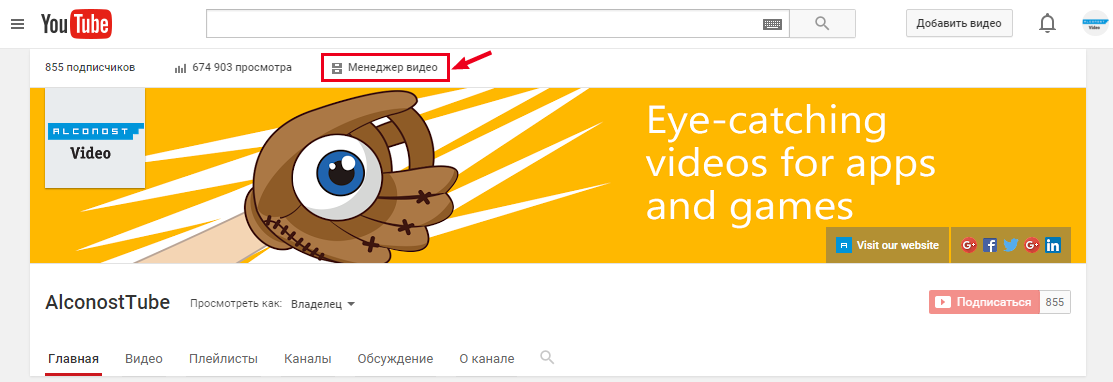
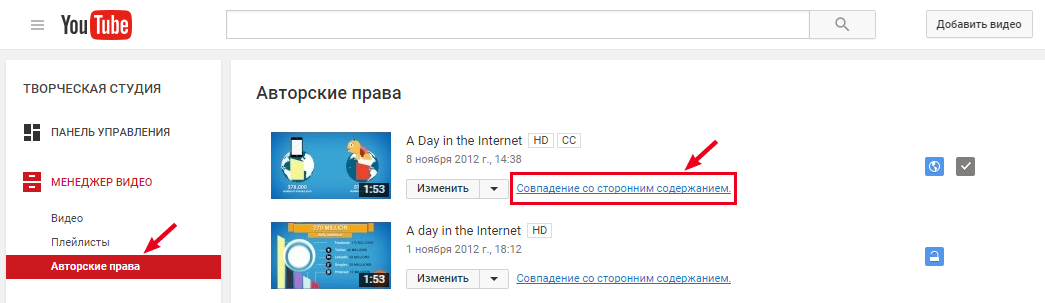
2. In the "Video Manager" (column on the left) click on " Copyright". A list of videos for which there are complaints will open. Click on the link “Video contains copyrighted material” (in our case, the link was called “Match with third-party content”).
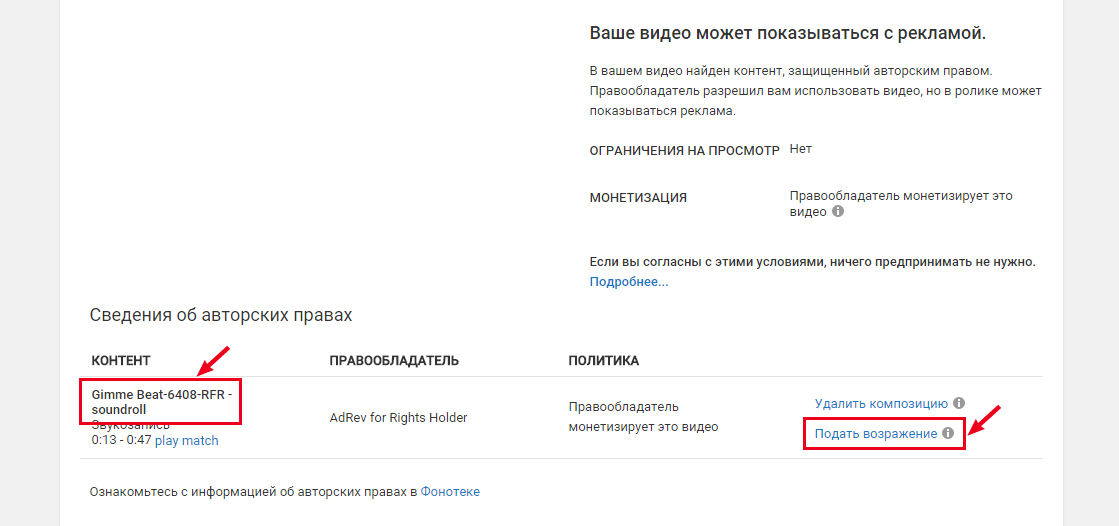
3. We review the essence of the claim, remember or copy the line from the “Content” item (this is the name of the track and the name of the author, they will be useful in steps 6 and 7), click on the link “Submit an objection” (bottom right).
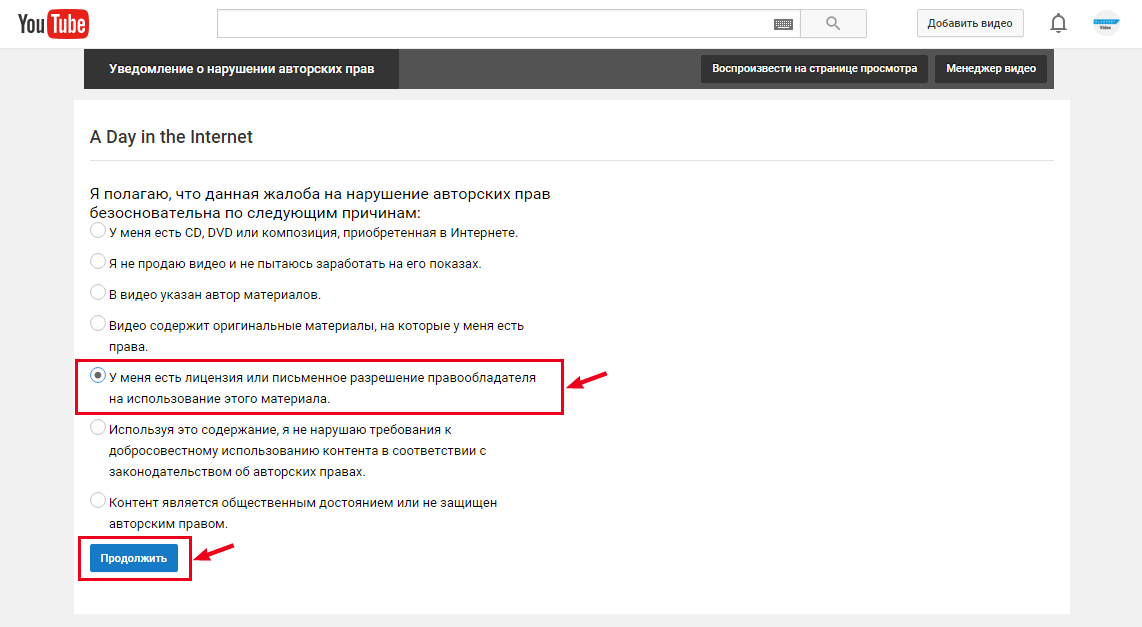
4. We get acquainted with the list of grounds for objection, select the item “I have a license or written permission from the copyright holder to use this material” and click “Continue”.
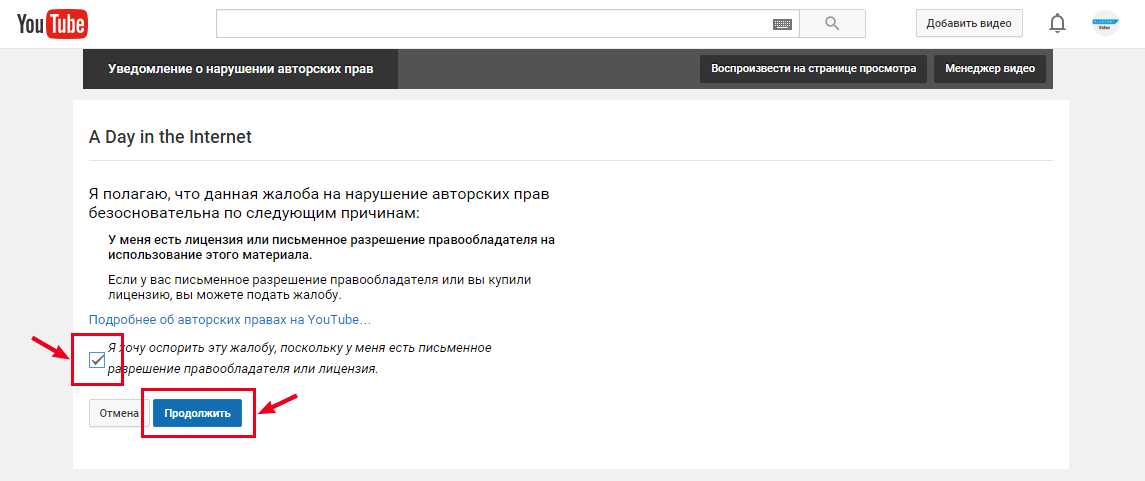
5. We tick off the item “I want to challenge this complaint, because I have a written permission of the copyright holder or a license” and click “Continue”.
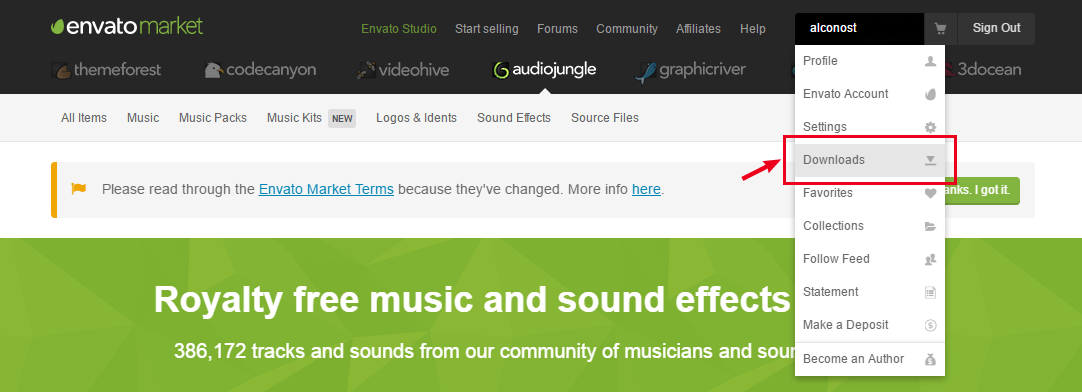
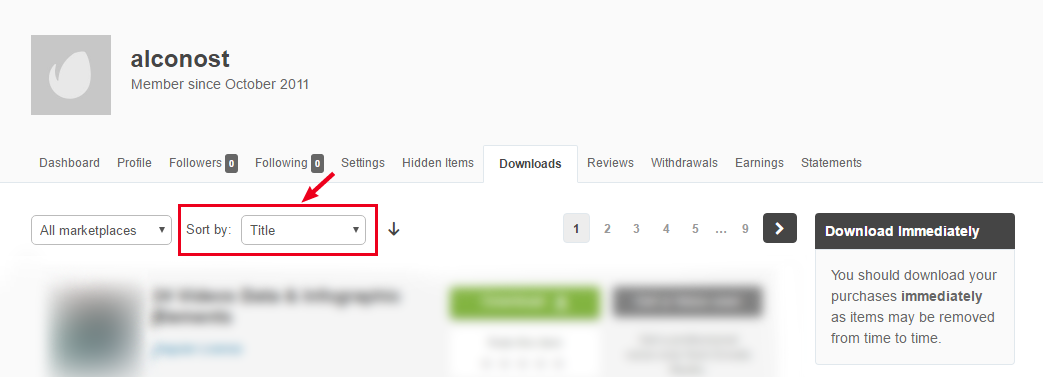
6. In another window, open your account on Audiojungle, go to the Downloads section and sort the downloads by name (sort by: Title). Having looked at the name of the track (which we prudently remembered or copied in step 3), we look for the desired track in the list. Then we click the Download button opposite the desired track and select the License sertificate & purchase code (text) item.
7. Return to Youtube. In the form for a brief explanation, we enter the text "A license to use this royalty-free music by [author] was purchased from AudioJungle.net" (the name of the author of the music is indicated in the license certificate, in the Licensor's Author Username field). A little lower in the same form - insert the full text of the license certificate. Next, tick off the remaining items, put a signature and click "Continue."

8. Check the completed form. If you forgot to indicate something or made a typo - click "Back". If everything is correct - click "Send an objection."
9. Youtube is worried that we will double-check everything three times and issue a pop-up window with confirmation of the action (if you have a pop-up blocker, it probably makes sense to disable it for this step). We recheck the contents of the complaint again and, if everything is OK, confirm this.
10. Finally, a checkmark appears on the page with the text “Answer to the copyright dispute sent.”
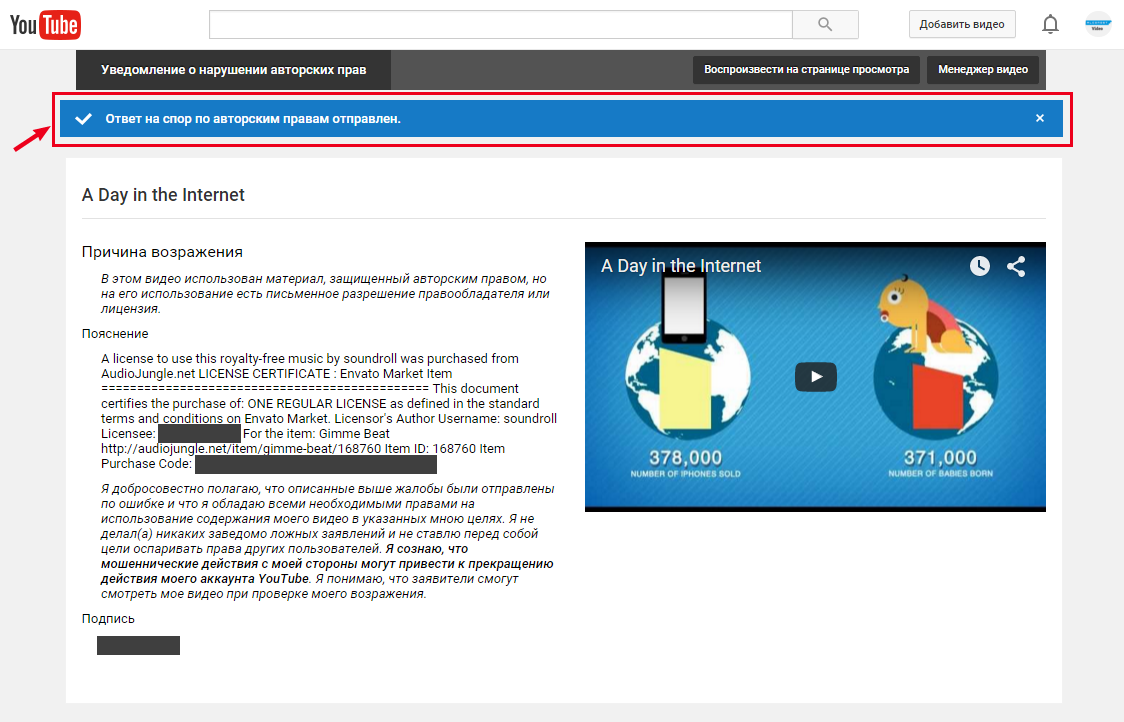
11. Now, when you click on a claim in this video, the status of the complaint will be displayed.
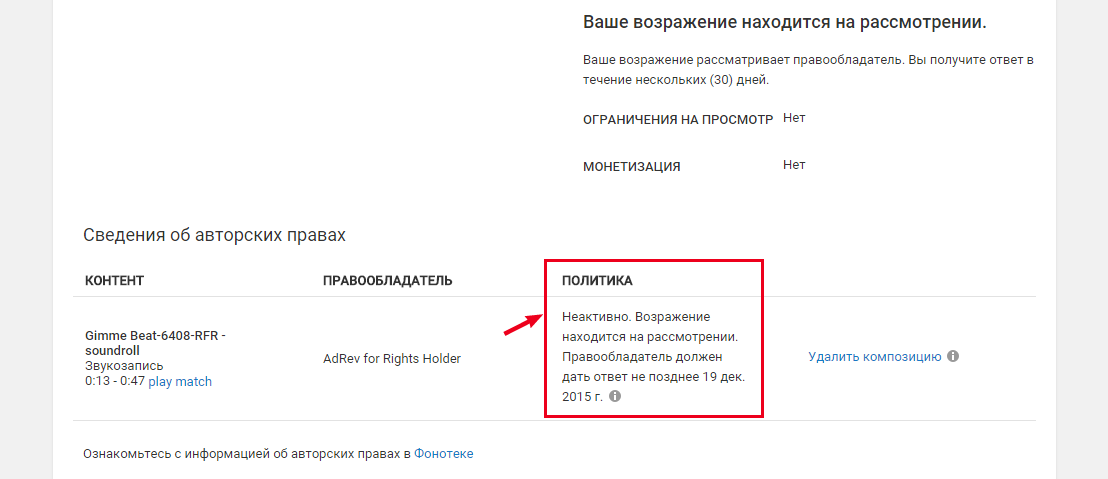
What will happen next - obviously, there are several scenarios. In our case, it was like this: we received a letter from Youtube with a subject"[A complaint of copyright infringement] withdraw the application for the video" A Day in the of Internet »» . The letter contained the following notice:
"Good news! 30 days have passed since you objected to the complaint of copyright infringement, and the copyright holder has not responded to it. This means that your arguments are automatically accepted and the complaint is withdrawn . ”
conclusions
1. Be sure to keep licensed certificates for music.
As you can see, a certificate may be needed even if you managed to get married and have children since the time you bought the track - and even if the track at the time of purchase simply did not have the Content ID parameter. It’s good that Audiojungle automatically saves purchased tracks in your account and you can download a license certificate at any time.
2. If you order a video from a studio, freelancer or friend - require a certificate for music when accepting work.
Firstly, you’ll be sure that your video uses licensed music. Secondly, you can solve the problem with sudden advertising as quickly as possible. We repeat: even if your video uses music without the Content ID parameter, the appearance of this characteristic is only a matter of time. If you have a certificate, you can solve the problem quickly and independently, without slowing down the agency and not waiting for them to find the certificate.
3. If it is not possible to get a certificate, there are other options.
As you can see in the screenshots, in addition to filing a complaint, there is also another option - turn off the music in the video (button “Delete song”). This is also quite a compromise. And in order not to remain with a dumb video, you can contact us for re-dubbing the video . We will select a new track, add sound effects and give you a license certificate for new music in your video.
If you have encountered other reasons for the appearance of the mark “coincidence with third-party content” and your problem was solved in a different way, please share your experience in the comments.
About the author
Alconost localizes applications, games and sitesinto 60 languages. Native-language translators, linguistic testing, cloud platform with API, continuous localization, project managers 24/7, any format of string resources.
We also make advertising and training videos - for sites that sell, image, advertising, training, teasers, expliner, trailers for Google Play and the App Store.
Read more: https://alconost.com









