 May 24, 2016 at 11:27
Generation 13, fourth wave: entry-level Dell PowerEdge servers
Launched in November 2015, the entry-level PowerEdge servers provide greater storage capacity and are available in a variety of configurations depending on the application. They support four slots for installing DDR4 SDRAM memory modules (up to 64 GB of RAM) and up to four or eight hard drives, depending on the model. The new 13th-generation Dell PowerEdge single-processor servers are targeted at growing small and medium-sized businesses, with the necessary performance, flexibility, and extensibility.
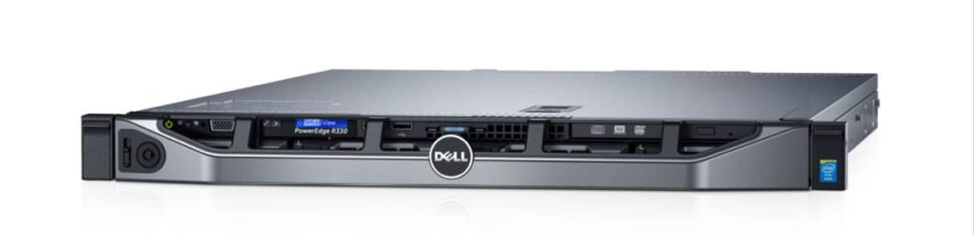
Small and medium-sized companies operate in a complex, rapidly changing environment, and not everyone has the ability to support IT professionals. The servers feature an integrated Dell Remote Access Controller (iDRAC8) with Lifecycle Controller for full-featured remote management and Dell OpenManage software, which also allows you to manage servers remotely. In addition, Dell OpenManage software enables small companies to reduce deployment time and simplify management by up to 40%. Thus, OpenManage will help businesses (especially beginners) quickly and efficiently implement a server in their IT infrastructure. And if you wish, you can transfer the server management functions to outsourcing.

New Dell Servershelp SMBs improve productivity, move to more demanding applications and increase operational efficiency. The main differences between the four models are in their form factor and configuration options.

From the 12th to the 13th generation. Four new Dell PowerEdge server models have replaced the old ones.
The R230 is a good option for a hosting company that offers customers a dedicated physical server. The powerful Dell PowerEdge R230 Rack Server can also be used to support decentralized applications in small and medium enterprises.
The Dell PowerEdge R330 Universal Rack Server with expandable storage subsystem is ideal for organizations opening a subsidiary office. It is intended for small companies, remote affiliates of large organizations and OEM customers.
Dell PowerEdge T130 Powerful Tower Server for small offices makes it easy to use office applications and collaboration tools.
The Dell PowerEdge T330 tower server with rack-mountability is designed for the future growth of the enterprise and is designed for small and medium-sized businesses, departments and remote offices of large organizations that need to store a large amount of data.
As organizations grow, organizations can add new Dell PowerEdge servers with other Dell hardware, software, and Dell services.
The presented models are distinguished not only by the new Intel Xeon E3-1200 v5 series processors and DDR4 memory, which is 33% faster than DDR3 memory, but also by almost twice as much throughput, which was made possible thanks to the transition to a new type of input / output interface - PCIe 3.0 In practice, this means increasing the speed of a wide range of applications, reducing the response time of the system, and reducing the processing time.

DDR4 memory modules with a frequency of 2133 MHz (versus 1600 for DDR3) have 30% higher bandwidth, while their power consumption is 30% less in active mode and 50% in standby mode. With 64GB DIMMs, server RAM will double the capacity of the previous generation.
The IOPS (I / O per second) doubled (750 instead of 375), which was facilitated by the Dell PERC9 controller (PowerEdge RAID Controller 9) with support for RAID technology, which replaced the previous PERC8 controller. To install hard drives (or other types of drives), servers provide from four to eight bays (depending on configuration), and this is a sufficiently large capacity for storing data in budget systems. A wider selection of network adapters makes it possible to more flexibly configure servers for different tasks.
Finally, support for Fresh Air 2.0 technology allows servers to operate at higher temperatures and thereby save on cooling.
The new models are ready to deploy virtual environments and support Microsoft Windows Server with Hyper-V, VMWare vSphere ESXi, and Citrix XenServer (R330 also supports the Red Hat Enterprise Virtualization hypervisor).
Let us consider in more detail each of the four models.
R330
The main purpose of this server is web hosting and e-commerce, file and print management, application and collaboration systems support, desktop consolidation and virtualization.

New storage options: two 1.8 ”SSDs in the ODD bay speed up system loading, and four 3.5” or 2.5 ”disk drives can be used in the server storage subsystem. In the latter case, a special adapter housing is used.

In a configuration without an SSD, you can install 6 2.5 ”HDDs into the chassis: SATA 7.2K, SAS 15K, Near Line SAS 7.2K or SAS 10K.

Another option: four 3.5 ”Enterprise SATA 7.2K or Near Line SAS 7.2K drives. Disk drives are hot swappable.

Third option: two 1.8 ”SSDs and four 3.5” SATA / SAS 7.5K HDDs.
Server Stuffing: Intel E3-1200V5 processor, up to four DDR4 UDIMM ECC memory modules (dual-channel DIMMs) of 4, 8 or 16 GB, hot-swappable 250 W power supply. On the server case - two USB 3.0 ports at the back and two USB 2.0 ports at the front, as well as one internal USB 3.0 port.

Comparison of R320 and R330 servers.

A more efficient design and better heat dissipation allowed the use of four fans instead of five.

This is what the R330 looks like inside. The internals of the R330 server are very similar to the R230 minus the redundant power supply.

At the rear of the R330 are a serial port and a VGA port, on the right is a power supply (there is no redundant one in this model), in the center is a single-port 1Gb Base-T adapter, to the left is a dual-port Broadcom 1Gb Base-T adapter, two USB 3.0 ports and a network port.
This server will compete with the HP ProLiant DL120 Gen9 and Lenovo System X3250 M5 systems and will strengthen Dell's position in the world market of single-processor rack servers, where the company leads with a share of 33.8%.
R230
Let's move on to R230, an entry-level single-processor rack server for SMB enterprises and distributed offices of large organizations. The purpose of this server is to support applications for collaboration and productivity, e-mail and messaging systems, file collaboration and data protection, as well as desktop consolidation and virtualization.

Let's see how the new model differs from the previous one.

Comparison of R220 and R230 servers. In new systems, the density of the storage subsystem has been significantly increased - up to four hot-swap drives are supported.
Three configurations of this server are offered:

The R230 with two 3.5 ”disk cable connectivity is an entry-level budget configuration for users with basic server storage subsystem requirements. If you do not plan to support critical applications, then you can install inexpensive HDDs designed for client systems, but they cannot be combined with an enterprise-class HDD.

R230 with four connectable 3.5 ”cable drives - configuration with high density storage subsystem. It also supports low-cost drives and is designed for customers who do not want to spend money on redundant functions.

R230 with four 2.5 ”/ 3.5” hot-swap drives, LCD display and iDRAC controller.

For 2.3 ”drives, this adapter case is used, and you can install a SATA SSD in it.

At the back of the R230 server are a serial port and a VGA port (left), a power supply (right), a four-port Broadcom 1Gb Base-T network adapter (in the center). To the left are the dual-port Broadcom 1Gb Base-T adapter, two USB 3.0 ports and a network port, as well as two PCIe expansion slots.
Now let's move on to outdoor models.
T130
This server in a compact tower case works very quietly, which allows you to install it directly in the office, while supporting full-featured remote control.

T130 is a universal server for SOHO and small business. It will cope well with the role of a file server, print server, and can be used to support applications and teamwork systems, email and messaging systems, data collaboration, desktop consolidation.

Differences of the T130 server from the previous model.

It looks like the case at the back. Note that it is not designed for rack mounting and only supports 3.5 ”drives - up to 4 HDD Enterprise SATA 7.2K, NL SAS 7.2K or SATA client drives. In the case - two fans (1 + 1), power supply 290 W Bronze EPA.
T330

On T330 Enclosure:
Front: 2 x USB3.0 + 4 x USB 2.0
Rear: 1 x USB 2.0 + 1 x USB 3.0
DVD drive and LCD display with server status information. In the lower part - compartments for HDD.
The T330 is an entry-level single-processor server in a tower case, which can also be rack mounted. It features enterprise-class high availability tools. It is a server for SMB and Remote Offices (ROBO) of large organizations.
Like the T130 model, it can be used as a file server, print server, it can be used to support applications and collaboration systems, email and messaging systems, data collaboration, desktop consolidation.

Differences between T330 servers from previous generation servers.
The single-processor T330 server in the 5U case supports up to 8 3.5 ”drives (or 2.5" in special adapter slides). The ReadyRails kit is used for rack mounting. It allows you to easily slide the case out of the rack.

At the back of the T330 are a serial port and a VGA port, 2 port USB 3.0 + 4 x USB 2.0 ports and two network right -. power Supplies (1 x 350 W or 2 x 495 Watt rezerrvirovaniem) In the center -. dual port adapter Broadcom 1Gb Base-T.
Management
About controls is worth telling more. PowerEdge servers come with Dell OpenManage Server Administrator (OMSA) software and the OpenManage Essentials (OME) management console, which enables you to use the Integrated Dell Remote Access Controller 8 (iDRAC8) with Lifecycle Controller software. OSMA uses software agents for management. With their help, you can perform administrative functions from the command line or Web-based GUI, and iDRAC provides remote access to the system regardless of whether the OS is installed in it. The System Summary page displayed by the iDRAC gives administrators the ability to see basic iDRAC information, monitor system status, run tasks, upgrade firmware, view logs, turn server power on / off, and initiate iDRAC reset.

The Fan Setup page allows you to configure the energy profile (Thermal Profile), change the default setting to the maximum or minimum - Maximum Performance (Performance Optimized) / Minimum Power (Performance per Watt Optimized). Fan Speed Offset enhances server cooling, and the Minimum Fan Speed in PWM (% of Max) option controls the fan speed in more detail. The CPU section shows the status of the system. You can also use the OpenManage Mobile application to work with Dell OpenManage Essentials.
Based on independent testingPowerEdge 13G Wave 4 servers - two floor-standing (T130 and T330) and two rack-mount (R230 and R330) models - show high performance when running applications. They allow you to combine SAS or SATA disks, have high throughput when processing data and speed in IOPS. In the Sysbench and SQL Server tests, these single-processor servers can compete with four-processor systems, for example, PowerEdge R230 - with the R930 and R920. And iDRAC and OpenManage management tools greatly simplify their deployment and maintenance. And all this - at a very modest price.
Small and medium-sized companies operate in a complex, rapidly changing environment, and not everyone has the ability to support IT professionals. The servers feature an integrated Dell Remote Access Controller (iDRAC8) with Lifecycle Controller for full-featured remote management and Dell OpenManage software, which also allows you to manage servers remotely. In addition, Dell OpenManage software enables small companies to reduce deployment time and simplify management by up to 40%. Thus, OpenManage will help businesses (especially beginners) quickly and efficiently implement a server in their IT infrastructure. And if you wish, you can transfer the server management functions to outsourcing.
New Dell Servershelp SMBs improve productivity, move to more demanding applications and increase operational efficiency. The main differences between the four models are in their form factor and configuration options.
From the 12th to the 13th generation. Four new Dell PowerEdge server models have replaced the old ones.
The R230 is a good option for a hosting company that offers customers a dedicated physical server. The powerful Dell PowerEdge R230 Rack Server can also be used to support decentralized applications in small and medium enterprises.
The Dell PowerEdge R330 Universal Rack Server with expandable storage subsystem is ideal for organizations opening a subsidiary office. It is intended for small companies, remote affiliates of large organizations and OEM customers.
Dell PowerEdge T130 Powerful Tower Server for small offices makes it easy to use office applications and collaboration tools.
The Dell PowerEdge T330 tower server with rack-mountability is designed for the future growth of the enterprise and is designed for small and medium-sized businesses, departments and remote offices of large organizations that need to store a large amount of data.
As organizations grow, organizations can add new Dell PowerEdge servers with other Dell hardware, software, and Dell services.
| 13th generation | The main difference from the previous generation server |
| Dell PowerEdge R330 | Provides 56% more disk capacity. |
| Dell PowerEdge R230 | It supports twice as much RAM, three times as much internal disk capacity and twice as many I / O ports. |
| Dell PowerEdge T330 | Supports four DDR4 slots and eight 3.5-inch hard drives. |
| Dell PowerEdge T130 | Supports twice as much RAM. |
The presented models are distinguished not only by the new Intel Xeon E3-1200 v5 series processors and DDR4 memory, which is 33% faster than DDR3 memory, but also by almost twice as much throughput, which was made possible thanks to the transition to a new type of input / output interface - PCIe 3.0 In practice, this means increasing the speed of a wide range of applications, reducing the response time of the system, and reducing the processing time.
DDR4 memory modules with a frequency of 2133 MHz (versus 1600 for DDR3) have 30% higher bandwidth, while their power consumption is 30% less in active mode and 50% in standby mode. With 64GB DIMMs, server RAM will double the capacity of the previous generation.
The IOPS (I / O per second) doubled (750 instead of 375), which was facilitated by the Dell PERC9 controller (PowerEdge RAID Controller 9) with support for RAID technology, which replaced the previous PERC8 controller. To install hard drives (or other types of drives), servers provide from four to eight bays (depending on configuration), and this is a sufficiently large capacity for storing data in budget systems. A wider selection of network adapters makes it possible to more flexibly configure servers for different tasks.
Finally, support for Fresh Air 2.0 technology allows servers to operate at higher temperatures and thereby save on cooling.
The new models are ready to deploy virtual environments and support Microsoft Windows Server with Hyper-V, VMWare vSphere ESXi, and Citrix XenServer (R330 also supports the Red Hat Enterprise Virtualization hypervisor).
Let us consider in more detail each of the four models.
R330
The main purpose of this server is web hosting and e-commerce, file and print management, application and collaboration systems support, desktop consolidation and virtualization.
New storage options: two 1.8 ”SSDs in the ODD bay speed up system loading, and four 3.5” or 2.5 ”disk drives can be used in the server storage subsystem. In the latter case, a special adapter housing is used.
In a configuration without an SSD, you can install 6 2.5 ”HDDs into the chassis: SATA 7.2K, SAS 15K, Near Line SAS 7.2K or SAS 10K.
Another option: four 3.5 ”Enterprise SATA 7.2K or Near Line SAS 7.2K drives. Disk drives are hot swappable.
Third option: two 1.8 ”SSDs and four 3.5” SATA / SAS 7.5K HDDs.
Server Stuffing: Intel E3-1200V5 processor, up to four DDR4 UDIMM ECC memory modules (dual-channel DIMMs) of 4, 8 or 16 GB, hot-swappable 250 W power supply. On the server case - two USB 3.0 ports at the back and two USB 2.0 ports at the front, as well as one internal USB 3.0 port.
Comparison of R320 and R330 servers.
A more efficient design and better heat dissipation allowed the use of four fans instead of five.
This is what the R330 looks like inside. The internals of the R330 server are very similar to the R230 minus the redundant power supply.
At the rear of the R330 are a serial port and a VGA port, on the right is a power supply (there is no redundant one in this model), in the center is a single-port 1Gb Base-T adapter, to the left is a dual-port Broadcom 1Gb Base-T adapter, two USB 3.0 ports and a network port.
This server will compete with the HP ProLiant DL120 Gen9 and Lenovo System X3250 M5 systems and will strengthen Dell's position in the world market of single-processor rack servers, where the company leads with a share of 33.8%.
R230
Let's move on to R230, an entry-level single-processor rack server for SMB enterprises and distributed offices of large organizations. The purpose of this server is to support applications for collaboration and productivity, e-mail and messaging systems, file collaboration and data protection, as well as desktop consolidation and virtualization.
Let's see how the new model differs from the previous one.
Comparison of R220 and R230 servers. In new systems, the density of the storage subsystem has been significantly increased - up to four hot-swap drives are supported.
Three configurations of this server are offered:
The R230 with two 3.5 ”disk cable connectivity is an entry-level budget configuration for users with basic server storage subsystem requirements. If you do not plan to support critical applications, then you can install inexpensive HDDs designed for client systems, but they cannot be combined with an enterprise-class HDD.
R230 with four connectable 3.5 ”cable drives - configuration with high density storage subsystem. It also supports low-cost drives and is designed for customers who do not want to spend money on redundant functions.
R230 with four 2.5 ”/ 3.5” hot-swap drives, LCD display and iDRAC controller.
For 2.3 ”drives, this adapter case is used, and you can install a SATA SSD in it.
At the back of the R230 server are a serial port and a VGA port (left), a power supply (right), a four-port Broadcom 1Gb Base-T network adapter (in the center). To the left are the dual-port Broadcom 1Gb Base-T adapter, two USB 3.0 ports and a network port, as well as two PCIe expansion slots.
Now let's move on to outdoor models.
T130
This server in a compact tower case works very quietly, which allows you to install it directly in the office, while supporting full-featured remote control.
T130 is a universal server for SOHO and small business. It will cope well with the role of a file server, print server, and can be used to support applications and teamwork systems, email and messaging systems, data collaboration, desktop consolidation.
Differences of the T130 server from the previous model.
It looks like the case at the back. Note that it is not designed for rack mounting and only supports 3.5 ”drives - up to 4 HDD Enterprise SATA 7.2K, NL SAS 7.2K or SATA client drives. In the case - two fans (1 + 1), power supply 290 W Bronze EPA.
T330
On T330 Enclosure:
Front: 2 x USB3.0 + 4 x USB 2.0
Rear: 1 x USB 2.0 + 1 x USB 3.0
DVD drive and LCD display with server status information. In the lower part - compartments for HDD.
The T330 is an entry-level single-processor server in a tower case, which can also be rack mounted. It features enterprise-class high availability tools. It is a server for SMB and Remote Offices (ROBO) of large organizations.
Like the T130 model, it can be used as a file server, print server, it can be used to support applications and collaboration systems, email and messaging systems, data collaboration, desktop consolidation.
Differences between T330 servers from previous generation servers.
The single-processor T330 server in the 5U case supports up to 8 3.5 ”drives (or 2.5" in special adapter slides). The ReadyRails kit is used for rack mounting. It allows you to easily slide the case out of the rack.
At the back of the T330 are a serial port and a VGA port, 2 port USB 3.0 + 4 x USB 2.0 ports and two network right -. power Supplies (1 x 350 W or 2 x 495 Watt rezerrvirovaniem) In the center -. dual port adapter Broadcom 1Gb Base-T.
Management
About controls is worth telling more. PowerEdge servers come with Dell OpenManage Server Administrator (OMSA) software and the OpenManage Essentials (OME) management console, which enables you to use the Integrated Dell Remote Access Controller 8 (iDRAC8) with Lifecycle Controller software. OSMA uses software agents for management. With their help, you can perform administrative functions from the command line or Web-based GUI, and iDRAC provides remote access to the system regardless of whether the OS is installed in it. The System Summary page displayed by the iDRAC gives administrators the ability to see basic iDRAC information, monitor system status, run tasks, upgrade firmware, view logs, turn server power on / off, and initiate iDRAC reset.
The Fan Setup page allows you to configure the energy profile (Thermal Profile), change the default setting to the maximum or minimum - Maximum Performance (Performance Optimized) / Minimum Power (Performance per Watt Optimized). Fan Speed Offset enhances server cooling, and the Minimum Fan Speed in PWM (% of Max) option controls the fan speed in more detail. The CPU section shows the status of the system. You can also use the OpenManage Mobile application to work with Dell OpenManage Essentials.
Based on independent testingPowerEdge 13G Wave 4 servers - two floor-standing (T130 and T330) and two rack-mount (R230 and R330) models - show high performance when running applications. They allow you to combine SAS or SATA disks, have high throughput when processing data and speed in IOPS. In the Sysbench and SQL Server tests, these single-processor servers can compete with four-processor systems, for example, PowerEdge R230 - with the R930 and R920. And iDRAC and OpenManage management tools greatly simplify their deployment and maintenance. And all this - at a very modest price.









