Working with geofences in Android. Update
Some time ago, I was tasked with determining the change in the user's location on the map. According to the results of the experiment in the article , Google Services Geofences is perfect for these purposes, in terms of accuracy and energy efficiency.
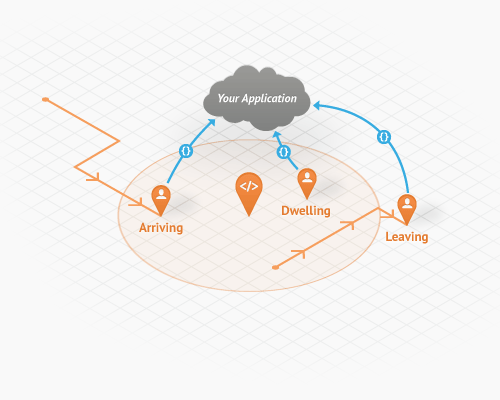
How to work with Geofences is described in detail in the only Russian-language example on the use of Location APIs in an article on the hub, but 2 years have passed since then, and the information is very outdated.
Unfortunately, the author’s example on github didn’t even compile, so I decided to get it under the latest versions of libraries. To my surprise, API changes between com.google.android.gms:play-services:4.0.30and com.google.android.gms:play-services:8.4.0there were many! Actually, they will be discussed further in the article.
So what are the differences?
For starters, it is advisable to familiarize yourself with the original .
Nothing has changed in the concept itself, only responsible classes have changed.
So, instead LocationClient, we have api.GoogleApiClient, of callbacks GooglePlayServicesClientalso moved in api.GoogleApiClientinstead new LocationClient(this, this, this)appeared friendly builder:
    new GoogleApiClient.Builder(this)
        .addApi(LocationServices.API)
        .addConnectionCallbacks(this)
        .addOnConnectionFailedListener(this)
        .build();
An important difference is that the addition and removal of geofences mGoogleApiClientis not done directly, but through LocationServices.GeofencingApi.
    GeofencingRequest build = ...
    LocationServices.GeofencingApi.addGeofences(mGoogleApiClient, builder.build(), getPendingIntent())
            .setResultCallback(new ResultCallback() {
                @Override
                public void onResult(@NonNull Status status) {
                    if (status.isSuccess()) {
                        String msg = "Geofences added: " + status.getStatusMessage();
                        Log.e("GEO", msg);
                        Toast.makeText(GeofencingService.this, msg, Toast.LENGTH_SHORT)
                                .show();
                    }
                    GeofencingService.this.onResult(status);
                }
            });
The first parameter has also changed: instead of a list of geofences, it is transmitted GeofencingRequest, which can be obtained through a special builder:
    GeofencingRequest.Builder builder = new GeofencingRequest.Builder();
    builder.setInitialTrigger(GeofencingRequest.INITIAL_TRIGGER_ENTER);
    builder.addGeofences(mGeofenceListsToAdd);
    GeofencingRequest build = builder.build();
One of the capabilities of the new builder is to control the behavior of geofences at the time of addition. For example, in the comments on the original article they asked about the possibility of a trigger Exit geofencefor the case when the device is outside the zone at the time of its installation. Now this can be done by passing the flag GeofencingRequest.INITIAL_TRIGGER_EXITthrough the method setInitialTrigger (int initialTrigger), the default flags are GeofencingRequest.INITIAL_TRIGGER_ENTERand GeofencingRequest.INITIAL_TRIGGER_DWELL. Flags can be combined with each other.
In addition, the last callback parameter was removed, now it LocationServices.GeofencingApi.addGeofencesreturns instead PendingResult, with which you can, by blocking the stream, wait for the result or receive a response asynchronously using the callback method setResultCallback(..). In any case, the result will be the status of the operation of adding / removing geofences. This callback replaces OnAddGeofencesResultListeneror onRemoveGeofencesByRequestIdsResultfrom the original article.
You can delete unnecessary geofences through methods:
LocationServices.GeofencingApi.removeGeofences(mGoogleApiClient, /*PendingIntent или список id геозон*/)Changes to ReceiveTransitionsIntentService
If earlier for processing the results of triggering of triggers on the geofence, static methods from the class LocationClientwere used that required the comer as a parameter Intent, but now it is engaged in it GeofencingEvent, which has the same methods for doing the same work. You can get it as follows:
GeofencingEvent geofencingEvent = GeofencingEvent.fromIntent(intent);The creation of the geofences themselves remains unchanged and occurs through Geofence.Builder.
Another innovation is that after the trigger is triggered, the geofence is deleted automatically, so we do not need to remove them ourselves anymore!
Also in the example code, I added another button that puts a geofence with a trigger to exit it.
A few tips for working with geofences
For testing, I chose the Genymotion emulator, but when I tried to set the geofence I got an
LocationServiceserrorstatus code = 1000(GEOFENCE_NOT_AVAILABLE). The solution to this problem was found on stackoverflowIf you set triggers
GeofencingRequest.INITIAL_TRIGGER_EXITandGeofencingRequest.INITIAL_TRIGGER_ENTERandGeofence.GEOFENCE_TRANSITION_ENTERand as the triggering conditionGeofence.GEOFENCE_TRANSITION_EXIT, then only one condition from each pair will work, after which the zone will be deletedYou can use this library to work with Rx , then the whole process of adding / removing is reduced to code:
GeofencingRequest.Builder builder = new GeofencingRequest.Builder() ... new ReactiveLocationProvider(context). locationProvider.addGeofences(getPendingGeoIntent(),builder.build()) .subscribe(status -> { if (status.isSuccess()) {} };- Unfortunately, if you simply change the coordinates through the built-in card in Genymotion, then the triggers do not work. But everything works fine through lockito !
References:
- Github code
- Original article
- White papers on Geofences 1 and 2
- ReactiveLocation
- lockito