April 4, 2016 at 13:45
Overview and Updates of Juniper Networks Routing, Switching, and Security Solutions
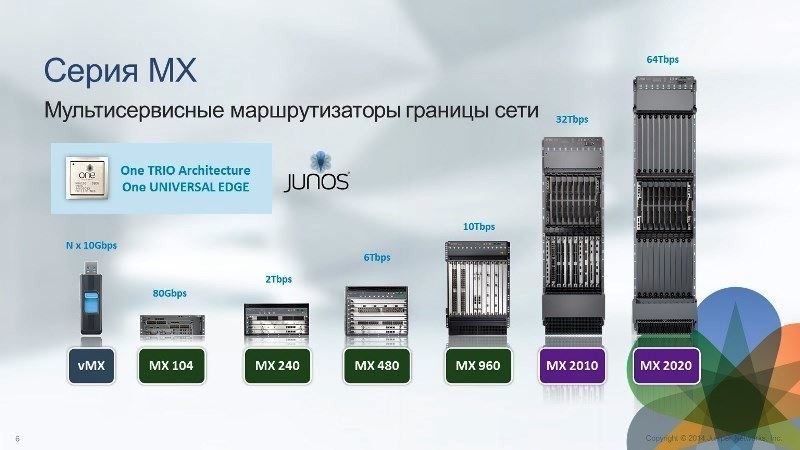
MX Series routers Fig. 1. - Series MX. Multiservice Network Border Routers
MX Line is the company's flagship product. In Fig. Figure 1 shows the entire model range - six devices, from the younger model to the top one, as well as a virtual vMX device (more about it below).
Due to its high versatility, MX can be used in a wide variety of scenarios - for managing broadband subscribers and in Enterprise scenarios as a VPN concentrator. Due to the very high quality multicast-support MX is well suited for the distribution of the video stream. Another use case is a service gateway. MX allows you to organize Firewall and NAT (Network Address Translation)
The classic service deployment model assumes that a different hardware device is used for each service. If you use MX, all this can be combined. One of the most popular scenarios for using the MX carrier segment is BNG or Bras, all that is connected with subscriber authorization and traffic accounting.
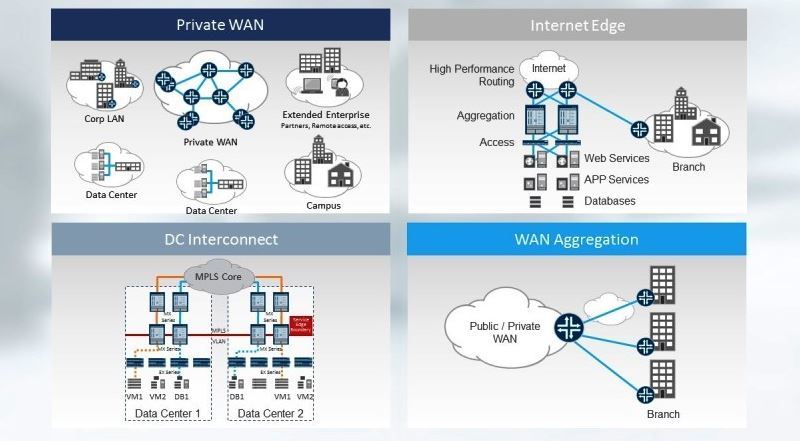
Fig. 2. - Enterprise scenarios implemented on the basis of MX
An example of a corporate scenario is the collaboration of a data center (DC Interconnect). If the company uses applications that need L2 mobillity, for example vMotion, then they usually make a separate decision to “stretch” the L2 segment through a public network or through a backbone connection. MX in this respect supports VXLAN, that is, it can be used as a "translator" between the data center and the LAN.
MX lineup
In general, the MX lineup is shown above. Let's consider it in more detail.
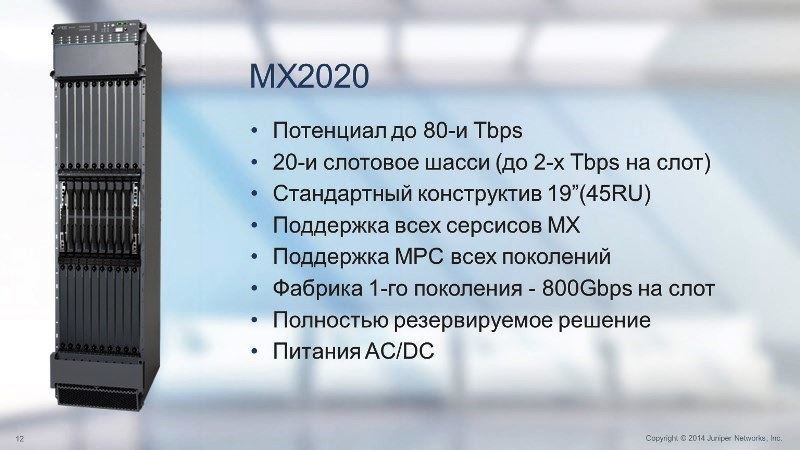
Fig. 3. - The older model of the series, MX2020
The next model (as it decreases) has half the potential throughput than the MX2020, - 40 Tbps. Next come the MX960 with 14 slots, MX480 (the same with 8 slots), a 4-slot model, etc., up to the form factor of a USB flash drive.

Fig. 4. - Virtual MX
As shown in the figure, the virtual MX uses the same JunOS, adapted to work as a virtual machine
Why is this solution needed? It suits the user perfectly if he needs MX functionality, but there is no need for data streams of 20-80 Gbps level. Virtual MX is typically used at 2-10 Gbps speeds. To date, Juniper has managed to get 40Gbps imix half duplex.
Today, vMX functionality does not fully match the hardware MX functionality. In the near future, parity will be achieved, and the development of new functionality will go in parallel - that is, everything that will be developed for "large" physical MXs will be transferred to the virtual MX.
MX Line Cards
Line cards MPC (Modular Port Concentrator) are in demand on the market and their development continues. Several generations of cards have already changed, up to MPC7. They are supported on all MX chassis, i.e. Regardless of the chassis used, any combination of line cards can be configured. In Fig. 5 shows including MIC (Modular Interface Cards), which can also be dialed in various combinations.
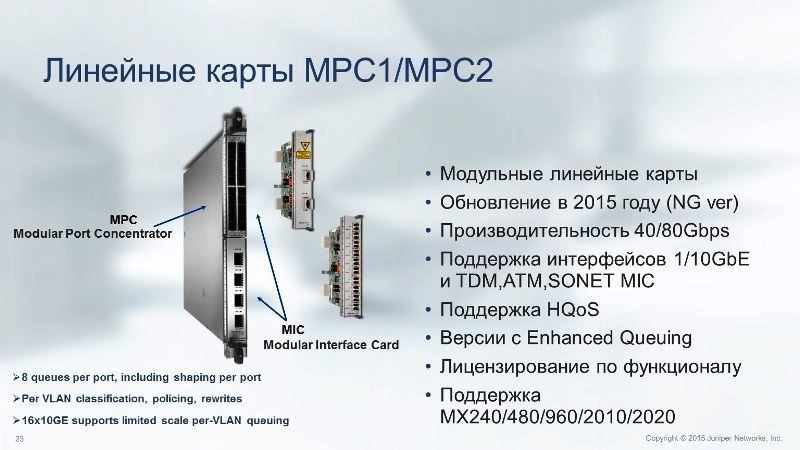
Fig. 5. -MRS1 / MPC2 line cards
Already in the MPC1 / MPC2 generation, support for various interfaces and support for HQoS (Hierarchical Quality of Service) - very important for operators - www.juniper.net/documentation/en_US/junos13.3/topics/concept /mx-series-qos-faq-overview.html
In MP3, the performance was brought up to 130 Gbps. The cards already had a fixed configuration with the characteristics shown in Fig. 6. In MPC6, performance has increased to 480 Gbps per slot.
The latest MPC 7 cards also support up to 480 Gbps. However, there are no longer fixed physical ports with a fixed speed. They were replaced by virtual ports, the characteristics of which are set programmatically. Therefore, here you can create an arbitrary combination of ports at 10, 40 and 100 Gbps.
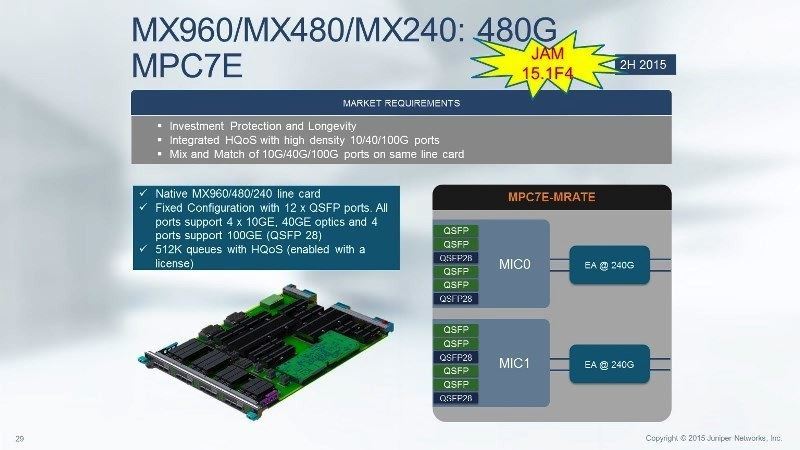
Fig. 6. - Characteristics and use of the MPC7E line card in the MX960 / MX480 / MX240 models The
characteristics of the remaining line cards from MPC1 to MPC6 are summarized in the table.
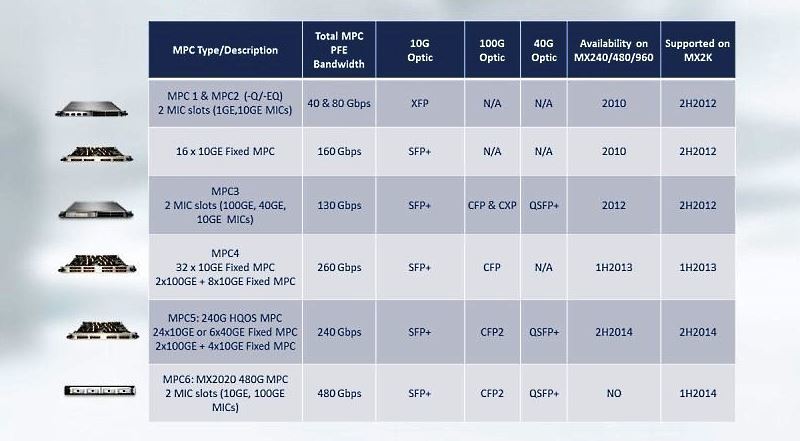
Fig. 7. - Characteristics of MPC
Service Cards
It should be noted separately service cards MS-MPC and MS-MIC. These are special cards for deploying services such as IPSec and NAT. They are typically used in the carrier segment.
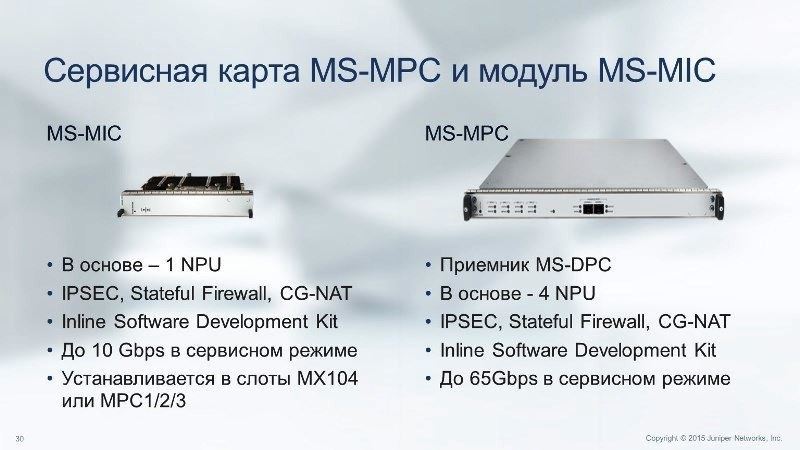
Fig. 8. - MS-MPC service card and MS-MIC module
MX series routers also implement Virtual Chassis technology, which allows two physical devices to work as a single logical device in active-active scenarios. Today, MX series routers are used by almost all telecom operators.
MX is Juniper Networks flagship platform. It is developing, and the roadmap for it has been developed for several years to come. In the MX portfolio, they are classified as “large” routers.
The MX range of products offered by Juniper is far from exhausted. In accordance with the requirements of the market segments where the company is represented, it offers a number of products that are well received by consumers.
ACX Series Routers ACX Series
Routers are designed to solve access level tasks. They are used to build networks such as the Mobile Backhole, or to implement technology networks linking power equipment.
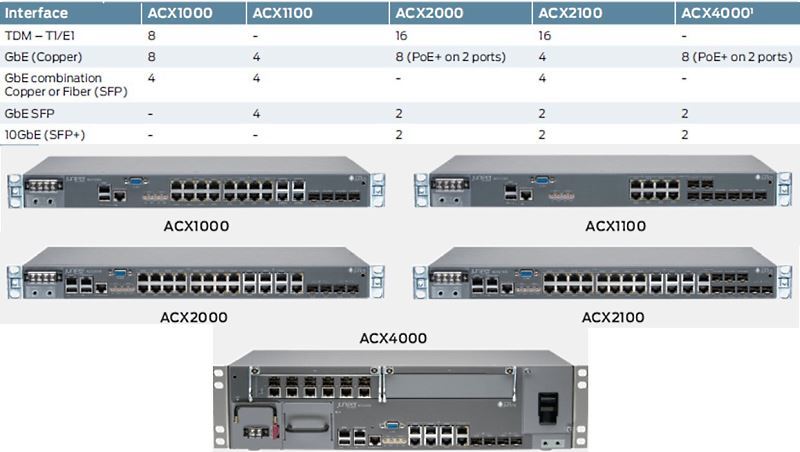
Fig. 9. - The line of ACX series routers
Accordingly, ACX must operate in a wide temperature range. There are options in a protected version that can work in difficult conditions.
The advantage of the solution is that you can configure a completely transparent End-to-End MPLS structure, with all its advantages - service management, QoS and synchronization (when migrating from traditional, classical SDH, PDH to modern packet networks).
The equipment fully supports synchronous Ethernet. When using the PTP protocol, an SDH quality level of 50 ms or less is achieved. You can create quite large, scalable Metro Ethernet networks.
For the ACX series routers, from the point of view of return on investment (ROI), the peculiarity is that they are licensed by the number of ports, which can increase (and, accordingly, be paid) as the network expands.
EX Series switches
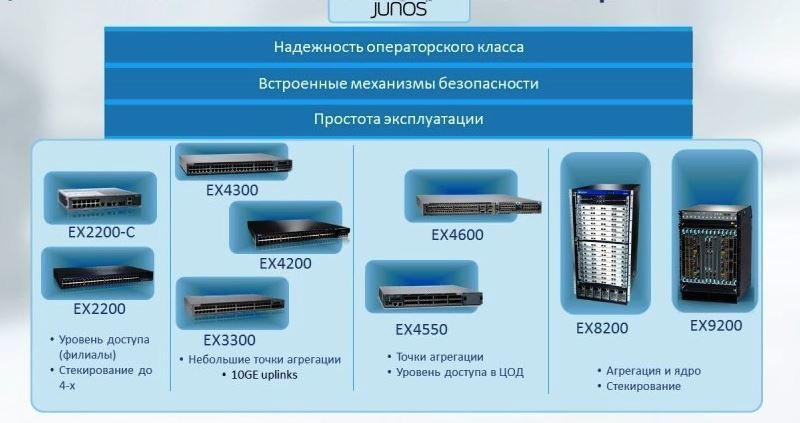
Fig. 10. - Assortment and classification by purpose of EX series switches
EX Series Switches are designed primarily for the Enterprise segment, for campus-level solutions.
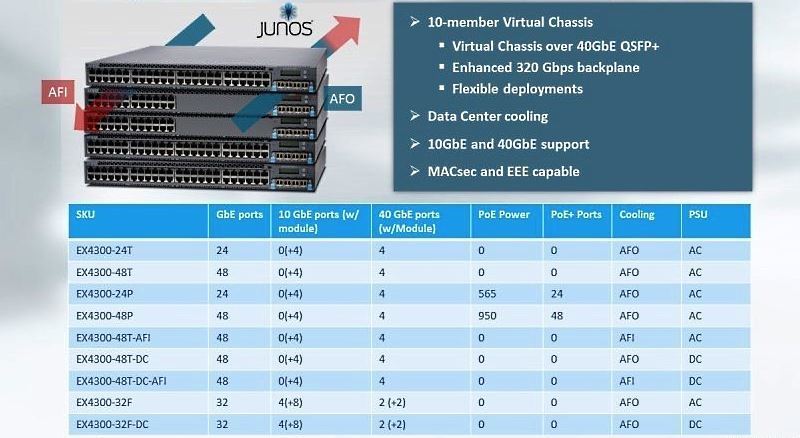
Fig. 11. - Universal 1G EX4300 switch The EX4300
switch can be used both in Entrprise campuses and in data centers. It is a one-stop solution, fault tolerant and scalable.
Switches can be assembled in Virtual Chassis using any interface. This device has 4 x 40-Gbps interfaces, depending on which QSFP (Quad Small Form-factor Pluggable) transceiver is used. Virtual Chassis can operate at a distance of up to 80 km. In addition, Virtual Chassis can be mixed, combining 1 Gbps and 10 Gbps devices.
The EX series starts with gigabit switches (Juniper entered the market in 2008 and immediately offered 1 Gbps, bypassing 100 Mbps).
EX-based solutions scale well, from fixed to modular switches. The latter are based on MX routers, but have slightly different software and a significantly lower price. The functionality of the hardware is adapted to build switches as the core of campuses and data centers. In the Juniper offerings structure, EX line cards also occupy an appropriate place.
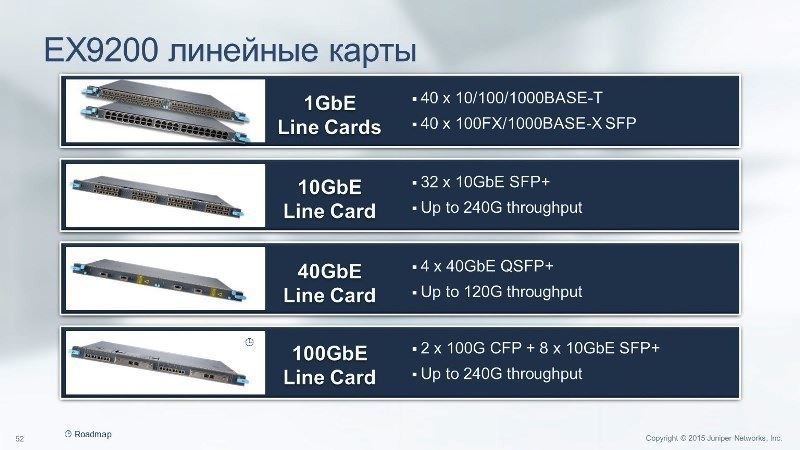
Fig. 12. - Characteristics of line cards EX9200
Platform SRX
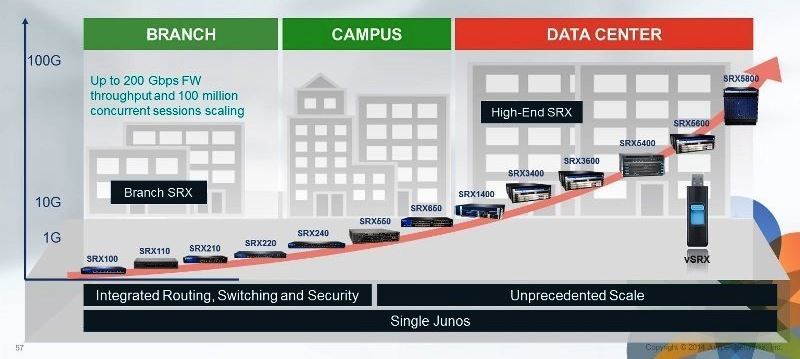
Fig. 13. - The range and purpose of the SRX series of firewalls The
performance of solutions built on the SRX can be 100, 200, 300 and 400 Mbps, 1 and 1.5 Gbps in the normal firewall mode. Performance on services depends on the type of service and is in the range of 50-500 Mbps.
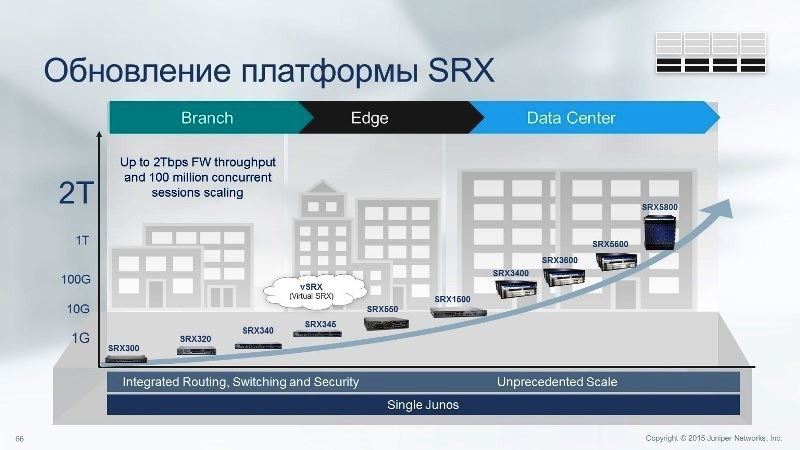
Fig. 14. - Update of the SRX platform
Now an update has been released, 300 series. It completely replaces the models of the 100 and 200 series
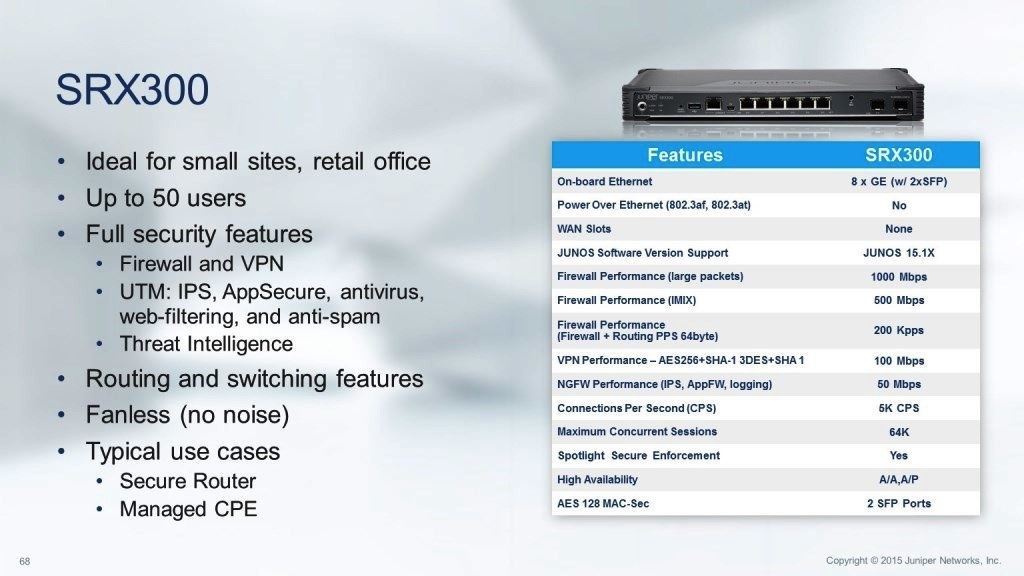
. 15. - Features of the new SRX300 Series
In Figure 16. The table summarizes the performance in realistic IMIX traffic. Usually the data is for large packages, but here all the numbers are for IMIX and NGFW. The bottom of the table indicates what it includes - IPS, Application Firewall and logging.
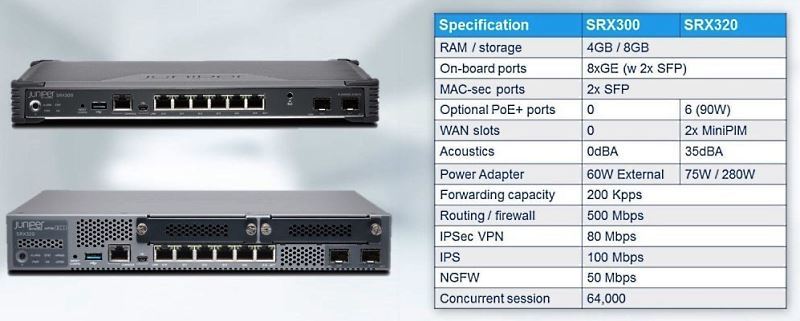
Fig. 16. - Comparison of the SRX300 and SRX320
What was the SRX320 related to? Firstly, the model range has not been updated for quite some time, and the performance for some customers was not optimal. Secondly, it was required to carry out certification of the European Union RoHS 2, which required some changes.
Otherwise, the difference between these models is only in scaling and some additional features - for example, you can add the ADSL, T1 or E1 interface to the SRX320.
The latest model, the SRX340, is essentially a mini-server. In its configuration, you can include a 120 Gb SSD, where third-party applications are usually located.
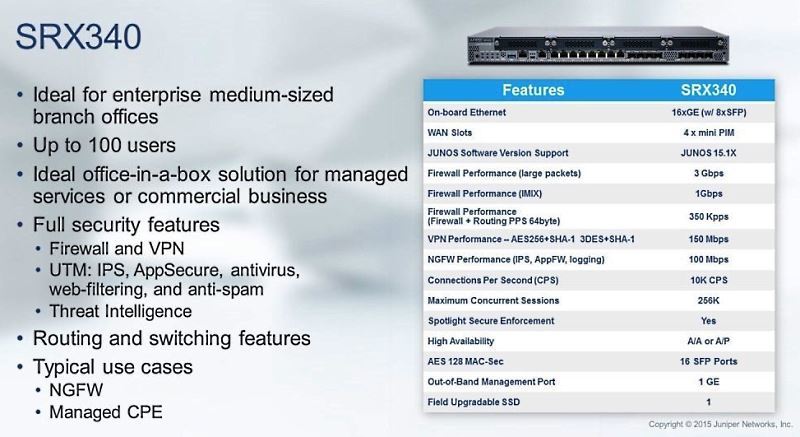
Fig. 17. - Features of the SRX340
The SRX340 uses three main types of VPNs.
Auto VPN for conventional hub-and-spoke. The advantage is that if you add a new spoke, you do not need to reconfigure the hub, this happens automatically. ADVPN, a counterpart to Cisco DMVPN, allows you to dynamically create tunnels between branches. Third, group VPN is the equivalent of Cisco VPN GETVPN. But, if Cisco GETVPN is based on its proprietary protocols, then Juniper follows generally accepted standards.
The main advantage of group VPN is that it allows you to create a dynamic tunnel between branches without the use of a tunnel in its classical sense. This is usually useful for large Enterprise class solutions when they want to get the MPLS service, and the service provider provides them with the opportunity to use such a model.
SRX Management Tools
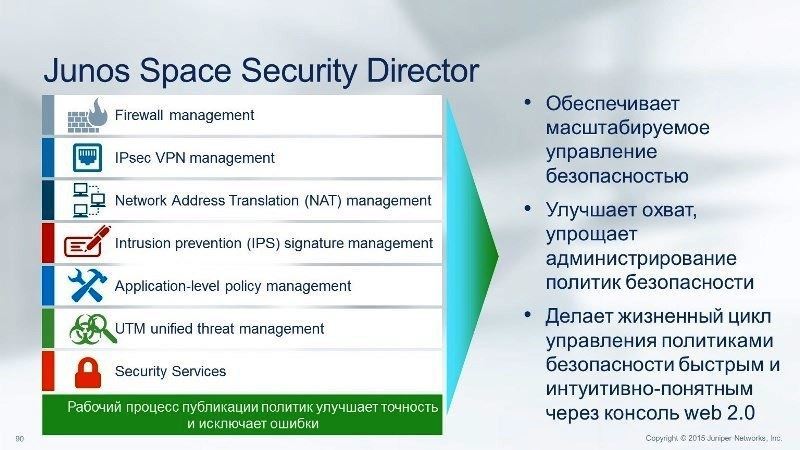
Fig. 18. - Composition and purpose of Junos Space Security Director
Control Panel Junos Space Security Director v. 15.2 is now available. The delivery includes 48 templates and examples for quickly creating your own unique panels.
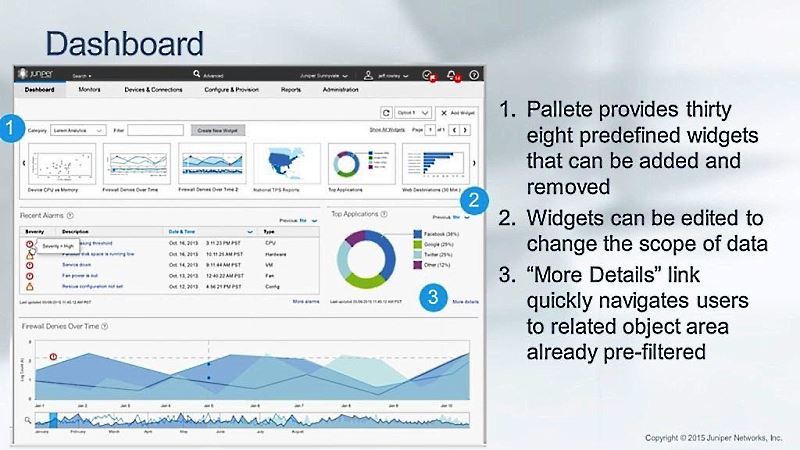
Fig. 19. - Junos Space Security Director Dashboard v. 15.2
In addition, the new Log GUI allows convenient viewing of logs. Its purpose is to make SRX control more understandable and convenient. Previously, sampling was more difficult, manually. Now the information is summarized and displayed in a convenient form for perception.
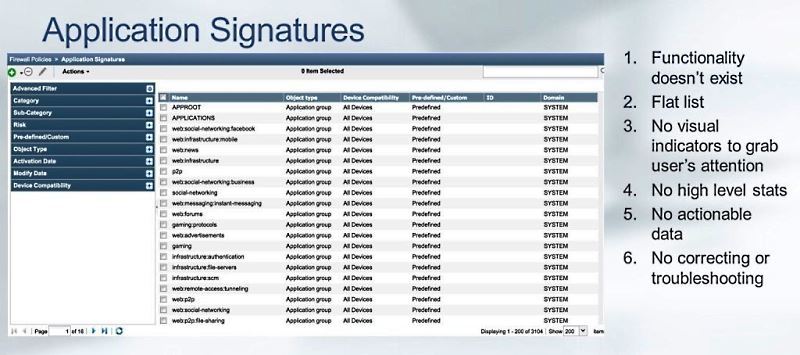
Fig. 20. - Application Signatures
In terms of Application visibility, you also had to make manual requests earlier. Now, in the new version, you can see everything that passes through SRX by category - for example, you can easily determine the most popular applications by bandwidth.
Or you can characterize the traffic of an application, for example, a social network, YouTube, etc. If you hover over a specific application, the traffic is displayed for users, the number of sessions, and the username is taken from Active Directory.
There is also a User Firewall that can be associated with LDAP and used as an additional policy element. In addition to diagrams, all information in the control panel is presented in text form.
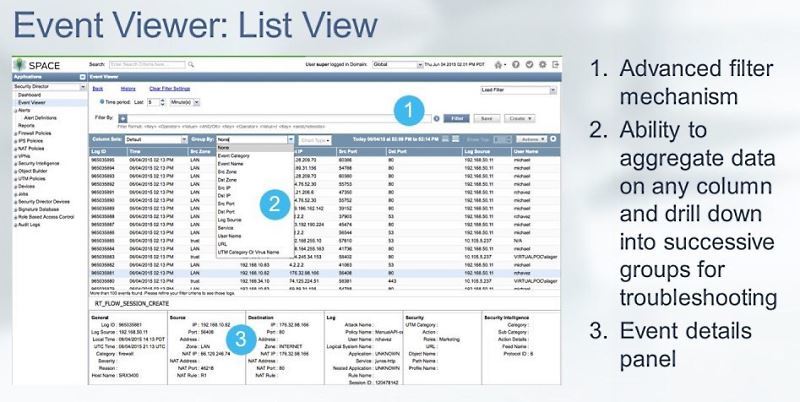
Fig. 21. - Event Viewer: List View
One of the most popular tools for operators is a log handler. Previously, it was just a “wall of text”, and you had to know exactly what to look for in order to localize information.
Now there is a window where, for example, intense events are represented by one graph. If there is some kind of leap, you can immediately go there and get more detailed information.
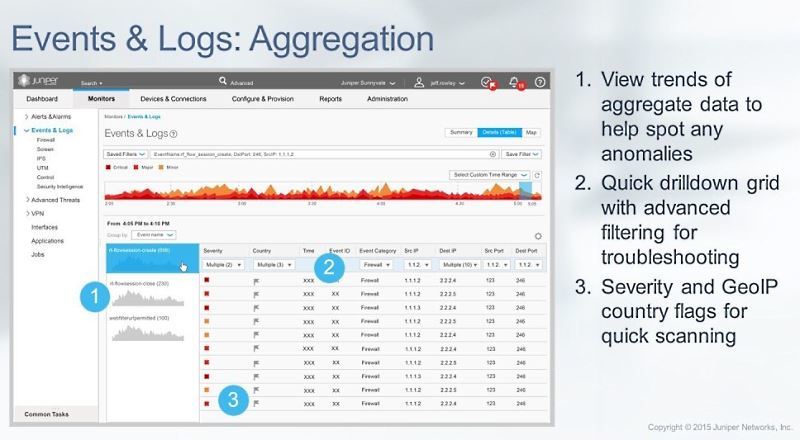
Fig. 22. - Events & Logs: Aggregation
The same goes for aggregation. In this window, we already see traffic on certain flows. Here you can see Source, Destination and ports.
In conclusion, we can say that today Juniper Networks offers a practically comprehensive range of routers and switches for professional use by telecom operators and medium and large-sized enterprises.
Distribution of Juniper Networks solutions in Ukraine , Belarus , Moldova , Armenia , Georgia , Tajikistan , Kazakhstan , and other CIS countries .
Juniper Networks MUK-Service training courses
- all types of IT repair: warranty, non-warranty repair, sale of spare parts, contract service
The classic service deployment model assumes that a different hardware device is used for each service. If you use MX, all this can be combined. One of the most popular scenarios for using the MX carrier segment is BNG or Bras, all that is connected with subscriber authorization and traffic accounting.
Fig. 2. - Enterprise scenarios implemented on the basis of MX
An example of a corporate scenario is the collaboration of a data center (DC Interconnect). If the company uses applications that need L2 mobillity, for example vMotion, then they usually make a separate decision to “stretch” the L2 segment through a public network or through a backbone connection. MX in this respect supports VXLAN, that is, it can be used as a "translator" between the data center and the LAN.
MX lineup
In general, the MX lineup is shown above. Let's consider it in more detail.
Fig. 3. - The older model of the series, MX2020
The next model (as it decreases) has half the potential throughput than the MX2020, - 40 Tbps. Next come the MX960 with 14 slots, MX480 (the same with 8 slots), a 4-slot model, etc., up to the form factor of a USB flash drive.
Fig. 4. - Virtual MX
As shown in the figure, the virtual MX uses the same JunOS, adapted to work as a virtual machine
Why is this solution needed? It suits the user perfectly if he needs MX functionality, but there is no need for data streams of 20-80 Gbps level. Virtual MX is typically used at 2-10 Gbps speeds. To date, Juniper has managed to get 40Gbps imix half duplex.
Today, vMX functionality does not fully match the hardware MX functionality. In the near future, parity will be achieved, and the development of new functionality will go in parallel - that is, everything that will be developed for "large" physical MXs will be transferred to the virtual MX.
MX Line Cards
Line cards MPC (Modular Port Concentrator) are in demand on the market and their development continues. Several generations of cards have already changed, up to MPC7. They are supported on all MX chassis, i.e. Regardless of the chassis used, any combination of line cards can be configured. In Fig. 5 shows including MIC (Modular Interface Cards), which can also be dialed in various combinations.
Fig. 5. -MRS1 / MPC2 line cards
Already in the MPC1 / MPC2 generation, support for various interfaces and support for HQoS (Hierarchical Quality of Service) - very important for operators - www.juniper.net/documentation/en_US/junos13.3/topics/concept /mx-series-qos-faq-overview.html
In MP3, the performance was brought up to 130 Gbps. The cards already had a fixed configuration with the characteristics shown in Fig. 6. In MPC6, performance has increased to 480 Gbps per slot.
The latest MPC 7 cards also support up to 480 Gbps. However, there are no longer fixed physical ports with a fixed speed. They were replaced by virtual ports, the characteristics of which are set programmatically. Therefore, here you can create an arbitrary combination of ports at 10, 40 and 100 Gbps.
Fig. 6. - Characteristics and use of the MPC7E line card in the MX960 / MX480 / MX240 models The
characteristics of the remaining line cards from MPC1 to MPC6 are summarized in the table.
Fig. 7. - Characteristics of MPC
Service Cards
It should be noted separately service cards MS-MPC and MS-MIC. These are special cards for deploying services such as IPSec and NAT. They are typically used in the carrier segment.
Fig. 8. - MS-MPC service card and MS-MIC module
MX series routers also implement Virtual Chassis technology, which allows two physical devices to work as a single logical device in active-active scenarios. Today, MX series routers are used by almost all telecom operators.
MX is Juniper Networks flagship platform. It is developing, and the roadmap for it has been developed for several years to come. In the MX portfolio, they are classified as “large” routers.
The MX range of products offered by Juniper is far from exhausted. In accordance with the requirements of the market segments where the company is represented, it offers a number of products that are well received by consumers.
ACX Series Routers ACX Series
Routers are designed to solve access level tasks. They are used to build networks such as the Mobile Backhole, or to implement technology networks linking power equipment.
Fig. 9. - The line of ACX series routers
Accordingly, ACX must operate in a wide temperature range. There are options in a protected version that can work in difficult conditions.
The advantage of the solution is that you can configure a completely transparent End-to-End MPLS structure, with all its advantages - service management, QoS and synchronization (when migrating from traditional, classical SDH, PDH to modern packet networks).
The equipment fully supports synchronous Ethernet. When using the PTP protocol, an SDH quality level of 50 ms or less is achieved. You can create quite large, scalable Metro Ethernet networks.
For the ACX series routers, from the point of view of return on investment (ROI), the peculiarity is that they are licensed by the number of ports, which can increase (and, accordingly, be paid) as the network expands.
EX Series switches
Fig. 10. - Assortment and classification by purpose of EX series switches
EX Series Switches are designed primarily for the Enterprise segment, for campus-level solutions.
Fig. 11. - Universal 1G EX4300 switch The EX4300
switch can be used both in Entrprise campuses and in data centers. It is a one-stop solution, fault tolerant and scalable.
Switches can be assembled in Virtual Chassis using any interface. This device has 4 x 40-Gbps interfaces, depending on which QSFP (Quad Small Form-factor Pluggable) transceiver is used. Virtual Chassis can operate at a distance of up to 80 km. In addition, Virtual Chassis can be mixed, combining 1 Gbps and 10 Gbps devices.
The EX series starts with gigabit switches (Juniper entered the market in 2008 and immediately offered 1 Gbps, bypassing 100 Mbps).
EX-based solutions scale well, from fixed to modular switches. The latter are based on MX routers, but have slightly different software and a significantly lower price. The functionality of the hardware is adapted to build switches as the core of campuses and data centers. In the Juniper offerings structure, EX line cards also occupy an appropriate place.
Fig. 12. - Characteristics of line cards EX9200
Platform SRX
Fig. 13. - The range and purpose of the SRX series of firewalls The
performance of solutions built on the SRX can be 100, 200, 300 and 400 Mbps, 1 and 1.5 Gbps in the normal firewall mode. Performance on services depends on the type of service and is in the range of 50-500 Mbps.
Fig. 14. - Update of the SRX platform
Now an update has been released, 300 series. It completely replaces the models of the 100 and 200 series
. 15. - Features of the new SRX300 Series
In Figure 16. The table summarizes the performance in realistic IMIX traffic. Usually the data is for large packages, but here all the numbers are for IMIX and NGFW. The bottom of the table indicates what it includes - IPS, Application Firewall and logging.
Fig. 16. - Comparison of the SRX300 and SRX320
What was the SRX320 related to? Firstly, the model range has not been updated for quite some time, and the performance for some customers was not optimal. Secondly, it was required to carry out certification of the European Union RoHS 2, which required some changes.
Otherwise, the difference between these models is only in scaling and some additional features - for example, you can add the ADSL, T1 or E1 interface to the SRX320.
The latest model, the SRX340, is essentially a mini-server. In its configuration, you can include a 120 Gb SSD, where third-party applications are usually located.
Fig. 17. - Features of the SRX340
The SRX340 uses three main types of VPNs.
Auto VPN for conventional hub-and-spoke. The advantage is that if you add a new spoke, you do not need to reconfigure the hub, this happens automatically. ADVPN, a counterpart to Cisco DMVPN, allows you to dynamically create tunnels between branches. Third, group VPN is the equivalent of Cisco VPN GETVPN. But, if Cisco GETVPN is based on its proprietary protocols, then Juniper follows generally accepted standards.
The main advantage of group VPN is that it allows you to create a dynamic tunnel between branches without the use of a tunnel in its classical sense. This is usually useful for large Enterprise class solutions when they want to get the MPLS service, and the service provider provides them with the opportunity to use such a model.
SRX Management Tools
Fig. 18. - Composition and purpose of Junos Space Security Director
Control Panel Junos Space Security Director v. 15.2 is now available. The delivery includes 48 templates and examples for quickly creating your own unique panels.
Fig. 19. - Junos Space Security Director Dashboard v. 15.2
In addition, the new Log GUI allows convenient viewing of logs. Its purpose is to make SRX control more understandable and convenient. Previously, sampling was more difficult, manually. Now the information is summarized and displayed in a convenient form for perception.
Fig. 20. - Application Signatures
In terms of Application visibility, you also had to make manual requests earlier. Now, in the new version, you can see everything that passes through SRX by category - for example, you can easily determine the most popular applications by bandwidth.
Or you can characterize the traffic of an application, for example, a social network, YouTube, etc. If you hover over a specific application, the traffic is displayed for users, the number of sessions, and the username is taken from Active Directory.
There is also a User Firewall that can be associated with LDAP and used as an additional policy element. In addition to diagrams, all information in the control panel is presented in text form.
Fig. 21. - Event Viewer: List View
One of the most popular tools for operators is a log handler. Previously, it was just a “wall of text”, and you had to know exactly what to look for in order to localize information.
Now there is a window where, for example, intense events are represented by one graph. If there is some kind of leap, you can immediately go there and get more detailed information.
Fig. 22. - Events & Logs: Aggregation
The same goes for aggregation. In this window, we already see traffic on certain flows. Here you can see Source, Destination and ports.
In conclusion, we can say that today Juniper Networks offers a practically comprehensive range of routers and switches for professional use by telecom operators and medium and large-sized enterprises.
Distribution of Juniper Networks solutions in Ukraine , Belarus , Moldova , Armenia , Georgia , Tajikistan , Kazakhstan , and other CIS countries .
Juniper Networks MUK-Service training courses
- all types of IT repair: warranty, non-warranty repair, sale of spare parts, contract service