RISC's Debian under QEMU
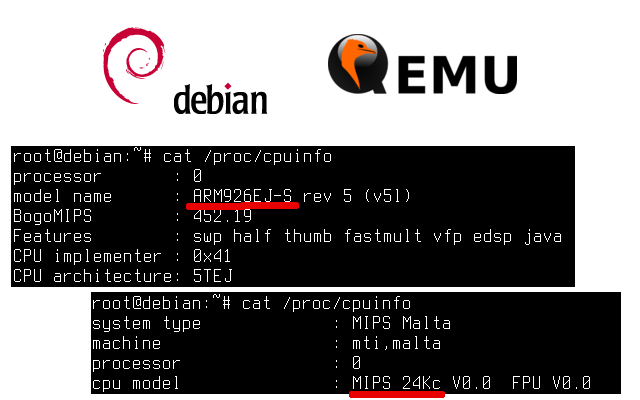
For embedded systems based on processors with MIPS and ARM architectures, GNU / Linux specialized distribution generators are often used: buildroot, openwrt, and other Yocto.
But sometimes it’s interesting to run the universal Debian OS on such a system. Installing Debian on a computer with an x86 / amd64 architecture processor is not a big deal, but with embedded systems, believe me, everything is not so simple ...
In this publication I will tell you how to install using debootstrap and then using QEMU to start Debian OS for computers with MIPS and ARM processors.
Introduction
GNU / Linux operating systems most often consist of at least two components: the kernel of the OS (kernel) and user programs (userspace). The Linux kernel (yes, yes, this is the kernel called Linux!) Directly interacts with the hardware and provides user programs with access to computer hardware resources using abstract interfaces.
While the kernel is strongly tied to a specific SoC family or even to a specific board, user applications turn out to be much more “disconnected” components; their executable files are attached only to a specific version of the processor command system (for example, MIPS-I or MIPS32r2), and to the version of the kernel programming interfaces.
This situation turns out to be the following: it becomes possible to run the same applications on completely different SoCs, on completely different boards, the main thing is to ensure that the kernel programming interfaces are the same.
This “detachment” of applications can be very useful in practice. For example, the Raspbian and QEMU publication describes the launch of the Raspbian OS for the Raspberry Pi on a QEMU-emulated ARM Versatile board.
Action plan
From the foregoing, it is clear that to run Debian on an emulated board with a MIPS (or ARM) processor, we need:
- Linux kernel that runs on QEMU;
- An image of the Debian root file system (i.e. the applications mentioned above).
We will build the Linux kernel using cross-development tools ourselves, and we will trust the debootstrap program to create the image of the Debian root file system.
As a tool computer (a computer on which we will cross-compile and run the QEMU emulator) we will use a computer with an x86_64 architecture processor running Debian Linux testing version.
Why exactly is Debian testing?
Because Debian testing out of the box supports the relatively recent version of QEMU and cross-compilers for both MIPS and ARM.
All actions for assembling the kernel and forming the image of the root file system are performed from the command line, do not require operator intervention and can easily be placed inside the script.
Commands that must be executed as root are preceded by a symbol
#, commands that do not need superuser privileges are preceded by a symbol $. For instance:
- the command to install the software is executed as root:
# aptitude install -y binfmt-support qemu qemu-user-static debootstrap
- The command to build the linux kernel can be executed on behalf of an unprivileged user:
$ make
How to quickly build the required instrumental computer?
The required instrumental computer can be easily built using virtualization software (VMWare, VirtualBox or QEMU / KVM).
For this:
For this:
- Download the debian-8.3.0-amd64-netinst.iso network installation disk image ,
- create a virtual computer with the following minimum parameters: RAM: 1 GB, HDD: 8 GB; connect the Debian installation boot disk to the virtual computer;
- start the virtual computer by downloading the Debian installer from the installation disk;
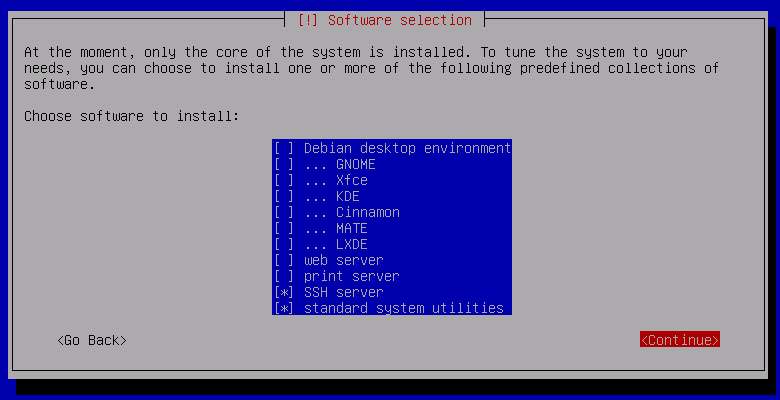
- Install the Debian OS on the hard drive in an almost minimal configuration (for example, there is no need to install the web server and graphical user interface components to run QEMU):
- Download the freshly installed Debian OS and log in as the root user;
- enable the ability to install Debian packages testing version, for this, on the command line
# echo "deb http://ftp.ru.debian.org/debian/ testing main non-free contrib" \
        >> /etc/apt/sources.list
# apt-get update
Note: in a good way, it would be better toapt-get updatedo something laterapt-get dist-upgrade, but if you want to use the virtual machine only to run Debian MIPS / ARM, then this is not necessary at all.
Debian for MIPS
We will demonstrate the work of Debian for MIPS under QEMU on a virtual MIPS Malta motherboard with an MIPS32R2 architecture processor in big-endian mode.
Linux kernel assembly for QEMU Malta
First, let's take care of getting the kernel sources - download them from kernel.org:
$ wget https://cdn.kernel.org/pub/linux/kernel/v4.x/linux-4.4.3.tar.xz
Unpack the archive and go to the directory
linux-4.4.3:$ tar fx linux-4.4.3.tar.xz $ cd linux-4.4.3
Install the toolchain for MIPS:
# aptitude install -y gcc-mips-linux-gnu
In addition to the MIPS toolchain, additional tools are needed to build the Linux kernel:
# aptitude install -y make gcc gawk
Prepare for assembly under MIPS:
$ export ARCH = mips
$ export CROSS_COMPILE = mips-linux-gnu-
The variable
ARCHexplains to the kernel build system (Kbuild) that all platform-dependent kernel components should be taken in the directory arch/mips, and the variable CROSS_COMPILEexplicitly tells Kbuild which compiler (or rather toolchain) to use - there can be several of them on the machine, and Kbuild likes precision.A note about ARCH and CROSS_COMPILE
In principle it is possible to do, and every time to set variables
ARCHand CROSS_COMPILEto make the command line, but then make the line will look a bit cumbersome.Out of tree build note
The Linux kernel build order described below is called in tree build , i.e. compiled object files fall into the same directories as the source files. Kbuild is allowed to use the out of tree build assembly order , in which object files are placed in a separate directory, which allows you to collect several different kernel variants from the same source code, and object files of different kernel variants will not conflict. For details, see, for example, here .
Now choose the configuration for the kernel based on the prepared configuration for the Malta board.
The configuration file for the Malta board
arch/mips/configs/malta_defconfig, which ships in linux-4.4.3, does not work for two reasons:- the configuration is designed for a Malt board in little-endian mode, but I would like to use big-endian mode.
malta_defconfigoptions (CONFIG_FHANDLEandCONFIG_CGROUPS) are not included in the configuration , without which Debian 8 simply will not boot.
Based on this,
malta_defconfigwe will create the configuration file we need malta-big_defconfig, which will not have the indicated disadvantages:$ sed "s / CONFIG_CPU_LITTLE_ENDIAN = y / CONFIG_CPU_BIG_ENDIAN = y /" \
<arch / mips / configs / malta_defconfig \
> arch / mips / configs / malta-big_defconfig
$ echo "CONFIG_FHANDLE = y" >> arch / mips / configs / malta-big_defconfig
$ echo "CONFIG_CGROUPS = y" >> arch / mips / configs / malta-big_defconfigNow, from the workpiece, we will generate the kernel configuration file itself
.config:$ make malta-big_defconfig
And run the build process:
$ make
Note: If your instrumental computer has more than one processor core, then it is worth using them. In order to parallelize the work of make, the -j option is used, the argument of which is the number of tasks (commands) that make will try to run at the same time. So on a 4-processor instrumental computer it makes sense to run make like this:$ make -j 4
As a result, we get the kernel file
vmlinux. Let's check its performance under QEMU! Install QEMU:
# aptitude install -y qemu-system
Run the freshly compiled kernel under QEMU, after leaving the linux-4.4.3 directory:
$ cd ..
$ qemu-system-mips -nodefaults -nographic -kernel linux-4.4.3 / vmlinux -serial stdio
Linux version 4.4.3 (user @ debian) (gcc version 5.3.1 20160205 (Debian 5.3.1-8))
earlycon: Early serial console at I / O port 0x3f8 (options '38400n8')
bootconsole [uart0] enabled
Config serial console: console = ttyS0,38400n8r
CPU0 revision is: 00019300 (MIPS 24Kc)
FPU revision is: 00739300
MIPS: machine is mti, malta
...
Kernel panic - not syncing: VFS: Unable to mount root fs on unknown-block (0,0)
As you can see, the kernel successfully passed initialization and tried to mount the root file system, which, however, did not work.
Let's create the necessary root file system!
Creating a root file system for MIPS
Creating the Debian root file system, so let's start by installing debootstrap and the necessary components for it to work:
# aptitude install -y binfmt-support qemu qemu-user-static debootstrap
Now run the first stage of debootstrap:
# debootstrap --foreign --arch = mips jessie debian-jessie-mips / \
        http://ftp.ru.debian.org/debian/
In the first stage, debootstrap downloads the Debian version of jessie (stable) necessary for the minimum root file system from ftp.ru.debian.org/debian (the official Russian Debian mirror) for the 32-bit MIPS big-endian architecture (
--foreignand options --arch=mips) , and unpack them into a directory debian-jessie-mips/. Based on the results of the first stage of debootstrap
debian-jessie-mips/, a file system will be formed in the directory that is very similar to the real one, you can even try to use it for downloading. However, the root file system components (Debian packages) are not yet configured at this stage.To configure, you must run the second stage of debootstrap. At this stage, you will need to run programs for MIPS, so you have to use a special version of QEMU, the so-called usermode qemu, which provides the launch of individual programs for Linux MIPS under Linux amd64.
We put a statically assembled system emulator with a MIPS architecture processor inside the root file system and run debootstrap inside the root file system using chroot:
# cp / usr / bin / qemu-mips-static debian-jessie-mips / usr / bin /
# DEBIAN_FRONTEND = noninteractive DEBCONF_NONINTERACTIVE_SEEN = true \
        LC_ALL = C LANGUAGE = C LANG = C \
        PATH = / usr / local / bin: / usr / bin: / bin: / usr / local / sbin: / usr / sbin: / sbin \
        chroot debian-jessie-mips / / debootstrap / debootstrap --second-stage
At the end of the second stage of debootstrap, the components of the Debian root file system are configured, and it remains to put the finishing touches (for example, fix some files in
/etc, say, configure the hostname and network, add users, etc.). But for this demo, we restrict ourselves to setting a trivial password of 123 for the root user:
# echo 'root: 123' | chroot debian-jessie-mips / chpasswd
Now the root file system can be considered configured - it's time to cover up traces. For security, we archive the root file system:
# rm debian-jessie-mips / usr / bin / qemu-mips-static
# tar czf debian-jessie-mips.tar.gz -C debian-jessie-mips.
To run under the emulator, the root file system will have to be placed on a virtual drive (in the case of Malta, this is a virtual IDE disk).
Let's estimate what size disk we will have to create:
# du -sh debian-jessie-mips /
284M debian-jessie-mips /
Since the root file system takes up less than 300 MB, it is quite possible to allocate a 512 MB virtual disk for its storage. Create a virtual disk file, create an ext2 file system on it, onto which we copy our root file system:
$ dd if = / dev / zero bs = 1M count = 512 of = debian-jessie-mips.ext2
$ / sbin / mke2fs -F debian-jessie-mips.ext2
# mkdir ext2
# mount debian-jessie-mips.ext2 ext2 /
# tar xf debian-jessie-mips.tar.gz -C ext2 /
# umount ext2 /
# rmdir ext2 /
Now run Debian Linux under QEMU:
$ qemu-system-mips -nodefaults -nographic -kernel linux-4.4.3 / vmlinux \
        -serial stdio -hda debian-jessie-mips.ext2 -append "root = / dev / sda"
After the invitation appears,
login:you can log in as root (password is 123) and check the processor type: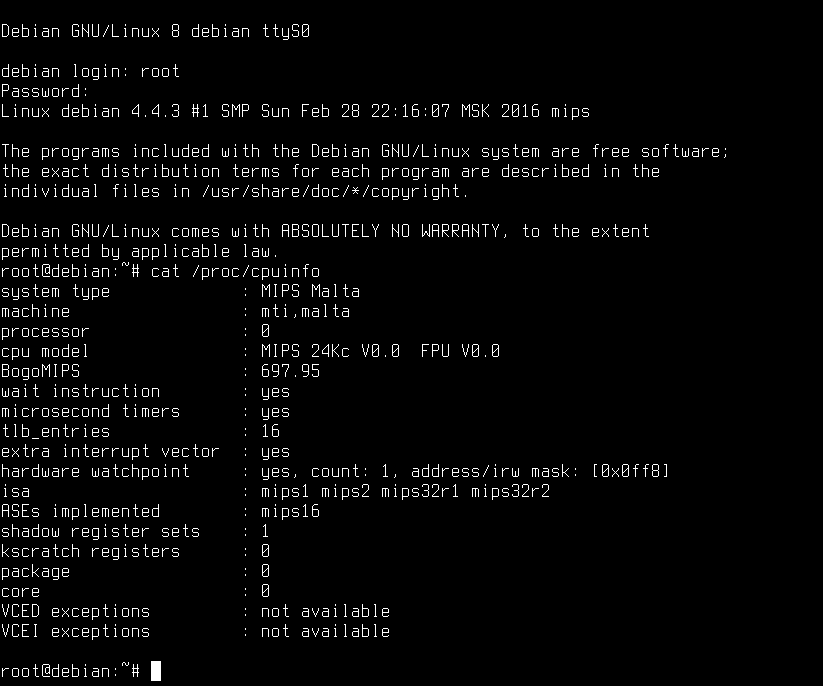
Debian for ARM
We will demonstrate Debian for ARM under QEMU on the ARM Versatile PB virtual card.
The steps to build the Linux kernel and create the root file system are almost completely similar to those for MIPS, so I will only give a sequence of commands to achieve the result with minimal comments.
We assume that we are starting to work on a "clean" instrumental computer.
Linux kernel assembly for ARM Versatile PB
$ wget https://cdn.kernel.org/pub/linux/kernel/v4.x/linux-4.4.3.tar.xz
$ tar fx linux-4.4.3.tar.xz
$ cd linux-4.4.3
# aptitude install -y gcc-arm-linux-gnueabi
# aptitude install -y make gcc gawk
$ export ARCH = arm
$ export CROSS_COMPILE = arm-linux-gnueabi-
You will have to tinker with preparing the kernel configuration for Versatile, since the emulated QEMU built-in ROM Versatile PB is very small (64 MB). Fortunately, the emulated Versatile PB has a PCI controller to which you can connect a virtual SCSI controller. However, support for this equipment will have to be enabled in the kernel forcibly:
$ cp arch / arm / configs / versatile_defconfig arch / arm / configs / versatile-debian_defconfig
$ echo "CONFIG_FHANDLE = y" >> arch / arm / configs / versatile-debian_defconfig
$ echo "CONFIG_CGROUPS = y" >> arch / arm / configs / versatile-debian_defconfig
$ echo "CONFIG_DEVTMPFS = y" >> arch / arm / configs / versatile-debian_defconfig
$ echo "CONFIG_TMPFS = y" >> arch / arm / configs / versatile-debian_defconfig
$ echo "CONFIG_PCI = y" >> arch / arm / configs / versatile-debian_defconfig
$ echo "CONFIG_SCSI = y" >> arch / arm / configs / versatile-debian_defconfig
$ echo "CONFIG_BLK_DEV_SD = y" >> arch / arm / configs / versatile-debian_defconfig
$ echo "CONFIG_SCSI_SYM53C8XX_2 = y" >> arch / arm / configs / versatile-debian_defconfig
$ make versatile-debian_defconfig
$ make
# aptitude install -y qemu-system
Unlike the MIPS Malta board, download support
vmlinuxfor Versatile PB is not implemented, image loading is supported zImage:$ cd ..
$ qemu-system-arm -nodefaults -nographic -M versatilepb \
-kernel linux-4.4.3 / arch / arm / boot / zImage \
-append "console = ttyAMA0" -serial stdio
...
Uncompressing Linux ... done, booting the kernel.
Booting Linux on physical CPU 0x0
Linux version 4.4.3 (antony @ debian) (gcc version 5.3.1 20160205 (Debian 5.3.1-8))
CPU: ARM926EJ-S [41069265] revision 5 (ARMv5TEJ), cr = 00093177
CPU: VIVT data cache, VIVT instruction cache
Machine: ARM-Versatile PB
...
Kernel panic - not syncing: VFS: Unable to mount root fs on unknown-block (0,0)Creating a root file system for ARM
# aptitude install -y binfmt-support qemu qemu-user-static debootstrap
# debootstrap --foreign --arch = armel jessie debian-jessie-armel \
        http://ftp.ru.debian.org/debian/
# cp / usr / bin / qemu-arm-static debian-jessie-armel / usr / bin /
# DEBIAN_FRONTEND = noninteractive DEBCONF_NONINTERACTIVE_SEEN = true \
        LC_ALL = C LANGUAGE = C LANG = C \
        PATH = / usr / local / bin: / usr / bin: / bin: / usr / local / sbin: / usr / sbin: / sbin \
        chroot debian-jessie-armel / / debootstrap / debootstrap --second-stage
# echo 'root: 123' | chroot debian-jessie-armel / chpasswd
# rm debian-jessie-armel / usr / bin / qemu-arm-static
# tar czf debian-jessie-armel.tar.gz -C debian-jessie-armel.
# du -sh debian-jessie-armel /
270M debian-jessie-armel /
$ dd if = / dev / zero bs = 1M count = 512 of = debian-jessie-armel.ext2
$ / sbin / mke2fs -F debian-jessie-armel.ext2
# mkdir ext2
# mount debian-jessie-armel.ext2 ext2 /
# tar xf debian-jessie-armel.tar.gz -C ext2 /
# umount ext2 /
# rmdir ext2 /
$ qemu-system-arm -nodefaults -nographic -M versatilepb \
        -kernel linux-4.4.3 / arch / arm / boot / zImage \
        -append "console = ttyAMA0 root = / dev / sda" \
        -serial stdio -hda debian-jessie-armel.ext2
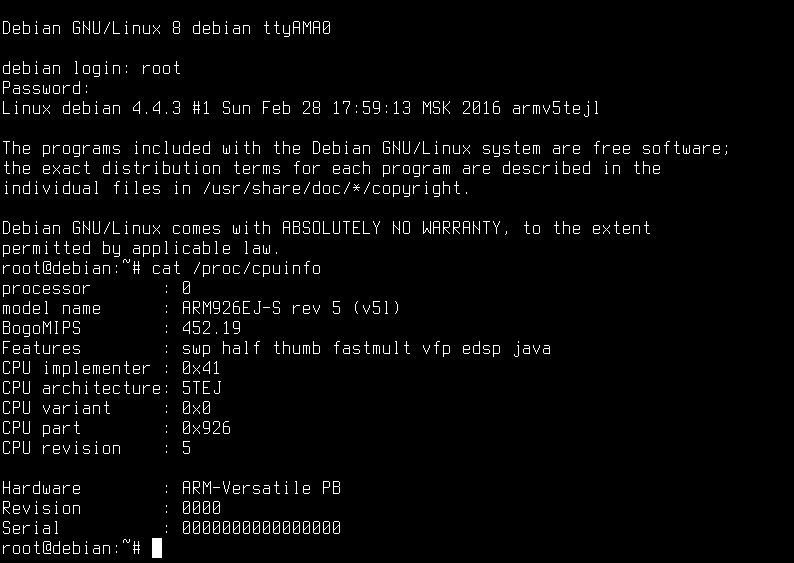
The results of checking the type of processor (recall, the password is 123):
Conclusion
As you can see, installing and running Debian for MIPS and ARM is not so difficult.
Running Debian on a real board with a MIPS or ARM architecture processor is usually more troublesome and worthy of a separate publication.









