Bidirectional rendering with diacritics support
Introduction
In this article I will share my experience of how support for bidirectional text with the correct display of diacritics using FriBidi and HarfBuzz was added to my own TextBox. This is the second article on this topic, and the first was Adding bidirectional text support to your own TextBox . In it, I described the features of adding Arabic to your own text using FriBidi.
What is the problem?
Diacritical marks (diacritics (professional-jargon)) in typography are written elements that modify the markings and are usually typed separately. In the previous sentence, the accent marks over u and a are diacritics. For example, in Russian, diacritics can be considered two dots above “ё” and briefly above “» ”. But the addition of these diacritics led to the creation of new letters, although for ё two points are often omitted.
In most languages, when working with text, special problems with rendering diacritics do not arise (unless of course you indicate the stress on each letter), because letters with diacritics are either a single letter in the alphabet or in font files they go as a separate character. In other words, TextBox doesn't need to place diacritics separately over letters.
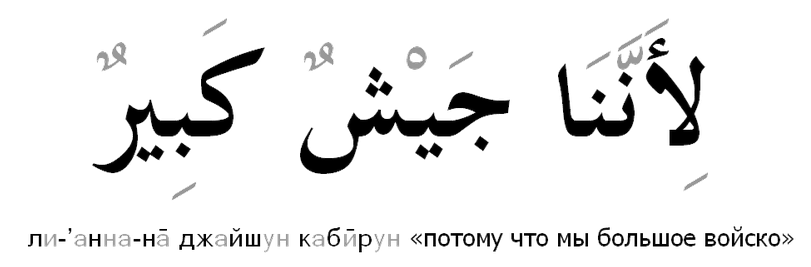
But in Arabic (and, for example, in Hindi), things are not so simple. In Arabic, vowels are diacritical marks. They can be used with almost every letter, and even a single letter can have several vowels.
The letters of the Arabic alphabet are shown in black, and the vowels (diacritics) in gray.
As you understand, no one went through all possible combinations of letters and voices and did not start a separate symbol for each combination. That is, for the correct rendering of the Arabic text, it is necessary to draw the Arabic letter and draw a diacritic separately above or below it.
FreeType, which we used, allows us to get the diacritic image from the font file and even tells us the shifts. But these shifts are incorrect, i.e. one character is impossible to understand how to arrange diacritic. A case in point is a few diacritics above the letter. For proper positioning, you need to analyze the entire text.

To calculate the position of diacritics over the letters, we used the HarfBuzz library . The library allows you to get the glyph numbers in the font and their shifts for further rendering.
How to use HarfBuzz
HarfBuzz receives a font and a string as input, and returns the position of each letter and additional information (for example, glyph number).
hb_buffer_t *buf; // harfbuzz буфер. hb_buffer_create/hb_buffer_destroy
hb_font_t *hb_ft_font; // harfbuzz шрифт, для создания используйте hb_font_create, для уничтожения hb_font_destroy
hb_script_t script; // Скрипт текущего текста. Используйте hb_unicode_script для получения скрипта.
hb_direction_t dir = hb_script_get_horizontal_direction(script);
hb_buffer_set_direction(buf, dir); // Справа налево или слева на право
hb_buffer_set_script(buf, script);
hb_buffer_add_utf32(buf, (const uint32_t*)text,length, 0,length); // Добавляем наш текст в harfbuzz буффер.
hb_shape(hb_ft_font, buf, NULL, 0); // расчёт
unsigned int glyph_count = 0;
hb_glyph_info_t     *glyph_info   = hb_buffer_get_glyph_infos(buf, &glyph_count); // Получаем информацию о глифах.
hb_glyph_position_t *glyph_pos    = hb_buffer_get_glyph_positions(buf, &glyph_count); // Получаем позицию глифов.
It is worth noting that the above code should be applied only to text that uses the same font and has the same script. To implement text splitting into such parts, you can use the hb_unicode_script function, which returns a character script.
Since we were faced with the task of supporting not just Arabic, but also bidirectional text (for example, Arabic and Latin can be on the same line), we used FriBidi for the correct positioning. But this was described in more detail in the first article, Adding Bidirectional Support to a Native TextBox .
Changes to TextBox
So, the text box already supported bidirectional text. Symbols are stored in memory in the order of input, but each of them corresponded to a position in the rendering order.

With the addition of daikritiks, the situation became a bit more complicated, because a single letter during rendering could correspond to several characters entered. In order for the code to work with cursor positioning to work independently of diacritics, the letters had to be a little complicated. Now each letter contained a list of glyphs that are included in it.
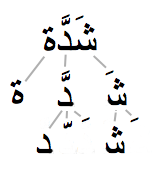
With this approach, the implementation of editing functions, including copying and pasting, has been simplified. But this approach does not make it possible to delete a separate diacritic, since the cursor can be placed only before or behind the letter.
Example
You can find an example of bidirectional text rendering here GitHub / ex-sdl-freetype-harfbuzz-fribidi . The example uses: SDL2 - to create a visualization window; Freetype - for rendering letters; fribidi - for proper positioning; harfbuzz - to get glyphs and their positions.

Disclaimer
Yes, we write our bike, so we are implementing our TextBox from scratch. And we did not use Pango, because with him was a bad experience before. Maybe with Pango it would be easier.
useful links
- behdad.org/text - about rendering text
- www.freedesktop.org/wiki/Software/HarfBuzz - HarfBuzz library.
- fribidi.org - FriBidi library.
- en.wikipedia.org/wiki/Arabic_Labelings - About Diacritics in Arabic Writing.
- en.wikipedia.org/wiki/ Diacritical Signs - Diacritical Marks.
- ex-sdl-freetype-harfbuzz-fribidi is my example of using fridibi + harfbuzz, based on https://github.com/lxnt/ex-sdl-freetype-harfbuzz .
- www.unicode.org/reports/tr9 - bidirectional text display algorithm.
- www.pango.org - Pango library.