Undocumented capabilities of the ZTE ZXHN F660 optical terminal from MGTS
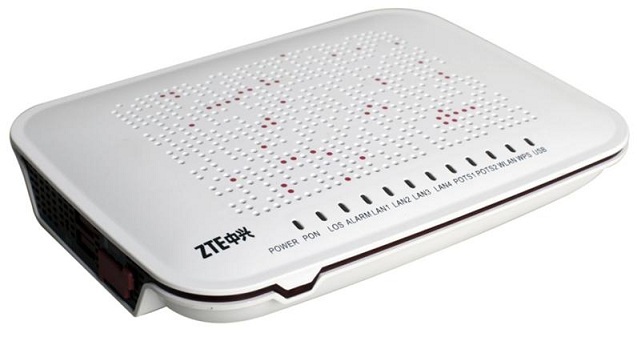
According to the results of our research, the idea was born to sketch out a small Q&A on working with some undocumented functions of the ZTE ZXHN F660 optical terminal, which is now installed in apartments by MGTS.
The article is intended for beginners who, nevertheless, have already familiarized themselves with the Web-based interface for managing the terminal and know how to do basic things in it: password change, SAMBA activation, port forwarding, WLAN settings, filtering settings, etc. In it, we will not consider changing the firmware or “decoupling” from the provider - all things related to remote updating, setting up VOIP, etc. I highly recommend not touching. Leave the provider the opportunity to carry out their work and maintain their device (it is his, not yours, if you remember the contract).
To get started, I want to reassure those who stumbled upon information on the Internet about a terrible hole in the security of WiFi networks - vulnerabilities in WPS. This was the case in the early ZXVA firmware, but now WPS is not active by default, so there is nothing to fear.
But she did not go anywhere, although they wrote about her for a long time. Going from the internal network to the address 192.168.1.1/manager_dev_config_t.gch and clicking on the “Backup Configuration” button (if you have Russian as the default language, this is the top button, the name was incorrectly translated) ANY user (without authorization!) Will receive An XML file with all settings, including ALL passwords to ALL interfaces (including user mgts to the web interface and root to telnet). Thus, by letting someone into your internal network, you at the same time give him the potential to fully manage it.
When you try to load a manually modified XML settings file, F660, don't be a fool, checks the checksum and rejects the changed files. But it is possible to edit the source file itself:
- regularly enable SAMBA in the web interface
- go to telnet with the username and password obtained from step 2
- do:
- we go the explorer to \\ 192.168.1.1 \ samba \ config
- we edit (at least Notepad) the db_user_cfg.xml file (we don’t touch other files!)
- after saving the file we reboot F660.
- in case of damage to this file, you have the db_backup_cfg.xml file lying there, and also the Reset button, which will write default settings to it.
In the settings file (item 3) we change the parameter "TS_UPwd".
In the settings file (item 3) we change the “FtpEnable” flag to “1”. At the same time, set the “FtpAnon” parameter to “1” or edit the usernames / passwords of the “FTPUser” section.
Suppose you have a prepared site structure on a flash drive with a start INDEX.HTM in the root.
- rename INDEX.HTM to setlang.gch
- insert the USB flash drive into F660
- go to telnet with the username and password obtained from step 2
- do:
- we see new content at 192.168.1.1
- this only works until the next reboot
If we talk about the standard port (21 for FTP and 80 for HTTP, respectively) and the MGTS provider (we assume that a static IP is not purchased, but we can access our temporary external IP - using dyndns, for example) - then nothing. MGTS cuts incoming connections to the most popular ports (at least 21,23,80,443,8080) on its side, so we cannot influence this.
If you are ready to access a non-standard port from the outside, then simply prescribe port mapping from some 5-digit external port to internal 21 (and / or 80) and specify 192.168.1.1 as the address of the internal computer. BUT! Doing this is strongly discouraged.because you leave your poor terminal alone with the cruel outside world: FTP is a protocol without encryption, which means that anyone can intercept the username / password for access to it, remember about the Web server that after rebooting it turns into apumpkin settings interface, open to everyone (see p. 2), finally, we are simply easy to DOS for, yet the F660 is a weak piece of hardware in comparison with a full-fledged server.
From an external access network, and so no. If we are trying to defend ourselves against guests who are allowed into the internal network, then there are 2 options:
- Permanent: With the regular “Services Control” mechanism. Unfortunately, he does not know how to distinguish between WiFi and Ethernet access, and blocking only the IP range, leaving access from “his” addresses is unreliable (since replacing IP is easier than easy), so we block the Web from ALL addresses. But keep in mind that at the same time you lose the Web-based interface for managing the terminal, and you can only remove this lock by resetting the settings with the Reset button or manually editing db_user_cfg.xml (therefore, you don’t need to block telnet at the same time, just change the password for it).
- Temporary. We replace the web interface by analogy with item 6, but the flash drive is no longer needed: we can create a folder somewhere in / userconfig (it does not erase when the terminal is rebooted), put the setlang.gch file with contents like:
and mount it in place of / home / httpd. This only works until the next reboot.
If you need to return the web-based management interface without rebooting, do
If there are few records, then the regular way is enough - in the section Applications => DNS Service => Hosts. Settings are saved upon reboot, but each must be entered separately, and it takes up a decent place in db_user_cfg.xml. If you have your own file with thousands of names, you can add them to the temporary hosts file located in / var / tmp /. (The method of obtaining file access to it is by analogy with clause 3). It works until the next reboot.
This is not a beginner's question. There is a hardcore article about building your own toolchain for the previous version of F660 - habrahabr.ru/post/211759 There is also a description of the installation of the torrent client transmission. Just keep in mind that ZXHN already has a different filling - instead of MIPS there is ARM9.
I really do not recommend doing this. The F660 has 2 sad features:
1) The reset button is not a complete reset of the device, but just a signal to replace the settings file with the default one, it will not help to restore the violated boot procedure.
2) All communication interfaces rise closer to the end of the download.
The combination of these 2 features gives the result: any problems in the download - and you get a "brick" .
Before experimenting with downloading, consider whether you really need it. For example, I have uptime of the device reaches several months (in fact, I was able to remember only 1 reboot per year, not because of the application of the settings), so there simply is no need.
The article is intended for beginners who, nevertheless, have already familiarized themselves with the Web-based interface for managing the terminal and know how to do basic things in it: password change, SAMBA activation, port forwarding, WLAN settings, filtering settings, etc. In it, we will not consider changing the firmware or “decoupling” from the provider - all things related to remote updating, setting up VOIP, etc. I highly recommend not touching. Leave the provider the opportunity to carry out their work and maintain their device (it is his, not yours, if you remember the contract).
1. Is there a vulnerability in WPS?
To get started, I want to reassure those who stumbled upon information on the Internet about a terrible hole in the security of WiFi networks - vulnerabilities in WPS. This was the case in the early ZXVA firmware, but now WPS is not active by default, so there is nothing to fear.
2. Is there a vulnerability in the settings web interface?
But she did not go anywhere, although they wrote about her for a long time. Going from the internal network to the address 192.168.1.1/manager_dev_config_t.gch and clicking on the “Backup Configuration” button (if you have Russian as the default language, this is the top button, the name was incorrectly translated) ANY user (without authorization!) Will receive An XML file with all settings, including ALL passwords to ALL interfaces (including user mgts to the web interface and root to telnet). Thus, by letting someone into your internal network, you at the same time give him the potential to fully manage it.
3. How to upload your settings file?
When you try to load a manually modified XML settings file, F660, don't be a fool, checks the checksum and rejects the changed files. But it is possible to edit the source file itself:
- regularly enable SAMBA in the web interface
- go to telnet with the username and password obtained from step 2
- do:
mkdir /mnt/config
mount –o bind /userconfig/cfg /mnt/config
- we go the explorer to \\ 192.168.1.1 \ samba \ config
- we edit (at least Notepad) the db_user_cfg.xml file (we don’t touch other files!)
- after saving the file we reboot F660.
- in case of damage to this file, you have the db_backup_cfg.xml file lying there, and also the Reset button, which will write default settings to it.
4. How to change the telnet password?
In the settings file (item 3) we change the parameter "TS_UPwd".
5. How to activate FTP access?
In the settings file (item 3) we change the “FtpEnable” flag to “1”. At the same time, set the “FtpAnon” parameter to “1” or edit the usernames / passwords of the “FTPUser” section.
6. How to turn the F660 into a simple local web server?
Suppose you have a prepared site structure on a flash drive with a start INDEX.HTM in the root.
- rename INDEX.HTM to setlang.gch
- insert the USB flash drive into F660
- go to telnet with the username and password obtained from step 2
- do:
mount –o bind /mnt/usb1_1 /home/httpd- we see new content at 192.168.1.1
- this only works until the next reboot
7. How to make these FTP and / or Web server accessible from the Internet?
If we talk about the standard port (21 for FTP and 80 for HTTP, respectively) and the MGTS provider (we assume that a static IP is not purchased, but we can access our temporary external IP - using dyndns, for example) - then nothing. MGTS cuts incoming connections to the most popular ports (at least 21,23,80,443,8080) on its side, so we cannot influence this.
If you are ready to access a non-standard port from the outside, then simply prescribe port mapping from some 5-digit external port to internal 21 (and / or 80) and specify 192.168.1.1 as the address of the internal computer. BUT! Doing this is strongly discouraged.because you leave your poor terminal alone with the cruel outside world: FTP is a protocol without encryption, which means that anyone can intercept the username / password for access to it, remember about the Web server that after rebooting it turns into a
8. How to block the web-interface of the terminal, since it has a vulnerability?
From an external access network, and so no. If we are trying to defend ourselves against guests who are allowed into the internal network, then there are 2 options:
- Permanent: With the regular “Services Control” mechanism. Unfortunately, he does not know how to distinguish between WiFi and Ethernet access, and blocking only the IP range, leaving access from “his” addresses is unreliable (since replacing IP is easier than easy), so we block the Web from ALL addresses. But keep in mind that at the same time you lose the Web-based interface for managing the terminal, and you can only remove this lock by resetting the settings with the Reset button or manually editing db_user_cfg.xml (therefore, you don’t need to block telnet at the same time, just change the password for it).
- Temporary. We replace the web interface by analogy with item 6, but the flash drive is no longer needed: we can create a folder somewhere in / userconfig (it does not erase when the terminal is rebooted), put the setlang.gch file with contents like:
Здесь ничего нет
and mount it in place of / home / httpd. This only works until the next reboot.
If you need to return the web-based management interface without rebooting, do
umount /home/httpd
9. How to do mass filtering of DNS names by hosts file?
If there are few records, then the regular way is enough - in the section Applications => DNS Service => Hosts. Settings are saved upon reboot, but each must be entered separately, and it takes up a decent place in db_user_cfg.xml. If you have your own file with thousands of names, you can add them to the temporary hosts file located in / var / tmp /. (The method of obtaining file access to it is by analogy with clause 3). It works until the next reboot.
10. How to compile / run my own programs on the terminal?
This is not a beginner's question. There is a hardcore article about building your own toolchain for the previous version of F660 - habrahabr.ru/post/211759 There is also a description of the installation of the torrent client transmission. Just keep in mind that ZXHN already has a different filling - instead of MIPS there is ARM9.
11. Is it possible to hang my functions on startup?
I really do not recommend doing this. The F660 has 2 sad features:
1) The reset button is not a complete reset of the device, but just a signal to replace the settings file with the default one, it will not help to restore the violated boot procedure.
2) All communication interfaces rise closer to the end of the download.
The combination of these 2 features gives the result: any problems in the download - and you get a "brick" .
Before experimenting with downloading, consider whether you really need it. For example, I have uptime of the device reaches several months (in fact, I was able to remember only 1 reboot per year, not because of the application of the settings), so there simply is no need.