January 14, 2016 at 10:28
Docker compose and merging projects with mixer-a
One of the problems that we have to deal with when setting up the development environment using Docker and Docker-compose is the question of how to bring together several different projects. Provided that all projects, of course, have a
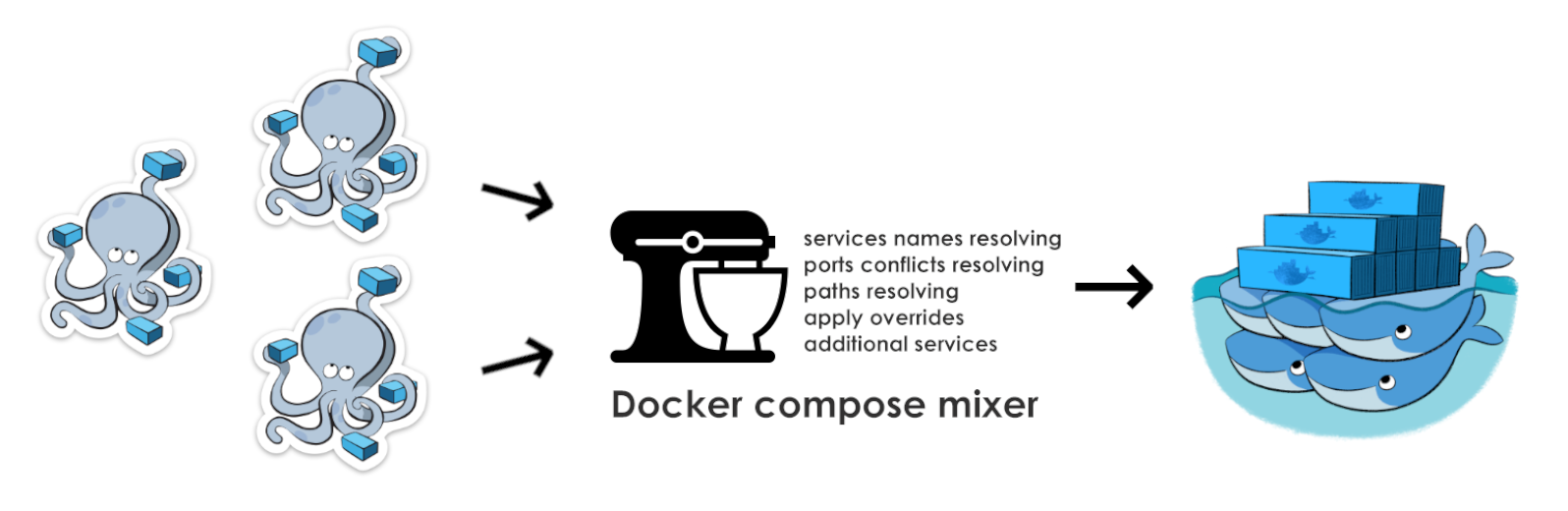
There may be several reasons why it becomes necessary to do this:
Actually, combining
Thus, having spent the mind it came to spend a couple of days off and write a simpledirty routine work of combining
As a result, we got a small (600 lines of code) script as a whole and completely solving the problems that once appeared before me.
However, as a bonus, in addition to the problems identified above, the script helped solve another interesting problem. Namely, after small inferences, it was possible to simultaneously run several instances of the application with one
A few steps that will allow you to quickly use this solution.
You need to download the binary file, which is a packaged
The contents of the configuration
Let's say we have 2 projects
Projects, being different versions of the system, are an application with a set of services: a
The basic task is to combine two environments into one using only one
configuration for combining files must be in the file
The command `
By default, the result of merging files will be saved to a file
I would like to pay attention to the output section of the debugger,,
Sample sources can be found here.
docker-compose.ymlfile.There may be several reasons why it becomes necessary to do this:
- Development of low-connected components of a huge system. Where each project, in fact, can be a separate independent application
- Connecting individual components for testing. Putting
mock-services and tests in separate containers with their own linking and interaction logic - External to the project systems that nonetheless 'live' in a docker environment
Content
- Problem
- Decision
- Usage example
- Installation
- Configuration
- Launch
- Result
- Resources
Problem
Actually, combining
Nfiles into one and launching them as a complete application became the main problem. What became secondary problems that did not allow simply to simply merge existing files one by one?- Container name conflicts with updating the entire configuration tree
- Conflicts of ports forwarded to the host machine
- Overriding Service Properties
- Relative Path Resolution
- Removing redundant or duplicate services
Decision
Thus, having spent the mind it came to spend a couple of days off and write a simple
pythonpreprocessor that will do all the docker-composefiles. As a result, we got a small (600 lines of code) script as a whole and completely solving the problems that once appeared before me.
However, as a bonus, in addition to the problems identified above, the script helped solve another interesting problem. Namely, after small inferences, it was possible to simultaneously run several instances of the application with one
docker-composefile.Examples of using
A few steps that will allow you to quickly use this solution.
Installation
You need to download the binary file, which is a packaged
pythonmoduleInstallation
sudo wget https://github.com/paunin/docker-compose-mixer/blob/master/dist/dc-mixer?raw=true -O /usr/local/bin/dc-mixer
sudo chmod +x /usr/local/bin/dc-mixer
Configuration
The contents of the configuration
docker-compose-mixer.ymlfile is essentially a small config that describes how exactly two or more projects will start together. Let's say we have 2 projects
project Aand project Bc two docker-compose.ymlfiles. Projects, being different versions of the system, are an application with a set of services: a
java-application, redis, rabbitmq, mailproject project A(new version) also contains a mysqlservice.project a
$ cat ../proj_a/docker-compose.yml
sources:
  build: images/sources
  volumes:
    - .:/var/application.host
application:
  build: images/java
  dockerfile: application.yml
  dns:
    - 8.8.8.8
    - 9.9.9.9
  hostname: application.host
  working_dir: /var/application.host
  cgroup_parent: m-executor-abcd
  links:
    - redis:redis
    - rabbitmq
    - mail
    - mysql:db
  volumes_from:
    - sources
  command: "/start.sh"
  env_file:
    - ./env_files/application.env
    - ./env_files/rabbit.env
  environment:
    - DB_DRIVER: mysql
    - DB_PORT: 3306
  ports:
    - "80:80"     #http
    - "1098:1098" #jmx
  external_links:
    - redis_1
    - project_db_1:mysql
  extra_hosts:
    - "somehost:162.242.195.82"
  labels:
    com.example.description: "Accounting webapp"
    com.example.department: "Finance"
redis:
  labels:
    - "com.example.description=Accounting webapp"
    - "com.example.department=Finance"
  extends:
    file: ../redis.yml
    service: redisbase
  expose:
  ports:
    - "6379:6379"
    - "127.0.0.1:6370:6370"
  log_driver: "syslog"
  log_opt:
    syslog-address: "tcp://192.168.0.42:123"
  net: "bridge"
rabbitmq:
  build: images/rabbitmq
  ports:
    - "15672:15672"
  volumes_from:
    - sources
  command: /start.sh
  env_file:
    - ./env_files/rabbit.env
mail:
  build: images/mail
  hostname: mail
  domainname: application.host
  expose:
    - 25
    - 143
  ports:
    - "25:25"
    - "143:143"
  volumes:
    - ./images/mail/spamassassin:/tmp/spamassassin/
    - ./images/mail/postfix:/tmp/postfix/
    - ./images/mail/mail:/tmp/mail/
mysql:
  build: images/mysql
  ports:
    - 3602
project B
$ cat ./proj_b/docker-compose.yml
sources:
  build: images/sources
  volumes:
    - .:/var/application.host
application:
  build: images/java
  dockerfile: application.yml
  dns:
    - 8.8.8.8
    - 9.9.9.9
  hostname: application.host
  working_dir: /var/application.host
  cgroup_parent: m-executor-abcd
  links:
    - redis:redis
    - rabbitmq
    - mail
  volumes_from:
    - sources
  command: "/start.sh"
  env_file:
    - ./env_files/application.env
    - ./env_files/rabbit.env
  environment:
    - VARIABLE: value
  ports:
    - "80:80"     #http
    - "1098:1098" #jmx
  external_links:
    - redis_1
    - project_db_1:mysql
  extra_hosts:
    - "somehost:162.242.195.82"
  labels:
    com.example.description: "Accounting webapp"
    com.example.department: "Finance"
redis:
  labels:
    - "com.example.description=Accounting webapp"
    - "com.example.department=Finance"
  extends:
    file: ../redis.yml
    service: redisbase
  expose:
  ports:
    - "6379:6379"
    - "127.0.0.1:6370:6373"
  log_driver: "syslog"
  log_opt:
    syslog-address: "tcp://192.168.0.42:123"
  net: "bridge"
rabbitmq:
  build: images/rabbitmq
  ports:
    - "15672:15672"
  volumes_from:
    - sources
  command: /start.sh
  env_file:
    - ./env_files/rabbit.env
mail:
  build: images/mail
  hostname: mail
  domainname: application.host
  expose:
    - 25
    - 143
  ports:
    - "25:25"
    - "143:143"
  volumes:
    - ./images/mail/spamassassin:/tmp/spamassassin/
    - ./images/mail/postfix:/tmp/postfix/
    - ./images/mail/mail:/tmp/mail/
The basic task is to combine two environments into one using only one
rabbitmqservice. In addition, you need to create a new service pgsqland connect it to the first project (replacing mysql). The configuration for combining files must be in the file
./docker-compose-mixer.yml(the option -i, --input-filecan specify a different name for the file)docker-compose-mixer.yml
$ cat ./docker-compose-mixer.yml
includes:
  proja: ../proj_a/docker-compose.yml
  projb: ./proj_b/docker-compose.yml
ignores:
  - projbrabbitmq
overrides:
  projbapplication:
    links:
      - projaredis:redis
      - projarabbitmq:rabbitmq
      - projamail:mail
  projaapplication:
    links:
      - projaredis:redis
      - projarabbitmq:rabbitmq
      - projamail:mail
      - pgsql:db
    environment:
      - DB_DRIVER: pgsql
      - DB_PORT: 5432
master_services:
  pgsql:
    image: pgsql:latest
    expose:
      - 5432
    ports:
      5432:5432
Launch
The command `
dc-mixer -v` starts the preprocessor in verbal mode and saves the result to a file. Launch options help control behavior.Launch options
$ dc-mixer --help
Compile docker-compose from several docker-compose.yml files
Usage:
  dc-mixer [options]
Options:
  -h, --help                Print help information
  -i, --input-file          Input file (default `docker-compose-mixer.yml` in current directory)
  -o, --output-file         Output file (default `docker-compose.yml` in current directory)
  -h, --help                Print help information
  -v, --verbose             Enable verbose mode
For more information read documentation: https://github.com/paunin/docker-compose-mixer
Result
By default, the result of merging files will be saved to a file
./docker-compose.yml. (option -o, --output-filecan specify a different name for the file)The result of the script
$ dc-mixer -v -o docker-compose.yml
DEBUG:root:Start compiling compose file...
DEBUG:root:Input file: /Users/paunin/Sites/dc-mixer.local/examples/example2/proj/docker-compose-mixer.yml; output file: docker-compose.yml
DEBUG:root:Mixer config is below:
        {'overrides': {'projbapplication': {'links': ['projaredis:redis', 'projarabbitmq:rabbitmq', 'projamail:mail']}, 'projaapplication': {'environment': {'DB_DRIVER': 'pgsql', 'DB_PORT': 5432}, 'links': ['projaredis:redis', 'projarabbitmq:rabbitmq', 'projamail:mail', 'pgsql:db']}}, 'master_services': {'pgsql': {'image': 'pgsql:latest', 'expose': [5432], 'ports': '5432:5432'}}, 'ignores': ['projbrabbitmq'], 'includes': {'projb': './proj_b/docker-compose.yml', 'proja': '../proj_a/docker-compose.yml'}}
DEBUG:root:Creating scope for file: /Users/paunin/Sites/dc-mixer.local/examples/example2/proj/proj_b/docker-compose.yml and prefix: projb
DEBUG:root:Creating scope for file: /Users/paunin/Sites/dc-mixer.local/examples/example2/proj_a/docker-compose.yml and prefix: proja
DEBUG:root:Resolving services names
DEBUG:root:Resolving services paths with
DEBUG:root:Resolving services ports
DEBUG:root:Redefined ports:
        {'projaapplication': {80: 81, 1098: 1099}, 'projaredis': {6370: 6371, 6379: 6380}, 'projamail': {25: 26, 143: 144}}
DEBUG:root:Result scope is:
        {'projasources': {'build': '../proj_a/images/sources', 'volumes': ['./../proj_a:/var/application.host']}, 'projaredis': {'log_opt': {'syslog-address': 'tcp://192.168.0.42:123'}, 'log_driver': 'syslog', 'expose': None, 'labels': ['com.example.description=Accounting webapp', 'com.example.department=Finance'], 'extends': {'service': 'redisbase', 'file': '../redis.yml'}, 'net': 'bridge', 'ports': ['6380:6379', '127.0.0.1:6371:6370']}, 'projbmail': {'domainname': 'application.host', 'expose': [25, 143], 'hostname': 'mail', 'build': 'proj_b/images/mail', 'volumes': ['./proj_b/images/mail/spamassassin:/tmp/spamassassin/', './proj_b/images/mail/postfix:/tmp/postfix/', './proj_b/images/mail/mail:/tmp/mail/'], 'ports': ['25:25', '143:143']}, 'projamail': {'domainname': 'application.host', 'expose': [25, 143], 'hostname': 'mail', 'build': '../proj_a/images/mail', 'volumes': ['./../proj_a/images/mail/spamassassin:/tmp/spamassassin/', './../proj_a/images/mail/postfix:/tmp/postfix/', './../proj_a/images/mail/mail:/tmp/mail/'], 'ports': ['26:25', '144:143']}, 'pgsql': {'image': 'pgsql:latest', 'expose': [5432], 'ports': '5432:5432'}, 'projbapplication': {'hostname': 'application.host', 'links': ['projaredis:redis', 'projarabbitmq:rabbitmq', 'projamail:mail'], 'cgroup_parent': 'm-executor-abcd', 'labels': {'com.example.description': 'Accounting webapp', 'com.example.department': 'Finance'}, 'extra_hosts': ['somehost:162.242.195.82'], 'environment': [{'VARIABLE': 'value'}], 'working_dir': '/var/application.host', 'command': '/start.sh', 'build': 'proj_b/images/java', 'dns': ['8.8.8.8', '9.9.9.9'], 'volumes_from': ['projbsources'], 'env_file': ['proj_b/env_files/application.env', 'proj_b/env_files/rabbit.env'], 'dockerfile': 'application.yml', 'ports': ['80:80', '1098:1098'], 'external_links': ['redis_1', 'project_db_1:mysql']}, 'projaapplication': {'hostname': 'application.host', 'links': ['projaredis:redis', 'projarabbitmq:rabbitmq', 'projamail:mail', 'pgsql:db'], 'cgroup_parent': 'm-executor-abcd', 'labels': {'com.example.description': 'Accounting webapp', 'com.example.department': 'Finance'}, 'extra_hosts': ['somehost:162.242.195.82'], 'environment': {'DB_DRIVER': 'pgsql', 'DB_PORT': 5432}, 'working_dir': '/var/application.host', 'command': '/start.sh', 'build': '../proj_a/images/java', 'dns': ['8.8.8.8', '9.9.9.9'], 'volumes_from': ['projasources'], 'env_file': ['../proj_a/env_files/application.env', '../proj_a/env_files/rabbit.env'], 'dockerfile': 'application.yml', 'ports': ['81:80', '1099:1098'], 'external_links': ['redis_1', 'project_db_1:mysql']}, 'projamysql': {'build': '../proj_a/images/mysql', 'ports': []}, 'projarabbitmq': {'volumes_from': ['projasources'], 'env_file': ['../proj_a/env_files/rabbit.env'], 'command': '/start.sh', 'build': '../proj_a/images/rabbitmq', 'ports': ['15672:15672']}, 'projbredis': {'log_opt': {'syslog-address': 'tcp://192.168.0.42:123'}, 'log_driver': 'syslog', 'expose': None, 'labels': ['com.example.description=Accounting webapp', 'com.example.department=Finance'], 'extends': {'service': 'redisbase', 'file': 'redis.yml'}, 'net': 'bridge', 'ports': ['6379:6379', '127.0.0.1:6370:6373']}, 'projbsources': {'build': 'proj_b/images/sources', 'volumes': ['./proj_b:/var/application.host']}}
DEBUG:root:Save result scope in the file "docker-compose.yml"
Resulting docker-compose.yml
pgsql:
  expose:
    - 5432
  image: "pgsql:latest"
  ports: "5432:5432"
projaapplication:
  build: ../proj_a/images/java
  cgroup_parent: m-executor-abcd
  command: /start.sh
  dns:
    - "8.8.8.8"
    - "9.9.9.9"
  dockerfile: application.yml
  env_file:
    - ../proj_a/env_files/application.env
    - ../proj_a/env_files/rabbit.env
  environment:
    DB_DRIVER: pgsql
    DB_PORT: 5432
  external_links:
    - redis_1
    - "project_db_1:mysql"
  extra_hosts:
    - "somehost:162.242.195.82"
  hostname: application.host
  labels:
    com.example.department: Finance
    com.example.description: "Accounting webapp"
  links:
    - "projaredis:redis"
    - "projarabbitmq:rabbitmq"
    - "projamail:mail"
    - "pgsql:db"
  ports:
    - "81:80"
    - "1099:1098"
  volumes_from:
    - projasources
  working_dir: /var/application.host
projamail:
  build: ../proj_a/images/mail
  domainname: application.host
  expose:
    - 25
    - 143
  hostname: mail
  ports:
    - "26:25"
    - "144:143"
  volumes:
    - "./../proj_a/images/mail/spamassassin:/tmp/spamassassin/"
    - "./../proj_a/images/mail/postfix:/tmp/postfix/"
    - "./../proj_a/images/mail/mail:/tmp/mail/"
projamysql:
  build: ../proj_a/images/mysql
  ports: []
projarabbitmq:
  build: ../proj_a/images/rabbitmq
  command: /start.sh
  env_file:
    - ../proj_a/env_files/rabbit.env
  ports:
    - "15672:15672"
  volumes_from:
    - projasources
projaredis:
  expose: ~
  extends:
    file: ../redis.yml
    service: redisbase
  labels:
    - "com.example.description=Accounting webapp"
    - com.example.department=Finance
  log_driver: syslog
  log_opt:
    syslog-address: "tcp://192.168.0.42:123"
  net: bridge
  ports:
    - "6380:6379"
    - "127.0.0.1:6371:6370"
projasources:
  build: ../proj_a/images/sources
  volumes:
    - "./../proj_a:/var/application.host"
projbapplication:
  build: proj_b/images/java
  cgroup_parent: m-executor-abcd
  command: /start.sh
  dns:
    - "8.8.8.8"
    - "9.9.9.9"
  dockerfile: application.yml
  env_file:
    - proj_b/env_files/application.env
    - proj_b/env_files/rabbit.env
  environment:
    -
      VARIABLE: value
  external_links:
    - redis_1
    - "project_db_1:mysql"
  extra_hosts:
    - "somehost:162.242.195.82"
  hostname: application.host
  labels:
    com.example.department: Finance
    com.example.description: "Accounting webapp"
  links:
    - "projaredis:redis"
    - "projarabbitmq:rabbitmq"
    - "projamail:mail"
  ports:
    - "80:80"
    - "1098:1098"
  volumes_from:
    - projbsources
  working_dir: /var/application.host
projbmail:
  build: proj_b/images/mail
  domainname: application.host
  expose:
    - 25
    - 143
  hostname: mail
  ports:
    - "25:25"
    - "143:143"
  volumes:
    - "./proj_b/images/mail/spamassassin:/tmp/spamassassin/"
    - "./proj_b/images/mail/postfix:/tmp/postfix/"
    - "./proj_b/images/mail/mail:/tmp/mail/"
projbredis:
  expose: ~
  extends:
    file: redis.yml
    service: redisbase
  labels:
    - "com.example.description=Accounting webapp"
    - com.example.department=Finance
  log_driver: syslog
  log_opt:
    syslog-address: "tcp://192.168.0.42:123"
  net: bridge
  ports:
    - "6379:6379"
    - "127.0.0.1:6370:6373"
projbsources:
  build: proj_b/images/sources
  volumes:
    - "./proj_b:/var/application.host"
I would like to pay attention to the output section of the debugger,,
DEBUG:root:Redefined portswhich provides information about automatically changed ports. Sample sources can be found here.
Resources
- Github project: github.com/paunin/docker-compose-mixer
- Docker-compose syntax: docs.docker.com/compose/compose-file