December 24, 2015 at 14:02
Plugin for Redmine: Performance Reports
We continue to develop plugins to automate the work of our team.
As the next stage of automation, it was decided to create a plugin for reports on the volume of work.
This is useful both for the statistics of work on projects and for monitoring the work of employees, which is very important with a remote cooperation scheme.
The plugin is called the Redmine activity report plugin and is used to send reports on elapsed time and closed tasks for each employee and project. Reports are generated daily, weekly and monthly.
The plugin is very easy to install and configure.
We clone the code on the server with Redmine:
We start the migration:
Add tasks in crowns:
To clean the crown, use the command:
After that, in the project settings for which we want to receive reports, enable this module.

And we have a new tab in the project settings with the parameters for this plugin.
There you can choose: whether the plugin will work for subsidiary projects, for which groups the data will be collected or for which users, as well as which users to send it to.

As a result, at the specified time intervals we will receive reports in the form of tables:
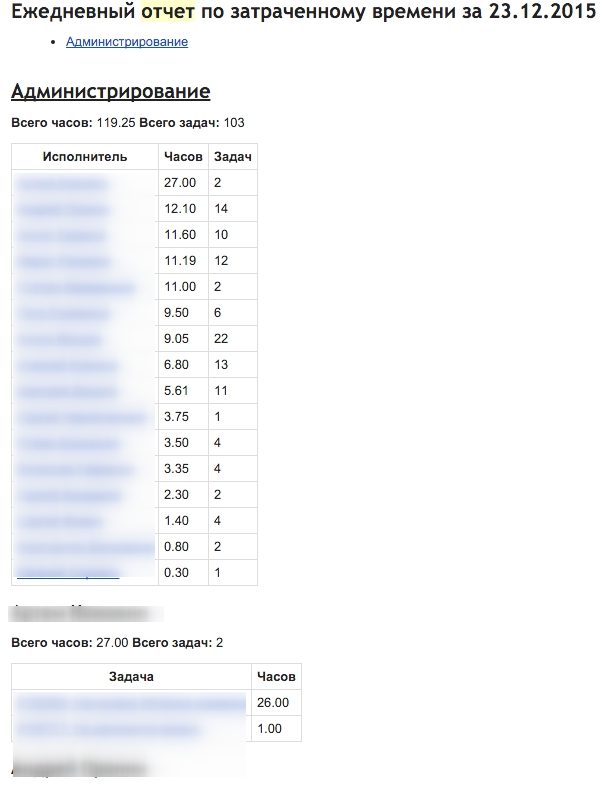
In the upper part there is a summary of statistics for each employee, then there is a transcript for each with an indication of tickets and time.
Write comments and suggestions in the comments.
Thanks for attention!
As the next stage of automation, it was decided to create a plugin for reports on the volume of work.
This is useful both for the statistics of work on projects and for monitoring the work of employees, which is very important with a remote cooperation scheme.
The plugin is called the Redmine activity report plugin and is used to send reports on elapsed time and closed tasks for each employee and project. Reports are generated daily, weekly and monthly.
The plugin is very easy to install and configure.
We clone the code on the server with Redmine:
git clone https://github.com/centosadmin/redmine_activity_report /opt/redmine/plugins
We start the migration:
bundle exec rake redmine:plugins:migrate
Add tasks in crowns:
bundle exec whenever -i redmine_activity_report -f plugins/redmine_activity_report/config/schedule.rb
To clean the crown, use the command:
bundle exec whenever -c redmine_activity_report -f plugins/redmine_activity_report/config/schedule.rb
After that, in the project settings for which we want to receive reports, enable this module.
And we have a new tab in the project settings with the parameters for this plugin.
There you can choose: whether the plugin will work for subsidiary projects, for which groups the data will be collected or for which users, as well as which users to send it to.
As a result, at the specified time intervals we will receive reports in the form of tables:
In the upper part there is a summary of statistics for each employee, then there is a transcript for each with an indication of tickets and time.
Write comments and suggestions in the comments.
Thanks for attention!