September 23, 2015 at 08:58
Localization of extensions of Google Chrome - it is necessary and simple
The variety and ease of accessibility of extensions has played a significant role in the popularity of Google Chrome. Most of you probably have experience writing them. Perhaps not experience yet, but already a desire to try or even a specific idea. It remains only to begin.
Already at the design stage, I suggest you think about multilingualism. Most people are much more comfortable using the product in their own language, even if they know English, and especially if they don’t.
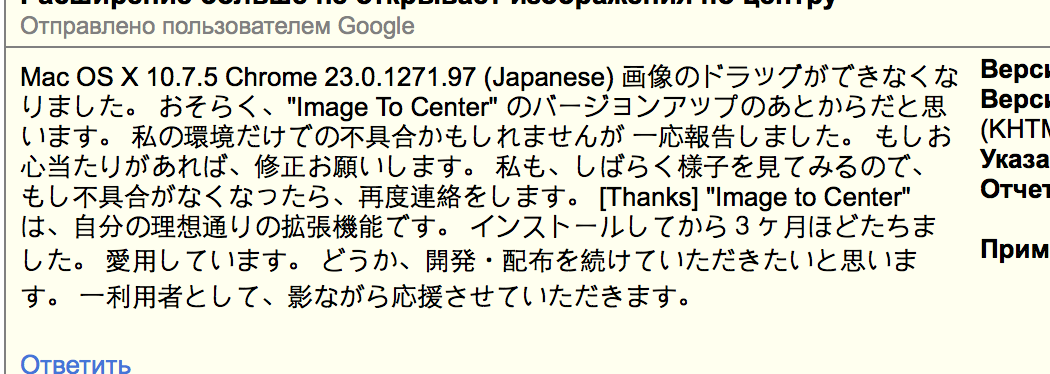
Considerable benefit for you: the potential audience will grow significantly, the number of installations will increase. You will receive an intriguing feedback:
In this post I will talk about how I translated my extension “ Image in the center”In 11 languages, how he organized the process and what auxiliary tools he used to automate a boring routine.
The documentation for Google Chrome developers describes in detail what exactly needs to be done to translate the interface of your extension or application into more than 50 languages. Do not worry, you don’t have to translate to all 50, you can skip Vietnamese, or even leave a couple of popular ones, including Russian.
Distracted. In short, then:
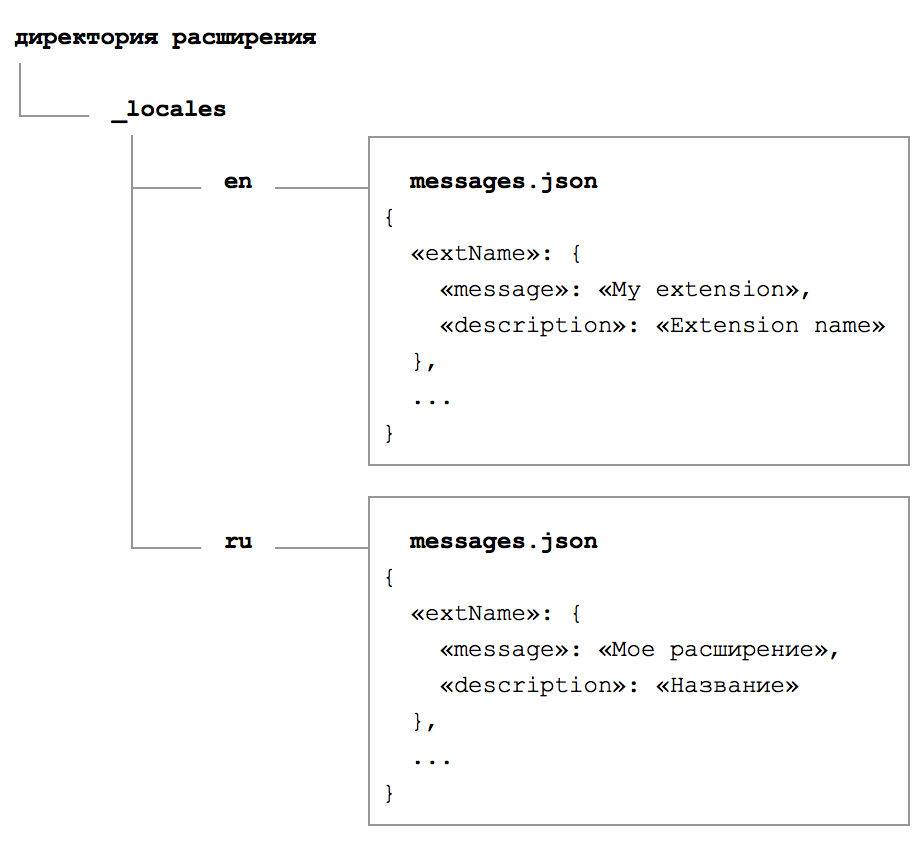
A file is simple in structure - it is a list of keys, each of which corresponds to a certain word, phrase, sentence or the whole story. Using these keys, pieces of text will be taken from messages.json and added to the interface. Each of them carries three parts:
Unfortunately, the development team of the Chromium engine, which is the basis of Google Chrome, did not implement “pluralization” (declension of words depending on the number) at the level of the locale file structure. They can be understood. Due to the variety of languages, due to the abundance of specific rules, this would be very difficult to do. Instead, they suggest using streamlined wording, for example, “The number of available languages: 11” instead of “Translated into 11 languages . ”
When you decide to add a translation into another language, you will need to create another directory, place the file there and carefully fill out the keys, as in other fields, phrase by phrase.
But what if another button appears in the interface? It doesn’t matter - we open each directory sequentially, then each file, add a new key with the name of the button there, write a translation, save it. So, wait, have you added fr to the directory ? We open the file, check, save ... Have you translated it into Spanish? We open, check, save ...
But what if five new elements appeared in the interface? What if ten? The probability of an error is very high.
Google gave developers good tools for internationalization, but in practice, daily work with file bundling is inconvenient and boring. Even if you are willing to put up with boredom, the human factor leaves a loophole for mistakes. Their probability must be reduced at every opportunity.
How to improve the existing scheme?
Having decided that it is better to lose a day and then fly in five minutes, I began to search for a more convenient solution. I won’t lie, I didn’t look for long. Like any other developer, he quickly gave up and took on his bike.
The first thing that comes to mind is that it’s much more convenient to store and edit phrases in one place, in one file. So that everything is immediately in front of your eyes.
The ideal format is a table. Columns correspond to languages, rows correspond to keys with phrases. You can use any convenient editor: Microsoft Excel, Numbers from Apple, and something else. I settled on tables from Google Docs. For example, this is how a fragment of my only file now looks:
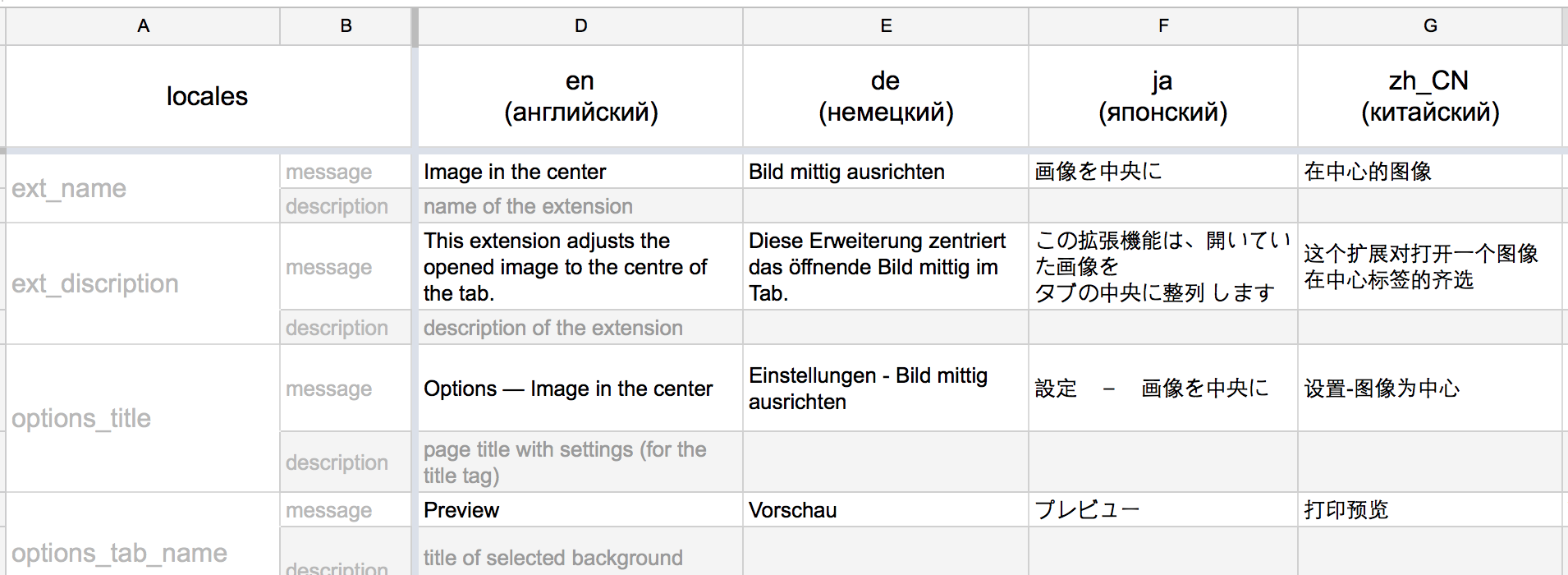
With such a table, it’s easy to add new languages - copy the file and send it to the translator. He fills his column and sends back.
With such a table, it is easy to add new phrases - create a new row for the next key and fill in all columns sequentially. In the editor, you can set the highlighting of empty cells in alarm-orange color - now we will definitely not miss anything.
Placeholders are also added simply, wrap the group in brackets, separate the key and value with a colon ( see example ).
Creating a structure, correspondence with translators, something on your own - the table is ready. What's next?
To generate all the necessary directories and files, I wrote the cpm -locales npm module . Its core is another, third-party csv-parse utility . The name does not lie, it parses the CSV file, converts it to json and passes the result to me. The CSV file itself is obtained by export from our table. Further, the document is analyzed and divided into smaller fragments, into separate languages. They are in the form of messages.json placed in the target directories. Everything happens one to one, as I said a little higher, but almost instantly and without errors ** laughter from the audience ** .
We will reduce our participation to a minimum, we will start the process with one command from the console. I wrapped the module in plugins for two popular build systems:
All that is required is to export your file to CSV format and set a script on it. We use this sample as the basis for the table .
Example setup for grunt:
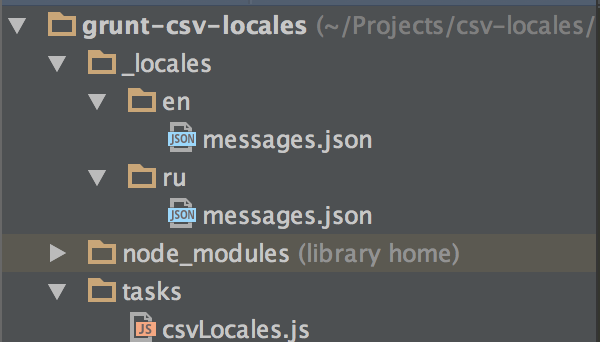
Result:
Hooray! Adding new languages, new text elements to the interface no longer causes depression. Automation of the routine allows you to focus on really important points, on more interesting tasks, without the boring “opened / edited / closed / repeat” .
It should be noted that the Google team offers to order the translation of your extension directly from the developer toolbar. You just need to download the original message.json , choose languages and pay for the work of translators. I have not tried. This service appeared relatively recently, when I no longer needed it. Plus, for the money it will come out much more expensive than freelance translators. If you have experience with such a translation, please tell us about it in a comment.

The standard solution for software localization is the gettext library . It is not used for Google Chrome extensions, however, gettext-parser already exists in npm, which means that we can implement support for PO files if desired. Why not plans for the future?
For those who have read to the end, useful links:
I will be glad to answer your questions, hear feedback. Tell us about your experience. What are you using? What advise me?
Already at the design stage, I suggest you think about multilingualism. Most people are much more comfortable using the product in their own language, even if they know English, and especially if they don’t.
Considerable benefit for you: the potential audience will grow significantly, the number of installations will increase. You will receive an intriguing feedback:
In this post I will talk about how I translated my extension “ Image in the center”In 11 languages, how he organized the process and what auxiliary tools he used to automate a boring routine.
Documentation
The documentation for Google Chrome developers describes in detail what exactly needs to be done to translate the interface of your extension or application into more than 50 languages. Do not worry, you don’t have to translate to all 50, you can skip Vietnamese, or even leave a couple of popular ones, including Russian.
Distracted. In short, then:
- All translations are inside the _locales directory located at the root of the project.
- For each language , a folder corresponding to the language identifier is created inside _locales . For Russian ru , for English en and so on. Their full list is on the docks .
- Inside the directory with the locale name lies the messages.json file . Translation in it.
A file is simple in structure - it is a list of keys, each of which corresponds to a certain word, phrase, sentence or the whole story. Using these keys, pieces of text will be taken from messages.json and added to the interface. Each of them carries three parts:
- message - the same text to display on the screen, for which everything was started.
- description - auxiliary text that allows the translator to understand the context of using message . After all, the same word can be translated in different ways depending on the situation. So “spit (a narrow strip of land going from the coast)” will turn into “foreland” , and “spit (agricultural tool)” will become “scythe” . The text in the description is optional, you can skip it.
- placeholders - an optional property that allows you to pass an arbitrary context for the phrase. For example, to show the title of Pasha , "Hi, Pasha!" , And for Maria , "Hi, Maria!" . You can read more about using placeholders in the corresponding section of the documentation .
Unfortunately, the development team of the Chromium engine, which is the basis of Google Chrome, did not implement “pluralization” (declension of words depending on the number) at the level of the locale file structure. They can be understood. Due to the variety of languages, due to the abundance of specific rules, this would be very difficult to do. Instead, they suggest using streamlined wording, for example, “The number of available languages: 11” instead of “Translated into 11 languages . ”
When you decide to add a translation into another language, you will need to create another directory, place the file there and carefully fill out the keys, as in other fields, phrase by phrase.
But what if another button appears in the interface? It doesn’t matter - we open each directory sequentially, then each file, add a new key with the name of the button there, write a translation, save it. So, wait, have you added fr to the directory ? We open the file, check, save ... Have you translated it into Spanish? We open, check, save ...
But what if five new elements appeared in the interface? What if ten? The probability of an error is very high.
Google gave developers good tools for internationalization, but in practice, daily work with file bundling is inconvenient and boring. Even if you are willing to put up with boredom, the human factor leaves a loophole for mistakes. Their probability must be reduced at every opportunity.
How to improve the existing scheme?
Optimization
Having decided that it is better to lose a day and then fly in five minutes, I began to search for a more convenient solution. I won’t lie, I didn’t look for long. Like any other developer, he quickly gave up and took on his bike.
The first thing that comes to mind is that it’s much more convenient to store and edit phrases in one place, in one file. So that everything is immediately in front of your eyes.
The ideal format is a table. Columns correspond to languages, rows correspond to keys with phrases. You can use any convenient editor: Microsoft Excel, Numbers from Apple, and something else. I settled on tables from Google Docs. For example, this is how a fragment of my only file now looks:
With such a table, it’s easy to add new languages - copy the file and send it to the translator. He fills his column and sends back.
With such a table, it is easy to add new phrases - create a new row for the next key and fill in all columns sequentially. In the editor, you can set the highlighting of empty cells in alarm-orange color - now we will definitely not miss anything.
Placeholders are also added simply, wrap the group in brackets, separate the key and value with a colon ( see example ).
Creating a structure, correspondence with translators, something on your own - the table is ready. What's next?
Automation
To generate all the necessary directories and files, I wrote the cpm -locales npm module . Its core is another, third-party csv-parse utility . The name does not lie, it parses the CSV file, converts it to json and passes the result to me. The CSV file itself is obtained by export from our table. Further, the document is analyzed and divided into smaller fragments, into separate languages. They are in the form of messages.json placed in the target directories. Everything happens one to one, as I said a little higher, but almost instantly and without errors ** laughter from the audience ** .
We will reduce our participation to a minimum, we will start the process with one command from the console. I wrapped the module in plugins for two popular build systems:
All that is required is to export your file to CSV format and set a script on it. We use this sample as the basis for the table .
Example setup for grunt:
module.exports = function (grunt) {
  grunt.initConfig({
    csvLocales: {
      all: 'source/locales.csv',
      options: {
        dirPath: '_locales'
      }
    }
  });
  grunt.loadNpmTasks('grunt-csv-locales');
};
Result:
Hooray! Adding new languages, new text elements to the interface no longer causes depression. Automation of the routine allows you to focus on really important points, on more interesting tasks, without the boring “opened / edited / closed / repeat” .
It should be noted that the Google team offers to order the translation of your extension directly from the developer toolbar. You just need to download the original message.json , choose languages and pay for the work of translators. I have not tried. This service appeared relatively recently, when I no longer needed it. Plus, for the money it will come out much more expensive than freelance translators. If you have experience with such a translation, please tell us about it in a comment.
The standard solution for software localization is the gettext library . It is not used for Google Chrome extensions, however, gettext-parser already exists in npm, which means that we can implement support for PO files if desired. Why not plans for the future?
For those who have read to the end, useful links:
- grunt task
- gulp task
- the csv-locales module underlying the task
- sample table structure
- Google Chrome documentation on translating extensions and applications into different languages
- funny cat GIF
I will be glad to answer your questions, hear feedback. Tell us about your experience. What are you using? What advise me?