September 22, 2015 at 09:23
Intel Threading Building Blocks 4.4 - what's new?
Recently, the big update for Intel® Parallel Studio XE 2016 came out, and with it Intel® Threading Building Blocks 4.4. The new version has several interesting additions:
There are many cases when you need to limit the number of workflows of a parallel algorithm. Intel TBB allows you to do this through the initialization of the tbb :: task_scheduler_init object, specifying the desired number of threads in the parameter:
However, the application may have a complex structure. For example, many plugins, or threads, each of which can use its own version of Intel TBB. In this case, there will be several tbb :: task_scheduler_init objects , and you can’t fix this by creating a new one.
To solve such problems, the tbb :: global_control class appeared . Creating an object of this class with the global_control :: max_allowed_parallelism parameter limits the number of active Intel TBB threads globally. Unlike the tbb :: task_scheduler_init, this restriction immediately becomes common to the whole process, even if the library is already initialized in other modules or threads. Already created streams, of course, will not disappear, but they will actively work simultaneously as much as indicated, the rest will wait.
In this example, the functions foo () and bar () initialize the TBB task scheduler locally. The global_control object in main () sets the upper limit for simultaneously running threads. If we had one more task_scheduler_init instead of global control, Intel TBB reinitialization in foo () and bar () would not occur, because the main thread would already have an active task_scheduler_init . Local settings in foo () and bar () would be ignored, both functions would use exactly the number of threads that were set in main () . C global_controlwe strictly limit the upper limit (for example, no more than 8 threads), but this does not interfere with initializing the library locally with fewer threads. Global_control
objects can be nested. When we create a new one, it rewrites the limit of flows in a smaller direction, in a larger way. Those. If you first created global_control with 8 threads, then with 4, then the limit will be 4. And if you first with 8, then with 12, the limit will be 8. And when the global_control object is deleted, the previous value is restored, i.e. minimum of installations of all “living” objects of global control. tbb :: global_control
while is a preview feature in Intel TBB 4.4. In addition to the number of threads, this class allows you to limit the stack size for threads through the thread_stack_size parameter .
A new type of node tbb :: flow :: composite_node allows you to "pack" any number of other nodes. Large applications with hundreds of nodes can be better structured by assembling from several large tbb :: flow :: composite_node blocks , with defined input and output interfaces.

The example in the picture above uses composite_node to encapsulate two nodes, join_node and function_node . The concept is to demonstrate that the sum of the first n positive odd numbers is n squared.
First we create the adder class . It has join_node j with two inputs and function_nodef. j receives a number on each of its inputs, and sends a tuple of these numbers to input f, which adds up the numbers. To encapsulate these two nodes, the adder is inherited from the composite_node type with two inputs and one output, which corresponds to two inputs j and one output f:
Next, create split_node s, which will serve as a source of positive odd numbers. We use the first 4 of these numbers: 1, 3, 5, and 7. Create three adder objects : a0, a1, and a2. Adder a0 gets 1 and 3 from split_node . They add up and the amount goes to a1. The second adder a1 receives the sum of 1 and 3 from one input port, and 5 from the second from split_node . These values also add up and the amount is sent to a2. In the same way, the third adder a2 receives the sum of 1, 3 and 5 from one input and 7 from the second input from split_node . Each adder writes the amount that he calculated, which is equal to the square of the number of numbers at the time of executionadder in the graph.
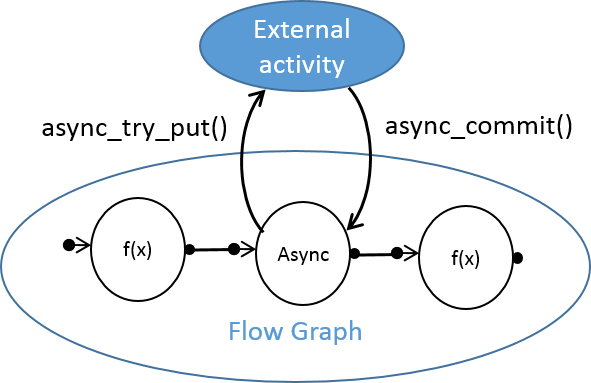
The async_node template class allows you to asynchronously work with activities that occur outside the Intel TBB thread pool. For example, if your Flow Graph application needs to communicate with a third-party stream, runtime or device, async_node may become useful. It has interfaces for sending the result back, supporting two-way asynchronous communication between the TBB Flow Graph and an entity external to it. async_node is a preview feature in Intel TBB 4.4.
Now you can reset the state of the Flow Graph after an incorrect stop, for example, an exception thrown or an explicit stop (cancel) by calling tbb :: flow :: graph :: reset (reset_flags f) . To remove all edges of a graph, use the reset flag (rf_clear_edges), to reset all functional objects, use the reset flag (rf_reset_bodies).
Also added (as preview) the following operations on the graph:
C ++ 11 move operations help avoid unnecessary data copying. Intel TBB 4.4 introduced move-aware insert and emplace methods for the concurrent_unordered_map and concurrent_hash_map containers . concurrent_vector :: shrink_to_fit has been optimized for types supporting C ++ 11 move semantics.
The tbb :: enumerable_thread_specific container received a move constructor and an assignment operator. Local stream values can now be constructed with an arbitrary number of arguments using a constructor using variadic templates.
The tbb / compat / thread header file automatically includes C ++ 11 where possible. “Exact exception propagation” appeared for the Intel® C ++ Compiler under OS X *.
You can download the latest Intel TBB from open source or commercial sites.
- Global control for resource management, primarily the number of workflows.
- New Flow Graph node types: composite_node and async_node. In addition, the Flow Graph has improved reset functionality.
- More chips from C ++ 11 for better performance.
Global control
There are many cases when you need to limit the number of workflows of a parallel algorithm. Intel TBB allows you to do this through the initialization of the tbb :: task_scheduler_init object, specifying the desired number of threads in the parameter:
tbb::task_scheduler_init my_scheduler(8);
However, the application may have a complex structure. For example, many plugins, or threads, each of which can use its own version of Intel TBB. In this case, there will be several tbb :: task_scheduler_init objects , and you can’t fix this by creating a new one.
To solve such problems, the tbb :: global_control class appeared . Creating an object of this class with the global_control :: max_allowed_parallelism parameter limits the number of active Intel TBB threads globally. Unlike the tbb :: task_scheduler_init, this restriction immediately becomes common to the whole process, even if the library is already initialized in other modules or threads. Already created streams, of course, will not disappear, but they will actively work simultaneously as much as indicated, the rest will wait.
#include "tbb/parallel_for.h"
#include "tbb/task_scheduler_init.h"
#define TBB_PREVIEW_GLOBAL_CONTROL 1
#include "tbb/global_control.h"
using namespace tbb;
void foo()
{
    // The following code could use up to 16 threads.
    task_scheduler_init tsi(16);
    parallel_for( . . . );
}
void bar()
{
    // The following code could use up to 8 threads.
    task_scheduler_init tsi(8);
    parallel_for( . . . );
}
int main()
{
    {
        const size_t parallelism = task_scheduler_init::default_num_threads();
        // total parallelism that TBB can utilize is cut in half for the dynamic extension
        // of the given scope, including calls to foo() and bar()
        global_control c(global_control::max_allowed_parallelism, parallelism/2);
        foo();
        bar();
    } // restore previous parallelism limitation, if one existed
}
In this example, the functions foo () and bar () initialize the TBB task scheduler locally. The global_control object in main () sets the upper limit for simultaneously running threads. If we had one more task_scheduler_init instead of global control, Intel TBB reinitialization in foo () and bar () would not occur, because the main thread would already have an active task_scheduler_init . Local settings in foo () and bar () would be ignored, both functions would use exactly the number of threads that were set in main () . C global_controlwe strictly limit the upper limit (for example, no more than 8 threads), but this does not interfere with initializing the library locally with fewer threads. Global_control
objects can be nested. When we create a new one, it rewrites the limit of flows in a smaller direction, in a larger way. Those. If you first created global_control with 8 threads, then with 4, then the limit will be 4. And if you first with 8, then with 12, the limit will be 8. And when the global_control object is deleted, the previous value is restored, i.e. minimum of installations of all “living” objects of global control. tbb :: global_control
while is a preview feature in Intel TBB 4.4. In addition to the number of threads, this class allows you to limit the stack size for threads through the thread_stack_size parameter .
Flow Graph composite_node
A new type of node tbb :: flow :: composite_node allows you to "pack" any number of other nodes. Large applications with hundreds of nodes can be better structured by assembling from several large tbb :: flow :: composite_node blocks , with defined input and output interfaces.
The example in the picture above uses composite_node to encapsulate two nodes, join_node and function_node . The concept is to demonstrate that the sum of the first n positive odd numbers is n squared.
First we create the adder class . It has join_node j with two inputs and function_nodef. j receives a number on each of its inputs, and sends a tuple of these numbers to input f, which adds up the numbers. To encapsulate these two nodes, the adder is inherited from the composite_node type with two inputs and one output, which corresponds to two inputs j and one output f:
#include "tbb/flow_graph.h"
#include
#include
using namespace tbb::flow;
class adder : public  composite_node<  tuple< int, int >,  tuple< int > > {
    join_node<  tuple< int, int >,  queueing > j;
    function_node<  tuple< int, int >, int > f;
    typedef  composite_node<  tuple< int, int >,  tuple< int > > base_type;
    struct f_body {
        int operator()( const  tuple< int, int > &t ) {
            int n = (get<1>(t)+1)/2;
            int sum = get<0>(t) + get<1>(t);
            std::cout << "Sum of the first " << n <<" positive odd numbers is  " << n <<" squared: "  << sum << std::endl;
            return  sum;
        }
    };
public:
    adder( graph &g) : base_type(g), j(g), f(g,  unlimited, f_body() ) {
        make_edge( j, f );
        base_type::input_ports_type input_tuple(input_port<0>(j), input_port<1>(j));
        base_type::output_ports_type output_tuple(f);
        base_type::set_external_ports(input_tuple, output_tuple);
    }
};
Next, create split_node s, which will serve as a source of positive odd numbers. We use the first 4 of these numbers: 1, 3, 5, and 7. Create three adder objects : a0, a1, and a2. Adder a0 gets 1 and 3 from split_node . They add up and the amount goes to a1. The second adder a1 receives the sum of 1 and 3 from one input port, and 5 from the second from split_node . These values also add up and the amount is sent to a2. In the same way, the third adder a2 receives the sum of 1, 3 and 5 from one input and 7 from the second input from split_node . Each adder writes the amount that he calculated, which is equal to the square of the number of numbers at the time of executionadder in the graph.
int main() {
    graph g;
    split_node< tuple > s(g);
    adder a0(g);
    adder a1(g);
    adder a2(g);
    make_edge(output_port<0>(s), input_port<0>(a0));
    make_edge(output_port<1>(s), input_port<1>(a0));
    make_edge(output_port<0>(a0),input_port<0>(a1));
    make_edge(output_port<2>(s), input_port<1>(a1));
    make_edge(output_port<0>(a1), input_port<0>(a2));
    make_edge(output_port<3>(s), input_port<1>(a2));
    s.try_put(std::make_tuple(1,3,5,7));
    g.wait_for_all();
    return 0;
}
Flow Graph async_node
The async_node template class allows you to asynchronously work with activities that occur outside the Intel TBB thread pool. For example, if your Flow Graph application needs to communicate with a third-party stream, runtime or device, async_node may become useful. It has interfaces for sending the result back, supporting two-way asynchronous communication between the TBB Flow Graph and an entity external to it. async_node is a preview feature in Intel TBB 4.4.
Reset flow graph (reset)
Now you can reset the state of the Flow Graph after an incorrect stop, for example, an exception thrown or an explicit stop (cancel) by calling tbb :: flow :: graph :: reset (reset_flags f) . To remove all edges of a graph, use the reset flag (rf_clear_edges), to reset all functional objects, use the reset flag (rf_reset_bodies).
Also added (as preview) the following operations on the graph:
- Cutting one node from a graph
- Getting the number of "predecessors" and "followers" of a node
- Getting a copy of all the "predecessors" and "followers" of the node
C ++ 11
C ++ 11 move operations help avoid unnecessary data copying. Intel TBB 4.4 introduced move-aware insert and emplace methods for the concurrent_unordered_map and concurrent_hash_map containers . concurrent_vector :: shrink_to_fit has been optimized for types supporting C ++ 11 move semantics.
The tbb :: enumerable_thread_specific container received a move constructor and an assignment operator. Local stream values can now be constructed with an arbitrary number of arguments using a constructor using variadic templates.
The tbb / compat / thread header file automatically includes C ++ 11 where possible. “Exact exception propagation” appeared for the Intel® C ++ Compiler under OS X *.
You can download the latest Intel TBB from open source or commercial sites.