
 September 10, 2015 at 17:25
Ransomware Android / Lockerpin.A attacks US users
Recently, our analysts recorded another surge in the activity of attackers who distributed one of the ransomware modifications for Android. Earlier, we already observed ransomware families that also combined the functions of a fake antivirus (Fake AV) and could block the screen of a user's device (for example, Android Defender). Last year, we also wrote about the ransomware Simplocker, which is the first malicious program - the ransomware for Android, which contained the ability to encrypt files.

In previous versions of Android ransomware such as LockScreen, the screen lock mechanism was usually implemented by constantly drawing the ransomware window in the foreground, and this operation was performed in an endless loop so that no one could interrupt it. On the other hand, overcoming such a self-defense mechanism was not difficult for an experienced user; he could use the Android Debug Bridge (ADB) mechanism to unlock or disable Administrator rights, as well as remove malware in Safe Mode.
In a new modification of the ransomware family for Android, which is detected by ESET antivirus products as Android / Lockerpin.A, users are deprived of any way to restore lost control over their device without root rights or without a security product installed on the device. This eliminates the obvious hard reset method, which helps restore the device to the factory settings and remove all data from it.
In addition, the ransomware also uses a special method to obtain and maintain Device Administrator rights on the device to prevent its removal. This is the first case of similar behavior of the Android malware from those that we observed earlier.
Analysis
After successful installation on the device, Android / Lockerpin.A tries to obtain the administrator privileges of the device in the system. This method is used by Android malware authors more and more often and makes it difficult to remove them from the system. Earlier versions of the Android / Locker family also relied on it.
In recent versions, however, the ransomware obtains administrator privileges more discreetly than in previous ones. A special activation window with the special name “Update patch installation” overlaps the main ransomware blocking window. When the user clicks on the control of this window to “install the update”, he activates the administrator privileges of the device, providing them with a malicious program.
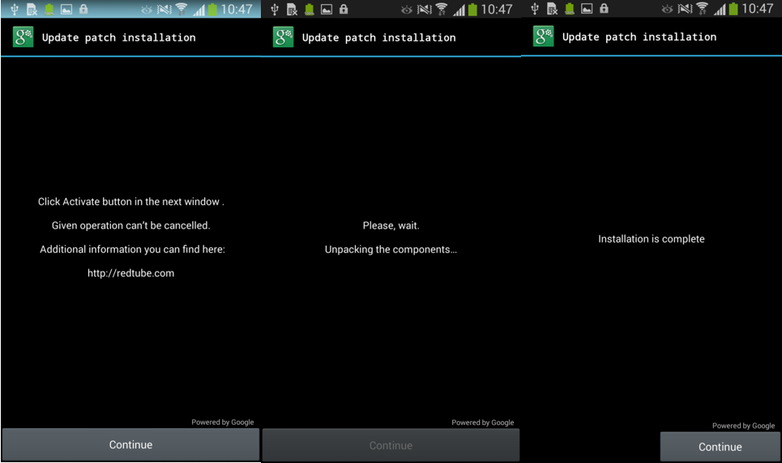
Fig. Window for secretive activation of the device administrator mode.
After clicking on the button, the user's device will be at the complete disposal of the ransomware: a malicious code gets administrator rights and can block the device, as well as set a new PIN code to unlock it. After this operation, the user will be asked to pay a ransom of $ 500 for viewing and storing prohibited pornographic materials.
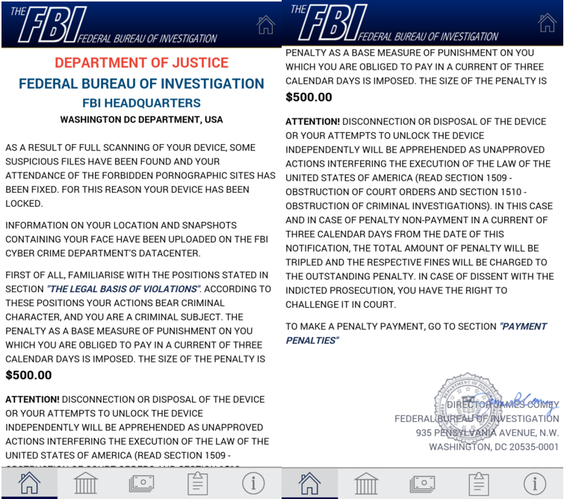
Fig. Redemption window.
After displaying this warning, the device’s screen is locked in a typical ransomware style. In the simple case, you can close the ransomware window and remove the malicious program from the system through downloading in safe mode or using Android Debug Bridge (ADB) mode. However, after a warning message is displayed, Android / Lockerpin.A blocks the device with a new PIN code, and the new PIN code is unknown to both the owner and the attackers themselves. The only way to unlock the device is to reset it to the factory settings or obtain root privileges in the system.

Fig. Ransomware device unlock screen.
Ransomware self-defense mechanisms
The Android / Lockerpin.A ransomware not only receives device administrator rights, it also uses some kind of aggressive self-defense mechanisms to support them. In the event that a user wants to deactivate the device administrator mode for a malicious program, he will not be able to perform such an operation, since the malicious program registers a callback function to reactivate elevated privileges in case of an attempt to delete them. When a user tries to disable this elevated rights mode, a false window is displayed, which is shown in Fig. 4. Pressing the “Continue” button re-activates the administrator mode.

Fig. A warning message about disabling device administrator mode.
Lockerpin's self-defense includes mechanisms for forcibly terminating antivirus product processes in the system when a user tries to disable administrator rights. The list of anti-virus products includes ESET Mobile Security, Avast and Dr.Web.

Fig. The function of forced termination of running processes.
Tracking the actions of the com.android.settings process is an attempt to prevent the removal of malware from the system through the Android application manager. The self-defense mechanisms of our antivirus product ESET Mobile Security do not allow forcing it to terminate its processes.
Distribution paths
Attackers chose social engineering methods to lure a user into installing a malicious program. To do this, it is offered as an adult video, as well as an application for viewing this kind of content. In all such cases, the app was called "Porn Droid."
Statistics obtained using our ESET LiveGrid cloud technology show that the largest number of infected devices is in the United States (more than 75% of the total number of infections). Such a geography of distribution is not familiar to us, since the ransomware that we recorded earlier was mainly used to compromise users in Russia and Ukraine. Obviously, in the US, attackers can benefit more from compromising users than in the above countries.

Fig. Distribution geography Android / Lockerpin.A.
Unlocking the device
As we mentioned earlier, the only solution that can be used to take a screen asking for a PIN code without resetting the device to factory settings is to gain root privileges or use the functions of an already installed security software. In the case of obtaining root privileges, the user can use the ADB tool to connect the device to the PC and delete the malware PIN file. To perform such an operation, the device must have the debugging function enabled (Settings -> Developer options -> USB Debugging). In this case, the user can use the following set of commands to unlock the device.
> adb shell
> su
> rm /data/system/password.key
After executing the above commands, the screen asking for the PIN code will be deleted, and the user will gain access to the device. In some cases, after the operations, rebooting the device is necessary.
Conclusion
Fortunately, the user cannot download the malicious Android / Lockerpin.A application from the Google Play Store. Malicious software can reach your device through third-party app stores, pirated software websites, or torrents. The most effective way to avoid infection and blocking the device is to use proactive means of protection. We highly recommend updating your antivirus in a timely manner. ESET Mobile Security antivirus product detects this threat as Android / Lockerpin.A .
In previous versions of Android ransomware such as LockScreen, the screen lock mechanism was usually implemented by constantly drawing the ransomware window in the foreground, and this operation was performed in an endless loop so that no one could interrupt it. On the other hand, overcoming such a self-defense mechanism was not difficult for an experienced user; he could use the Android Debug Bridge (ADB) mechanism to unlock or disable Administrator rights, as well as remove malware in Safe Mode.
In a new modification of the ransomware family for Android, which is detected by ESET antivirus products as Android / Lockerpin.A, users are deprived of any way to restore lost control over their device without root rights or without a security product installed on the device. This eliminates the obvious hard reset method, which helps restore the device to the factory settings and remove all data from it.
In addition, the ransomware also uses a special method to obtain and maintain Device Administrator rights on the device to prevent its removal. This is the first case of similar behavior of the Android malware from those that we observed earlier.
Analysis
After successful installation on the device, Android / Lockerpin.A tries to obtain the administrator privileges of the device in the system. This method is used by Android malware authors more and more often and makes it difficult to remove them from the system. Earlier versions of the Android / Locker family also relied on it.
In recent versions, however, the ransomware obtains administrator privileges more discreetly than in previous ones. A special activation window with the special name “Update patch installation” overlaps the main ransomware blocking window. When the user clicks on the control of this window to “install the update”, he activates the administrator privileges of the device, providing them with a malicious program.
Fig. Window for secretive activation of the device administrator mode.
After clicking on the button, the user's device will be at the complete disposal of the ransomware: a malicious code gets administrator rights and can block the device, as well as set a new PIN code to unlock it. After this operation, the user will be asked to pay a ransom of $ 500 for viewing and storing prohibited pornographic materials.
Fig. Redemption window.
After displaying this warning, the device’s screen is locked in a typical ransomware style. In the simple case, you can close the ransomware window and remove the malicious program from the system through downloading in safe mode or using Android Debug Bridge (ADB) mode. However, after a warning message is displayed, Android / Lockerpin.A blocks the device with a new PIN code, and the new PIN code is unknown to both the owner and the attackers themselves. The only way to unlock the device is to reset it to the factory settings or obtain root privileges in the system.
Fig. Ransomware device unlock screen.
Ransomware self-defense mechanisms
The Android / Lockerpin.A ransomware not only receives device administrator rights, it also uses some kind of aggressive self-defense mechanisms to support them. In the event that a user wants to deactivate the device administrator mode for a malicious program, he will not be able to perform such an operation, since the malicious program registers a callback function to reactivate elevated privileges in case of an attempt to delete them. When a user tries to disable this elevated rights mode, a false window is displayed, which is shown in Fig. 4. Pressing the “Continue” button re-activates the administrator mode.
Fig. A warning message about disabling device administrator mode.
Lockerpin's self-defense includes mechanisms for forcibly terminating antivirus product processes in the system when a user tries to disable administrator rights. The list of anti-virus products includes ESET Mobile Security, Avast and Dr.Web.
Fig. The function of forced termination of running processes.
Tracking the actions of the com.android.settings process is an attempt to prevent the removal of malware from the system through the Android application manager. The self-defense mechanisms of our antivirus product ESET Mobile Security do not allow forcing it to terminate its processes.
Distribution paths
Attackers chose social engineering methods to lure a user into installing a malicious program. To do this, it is offered as an adult video, as well as an application for viewing this kind of content. In all such cases, the app was called "Porn Droid."
Statistics obtained using our ESET LiveGrid cloud technology show that the largest number of infected devices is in the United States (more than 75% of the total number of infections). Such a geography of distribution is not familiar to us, since the ransomware that we recorded earlier was mainly used to compromise users in Russia and Ukraine. Obviously, in the US, attackers can benefit more from compromising users than in the above countries.
Fig. Distribution geography Android / Lockerpin.A.
Unlocking the device
As we mentioned earlier, the only solution that can be used to take a screen asking for a PIN code without resetting the device to factory settings is to gain root privileges or use the functions of an already installed security software. In the case of obtaining root privileges, the user can use the ADB tool to connect the device to the PC and delete the malware PIN file. To perform such an operation, the device must have the debugging function enabled (Settings -> Developer options -> USB Debugging). In this case, the user can use the following set of commands to unlock the device.
> adb shell
> su
> rm /data/system/password.key
After executing the above commands, the screen asking for the PIN code will be deleted, and the user will gain access to the device. In some cases, after the operations, rebooting the device is necessary.
Conclusion
Fortunately, the user cannot download the malicious Android / Lockerpin.A application from the Google Play Store. Malicious software can reach your device through third-party app stores, pirated software websites, or torrents. The most effective way to avoid infection and blocking the device is to use proactive means of protection. We highly recommend updating your antivirus in a timely manner. ESET Mobile Security antivirus product detects this threat as Android / Lockerpin.A .