 July 30, 2015 at 19:05
How I assembled the skeleton of a bot for ordering a taxi in Telegram
On the day of launching bots in Telegram, I assembled a bot in 3 hours, which sends the air temperature in response to the user's geolocation. From the same day I raved about calling a taxi through a bot in Telegram, since the taxi service API was at hand.
My goal is not just to tell how I put together a bot to call a taxi, but to share this process with others so that the time I spent on implementing the algorithm is not wasted by the rest. As a result of this work, any taxi service, if there is an API, can customize the template of this bot for itself in 5 minutes. Or a bot owner with a large number of users will be able to quickly connect a taxi service to himself.
Design and implementation
The first thing I did was draw on paper a simple taxi call machine and order status. I wanted to do it simply and quickly to understand how many resources will be spent on such a task from scratch. Since I had access to the taxi service API, I only needed to implement the logic.
In my process, I fixed the minimum functionality - an order for now and payment in cash. Functionally, the bot can only receive geolocation without recognizing text addresses. I assembled such minimal functionality with design, implementation and testing in 8 hours.
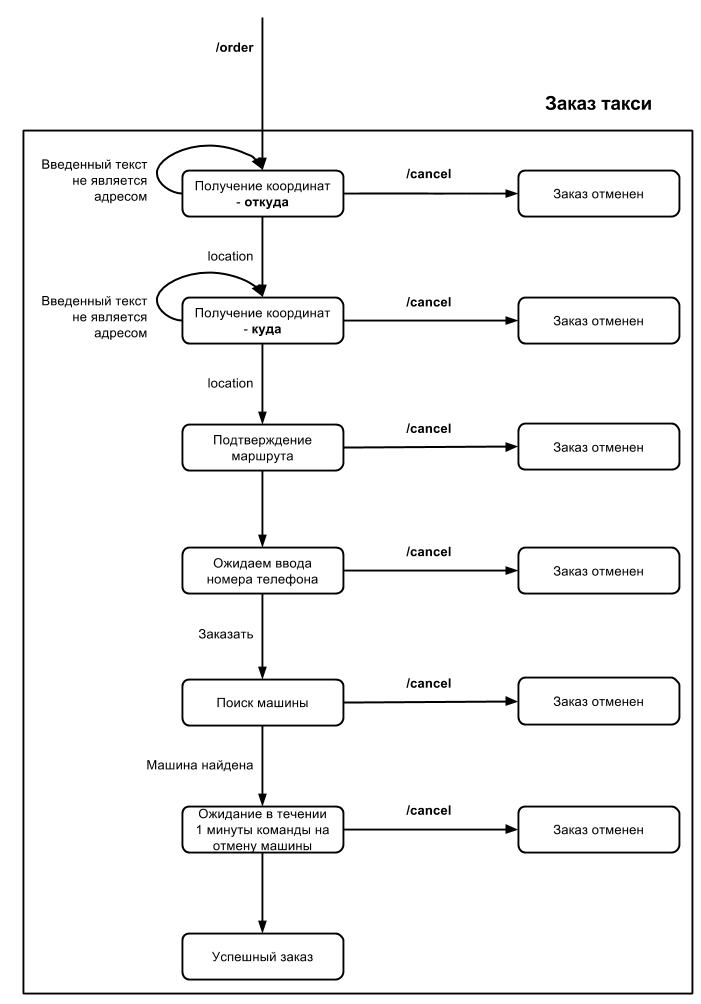
Later, at the stage of receiving the address from the user, I added text recognition through the Yandex Speech API so that you could send the name of the object or address instead of geolocation. But since the taxi ordering API used by me works in its own specific format for receiving an address, this function is not added to the assembly.
The next step, I moved to the paper described the process and logic in the cloud OS admin Corezoid and connected to the process of the actual API Telegram. Already at this stage, it was possible to test the receipt of messages from Telegram into the process. The next step, in the same order, I created the process of ordering a taxi.
This is how the machine looked, describing the states of users of the Telegram bot, in a draft and what it has become in Corezoid.
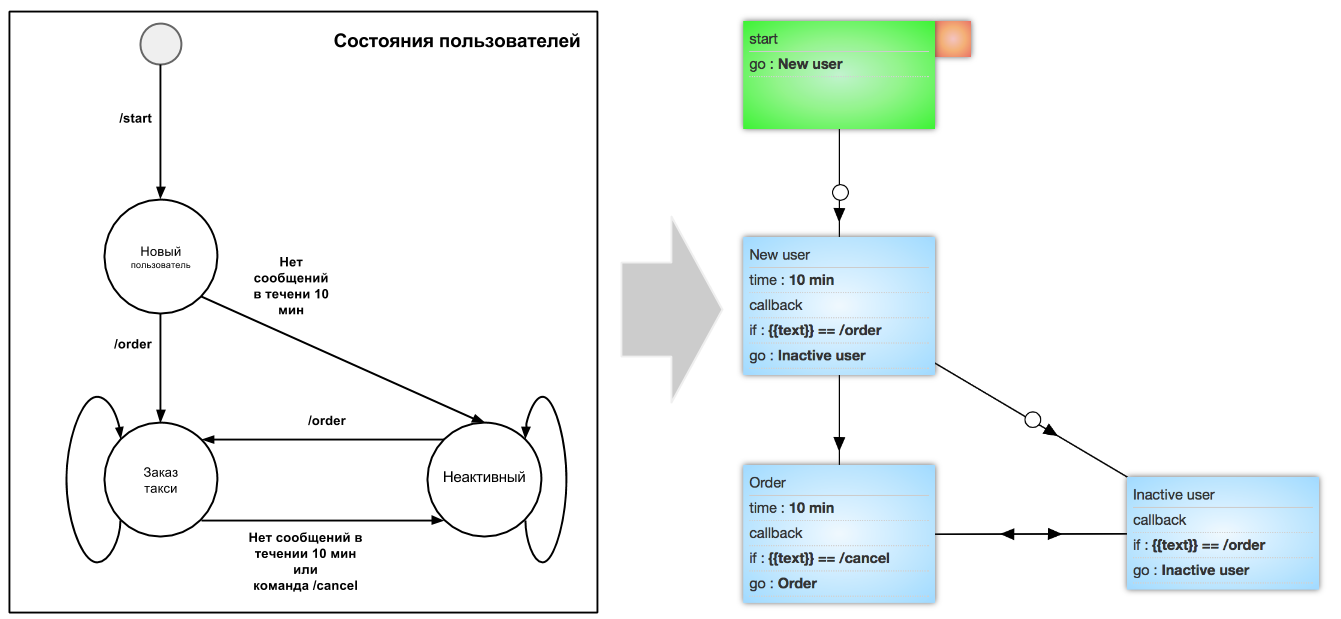
After creating the skeleton of the taxi ordering process, I created separate processes: sending a message to Telegram, processing geolocation, and working with the taxi service API. 5 minutes were spent on testing them and fixing bugs. Then he went on to create a dashboard.
Realtime dashboard and analysis
The core element in Corezoid is the Callback function, in terms of Telegram this is called Webhook. This feature allows a process to wait for a user response. There can be several reactions in this particular process: sending a geolocation by a user or canceling an order (in case of inaction or by the / cancel command). In the future, the system uses the Callback function to monitor the number of user steps in real time. This allows you to visualize the funnel of customers passing the taxi ordering process. By processing each step, you can analyze on which process the client fell off, and moderate the process.
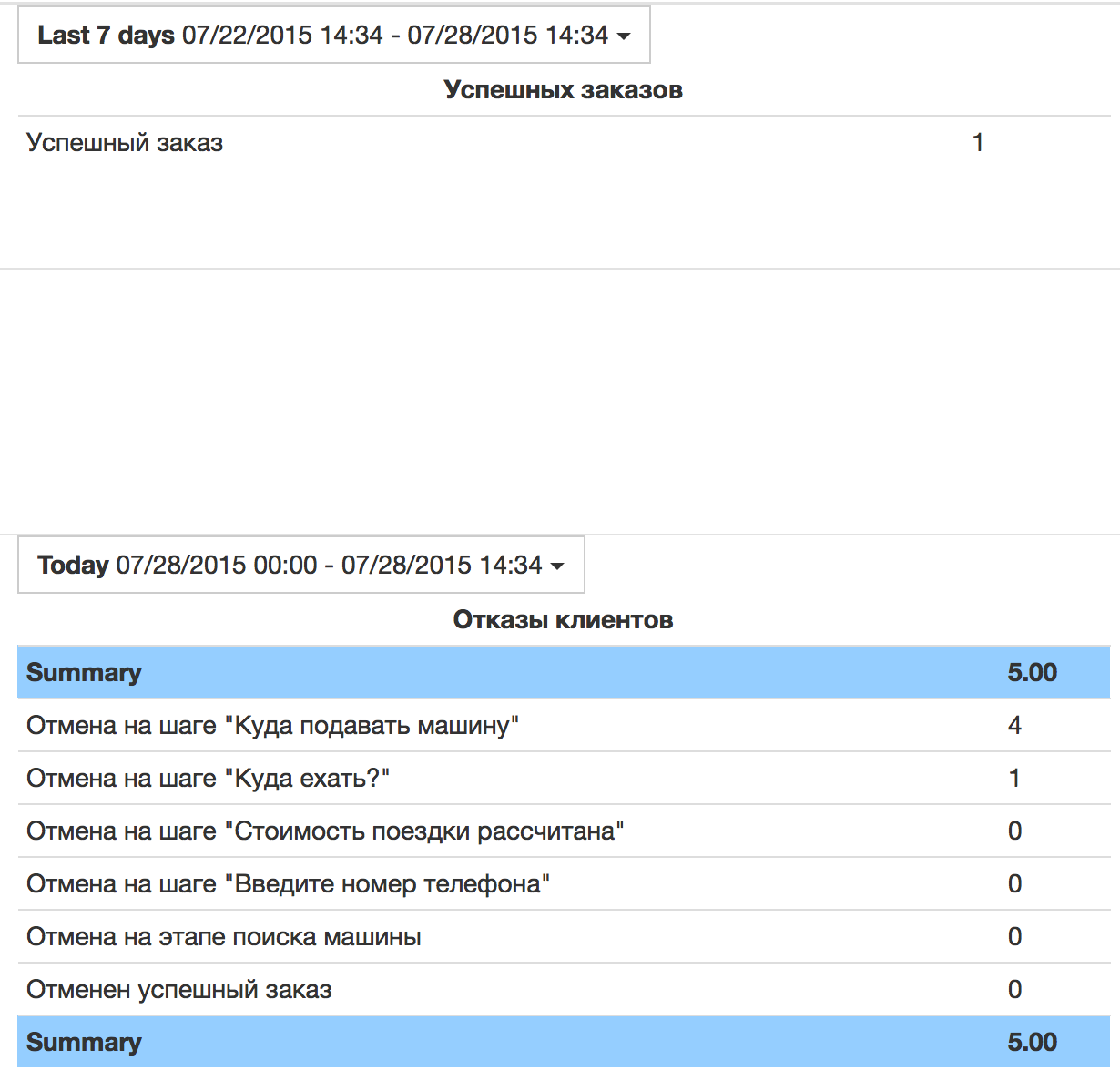
Since Corezoid automatically collects statistics for each state of the process, you can go in and see the detailed statistics of each state of the user and order.
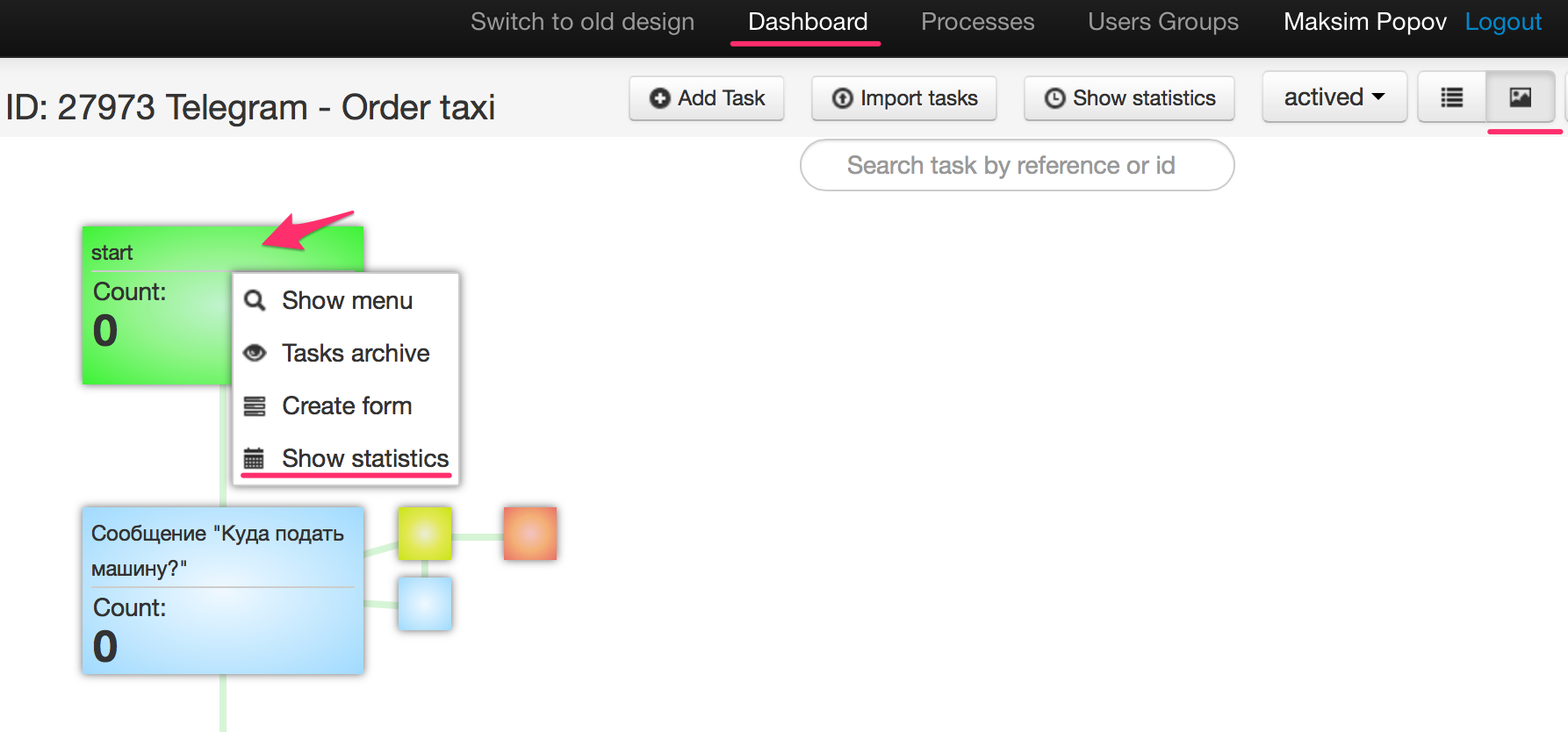
A dashboard is one of the tools to optimize a process. If you intend to use this process, then you will no longer need to build anything - dashboards come out of the box. There you will see how many users have connected the bot, how many are using, how many are not using. You can notify individual customers about some kind of update or awaken the sleeping ones.
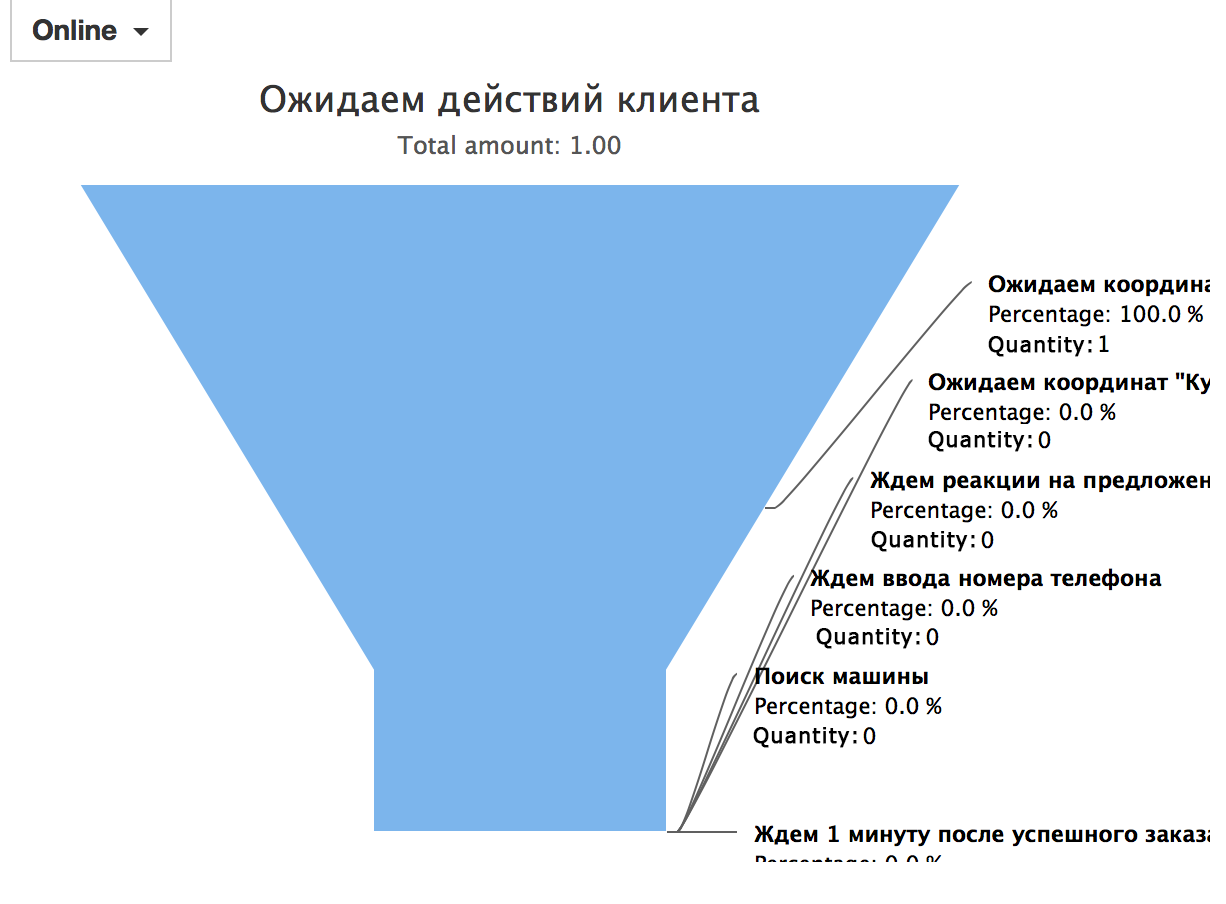
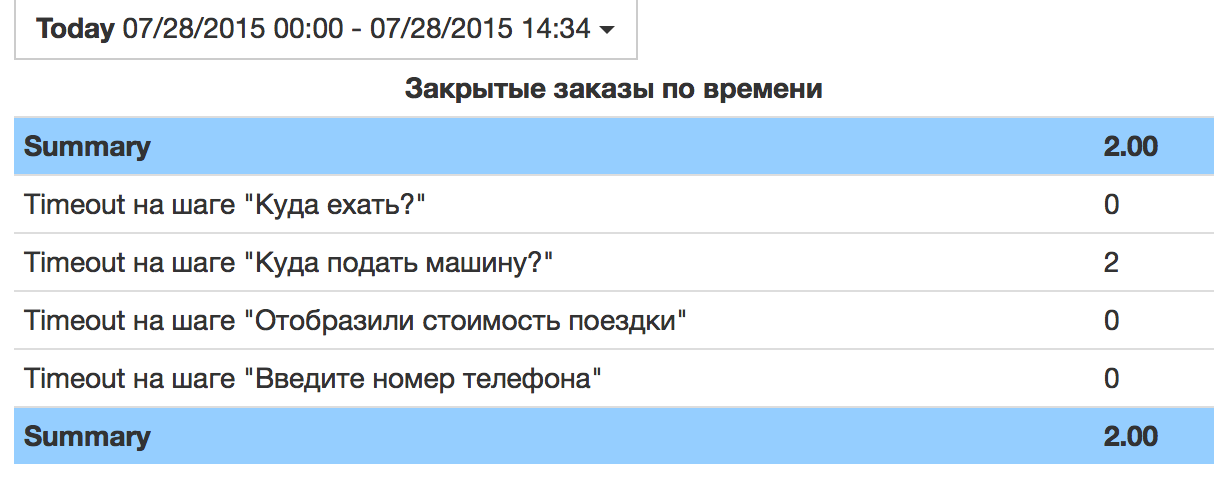
You can find @utaxibot contact in Telegram and go to this dashboard . When you enter the / order command in the bot, you will see how the realtime dashboard works.
How to use the template
I untied the bot from the existing taxi service API. So you can copy your template folderand connect a local taxi ordering service through the API. Just enter the key of your Telegram bot on the one hand and the taxi service API on the other.
Step 1 . Log in in 2 clicks on corezoid.com
Step 2 . Copy the folder with the process .
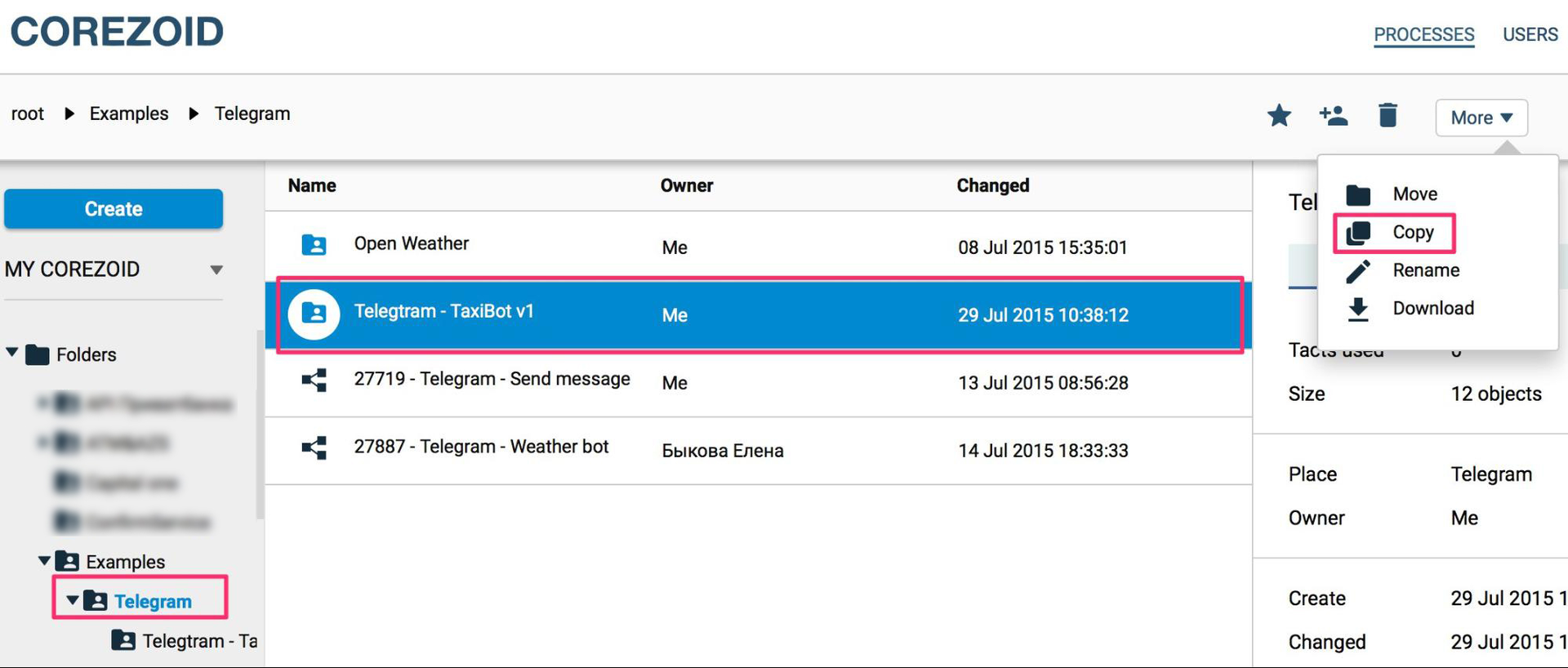
Step 3 . We register our Telegram bot in the @BotFather chat and attach its key to the process in Corezoid.
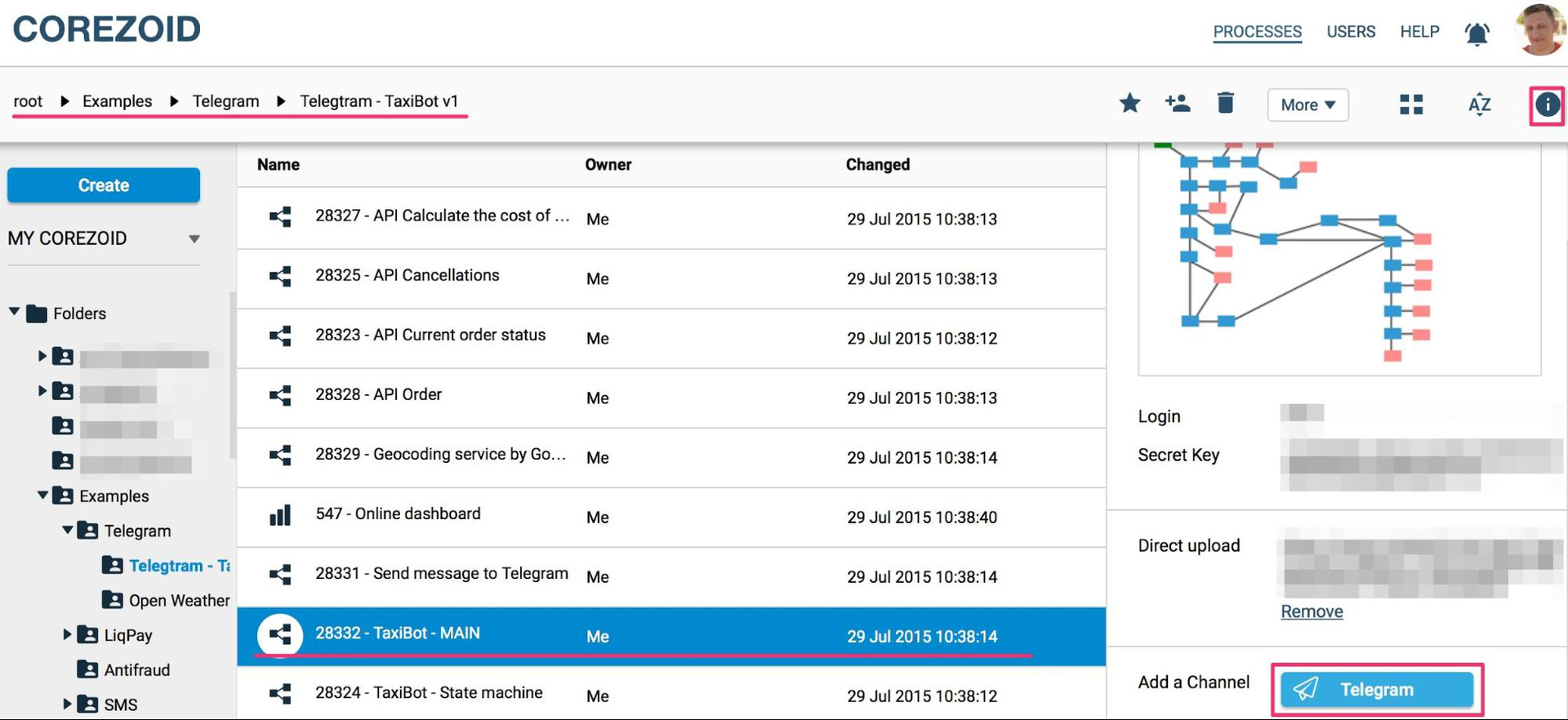
Step 4 . We connect the taxi service API according to the documentation .
Requirements for the taxi ordering API were written based on the API that I used. But Corezoid doesn’t care what API you use, you can independently specify the mapping of incoming and outgoing data, so you can have any of your parameters.
I suggest not just using Corezoid as a constructor for creating processes, but using a ready-made template process.
And most importantly, Corezoid can work with any frontend that supports the mode of operation via webhook / callback. So this process will work with other systems of interaction with the client (Slack, Telegram, SiteHeart, SMS, etc.). You can connect at least the Twitter Direct Message API, and the same process will work through Twitter.
I plan to gradually refine the functionality of the bot, for example, in the near future I will add: text recognition; optimization of work with desktop clients; order for multiple addresses and more. But, as an alternative channel, the bot can be used now.
Prequel
I work in PrivatBank and moderate the business logic of Privat24 using Corezoid. I am not a developer and have no idea about the code.
Initially, Corezoid was developed as a system exclusively for solving the bank's operational issues - escalation management. In the process of operation, it was transformed into a system for managing the state of objects and processes, and then it became clear that Corezoid perfectly suits the role of a backend for front-office systems, including messengers.
There are not many platforms for creating a backend. Recently on Habré I came across this article, where the guys started a conversation about designers for Telegram bots well. Today I continued this conversation and showed a flexible platform with dashboards out of the box. Enthusiasts can now call a taxi directly to Telegram.
Click here if you want to use my template. Or here if you want to familiarize yourself with the Corezoid documentation and figure out how to assemble other bots.
My goal is not just to tell how I put together a bot to call a taxi, but to share this process with others so that the time I spent on implementing the algorithm is not wasted by the rest. As a result of this work, any taxi service, if there is an API, can customize the template of this bot for itself in 5 minutes. Or a bot owner with a large number of users will be able to quickly connect a taxi service to himself.
Design and implementation
The first thing I did was draw on paper a simple taxi call machine and order status. I wanted to do it simply and quickly to understand how many resources will be spent on such a task from scratch. Since I had access to the taxi service API, I only needed to implement the logic.
In my process, I fixed the minimum functionality - an order for now and payment in cash. Functionally, the bot can only receive geolocation without recognizing text addresses. I assembled such minimal functionality with design, implementation and testing in 8 hours.
Later, at the stage of receiving the address from the user, I added text recognition through the Yandex Speech API so that you could send the name of the object or address instead of geolocation. But since the taxi ordering API used by me works in its own specific format for receiving an address, this function is not added to the assembly.
The next step, I moved to the paper described the process and logic in the cloud OS admin Corezoid and connected to the process of the actual API Telegram. Already at this stage, it was possible to test the receipt of messages from Telegram into the process. The next step, in the same order, I created the process of ordering a taxi.
This is how the machine looked, describing the states of users of the Telegram bot, in a draft and what it has become in Corezoid.
After creating the skeleton of the taxi ordering process, I created separate processes: sending a message to Telegram, processing geolocation, and working with the taxi service API. 5 minutes were spent on testing them and fixing bugs. Then he went on to create a dashboard.
Realtime dashboard and analysis
The core element in Corezoid is the Callback function, in terms of Telegram this is called Webhook. This feature allows a process to wait for a user response. There can be several reactions in this particular process: sending a geolocation by a user or canceling an order (in case of inaction or by the / cancel command). In the future, the system uses the Callback function to monitor the number of user steps in real time. This allows you to visualize the funnel of customers passing the taxi ordering process. By processing each step, you can analyze on which process the client fell off, and moderate the process.
Since Corezoid automatically collects statistics for each state of the process, you can go in and see the detailed statistics of each state of the user and order.
A dashboard is one of the tools to optimize a process. If you intend to use this process, then you will no longer need to build anything - dashboards come out of the box. There you will see how many users have connected the bot, how many are using, how many are not using. You can notify individual customers about some kind of update or awaken the sleeping ones.
You can find @utaxibot contact in Telegram and go to this dashboard . When you enter the / order command in the bot, you will see how the realtime dashboard works.
How to use the template
I untied the bot from the existing taxi service API. So you can copy your template folderand connect a local taxi ordering service through the API. Just enter the key of your Telegram bot on the one hand and the taxi service API on the other.
Step 1 . Log in in 2 clicks on corezoid.com
Step 2 . Copy the folder with the process .
Step 3 . We register our Telegram bot in the @BotFather chat and attach its key to the process in Corezoid.
Step 4 . We connect the taxi service API according to the documentation .
Requirements for the taxi ordering API were written based on the API that I used. But Corezoid doesn’t care what API you use, you can independently specify the mapping of incoming and outgoing data, so you can have any of your parameters.
I suggest not just using Corezoid as a constructor for creating processes, but using a ready-made template process.
And most importantly, Corezoid can work with any frontend that supports the mode of operation via webhook / callback. So this process will work with other systems of interaction with the client (Slack, Telegram, SiteHeart, SMS, etc.). You can connect at least the Twitter Direct Message API, and the same process will work through Twitter.
I plan to gradually refine the functionality of the bot, for example, in the near future I will add: text recognition; optimization of work with desktop clients; order for multiple addresses and more. But, as an alternative channel, the bot can be used now.
Prequel
I work in PrivatBank and moderate the business logic of Privat24 using Corezoid. I am not a developer and have no idea about the code.
Initially, Corezoid was developed as a system exclusively for solving the bank's operational issues - escalation management. In the process of operation, it was transformed into a system for managing the state of objects and processes, and then it became clear that Corezoid perfectly suits the role of a backend for front-office systems, including messengers.
There are not many platforms for creating a backend. Recently on Habré I came across this article, where the guys started a conversation about designers for Telegram bots well. Today I continued this conversation and showed a flexible platform with dashboards out of the box. Enthusiasts can now call a taxi directly to Telegram.
Click here if you want to use my template. Or here if you want to familiarize yourself with the Corezoid documentation and figure out how to assemble other bots.









