We are on the record: how we optimized the attachment of images in Mail.Ru Mail for iOS
According to the internal statistics of Mail.Ru Mail, 80% of files sent by email are images. Every day we ourselves send dozens of layouts, prototypes and screenshots. Of course, we wanted to make such a common scenario more convenient, and we succeeded. As a result, sending photos and videos from our iOS application has become much more convenient and faster than that of competitors. For example, to attach three photos to a letter, in Mail.Ru Mail you need only five clicks. This is 10 less than in Gmail, and as much as 13 - than in Apple Mail. Under the cut, a story about working on this task, from the emergence of an idea to its implementation, as well as several heavy gifs.
User Script Identification
Work on new features takes place in several stages. The first is to identify important user scenarios. What do users often do with our app? What can be improved? In search of an answer, we collect comments from feedback and the App Store, conduct surveys of beta testers and analyze statistics. This is how it turned out that more emails with files are sent through the application than via the web.
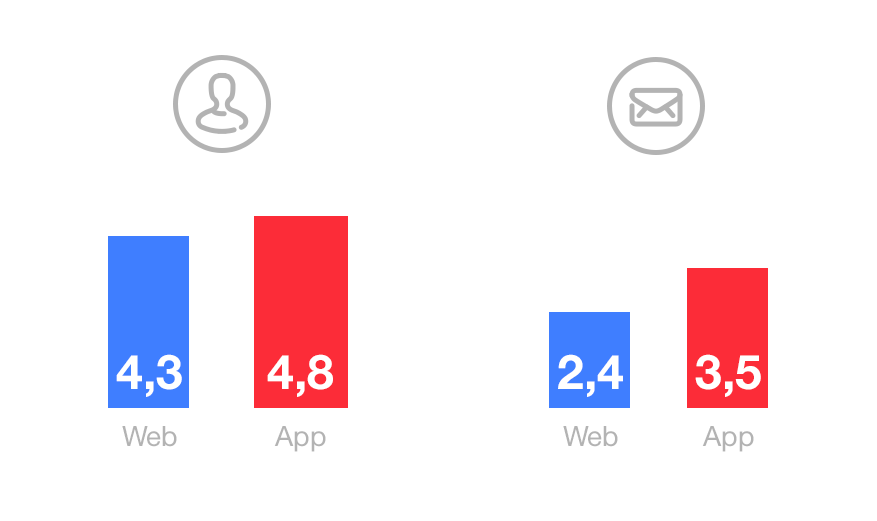
The average number of files sent through the Mail.Ru Mail application and through the web version of Mail: per person, per letter. Internal statistics Mail.Ru, May 2015
And what are most often sent images from smartphones - 80.5% of the total number of files.
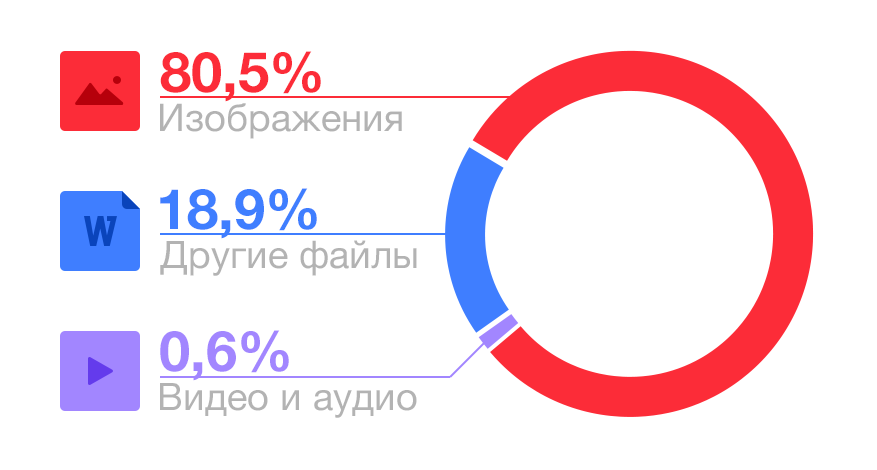
Types of files attached to letters in the Mail.Ru Mail application for iOS. Internal statistics Mail.Ru, August 2014
For a long time, we have systematically simplified writing a letter and attaching files to it:
- added hints when entering email with transliteration;
- made a list of frequently used contacts that is synchronized with the web;
- supported the selection of files from the Mail.Ru Cloud, Dropbox and other storage facilities;
- added the ability to compress pictures before sending.
Now we have focused on attaching images to letters.
The initial state
Before improvements, attaching one photo required 5 clicks:
- Tap on paper clip icon.
- Select “Photos and Videos”.
- Select an album.
- Highlight a photo.
- Click Finish.
Better than Apple Mail, but far from ideal.
First improvements
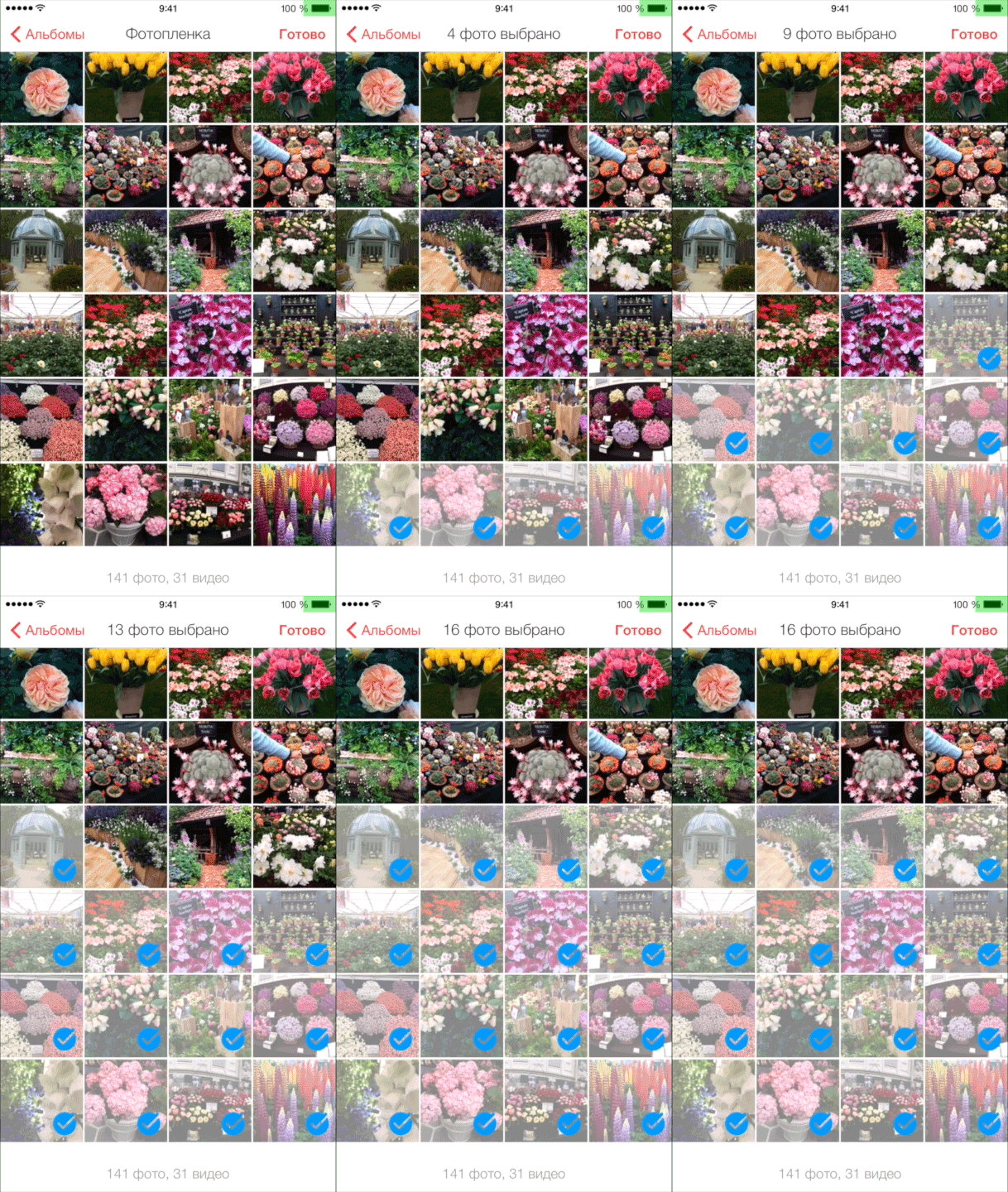
Interviewed users, looked at the statistics on beta versions: almost all the photos are sent from the Camera Roll album (“Camera Roll”). Many users have no other albums at all. The logical change is to get rid of the step with choosing an album. Now Camera Roll opens immediately, and to select another album, the user clicks “Albums”.
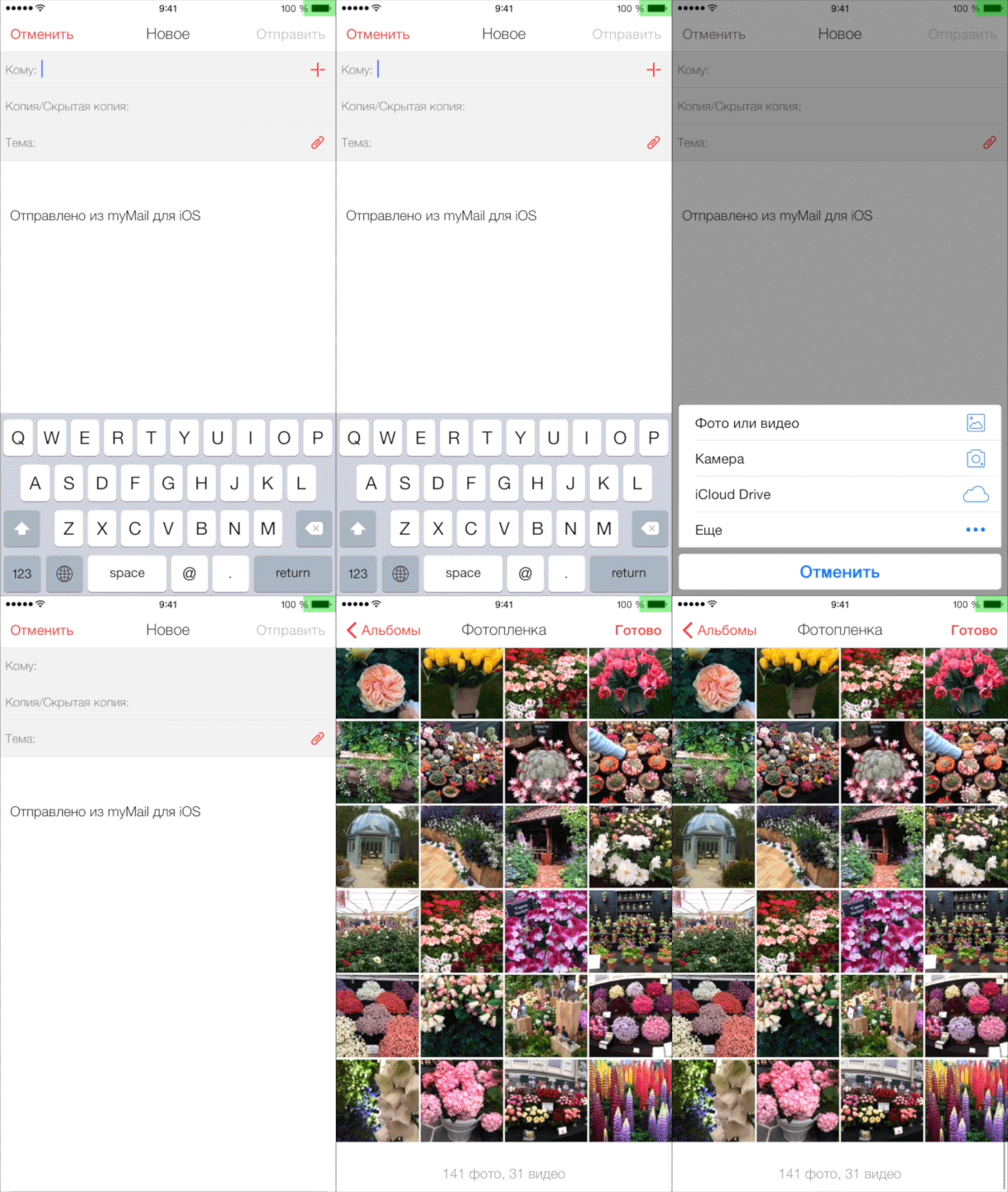
Then we made it easier to select several photos by adding multiselect on a swipe. Now, to select many photos or videos at once, you do not need to tap on each of them - just swipe your finger.
Design
Attaching a photograph to a letter still required four actions. We set ourselves the task of reducing this figure to three, without compromising the usability of other scripts, such as attaching files from other applications. Several options have been prepared (here and below we will show them on the example of layouts for the myMail application, which are being worked on in parallel).

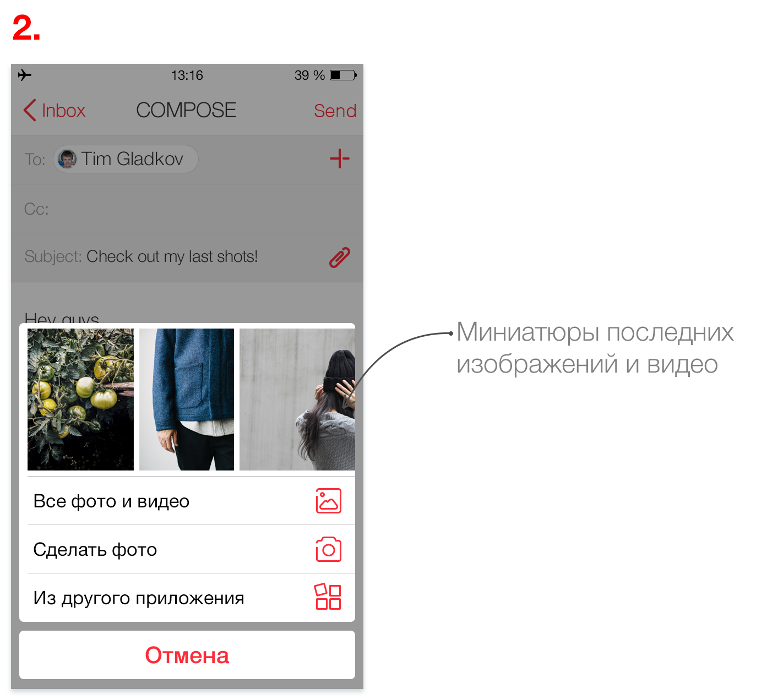

We immediately refused option # 1: the two icons nearby are confusing and make it difficult to choose. In addition, the number of actions is not reduced. The rest of the layouts had both pros and cons. For example, in option number 2, sometimes you have to scroll thumbnails for a long time to find the desired photo. But the user is not confused, because he remains in the same context - on the screen for writing a letter. To choose the best option, we conducted testing.
Prototyping and Verification
Design options are useful to show to guys from other departments to collect the first reviews and comments. We gave our colleagues layouts and analyzed their reaction. According to the results of the survey, they chose option number two - with thumbnails in the dialog.
The next stage of work on features is prototyping. With the prototype, you can try the feature in action without wasting time on development. We use different tools for prototyping - in this case, the prototype was built in the POP application.
The finished prototype was transferred to the usability laboratory. For testing, we invited users of the Mail application who are not associated in their professional activities with either design or development. They were asked to attach to the letter both one photograph or several. For control, an eye tracker was used, which records the movement of the eyes when working with a mobile device. Testing showed that this option of attaching photos is simple and convenient. There were also disadvantages:
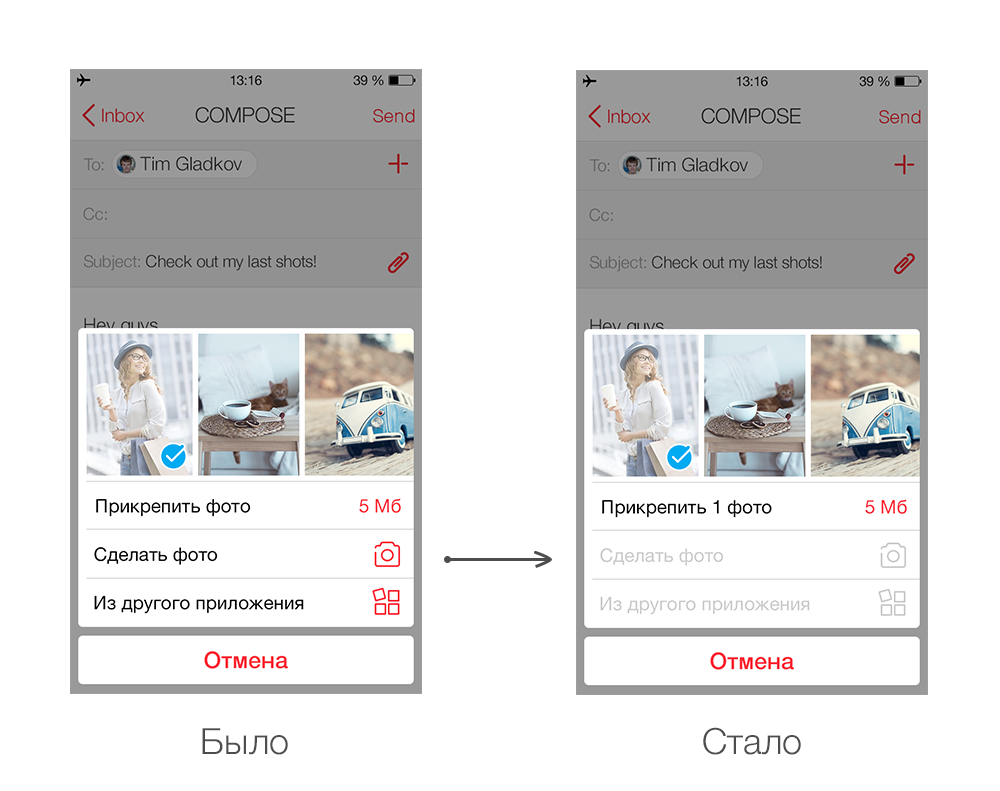
- People did not always notice that after selecting a photo, one of the items under the files turned into a “attach” button.
- Users are asked to show the number of selected files.
We took into account all comments and observations in the new design version. The button became more visible, the number of photos was indicated on it.
We passed this design into development.
Beta testing
Each of our applications has a beta user base that receives updates before the official release. Often they help to identify bugs and shortcomings or suggest ideas on how to improve the feature. So it was this time: the comments of beta testers gave us an idea - to make the photo attachment button even more visible and convenient, for which many thanks to them.

Here's how the attach button changed during the design test.

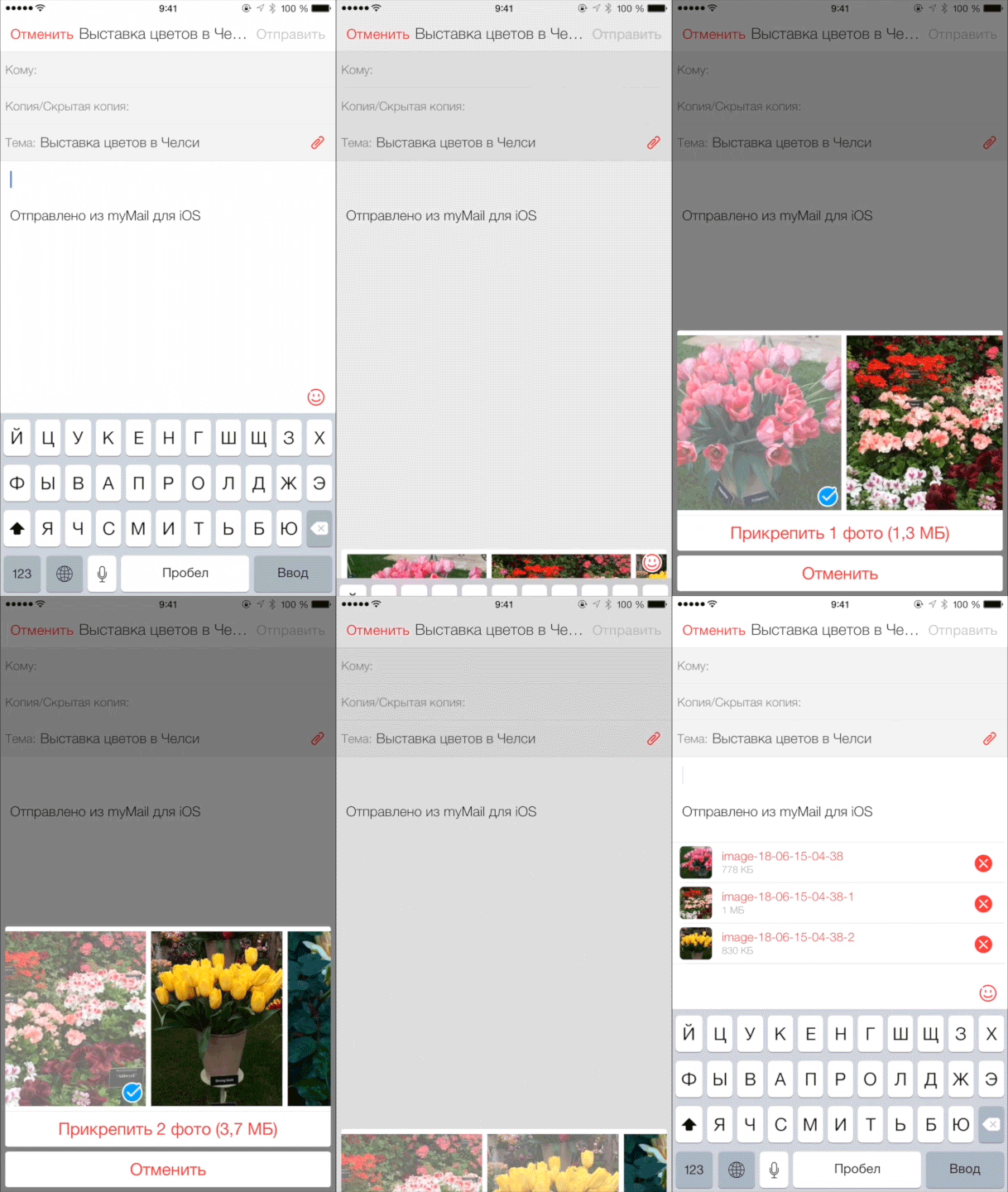
So, the bottom line: now in Mail.Ru Mail for iOS users will be able to attach photos faster than in other email clients. For comparison, we offer to see how many clicks you will need to attach three photos in popular email applications:
| Application Version | Number of clicks |
|---|---|
| Mail.Ru Mail, 3.4 | five |
| Mail.Ru Mail, 3.0 | 6 |
| Yandex.Mail, 2.08 | 7 |
| Gmail 4.0 | 15 |
| Apple Mail, iOS 8.4 | 18 |
PS We reduced the number of tapas by teaching Mail for iOS to guess what the user wants (in our case, to open the latest photos from Camera Roll). It’s great to be aware that you are making an application that reads thoughts. If you have any ideas what other “telepathic” features would be useful for Mail.Ru Mail, tell us about them in the comments.









