 July 6, 2015 at 17:07
UITableView: add an icon to the UITableViewRowAction
The iOS SDK gives us “out of the box” two options to configure the button that will be shown when moving the UITableViewCell to the left.

The first option , available from the first versions to the present day, is not very attractive for ordinary buttons, since it is designed specifically for “dangerous” actions, because the background is painted in red by the system and can not be easily changed through the public API.
The second option , available with iOS 8, is more attractive because it is possible to specify the button style (Destructive, Normal), and also, if necessary, set a specific background color through backgroundColor .
Neither the first nor the second options make it possible to assign an icon, which is rather unpleasant.
But we still try to do something.
Trying once a
UITableViewRowAction looks richer to customize. Let's try to give it backgroundColor using patternImage :
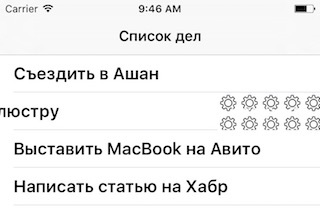
The result is expectedly crooked, but at least we got an icon on the button.
Let us leave the question of the background color and text for later, first we’ll try to customize the icon itself.
Attempt two
Since patternImage is intended to be repeated, let's try to increase the pattern itself so that it repeats less - create a pattern to fit the button:
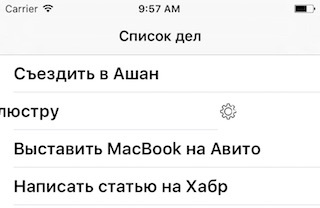
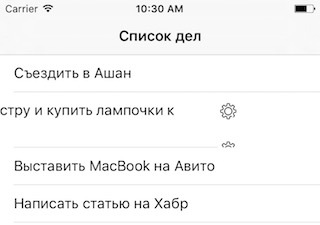
Now it looks much better. But if, for example, the field turns out to be multi-line, and the cell stretches next in height, then it will not be very pleasant:
Trying three
Let's try to do it differently. What happens when we move the line to the left? True, she simply leaves to the left, exposing what is lower in the hierarchy: the button. Let's try to add a layer on top, which will be fastened to the right edge of the cell (PureLayout component to help for quick implementation).
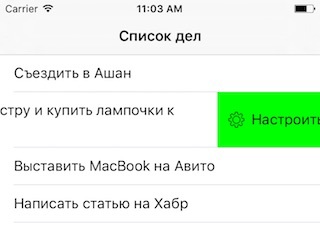
Now the result is much more pleasant, though there is one thing but in this approach: the width of the cell shift is determined by the text in UITableViewRowAction.title. Accordingly, it is necessary to adjust the visible part of the button with this parameter. As an option - fill it with spaces corresponding to the desired width, or append something to the beginning or end.
By the way, this element does not work out pressing itself, so they are quietly forwarded to UITableViewRowAction.handler .
Attempt four
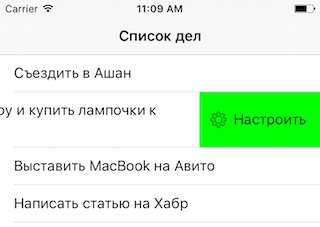
Everything seems to be looking great now.
As a result, there are two but with this approach:
- the shift width is determined separately by the UITableViewRowAction.title parameter
- it will not be possible to make more than one button, or it will be necessary to squeeze them all in its own layer and insert its buttons in the same place.
However, this seems more pleasant to me than the common approach to embedding buttons in the cell itself with gesture processing, because the logic is complicated.
Perhaps there is an even more concise way to achieve the desired, but I still do not know about this.
The first option , available from the first versions to the present day, is not very attractive for ordinary buttons, since it is designed specifically for “dangerous” actions, because the background is painted in red by the system and can not be easily changed through the public API.
- (NSString *)tableView:(nonnull UITableView *)tableView titleForDeleteConfirmationButtonForRowAtIndexPath:(nonnull NSIndexPath *)indexPath
{
    return @"Настроить";
}
The second option , available with iOS 8, is more attractive because it is possible to specify the button style (Destructive, Normal), and also, if necessary, set a specific background color through backgroundColor .
- (NSArray *)tableView:(nonnull UITableView *)tableView editActionsForRowAtIndexPath:(nonnull NSIndexPath *)indexPath
{
    UITableViewRowAction *configureAction;
    configureAction = [UITableViewRowAction
                       rowActionWithStyle:UITableViewRowActionStyleNormal
                       title:@"Настроить"
                       handler:^(UITableViewRowAction * __nonnull action, NSIndexPath * __nonnull indexPath) {
                          // handle
                       }];
    return @[ configureAction ];
}
Neither the first nor the second options make it possible to assign an icon, which is rather unpleasant.
But we still try to do something.
Trying once a
UITableViewRowAction looks richer to customize. Let's try to give it backgroundColor using patternImage :
UIImage *patternImage = [UIImage imageNamed:@"gear_compact"]; // 50x50
configureAction.backgroundColor = [UIColor colorWithPatternImage:patternImage];
The result is expectedly crooked, but at least we got an icon on the button.
Let us leave the question of the background color and text for later, first we’ll try to customize the icon itself.
Attempt two
Since patternImage is intended to be repeated, let's try to increase the pattern itself so that it repeats less - create a pattern to fit the button:
UIImage *patternImage = [UIImage imageNamed:@"gear_fullsize"]; // 240x90
configureAction.backgroundColor = [UIColor colorWithPatternImage:patternImage];
Now it looks much better. But if, for example, the field turns out to be multi-line, and the cell stretches next in height, then it will not be very pleasant:
Trying three
Let's try to do it differently. What happens when we move the line to the left? True, she simply leaves to the left, exposing what is lower in the hierarchy: the button. Let's try to add a layer on top, which will be fastened to the right edge of the cell (PureLayout component to help for quick implementation).
- (UITableViewCell *)tableView:(UITableView *)tableView cellForRowAtIndexPath:(NSIndexPath *)indexPath
{
    UITableViewCell *cell = [UITableViewCell new];
    cell.textLabel.text = self.objects[indexPath.row];
    cell.textLabel.numberOfLines = 0;
    UIView *actionView = [UIView new];
    actionView.backgroundColor = [UIColor greenColor];
    [cell addSubview:actionView];
    [actionView autoMatchDimension:ALDimensionHeight toDimension:ALDimensionHeight ofView:cell];
    [actionView autoMatchDimension:ALDimensionWidth toDimension:ALDimensionWidth ofView:cell];
    [actionView autoPinEdge:ALEdgeLeft toEdge:ALEdgeRight ofView:cell];
    [actionView autoAlignAxis:ALAxisHorizontal toSameAxisOfView:cell.contentView];
    UIImageView *actionIcon = [[UIImageView alloc] initWithImage:[UIImage imageNamed:@"gear_compact"]];
    [actionView addSubview:actionIcon];
    [actionIcon autoAlignAxis:ALAxisHorizontal toSameAxisOfView:actionView];
    [actionIcon autoPinEdge:ALEdgeLeft toEdge:ALEdgeLeft ofView:actionView withOffset:10];
    UILabel *actionLabel = [UILabel new];
    actionLabel.text = @"Настроить";
    [actionView addSubview:actionLabel];
    [actionLabel autoAlignAxis:ALAxisHorizontal toSameAxisOfView:actionView];
    [actionLabel autoPinEdge:ALEdgeLeft toEdge:ALEdgeRight ofView:actionIcon withOffset:5];
	return cell;
}
Now the result is much more pleasant, though there is one thing but in this approach: the width of the cell shift is determined by the text in UITableViewRowAction.title. Accordingly, it is necessary to adjust the visible part of the button with this parameter. As an option - fill it with spaces corresponding to the desired width, or append something to the beginning or end.
By the way, this element does not work out pressing itself, so they are quietly forwarded to UITableViewRowAction.handler .
Attempt four
- (NSArray *)tableView:(nonnull UITableView *)tableView editActionsForRowAtIndexPath:(nonnull NSIndexPath *)indexPath
{
    UITableViewRowAction *configureAction;
    configureAction = [UITableViewRowAction
                       rowActionWithStyle:UITableViewRowActionStyleNormal
                       title:@"(i) Настроить"
                       handler:^(UITableViewRowAction * __nonnull action, NSIndexPath * __nonnull indexPath) {
                          // handle
                       }];
    return @[ configureAction ];
}
Everything seems to be looking great now.
As a result, there are two but with this approach:
- the shift width is determined separately by the UITableViewRowAction.title parameter
- it will not be possible to make more than one button, or it will be necessary to squeeze them all in its own layer and insert its buttons in the same place.
However, this seems more pleasant to me than the common approach to embedding buttons in the cell itself with gesture processing, because the logic is complicated.
Perhaps there is an even more concise way to achieve the desired, but I still do not know about this.









