Working with devices on LibUsb from under Android
Once and then it took me that one device that was controlled via USB from the desktop program could also be controlled via the Android application. The peculiarity was that HID, CDC and other standard classes of devices were not used. Data transfer was carried out through Bulk transfer and end points. At the heart of working with usb was the libusb library.
We will create a test application with which you can transfer and receive arbitrary data from the device.
I will touch on the key points, and the link to the full code will be at the end.
To begin, we act according to the official documentation for working with UsbHost.
Add a line to the manifest
If we want the device to automatically detect and start the application, then in the manifest for the main activation we write the following.
We specify for our device its VID and PID in the file with resources device_filter.xml
Usb manager we get in the onCreate method.
Next, we get a list of devices connected to USB, and among them we are looking for the USB_CLASS_PER_INTERFACE class device we need.
Next, we find the interface we need, do not forget to check the permissions, iterate through all its control points, among them select points for reading and writing and finally connect.
To work with I / O operations, data buffering, asynchrony, and other handy things, an auxiliary manager class is used, but in fact data exchange comes down to the following code.
Reading:
Record:
Thus, BulkTransfer packets are transmitted and received.
As a result, our simple application can transmit and receive arbitrary data.
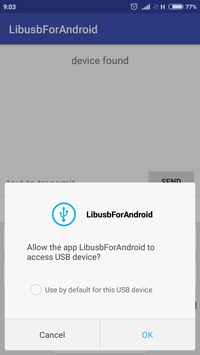
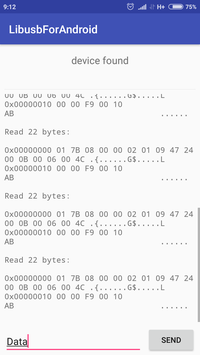
Works!
Project of this test application on GitHub
Useful links:
We will create a test application with which you can transfer and receive arbitrary data from the device.
I will touch on the key points, and the link to the full code will be at the end.
To begin, we act according to the official documentation for working with UsbHost.
Add a line to the manifest
<uses-featureandroid:name="android.hardware.usb.host"/>If we want the device to automatically detect and start the application, then in the manifest for the main activation we write the following.
<intent-filter><actionandroid:name="android.hardware.usb.action.USB_DEVICE_ATTACHED"/></intent-filter><meta-dataandroid:name="android.hardware.usb.action.USB_DEVICE_ATTACHED"android:resource="@xml/device_filter"/>We specify for our device its VID and PID in the file with resources device_filter.xml
<resources><usb-deviceproduct-id="0037"vendor-id="8742"/></resources>Usb manager we get in the onCreate method.
mUsbManager = (UsbManager) getSystemService(Context.USB_SERVICE);Next, we get a list of devices connected to USB, and among them we are looking for the USB_CLASS_PER_INTERFACE class device we need.
UsbDevice findDevice(UsbManager usbManager){
   for (UsbDevice usbDevice : usbManager.getDeviceList().values()) {
       if (usbDevice.getDeviceClass() == UsbConstants.USB_CLASS_PER_INTERFACE) {
           return usbDevice;
       } else {
           UsbInterface usbInterface = findInterface(usbDevice);
           if (usbInterface != null) return usbDevice;
       }
   }
   returnnull;
}
UsbInterface findInterface(UsbDevice usbDevice){
   for (int nIf = 0; nIf < usbDevice.getInterfaceCount(); nIf++) {
       UsbInterface usbInterface = usbDevice.getInterface(nIf);
       if (usbInterface.getInterfaceClass() ==
           UsbConstants.USB_CLASS_PER_INTERFACE) {
           return usbInterface;
       }
   }
   returnnull;
}
Next, we find the interface we need, do not forget to check the permissions, iterate through all its control points, among them select points for reading and writing and finally connect.
privatevoidinitUsbDevice(){
   PendingIntent mPermissionIntent =
       PendingIntent.getBroadcast(this, 0, new Intent(ACTION_USB_PERMISSION), 0);
   IntentFilter filter = new IntentFilter(ACTION_USB_PERMISSION);
   registerReceiver(mUsbReceiver, filter);
   mUsbManager.requestPermission(mUsbDevice, mPermissionIntent);
   mUsbInterface = findInterface(mUsbDevice);
   for (int nEp = 0; nEp < mUsbInterface.getEndpointCount(); nEp++) {
       UsbEndpoint tmpEndpoint = mUsbInterface.getEndpoint(nEp);
       if (tmpEndpoint.getType() != UsbConstants.USB_ENDPOINT_XFER_BULK)
           continue;
       if ((mOutEndpoint == null)
               && (tmpEndpoint.getDirection() == UsbConstants.USB_DIR_OUT)) {
           mOutEndpoint = tmpEndpoint;
       } elseif ((mInEndpoint == null)
               && (tmpEndpoint.getDirection() == UsbConstants.USB_DIR_IN)) {
           mInEndpoint = tmpEndpoint;
       }
   }
   if (mOutEndpoint == null) {
       Toast.makeText(this, "no endpoints", Toast.LENGTH_LONG).show();
   }
   mConnection = mUsbManager.openDevice(mUsbDevice);
   if (mConnection == null) {
       Toast.makeText(this, "can't open device", Toast.LENGTH_SHORT).show();
       return;
   }
   mConnection.claimInterface(mUsbInterface, true);
   startIoManager();
}
To work with I / O operations, data buffering, asynchrony, and other handy things, an auxiliary manager class is used, but in fact data exchange comes down to the following code.
Reading:
mConnection.bulkTransfer(mInEndpoint, data, size, READ_TIMEOUT);Record:
int bytesWritten = mConnection.bulkTransfer(mOutEndpoint,
       Arrays.copyOfRange(data, offset, offset + size), size, WRITE_TIMEOUT);
Thus, BulkTransfer packets are transmitted and received.
As a result, our simple application can transmit and receive arbitrary data.
Works!
Project of this test application on GitHub
Useful links: