Everything that is acquired by excessive labor. About using the free version of Arcserve UDP at home
- Tutorial

It is always unpleasant, turning on the computer, to understand that the hard disk on which important data and favorite photos were stored over the past few years no longer shows signs of life. Or realize that the laptop, recklessly left in the trunk of the car for a minute, disappeared, taking with it the work of recent months.
The recipe for such troubles was invented for a long time: store the data in several copies in different places ( TWO gold cigarette case, TWO imported imported cameras, ... ). Naturally, manually making copies of the data is not our method. First of all, laziness. Secondly, you can forget what you copied and what you did not copy. And when did it last time.
For us these backup programs can take over. But they either cost money (which they spend with a creak on software for a home computer), or, being free, can suddenly stop developing and even exist.
Not so long ago, the list of free data backup tools for personal computers was replenished with another - Arcserve UDP product. More precisely, its free edition for workstations (read - for computers with Windows 7, 8, 8.1). We get a product of industrial quality, but with slightly truncated functionality. Looking ahead, I’ll say that the fact that at home is hardly likely to be needed is cut back.
Since I have been familiar with this product (in previous reincarnations) for a long time, I will allow myself to talk about how to use it to protect my home data from loss.
Installation
First, buy an external drive that can be connected to a computer via a USB port. Something like this, with a USB3 interface:

which interface is better?
Of all the types of connections to a computer (eSATA, FireWire, USB2, USB3, Ethernet, ...) for home use today I consider USB3 to be the most justified. (To thin connoisseurs of FreeNAS, optics and other difficult things - my respect, but to us, mere mortals, USB will be most convenient.)
My external drive and computer support USB3, and my copy speed is around 3 gigabytes per minute. If I connect a USB 2 drive, then the speed drops to 1 Gigabyte per minute. Roughly at speeds like these to estimate the time it takes to copy your data.
It is important that the disk capacity be significantly larger than how much data is occupied on the computer. Once in two or three it would be nice to start. So, if your computer has 500 gigabytes of space, take a look at disks with a size of at least 1000 gigabytes.
Next, download the software.
Links are not allowed here, so google “Arcserve UDP Workstation FREE edition”.
We start the installation. I must say that a reboot is required. Therefore, do not start anything serious before installation.
When installing, you need to pay attention to 2 things.
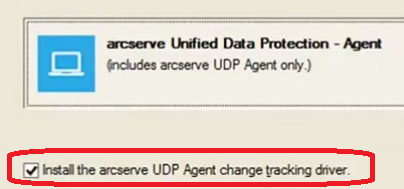
1. Be sure to leave a check mark in the installation item of the change tracking driver on the disk, otherwise nothing of what we need will work.
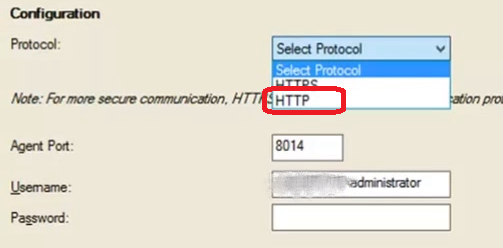
2. The web interface (and there is no other) can work through HTTP or HTTPS. I strongly recommend HTTP for home, otherwise you will either have to bother with certificates, or constantly close windows with browser warnings that you cannot trust what you see.
Getting ready to copy
After rebooting, you need to make the settings. First, launch the web interface:
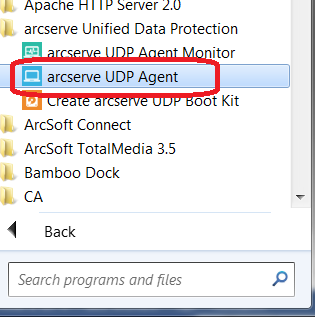
After entering the user password, go to the settings ( Settings ... ).
In the “ Backup Destination ” section, select some directory on the external drive where we will store the backups.
In the “ Backup Source ” section , we usually select “ Backup All Volumes ”. That is, we will make backup copies for all computer data.
In the “ Retention Settings ” section , we indicate how many backups we will keep on disk.
If you do not want to delve into the intricacies, install some large number (1000), and do not strain until the backup disk is full.
For the curious: And what happens if the maximum number of stored backups is not very large, for example, 12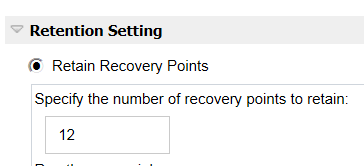
When it comes time to back up, and this will be the 13th copy, the first copy will be destroyed. Thus, the last 12 copies will remain.
However, if the second copy at the same time depended on the first (that is, it was incremental), then before the destruction of the first copy, the second copy will be artificially converted from the incremental to the full one by adding the missing parts from the first. This process is called Merge and starts shortly after the backup if the number of backups exceeded the maximum value that we set.
The merge process is long, comparable in time and resources with a full backup. However, this is the most economical mechanism in terms of used disk space.
If there is enough free disk space for backups, and time is a pity, then you can use another option called Recovery Sets (backup sets).
Recovery Set - a set of backups that are not related to the previous ones. Obviously, it starts with a full backup. And we can delete all such a set without affecting the rest of the sets.
If we indicate that we want to store two sets of backups, then the first cannot be deleted until we proceed to the fourth. But its removal will not cause overhead costs - no one needs it anymore.
When it comes time to back up, and this will be the 13th copy, the first copy will be destroyed. Thus, the last 12 copies will remain.
However, if the second copy at the same time depended on the first (that is, it was incremental), then before the destruction of the first copy, the second copy will be artificially converted from the incremental to the full one by adding the missing parts from the first. This process is called Merge and starts shortly after the backup if the number of backups exceeded the maximum value that we set.
The merge process is long, comparable in time and resources with a full backup. However, this is the most economical mechanism in terms of used disk space.
If there is enough free disk space for backups, and time is a pity, then you can use another option called Recovery Sets (backup sets).
Recovery Set - a set of backups that are not related to the previous ones. Obviously, it starts with a full backup. And we can delete all such a set without affecting the rest of the sets.
If we indicate that we want to store two sets of backups, then the first cannot be deleted until we proceed to the fourth. But its removal will not cause overhead costs - no one needs it anymore.
In the “ Schedule ” section, clear all automatic copy repetitions. At home, we will start the backup only manually.

And the last thing to fill out is the administrator’s name and password on the “ Advanced ” tab (most likely, you are the administrator if you were able to install the product).
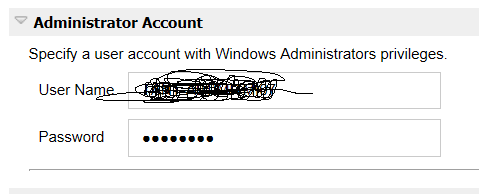
Finally, click the “ Save ” button to save the settings.
First backup
Click the “ Backup Now ” button.
You will be asked to perform a full or incremental backup (as well as another tricky option - Verify Backup . About it later).
But no matter what you choose, the first copy will always be performed as complete.
Subsequently, you can [theoretically] always choose incremental backups, even if the number of backups is in the hundreds. But we must remember that a chain of incremental copies depends on the integrity of all elements of the chain. If one of the links is distorted for any reason, then all subsequent copies will also be distorted. And the recovery time for a long chain can be long.
Therefore, despite the temptation to make incremental backups again in 15 minutes, instead of a five-hour full backup, still, at least once a quarter, force yourself to make a full backup. Leave for the night - and all business. But here we must already remember that a full copy will eat up as much space on your external drive as you have on your computer. Since full copies can very quickly exhaust all available space, see what is written above about the maximum number of backups.
If the computer did not finish correctly (it hung, roughly turned off by the power button), then the table of changed disk blocks may be unreliable, and in this case, the data blocks on the disk are compared with those in the backup. Only those that are really different are copied. This mechanism is called Verify Backup.
“Any backup is only worth something if it can be restored ...”
Let's try to recover some files. Click the “ Restore ” button , then “ Browse recovery Points ”.
Then select the date on the calendar with the backup you are interested in (1), time (2), files and directories for recovery:

We can restore it to the same place it was taken from ( Restore to Original Location ) , but we can go to some other place.
Bare Iron Recovery
Read this too, because you need to prepare for recovery on a machine that is not loaded.
The fact is that a ready-made boot disk for recovery is not supplied. It must be done by ourselves, and done in advance. This is explained by the fact that according to the latest Microsoft regulations, you can not include Windows PE in the composition of the products.
Therefore, we independently load the Windows ADK (5 Gigabytes, for a minute), and only after that we create an ISO image of a disk or a bootable USB flash drive using the “Create Arcserve UDP Boot Kit” utility.
A nice feature is the ability to restore the backup to another machine with a different hardware configuration. At the end of the data recovery process, but before the first boot of the restored machine, it is checked that all the necessary drivers are present in the restored image. If necessary, we will be asked to add the necessary drivers to the restored system in order to avoid troubles, such as a blue screen of death at boot.
The recovery process itself is repeatedly illustrated, it can be found on the network in the form of video clips, including in Russian, so I won’t repeat it here.
And for what they take money in the paid version?
Firstly, for deduplication.
In short, you can constantly make full backups, and only unique (new) data blocks will be transmitted over the network, and they will also be stored only in a single copy. The actual place taken by a deduplicated full backup can be a few percent of a real full backup. Impressive, by the way, when you see reports on the occupied place.
Secondly, for the replication of backups. That is, backups stored locally can send themselves to the backup computing center. If something happens with the local copies - you can pick them up from the zashnik.
Still for the ability to copy servers, all kinds of server applications, AD, virtual systems without installing agents, turning backups into virtual machines on the go, centralized management. Well, every little thing.
If you have Windows XP
- Doctor, I have XP SP3, but nothing starts up ...
- For an operating system of this age, this is normal.
- And my friend has XP SP1, he says that everything starts up for him.
- Well, and you say.
I myself am one of those. I have a couple of XP mastodons for which I made backups using the ancestor of this product, called Arcserve D2D. Currently, Arcserve UDP cannot be installed on XP machines, although it is said that its bare-metal recovery disk can restore XP backups received by previous versions of the product.
Can i be calm True?
“Only insurance can give a person peace of mind,” Ostap answered, not slowing down. “So any life insurance agent will tell you.”
In the case of backups, for certainty and peace of mind, it is customary to conduct periodic checks that the data can be restored.
This is not easy to organize on a home computer. We do not have yet another computer in stock, where we can restore data for verification. But cutting to life - to restore to the computer from which the copy was received - is pointless.
The fact that data cannot be recovered can be established only by losing this data.
I usually use a virtual environment for such purposes. The benefit of these now - heaps. For example, VMware Workstation or Oracle VM VirtualBox. The only thing to worry about is free disk space.
We create a virtual machine, load it from the recovery disk, restore the data (we connect the external backup disk either directly to the virtual machine or as a network folder), we make sure that it works.
Good luck in saving and restoring data.