
openEMS - open source electromagnetic simulator
This post talks about the openEMS open source electromagnetic simulator. The author of the project is Thorsten Liebig (Germany, University of Duisburg-Essen). The project website is openems.de . Github repository: github.com/thliebig/openEMS-Project . The simulator is cross-platform and runs on Linux and Windows.
When I first saw this project, I did not believe that such a thing could be created. Creating an electromagnetic simulator is a rather time-consuming task, and before, I thought that this was beyond the power of the open-source community. However, openEMS refutes this view. This is a full electromagnetic simulator. Of course, he does not reach the level of HFSS, but this is already a very worthy result.
Here is an example of using a simulator. This is the 15 GHz horn antenna pattern obtained with openEMS.

A distinctive feature of this simulator is that it does not have its own graphical interface, but is embedded in Octave or Matlab. The simulation task is an Octave or Matlab script, and the Paraview program is used to view the results. For example, a horn antenna is modeled by such a script.
An electromagnetic simulator is designed to calculate the distribution of the electromagnetic field in various systems, excited by both an AC voltage source and an external electromagnetic field.
1. Calculation of the electromagnetic field (electrodynamics) by the FDTD method (finite difference method in the time domain)
2. Calculation of the S-parameters of electromagnetic systems
3. Calculation of the electromagnetic field in the near and far zones
4. Calculation of antenna patterns
. 5. Visualization of results.
The advantage of openEMS is that it is built into Matlab / Octave, and therefore we have unlimited possibilities for parameterization of models. For post-processing the results, you can also use the full power of these systems of numerical mathematics. It doesn’t require fussing with exporting the results and pushing them into the mathematical system, but you can immediately get the graphs and insert them into articles.
The disadvantage of openEMS is the increased entry threshold. The simulator is not intuitive. To understand what to do with it, you must read the manuals. Without knowledge of Matlab / Octave, working with it is generally impossible.
Installation instructions are here www.openems.de/index.php/OpenEMS#Installation.
For installation under Linux, you can use ready-made packages for your distribution by connecting a third-party openEMS repository. For example, for Debian 7, installation is performed in two stages. First, add the repository:
And then install the packages:
For Slackware14.1, there is SlackBuild from me: github.com/ra3xdh/openEMS.SlackBuild
If there are no ready-made packages for your distribution kit, you will have to compile openEMS from the source. Assembly instructions are located here: www.openems.de/index.php/Compile_from_Source
The following libraries will be required for assembly:
It should be noted that openEMS requires the VTK5 library, which is incompatible with VTK6. So if you have VTK6 in your distribution, then you need to build and install VTK5 first. Take VTK5 here www.vtk.org/download .
To view the simulation results, you need to install Paraview. It is usually in your distribution and is installed using the package manager.
Now you need to register the paths to the openEMS package in the Octave or Matlab configuration file. Suppose openEMS is installed in / opt / openEMS. Then in the $ HOME / .octaverc file you need to add:
For Matlab, the same thing needs to be added to the startup.m file.
Now you can get to work.
First, we verify that the openEMS kernel itself starts. To do this, in the console, go to the directory where openEMS is installed, and then run openEMS. For example, for the case of installation in / opt / openEMS:
You should get something like this in the console:
If it turned out, then you can continue. Otherwise, something went
wrong.
Now we check the interface with Octave. run Octave or Matlab and verify that everything is functioning. First, we check that there is interaction with CSXCAD, a program for previewing a 3D model. You need to enter the InitCSX () command and the system should give something like this:
Now you need to check the interface to create a finite difference space in the time domain:
Now we try to start openEMS from Matlab / Octave with a nonexistent task:
Now try to run the CSXCAD geometry viewer. To do this, type the command inside Octave (it launches CSXCAD with some empty file):
In response, you should receive an error message in which we click OK and then the CSXCAD window should open. It looks like this:
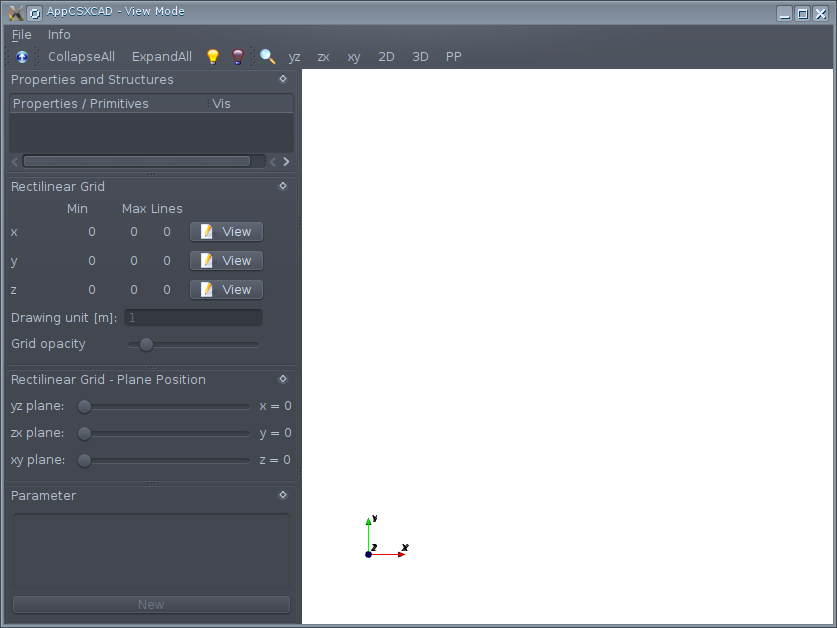
If all these steps have been completed, then you can begin to master the simulator. The next part will describe how to model the propagation of an electromagnetic wave in the space between two parallel plates.
When I first saw this project, I did not believe that such a thing could be created. Creating an electromagnetic simulator is a rather time-consuming task, and before, I thought that this was beyond the power of the open-source community. However, openEMS refutes this view. This is a full electromagnetic simulator. Of course, he does not reach the level of HFSS, but this is already a very worthy result.
Here is an example of using a simulator. This is the 15 GHz horn antenna pattern obtained with openEMS.
Key features
A distinctive feature of this simulator is that it does not have its own graphical interface, but is embedded in Octave or Matlab. The simulation task is an Octave or Matlab script, and the Paraview program is used to view the results. For example, a horn antenna is modeled by such a script.
An electromagnetic simulator is designed to calculate the distribution of the electromagnetic field in various systems, excited by both an AC voltage source and an external electromagnetic field.
1. Calculation of the electromagnetic field (electrodynamics) by the FDTD method (finite difference method in the time domain)
2. Calculation of the S-parameters of electromagnetic systems
3. Calculation of the electromagnetic field in the near and far zones
4. Calculation of antenna patterns
. 5. Visualization of results.
The advantage of openEMS is that it is built into Matlab / Octave, and therefore we have unlimited possibilities for parameterization of models. For post-processing the results, you can also use the full power of these systems of numerical mathematics. It doesn’t require fussing with exporting the results and pushing them into the mathematical system, but you can immediately get the graphs and insert them into articles.
The disadvantage of openEMS is the increased entry threshold. The simulator is not intuitive. To understand what to do with it, you must read the manuals. Without knowledge of Matlab / Octave, working with it is generally impossible.
Installation
Installation instructions are here www.openems.de/index.php/OpenEMS#Installation.
For installation under Linux, you can use ready-made packages for your distribution by connecting a third-party openEMS repository. For example, for Debian 7, installation is performed in two stages. First, add the repository:
wget -O- 'http://download.opensuse.org/repositories/home:/sibbi77:/openEMS/Debian_7.0/Release.key' 2>/dev/null | apt-key add -
echo 'deb http://download.opensuse.org/repositories/home:/sibbi77:/openEMS/Debian_7.0/ /' > /etc/apt/sources.list.d/openems.list
And then install the packages:
apt-get update
apt-get install openems appcsxcad
For Slackware14.1, there is SlackBuild from me: github.com/ra3xdh/openEMS.SlackBuild
If there are no ready-made packages for your distribution kit, you will have to compile openEMS from the source. Assembly instructions are located here: www.openems.de/index.php/Compile_from_Source
The following libraries will be required for assembly:
- Cgal
- boost
- tinyxml
- hdf5
- Qt4
- VTK5
It should be noted that openEMS requires the VTK5 library, which is incompatible with VTK6. So if you have VTK6 in your distribution, then you need to build and install VTK5 first. Take VTK5 here www.vtk.org/download .
To view the simulation results, you need to install Paraview. It is usually in your distribution and is installed using the package manager.
Setup after installation
Now you need to register the paths to the openEMS package in the Octave or Matlab configuration file. Suppose openEMS is installed in / opt / openEMS. Then in the $ HOME / .octaverc file you need to add:
addpath('/opt/openEMS/share/openEMS/matlab');
addpath('/opt/openEMS/share/CSXCAD/matlab');
For Matlab, the same thing needs to be added to the startup.m file.
Now you can get to work.
Trial run
First, we verify that the openEMS kernel itself starts. To do this, in the console, go to the directory where openEMS is installed, and then run openEMS. For example, for the case of installation in / opt / openEMS:
cd /opt/openEMS/bin/
./openEMS
You should get something like this in the console:
 ----------------------------------------------------------------------
 | openEMS 64bit -- version v0.0.32-14-g63adb58
 | (C) 2010-2013 Thorsten Liebig   GPL license
 ----------------------------------------------------------------------
        Used external libraries:
                CSXCAD -- Version: v0.5.2-15-gcb5b3cf
                hdf5   -- Version: 1.8.13
                          compiled against: HDF5 library version: 1.8.13
                tinyxml -- compiled against: 2.6.2
                fparser
                boost  -- compiled against: 1_54
                vtk -- Version: 5.10.1
                       compiled against: 5.10.1
If it turned out, then you can continue. Otherwise, something went
wrong.
Now we check the interface with Octave. run Octave or Matlab and verify that everything is functioning. First, we check that there is interaction with CSXCAD, a program for previewing a 3D model. You need to enter the InitCSX () command and the system should give something like this:
octave:1> InitCSX()
ans =
  scalar structure containing the fields:
    Properties = [](0x0)
    ATTRIBUTE =
      scalar structure containing the fields:
        CoordSystem = 0
Now you need to check the interface to create a finite difference space in the time domain:
octave:2> InitFDTD(0,0)
ans =
  scalar structure containing the fields:
    ATTRIBUTE =
      scalar structure containing the fields:
        NumberOfTimesteps = 0
        endCriteria = 0
Now we try to start openEMS from Matlab / Octave with a nonexistent task:
octave:4> RunOpenEMS('.','nonexistent.xml','.')
 ----------------------------------------------------------------------
 | openEMS 64bit -- version v0.0.32-14-g63adb58
 | (C) 2010-2013 Thorsten Liebig   GPL license
 ----------------------------------------------------------------------
 [....]
openEMS - unknown argument: .
openEMS: Error File-Loading failed!!! File: nonexistent.xml
Now try to run the CSXCAD geometry viewer. To do this, type the command inside Octave (it launches CSXCAD with some empty file):
CSXGeomPlot('nonexistant.xml')
In response, you should receive an error message in which we click OK and then the CSXCAD window should open. It looks like this:
If all these steps have been completed, then you can begin to master the simulator. The next part will describe how to model the propagation of an electromagnetic wave in the space between two parallel plates.
OpenEMS Resources
- Project sai : openems.de
- Github: github.com/thliebig/openEMS-Project
- Wiki: openems.de/index.php/Main_Page
- Feature List: openems.de/index.php/List_of_Functions