Twitter Bootstrap and SharePoint. How to make Bootstrap work correctly under SP
Why use bootstrap?
When developing and finalizing solutions based on SharePoint, I began to face more and more high expectations of users from standard forms for creating and editing elements. Everyone is surrounded by such convenient and familiar Yandex, Gmail, Facebook, VK and others. Nice, fast and clear interfaces have become the norm. Many expect interfaces of a similar level in enterprise systems.
I will leave aside the comparison of budgets for the development of interfaces of an average integrator, or a small development department in a large company on the one hand, and software and web giants on the other, however, I note that these subtleties are usually not interesting to the user and customer. The result itself is interesting. For developers who use front-end frameworks, this result is usually satisfactory to customers. However, the question remains, why Bootstrap? To do this, consider typical “Wishlist”:
- The ability to painlessly fill out a form from a mobile device (starting with the iPad, ending with Android smartphones with a resolution of 800x600 pixels);
- Modern design - everyone is very tired of the standard SharePoint interface;
- Complex, compound controls.
If you translate these desires into a technical language, you get the following:
- Adaptive layout;
- Preset styles, themes, etc .;
- Complex controls, usually a bunch of logic in JS + CSS.
To solve these problems, I did a little research on the current front-end frameworks. The choice fell on Twitter Boostrap for several reasons. I note only those that apply to the situation:
- The most popular one is usually, this means that all questions have already been answered;
- Excellent documentation and examples;
- When implementing markup on a bootstrap, we do not create styles, HTML markup, etc., in fact, we take ready-made blocks and paste them into our form;
- There is no need to write your own complex modules and controls, you can take ready-made scripts, connect to the page and use according to the developer's documentation;
- Low entry threshold - just understand the basic principles of HTML JS CSS and you can already start using all the features of bootstrap.
Specifically for the tasks:
- Adaptive layout - for clarity - http://www.youtube.com/watch?v=5wMk4iXnpG0#t=75 (in fairness, adaptability, now, the standard for modern front-end frameworks);
- In addition to the fact that the bootstrap itself looks modern, thousands of themes have been created on its basis, including free ones, for example - http://ironsummitmedia.github.io/startbootstrap-sb-admin/index.html ;
- Countless plugins and libraries have been written for the bootstrap, it will not be difficult to find a ready-made solution, the other thing is that all of them will most likely have to be finalized, but this is a common disease of open source solutions.
And the most important thing to understand. Using bootstrap, you get a powerful, proven front-end community of developers tool, thanks to which you simplify the life of yourself, the customer and your boss. The customer will use a modern and convenient interface, you will quickly get a decent result, and the boss will reduce costs without sacrificing quality.
Task
It is necessary for a short period of time to realize the form in the form of a wizard with custom validation. It will be filled by users, including from mobile devices. The organization has all kinds of browsers, IE8 +, etc. One of the main requirements is “to look modern”.
Having studied the examples, I decided to try to implement it. The result is excellent: But if you look closely, problems are visible: After examining the question, it turned out that Bootstrap uses the box-sizing: border-box style, applies it to the entire document and thus breaks the SharePoint layout, where the value of box-sizing: content- box. In the first version, when calculating the position of an element, the boundary is considered inside the element, and in the second, outside. I recommend to familiarize yourself with: http://www.w3schools.com/cssref/css3_pr_box-sizing.asp

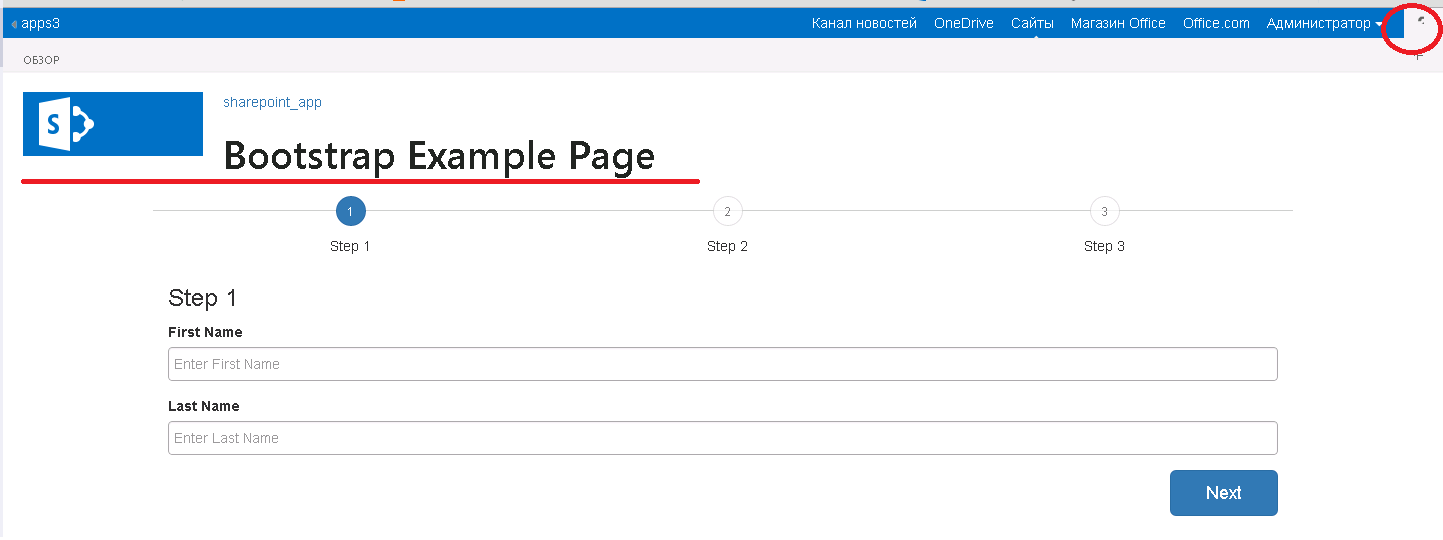
In bootstrap, border-box is used, because this simplifies the calculation of the final width of the adaptive layout system blocks.
The question arose in full growth: and how? Refuse bootstrap? Not! One of the first decisions is to use a custom Masterpage ( under 2013 , under 2010 ). This solution has both pros and cons:
[+] Bootstrap works without any tricks;
[+] Any themes and snippets taken from the network get up quickly and look good;
[-] This is a custom masterpage, it is not always possible to install it;
[-] If custom masterpage is used, this one will have to be finalized.
Decision
In my case, the implementation with a custom mastepage did not work. So that Boostrap does not break the layout of SharePoint, I decided to use a workaround, namely:
- Created a fork and a new branch of the Bootstrap project on the github ( https://github.com/dimkk/bootstrap/tree/bootstrap-scoped );
- Made changes to LESS files + fixed styles for Body and Html;
- Compiled and put in the / scoped / folder of this branch;
- Now, in order for the bootstrap styles to work, it is enough to implement the following markup:
<divclass='bootstrap-scope'><divclass='bootstrap-html'><divclass='bootstrap-body'>
      [Тут работаем как с обычным бутстрапом]
    </div></div></div>
I connected this file to my project, it became ok, but not really! Since I took this wizard for example with bootsnipp , additional styles are used there, which also need to be "bought up" for our bootstrap styles. The result was very good: The source for this application is available at: https://github.com/dimkk/sharepoint.app.bootstrap Unfortunately, this method is also not a panacea. It has its pros and cons: [+] Ease of implementation - plugged in, added markup, and work anywhere in SP without risk of breaking the rest of the layout;
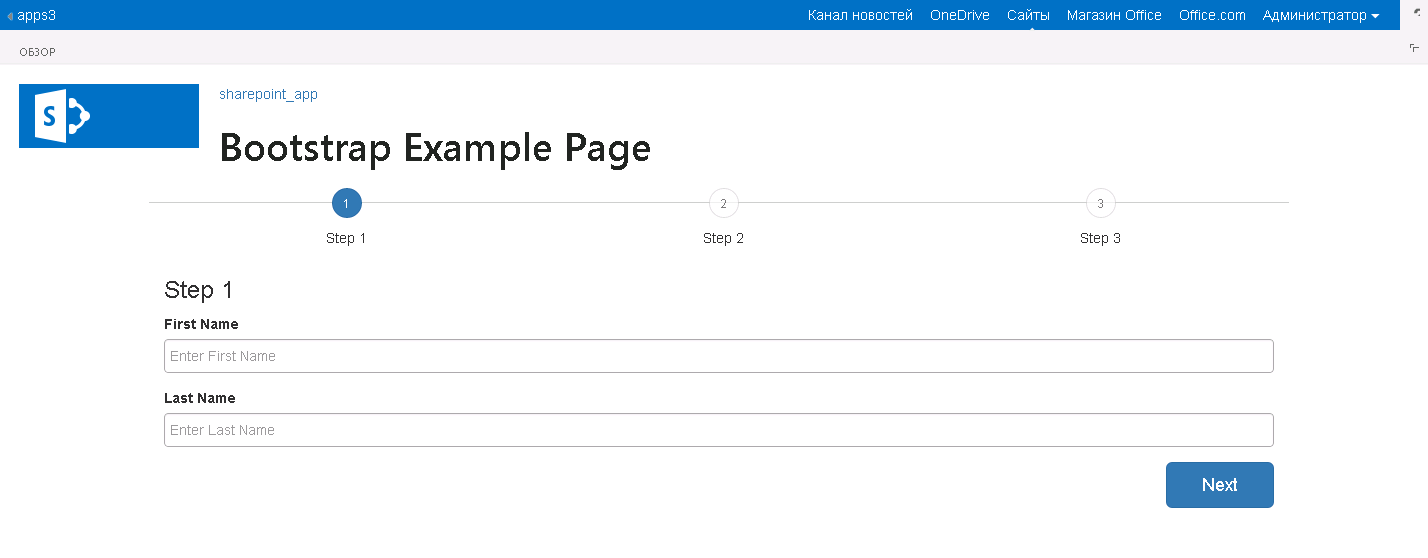
[-] If you copy ready-made solutions, you have to modify the layout for a specific "scope", however, it must be said that sometimes there are ready-made solutions that will satisfy the most demanding customers, then, in cases where masterpage cannot be used, this method will be a real solution problems.
To deploy the example, you need:
- In the case of Sharepoint Online:
- In the SharePoint Central Administration Center, create a private site collection, select the template - the developer's site, and the rest of the parameters as usual.
- Open the downloaded project in the studio, click on the project, press F4 - in the properties window in the Site URL field enter the URL of the newly created site
- Click Deploy - look at the result
- In the case of On-Premise SharePoint 2013:
- If you have not deployed Apps infrastructure, you need to deploy it, for example, according to this guide: Text Video
- Open the downloaded solution, also enter Site Url - deploy the solution
PS In the near future I plan to talk about how to assemble the logic for this form using Angular, as well as how to test Angular code under Visual Studio. I will dwell in more detail on the Appa deployment.