 February 3, 2015 at 11:05
PHP output buffer
- Transfer
In this article I want to talk about how the "output buffering" layer is implemented in PHP, how it works and how to interact with it from PHP. There is nothing complicated in this layer, but many developers either do not understand how to handle it at all or do not have complete clarity. Everything that I will write about belongs to PHP version 5.4 and higher. It is starting from it that many things related to the output buffer (BV) have changed. In fact, this functionality has been completely rewritten, so compatibility with version 5.3 is only partially preserved.
The output stream in PHP contains bytes, usually in the form of text, which the developer needs to display. Most often, the echo or printf () construct is used for this . First, you need to understand that any function that outputs something will use BVs from the PHP domain. If we talk about extensions for PHP, then you can access functions that write to SAPI directly, bypassing any upstream BV. The C API is documented in lxr.php.net/xref/PHP_5_5/main/php_output.h , a lot of information can be gleaned from it, for example, about the default buffer size.
The second important point: the BV layer is not the only layer in which the output data is buffered.
And the third: depending on the SAPI you are using (web or cli), the BV layer can behave differently.
Below is a diagram that will help to understand all of the above:
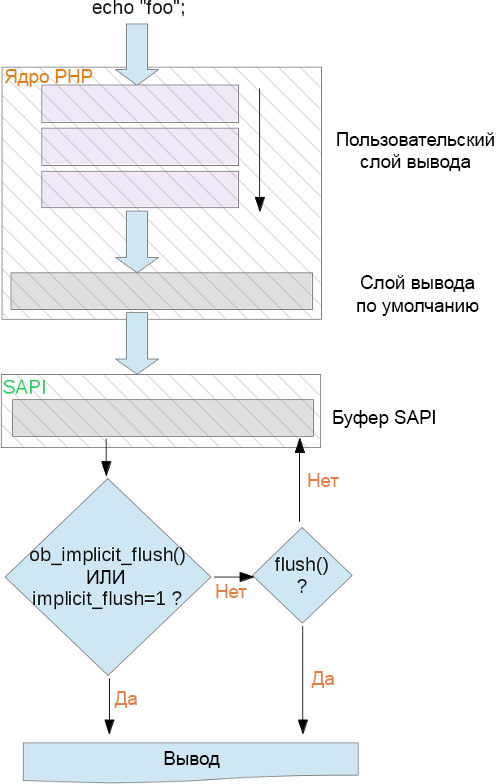
Here we see that in order to control the output data in PHP, three logical layers of buffering are used. Two of them belong to the same "output buffer", and the third - SAPI. When the output stream leaves the PHP area to get to the lower level of the architecture, new buffers may appear along the way: terminal buffer, FastCGI buffer, web server buffer, operating system buffer, TCP / IP stack buffers. Do not forget about it. Although in the framework of this article we will only talk about PHP, there are still a lot of software tools on the stack on the way to the bottom layer and the user.
An important note regarding the SAPI CLI: it disables any default output buffer in PHP by setting the output_buffering parameter ini to 0. So, until you manually write the ob_ () function in the CLI , by default all the output will go directly to the SAPI layer . Moreover, in the CLI , the value of 1 is implicitly specified for the implicit_flush parameter . The developers always misunderstand the essence of this parameter, although the code says it is completely unambiguous: when implicit_flush is 1, the SAPI layer buffer is reset each time it is written. That is, every time you write data for output using the CLI SAPI, they are immediately sent to the lower level, where they are written as stdout, and then reset.
If you use SAPI not like the CLI, but for example PHP-FPM, then you can experiment with three parameters in ini related to the buffer:
Please note that using ini_set () with them will not have any effect, since their values are read at the moment PHP is launched, before it can run any script. If you use ini_set () with any of these parameters, then it changes the value, however, it will not be used anywhere. Too late - the BI layer is already running and active. You can change these parameters by editing php.ini or by applying the –d switch to the PHP binary.
By default, php.ini, which is included with the PHP distribution , has output_buffering set to “4096” (bytes). If you do not use php.ini (or run PHP with the –n switch), then the default value will be "0", that is, disabled. If the hardcode is set to “On”, then the standard size of the output buffer (16 KB) will be assigned.
As you probably already guessed, using a buffer for output in a web environment has a beneficial effect on performance. The initial 4K is enough, because it means that you can write up to 4096 ASCII characters until PHP starts interacting with the underlying SAPI layer. On the web, sending data by byte, on the contrary, does not improve performance. It is much better if the server sends all the content in bulk or in bulk. The less often the levels exchange data, the better in terms of performance. Therefore, be sure to use the output buffer. PHP will send its contents at the end of the request and you don’t have to do anything for this.
In the previous chapter, I mentioned implicit_flush in the context of the CLI. In the case of any other SAPI, implicit_flush is initially disabled. This is good, since you are unlikely to welcome an SAPI reset immediately after writing to it. For the FastCGI protocol, flushing can be compared to terminating and sending a packet after each write. However, it is better to first fill the FastCGI buffer completely, and only then send packets. If you need to manually reset the SAPI buffer, use the flush () PHP function for this . To reset after each record, as mentioned above, you can use the implicit_flush parameter in php.ini. Alternatively, a single call to the PHP function ob_implicit_flush () .
Callback can be applied to the contents of the bufferoutput_handler . In general, thanks to PHP extensions, we have a lot of callbacks available (users can also write them, which I will discuss in the next chapter).
You can use only one callback, which will receive the contents of the buffer and make useful conversions for output, which is good news. To analyze the data that PHP sends to the web server, which the server sends to the user, it is useful to use callbacks and output buffers. By the way, by “conclusion” I mean both the headline and the body. HTTP headers are also part of the output buffering layer.
When you use an output buffer (it doesn't matter whether it's custom or one of the standard ones), you can send HTTP headers and content as you like. Any protocol requires sending the header first, and then the body, but PHP will do it for you if you use the BV layer. Any PHP function that works with headers ( header (), setcookie (), session_start () ) actually uses the internal function sapi_header_op (), which simply fills the header buffer. If after that we write the output data, for example, using printf () , then they are written to one of the corresponding output buffers. And while sending the buffer, PHP first
sends the headers, and only then the body. If you don’t like this concern from PHP, you’ll have to disable the BV layer altogether.
Let's look at examples of how this works and what you can do. Keep in mind that if you want to use the standard PHP buffering layer, you cannot use the CLI because it is disabled as a layer.
The following is an example of working with a standard PHP layer using the internal SAPI web server:
We started PHP with a standard output buffer of 32 bytes, after which we immediately wrote 31 bytes into it until the execution delay turned on. The screen is black until nothing is sent. Then the sleep () action ends, and we write another byte, thereby completely filling the buffer. After that, it immediately flushes itself to the buffer of the SAPI layer, and it flushes itself to output, since implicit_flush has the value 1. The line aaaaaaaaaa {31 times} b appears on the screen , after which sleep () starts to act again . Upon completion, an empty 31-byte buffer is filled with a single byte, after which PHP exits and flushes the buffer. Appears on the screen with .
This is how the work of a standard PHP buffer looks like without calling any ob functions. Do not forget that this is the standard buffer, that is, it is already available (only you can not use the CLI).
Now with ob_start () you can run custom buffers, and as many as you need, until the memory runs out. Each buffer will be placed behind the previous one and immediately flushed to the next one, which will gradually lead to overflow.
As I said, starting with version 5.4, the output buffering mechanism has been completely rewritten. Before that, the code was very messy, many things were not easy to do, often bugs occurred. You can read more about this here . The new code base is much cleaner, better organized, new features have appeared. True, compatibility with version 5.3 is only partly provided.
Perhaps one of the most pleasant innovations was that extensions can now declare their callbacks and output buffers that conflict with callbacks of other extensions. Previously, it was impossible to completely manage situations where other extensions could also declare their callbacks.
Here's a quick quick example demonstrating how to register a callback that converts data to uppercase:
For the most part, they are documented, some of them are quite obvious, and some not too much. The obvious ones can be attributed, for example, to the fact that you should not call any buffer functions from inside the callback of the BV, as well as write the data output from there.
The non-obvious pitfalls include the fact that some PHP functions use the internal BV for themselves, filling it, and then resetting or returning it. The next buffer is pushed onto the stack. Such functions include print_r (), highlight_file (), and SoapServer :: handle () . Do not use them from inside a callback of a BV - this can lead to unpredictable consequences.
The output layer can be compared with a kind of network that catches any possible "leakage" of output from PHP and stores them in a buffer of a given size. When the buffer is full, it is flushed (written) to the lower level, if any. At least to the lowest available one - to the SAPI buffer. Users can control the number of buffers, their size and the operations that can be allowed in each layer of the buffer (flush, flush, or delete). This is a very flexible tool that allows, for example, the creators of libraries and frameworks to fully control the output stream, directing it to the global buffer and processing there. At the same time, PHP itself regulates the order of sending headers and output stream.
By default, there is one output buffer controlled by three settings in the ini-file. It is designed to perform write operations less frequently and not to access the SAPI layer too often, which means the network. This is done to improve overall performance. Also, PHP extensions can declare callbacks launched in each buffer - for example, for data compression, string replacement, HTTP header control and many other operations.
What is an output buffer?
The output stream in PHP contains bytes, usually in the form of text, which the developer needs to display. Most often, the echo or printf () construct is used for this . First, you need to understand that any function that outputs something will use BVs from the PHP domain. If we talk about extensions for PHP, then you can access functions that write to SAPI directly, bypassing any upstream BV. The C API is documented in lxr.php.net/xref/PHP_5_5/main/php_output.h , a lot of information can be gleaned from it, for example, about the default buffer size.
The second important point: the BV layer is not the only layer in which the output data is buffered.
And the third: depending on the SAPI you are using (web or cli), the BV layer can behave differently.
Below is a diagram that will help to understand all of the above:
Here we see that in order to control the output data in PHP, three logical layers of buffering are used. Two of them belong to the same "output buffer", and the third - SAPI. When the output stream leaves the PHP area to get to the lower level of the architecture, new buffers may appear along the way: terminal buffer, FastCGI buffer, web server buffer, operating system buffer, TCP / IP stack buffers. Do not forget about it. Although in the framework of this article we will only talk about PHP, there are still a lot of software tools on the stack on the way to the bottom layer and the user.
An important note regarding the SAPI CLI: it disables any default output buffer in PHP by setting the output_buffering parameter ini to 0. So, until you manually write the ob_ () function in the CLI , by default all the output will go directly to the SAPI layer . Moreover, in the CLI , the value of 1 is implicitly specified for the implicit_flush parameter . The developers always misunderstand the essence of this parameter, although the code says it is completely unambiguous: when implicit_flush is 1, the SAPI layer buffer is reset each time it is written. That is, every time you write data for output using the CLI SAPI, they are immediately sent to the lower level, where they are written as stdout, and then reset.
Standard PHP output buffering layer
If you use SAPI not like the CLI, but for example PHP-FPM, then you can experiment with three parameters in ini related to the buffer:
- output_buffering
- implicit_flush
- output_handler
Please note that using ini_set () with them will not have any effect, since their values are read at the moment PHP is launched, before it can run any script. If you use ini_set () with any of these parameters, then it changes the value, however, it will not be used anywhere. Too late - the BI layer is already running and active. You can change these parameters by editing php.ini or by applying the –d switch to the PHP binary.
By default, php.ini, which is included with the PHP distribution , has output_buffering set to “4096” (bytes). If you do not use php.ini (or run PHP with the –n switch), then the default value will be "0", that is, disabled. If the hardcode is set to “On”, then the standard size of the output buffer (16 KB) will be assigned.
As you probably already guessed, using a buffer for output in a web environment has a beneficial effect on performance. The initial 4K is enough, because it means that you can write up to 4096 ASCII characters until PHP starts interacting with the underlying SAPI layer. On the web, sending data by byte, on the contrary, does not improve performance. It is much better if the server sends all the content in bulk or in bulk. The less often the levels exchange data, the better in terms of performance. Therefore, be sure to use the output buffer. PHP will send its contents at the end of the request and you don’t have to do anything for this.
In the previous chapter, I mentioned implicit_flush in the context of the CLI. In the case of any other SAPI, implicit_flush is initially disabled. This is good, since you are unlikely to welcome an SAPI reset immediately after writing to it. For the FastCGI protocol, flushing can be compared to terminating and sending a packet after each write. However, it is better to first fill the FastCGI buffer completely, and only then send packets. If you need to manually reset the SAPI buffer, use the flush () PHP function for this . To reset after each record, as mentioned above, you can use the implicit_flush parameter in php.ini. Alternatively, a single call to the PHP function ob_implicit_flush () .
Callback can be applied to the contents of the bufferoutput_handler . In general, thanks to PHP extensions, we have a lot of callbacks available (users can also write them, which I will discuss in the next chapter).
- ob_gzhandler: compressing output with ext / zlib
- mb_output_handler: translate character encoding with ext / mbstring
- ob_iconv_handler: translate character encoding with ext / iconv
- ob_tidyhandler: flush HTML output with ext / tidy
- ob_ [inflate / deflate] _handler: compress output with ext / http
- ob_etaghandler: automatically generate ETag headers using ext / http
You can use only one callback, which will receive the contents of the buffer and make useful conversions for output, which is good news. To analyze the data that PHP sends to the web server, which the server sends to the user, it is useful to use callbacks and output buffers. By the way, by “conclusion” I mean both the headline and the body. HTTP headers are also part of the output buffering layer.
Body and Headers
When you use an output buffer (it doesn't matter whether it's custom or one of the standard ones), you can send HTTP headers and content as you like. Any protocol requires sending the header first, and then the body, but PHP will do it for you if you use the BV layer. Any PHP function that works with headers ( header (), setcookie (), session_start () ) actually uses the internal function sapi_header_op (), which simply fills the header buffer. If after that we write the output data, for example, using printf () , then they are written to one of the corresponding output buffers. And while sending the buffer, PHP first
sends the headers, and only then the body. If you don’t like this concern from PHP, you’ll have to disable the BV layer altogether.
Custom output buffers
Let's look at examples of how this works and what you can do. Keep in mind that if you want to use the standard PHP buffering layer, you cannot use the CLI because it is disabled as a layer.
The following is an example of working with a standard PHP layer using the internal SAPI web server:
/* запущено так: php -doutput_buffering=32 -dimplicit_flush=1 -S127.0.0.1:8080 -t/var/www */
echo str_repeat('a', 31);
sleep(3);
echo 'b';
sleep(3);
echo 'c';
We started PHP with a standard output buffer of 32 bytes, after which we immediately wrote 31 bytes into it until the execution delay turned on. The screen is black until nothing is sent. Then the sleep () action ends, and we write another byte, thereby completely filling the buffer. After that, it immediately flushes itself to the buffer of the SAPI layer, and it flushes itself to output, since implicit_flush has the value 1. The line aaaaaaaaaa {31 times} b appears on the screen , after which sleep () starts to act again . Upon completion, an empty 31-byte buffer is filled with a single byte, after which PHP exits and flushes the buffer. Appears on the screen with .
This is how the work of a standard PHP buffer looks like without calling any ob functions. Do not forget that this is the standard buffer, that is, it is already available (only you can not use the CLI).
Now with ob_start () you can run custom buffers, and as many as you need, until the memory runs out. Each buffer will be placed behind the previous one and immediately flushed to the next one, which will gradually lead to overflow.
ob_start(function($ctc) { static $a = 0; return $a++ . '- ' . $ctc . "\n";}, 10);
ob_start(function($ctc) { return ucfirst($ctc); }, 3);
echo "fo";
sleep(2);
echo 'o';
sleep(2);
echo "barbazz";
sleep(2);
echo "hello";
/* 0- FooBarbazz\n 1- Hello\n */
Output buffering device
As I said, starting with version 5.4, the output buffering mechanism has been completely rewritten. Before that, the code was very messy, many things were not easy to do, often bugs occurred. You can read more about this here . The new code base is much cleaner, better organized, new features have appeared. True, compatibility with version 5.3 is only partly provided.
Perhaps one of the most pleasant innovations was that extensions can now declare their callbacks and output buffers that conflict with callbacks of other extensions. Previously, it was impossible to completely manage situations where other extensions could also declare their callbacks.
Here's a quick quick example demonstrating how to register a callback that converts data to uppercase:
#ifdef HAVE_CONFIG_H
#include "config.h"
#endif
#include "php.h"
#include "php_ini.h"
#include "main/php_output.h"
#include "php_myext.h"
static int myext_output_handler(void **nothing, php_output_context *output_context)
{
char *dup = NULL;
dup = estrndup(output_context->in.data, output_context->in.used);
php_strtoupper(dup, output_context->in.used);
output_context->out.data = dup;
output_context->out.used = output_context->in.used;
output_context->out.free = 1;
return SUCCESS;
}
PHP_RINIT_FUNCTION(myext)
{
php_output_handler *handler;
handler = php_output_handler_create_internal("myext handler", sizeof("myext handler") -1, myext_output_handler, /* PHP_OUTPUT_HANDLER_DEFAULT_SIZE */ 128, PHP_OUTPUT_HANDLER_STDFLAGS);
php_output_handler_start(handler);
return SUCCESS;
}
zend_module_entry myext_module_entry = {
STANDARD_MODULE_HEADER,
"myext",
NULL, /* Function entries */
NULL,
NULL, /* Module shutdown */
PHP_RINIT(myext), /* Request init */
NULL, /* Request shutdown */
NULL, /* Module information */
"0.1", /* Replace with version number for your extension */
STANDARD_MODULE_PROPERTIES
};
#ifdef COMPILE_DL_MYEXT
ZEND_GET_MODULE(myext)
#endif
Underwater rocks
For the most part, they are documented, some of them are quite obvious, and some not too much. The obvious ones can be attributed, for example, to the fact that you should not call any buffer functions from inside the callback of the BV, as well as write the data output from there.
The non-obvious pitfalls include the fact that some PHP functions use the internal BV for themselves, filling it, and then resetting or returning it. The next buffer is pushed onto the stack. Such functions include print_r (), highlight_file (), and SoapServer :: handle () . Do not use them from inside a callback of a BV - this can lead to unpredictable consequences.
Conclusion
The output layer can be compared with a kind of network that catches any possible "leakage" of output from PHP and stores them in a buffer of a given size. When the buffer is full, it is flushed (written) to the lower level, if any. At least to the lowest available one - to the SAPI buffer. Users can control the number of buffers, their size and the operations that can be allowed in each layer of the buffer (flush, flush, or delete). This is a very flexible tool that allows, for example, the creators of libraries and frameworks to fully control the output stream, directing it to the global buffer and processing there. At the same time, PHP itself regulates the order of sending headers and output stream.
By default, there is one output buffer controlled by three settings in the ini-file. It is designed to perform write operations less frequently and not to access the SAPI layer too often, which means the network. This is done to improve overall performance. Also, PHP extensions can declare callbacks launched in each buffer - for example, for data compression, string replacement, HTTP header control and many other operations.









