Mobile Client Server Application Architecture

Sooner or later, any complex project comes to the addition of an external server. The reasons, however, are completely different. Some download additional information from the network, others synchronize data between client devices, others transfer the application execution logic to the server side. As a rule, the latter include most “business” applications. As we move away from the “sandbox” paradigm, in which all actions are performed only within the framework of the source system, the logic of the processes is intertwined, intertwined, tied up by nodes so that it becomes difficult to understand what is the starting point of entry into the application process. At this point, the first place is no longer the functional properties of the application itself, but its architecture, and, as a consequence, the ability to scale.
The foundation laid allows either to create a magnificent architectural ensemble, or “dope” - a hut on chicken legs, which crumbles from one push of a “good fellow” of whom, during its existence, it has seen apparently - invisibly, because, when looking at multiple construction defects, the customer is inclined to change not the original project, but a team of builders.
Planning is the key to the success of the project, but the minimum amount of time is allocated to it by the customer. Building patterns - an ace in the sleeve of a developer that covers unfavorable combinations where time is - turns out to be a decisive factor. The working solutions taken as a basis allow you to make a quick start in order to move on to tasks that seem most relevant to the customer (such as painting a chimney pipe on a roof not yet erected).
In this article, I will try to state the principle of building a scalable system for mobile devices, covering 90-95% of client-server applications, and providing the maximum distance from the sacramental "good news."
While I was working on finalizing this article, a similar article was published on the hub ( http://habrahabr.ru/company/redmadrobot/blog/246551/ ). I do not agree with all the accents of the author, but in general, my vision does not contradict and does not intersect with the material presented there. The reader will be able to determine which of the approaches is more flexible, and more relevant.
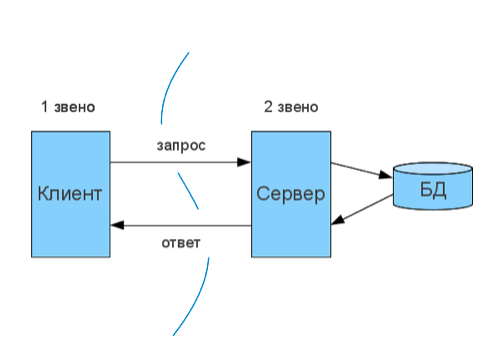
The general structure of client-server interaction on the server side is presented here: www.4stud.info/networking/lecture5.htmlHowever, we are more interested in the same view from the client side, and in this regard, there is no difference between two-link and sober architecture:
Understanding two things is important here:
- There may be many clients using one account to communicate with the north.
- Each client, as a rule, has its own local storage. *
* In some cases, the local storage can be synchronized with the cloud, and, accordingly, with each of the clients. Since this is a special case and, for the most part, not affecting the architecture of the application, we omit it.
It should be noted that since some developers seek to get rid of the "server side", some applications are built around the synchronization of their storage in the "cloud". That is, in fact, they also have a two-link system, but with the transfer of the architecture of its deployment to the level of the operating system. In some cases, such a structure is justified, but such a system is not so easily scaled, and its capabilities are very limited.
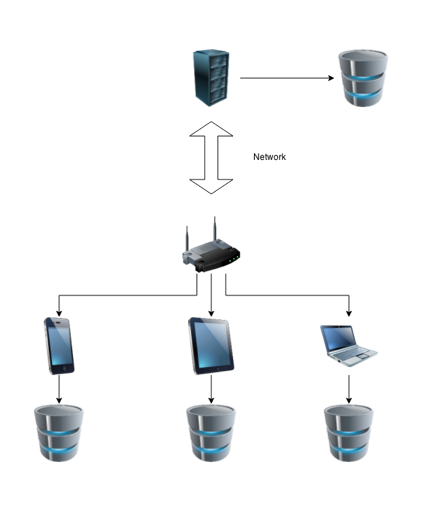
General application structure
At the most primitive level of abstraction, a server-oriented application consists of the following architectural layers:
- The core of the application, which includes system components that are not available for user interaction.
- Graphical user interface
- Reuse components: libraries, visual components, and more.
- Environment Files: AppDelegate, .plist, etc.
- Application resources: graphic files, sounds, necessary binary files.
The most important condition for building a stress-resistant architecture is to separate the core of the system from the GUI, so that one could successfully function without the other. Meanwhile, most RAD systems come from the opposite message - molds form the skeleton of the system, and functions build muscle. As a rule, this means that the application does not become limited by its interface. And, the interface takes on an unambiguous interpretation both from the point of view of the user and from the point of view of the class hierarchy.

Kernel The
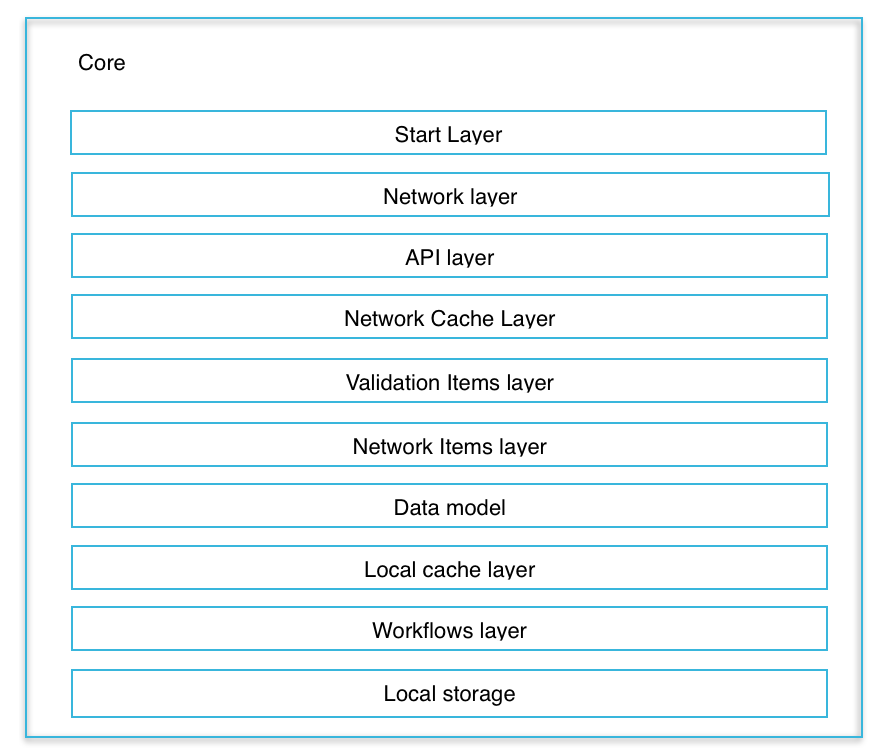
core of the application consists of the following layers:
- (Start layer) The start layer that defines the workflow of the start of program execution.
- (Network layer) A network layer that provides a mechanism for transport interaction.
- (API layer) An API layer that provides a unified system of commands for interaction between a client and a server.
- (Network Cache Layer) A network caching layer that accelerates the network interaction of the client and server.
- (Validation Items Layer) Network validation layer
- (Network Items Layer) Network entity layer
- (Data Model) A data model that enables the interaction of data entities.
- (Local cache layer) A layer of local caching that provides local access to already received network resources.
- (Workflow layer) A workflow layer that includes classes and algorithms specific to a given application.
- (Local storage) Local storage
One of the main tasks facing the developers of the system is to ensure the mutually independent functioning of these layers. Each layer should ensure only the performance of the functions assigned to it. As a rule, a layer located at a higher level of the hierarchy should not have an idea of the specifics of the implementation of other layers.
Consider the process of solving the problem from the perspectives of Junior and Senior developers.
Objective: write a program "currency calculator" that would receive data from the network, and build a graph of exchange rates.
Junior:
1) Based on the statement of the problem, we know that the application will consist of the following parts:
- Form for mathematical operations (addition, subtraction)
- Graph display form
- Additional forms: splash screen, about.
2) We make the dependence of forms as follows: the form of calculations is the main one in our application. It launches a splash form, which is hidden after a certain period of time, the shape of the graphs and about by clicking on a specific button.
3) Splash screen display time - equivalent to the time it takes to download data from the network.
4) Since downloading from the network is performed only during the display of the splash form, the data loading code is placed inside the form, and upon completion of the form, it is deleted from memory along with the form.
How functional is this application? I think that no one has any doubt that using Delphi or Visual Studio you can solve this problem at the moment. Using Xcode to make this a little more difficult, but you can also not very hard. However, with the advent of the prototype, scalability issues are starting to appear. It becomes obvious that to display the graph, you need to store data for the previous period. Not a problem, you can add a data warehouse inside the chart form. However, data may come from different providers and in different formats. In addition, arithmetic operations can be carried out with different currencies, which means that it is necessary to ensure their choice. To make such a choice on the form of graphs is somewhat illogical, although it is possible, however, what we will display on the graph depends on such settings. It means, that if we place additional parameters in the settings window, we will have to somehow transfer them through the main form to the graphs window. In this case, it would be logical to make a local variable in which to store the passed parameters and provide access from one form to another form through the main form. Well and so on. The chain of reasoning can be built for a very long time, and the complexity of the interactions will increase.
Senior: The
statement of the problem allows us to distinguish several sub-tasks that can be described in separate classes:
1) Downloading data from the network.
- Verification of received data
- Saving data in persistent storage.
- Data calculation.
- addition operation
- subtraction operation
- Filtering data by specified criteria (application settings)
- Application start class.
2) Ensure the associated operation of the interface, which consists of the following main forms:
- Main controller (may be invisible)
- Calculation form
- Chart Form
- Splash and About
- Optional settings form.
3) After starting the application for execution, the creation (instance) of the object responsible for loading the data (in the vast majority of cases asynchronous) is performed and the process begins. The main controller of the application displays a splash screen, and at this time, forms a form that will take its place in hiding the splash form.
4) At the end of the data loading, a validator object and a local storage provider object are created. If the data has passed the necessary validation, they can be transferred to the local storage provider.
5) To display the graph, a local storage object and a data settings object are created. Data settings are transferred to the local storage provider to retrieve data with filters installed.
6) To carry out the calculations, a calculator object and operation objects are created. The data received from the form is transferred to the calculator object, and one of the two operations objects that know exactly how to perform the calculations.
Of course, this approach requires more programming efforts, and accordingly, initially it takes more time. However, based on the subtasks, it is clear that, firstly, work on it is easy to parallelize - while one developer is busy building the kernel - the other creates and debugs the UI. The kernel can safely work within the console, the UI is clicked on in the device, and, among other things, independent unit tests can be screwed to both parts. Another undoubted advantage is that the second approach is much more scalable. In the case of revising the functionality of the project, any changes will be made many times faster, because there is simply no restrictive framework for visual representations. The visual forms themselves (GUIs) display the required minimum based on existing tasks in the kernel.
Start layer:
In iOS, an application starts by launching a delegate class object. Its purpose is to receive and transfer system calls to the application, as well as to carry out the initial configuration of the application GUI. All algorithms and mechanisms that are not related to the start of the application, or the receipt of messages from the system, must be placed in separate classes. Immediately after completion of the initial configuration, control should be transferred to the class that performs the rest of the application configuration operations: authorization, reconfiguration of the interface depending on the conditions, initial data loading, obtaining the necessary tokens, and so on. A typical mistake of developers is the monstrous spaghetti code placed in AppDelegate. It is understandable. Almost all examples of external frameworks have their own code here for ease of understanding. Unlucky programmers do not waste time refactoring, and simply copy "whatever." The situation is quite typical for those who use the built-in template for creating CoreData.
Often there you can see the implementation of the following functions:
- Setting up and maintaining Facebook sessions
- Setting up the tab manager if the application supports UITabbarController.
- Clearing CoreData and saving data when entering Background.
- Checking and initializing updates
- Notification of external statistics servers
- Data Model Synchronization
Network Layer:
Provides the basic algorithms for the transport layer of sending messages from the client to the server, and obtaining the necessary information from it. As a rule, messages can be transmitted in the JSON and Multipart formats, although, in some exotic cases, it can be XML or a binary stream in general. In addition, each message may have a header with overhead information. For example, the duration of the request / response storage in the application cache can be described there.
Network Layer has no idea about the servers used by the application, or about its command system. Network connection error handling is performed by virtual methods at the following application levels. The task of this layer is only to make a call to the processing method and transfer information received from the network to it.
In addition, before directly requesting information from the network, the network layer polls the local cache, and if there is a response there, it immediately returns it to the user.
The content of this layer largely depends on which transport technology is closest to you. In the arsenal of the developer, the following options are most in demand:
- Socket is the most low-level approach, which includes synchronous and asynchronous requests, and has the ability to work with both TCP and UDP connections. It allows you to do almost anything, but it requires a high degree of concentration on the task, not too much perseverance, and a large amount of code.
- WebSocket - an approach based on the use of headers on top of TCP. Details can be read here: habrahabr.ru/post/79038 Mobile development is not often used, as it is not flexible enough and still requires a fairly large amount of code to support it.
- WCF is probably the most advanced mechanism, but with such a serious minus that outweighs all the advantages. The approach invented in the bowels of Microsoft relies on the creation of a proxy class that mediates the relationship between application logic and remote north. It works "with a bang" if it is possible to generate a proxy class based on WSDL schemes ( en.wikipedia.org/wiki/Web_Services_Description_Language ), which is, to put it mildly, not trivial. In addition, this class must be regenerated after each server API update. And if for Visual Studio developers this is done with the ease of Zephyr, for iOS developers it’s an absolutely impossible task, even for those who use MonoTouch in development.
- REST is a reliable, time-tested compromise of all the above approaches ( en.wikipedia.org/wiki/REST ). Of course, part of the capabilities of each approach has to be abandoned, but this is done quickly and extremely efficiently with a minimum of effort.
GitHub contains many libraries allowing you to use REST connections, for iOS, AFNetworking is the most popular.
REST relies on the use of GET, POST, PUT, HEAD, PATCH and DELETE requests. Such a zoo is called RESTFul ( habrahabr.ru/post/144011 ) and, as a rule, it is used only when a universal API is written for working mobile applications, websites, desktops and space stations in one bundle.
The vast majority of applications limit the command system to two types, GET and POST, although only one is enough - POST.
The GET request is sent as a string that you use in the browser, and the parameters for the request are passed separated by the '&' characters. The POST request also uses the “browser string”, but it hides the parameters inside the invisible body of the message. The last two statements plunge into despondency those who have never encountered requests before, in reality, the technology has been worked out so much that it is completely transparent to the developer, and you do not have to delve into such nuances.
Above, it was described what is sent to the server. But what comes from the server is much more interesting. If you use AFNetworking, then on the server side you will receive As a rule, iOS developers call JSON-based serialized dictionary, but this is not entirely true. True JSON has a slightly more complex format, but in its pure form it is almost never necessary to use it. However, that there is a difference you need to know - there are nuances.
If you are working with a service installed on Microsoft Windows Server, then most likely, WCF will be used there. However, starting with Windows Framework 4, it is possible for clients supporting only the REST protocol to make access completely transparent, declarative. You can even not waste time getting explanations about the API - the documentation about the command system is automatically generated by IIS (Microsoft web server).
Below is the minimum code for implementing Network Layer using AFNetworking 2 on Objective-C.
Listing 1
ClientBase.h
ClientBase.m
#import "AFHTTPRequestOperationManager.h"
NS_ENUM(NSInteger, REQUEST_METHOD)
{
    GET,
    HEAD,
    POST,
    PUT,
    PATCH,
    DELETE
};
@interface ClientBase : AFHTTPRequestOperationManager
@property (nonatomic, strong) NSString *shortEndpoint;
- (void)request:(NSDictionary *)data andEndpoint:(NSString *)endpoint andMethod:(enum REQUEST_METHOD)method success:(void(^)(id response))success fail:(void(^)(id response))fail;
@end
ClientBase.m
#import "ClientBase.h"
@implementation ClientBase
- (void)request:(NSDictionary *)data andEndpoint:(NSString *)endpoint andMethod:(enum REQUEST_METHOD)method success:(void(^)(id response))success fail:(void(^)(id response))fail
{
    self.requestSerializer = [AFJSONRequestSerializer serializer];
    if(data == nil)
        data = @{};
   AFHTTPRequestOperation *operation = [self requestWithMethod:method path:endpoint parameters:data success:success fail:fail];
   [operation start];
}
- (AFHTTPRequestOperation *)requestWithMethod:(enum REQUEST_METHOD)method path:endpoint parameters:data success:(void(^)(id response))success fail:(void(^)(id response))fail{
    switch (method)
    {
        case GET:
            return [self requestGETMethod:data andEndpoint:endpoint success:success fail:fail];
        case POST:
            return [self requestPOSTMethod:data andEndpoint:endpoint  success:success fail:fail];
        default:
            return  nil;
    }
}
- (AFHTTPRequestOperation *)requestGETMethod:(NSDictionary *)data andEndpoint:(NSString *)endpoint success:(void(^)(id response))success fail:(void(^)(id response))fail
{
    return [self GET:endpoint
          parameters:data
             success:^(AFHTTPRequestOperation *operation, id responseObject) {
                [self callingSuccesses:GET withResponse:responseObject endpoint:endpoint data:data success:success fail:fail];
                 [KNZHttpCache cacheResponse:responseObject httpResponse:operation.response];
             } failure:^(AFHTTPRequestOperation *operation, NSError *error) {
                 NSLog(@"\n\n--- ERROR: %@", operation);
                 NSLog(@"\n--- DATA: %@", data);
                [self callingFail:fail error:error];
            }];
}
- (AFHTTPRequestOperation *)requestPOSTMethod:(NSDictionary *)data andEndpoint:(NSString *)endpoint success:(void(^)(id response))success fail:(void(^)(id response))fail {
    return [self POST:endpoint
           parameters:data
              success:^(AFHTTPRequestOperation *operation, id responseObject) {
                 [self callingSuccesses:POST withResponse:responseObject endpoint:endpoint data:data success:success fail:fail];
              } failure:^(AFHTTPRequestOperation *operation, NSError *error) {
                  NSLog(@"\n\n--- ERROR: %@", operation);
                  NSLog(@"\n--- DATA: %@", data);
                 [self callingFail:fail error:error];
             }];
}
- (void)callingSuccesses:(enum REQUEST_METHOD)requestMethod withResponse:(id)responseObject endpoint:(NSString *)endpoint data:(NSDictionary *)data success:(void(^)(id response))success fail:(void(^)(id response))fail {
    if(success!=nil)
        success(responseObject);
}
- (void)callingFail:(void(^)(id response))fail error:(NSError *)error {
    if(fail!=nil)
        fail(error);
}
@end
This is enough to send network GET and POST messages. For the most part, you will no longer need to adjust these files.
API Layer:
Describes REST commands and makes host selection. The Layer API is completely separate from knowledge of the implementation of network protocols and any other features of the application. Technically, it can be completely replaced, without any changes to the rest of the application.
The class is inherited from ClientBase. The class code is so simple that it is not even necessary to give it in its entirety - it consists of a uniform description of the API:
Listing 2
#define LOGIN_FACEBOOK_ENDPOINT @"/api/v1/member/login/facebook/"
#define LOGIN_EMAIL_ENDPOINT @"/api/v1/member/login/email/"
- (void)loginFacebook:(NSDictionary *)data success:(void(^)(id response))success fail:(void(^)(id response))fail {
    [self request:data andEndpoint:LOGIN_FACEBOOK_ENDPOINT andMethod:POST success:success fail:fail];
}
- (void)loginEmail:(NSDictionary *)data success:(void(^)(id response))success fail:(void(^)(id response))fail {
    [self request:data andEndpoint:LOGIN_EMAIL_ENDPOINT andMethod:POST success:success fail:fail];
}
As the saying goes: "Nothing more."
Network Cache Layer:
This cache layer is used to speed up network communication between the client and server at the iOS SDK level. The choice of answers is carried out by a party that lies outside the control of the system, and does not guarantee a decrease in network traffic, but accelerates it. There is no access to data or implementation mechanisms from either the application or the system. It uses SQLite storage.
The code necessary for this is too simple not to use it in any project that has access to the network:
Listing 3
#define memoCache 4 * 1024 * 1024
#define diskCache 20 * 1024 * 1024
#define DISK_CACHES_FILEPATH @"%@/Library/Caches/httpCache"
- (void)start {
    NSURLCache *URLCache = [[NSURLCache alloc] initWithMemoryCapacity:memoCache
                                                         diskCapacity:diskCache
                                                             diskPath:nil];
    [NSURLCache setSharedURLCache:URLCache];
}
You need to call it from anywhere in the application once. For example, from the starting layer.
Validation Items layer:
The format of the data received from the network is more dependent on the server developers. The application is physically unable to control the use of the originally specified format. For complex-structured data, error correction is comparable in complexity to the development of the application itself. The presence of errors, in turn, is fraught with an application crash. Using the data validation mechanism significantly reduces the risk of incorrect behavior. The validation layer consists of JSON schemes for most server requests, and a class that checks the received data against the loaded scheme. If the received packet does not match the scheme, it is rejected by the application. The calling code will receive an error notification. A similar notification will be recorded in the console log. Moreover, a server command may be called to send a report about an error to the server side. The main thing is to provide a way out of recursion if the command to send such a message also causes some kind of error (4xx or 5xx).
It makes sense to send the following data to the server:
- For which account an error occurred.
- Which team caused the error.
- What data was transferred to the server.
- What response was received from the server.
- UTC time *
- Status code of the team. For validation errors, it is always 200.
- A scheme that the server response does not satisfy.
* UTC time is the time when the command was called, and not when the response was returned to the server. As a rule, they coincide, but since the application may have a request queue mechanism, theoretically, months can elapse between the invocation of a failed command and the recording of a record by the server.
It is assumed that JSON request schemes are provided by server developers after implementing new API commands.
Each scheme, as well as each team, is obliged to satisfy certain criteria previously agreed upon. In the above example, the server response should contain two main and one optional field.
"Status" is required. Contains an OK or ERROR identifier (or an HTTP code of type "200").
"Reason" required Contains a textual description of the cause of the error, if it occurred. Otherwise, this field is empty.
"Data" is optional. Contains the result of the command. In case of error, missing.
Example circuit:
Listing 4
{
    "title": "updateconfig",
    "description": "/api/v1/member/updateconfig/",
    "type":"object",
    "properties":
    {
        "reason":
        {
            "type":"string",
            "required": true
        },
        "status":
        {
            "type":"string",
            "required": true
        },
        "data":
        {
            "type":"object"
        }
    },
    "required": ["reason", "status"]
}
Thanks to the library developed by Maxim Lunin, it became very easy to do. ( habrahabr.ru/post/180923 )
The validation class code is given below
Listing 5
ResponseValidator.h
#import "ResponseValidator.h"
#import "SVJsonSchema.h"
@implementation ResponseValidator
+ (instancetype)sharedInstance
{
    static ResponseValidator *sharedInstance;
    static dispatch_once_t onceToken;
    dispatch_once(&onceToken, ^{
        sharedInstance = [[ResponseValidator alloc] init];
    });
    return sharedInstance;
}
#pragma mark - Methods of class
+ (void)validate:(id)response endpoint:(NSString *)endpoint success:(void(^)())success fail:(void(^)(NSString *error))fail
{
    [[м sharedInstance] validate:response endpoint:endpoint success:success fail:fail];
}
+ (NSDictionary *)schemeForEndpoint:(NSString *)endpoint
{
    NSString *cmd = [[ResponseValidator sharedInstance] extractCommand:endpoint];
    return [[ResponseValidator sharedInstance] validatorByName:cmd];
}
#pragma mark - Methods of instance
- (void)validate:(id)response endpoint:(NSString *)endpoint success:(void(^)())success fail:(void(^)(NSString *error))fail
{
    NSString *cmd        = [self extractCommand:endpoint];
    NSDictionary *schema = [self validatorByName:cmd];
    SVType *validator    = [SVType schemaWithDictionary:schema];
    NSError *error;
    [validator validateJson:response error:&error];
    if(error==nil)
    {
        if(success!=nil)
            success();
    }
    else
    {
        NSString *result = [NSString stringWithFormat:@"%@ : %@", cmd, error.description];
        if(fail!=nil)
            fail(result);
    }
}
- (NSString *)extractCommand:(NSString *)endpoint
{
    NSString *cmd = [endpoint.stringByDeletingLastPathComponent lastPathComponent];
    return cmd;
}
- (NSDictionary *)validatorByName:(NSString *)name
{
    static NSString *ext = @"json";
    NSString *filePath   = [[NSBundle mainBundle] pathForResource:name ofType:ext];
    NSString *schema     = [NSString stringWithContentsOfFile:filePath encoding:NSUTF8StringEncoding error:nil];
    if(schema == nil)
        return nil;
    NSData *data         = [schema dataUsingEncoding:NSUTF8StringEncoding];
    NSError *error;
    NSDictionary *result = [NSJSONSerialization JSONObjectWithData:data options:0 error:&error];
    return result;
}
@end
The validation call is pretty simple:
Listing 6
    [ResponseValidator validate:responseObject endpoint:endpoint success:^{
/*
	Валидация прошла успешно, вызываем конвейер обработки команды
*/
   } fail:^(NSString *error) {
/*
	Валидация провалена. Можем что-то сделать, а можем просто игнорировать результат. Зависит от религиозных предпочтений.
*/
   }];
Network Items layer:
It is on this layer that is responsible for mapping data from JSON to a deserialized representation. This layer is used to describe classes that implement object or object-relational transformation. There are a large number of libraries on the network that implement object-relational transformations. For example, the JSON Model ( github.com/icanzilb/JSONModel ) or the same Maxim Lunin library. However, not everything is so rosy. They do not relieve mapping problems.
Let us explain what mapping is:
Suppose there are two queries that return identical data in structure. For example, users of the application and friends of the user who have fields such as "identifier" and "username". The trouble is that server developers in one request can pass the fields: "id", "username", and in the second "ident", "user_name". Such a discrepancy can have a whole set of troubles:
- A deserialized data object in Objective-C cannot have an id field when using CoreData
- Serialized data in the id and ident fields can contain either a string or NSNumber. When displaying them on the console, there will be no difference between the two numbers, but. their hashcode will be different, and the dictionary will perceive the meaning of these fields differently.
- The differences between the field names are the responsibility of the server, and server developers may simply not make contact, in order to replace their names with uniform, convenient for client developers.
There is no universal solution to these problems, but they are not so complex as to require significant intellectual effort.
Local cache layer:

The tasks for this layer are:
- Caching images downloaded from the network.
- Server request / response caching
- Forming a queue of requests in the absence of a network and offline user work.
- Monitor cached data and clear data that has expired.
- Notification of the application about the inability to obtain information about the specified object from the network.
In general, this layer is the topic of a separate large article. But there are a certain number of nuances that developers should consider.
For query caching, you can slightly upgrade the procedures from Listing 1. I highly recommend using virtual methods for this, but for simplicity, a direct call to the class method will be demonstrated:
Listing 7
- (void)request:(NSDictionary *)data andEndpoint:(NSString *)endpoint andMethod:(enum REQUEST_METHOD)method success:(void(^)(id response))success fail:(void(^)(id response))fail queueAvailable:(BOOL)queueAvailable
{
    self.requestSerializer = [AFJSONRequestSerializer serializer];
    if(data == nil)
        data = @{};
   // Returning cache response.
    NSDictionary *cachedResponse = [HttpCache request:endpoint];
    if(cachedResponse !=nil)
    {
        [self callingSuccesses:method withResponse:cachedResponse endpoint:endpoint data:data success:success fail:fail];
        return;
    }
   AFHTTPRequestOperation *operation = [self requestWithMethod:method path:endpoint parameters:data success:success fail:fail];
    [self consoleLogRequest:data operation:operation];
    [operation start];
}
- (AFHTTPRequestOperation *)requestPOSTMethod:(NSDictionary *)data andEndpoint:(NSString *)endpoint success:(void(^)(id response))success fail:(void(^)(id response))fail {
    return [self POST:endpoint
           parameters:data
              success:^(AFHTTPRequestOperation *operation, id responseObject) {
                 [self callingSuccesses:POST withResponse:responseObject endpoint:endpoint data:data success:success fail:fail];
                  [HttpCache cacheResponse:responseObject httpResponse:operation.response];
              } failure:^(AFHTTPRequestOperation *operation, NSError *error) {
                  NSLog(@"\n\n--- ERROR: %@", operation);
                  NSLog(@"\n--- DATA: %@", data);
                 [self callingFail:fail error:error];
             }];
}
In the HttpCache class, in addition to methods for storing query results, there is another interesting method:
Listing 8
#define CacheControlParam @"Cache-Control"
#define kMaxAge @"max-age="
- (NSInteger)timeLife:(NSHTTPURLResponse *)httpResponse {
    NSString *cacheControl = httpResponse.allHeaderFields[CacheControlParam];
    if(cacheControl.length > 0)
    {
        NSRange range = [cacheControl rangeOfString:kMaxAge];
        if(range.location!=NSNotFound)
        {
            cacheControl = [cacheControl substringFromIndex:range.location + range.length];
            return cacheControl.integerValue;
        }
    }
    return 0;
}
It allows you to extract key information from the server response header about how many seconds the received packet will expire (the date will be expired). Using this information, you can write data to local storage, and when you repeat the same request, just read the previously received data. If the method returns 0, then such data can be omitted.
Thus, on the server it is possible to regulate what exactly should be cached on the client. It is worth noting that standard header fields are used. So, in terms of standard, the bicycle is not invented.
With another small modification to Listing 1, the queue issue is easily resolved:
Listing 9
- (void)request:(NSDictionary *)data andEndpoint:(NSString *)endpoint andMethod:(enum REQUEST_METHOD)method success:(void(^)(id response))success fail:(void(^)(id response))fail queueAvailable:(BOOL)queueAvailable
{
    self.requestSerializer = [AFJSONRequestSerializer serializer];
    if(data == nil)
        data = @{};
   if(queueAvailable)
    {
       [HttpQueue request:data endpoint:endpoint method:method];
    }
   AFHTTPRequestOperation *operation = [self requestWithMethod:method path:endpoint parameters:data success:success fail:fail];
   [operation start];
}
The HttpQueue class checks whether there is currently a network connection and, if it is not connected, writes the request to the repository with the time of the request being made up to milliseconds. When the connection is resumed, data is read from the storage and transferred from the server, while the request queue is cleared. This makes it possible to provide a specific client-server operation without a direct connection to the network.
Checking network connectivity is done using the AFNetworkReachabilityManager or Reachability classes from Apple ( developer.apple.com/library/ios/samplecode/Reachability/Introduction/Intro.html ) in conjunction with the observer pattern. His device is too primitive to describe in the article.
However, not all requests must be sent to the queue. Some of them may not be relevant at the time of the appearance of the network. It is possible to decide which of the commands should be written to the queue cache, and which should be relevant at the time of the call, both at the level of the cache layer and at the level of the API layer.
In the first case, in Listing 9, instead of calling the save method in the queue, you need to insert a virtual method and inherit from the ApiLayer class to inherit the LocalCacheLayerWithQueue and LocalCacheLayerWithoutQueue classes. Then, in the specified virtual method of the LocalCacheLayerWithQueue class, make a call [HttpQueue request: endpoint: method:]
In the second case, the request call from the ApiLayer class will change a little
Listing 10
- (void)trackNotification:(NSDictionary *)data success:(void(^)(id response))success fail:(void(^)(id response))fail {
    [self request:data andEndpoint:TRACKNOTIFICATION_ENDPOINT andMethod:POST success:success fail:fail queueAvailable:YES];
}
Listing 9 is for exactly this case if (queueAvailable) is provided.
Also, a separate issue is the issue of image caching. In general, the question is not complicated, and therefore, having an infinite number of implementations. For example, the SDWebImage library does this very successfully: ( github.com/rs/SDWebImage ).
Meanwhile, there are some things that she does not know how to do. For example, it cannot clear the image cache according to specified criteria (the number of images, the date they were created, etc.), logging or correcting specific errors, i.e. the developer still has to invent his own bikes for caching.
I’ll give an example of asynchronously downloading an image from the network, with MIME error correction (for example, Amazon often gives the wrong MIME type, as a result of which their web server sends the image, not as a binary file with a picture, but as a data stream).
Listing 11
#define LOCAL_CACHES_IMAGES_FILEPATH @"%@/Library/Caches/picture%ld.jpg"
- (void)loadImage:(NSString*)link
          success:(void(^)(UIImage *image))success
          fail:(void(^)(NSError *error))fail
{
    UIImage *image = [ImagesCache imageFromCache:link.hash];
    if(image == nil)
    {
        dispatch_async(dispatch_get_global_queue(DISPATCH_QUEUE_PRIORITY_DEFAULT, 0), ^{
            __block NSData *data;
            __block UIImage *remoteImage;
            __block NSData *dataImage;
            __block NSString *imgFilePath = [NSString stringWithFormat:LOCAL_CACHES_IMAGES_FILEPATH, NSHomeDirectory(), (unsigned long)link.hash];
            data = [NSData dataWithContentsOfURL: [NSURL URLWithString:link]]; // Reading DATA
            if(data.length > 0)
            {
                remoteImage = [[UIImage alloc] initWithData: data]; // TRANSFORM DATA TO IMAGE
                if(remoteImage!=nil)
                {
                    dataImage = [NSData dataWithData:UIImageJPEGRepresentation(remoteImage, 1.0)]; // TRANSFORM IMAGE TO JPEG DATA
                    if(dataImage!=nil && dataImage.length > 0)
                        [dataImage writeToFile:imgFilePath atomically:YES]; // Writing JPEG file
                }
                else // try to fix BINARY image type (first method)
                {
                    [dataImage writeToFile:imgFilePath atomically:YES];
                    remoteImage = [UIImage imageWithContentsOfFile:imgFilePath];
                }
            }
            else // try to fix BINARY image type (second method)
            {
                NSURLRequest *urlRequest = [NSURLRequest requestWithURL:[NSURL URLWithString:link]];
                NSURLResponse *response  = nil;
                NSError *error           = nil;
                data = [NSURLConnection sendSynchronousRequest:urlRequest returningResponse:&response  error:&error];
                if (error == nil)
                {
                    remoteImage = [[UIImage alloc] initWithData: data]; // TRANSFORM DATA TO IMAGE
                    if(remoteImage!=nil)
                    {
                        dataImage = [NSData dataWithData:UIImageJPEGRepresentation(remoteImage, 1.0)]; // TRANSFORM IMAGE TO JPEG DATA
                        if(dataImage!=nil && dataImage.length > 0)
                            [dataImage writeToFile:imgFilePath atomically:YES]; // Writing JPEG file
                    }
                    NSLog(@"USED SECONDARY METHOD FOR LOAD OF IMAGE");
                }
                else
                    NSLog(@"DATA WASN'T LOAD %@\nLINK %@", error, link);
            }
            dispatch_async(dispatch_get_main_queue(), ^{
                if(remoteImage!=nil && success!=nil)
                {
                    success(remoteImage);
                    [ImagesCache update:link.hash];
                }
                else
                {
                    if(data.length == 0)
                        NSLog(@"%@", @"\n============================\nDETECTED ERRROR OF DOWNLOAD IMAGE\nFILE CAN'T LOAD\nUSED PLACEHOLDER\n============================\n");
                    else
                        NSLog(@"%@", @"\n============================\nDETECTED ERRROR OF DOWNLOAD IMAGE\nUSED PLACEHOLDER\n============================\n");
                    NSLog(@"LINK %@", link);
                    UIImage *placeholder = [LoadImage userPlaceholder];
                    if (success)
                        success(placeholder);
//                    if(fail!=nil)
//                        fail([NSError errorWithDomain:[NSString stringWithFormat:@"%@ not accessible", link] code:-1 userInfo:nil]);
               }
            });
        });
    }
    else
    {
        success(image);
    }
}
The method may seem very redundant, but easily modifiable to the specific needs of the developer. Of the important points, it should be noted that the hash of the image URL is used as the key for caching. It is almost impossible that with this approach a collision occurs within the device’s file system.
Each time a file is read from the cache, its access date is modified. Files that are not reread for a long time can be safely deleted even at the start of the application.
When it comes to reading a file from an application bundle, there is a nuance that developers forget: iOS SDK provides us with such methods as [UIImage imageNamed:] and [UIImage imageWithContentsOfFile:]. Using the first one is simpler, but it significantly affects the memory load - the fact is that the file downloaded with it remains in the device’s memory until the application is completed. If this is a file that has a large volume, then this can be a problem. It is recommended that you use the second method as often as possible. In addition, it is useful to make a slight improvement to the loading method:
Listing 12
+ (UIImage *)fromBundlePng:(NSString *)name
{
    return [[LoadImage sharedInstance] fromBundlePng:name];
}
- (UIImage *)fromBundle:(NSString *)name
{
    return [self downloadFromBundle:name.stringByDeletingPathExtension ext:name.pathExtension];
}
- (UIImage *)downloadFromBundle:(NSString *)name ext:(NSString *)ext
{
    NSString *filePath = [[NSBundle mainBundle] pathForResource:name ofType:ext];
    if(filePath == nil)
    {
        NSString *filename = [NSString stringWithFormat:@"%@@2x", name];
        filePath = [[NSBundle mainBundle] pathForResource:filename ofType:ext];
    }
    return [UIImage imageWithContentsOfFile:filePath];
}
Now you do not have to wonder at what resolution the file is present.
Workflows layer:
All implemented algorithms that do not belong to the kernel layers and do not constitute a GUI should be placed in classes of specific workflow sequences. Each of these processes is designed in its own style, and connects to the main part of the application by adding links to an instance of the corresponding class in the GUI. In the vast majority of cases, all these processes are not visual. However, there are some exceptions, for example, when it is necessary to implement a long sequence of predefined animation frames, with specified display algorithms
The calling code must have minimal knowledge of this functionality. All flow settings must be encapsulated. Google, as an example, cites the notification code from the analytics server, and suggests including it in the place where the event occurs.
Listing 13
           // Analytics
            [Analytics passedEvent:ANALYTICS_EVENT_PEOPLE_SELECT
                          ForCategory:ANALYTICS_CATEGORY_PEOPLE
                       WithProperties:nil];
Obviously, if there is a need to notify another server, next to this code, you will need to add the same code with your settings. This approach is not justified and unacceptable. Instead, you must create a class that has a class method to invoke analytic servers with the given functionality.
There are quite developed work processes, the logic of functioning of which depends on the internal state. Such processes should be implemented using the “Strategy” or “State Machine” patterns. As a rule, together with the “strategy” pattern, the “mediator” pattern is used which mediates the appeal to a particular algorithm.
One of the commonly used processes - the user authorization process - is an obvious candidate for reforiting using the “state machine” pattern. At the same time, it is precisely on this flow that responsibility should lie for the "automatic" user authorization, and not be recursively called from abstract layers (Network Layer, or Validation Items).
Each call of the kernel layers is accompanied by the transfer of a callback object, and it is through it that control should be returned to the application when the command is executed successfully or errors occur. In no case should the implicit call of the kernel layers be allowed by objects of the working sequence.
Also, in no case should it be allowed that any universal visual controls would depend on the state of working sequences. If critically necessary, such controls should be privatized in sequence. Access to the state of controls can be achieved through the properties of the controls themselves, inheritance and redefinition of methods, and, in extreme cases, through the implementation of delegate methods and by creating categories. The key to this ornate message is that categories are evil that should be avoided. That is, I do not propose to abandon categories, but ceteris paribus, code without them is easier to read and undoubtedly more predictable.
Local storage:
The desire of developers is in the trend of new technologies, sometimes it comes across common sense, and the latter often loses. One of the fashion trends was the use of local storage based on CoreData. Some developers insisted that it should be used in as many projects as possible, despite the fact that even Apple itself recognized that there were certain difficulties.
There are a large number of ways to store temporary data in a permanent storage device. Using CoreData is justified when we need to store a large amount of rarely updated data. However, if the application has several hundred records, and neither is constantly updated in an array, using CoreData for these purposes is unreasonably expensive. Thus, it turns out that most of the time the device spends resources on synchronizing data received from the network with the data that is already on the device, despite the fact that the entire data array will be updated during the next session.
Using CoreData ( habrahabr.ru/post/191334), in addition, it also requires compliance with certain procedures, algorithms and architectural decisions, which limits us in choosing a development strategy, and also significantly complicates the debugging mechanisms of our application.
As a rule, the use of persistent storage is designed to provide a significant reduction in network traffic, due to the use of information already received from the network. However, in some cases this does not happen because the source of this information is the server, which makes decisions regarding the relevance of this information.
Local storage based on the file system
Using NSDictionary as the format of the received data allows you to automatically solve a number of architectural problems:
- data in arrays can be represented exactly in the order in which they were received from the server.
- the data unambiguously corresponds to the used request to the server, up to the transmitted parameters in the POST request (i.e., it was easy to distinguish between objects received from a specific command and objects received from the same command, but with other data transferred as POST parameters )
- The atomic nature of writing a data object to persistent storage.
- Instantaneous and atomic read data from persistent storage.
- Full ACID Transactional Compliance: en.wikipedia.org/wiki/ACID
- No need to normalize data.
- Independence in data interpretation.
- All data is always up to date.
- Support code is minimal (1 line).
The iOS SDK reader / writer makes NSDictionary an ideal format for storing relatively small, short-lived data, as it uses single-pass algorithms.
There is no need to use additional logic to read serialized stored data. Data can be returned by the same command that reads data from the network.
The negative side of this approach is that this affects the performance of the device, however, the study of the issue shows that the amount of such data does not exceed 5KB, the data is loaded into memory instantly, in a single block, and in the same way freed from memory immediately after how they are no longer needed, for example, when the ViewController ceases to exist. At the same time, reading data in blocks (line by line) from the SQL database generates a large number of objects (at a level that goes beyond the control of the application) that total exceed the specified volume, and also create additional load on the processor. Using a central repository is justified when data must be stored for a long time, during many sessions of the application. At the same time, data from the network is partially downloaded.
Local storage based on CoreData.
CoreData does not provide the ability to use serialized data. All data must be subjected to object-relational transformations before being used by the local storage layer. After receiving data from the API profile command, data is transferred to the copyDataFromRemoteJSON category method, where data is extracted from the dictionary and then saved in the corresponding managed object (a descendant of the NSManagedObject class).
Here is an example of how this happens:
Listing 14
    [[Client client] profile:@{} success:^(id response) {
        [[Member getCurrentMember] copyDataFromRemoteJSON:[response valueForKey:@"data"]];
    } fail:^(id response) {
    }];
An even better approach would be if the callback from the API could return validated serialized data, packaged, moreover, into a managed object.
The general algorithm for working with data is as follows:
- Пользователю отображаются данные которые присутствуют в системе сразу после запуска приложения.
- Производится запрос на получение тех же данных с удаленного сервера, так как сервер должен подтвердить их актуальность. Этот запрос подтверждает авторизацию приложения.
- Если данные с сервера получены, то авторизация осуществлена успешно, и производится циклическая загрузка остальных данных.
- Если сервер не подтверждает авторизацию (срок жизни токена истек) все данные локальной системы удаляются. Пользовательский интерфейс обновляется.
- Полученные данные синхронизируются с содержимым локального хранилища. (Т. е. каждый объект частично вычитывается из локального хранилища, проверяется, есть ли идентификатор такого объекта, если такой идентификатор уже есть, данные игнорируются/обновляются, если его нет, данные добавляются).
- After the recording process has been fully implemented, the user interface is updated.
Advantages of this approach: It is
hypothetically believed that lazy loading using NSFetchController can significantly accelerate the display of data from the database when their number is several thousand records. Also, adding data to the database reduces the amount of information transmitted over the network. Data is being added. Those that are are shown to the user. The user can delete data that he does not need. Data is added to those objects that already exist, as elements of their array.
The disadvantages of this approach:
- First of all, the advantages of the approach should include all those advantages that were considered above (approach based on the file system):
- Последовательность отображения данных на экране не гарантируется, поскольку, данные извлекаются из SQLite базы данных, а там они лежат в «натуральном» порядке. Для создания последовательного отображения требуется вводить атоинкрементный номер, или какой-либо другой механизм, которые не предоставляется, ни CoreData ни SQLite.
- Данные никак не связаны с сетевыми запросами, что сильно осложняет их отладку.
- Сохранение данных в локальном хранилище происходит атомарно для всего контекста. Но, между вызовами записи данные могут быть потеряны, или перезатерты. Кроме того, процедура сохранения в базе может быть не вызвана.
- Большие объемы данных извлекаются из Database с существенно большей скоростью чем чтение плоского файла, однако, для сравнительно небольших файлов, скорость все равно будет выше.
- ACID не применим к SQLite в реализации с CoreData. Одновременная запись разных контекстов из разных потоков легко приводит к крешам приложения. Частично проблема решается путем использования библиотеки MagicRecords.
- Для нормализации данных необходимо применять специальные процедуры. Если некоторые поля заполняются по определенному условию, а объем данных возрастает, то либо данные необходимо дробить на большое количество объектов, либо извлекать из них абстрактные сущности, либо применять специальные процедуры для удаления устаревающих данных.
- Данные в CoreData всегда реляционны. Поэтому этому вопрос независимости рассматриваться может только в том случае, если схема CoreData не содержит связей между элементами.
- Since the relevance of the data is determined by the server and not by the application, data that was not received from the network still has to be deleted. Thus, the use of CoreData does not affect the network traffic in this scheme.
- The amount of code is many times greater than that required to maintain file system-based storage. Also, the use of CoreData imposes certain restrictions on the user interface.
Secondly, the disadvantages of the approach must also include the fact that:
- CoreData requires a certain discipline to work from various application threads, and choosing the current context.
- Data synchronization can so reduce the performance of the device that the issue of using 4S devices will be very relevant.
- Debugging applications is very complicated. Some operations are not obvious, and to search for erroneous behavior you have to study the MagicalRecords library (https://github.com/magicalpanda/MagicalRecord) or add your classes and categories.
Before making a choice between CoreData, the local file system, or any other storage, you should understand for yourself what your local storage will be used for. If for storing and accumulating data between sessions, then CoreData is an ideal mechanism for such an implementation, but if it is temporary data, it is worth considering options for storing data in the form of flat files, or hierarchical storage like NoSQL databases or XML.
When using the MagicalRecords library, a situation arises where the table view must be part of the UITableViewController for the application to function correctly, otherwise it becomes difficult to use the NSFetchController that underlies the loading of CoreData data. Thus, there is a dependency in the use of the user interface on local storage. That is, the implementation of CoreData limits the development of UI.
An alternative view
Despite the objections expressed, the use of CoreData can, indeed, potentially increase productivity with increasing data volume, if you use the following alternatives:
Alternative 1
To normalize the server API data. The server should return not a complete hierarchical object, with many nested entities, but many small objects that are easily added to the database.
In this case:
Small portions of fresh data will be loaded, which will reduce network traffic.
Allows an application to make a request to the server with object identifiers so that the server returns a list of what needs to be deleted.
There is no need to synchronize the received data for each loaded record.
Alternative 2
The task can be solved only by means of the client application: create a table in CoreData into which to write the JSON object in its pure form, immediately after accessing the network. Additionally enter there the date of recording, user ID, request hash, and data hash.
This will allow:
- Serialize data on the fly to binary objects based on JSON schema.
- To ensure the functioning of this mechanism at the level of the Core Layer, i.e., transparent to the developer.
- Switch instantly between user contexts.
- Delete irrelevant entries as they become obsolete, based on the information specified by the server in the response header.
- Despite the use of SQLite server data will not require normalization.
- Significantly reduce the amount of code used.
Conclusion: The
article turned out to be quite long, and I doubt that most readers will master it to the end. For this reason, I decided to throw out the part related to the GUI from here. Firstly, it related to the construction of the user interface via UITabbar, and secondly, in one of the Skype groups, a very interesting discussion took place regarding the use of well-known MVC and MVVM patterns. It makes no sense to state the principles of building an interface without a meticulous presentation of existing practices and approaches that lead developers to a standstill. But this is the topic of another large multi-page article. Here, I tried to consider only issues related to the functioning of the application core.
If readers show sufficient interest in this topic, then in the near future I will try to lay out the source classes for use as an application template.