
 December 19, 2014 at 11:20
The best messenger for teamwork: Compare HipChat, Slack and Kato

The amount of information that both individual users of the network and entire companies have to deal with is constantly growing. In the corporate world, the standard for working with the incoming data stream has long been e-mail, but it is often not very suitable for organizing communications within the company (both within individual teams within its framework and between them).
Messengers for corporate communications are called to compensate for the shortcomings of email (“team chat” in English). At the same time, it can be difficult to choose the right tool from the huge number of systems offered on the market - many important advantages and disadvantages of specific products are revealed only at the stage of their use, when it is not so easy to switch to another messenger.
In today's article, we will compare our own Kato.im service with the market leaders of instant messengers for team work Slack and HipChat.
Who is involved in the comparison
Slack and HipChat are recognized leaders in the messenger market for corporate communication. It is them we will compare with each other (and with Kato.im).
Slack
Created by one of the founders of the Flickr photo service, the Slack messenger in the technology press was dubbed the email killer .
Slack integrates messages from other applications for communication and work (for example, Drobpox, Google Docs, GitHub) into its channels and is able to send signals to these services directly from chat rooms. This allows users to track progress in various projects using one platform, as well as reduce the information overload that occurs when it is necessary to communicate with many people in different messengers and mail. There is a web version of the service, as well as applications for iPhone and Android. In October of this year, it became known that the project attracted

$ 120 million investment with a total valuation of Slack at $ 1.12 billion. According to the Slack service itself, at the end of October this year it had more than 30 thousand user teams, and the number of active paid users was 73 thousand.
Hip chat
Launched in 2010 and purchased by Atlassian in March 2012, the service allows team members to communicate in rooms uniting several interlocutors, as well as in 1: 1 mode. In the paid version of the system, video calls, a screen demonstration and an unlimited amount of data are available for users. HipChat integrates with other Atlassian products, as well as with popular services such as GitHub, MailChimp and Heroku (a total of 46 services for the fall of 2014). In addition to the web version, there are mobile clients.

Kato
The company was established in February 2013 and to date has attracted $ 1.9 million investment. The Kato messenger allows users to communicate in several rooms at the same time (including 1: 1) and direct information flows from different sources to rooms using integrations (for example, with IFTTT, Hubot, Stripe or UberConference ). There is a web version of the service, as well as applications for iPhone and Android. Native desktop applications for OS X and Windows are being developed.

There is a free version of the product that does not impose any restrictions on the ability to communicate and the amount of data stored, and a paid version is being developed for large companies that need tools to integrate the messenger with the existing IT infrastructure (for example, linking an account in a messenger to a domain account by LDAP).
Comparison of instant messengers
The requirements for messengers for teamwork differ from the wishes of users of individual services (like Skype or WhatsApp). Among the most important parameters of the messenger for corporate communication is: the ability to control noise; the possibility of parallel communication in several rooms and organizations at once; cost; convenience of formatting messages; number of integrated external services and their range; ease of work in the system; the presence of mobile and native clients; reliability of work; data access policy.
Work in multiple rooms and noise control
The ability to control the level of “noisy” communications plays an increasingly important role for users of corporate instant messengers.
Slack and HipChat do not give users the ability to chat in several rooms at once - the user needs to switch context in order to enter the desired conversation. In addition, these two instant messengers use the concept of “being” in a room - in order to see messages, the user will need to either receive an invitation to the corresponding room or “enter” there. Leaving the room, he will lose the opportunity to see the messages published in it.
In this regard, Kato, in our opinion, is more convenient, since it uses the Twitter service approach- the user can "subscribe" to the rooms he needs and see what is published in them. In addition, he can be mentioned even in the room to which he is not subscribed, and he will still see this mention. Uninformative rooms can be ignored. Together, these functional solutions allow you to quickly access the information you need, filtering out unnecessary information (that is, effectively controlling the noise level).
Simultaneous work in different teams
Another important point is communication in several teams. Quite often, a messenger user must work in more than one team (for example, an external consultant or project manager in a large company). In Slack, there is support for several teams, but the user has to explicitly select the “current” team in order to interact with its members.
In HipChat, you also need to “log in” to the account associated with a particular team and only communicate with its members at a specific moment in time (in particular, Quora users complained about this in the thread discussing instant messengers).
Kato allows users of the free version of Kato Teams to simultaneously work both in rooms belonging to their main team and in rooms from other teams (for example, employees of a consulting company can communicate in the rooms of their organization and in the rooms of several client companies ).
Message Formatting
Quite often there is a need to create more complex (than plain text) messages in the format. Highlighting several words in bold, compiling lists, pasting code snippets into a line, highlighting headers are typical examples of message formatting. Note that recently created a specially designed markup language called Markdown specifically for these purposes . All three messengers try to solve the problem of formatting messages in different ways.
Slack does not support Markdown, but it has the ability to embed code, and there is a simple mechanism for highlighting the right messages or inserting quotes. The capabilities of this mechanism are limited - for example, using it you cannot create a list, which Markdown makes it easy to do.
HipChat also does not support Markdown, but it contains a set of commands with which, among other things, it is possible to carry out simple text formatting (highlighting messages, displaying "in code mode", and so on).
Kato supports a significant portion of the Markdown markup language, and also supports a special mode for publishing code snippets.
Keyboard control
The use of keyboard shortcuts (shortcuts) significantly speeds up the work in instant messengers compared to using a familiar mouse or other non-keyboard devices.
Slack provides a set of hot keys that allow you to switch between rooms, set user status, set flags for messages (“mark everything as read”), and so on.
HipChat uses the commands mentioned above , with the help of which you can not only engage in simple text formatting, but also enter and leave rooms or set the user status (“online”, “left”, and the like).
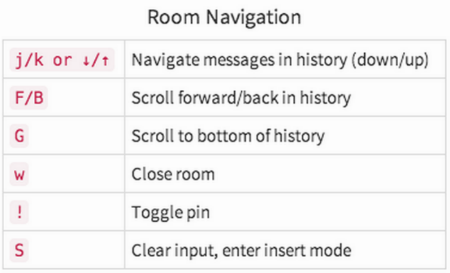
Kato uses the Vim Unix editor approach for keyboard control, which can work in two modes - command and text editing. The advantage of switching between modes is that the user does not need to hold down keys like {command}, {shift} or {alt}, and at the same time drag his fingers to other keys on the keyboard.
After switching on the command mode, it is no longer possible to immediately enter text into the Kato key {Esc} - pressing some keys will be interpreted by the service as a command. You can switch to text input and editing mode by pressing the {i} key. The introduction of the Vim ideology was expressed not only in the borrowing of the principle of two modes - in addition, the keyboard shortcuts available in this editor were also used to the maximum . The screenshot below shows a fragment of the description of keyboard control in Kato:
Price
Two tariff plans are available to Slack users - Lite and Standard (two more - Plus and Enterprise are under development). In the free Lite version, users have: search through the archive up to 10 thousand messages; file storage with a total capacity of up to 5GB; Connect up to five external products Applications for iOS and Android. There are no restrictions on the message archive and the number of integrations with external services in the paid version - it costs $ 6.67 per user per month, subject to payment for the year.
HipChat is free - the limitation of this version is the size of the message history archive (25 thousand recent messages), which you can search, the version for $ 2 per user per month is also available - it has the ability to make video calls and display a screen.
Kato has a free version (Kato Teams), in which there are no restrictions on the size of the message archive or the number of external services connected - thus, its capabilities in terms of organizing communication are enough even for a large company. In the beta version there is a paid version of the product (Kato Enterprise) - it will be in demand by organizations interested in the possibility of obtaining analytical data on the communication of their employees (also in the paid version all messages, even in 1: 1 rooms, belong to the company that pays for the license )
Availability of mobile applications and desktop clients
All three projects under consideration have mobile applications. There are also versions of HipChat for Mac, Windows, and Linux. At Kato, native desktop applications for OS X and Windows are currently undergoing internal testing.
Work stability
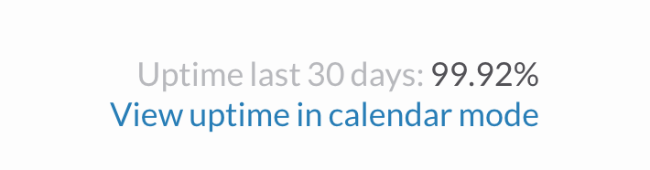
Over the past thirty days, Slack worked without failures 99.92% of the time:
Note that in October 2014, users discovered a security error in the Slack system, which allowed viewing information about projects of companies using this service. Among them were such giants as Apple, Microsoft and Facebook.
According to HipChat's own data , the stability (uptime) of this product over the past month was 100% (at the time of writing the material, the figure was 99.997% ):


At the same time, failures of this service happen quite regularly .
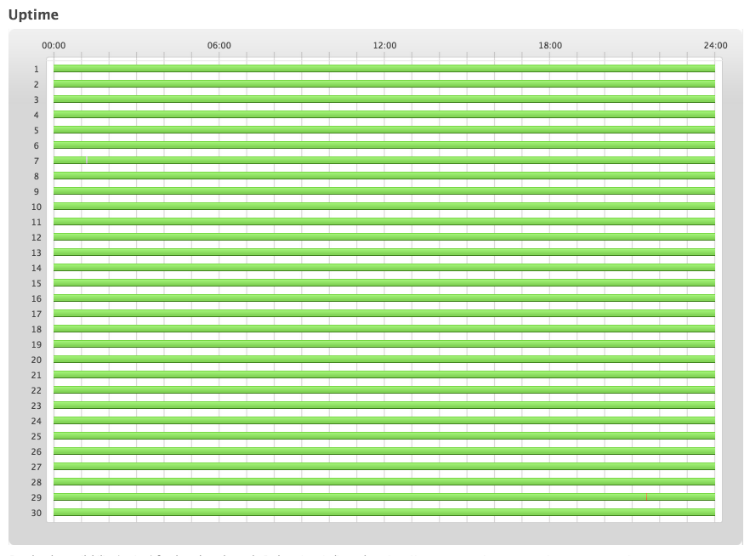
According to the Pingdom service , the Kato messenger uptime for the last month is 100%:
Summary
Small teams can communicate productively using a wide variety of services, but larger teams or organizations require significant flexibility to effectively manage information flows. This flexibility is supported by significantly fewer systems.
Naturally, this comparison does not include all the most important parameters of instant messengers, so you should try as many different products as possible. Each of the described tools may be better or worse for solving specific problems. Which one to choose is up to you to decide, but for now, here is a comparison table based on the results of our analysis:
| Comparison | Slack | Hip chat | Kato |
|---|---|---|---|
| Work in several rooms at the same time | Not | Not | there is |
| Noise control | You can only leave the unnecessary room | You can only leave the unnecessary room | Twitter approach |
| Message Formatting | Small opportunities | Several commands for easy formatting | Extensive Markdown Support and Code Forwarding Mode |
| Hotkeys | there is | A small set of commands | Ideology and keyboard shortcuts from Vim |
| Price version with full functionality | $ 6.67 per month per person (when paying for the year) | $ 2 per month per person | Is free |
| Mobile and desktop applications | Mobile applications | Mobile apps + versions for Mac, Windows and Linux | Mobile apps only |
| Stability (Uptime last 30 days) | 99.92% | 100% | 100% |
Thanks for attention!