Home Automation System TAIYITO
In the modern world, at an incredible speed, automated control of various devices is being introduced into our lives to facilitate the process of their operation and ensure ease of use. In this regard, intelligent home systems are designed to make life easier for the general population. "Smart Home" is a complex of software and hardware that provides comfort of human life through the automation of daily processes. Also, the goal is to design a system in which the lowest heat carrier costs will be realized and, as a result, material resources will be saved. But the technology of “Smart Homes” is still in a stage of rapid development, Every year, the global giants of the electronic industry market increasingly sophisticated and functional devices, data transfer protocols are improved, and the concept and ideology of these systems are being processed. Several senior students from our department recently presented their development in this technical field.
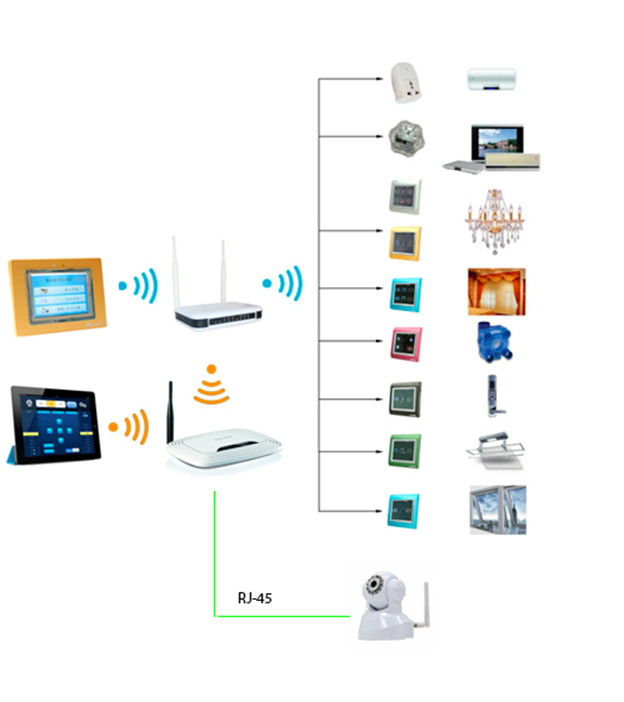
TAIYITO has a wide range of diverse devices to automate daily processes. Block diagram of devices:
First, turn on the Taiyito TDWZ6617 ZigBee Control Server and use a computer to connect to the HF-A11x_AP access point that appears. After connecting, go to the browser at 10.10.100.254, enter the username / password (admin / admin by default) and get into a very ascetic web interface.

After that, we proceed to the settings described in the instructions that came with this device:
After completing the above steps, restart the server - Device Management tab - Restart Module - click the Restart button. After that, he switches to the client mode of the local Wi-Fi network and server mode for the ZigBEE network.
Now you can add all available devices to the network. To do this, put the server in the “search network” mode: hold down the Z button on the back of the device and hold until the green LED with the “LED” designation blinks once; Then hold down the same button until the red LED with the designation “DA” blinks. Now the server is waiting for new devices to connect
After all the devices are added, we can begin to configure the TYTSmart application that controls the entire system. To do this, we need to connect to the local network where the server is located and launch the application. After that, go to the Remote config tab and set the ip address and port of our server. Then we go to the Password Settings tab and enter the password (by default 123456). We can divide devices into rooms and classes. In this case, we created the Bedroom room and added the Taiyito TDZ4404S ZigBEE Touch Screen 2-way Dimmer Switch to it:

Since this device does not work with the Zigbee protocol, therefore, the connection goes directly to the Wi-Fi router. To control the camera remotely, use the IP Camera Device Client program shown below.

As you interacted with this system, its shortcomings were highlighted: the lack of sane documentation, the lack of technical support, frequent application errors and crashes, both when working on iOS and Android. Nevertheless, the advantages of the system were noted: the ability to integrate into ready-made systems, low cost, the availability of applications for most existing platforms
TAIYITO system
TAIYITO has a wide range of diverse devices to automate daily processes. Block diagram of devices:
Device list
- Wireless Router TP-LINK TL-WR741ND
- Taiyito TDWZ6617 ZigBee Control Server
- Taiyito TDZ4202S ZigBee Smart Socket
- Taiyito TDWZ6406 Touch Screen Wall Mount Centralized Controller
- Taiyito TDWZ6436 ZigBee 360 IR Transceiver
- Taiyito TDX6618H P2P Camera
- Taiyito TDZ4404S ZigBee Touch Screen 2-way Dimmer Switch
- Taiyito TDZ4405S ZigBee Touch Screen 3-way Switch
- Taiyito TDWZ6000S ZigBee Coordinator
Detailed description of each device
Wireless Router TP-LINK TL-WR741ND

Taiyito TDWZ6617 ZigBee Control Server
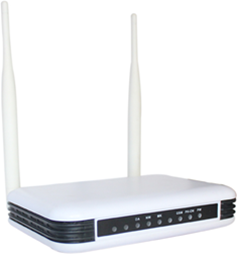
Taiyito TDZ4202S ZigBee Smart Socket
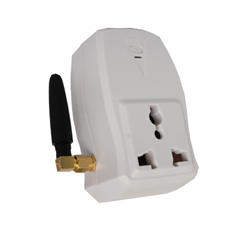
Taiyito TDWZ6406 Touch Screen Wall Mount Centralized Controller
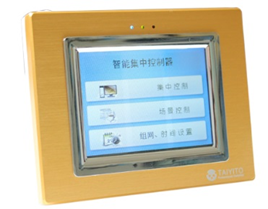
Taiyito TDWZ6436 ZigBee 360 IR Transceiver
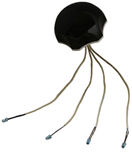
Taiyito TDX6618H P2P Camera

Taiyito TDZ4404S ZigBee Touch Screen 2-way Dimmer Switch

Taiyito TDZ4405S ZigBee Touch Screen 3-way Switch
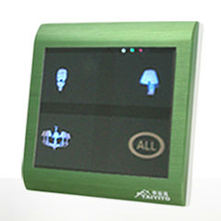
Taiyito TDWZ6000S ZigBee Coordinator

- Provides data transfer rates up to 150 Mbps
- CCA technology improves wireless performance by automatically preventing channel conflicts
- Support WDS function to expand your network
- Quickly configure security with the push of a QSS button
- The priority feature ensures the performance of sensitive applications such as video and network calls.
- SPI firewall support and access control
- Support WPA / WPA2 Encryption
- Fully compatible with 802.11b / g / n devices
Taiyito TDWZ6617 ZigBee Control Server
- ZigBee Protocol: IEEE 802.15.4
- Transmission Frequency: 2.4 GHz
- Connects to the system via TCP / IP interface and Wi-Fi (802.11b / g / n)
- Voltage: AC 95-240V
- Frequency: 50-60Hz
- Interface: RS485, dry contact, ZigBee
- Dimensions: 157x108x35mm
- Antenna Length: 170mm
Taiyito TDZ4202S ZigBee Smart Socket
- ZigBee Protocol: IEEE 802.15.4
- Grounding: standard
- Rated voltage: 95V-240V
- Rated Current: 3A
- Transmission Frequency: 2.4 GHz
- Operating voltage: AB 95-240V
Taiyito TDWZ6406 Touch Screen Wall Mount Centralized Controller
- ZigBee Protocol: IEEE 802.15.4
- Operating voltage: 95-240 V 50-60 Hz
- Output Power: 1500 W
- Front panel: 116-99-16 mm
- Back panel: 52-49-26 mm
Taiyito TDWZ6436 ZigBee 360 IR Transceiver
- ZigBee Protocol: IEEE 802.15.4
- Operating voltage: 95-240 V 50-60 Hz
- Signal Frequency: 2.4 GHz
- Signal Frequency: 38 MHz
- Size: 95-95-50 mm
Taiyito TDX6618H P2P Camera
- Power: 5 V, 2 A
- Operating Temperature Range: -10 ~ 50 ° C
- Size: 200-120-179 mm
- Horizontal rotation: 355 °
- Vertical Angle: 90 °
- Image Resolution: VGA (640 * 480), QVGA (320 * 240)
Taiyito TDZ4404S ZigBee Touch Screen 2-way Dimmer Switch
- ZigBee Protocol: IEEE 802.15.4
- Operating voltage: 95-240 V 50-60 Hz
- Signal Frequency: 2.4 GHz
- Front Panel: 86-86-13mm
- Back panel: 52-49-26 mm
- Operating Temperature Range: -10 ~ 50 ° C
Taiyito TDZ4405S ZigBee Touch Screen 3-way Switch
- ZigBee Protocol: IEEE 802.15.4
- Operating voltage: 95-240 V 50-60 Hz
- Signal Frequency: 2.4 GHz
- Front Panel: 86-86-13mm
- Back panel: 52-49-26 mm
- Operating Temperature Range: -10 ~ 50 ° C
Taiyito TDWZ6000S ZigBee Coordinator
- ZigBee Protocol: IEEE 802.15.4
- Voltage: DC 5V
- Connects to the system via ZigBee 2.4 GHz, IR
- Transmission Frequency: 2.4 GHz
- Operating voltage: AB 95-240V
- Working Current: 450mA
- Operating temperature: -10 to 50 ° C
TAIYITO system setup
First, turn on the Taiyito TDWZ6617 ZigBee Control Server and use a computer to connect to the HF-A11x_AP access point that appears. After connecting, go to the browser at 10.10.100.254, enter the username / password (admin / admin by default) and get into a very ascetic web interface.
After that, we proceed to the settings described in the instructions that came with this device:
- Go to the Application Settings tab and then in the Uart Settings section, change the Baudrate parameter to 9600, leave the rest of the parameters by default. Click Apply.
- Then in the Network Settings section we change the port to 8899, we leave the rest of the parameters by default. Click Apply.
- Go to the STA Interface tab and select STATIC (fixed ip) in the combo box WAN Connection Type.
- Then, in the Static Mode section, enter IP Address, Subnet Mask and Default Gateway sequentially. In our case, this is 192.168.0.236, 255.255.255.0 and 192.168.0.1 respectively.
- After that, in the STA Interface Parameters section, click the Search button and in the list that appears, find our router (in our case TP-Link_BF3B82), mark it and click Apply.
- Then in the same section, select the encryption type (Security Mode) - WPA2PSK. Encryption Type - AES. Pass Phrase - password used to access the router. Click Apply.
- The last item, go to the Mode Selection tab and change the Wi-Fi mode to STA Mode. Click Apply.
After completing the above steps, restart the server - Device Management tab - Restart Module - click the Restart button. After that, he switches to the client mode of the local Wi-Fi network and server mode for the ZigBEE network.
Now you can add all available devices to the network. To do this, put the server in the “search network” mode: hold down the Z button on the back of the device and hold until the green LED with the “LED” designation blinks once; Then hold down the same button until the red LED with the designation “DA” blinks. Now the server is waiting for new devices to connect
- Taiyito TDWZ6000S ZigBEE Coordinator;
Press the on / off button and wait for the red LED to blink 1 time, after which the green LED will light up inside the case. This means that the device is added to the network. - Taiyito TDZ4202S ZigBEE Smart Socket;
Setup is similar to the Taiyito TDWZ6000S ZigBEE Coordinator. - Taiyito TDWZ6406 ZigBEE Touch Screen Wall Mount Controller;
This touchpad works just like a mobile app. With its help, you can create similar scenarios for managing existing devices. To connect it to the network, we go into the settings and press the start button. After that, the green LED will turn on and the device will be added to the network. - Taiyito TDWZ6436 ZigBEE 360 IR Transceiver;
Press the left button once and the LEDs begin to flash alternately, then press it again, and the green LED lights up constantly. This means that the device is added to the network. - Taiyito TDZ4405S ZigBEE Touch Screen 3-way Switch
Hold down the top 2 buttons until they blink. Then we clamp the upper left button until it blinks, and again the two upper ones. After that, the second LED will turn green, which means that the device has been added to our network.
After all the devices are added, we can begin to configure the TYTSmart application that controls the entire system. To do this, we need to connect to the local network where the server is located and launch the application. After that, go to the Remote config tab and set the ip address and port of our server. Then we go to the Password Settings tab and enter the password (by default 123456). We can divide devices into rooms and classes. In this case, we created the Bedroom room and added the Taiyito TDZ4404S ZigBEE Touch Screen 2-way Dimmer Switch to it:
Using Taiyito TDX6618H P2P Camera
Since this device does not work with the Zigbee protocol, therefore, the connection goes directly to the Wi-Fi router. To control the camera remotely, use the IP Camera Device Client program shown below.
Conclusion
As you interacted with this system, its shortcomings were highlighted: the lack of sane documentation, the lack of technical support, frequent application errors and crashes, both when working on iOS and Android. Nevertheless, the advantages of the system were noted: the ability to integrate into ready-made systems, low cost, the availability of applications for most existing platforms









