Scale your hosting to the next level with ISPmanager 5 Business
ISPmanager 5 Lite replaced the 4th control panel at the end of 2013 and, starting from that moment, everyone was persistently interested in the progress of creating ISPmanager 5 Business.
When developing an extended version of ISPmanager 5, the task was to develop a new approach to creating shared hosting.
What's the Difference?
If we compare ISPmanager Lite and ISPmanager Pro 4 generations, their differences are as follows. The Pro version provides additional functionality for working with resellers, it is possible to create flexible tariff plans with limited access and system resources, as well as the ability to connect others to one control panel for centralized management of all servers.
When creating the 5th generation of the virtual hosting control panel, it was decided not to dwell on the functionality that simplifies the configuration and administration of servers and clients on shared hosting. The new version has the ability to scale the entire system. It became possible to connect additional servers and assign them specific roles: a database server, a mail server, a DNS server, and a server for hosting the sites themselves. ISPmanager 5 Business, like ISPmanager 4 Pro, takes advantage of the previously tested CloudLinux distribution to provide more flexible resource limits for users.
Installation process
Recommended and tested distributions for working with ISPmanager Linux operating systems are Centos 6.x and Debian 7.x. As in earlier versions, ISPmanager 5 Business is recommended to be installed on a server with a new distribution installation in the minimum configuration, in order to exclude any possible software conflicts. In this case, everything required for the functioning of the virtual hosting software will be installed from the repositories of the selected distribution and configured accordingly.
This article is an example of installing ISPmanager 5 on CentOS 6.5.
The initial installer has not changed and still it is a shell script that can be downloaded from the official ISPsystem website
This is a common installer for the entire fifth line of ISPsystem products, so we indicate what specifically to install using the parameters:
During the installation, in addition to the official CentOS repositories, EPEL and ISPsystem's own repositories will be connected.
It is important to note that in version 5, ordering trial licenses is not required for review, in their absence they will be issued to your server automatically.
As a result, they will be deployed: COREmanager (all fifth-generation ISPsystem software products are based on it), ISPmanager 5 Business, and the MySQL server, which stores the ISPmanager database in InnoDB.
This is due to the fact that one of the key features is the scaling of shared hosting. Everything is used with the expectation of heavy loads and simultaneous work with the control panel of a large number of shared hosting users (creating and deleting domain names, web domains, mailboxes, databases, ftp users, and the like). Working with data through the MySQL database is just the best fit for this, and synchronization with real configs of various services occurs in the background, which is not noticeable to the user.
The first step - the installation of the first component of the system to create a shared hosting is over.
ISPmanager 5 Business Settings
Next, create a space for virtual hosting, which will consist of 4 servers. The roles of the web server, primary name server, secondary name server, mail server, database server will be distributed between these servers.
Let us dwell in more detail on the description of the software that is used on the servers of all these roles.
The developers did not come up with anything fundamentally new in the software and settled on software products that were time-tested by the community and users.
After authorization in ISPmanager 5 Business, a license agreement appears. Upon acceptance of all provisions, the server control panel itself opens.
First of all, let's try to add the first user:
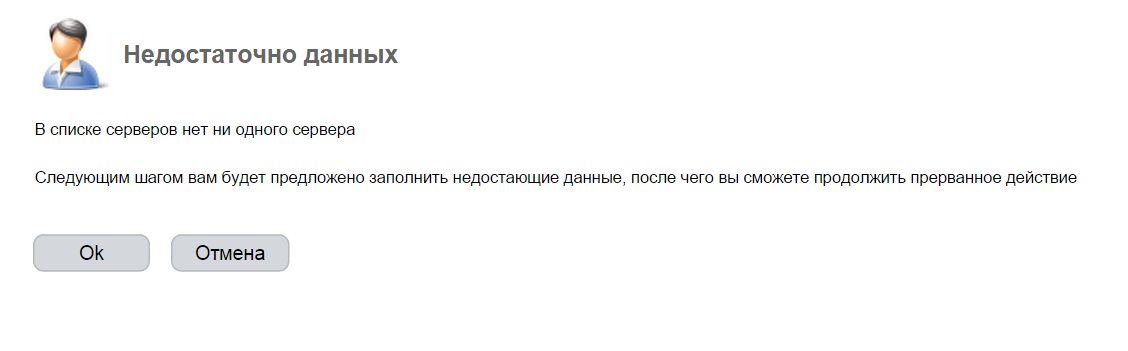
Adding the first user without first configuring the hosting server roles
As you can see, the system does not allow this to be done until the server roles are reconfigured.
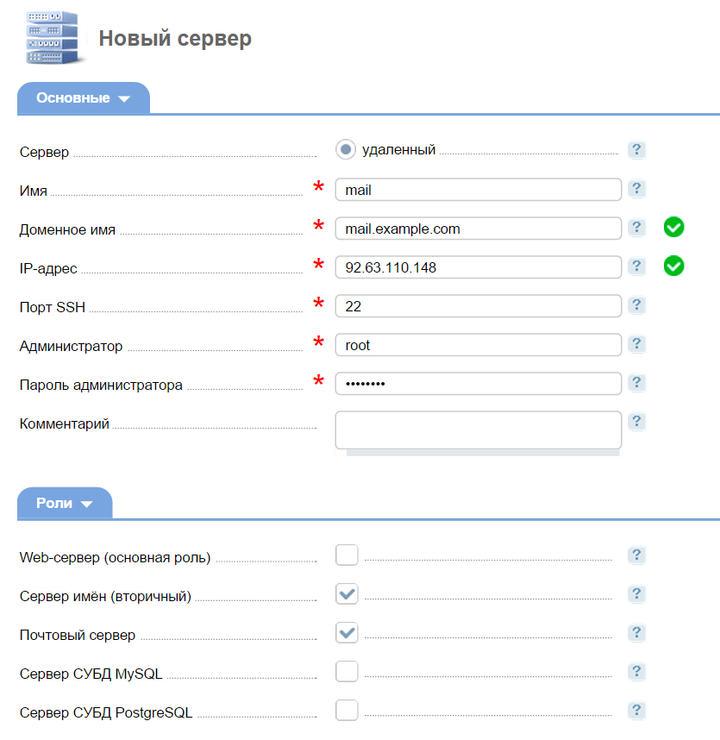
After adding servers and distributing roles, the installation of related software is initialized.
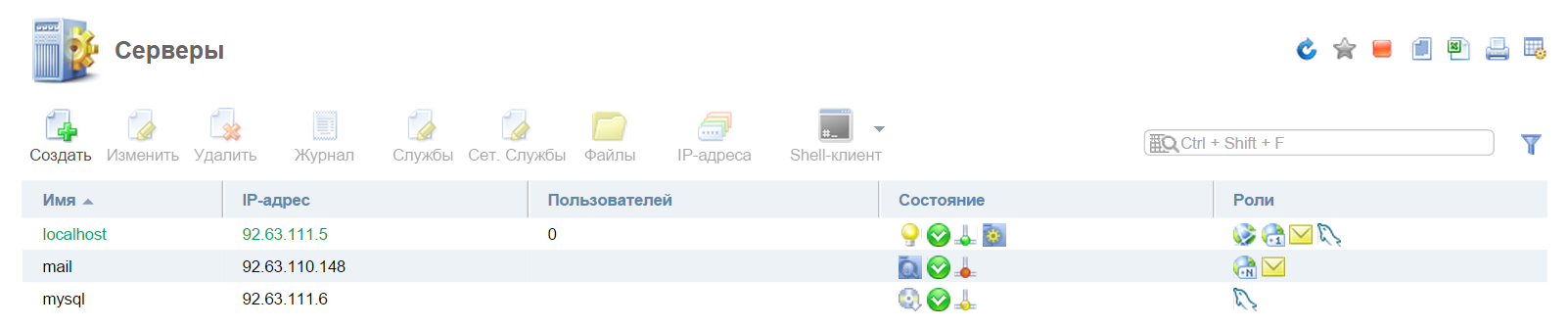
The process of adding role servers and automatically installing software on them.
These roles can be redistributed additionally. That is, you can always change the server configuration by adding a new role
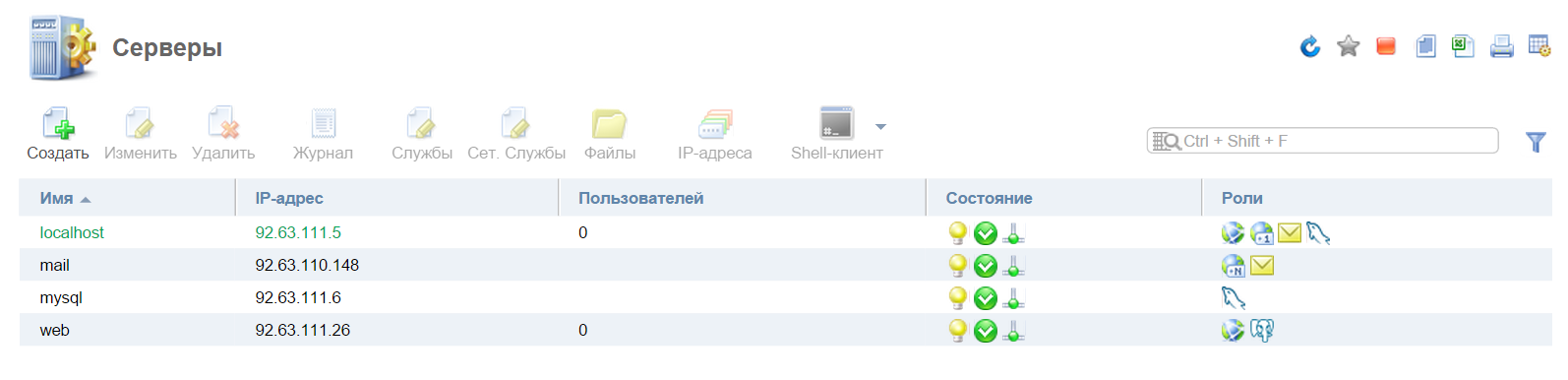
General view of ready-made role servers for hosting using 4 servers.
And now you should start creating templates - tariff plans and users.
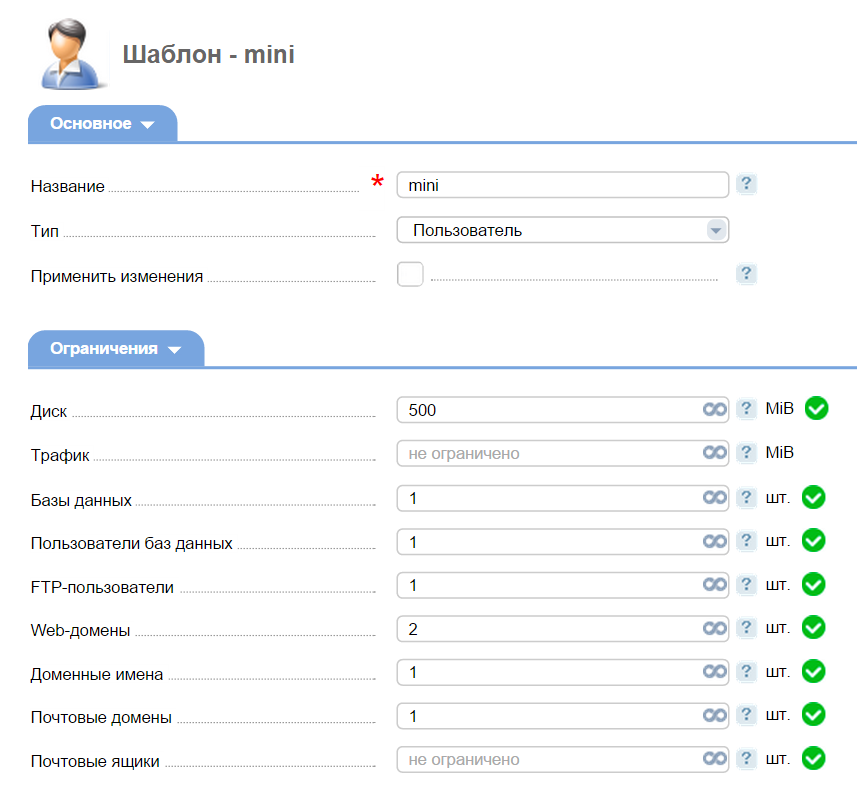

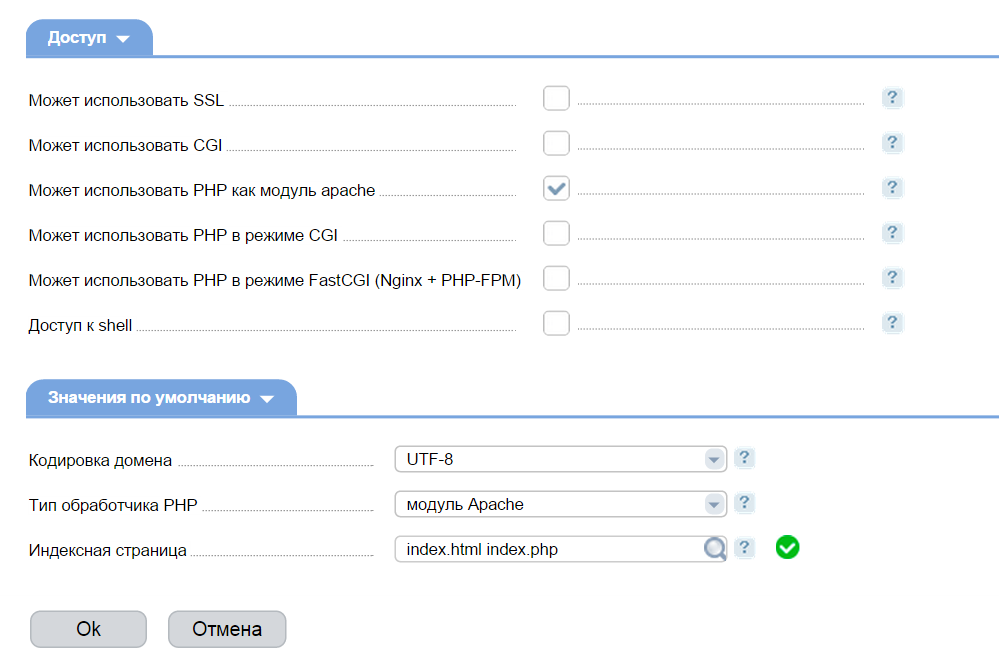
An example of a tariff plan template for hosting users
Thus, the result is a full-fledged scalable system for organizing a professional virtual hosting based on the Linux operating system and the ISPmanager 5 Business control panel.
A Few More Facts
At the moment, when adding mail domains, domain names, databases, and sites, the distribution of records takes place on each of the servers of the same role. In the future, various schemes described in the distribution policy will be implemented.
Removing a connected server will fail if user data is present on it.
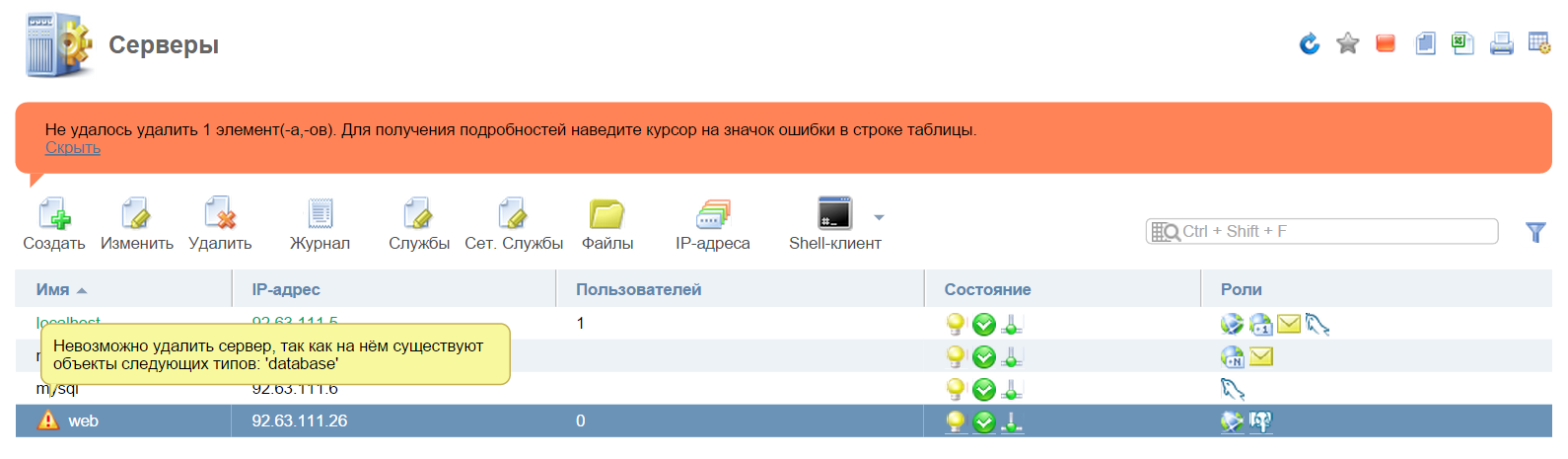
It is impossible to delete the server used.
You can find out the location of user data regarding servers of different roles using the "Location" button.
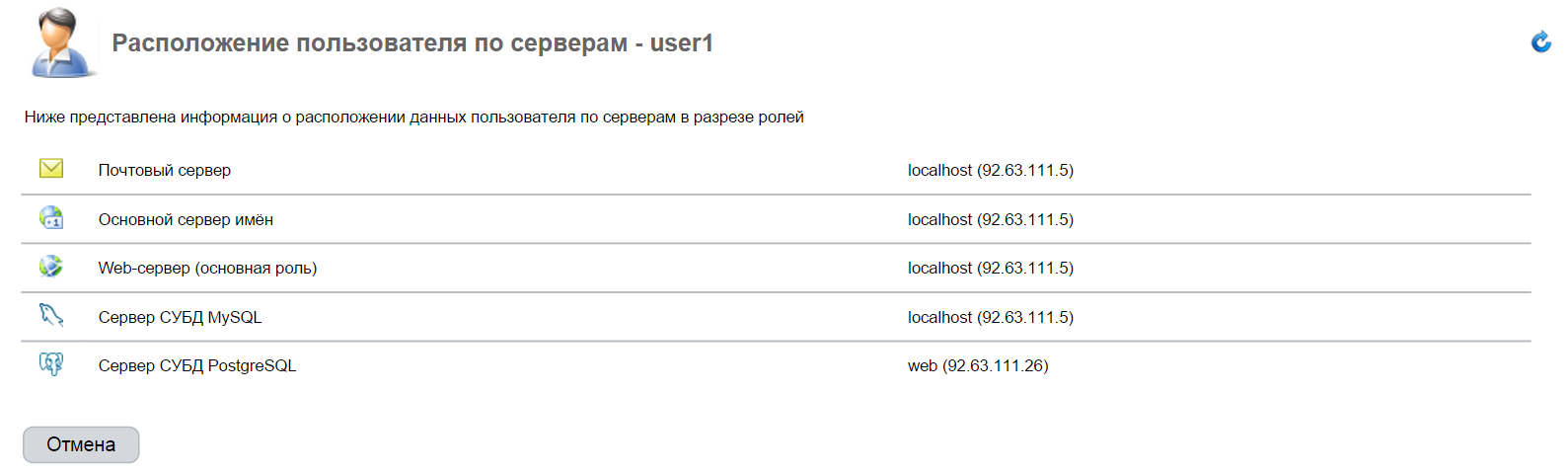
Location of user data on servers
Server upgrade from ISPmanager 4 Pro to ISPmanager 5 Business will not be implemented, because This is technically too complicated. To transfer existing users from ISPmanager 4 Pro, you will need a ready-made server with ISPmanager 5 Business installed, on which you should import users using the functions built into the control panel.
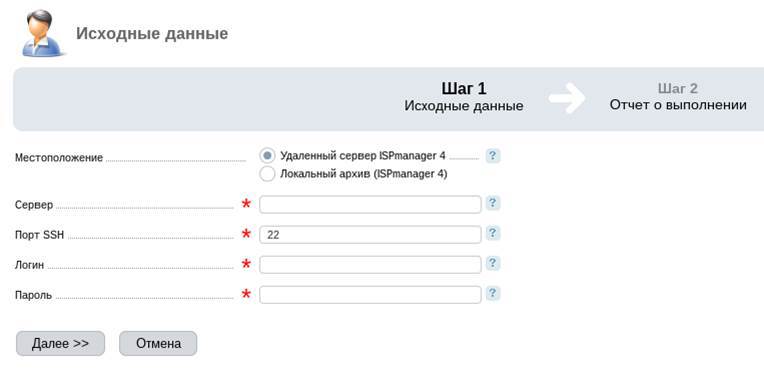
The first step is importing. Enter the server and authorization parameters.
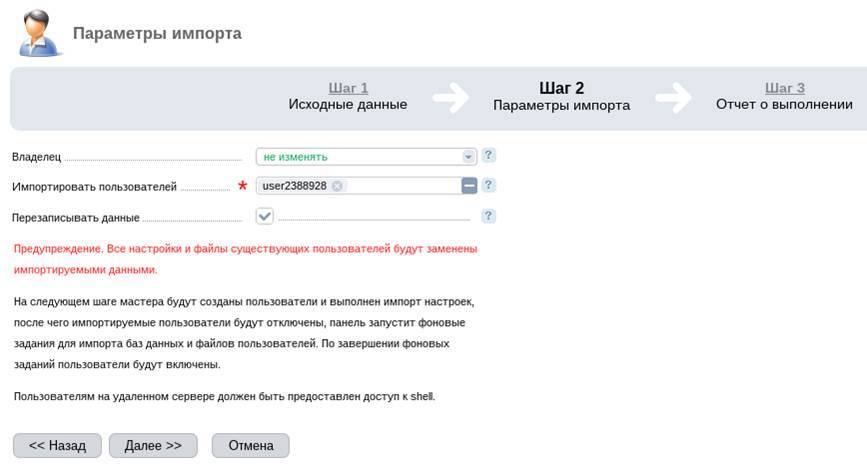
The second step is importing. Choosing a user, owner, and overwriting data
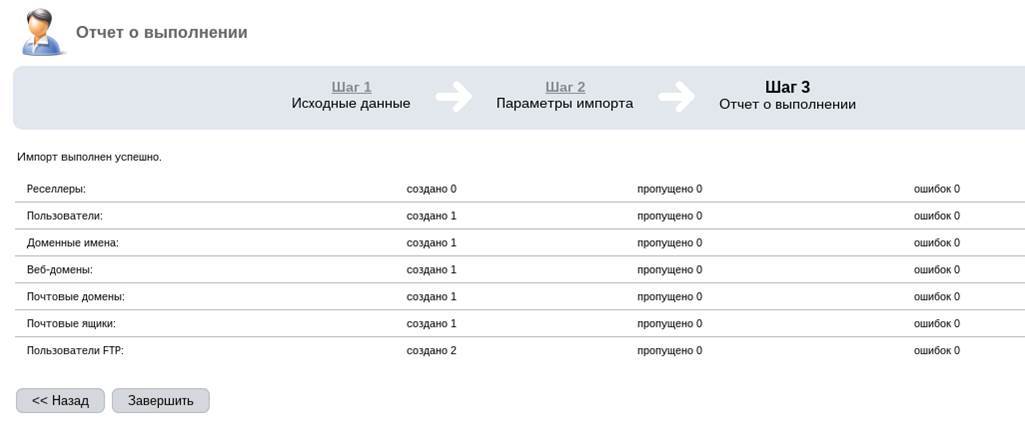
The third step is to import. Report on the completion of data transfer.
Importing a user is normal and generally does not cause any problems.
About development plans
ISPmanager 5 Business development plan for the next few months is as follows:
The Control Panel is in continuous development and over time will be supplemented by new services, functions and capabilities. We will be waiting for your feedback and comments.
When developing an extended version of ISPmanager 5, the task was to develop a new approach to creating shared hosting.
What's the Difference?
If we compare ISPmanager Lite and ISPmanager Pro 4 generations, their differences are as follows. The Pro version provides additional functionality for working with resellers, it is possible to create flexible tariff plans with limited access and system resources, as well as the ability to connect others to one control panel for centralized management of all servers.
When creating the 5th generation of the virtual hosting control panel, it was decided not to dwell on the functionality that simplifies the configuration and administration of servers and clients on shared hosting. The new version has the ability to scale the entire system. It became possible to connect additional servers and assign them specific roles: a database server, a mail server, a DNS server, and a server for hosting the sites themselves. ISPmanager 5 Business, like ISPmanager 4 Pro, takes advantage of the previously tested CloudLinux distribution to provide more flexible resource limits for users.
Installation process
Recommended and tested distributions for working with ISPmanager Linux operating systems are Centos 6.x and Debian 7.x. As in earlier versions, ISPmanager 5 Business is recommended to be installed on a server with a new distribution installation in the minimum configuration, in order to exclude any possible software conflicts. In this case, everything required for the functioning of the virtual hosting software will be installed from the repositories of the selected distribution and configured accordingly.
This article is an example of installing ISPmanager 5 on CentOS 6.5.
The initial installer has not changed and still it is a shell script that can be downloaded from the official ISPsystem website
This is a common installer for the entire fifth line of ISPsystem products, so we indicate what specifically to install using the parameters:
- sh install.5.sh --release beta ISPmanager-Business
During the installation, in addition to the official CentOS repositories, EPEL and ISPsystem's own repositories will be connected.
It is important to note that in version 5, ordering trial licenses is not required for review, in their absence they will be issued to your server automatically.
As a result, they will be deployed: COREmanager (all fifth-generation ISPsystem software products are based on it), ISPmanager 5 Business, and the MySQL server, which stores the ISPmanager database in InnoDB.
This is due to the fact that one of the key features is the scaling of shared hosting. Everything is used with the expectation of heavy loads and simultaneous work with the control panel of a large number of shared hosting users (creating and deleting domain names, web domains, mailboxes, databases, ftp users, and the like). Working with data through the MySQL database is just the best fit for this, and synchronization with real configs of various services occurs in the background, which is not noticeable to the user.
The first step - the installation of the first component of the system to create a shared hosting is over.
ISPmanager 5 Business Settings
Next, create a space for virtual hosting, which will consist of 4 servers. The roles of the web server, primary name server, secondary name server, mail server, database server will be distributed between these servers.
Let us dwell in more detail on the description of the software that is used on the servers of all these roles.
The developers did not come up with anything fundamentally new in the software and settled on software products that were time-tested by the community and users.
- Web server. The main server uses the standard apache bundle (mod_php) + nginx, used from previous generations of ISPmanager control panels. The developments in ISPmanager 5 Lite made it possible to use php-fpm + nginx as well, which excludes apache from working until it can be completely disconnected and deleted from the server.
- DNS-server . as the primary name server, it was decided to use the time-tested high-performance PowerDNS DNS server in conjunction with MysQL.
- Mail server . If ISPmanager4 supported all popular mail servers (sendmail, postfix, exim, communigate pro), then in the fifth generation the developers decided to make perfect support for one. It became Exim, which is a very flexible and most functional MTA, and allows you to solve all the tasks required of it with maximum speed.
- There have also been changes with webmail clients . ISPmanager4 used SquirrelMail, ISPmanager 5 Lite used Afterlogic, and ISPmanager 5 Business decided to consider RoundCube. With all the pluses, Afterlogic is absent in any distribution repositories, and this greatly complicated its installation and maintenance.
- Database server . These are MySQL and PosgreSQL. By default, those versions are installed that are available in the distribution repository.
After authorization in ISPmanager 5 Business, a license agreement appears. Upon acceptance of all provisions, the server control panel itself opens.
First of all, let's try to add the first user:
Adding the first user without first configuring the hosting server roles
As you can see, the system does not allow this to be done until the server roles are reconfigured.
After adding servers and distributing roles, the installation of related software is initialized.
The process of adding role servers and automatically installing software on them.
These roles can be redistributed additionally. That is, you can always change the server configuration by adding a new role
General view of ready-made role servers for hosting using 4 servers.
And now you should start creating templates - tariff plans and users.
An example of a tariff plan template for hosting users
Thus, the result is a full-fledged scalable system for organizing a professional virtual hosting based on the Linux operating system and the ISPmanager 5 Business control panel.
A Few More Facts
At the moment, when adding mail domains, domain names, databases, and sites, the distribution of records takes place on each of the servers of the same role. In the future, various schemes described in the distribution policy will be implemented.
Removing a connected server will fail if user data is present on it.
It is impossible to delete the server used.
You can find out the location of user data regarding servers of different roles using the "Location" button.
Location of user data on servers
Server upgrade from ISPmanager 4 Pro to ISPmanager 5 Business will not be implemented, because This is technically too complicated. To transfer existing users from ISPmanager 4 Pro, you will need a ready-made server with ISPmanager 5 Business installed, on which you should import users using the functions built into the control panel.
The first step is importing. Enter the server and authorization parameters.
The second step is importing. Choosing a user, owner, and overwriting data
The third step is to import. Report on the completion of data transfer.
Importing a user is normal and generally does not cause any problems.
About development plans
ISPmanager 5 Business development plan for the next few months is as follows:
- November 12, 2014 release of version 5.21. Backup function, CloudLinux support and user migration between hosting nodes.
- December 10, 2014, release of version 5.22 with support for CentOS 7.x
The Control Panel is in continuous development and over time will be supplemented by new services, functions and capabilities. We will be waiting for your feedback and comments.









