 September 21, 2014 at 16:38
Detecting the TV is turned on with a photodiode
I have a TV purchased for 8 years, NOT a smart TV, it does not have USB and Ethernet. Sometimes I turn it on to watch TV shows. And it often happens, he began to watch the program, when he suddenly needed to leave the house, got dressed, you stand in boots in the corridor, and the TV is not turned off! You have to take off your shoes (it’s not worth walking around the room in shoes), you go into the room, find the remote control on the sofa, turn off the TV, go about your business. This situation happens often, so I decided to put an end to this and still make the TV off button in the corridor.

Table of contents:
My house is partially automated by Z-Wave devices, including several Z-Wave.Me Dimmer for smooth lighting control, a couple of Fibaro Universal Sensors as motion sensors to turn on the lights, battery-powered switches and several more devices. In the corridor near the front door, an iPhone is mounted on the wall , which is the control panel of the Smart Home. From this panel you can see the temperature in the house and on the street, humidity in the room, traffic jams and turn off the lights in the rooms.

Fig. 1 - Smart Home Control Panel from iPhone 4
For the TV, I assembled an IR transceiverconnected to the Raspberry Pi. Thanks to this device, I can control the TV using HTTP requests: turn on / off, switch channels, change volume, etc. But I just can’t find out if the TV is on or off.

Fig. 2 - IR transceiver for controlling TV.
The task I had to solve was how to find out that the TV is turned on and how to transmit this information to the RaZberry smart home controller in order to work with it already as part of my home automation system. I’ll briefly talk about my home automation controller.
To communicate with Z-Wave devices, I use the RaZberry board installed on the Raspberry Pi.

Fig. 3 - Z-Wave RaZberry board on Raspbberry Pi
In the kit for the board there is software for automation - Z-Way. Z-Way has a modular structure. One part of it is a proprietary library for working with Z-Wave written in C, the second part is an OpenSource automation engine Z-Way Home Automation (Z-Way HA) written in JavaScript. Z-Way HA in addition to Z-Wave devices also supports any HTTP device, i.e. Devices with which you can communicate with HTTP requests. For the Z-Wave automation engine, devices and HTTP devices are no different. You can easily create an HTTP device that takes the weather with OpenWeather and create an automation rule: If it’s 30 ° C outside, turn on the Z-Wave relay, which controls the dormer’s electric window.
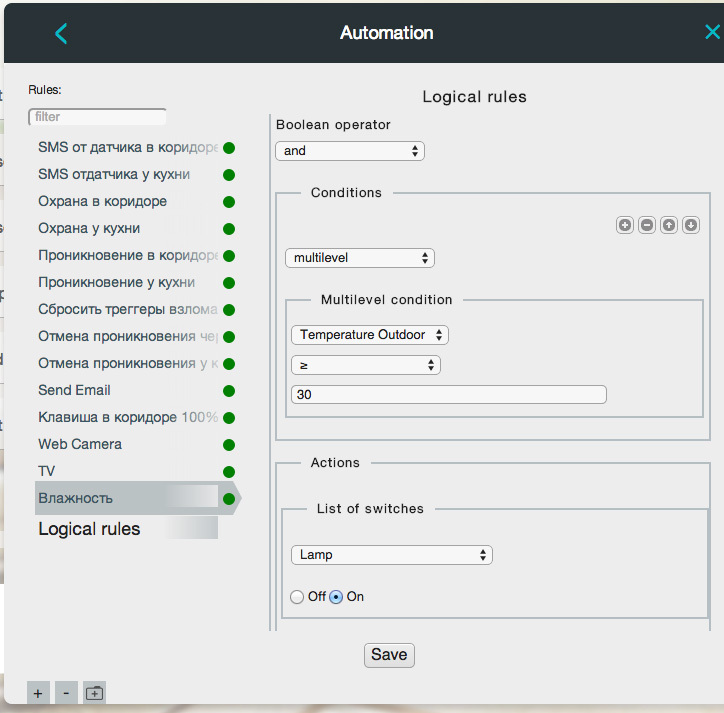
Fig. 4 - Automation rule in the Z-Way HA system
Using an HTTP device, I can add a TV to my automation system. You just need to understand what signal from the TV to transmit via HTTP.
There are several options for detecting that the TV is turned on:
I decided to detect the state of the TV using the LED on it. Near the TV I have a Raspberry Pi for watching a movie, I planned to connect the LED directly to the GPIO and thereby find out the state of the TV, but for this I had to remove the TV from the wall, disassemble it. I decided to go the other way.
To detect that the LED is on, I used the BPW34 photo diode , which works like a photo detector. To connect it to the Raspberry Pi, I first amplified the signal using the LM358 Operational Amplifier and then the signal from the op-amp was already applied to the GPIO. The scheme turned out to be simple:
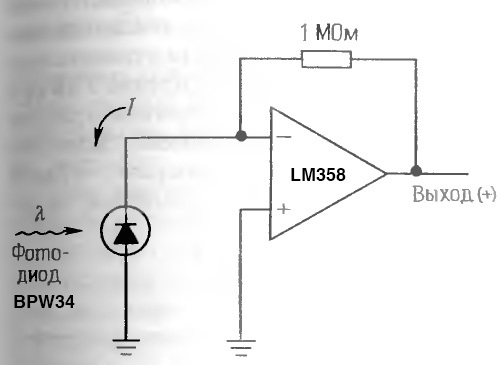
Fig. 5 - Photodetector circuit with digital output
Assembled device:
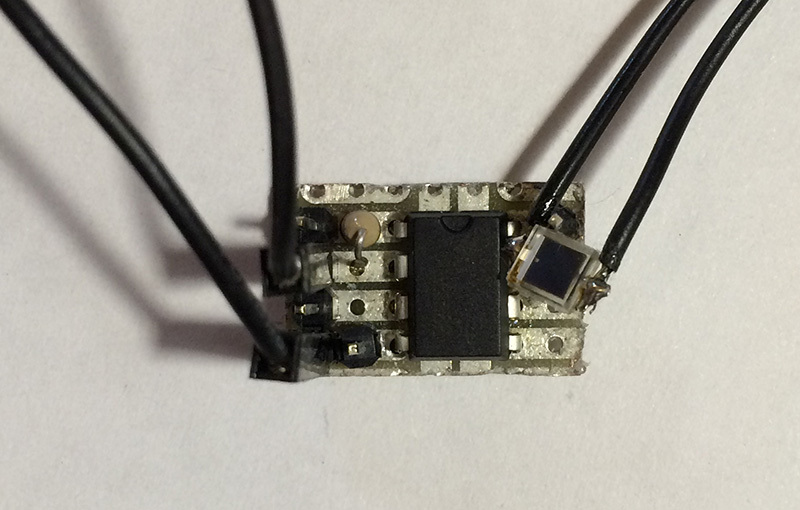
Fig. 6 - Photodetector connected to the Raspberry Pi
On the Raspberry Pi I already have an infrared transmitter and humidity sensor with a screen, I attached a photo detector to the screen:
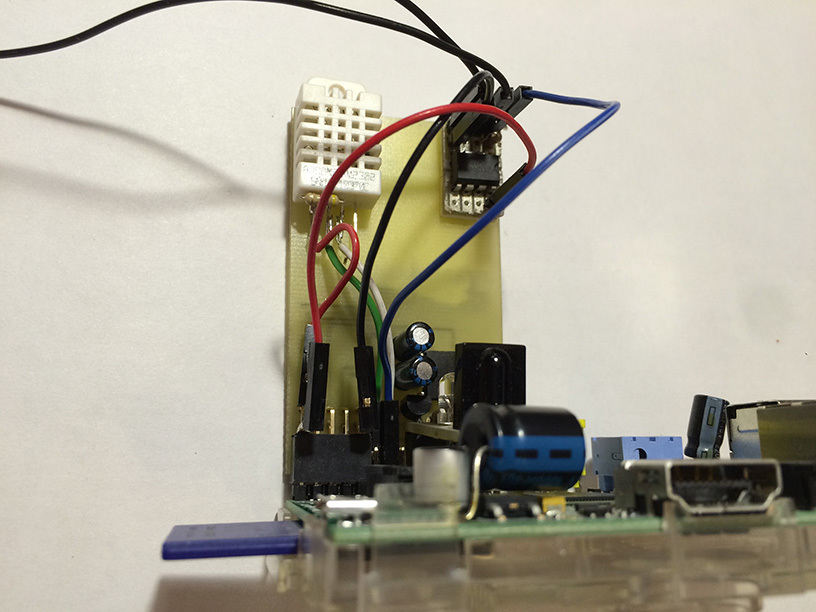
Fig. 7 - The installed photodetector on the Raspberry Pi
op-amp selects approximately 1.5 V from a 3.3 V power supply. When the LED is on, the output is 2 V, when off - 0 V. Raspberry Pi takes everything that is more than 1 V as a logical unit, so that everything works as planned. I connected the device to the Raspberry Pi, and attached the photodiode to the TV using a double-sided black tape.
Fig. 8 - Photodiode connected to the TV
With the help of a photodetector, I can find out the status of the TV, and with the help of an IR transceiver I can control it. To transfer the status and control the TV, I raised Apache to Raspberry Pi and wrote 2 small cgi scripts, one script receives HTTP commands and redirects them to IR, another script returns the status TV off or on :
In the Z-Way Home Automation automation system, I created an HTTP Device that turns the TV on / off and really shows its status, i.e. if you turn off the TV with the remote control or a button on it, then in Z-Way HA I will see the real state of the TV.
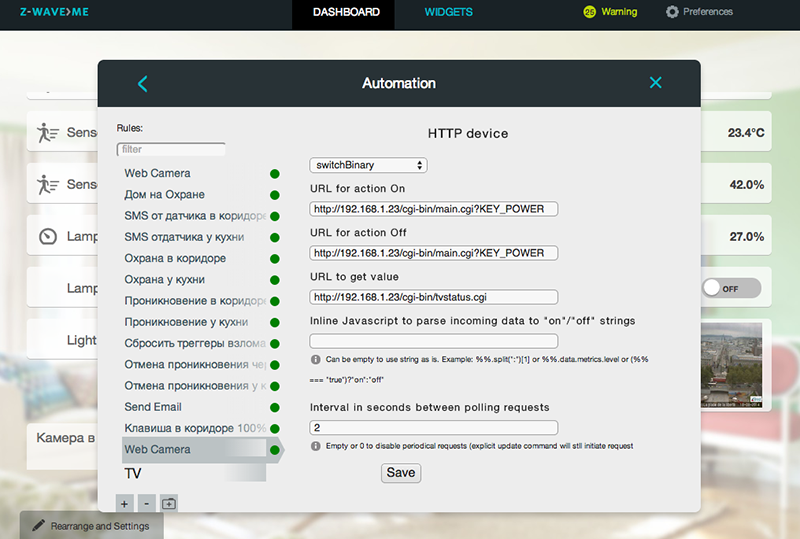
Fig. 9 - Creating an HTTP Device in the Z-Way HA system
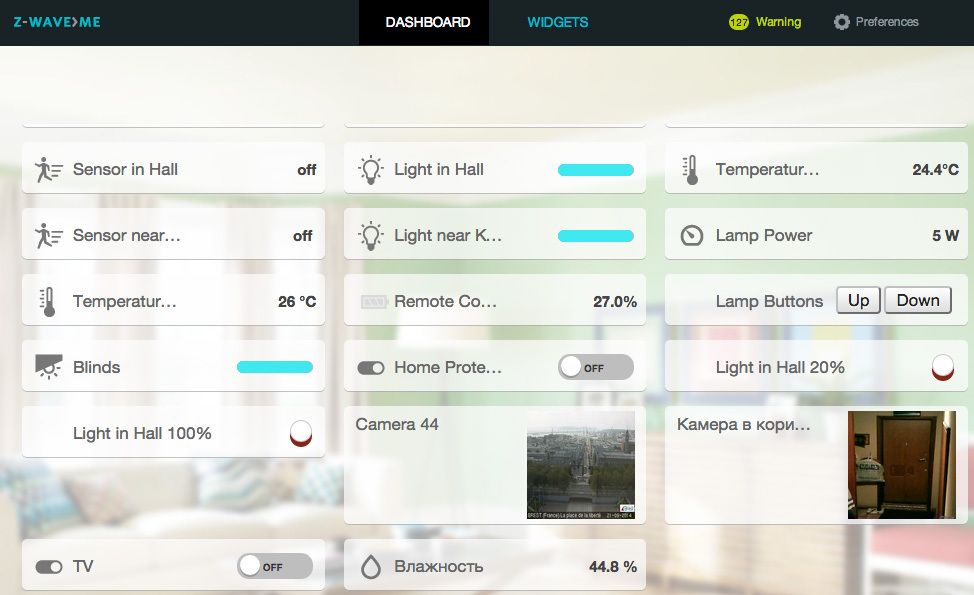
Fig. 10 - TV widget on the Dashboard
Why do I need to know the status of the TV? In addition, the same IR command is used to turn the TV on and off, and I need to send only the shutdown command from the panel in the corridor, because if you send the command to the TV when it is turned off, it will turn on.
Now, leaving home, I press one button in the corridor - “Turn off all”, and the teams disperse on different devices.
Table of contents:
- Description of the used Z-Wave automation system
- Detector for turning on the TV based on the BPW34 photodiode
- Embedding a photo detector in a Z-Way HA automation system using an HTTP Device
Description of the used Z-Wave automation system
My house is partially automated by Z-Wave devices, including several Z-Wave.Me Dimmer for smooth lighting control, a couple of Fibaro Universal Sensors as motion sensors to turn on the lights, battery-powered switches and several more devices. In the corridor near the front door, an iPhone is mounted on the wall , which is the control panel of the Smart Home. From this panel you can see the temperature in the house and on the street, humidity in the room, traffic jams and turn off the lights in the rooms.
Fig. 1 - Smart Home Control Panel from iPhone 4
For the TV, I assembled an IR transceiverconnected to the Raspberry Pi. Thanks to this device, I can control the TV using HTTP requests: turn on / off, switch channels, change volume, etc. But I just can’t find out if the TV is on or off.
Fig. 2 - IR transceiver for controlling TV.
The task I had to solve was how to find out that the TV is turned on and how to transmit this information to the RaZberry smart home controller in order to work with it already as part of my home automation system. I’ll briefly talk about my home automation controller.
To communicate with Z-Wave devices, I use the RaZberry board installed on the Raspberry Pi.
Fig. 3 - Z-Wave RaZberry board on Raspbberry Pi
In the kit for the board there is software for automation - Z-Way. Z-Way has a modular structure. One part of it is a proprietary library for working with Z-Wave written in C, the second part is an OpenSource automation engine Z-Way Home Automation (Z-Way HA) written in JavaScript. Z-Way HA in addition to Z-Wave devices also supports any HTTP device, i.e. Devices with which you can communicate with HTTP requests. For the Z-Wave automation engine, devices and HTTP devices are no different. You can easily create an HTTP device that takes the weather with OpenWeather and create an automation rule: If it’s 30 ° C outside, turn on the Z-Wave relay, which controls the dormer’s electric window.
Fig. 4 - Automation rule in the Z-Way HA system
Using an HTTP device, I can add a TV to my automation system. You just need to understand what signal from the TV to transmit via HTTP.
There are several options for detecting that the TV is turned on:
- Modern smart TVs via Ethernet will tell you what you want (My TV does not have Ethernet)
- Many TVs support CEC technology for HDMI (My does not support CEC)
- Some TVs do not have power at the USB output when turned off (My TV does not have USB)
- You can power the TV through the Fibaro Wall Plug - Z-Wave Socket Module with energy measurement. The most convenient option for me, since I stay within the Z-Wave system. It is easy to install, it is easy to detect the status of the TV set, there is power consumption - the TV set is on, there is no power consumption - the TV set is off (3000 rubles per module)
- Detect the status of the LED of the TV that is on when the TV is off and not on when the TV is on (My choice!)
Detector for turning on the TV based on the BPW34 photodiode
I decided to detect the state of the TV using the LED on it. Near the TV I have a Raspberry Pi for watching a movie, I planned to connect the LED directly to the GPIO and thereby find out the state of the TV, but for this I had to remove the TV from the wall, disassemble it. I decided to go the other way.
To detect that the LED is on, I used the BPW34 photo diode , which works like a photo detector. To connect it to the Raspberry Pi, I first amplified the signal using the LM358 Operational Amplifier and then the signal from the op-amp was already applied to the GPIO. The scheme turned out to be simple:
Fig. 5 - Photodetector circuit with digital output
Assembled device:
Fig. 6 - Photodetector connected to the Raspberry Pi
On the Raspberry Pi I already have an infrared transmitter and humidity sensor with a screen, I attached a photo detector to the screen:
Fig. 7 - The installed photodetector on the Raspberry Pi
op-amp selects approximately 1.5 V from a 3.3 V power supply. When the LED is on, the output is 2 V, when off - 0 V. Raspberry Pi takes everything that is more than 1 V as a logical unit, so that everything works as planned. I connected the device to the Raspberry Pi, and attached the photodiode to the TV using a double-sided black tape.
Fig. 8 - Photodiode connected to the TV
Embedding a photo detector in an automation system using an HTTP Device
With the help of a photodetector, I can find out the status of the TV, and with the help of an IR transceiver I can control it. To transfer the status and control the TV, I raised Apache to Raspberry Pi and wrote 2 small cgi scripts, one script receives HTTP commands and redirects them to IR, another script returns the status TV off or on :
xbian@xbian ~ $ cat /var/www/cgi-bin/tvstatus.cgi
#!/bin/bash
echo "Content-type: text/json"
echo ""
STATUS=`cat /sys/class/gpio/gpio27/value`
if [ "$STATUS" -eq "1" ]; then
    echo "off"
else
    echo "on"
fi
In the Z-Way Home Automation automation system, I created an HTTP Device that turns the TV on / off and really shows its status, i.e. if you turn off the TV with the remote control or a button on it, then in Z-Way HA I will see the real state of the TV.
Fig. 9 - Creating an HTTP Device in the Z-Way HA system
Fig. 10 - TV widget on the Dashboard
Why do I need to know the status of the TV? In addition, the same IR command is used to turn the TV on and off, and I need to send only the shutdown command from the panel in the corridor, because if you send the command to the TV when it is turned off, it will turn on.
Now, leaving home, I press one button in the corridor - “Turn off all”, and the teams disperse on different devices.









