 June 9, 2014 at 11:41
Syncthing Sync Overview + Raspberry Pi and Macbook Installation
In this article, we will talk about Syncthing - a new open cross-platform application that works according to the client-server model and is designed to synchronize files between participants (P2P). The application is written in Go and, in terms of functionality, is similar to BitTorrent Sync .
After reviewing the new service, we will try to install it on the Raspberry Pi and synchronize it with the laptop.
System Overview
To synchronize files between nodes in a P2P network, a simple, efficient and secure Block Exchange Protocol (BEP) was written . Syncthing program implements the capabilities of this protocol, although it can be used in any software. Development is completely open, all source code is published on Github . The protocol is also open, so any bugs can be immediately detected and fixed. The program is released for Mac OS X, Windows, Linux, FreeBSD and Solaris, it is easily configured through a convenient web interface, it works on a local network or via the Internet.
here is the interface of the administrative panel:

Ready-made assemblies are available on Github for all major platforms, and the site also hasDocumentation (English) and Quick Start Guide (English) .
Features of the program:
- Open source application and open protocol.
- Each node in the network is identified by a strong certificate.
- Block level synchronization support. With a small change in a large file, only the changed part will be synchronized.
- Lack of artificial channel limitation
- The ability to explicitly specify which nodes the synchronized directory will be available to.
- Directory and file synchronization by the date of the last change (so far without versioning support).
- The “master-slave” option, thanks to which other nodes will only synchronize with this directory, but will not be able to change its contents.
- Management through a convenient adaptable web interface.
- Cross-platform. Supported operating systems are Windows, Linux, Mac OS X, FreeBSD and Solaris. There is an unofficial client for Android.
- Security and privacy. Data is stored on client machines; interaction with a third-party server is not required. Supported by TLS.
Installation and setup
Now, after a brief overview, we proceed directly to the installation and configuration of the application. I will use the home macbook as the main host with the web interface, and the client will be installed on the Raspberry PI model B.
On the macbook, we go
to the download page for the current release and download the necessary archive, for Mac OS you need to download syncthing-darwin-amd64-v0. 8.13.tar.gz
list of currently supported platforms:

Unpack the downloaded archive and run the syncthing file in the program folder.
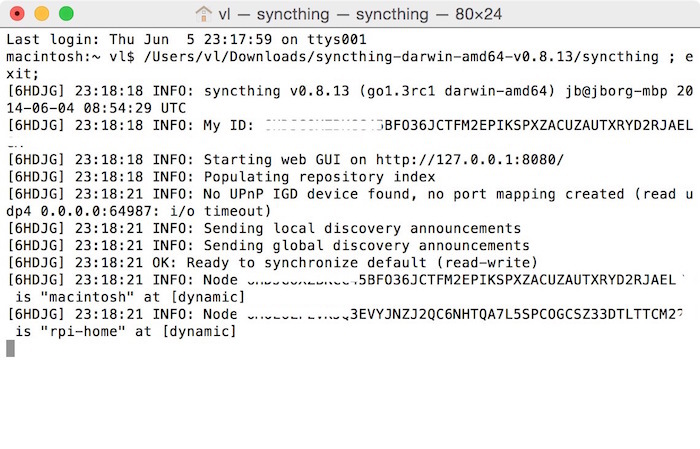
We wait for the program to finish and find in the console a line of the form:
My ID: WFDJGOXZBKCC45BFO36JCTFM2EPIKSPXZACUZAUTXRYD2RJAELGS
This is the system identifier, remember it, it will be useful to us a little later. Now let's deal with the client.
On the Raspberry Pi
Let's go to the Raspberry Pi console and download the package for this platform:
wget https://github.com/calmh/syncthing/releases/download/v0.8.13/syncthing-linux-armv5-v0.8.13.tar.gzNow unpack and start the service
tar xvzf synct*
cd synct*
./syncthing
It is necessary to wait for a while until a unique identifier key is generated and also remember (write) it.
After that, you need to add the first key generated on the laptop to the config.xml configuration file.
nano /home/pi/.config/syncthing/config.xmland add the “laptop” ID to the repository branch , as well as a new node:
dynamic
I got it like this
dynamic
dynamic
In general, the configuration file is readable enough and it has parameters that can be, and for more information, you can refer to the documentation.
Client setup on Raspberry Pi is completed, it remains to restart the service with the command
./syncthing &
Or add it to startup at /etc/rc.local.
Work check
Open the address http://127.0.0.1:8080 again in the laptop’s browser and select Edit → Add Node in the upper right corner.
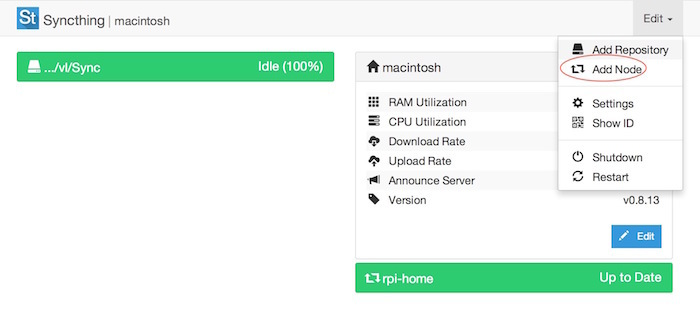
In the window that appears, fill in the fields, indicating the Raspberry Pi ID received earlier, the host name. The Address field is left “dynamic”.

Let's try to synchronize directories. By default, a synchronization folder is created in ~ / Sync / on each node.
We put the file and after a while it will be synchronized with the other nodes.
Now you can synchronize data between machines using the fast protocol. To exchange files, you just need to tell your computer ID to the person with whom you want to organize shared storage.
Statistics
Load on the Raspberry Pi
From the Syncthing admin panel:
RAM Utilization: ~
10MB CPU Utilization: ~ 1% at rest and up to 60% during synchronization.
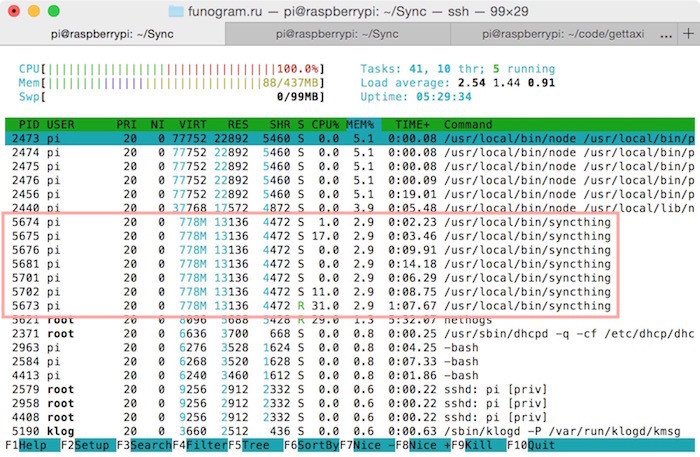
Displaying statistics of memory and processor overhead at the time of synchronization (htop)
Macbook Pro'13 load
From the Syncthing admin panel:
RAM Utilization: ~ 20MB
CPU Utilization: ~ 12 - 30%
Statistics screen from the Activity Monitor system utility
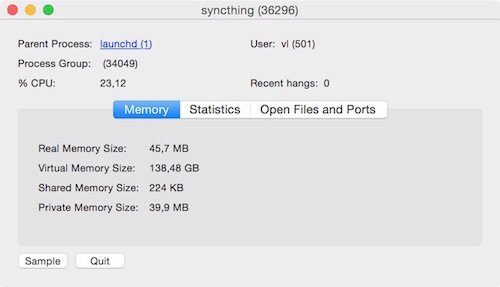
In the process of collecting statistics, I found that if the admin panel is open in the browser, the use of processor time increases many times (from 5 to 40%)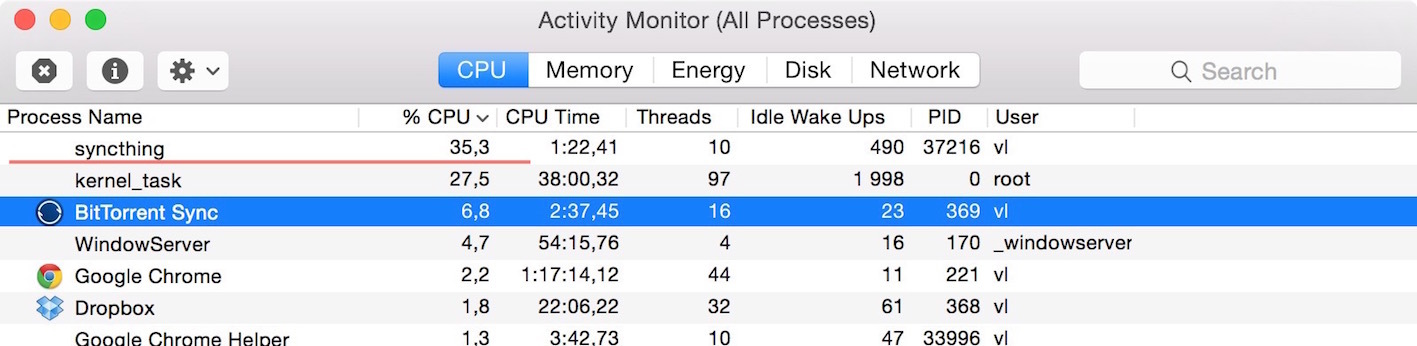
While the background process (without admin panel) consumes only 2−4%
For example, Bittorrent Sync consumes 5-9%. The data, of course, are relative and depend on the iron of other factors, but some conclusions can still be made.
The basis of the conclusion - do not leave the admin panel unnecessarily open in the browser, even in the background tab.
Conclusion
How much this application is more convenient and efficient than the same Bittorrent Sync - which I’m already used to - time will tell. The post was written in hot pursuit just a couple of hours after discovering Syncthing information.
Write your questions in the comments, I plan to test the service and, I will try to supplement the post with information about the synchronization speed, load, etc., if it will be interesting.
Related links
 Gihab Project: github.com/calmh/syncthing# Actual versions of the program for various platforms: github.com/calmh/syncthing/releases/latest
 Documentation: discourse.syncthing.net/category/documentation Support forum: discourse.syncthing .net Autorun script for Raspberry Pi (Debian):gist.github.com/arudmin/5a13e9105814c3f568ec








