April 22, 2014 at 16:49
The official Habrahabr mobile app
Last week, on the birthday of Habrahabr, we hinted that we were preparing mobile applications for the site. Waited? We have no doubt.
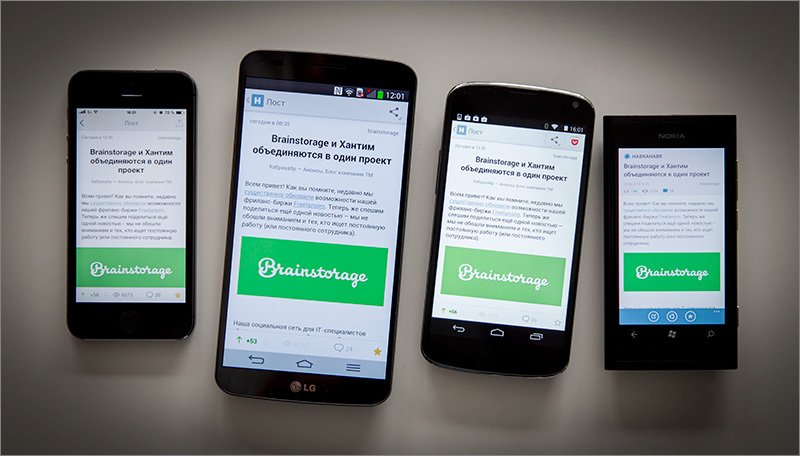
Ladies and gentlemen, ladies and gentlemen! It is time to uncover your smartphones for the new application.
The application came out under all the most popular platforms among our users. In this review, we are talking about the iOS7 version of the application for the iPhone.
It all starts with authorization. Login is available through TM ID or any social network available. If you don’t have an account, you can create one.
At the first start, the user will see a small tutorial for those who have not seen this post. If you are a new user, the application will offer to subscribe to thematic hubs of interest to you - if you do not, then posts from the 10 most popular hubs will be included in the feed.

Then everything is simple: when you start the application, you will see your feed, but in a compressed form - in the form of headers and other system information (swipe to the left calls the context menu from which the post can be added to favorites or shared). The full version of the post (with all formatting) is available by click.

Life hack: Swipes to the left and right from the post page will open the neighboring posts of your feed.
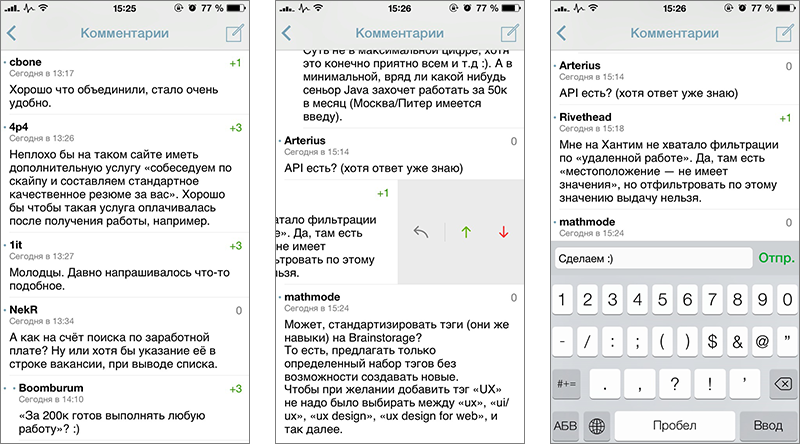
The transition to publication comments is carried out through the menu at the very end, they open in a new window and have a hierarchical structure - like on a site. Swipe left to comment allows you to answer or vote.
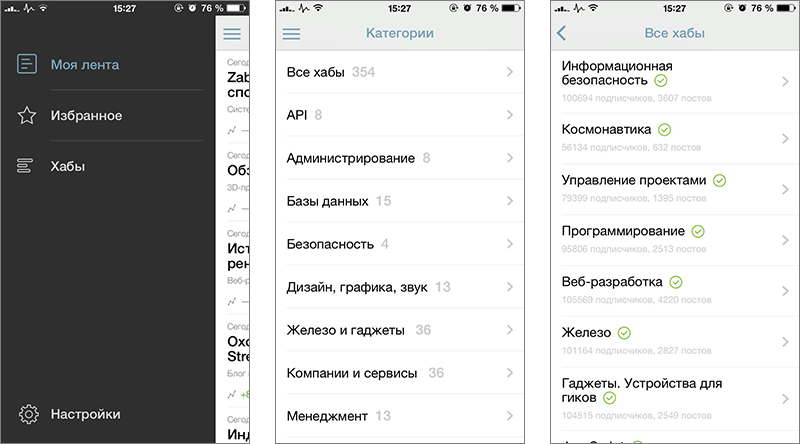
Swipe to the right (or the icon at the top left) in the posts ribbon calls up the application menu, through which you can switch from the ribbon to favorites, or to the list of hubs.
There is also a settings section in the menu where you can always see the status of your account (karma, rating), connect third-party services for sharing (including Pocket for deferred reading), specify the default browser (built-in to the application or some third-party) .

Special attention is paid to the settings section called “Appearance and Interface”, where you can:
- choose the font of the text in the posts (11 fonts to choose from) and its size;
- enable or disable text hyphenation;
- enable (optionally only with Wi-Fi) the downloading of media files (if you turn off the setting, there will be stubs instead of pictures and videos);
- enable the downloading of comments with the post.
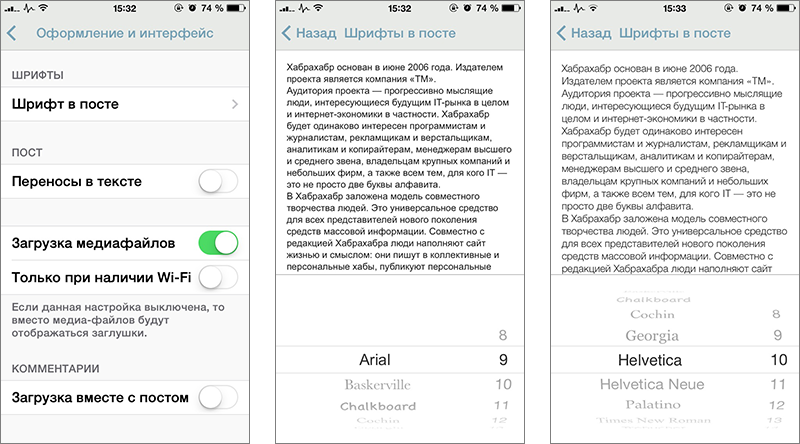
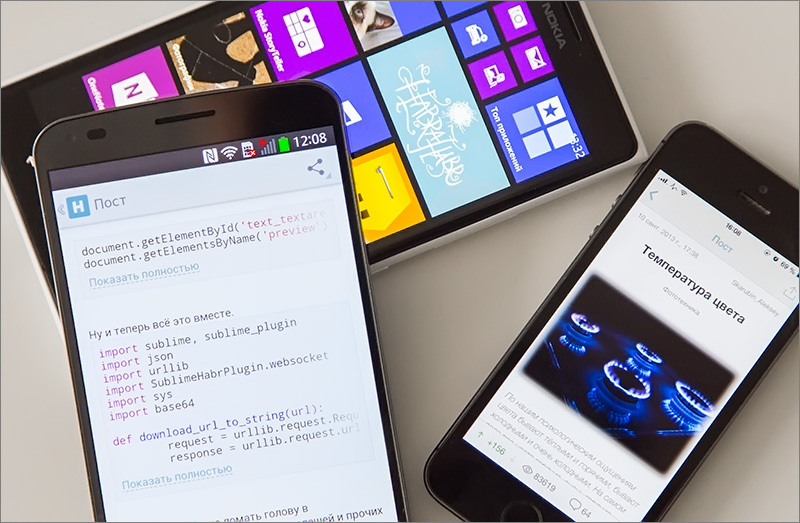
The post uses screenshots of the application in iOS7 for iPhone, the version for iPad will appear in the very near future.
As it was said at the beginning of the article, the application came out under other popular OSs, namely: Android (from version 4.0) for smartphones and Windows Phone (7.5 and 8. *). Given that in both categories there are “smartphones”, the application also looks good on them.

Install, try, write opinions, bugs and feature requests in the comments:
We take this opportunity to express our gratitude to the colleagues from CleverPumpkin , together with whom the application was developed. Boys are generally guys, but especially:
- The most important: Mofas
- Developers: erakitin , purrrminator , esavkin , byss and garifzyanov
- Designers: AndyLa and morochkovsky
- Tester: sandbuttrue
Spit them frantically and subscribe to the CleverPumpkin hubblog . In the near future, they promised to publish a post on how the development of the application went.
Well and most importantly:

- Download the application, put a plus / tip - we can conquer the tops only together;
- Repost, retweeting and other sharing in social networks will be very useful.
Stay in touch!
Ladies and gentlemen, ladies and gentlemen! It is time to uncover your smartphones for the new application.
The application came out under all the most popular platforms among our users. In this review, we are talking about the iOS7 version of the application for the iPhone.
It all starts with authorization. Login is available through TM ID or any social network available. If you don’t have an account, you can create one.
At the first start, the user will see a small tutorial for those who have not seen this post. If you are a new user, the application will offer to subscribe to thematic hubs of interest to you - if you do not, then posts from the 10 most popular hubs will be included in the feed.
Then everything is simple: when you start the application, you will see your feed, but in a compressed form - in the form of headers and other system information (swipe to the left calls the context menu from which the post can be added to favorites or shared). The full version of the post (with all formatting) is available by click.
Life hack: Swipes to the left and right from the post page will open the neighboring posts of your feed.
The transition to publication comments is carried out through the menu at the very end, they open in a new window and have a hierarchical structure - like on a site. Swipe left to comment allows you to answer or vote.
Swipe to the right (or the icon at the top left) in the posts ribbon calls up the application menu, through which you can switch from the ribbon to favorites, or to the list of hubs.
There is also a settings section in the menu where you can always see the status of your account (karma, rating), connect third-party services for sharing (including Pocket for deferred reading), specify the default browser (built-in to the application or some third-party) .
Special attention is paid to the settings section called “Appearance and Interface”, where you can:
- choose the font of the text in the posts (11 fonts to choose from) and its size;
- enable or disable text hyphenation;
- enable (optionally only with Wi-Fi) the downloading of media files (if you turn off the setting, there will be stubs instead of pictures and videos);
- enable the downloading of comments with the post.
The post uses screenshots of the application in iOS7 for iPhone, the version for iPad will appear in the very near future.
As it was said at the beginning of the article, the application came out under other popular OSs, namely: Android (from version 4.0) for smartphones and Windows Phone (7.5 and 8. *). Given that in both categories there are “smartphones”, the application also looks good on them.
Install, try, write opinions, bugs and feature requests in the comments:
| App Links: iOS | Android | Windows Phone | Finding an easter egg - plus in karma |
- The most important: Mofas
- Developers: erakitin , purrrminator , esavkin , byss and garifzyanov
- Designers: AndyLa and morochkovsky
- Tester: sandbuttrue
Spit them frantically and subscribe to the CleverPumpkin hubblog . In the near future, they promised to publish a post on how the development of the application went.
Well and most importantly:
How to make the best Habrahabr birthday present?
- Download the application, put a plus / tip - we can conquer the tops only together;
- Repost, retweeting and other sharing in social networks will be very useful.
Stay in touch!