May 3, 2014 at 12:34
Speeding up PHP (with ReactPHP)
In this post I would like to share an unusual way for the PHP world, the way to build an application, if you like - architecture. This approach allows PHP tools to increase the number of processed requests at times. I will also share my best practices in this direction. Of course, this approach is not free, in terms of code requirements, but let's take it in order.
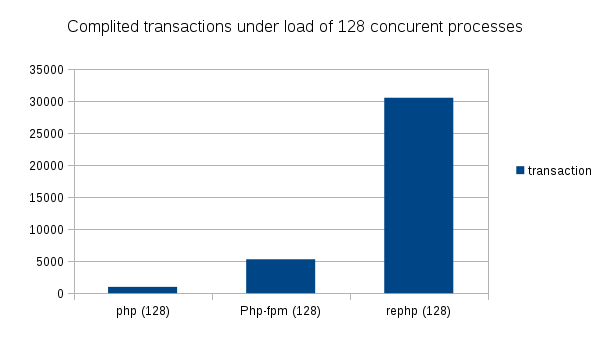
Yes, in the end we will get a performance increase of 30 times compared to regular PHP and 6 times compared to PHP + OPcache. But from the beginning, I would like to talk about existing, popular solutions to improve the performance of PHP applications.
Most modern installations use APC / OPcache and this is considered the standard and the maximum for PHP. This approach has the least number of disadvantages, as This is a native (native) solution offered to us by the PHP team. Everything would be fine, but not enough speed.
HHVM is really good, there are already repositories for popular Linux distros and all that remains is to install and configure, which is generally not a tricky thing. But this is a development from the facebook team and at the moment, HHVM greatly restricts the choice of extensions, and if you suddenly have your own patches for PHP extensions, it puts an end to the painless transition from PHP to HHVM. You can also forget about PHP 5.5. It is worth noting the excellent work of the facebook team to increase the compatibility of HHVM with the main tools and frameworks, but this figure is still around 97%.
Of the options that come to my mind, there are still raw HippyVM and the PhalconPHP framework. A lot of reviews have been written about Phalcon and I think it makes no sense to repeat them. HippyVM is under development, by the way it is an alternative to HHVM from the facebook team itself, written in python, which in my opinion makes this project even more foggy.
Suggest other options in the comments.
The classic installation of PHP includes the installation of one of the Nginx, Apache or Lighttpd web server, which processes incoming HTTP requests and redirects dynamic to PHP. There are several options for connecting PHP to a web server:
All PHP acceleration solutions are generally aimed at accelerating the slow PHP interpreter at the moment of redirecting the request from the web server to the script, which, as seen from the performance tests, gives its result. But this solution has a drawback, anyway, but for every PHP request the application has to declare classes, create instances, connect to the databases, read the cache - initialize its environment. And no matter how we speed up the PHP interpreter, a lot of resources are spent on the whole initialization, and this approach is clearly far from desirable, especially for highly loaded solutions. Why it happens? PHP was originally designed as a template language and toolkit, and was not conceived as a standalone web server. In addition, in PHP there is no parallel execution or even asynchronous like node.js, and all written extensions are blocking.
But PHP does not stand still. We have our own ecosystem with thousands of tools that can be easily installed thanks to Composer. PHP has borrowed many patterns from languages such as Java, JS and others, hello to the Symfony team. There are tools that allow PHP to work asynchronously. There is already an article on this subject on Habré , I will not repeat this in the description of this approach. I can only say that the asynchronous approach allows us to create not only a chat on websocket, but also to launch a full-fledged HTTP server, which means that we do not have to initialize PHP for each request. Thus, it is not difficult to guess, this approach will nullify the time spent on starting various frameworks and ultimately improve response time.
This solution, as the title implies, is built on ReactPHP. React itself is more a creation tool than a turnkey solution. Although it already has tools for processing incoming Http connections, as well as various tools, for example, for working with websockets or async redis, it does not have a patern, routing, etc. familiar to modern MVC frameworks, etc. For these purposes, we will connect ReactPHP to an existing Symfony2 application.
ReactPHP is based on eventloop and offers a choice of installing one of ext-libevent, ext-libev, ext-event to implement this architecture. In case of failure, React works through stream_selectand asynchronous capabilities are minimized, as in fact, everything will be executed in turn without the possibility of interrupting the process. Of course, you can omit this, because essentially asynchrony, this is a series of tasks within the same process. But if a function uses non-blocking calls, for example to async-redis, then an eventloop based on stream_select will be forced to wait for this function to execute, because there is no way to interrupt the php function for the duration of a non-blocking call. Of course, this can be circumvented by breaking the functional, but I hope the essence of the problem is clear.
I am a supporter of native solutions, and the installation of pecl extensions is not very included there. In addition, pecl installation will be required throughout the server fleet and there will be problems on the hosting. But PHP has the ability to implement coroutine using PHP 5.5. Thanks to the wonderful article from nikic ( translation on the hub ), I decided to build my implementation of eventloop based on the described nikic task scheduler. Yes, it doesn’t sound easy, and from a habit it really requires a thorough change in the way PHP applications are built. But in my opinion such decisions are the future of PHP.
By the way, Symfony was not chosen by chance. Implementation of the Symfony incoming request processing stack allows us to easily work without killing PHP after each request. In the meantime, I finished this post,offers with a similar implementation are already coming on the Symfony channel. And the developers themselves do not hide the fact that such a solution has been warming in their minds since the beginning of the launch of version 2.
But let's move on from words to deeds. First, we need your favorite Linux distribution with installed and configured nginx, php-cli 5.5.x, composer and your Symfony application. If you do not have Symfony applications at hand, then you can take a bare installation from the Symfony website, which will give an example. If you are not familiar with composer, then you can briefly review in my article on Satis .
Create a new folder, if the project is already there, go to it:
Install composer:
We put Symfony2.4.4:
Add these lines to your composer.json:
We start the package update:
Preparing Symfony cache:
And we start the web server, while only PHP means and in one copy, test so to speak. The port can be chosen to taste:
We check that everything works by opening localhost: 8080 in your favorite browser. The welcome page from Symfony should open, though the pictures will not show and css will not load. Thus, we got a PHP web server that processes incoming HTTP requests and does not die. But we only have 1 process, there is no statics processing and no balancer. As many have guessed, for this we will need nginx.
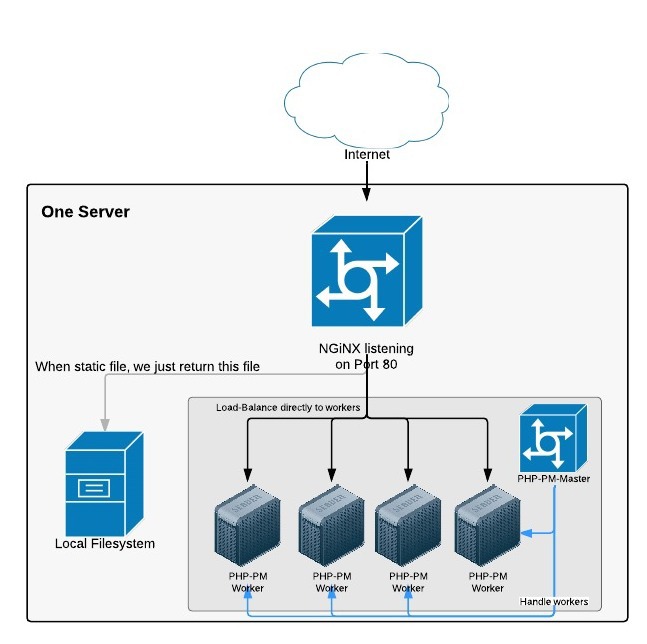
We configure nginx to proxy dynamic requests to our PHP server, simultaneously acting as a balancer, and give the statics without PHP:
In this case, server_name (fastapp.com) must be registered in / etc / hosts:
Now, so as not to bother with manually starting the n-number of processes in our PHP application (the presented nginx config is configured to n = 8), go to our project folder and execute:
We correct the ./ppm.json file:
Sometimes after changes you need to update the cache, maybe this is only in my case, because when writing an article, made changes to the code:
We restart our PHP Process Manager:
We get in response:
First, check the localhost: 5501 link in the browser, if everything opens, try opening fastapp.com. Everything should open, with pictures and css.
Now you can burn with the siege or ab tool, to choose from:
I’ll give some results of testing my (not helloworld) Symfony application on a development machine with AMD 8core, 8RAM and Fedora20.
We increase the number of concurrent requests to 256.
Unfortunately php-fpm fell out and refused to work with a limit of 32 processes against 256 concurrent requests.
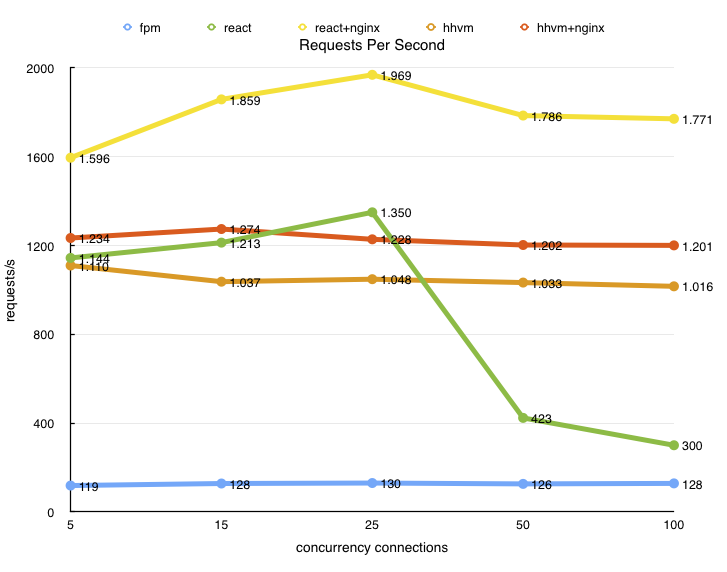
The idea to run Symfony applications through ReactPHP is not mine, I borrowed from Marc from his article , for which many thanks to him. By the way, he did his measurements and even compared with HHVM. Below is a chart from his article:
My contribution is to create an eventloop based on the work of nikic and finish the process manager to, in general, workability, as well as the nuances of running ReactPHP with the new eventloop. Perhaps with pecl event lib, it will all work faster, did not check. Unfortunately, my current projects do not correspond to the required quality of the code, so the operating time is gathering dust on the shelves of the “laboratory”, because this approach requires error-free code. That is, PHP, in fact, has no right to fall, and the omnivorous and dynamic PHP does not contribute to this in any way. This can be fixed by adding PHP PM to restart fallen processes, and you can also add tracking of changes in the code and also restart processes. But not yet in demand. Websocket server can also be launched on this basis. What was in the plans, but it remained there.
He left such a server for the whole weekend under load, there were no memory leaks. There is one problem that there is neither time nor need to look for: for some reason, after the load, 1-2 connections remain not closed. At small loads, it is not possible to identify the cause, but for large loads it is necessary to spend time to figure out how to identify the cause. So far, I have added a timer, which every 10 seconds checks the current connections for validity (resource, not resource) and kills the dead.
It is also worth noting that the application, ideally, should take into account the new features of asynchrony and interruption (yield), and will not be executed in one piece. It would also be nice to use non-blocking functionality.
Yes, in the end we will get a performance increase of 30 times compared to regular PHP and 6 times compared to PHP + OPcache. But from the beginning, I would like to talk about existing, popular solutions to improve the performance of PHP applications.
Opcache
Most modern installations use APC / OPcache and this is considered the standard and the maximum for PHP. This approach has the least number of disadvantages, as This is a native (native) solution offered to us by the PHP team. Everything would be fine, but not enough speed.
Hhvm
HHVM is really good, there are already repositories for popular Linux distros and all that remains is to install and configure, which is generally not a tricky thing. But this is a development from the facebook team and at the moment, HHVM greatly restricts the choice of extensions, and if you suddenly have your own patches for PHP extensions, it puts an end to the painless transition from PHP to HHVM. You can also forget about PHP 5.5. It is worth noting the excellent work of the facebook team to increase the compatibility of HHVM with the main tools and frameworks, but this figure is still around 97%.
Of the options that come to my mind, there are still raw HippyVM and the PhalconPHP framework. A lot of reviews have been written about Phalcon and I think it makes no sense to repeat them. HippyVM is under development, by the way it is an alternative to HHVM from the facebook team itself, written in python, which in my opinion makes this project even more foggy.
Suggest other options in the comments.
The classic installation of PHP includes the installation of one of the Nginx, Apache or Lighttpd web server, which processes incoming HTTP requests and redirects dynamic to PHP. There are several options for connecting PHP to a web server:
- mod_php (apache)
- f (ast) cgi
- php-fpm
All PHP acceleration solutions are generally aimed at accelerating the slow PHP interpreter at the moment of redirecting the request from the web server to the script, which, as seen from the performance tests, gives its result. But this solution has a drawback, anyway, but for every PHP request the application has to declare classes, create instances, connect to the databases, read the cache - initialize its environment. And no matter how we speed up the PHP interpreter, a lot of resources are spent on the whole initialization, and this approach is clearly far from desirable, especially for highly loaded solutions. Why it happens? PHP was originally designed as a template language and toolkit, and was not conceived as a standalone web server. In addition, in PHP there is no parallel execution or even asynchronous like node.js, and all written extensions are blocking.
But PHP does not stand still. We have our own ecosystem with thousands of tools that can be easily installed thanks to Composer. PHP has borrowed many patterns from languages such as Java, JS and others, hello to the Symfony team. There are tools that allow PHP to work asynchronously. There is already an article on this subject on Habré , I will not repeat this in the description of this approach. I can only say that the asynchronous approach allows us to create not only a chat on websocket, but also to launch a full-fledged HTTP server, which means that we do not have to initialize PHP for each request. Thus, it is not difficult to guess, this approach will nullify the time spent on starting various frameworks and ultimately improve response time.
This solution, as the title implies, is built on ReactPHP. React itself is more a creation tool than a turnkey solution. Although it already has tools for processing incoming Http connections, as well as various tools, for example, for working with websockets or async redis, it does not have a patern, routing, etc. familiar to modern MVC frameworks, etc. For these purposes, we will connect ReactPHP to an existing Symfony2 application.
ReactPHP is based on eventloop and offers a choice of installing one of ext-libevent, ext-libev, ext-event to implement this architecture. In case of failure, React works through stream_selectand asynchronous capabilities are minimized, as in fact, everything will be executed in turn without the possibility of interrupting the process. Of course, you can omit this, because essentially asynchrony, this is a series of tasks within the same process. But if a function uses non-blocking calls, for example to async-redis, then an eventloop based on stream_select will be forced to wait for this function to execute, because there is no way to interrupt the php function for the duration of a non-blocking call. Of course, this can be circumvented by breaking the functional, but I hope the essence of the problem is clear.
I am a supporter of native solutions, and the installation of pecl extensions is not very included there. In addition, pecl installation will be required throughout the server fleet and there will be problems on the hosting. But PHP has the ability to implement coroutine using PHP 5.5. Thanks to the wonderful article from nikic ( translation on the hub ), I decided to build my implementation of eventloop based on the described nikic task scheduler. Yes, it doesn’t sound easy, and from a habit it really requires a thorough change in the way PHP applications are built. But in my opinion such decisions are the future of PHP.
By the way, Symfony was not chosen by chance. Implementation of the Symfony incoming request processing stack allows us to easily work without killing PHP after each request. In the meantime, I finished this post,offers with a similar implementation are already coming on the Symfony channel. And the developers themselves do not hide the fact that such a solution has been warming in their minds since the beginning of the launch of version 2.
But let's move on from words to deeds. First, we need your favorite Linux distribution with installed and configured nginx, php-cli 5.5.x, composer and your Symfony application. If you do not have Symfony applications at hand, then you can take a bare installation from the Symfony website, which will give an example. If you are not familiar with composer, then you can briefly review in my article on Satis .
Create a new folder, if the project is already there, go to it:
mkdir fastapp && cd fastapp
Install composer:
curl -sS https://getcomposer.org/installer | php
We put Symfony2.4.4:
php composer.phar create-project symfony/framework-standard-edition symfdir/ 2.4.4 && mv symfdir/* ./ && rm -fr symfdir
We get
ls -l
drwxrwxr-x  6 user user 4.0K Apr 30 11:25 app/
drwxrwxr-x  2 user user 4.0K Apr 30 11:25 bin/
drwxrwxr-x  3 user user 4.0K Mar 14 09:37 src/
drwxrwxr-x 13 user user 4.0K Apr 30 11:25 vendor/
drwxrwxr-x  3 user user 4.0K Apr 30 11:25 web/
-rw-rw-r--  1 user user 2.0K Mar 14 09:37 composer.json
-rw-rw-r--  1 user user  56K Apr 30 11:25 composer.lock
-rwxr-xr-x  1 user user 990K Apr 30 11:23 composer.phar*
-rw-rw-r--  1 user user 1.1K Mar 14 09:37 LICENSE
-rw-rw-r--  1 user user 5.7K Mar 14 09:37 README.md
-rw-rw-r--  1 user user 1.3K Mar 14 09:37 UPGRADE-2.2.md
-rw-rw-r--  1 user user 2.0K Mar 14 09:37 UPGRADE-2.3.md
-rw-rw-r--  1 user user  356 Mar 14 09:37 UPGRADE-2.4.md
-rw-rw-r--  1 user user 8.3K Mar 14 09:37 UPGRADE.md
Add these lines to your composer.json:
{
    "repositories": [
        { "type": "vcs", "url": "http://github.com/Imunhatep/rephp" },
        { "type": "vcs", "url": "http://github.com/Imunhatep/php-pm" }
    ],
    "minimum-stability": "dev",
    "prefer-stable": true,
    "require": {
        "imunhatep/php-pm": "@dev"
    }
}
To look something like this
{
    "name": "symfony/framework-standard-edition",
    "license": "MIT",
    "type": "project",
    "description": "The \"Symfony Standard Edition\" distribution",
    "autoload": {
        "psr-0": { "": "src/" }
    },
    "repositories": [
        { "type": "vcs", "url": "http://github.com/Imunhatep/rephp" },
        { "type": "vcs", "url": "http://github.com/Imunhatep/php-pm" }
    ],
    "minimum-stability": "dev",
    "prefer-stable": true,
    "require": {
        "php": ">=5.5.3",
        "symfony/symfony": "~2.4",
        "doctrine/orm": "~2.2,>=2.2.3",
        "doctrine/doctrine-bundle": "~1.2",
        "twig/extensions": "~1.0",
        "symfony/assetic-bundle": "~2.3",
        "symfony/swiftmailer-bundle": "~2.3",
        "symfony/monolog-bundle": "~2.4",
        "sensio/distribution-bundle": "~2.3",
        "sensio/framework-extra-bundle": "~3.0",
        "sensio/generator-bundle": "~2.3",
        "incenteev/composer-parameter-handler": "~2.0",
        "imunhatep/php-pm": "@dev"
    },
    "scripts": {
        "post-install-cmd": [
            "Incenteev\\ParameterHandler\\ScriptHandler::buildParameters",
            "Sensio\\Bundle\\DistributionBundle\\Composer\\ScriptHandler::buildBootstrap",
            "Sensio\\Bundle\\DistributionBundle\\Composer\\ScriptHandler::clearCache",
            "Sensio\\Bundle\\DistributionBundle\\Composer\\ScriptHandler::installAssets",
            "Sensio\\Bundle\\DistributionBundle\\Composer\\ScriptHandler::installRequirementsFile"
        ],
        "post-update-cmd": [
            "Incenteev\\ParameterHandler\\ScriptHandler::buildParameters",
            "Sensio\\Bundle\\DistributionBundle\\Composer\\ScriptHandler::buildBootstrap",
            "Sensio\\Bundle\\DistributionBundle\\Composer\\ScriptHandler::clearCache",
            "Sensio\\Bundle\\DistributionBundle\\Composer\\ScriptHandler::installAssets",
            "Sensio\\Bundle\\DistributionBundle\\Composer\\ScriptHandler::installRequirementsFile"
        ]
    },
    "config": {
        "bin-dir": "bin"
    },
    "extra": {
        "symfony-app-dir": "app",
        "symfony-web-dir": "web",
        "incenteev-parameters": {
            "file": "app/config/parameters.yml"
        },
        "branch-alias": {
            "dev-master": "2.4-dev"
        }
    }
}
We start the package update:
php composer.phar update
We get
Loading composer repositories with package information
Updating dependencies (including require-dev)
  - Installing stack/builder (v1.0.1)
    Loading from cache
  - Installing react/promise (v2.0.0)
    Loading from cache
  - Installing guzzle/parser (v3.9.0)
    Loading from cache
  - Installing evenement/evenement (v2.0.0)
    Loading from cache
  - Installing react/react (v0.4.1)
    Loading from cache
  - Installing imunhatep/rephp (dev-master 13adf26)
    Cloning 13adf2697681a5954978ac56fe2c8fdf6a21dc4a
  - Installing imunhatep/php-pm (dev-master 02f44ec)
    Cloning 02f44ecb41ca5b4c81d4bb6087da7a0ed4964656
react/react suggests installing ext-libevent (Allows for use of a more performant event-loop implementation.)
react/react suggests installing ext-libev (Allows for use of a more performant event-loop implementation.)
react/react suggests installing ext-event (Allows for use of a more performant event-loop implementation.)
Writing lock file
Generating autoload files
Updating the "app/config/parameters.yml" file
Clearing the cache for the dev environment with debug true
Installing assets using the hard copy option
Installing assets for Symfony\Bundle\FrameworkBundle into web/bundles/framework
Installing assets for Acme\DemoBundle into web/bundles/acmedemo
Installing assets for Sensio\Bundle\DistributionBundle into web/bundles/sensiodistribution
Preparing Symfony cache:
php app/console cache:warmup --env=dev
And we start the web server, while only PHP means and in one copy, test so to speak. The port can be chosen to taste:
php bin/ppm start --workers 1 --port 8080
We check that everything works by opening localhost: 8080 in your favorite browser. The welcome page from Symfony should open, though the pictures will not show and css will not load. Thus, we got a PHP web server that processes incoming HTTP requests and does not die. But we only have 1 process, there is no statics processing and no balancer. As many have guessed, for this we will need nginx.
We configure nginx to proxy dynamic requests to our PHP server, simultaneously acting as a balancer, and give the statics without PHP:
upstream backend  {
    server 127.0.0.1:5501;
    server 127.0.0.1:5502;
    server 127.0.0.1:5503;
    server 127.0.0.1:5504;
    server 127.0.0.1:5505;
    server 127.0.0.1:5506;
    server 127.0.0.1:5507;
    server 127.0.0.1:5508;
}
server {
    root /path/to/symfony/web/;
    server_name fastapp.com;
    location / {
                # try to serve file directly, fallback to rewrite
                try_files $uri @rewriteapp;
        }
        location @rewriteapp {
                if (!-f $request_filename) {
                        proxy_pass http://backend;
                        break;
                }
        }
}
In this case, server_name (fastapp.com) must be registered in / etc / hosts:
127.0.0.1 fastapp.com
Now, so as not to bother with manually starting the n-number of processes in our PHP application (the presented nginx config is configured to n = 8), go to our project folder and execute:
cp vendor/imunhatep/rephp/ppm.json ./
We correct the ./ppm.json file:
{
        "bootstrap": "\\PHPPM\\Bootstraps\\Symfony",
        "bridge": "HttpKernel",
        "appenv": "dev",
        "workers": 8,
        "port": 5501
}
Sometimes after changes you need to update the cache, maybe this is only in my case, because when writing an article, made changes to the code:
app/console cache:warmup --env=dev
We restart our PHP Process Manager:
php bin/ppm start
We get in response:
8 slaves (5501, 5502, 5503, 5504, 5505, 5506, 5507, 5508) up and ready.
First, check the localhost: 5501 link in the browser, if everything opens, try opening fastapp.com. Everything should open, with pictures and css.
Now you can burn with the siege or ab tool, to choose from:
siege -qb -t 30S -c 128 http://fastapp.com/
I’ll give some results of testing my (not helloworld) Symfony application on a development machine with AMD 8core, 8RAM and Fedora20.
Php 5.5.10, via nginx + php-fpm:
siege -qb -t 30S -c 128 http://login.dev/signup
Lifting the server siege...      done.
Transactions:                 983 hits
Availability:              100.00 %
Elapsed time:               29.03 secs
Data transferred:            4.57 MB
Response time:                0.91 secs
Transaction rate:           34.26 trans/sec
Throughput:                0.16 MB/sec
Concurrency:               124.23
Successful transactions:         983
Failed transactions:               0
Longest transaction:            1.81
Shortest transaction:            0.42
Php 5.5.10 with OPcache enabled, via nginx + php-fpm:
siege -qb -t 30S -c 128 http://login.dev/signup
Lifting the server siege...      done.
Transactions:                5298 hits
Availability:              100.00 %
Elapsed time:               29.54 secs
Data transferred:           24.15 MB
Response time:                0.70 secs
Transaction rate:          179.35 trans/sec
Throughput:                0.82 MB/sec
Concurrency:              126.43
Successful transactions:        5298
Failed transactions:               0
Longest transaction:            1.68
Shortest transaction:            0.07
Php 5.5.10 with OPcache enabled, via nginx + ReactPHP + Coroutine eventloop:
siege -qb -t 30S -c 128 http://fastlogin.dev/signup
Lifting the server siege...      done.
Transactions:               30553 hits
Availability:              100.00 %
Elapsed time:               29.85 secs
Data transferred:          157.63 MB
Response time:                0.12 secs
Transaction rate:         1023.55 trans/sec
Throughput:                5.28 MB/sec
Concurrency:              127.43
Successful transactions:       30553
Failed transactions:               0
Longest transaction:            0.76
Shortest transaction:            0.00
We increase the number of concurrent requests to 256.
Php 5.5.10 with OPcache enabled, via nginx + php-fpm
siege -qb -t 30S -c 256 http://login.dev/signup
siege aborted due to excessive socket failure;
Transactions:                 134 hits
Availability:               10.48 %
Elapsed time:                1.58 secs
Data transferred:            0.78 MB
Response time:                1.21 secs
Transaction rate:           84.81 trans/sec
Throughput:                0.49 MB/sec
Concurrency:              102.93
Successful transactions:         134
Failed transactions:            1145
Longest transaction:            1.56
Shortest transaction:            0.00
Unfortunately php-fpm fell out and refused to work with a limit of 32 processes against 256 concurrent requests.
We try Php5.5.10 + ReactPHP + Coroutine eventloop
siege -qb -t 30S -c 256 http://fastlogin.dev/signup
Lifting the server siege...      done.
Transactions:               29154 hits
Availability:              100.00 %
Elapsed time:               29.16 secs
Data transferred:          150.40 MB
Response time:                0.25 secs
Transaction rate:          999.79 trans/sec
Throughput:                5.16 MB/sec
Concurrency:              252.70
Successful transactions:       29154
Failed transactions:               0
Longest transaction:            3.66
Shortest transaction:            0.00
Conclusion
The idea to run Symfony applications through ReactPHP is not mine, I borrowed from Marc from his article , for which many thanks to him. By the way, he did his measurements and even compared with HHVM. Below is a chart from his article:
My contribution is to create an eventloop based on the work of nikic and finish the process manager to, in general, workability, as well as the nuances of running ReactPHP with the new eventloop. Perhaps with pecl event lib, it will all work faster, did not check. Unfortunately, my current projects do not correspond to the required quality of the code, so the operating time is gathering dust on the shelves of the “laboratory”, because this approach requires error-free code. That is, PHP, in fact, has no right to fall, and the omnivorous and dynamic PHP does not contribute to this in any way. This can be fixed by adding PHP PM to restart fallen processes, and you can also add tracking of changes in the code and also restart processes. But not yet in demand. Websocket server can also be launched on this basis. What was in the plans, but it remained there.
He left such a server for the whole weekend under load, there were no memory leaks. There is one problem that there is neither time nor need to look for: for some reason, after the load, 1-2 connections remain not closed. At small loads, it is not possible to identify the cause, but for large loads it is necessary to spend time to figure out how to identify the cause. So far, I have added a timer, which every 10 seconds checks the current connections for validity (resource, not resource) and kills the dead.
It is also worth noting that the application, ideally, should take into account the new features of asynchrony and interruption (yield), and will not be executed in one piece. It would also be nice to use non-blocking functionality.