 April 8, 2014 at 12:18
GestureWorks Gameplay virtual controller - rebirth of your favorite games
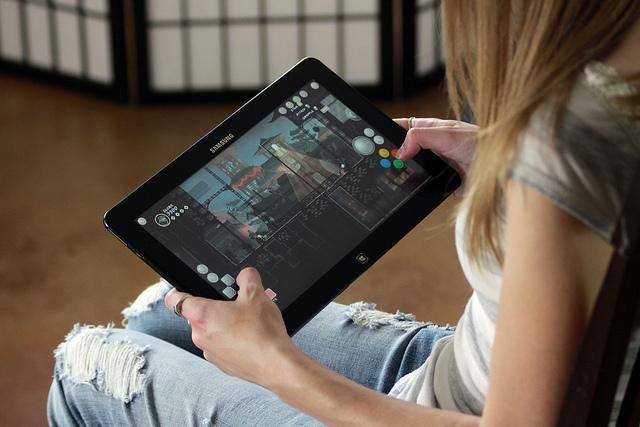
Portable computers are becoming more and more popular every year, and we want more from them. Meanwhile, the functionality of the device and the convenience of its use can sometimes be improved purely by software, and created by independent developers, the main thing to know about the existence of such tools. A good example of software is fundamentally changing the way of interaction with any device having a touch screen may serve as a virtual game controller GestureWorks Gameplay company Ideum .
Games for portable devices are a great pleasure for users and a headache for developers. It’s great when you can carry a good toy with you and run it when you have a free minute. However, designing a convenient interface for managing the game with your fingers is hellish torment; not every developer can solve this problem. Now, game creators may not bother at all about this, because users themselves can come up with a virtual controller for themselves and share it with others. If you get confused, you can create just a masterpiece!
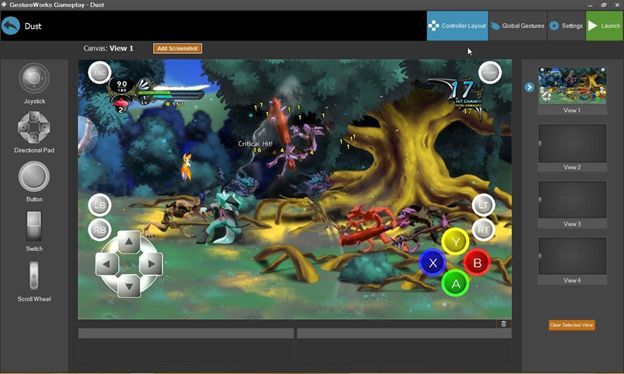
General view of the virtual controller
Windows games created in the pre-sensory era receive a second life - they can now also be played on portable devices. Just think how many great games are gathering dust on the shelf simply because they do not support the modern finger interface. But you don’t need to make any changes to the game code - just develop an “add-in” in the form of a virtual controller.
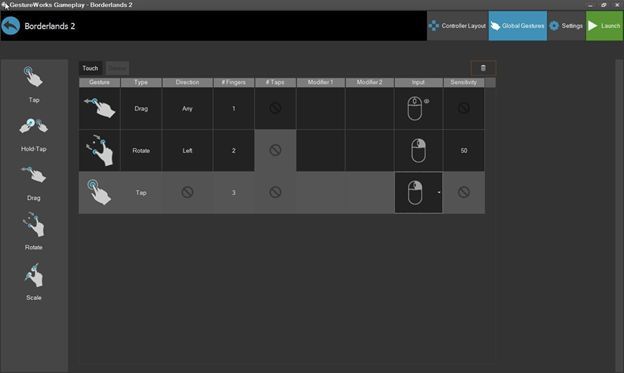
Gesture menu in the controller editor
The GestureWorks Gameplay controller is an extra layer placed on top of the main game screen. On this layer, there are several types of customizable virtual controls: buttons, switches, joysticks. The user has more than 200 types of gestures at his disposal - it is unlikely that the player will need a larger number of virtual “hot keys”. For the game, several virtual controllers can be created (for example, one for the research mode, the other for the combat mode).
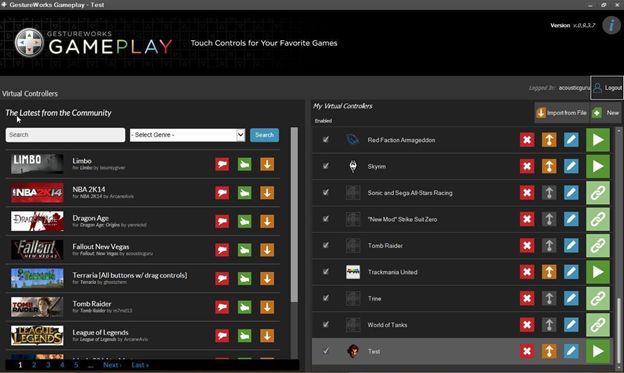
Catalog of available controllers
Currently, the GestureWorks Gameplay catalog contains over a hundred virtual controllers for various popular games; All of them can be edited at your discretion. It is possible to create your own controllers using a visual, easy-to-use editor, which even a person who is not involved in programming and game development can master.
The latest version of GestureWorks Gameplay introduced a major innovation. Now the program can be put on a smartphone, so it turns into a virtual wireless game controller. There are other progressive developments, for example, accelerometer support has already been introduced in a test form. The virtual controller is also able to determine the state of the device, which can be both a tablet and an ultrabook.
GestureWorks Gameplay Minute Demo
A little about the technical side of the product. Since the virtual controller must directly intervene in the exchange of data between the user and the game, the dll injection method is used for its operation, in which the code is executed in the address space of another process (in this case, the game) using a dynamically linked library. During the development, I had to solve many problems related to both the nuances of the injection and the features of touch control of the game. So, for example, testing showed that the interaction between the game and the controller is much better when the first is called by the second as a child process. But for this it is necessary that the controller starts first. The solution was found in the form of a small system service, constantly working and waiting in the wings. Or here is another example, regarding gameplay. It turned out that it is very difficult to implement sensory control in games where the movement of the mouse changes the direction of the gaze (the so-called “mouse” vision). I had to filter out the data received from the mouse, and then select the parameters of a virtual joystick that implements "mouse" vision for a long time.
Well, in conclusion, we will answer an unasked question why the story about GestureWorks Gameplay appeared on Intel's blog. It is easy to guess that such a software product as a virtual game controller has strict performance requirements: in short, the button should work exactly when it is pressed. That is why there are great prospects for optimization here - it is necessary to do the maximum possible. Consultations of Intel specialists and optimizing software tools of the company helped bring the product to mind, provided an acceptable speed of its work. We hope that the fruits of joint efforts will be appreciated.
Interested links









