February 19, 2015 at 01:18
Interprocess replication of objects using QtRemoteObjects
- Tutorial
On October 7, 2014, the public sources of the Qt-module QtRemoteObjects appeared in the public domain . The module was created in the bowels of the Ford Motor Company (author Brett Stottlemyer). The thing, in my opinion, is very promising. The module allows, for example, to transmit signals between objects over the network. But the capabilities of the module are not limited to this. More precisely, the essence of the module is described by its previous name - Replica, since objects are "replicated" between processes.
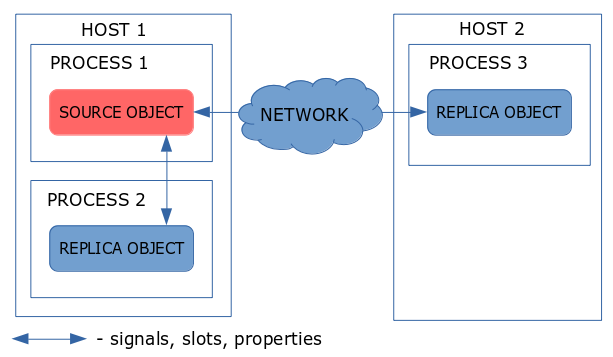
The key idea of QtRemoteObjects, which qualitatively distinguishes it from other methods of interprocess communication / remote procedure call, is the idea of completely duplicating a Qt object in other processes. This means that all changes to the properties in the source object are reflected (with notification by signals) in the replica object. Any signals that are emitted by the source object will also be emitted in each replica object. You can also set properties, call slots in the replica object, and requests are sent to the source object, which processes them, and then the changes are reflected in other replica objects by means of signals or by changing the properties. As a result, all objects (including the source object) are synchronized.
On your system, done by installing the qtbase5-private-dev package
git clone gitorious.org/qtplayground/qtremoteobjects.git
Assembled a project in QtCreator using a shadow build. As a result, all the necessary files appeared in the build-qtremoteobjects-qt5_3_0-Release directory. If you then make install install in this directory, the module header files, library, and code generator for rep files will be installed in the corresponding directories. The only thing that has not been installed is the contents of the qtremoteobjects / mkspecs / features directory, it must be copied to the / usr / lib / x86_64-linux-gnu / qt5 / mkspecs / features directory.
If there are problems with make install, you can do everything “manually”: copy the libQt5RemoteObjects.so (dll) library to the Qt library directory and the / include / QtRemoteObjects directory to the Qt file directory, respectively. Also, in “manual” mode, you will need to copy the binary from the bin / repc build directory to the Qt binaries directory (in my case, it is / usr / lib / x86_64-linux-gnu / qt5 / bin / repc).
The presence of an object - a source and an object - a replica is inspired by the idea of a client-server architecture. Therefore, to demonstrate the operation of the module, we will create two projects - a client and a server. The source object on the server will emit a signal, in the parameters of which the text will be transmitted, and in the slot of the client connected to the signal of the replica object, the transmitted text will be processed.
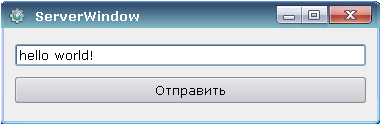
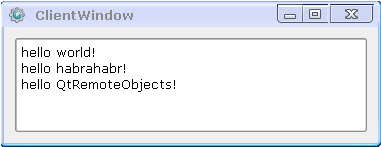
The example is very simple, but with such an example it will be easier to show the operation of the module. Two pictures of the resulting applications and the code below.
Server
Client
We will have one common directory (for example, remoteobj) and 2 subdirectories: client and server, in which the projects of two applications will be located. In the project files of both applications, you must connect the module.
Files with the extension .rep are used to describe the interface of the object that will be used for interprocess communication. In the directory parent to the client and server project directory, create a text file MessageSender.rep with the following contents:
Remember I wrote about files from the mkspecs / features directory? It is in these files that the rules for processing rep files are described. In order for them to be processed during the assembly, the following lines must be added in the project files:
for the client
Headers will be generated from MessageSender.rep during build
These files must be included in the header files of the client and server, respectively, their accessories.
We’ll first analyze the client, since it is simpler than the server.
You need to add a member of the client class:
And then in the initializing function (or directly in the constructor) we write:
In the appendMessage slot, the resulting string is simply added to the list, and so I will skip its description and go to the client description.
Since there is only an interface in the generated header files, in order to perform useful work by our source object, you need to add functionality to it. To do this, we inherit from the generated class and define the slot:
The implementation of this slot will simply emit a signal.
Now add the following members of the server class:
And in the initializing function (or directly in the constructor) we write:
In the startSendMessage () slot, the slot of the source object will be called:
Now we launch applications: first the server and then the client.
In this example, interprocess communication within the same host was described. When creating nodes without parameters, it is considered that the interaction is local.
To communicate over the network, you need to modify the node creation code
on the server side
on the client side
This article does not discuss the use of properties. An example of the use of properties and slots (which are also described in the rep file) can be seen in the examples supplied with the module.
Link to the archive with the source server and client.
Presentation from Qt Developers Days 2014 North America
The key idea of QtRemoteObjects, which qualitatively distinguishes it from other methods of interprocess communication / remote procedure call, is the idea of completely duplicating a Qt object in other processes. This means that all changes to the properties in the source object are reflected (with notification by signals) in the replica object. Any signals that are emitted by the source object will also be emitted in each replica object. You can also set properties, call slots in the replica object, and requests are sent to the source object, which processes them, and then the changes are reflected in other replica objects by means of signals or by changing the properties. As a result, all objects (including the source object) are synchronized.
Assembly and installation of the module
1. Install private header files for your version of Qt 5
On your system, done by installing the qtbase5-private-dev package
2. Get module sources
git clone gitorious.org/qtplayground/qtremoteobjects.git
3. Assemble and install the module
Assembled a project in QtCreator using a shadow build. As a result, all the necessary files appeared in the build-qtremoteobjects-qt5_3_0-Release directory. If you then make install install in this directory, the module header files, library, and code generator for rep files will be installed in the corresponding directories. The only thing that has not been installed is the contents of the qtremoteobjects / mkspecs / features directory, it must be copied to the / usr / lib / x86_64-linux-gnu / qt5 / mkspecs / features directory.
If there are problems with make install, you can do everything “manually”: copy the libQt5RemoteObjects.so (dll) library to the Qt library directory and the / include / QtRemoteObjects directory to the Qt file directory, respectively. Also, in “manual” mode, you will need to copy the binary from the bin / repc build directory to the Qt binaries directory (in my case, it is / usr / lib / x86_64-linux-gnu / qt5 / bin / repc).
Module usage
The presence of an object - a source and an object - a replica is inspired by the idea of a client-server architecture. Therefore, to demonstrate the operation of the module, we will create two projects - a client and a server. The source object on the server will emit a signal, in the parameters of which the text will be transmitted, and in the slot of the client connected to the signal of the replica object, the transmitted text will be processed.
The example is very simple, but with such an example it will be easier to show the operation of the module. Two pictures of the resulting applications and the code below.
Server
Client
Client and Server Projects
We will have one common directory (for example, remoteobj) and 2 subdirectories: client and server, in which the projects of two applications will be located. In the project files of both applications, you must connect the module.
QT += remoteobjects.Rep files
Files with the extension .rep are used to describe the interface of the object that will be used for interprocess communication. In the directory parent to the client and server project directory, create a text file MessageSender.rep with the following contents:
#include
class MessageSender
{
    SIGNAL(sendMessage(const QString &message));
};
Remember I wrote about files from the mkspecs / features directory? It is in these files that the rules for processing rep files are described. In order for them to be processed during the assembly, the following lines must be added in the project files:
for the client
REPC_REPLICA += ../MessageSender.repREPC_SOURCE += ../MessageSender.repHeaders will be generated from MessageSender.rep during build
for the client - rep_MessageSender_replica.h
#ifndef REP_MESSAGESENDER_REPLICA_H
#define REP_MESSAGESENDER_REPLICA_H
// This is an autogenerated file.
// Do not edit this file, any changes made will be lost the next time it is generated.
#include
#include
#include
#include
#include
#include
#include
class MessageSenderReplica : public QRemoteObjectReplica
{
    Q_OBJECT
    Q_CLASSINFO(QCLASSINFO_REMOTEOBJECT_TYPE, "MessageSender")
    friend class QRemoteObjectNode;
private:
    MessageSenderReplica() : QRemoteObjectReplica() {}
    void initialize()
    {
        QVariantList properties;
        properties.reserve(0);
        setProperties(properties);
    }
public:
    virtual ~MessageSenderReplica() {}
Q_SIGNALS:
    void sendMessage(const QString & message);
};
#endif // REP_MESSAGESENDER_REPLICA_H
for the server - rep_MessageSender_source.h
#ifndef REP_MESSAGESENDER_SOURCE_H
#define REP_MESSAGESENDER_SOURCE_H
// This is an autogenerated file.
// Do not edit this file, any changes made will be lost the next time it is generated.
#include
#include
#include
#include
#include
#include
class MessageSenderSource : public QObject
{
    Q_OBJECT
    Q_CLASSINFO(QCLASSINFO_REMOTEOBJECT_TYPE, "MessageSender")
    friend class QRemoteObjectNode;
public:
    MessageSenderSource(QObject *parent = Q_NULLPTR) : QObject(parent)
    {
    }
public:
    virtual ~MessageSenderSource() {}
Q_SIGNALS:
    void sendMessage(const QString & message);
};
class MessageSenderSimpleSource : public QObject
{
    Q_OBJECT
    Q_CLASSINFO(QCLASSINFO_REMOTEOBJECT_TYPE, "MessageSender")
    friend class QRemoteObjectNode;
public:
    MessageSenderSimpleSource(QObject *parent = Q_NULLPTR) : QObject(parent)
    {
    }
public:
    virtual ~MessageSenderSimpleSource() {}
Q_SIGNALS:
    void sendMessage(const QString & message);
};
template
struct MessageSenderSourceAPI : public SourceApiMap
{
    MessageSenderSourceAPI()
    {
        _properties[0] = 0;
        _signals[0] = 1;
        _signals[1] = qtro_signal_index(&ObjectType::sendMessage, static_cast(0),signalArgCount+0,signalArgTypes[0]);
        _methods[0] = 0;
    }
    QString name() const Q_DECL_OVERRIDE { return QStringLiteral("MessageSender"); }
    int propertyCount() const Q_DECL_OVERRIDE { return _properties[0]; }
    int signalCount() const Q_DECL_OVERRIDE { return _signals[0]; }
    int methodCount() const Q_DECL_OVERRIDE { return _methods[0]; }
    int sourcePropertyIndex(int index) const Q_DECL_OVERRIDE { return _properties[index+1]; }
    int sourceSignalIndex(int index) const Q_DECL_OVERRIDE { return _signals[index+1]; }
    int sourceMethodIndex(int index) const Q_DECL_OVERRIDE { return _methods[index+1]; }
    int signalParameterCount(int index) const Q_DECL_OVERRIDE { return signalArgCount[index]; }
    int signalParameterType(int sigIndex, int paramIndex) const Q_DECL_OVERRIDE { return signalArgTypes[sigIndex][paramIndex]; }
    int methodParameterCount(int index) const Q_DECL_OVERRIDE { return methodArgCount[index]; }
    int methodParameterType(int methodIndex, int paramIndex) const Q_DECL_OVERRIDE { return methodArgTypes[methodIndex][paramIndex]; }
    int propertyIndexFromSignal(int index) const Q_DECL_OVERRIDE
    {
        Q_UNUSED(index);
        return -1;
    }
    const QByteArray signalSignature(int index) const Q_DECL_OVERRIDE
    {
        switch (index) {
        case 0: return QByteArrayLiteral("sendMessage(QString)");
        }
        return QByteArrayLiteral("");
    }
    const QByteArray methodSignature(int index) const Q_DECL_OVERRIDE
    {
        Q_UNUSED(index);
        return QByteArrayLiteral("");
    }
    QMetaMethod::MethodType methodType(int) const Q_DECL_OVERRIDE
    {
        return QMetaMethod::Slot;
    }
    const QByteArray typeName(int index) const Q_DECL_OVERRIDE
    {
        Q_UNUSED(index);
        return QByteArrayLiteral("");
    }
    int _properties[1];
    int _signals[2];
    int _methods[1];
    int signalArgCount[1];
    const int* signalArgTypes[1];
    int methodArgCount[0];
    const int* methodArgTypes[0];
};
#endif // REP_MESSAGESENDER_SOURCE_H
These files must be included in the header files of the client and server, respectively, their accessories.
Client
We’ll first analyze the client, since it is simpler than the server.
You need to add a member of the client class:
QRemoteObjectNode clientNode;And then in the initializing function (or directly in the constructor) we write:
clientNode = QRemoteObjectNode::createNodeConnectedToRegistry(); //создаем ноду
QRemoteObjectReplica *sender = m_client.acquire< MessageSenderReplica >(); //получаем указатель на реплику
connect(sender, SIGNAL(sendMessage(const QString &)), this, SLOT(appendMessage(const QString &))); //коннектим сигнал к слоту
In the appendMessage slot, the resulting string is simply added to the list, and so I will skip its description and go to the client description.
Server
Since there is only an interface in the generated header files, in order to perform useful work by our source object, you need to add functionality to it. To do this, we inherit from the generated class and define the slot:
class MessageSender : public MessageSenderSource
{
    Q_OBJECT
public slots:
    void postMessage(const QString &message);
};
The implementation of this slot will simply emit a signal.
void MessageSender::postMessage(const QString &message)
{
    emit sendMessage(message);
}
Now add the following members of the server class:
    MessageSender *serverSender; //описанный выше класс
    QRemoteObjectNode registryHostNode; //нода регистра
    QRemoteObjectNode objectNode; //нода объекта
And in the initializing function (or directly in the constructor) we write:
    connect(ui->sendButton, SIGNAL(clicked()), this, SLOT(startSendMessage())); //обработка кнопки
    registryHostNode = QRemoteObjectNode::createRegistryHostNode(); //создаем ноду регистра
    objectNode = QRemoteObjectNode::createHostNodeConnectedToRegistry(); //создаем ноду объекта
    serverSender = new MessageSender(); //создаем объект-источник
    objectNode.enableRemoting(serverSender);//биндим его к ноде
In the startSendMessage () slot, the slot of the source object will be called:
QString messageText = ui->messageTextEdit->text();
serverSender->postMessage(messageText);
Now we launch applications: first the server and then the client.
Networking
In this example, interprocess communication within the same host was described. When creating nodes without parameters, it is considered that the interaction is local.
To communicate over the network, you need to modify the node creation code
on the server side
        objectNode = QRemoteObjectNode::createHostNode(QUrl("tcp://localhost:9999"));
        //registryHostNode не используется
on the client side
        clientNode = QRemoteObjectNode();
        clientNode.connect(QUrl("tcp://localhost:9999"));
Instead of a conclusion
This article does not discuss the use of properties. An example of the use of properties and slots (which are also described in the rep file) can be seen in the examples supplied with the module.
Link to the archive with the source server and client.
Presentation from Qt Developers Days 2014 North America