AES-128. Details and implementation in python
The idea to write something encrypting for myself was born rather trivially - I had to get another debit card and, therefore, keep another pin code in my head. Paranoia does not allow storing such information in an open form; it also does not use third-party services, so after some searches I settled on the AES standard. I immediately wanted to understand and implement the algorithm myself, without resorting to additional modules.
In the article I will tell in detail about the components of the algorithm, a little dive into the mat part and give an example implementation in python. In development, I limited myself only to what is part of the standard library.
Advanced Encryption Standard is the well-known name of the Rijndael algorithm ([rɛindaːl]), which was developed by two Belgian cryptographers Joan Dimen and Vincent Rayman. The algorithm is blocky and symmetric. Adopted as a data encryption standard for US government agencies. The recently acclaimed National Security Agency uses it to store documents: up to the SECRET level, encryption with a key of 128 bits is used, TOP SECRET information requires a key of 192 or 256 bits. In addition to high cryptographic strength, the algorithm is based on not the most complicated mathematics.
To work, we need a set of bytes as an encryption object and a secret key that will be required during decryption. Keeping long keys in your head is inconvenient, and it is believed that the key length is 128 bits, more than enough for inaccessibility, so I did not look at the options 192/256. In addition, as said here , under certain conditions, a longer key may lag in stability.
We introduce some notation:
The algorithm has four transformations, each of which in its own way affects the state of the State and ultimately leads to the result: SubBytes (), ShiftRows (), MixColumns () and AddRoundKey () . The general encryption scheme can be represented as:
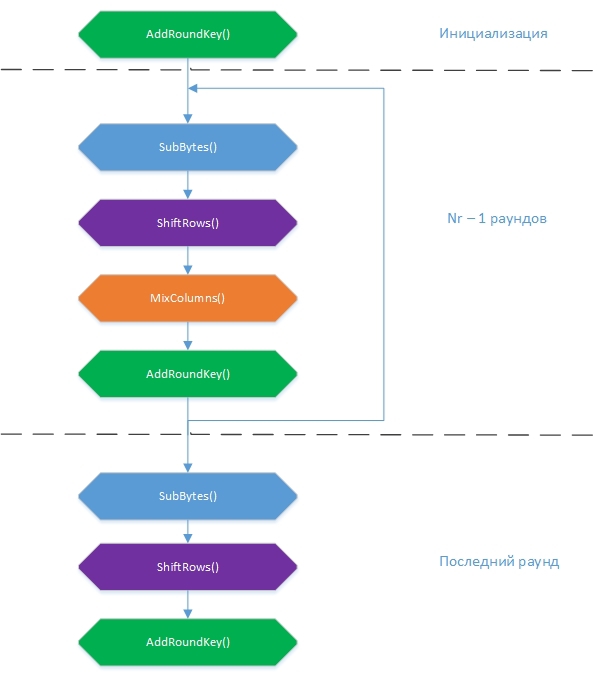
At the beginning, the State array is filled with input values according to the formula State [r] [c] = input [r + 4c], r = 0.1 ... 4; c = 0,1..Nb . That is, in columns. A 16-byte block is encrypted at a time.

The algorithm operates with bytes, considering them to be elements of a finite field or Galois field GF (2 8 ). The number in parentheses is the number of field elements or its power. Elements of the GF field (2 8) are polynomials of degree at most 7, which can be given by a string of their coefficients. Byte is very easy to represent as a polynomial. For example, byte {1,1,1,0,0,0,1,1,1} corresponds to a field element 1x 7 + 1x 6 + 1x 5 + 0x 4 + 0x 3 + 0x 2 + 1x 1 + 1x 0 = 1x 7 + 1x 6 + 1x 5 + x +1. The fact that we work with field elements is very important because it changes the rules of addition and multiplication operations. We will touch on this a bit later.
Next, we consider in detail each of the transformations.
A conversion is the replacement of each byte from State with the corresponding one from the Sbox constant table. Sbox element values are represented in hexadecimal notation. The table itself was obtained by transforming the GF field (2 8 ) already known to us.
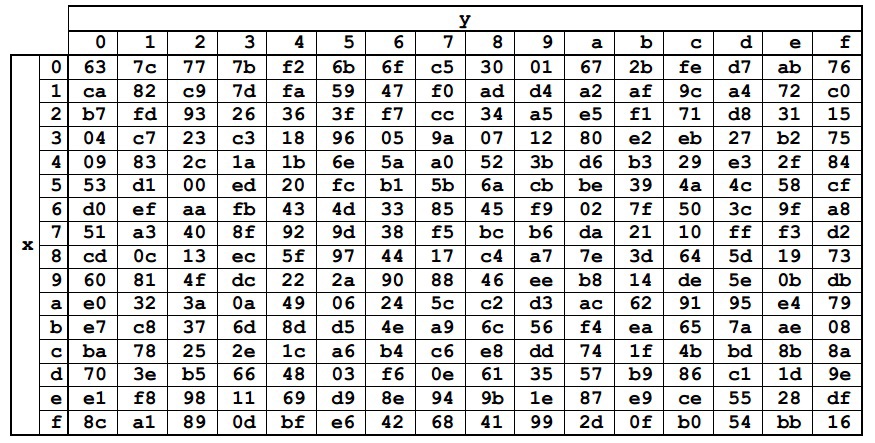
Each byte from State can be represented as {xy} in the hexadecimal notation. Then you should replace it with an element at the intersection of row x and column y. For example, {6e} will be replaced by {9f}, and {15} by {59}.
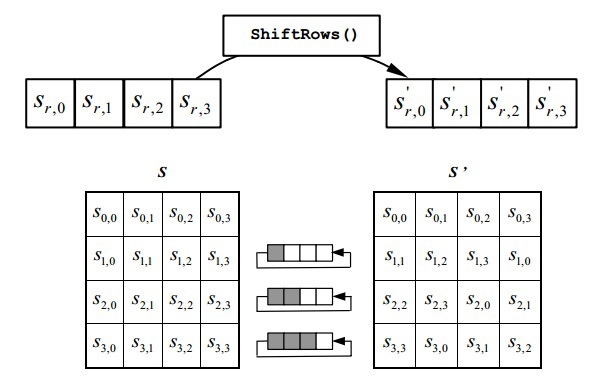
Simple transformation. It performs a cyclic left shift by 1 element for the first row, 2 for the second and 3 for the third. The zero line is not shifted.
As part of this transformation, each column in State is represented as a polynomial and multiplied in the GF (2 8 ) field modulo x 4 + 1 with a fixed polynomial 3x 3 + x 2 + x + 2. It sounds kind of simple, but it’s not clear how to do it . The picture becomes simpler if you look at the equivalent matrix entry provided in the official document of the standard:
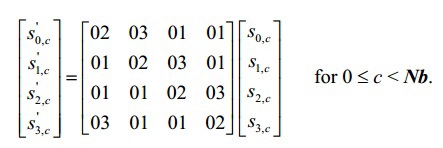
When multiplying the matrices, the value of a ij is obtained as the sum of the products of the corresponding elements of the i-th row of the first matrix and the j-th column of the second, i.e.,
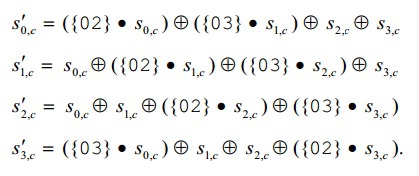
here we need to recall about the inoperability of the usual rules of addition and multiplication.
New rules:
Naturally, these are not general rules of arithmetic in the final field, but as part of the algorithm, you will have to multiply by three constants for encryption and four for decryption, so such local life hacks will be enough.
MixColumns () along with ShiftRows () add diffusion to the cipher.
The transformation produces a bitwise XOR of each element from State with the corresponding element from RoundKey. RoundKey is an array of the same size as State, which is built for each round based on the secret key with the KeyExpansion () function, which we will consider later.
This auxiliary transformation forms a set of round keys - KeySchedule. KeySchedule is a long table consisting of Nb * (Nr + 1) columns or (Nr + 1) blocks, each of which is equal in size to State. The first round key is filled on the basis of the secret key that you come up with, according to the formula
KeySchedule [r] [c] = SecretKey [r + 4c], r = 0.1 ... 4; c = 0,1..Nk.
It is clear that in KeySchedule we must enter bytes so that further operations are possible. If you use this algorithm for home encryption, it’s not at all comfortable to store a sequence of numbers in your head, so in our implementation KeyExpansion () will take a plaintext string as an input and apply

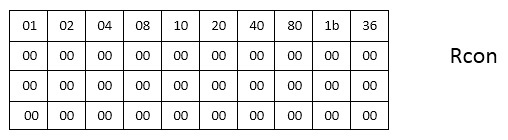
The figure shows the KeySchedule layout for AES-128: 11 blocks of 4 columns. For other variations of the algorithm, there will be (Nr + 1) blocks of Nb columns, respectively. Now we have to fill in the empty spaces. For conversions, a constant table is again defined - Rcon - whose values are in the hexadecimal number system.
KeySchedule refill algorithm:
This auxiliary transformation is the most voluminous in writing and, probably, the most complex, after the recognition of mathematics in MixColumns (), in the algorithm. A cryptographic key must consist of 4 * Nk elements (in our case 16). But since we are doing all this for home use, it is likely that not everyone will come up with a 16-character key and remember it. Therefore, if a line with a length of less than 16 arrives at the input, I in KeySchedule will add the values {01} to the norm.
As stated earlier, KeySchedule is used in the transformation of AddRoundKey (). In the initialization round, the round key will be the columns with numbers 0, .., 3, in the first - with the numbers 4, .., 7, etc. The whole point of AddRoundKey () is to produce an XOR State and a round key.
This, in fact, is all about the encryption process. The output array of encrypted bytes is compiled from State according to the formula output [r + 4c] = State [r] [c], r = 0.1 ... 4; c = 0,1..Nb . Meanwhile, the article is being delayed, so now we’ll quickly go over the decryption procedure.
The idea here is simple: if you execute a sequence of transformations that are inverse to encryption transformations with the same keyword, you get the original message. Such inverse transformations are InvSubBytes (), InvShiftRows (), InvMixColumns (), and AddRoundKey () . The general scheme of the decryption algorithm:
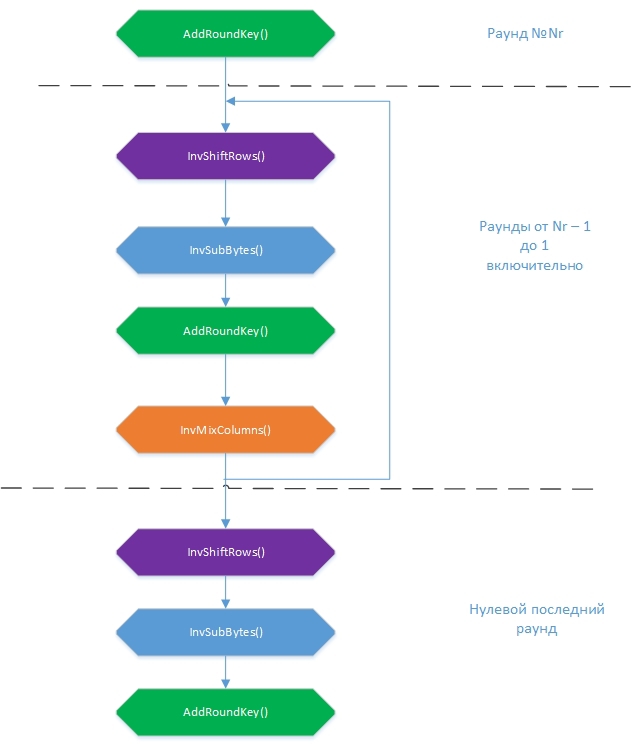
It should be noted that the sequence of adding round keys to AddRoundKey () should be the reverse: from Nr + 1 to 0. Initially, as with encryption, the State table is formed from the array of input bytes. Then, over it, in each round, transformations are performed, at the end of which a decrypted file should be obtained. The order of transformations has changed a bit. What will be the first, InvSubBytes () or InvShiftRows (), is not really important, because one of them works with byte values, and the second permutes bytes, without changing these values, but I followed the sequence of conversions in the standard pseudocode.
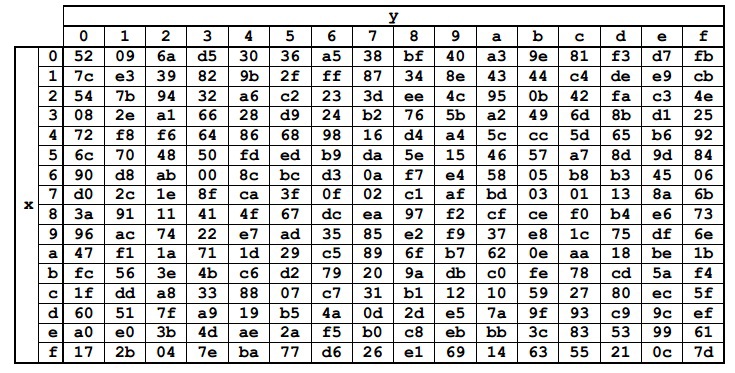
It works exactly the same as SubBytes (), except that replacements are made from the InvSbox constant table.
The remaining reverse transformations will also be very similar to their direct counterparts, so in the code we do not select separate functions for them. Each function that describes the transformation will have an input variable
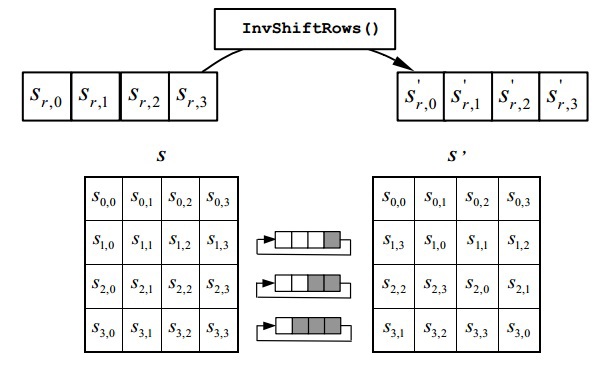
The transformation cycles to the right by 1 element for the first line of State, 2 for the second and 3 for the third. The zero line does not rotate.
Explanations for the code:
The operations are the same, but each State column is multiplied with a different polynomial {0b} x 3 + {0d} x 2 + {09} x + {0e}. In matrix form, it looks like this:

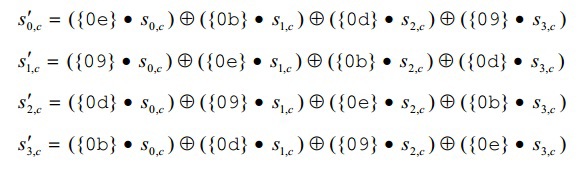
Or ready-made formulas. All values, of course, are in hexadecimal notation.
Here you need to digress towards mathematics and explain how to get the functions of multiplying by constants greater than {02}. As I said, they are obtained by decomposing them through {01} and {02}, namely:
Of course, it is possible to expand the numbers in another way, but it is personally verified that the expansion
n * {09} = n * {03} + n * {03} + n * {03}
and the call of the corresponding functions will give the wrong result (reference tables with the results is in one of the links in the list of sources). He specially left alternative (commented) versions of the calculations, because they are more understandable, elegant, but for some reason they work incorrectly.
Explanations for the code: the functions
This transformation is inverse to itself due to the property of the XOR operation:
Therefore, no changes should be made to it. A set of round keys is formed in the same way as for encryption using the KeyExpansion () function, but round keys must be substituted in the reverse order.
Now we have a comprehensive set of helper transformation functions to write
These two functions take a list of bytes that are not encrypted or encrypted, and a plaintext string with a secret keyword.
The article turned out to be quite long. I tried to dilute the text with pictures and, I hope, it was interesting to you and no one was bored. The code presented in the article is not completely exhaustive. I did not insert a global declaration of constant tables, small functions for MixColumns (), but only in words I explained that they are somewhere. Do not consider that I am PR, but the complete, glued together code can be taken in a repository . There is also a modest CLI interface that allows you to simply specify the path to the file, enter the secret key and get the encrypted file in the same directory as the source (the decrypted file can be obtained in the same way). Encrypt to health!
And in the end it is necessary to say about one important nuance - padding or addition to the block. AES - block encryption algorithm, functions
So I did (although the first option remained, just commented out. Suddenly, and come in handy).
Source selection:
In the article I will tell in detail about the components of the algorithm, a little dive into the mat part and give an example implementation in python. In development, I limited myself only to what is part of the standard library.
A little introduction
Advanced Encryption Standard is the well-known name of the Rijndael algorithm ([rɛindaːl]), which was developed by two Belgian cryptographers Joan Dimen and Vincent Rayman. The algorithm is blocky and symmetric. Adopted as a data encryption standard for US government agencies. The recently acclaimed National Security Agency uses it to store documents: up to the SECRET level, encryption with a key of 128 bits is used, TOP SECRET information requires a key of 192 or 256 bits. In addition to high cryptographic strength, the algorithm is based on not the most complicated mathematics.
A lot of encryption
To work, we need a set of bytes as an encryption object and a secret key that will be required during decryption. Keeping long keys in your head is inconvenient, and it is believed that the key length is 128 bits, more than enough for inaccessibility, so I did not look at the options 192/256. In addition, as said here , under certain conditions, a longer key may lag in stability.
We introduce some notation:
- State is an intermediate result of encryption, which can be represented as a rectangular array of bytes with 4 rows and Nb columns. Each State cell contains a value of 1 byte
- Nb is the number of columns (32-bit words) that make up State. Regulated for the standard Nb = 4
- Nk is the key length in 32-bit words. For AES, Nk = 4, 6, 8. We have already decided that we will use Nk = 4
- Nr - the number of rounds of encryption. Depending on the key length, Nr = 10, 12 or 14
The algorithm has four transformations, each of which in its own way affects the state of the State and ultimately leads to the result: SubBytes (), ShiftRows (), MixColumns () and AddRoundKey () . The general encryption scheme can be represented as:
At the beginning, the State array is filled with input values according to the formula State [r] [c] = input [r + 4c], r = 0.1 ... 4; c = 0,1..Nb . That is, in columns. A 16-byte block is encrypted at a time.
The algorithm operates with bytes, considering them to be elements of a finite field or Galois field GF (2 8 ). The number in parentheses is the number of field elements or its power. Elements of the GF field (2 8) are polynomials of degree at most 7, which can be given by a string of their coefficients. Byte is very easy to represent as a polynomial. For example, byte {1,1,1,0,0,0,1,1,1} corresponds to a field element 1x 7 + 1x 6 + 1x 5 + 0x 4 + 0x 3 + 0x 2 + 1x 1 + 1x 0 = 1x 7 + 1x 6 + 1x 5 + x +1. The fact that we work with field elements is very important because it changes the rules of addition and multiplication operations. We will touch on this a bit later.
Next, we consider in detail each of the transformations.
SybButes ()
A conversion is the replacement of each byte from State with the corresponding one from the Sbox constant table. Sbox element values are represented in hexadecimal notation. The table itself was obtained by transforming the GF field (2 8 ) already known to us.
Each byte from State can be represented as {xy} in the hexadecimal notation. Then you should replace it with an element at the intersection of row x and column y. For example, {6e} will be replaced by {9f}, and {15} by {59}.
ShiftRows ()
Simple transformation. It performs a cyclic left shift by 1 element for the first row, 2 for the second and 3 for the third. The zero line is not shifted.
MixColumns ()
As part of this transformation, each column in State is represented as a polynomial and multiplied in the GF (2 8 ) field modulo x 4 + 1 with a fixed polynomial 3x 3 + x 2 + x + 2. It sounds kind of simple, but it’s not clear how to do it . The picture becomes simpler if you look at the equivalent matrix entry provided in the official document of the standard:
When multiplying the matrices, the value of a ij is obtained as the sum of the products of the corresponding elements of the i-th row of the first matrix and the j-th column of the second, i.e.,
here we need to recall about the inoperability of the usual rules of addition and multiplication.
New rules:
- Addition in the field GF (2 8 ) is equivalent to the operation XOR
- Multiplying by {01} does not change the multiplying
- Multiplication by {02} is performed according to the rule: if the multiplied value is less than {80}, it is shifted to the left by 1 bit. If the multiplied value is greater than or equal to {80}, it is first shifted left by 1 bit, and then the XOR operation with the value {1b} is applied to the result of the shift. The result can skip the value {ff}, that is, beyond the boundaries of one byte. In this case, you need to return the remainder from dividing the result by {100}.
- Multiplication by other constants can be expressed through the previous
Naturally, these are not general rules of arithmetic in the final field, but as part of the algorithm, you will have to multiply by three constants for encryption and four for decryption, so such local life hacks will be enough.
MixColumns () along with ShiftRows () add diffusion to the cipher.
AddRoundKey ()
The transformation produces a bitwise XOR of each element from State with the corresponding element from RoundKey. RoundKey is an array of the same size as State, which is built for each round based on the secret key with the KeyExpansion () function, which we will consider later.
KeyExpansion ()
This auxiliary transformation forms a set of round keys - KeySchedule. KeySchedule is a long table consisting of Nb * (Nr + 1) columns or (Nr + 1) blocks, each of which is equal in size to State. The first round key is filled on the basis of the secret key that you come up with, according to the formula
KeySchedule [r] [c] = SecretKey [r + 4c], r = 0.1 ... 4; c = 0,1..Nk.
It is clear that in KeySchedule we must enter bytes so that further operations are possible. If you use this algorithm for home encryption, it’s not at all comfortable to store a sequence of numbers in your head, so in our implementation KeyExpansion () will take a plaintext string as an input and apply
ord()for each of the characters, write the result to the KeySchedule cells. This implies limitations: no more than 16 characters in length and, since we work with bytes, a ord()character must not return values greater than 255 or 11111111 in binary, otherwise we will get the wrong encryption at the output. It turns out that with the help of a key in Russian, encryption will not work. The figure shows the KeySchedule layout for AES-128: 11 blocks of 4 columns. For other variations of the algorithm, there will be (Nr + 1) blocks of Nb columns, respectively. Now we have to fill in the empty spaces. For conversions, a constant table is again defined - Rcon - whose values are in the hexadecimal number system.
KeySchedule refill algorithm:
- At each iteration, we work with a table column. Columns 0, .., (Nk - 1) are already pre-populated with values from the secret word. We start with the column number Nk (in our case, with the fourth)
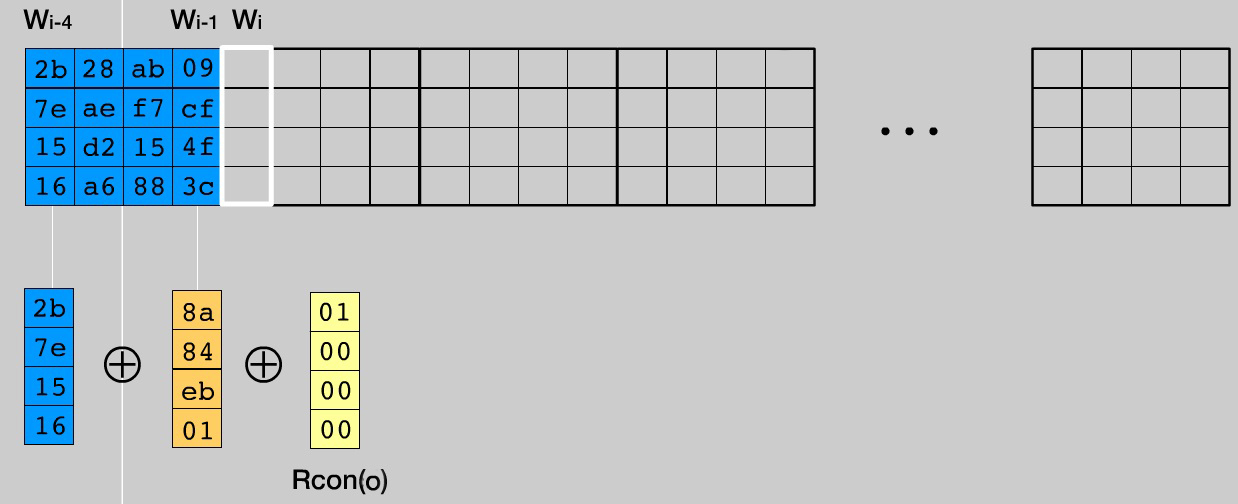
- If the column number W i is a multiple of Nk (in our case, every fourth), then we take the column W i-1 , perform a cyclic left shift over it by one element, then replace all the column bytes with the corresponding ones from the Sbox table, as they did in SubBytes () . Next, perform the XOR operation between the column W i-Nk , amended W i-1 and the column Rcon i / Nk-1 . The result is written to column W i . To make it a little more obvious, illustration for i = 4.
- For the remaining columns, perform XOR between W i-Nk and W i-1 . The result is written in W i
This auxiliary transformation is the most voluminous in writing and, probably, the most complex, after the recognition of mathematics in MixColumns (), in the algorithm. A cryptographic key must consist of 4 * Nk elements (in our case 16). But since we are doing all this for home use, it is likely that not everyone will come up with a 16-character key and remember it. Therefore, if a line with a length of less than 16 arrives at the input, I in KeySchedule will add the values {01} to the norm.
KeyExpansion () code
defkey_expansion(key):
    key_symbols = [ord(symbol) for symbol in key]
    # ChipherKey shoul contain 16 symbols to fill 4*Nk table. If it's less# complement the key with "0x01"if len(key_symbols) < 4*nk:
        for i in range(4*nk - len(key_symbols)):
            key_symbols.append(0x01)
    # make ChipherKey(which is base of KeySchedule)
    key_schedule = [[] for i in range(4)]
    for r in range(4):
        for c in range(nk):
            key_schedule[r].append(key_symbols[r + 4*c])
    # Comtinue to fill KeySchedulefor col in range(nk, nb*(nr + 1)): # col - column numberif col % nk == 0:
            # take shifted (col - 1)th column...
            tmp = [key_schedule[row][col-1] for row in range(1, 4)]
            tmp.append(key_schedule[0][col-1])
            # change its elements using Sbox-table like in SubBytes...for j in range(len(tmp)):
                sbox_row = tmp[j] // 0x10
                sbox_col = tmp[j] % 0x10
                sbox_elem =  sbox[16*sbox_row + sbox_col]
                tmp[j] = sbox_elem
            # and finally make XOR of 3 columnsfor row in range(4):
                s = key_schedule[row][col - 4]^tmp[row]^rcon[row][col/nk - 1]
                key_schedule[row].append(s)
        else:
            # just make XOR of 2 columnsfor row in range(4):
                s = key_schedule[row][col - 4]^key_schedule[row][col - 1]
                key_schedule[row].append(s)
    return key_schedule
As stated earlier, KeySchedule is used in the transformation of AddRoundKey (). In the initialization round, the round key will be the columns with numbers 0, .., 3, in the first - with the numbers 4, .., 7, etc. The whole point of AddRoundKey () is to produce an XOR State and a round key.
This, in fact, is all about the encryption process. The output array of encrypted bytes is compiled from State according to the formula output [r + 4c] = State [r] [c], r = 0.1 ... 4; c = 0,1..Nb . Meanwhile, the article is being delayed, so now we’ll quickly go over the decryption procedure.
Quickly about decryption
The idea here is simple: if you execute a sequence of transformations that are inverse to encryption transformations with the same keyword, you get the original message. Such inverse transformations are InvSubBytes (), InvShiftRows (), InvMixColumns (), and AddRoundKey () . The general scheme of the decryption algorithm:
It should be noted that the sequence of adding round keys to AddRoundKey () should be the reverse: from Nr + 1 to 0. Initially, as with encryption, the State table is formed from the array of input bytes. Then, over it, in each round, transformations are performed, at the end of which a decrypted file should be obtained. The order of transformations has changed a bit. What will be the first, InvSubBytes () or InvShiftRows (), is not really important, because one of them works with byte values, and the second permutes bytes, without changing these values, but I followed the sequence of conversions in the standard pseudocode.
InvSubBytes ()
It works exactly the same as SubBytes (), except that replacements are made from the InvSbox constant table.
The remaining reverse transformations will also be very similar to their direct counterparts, so in the code we do not select separate functions for them. Each function that describes the transformation will have an input variable
inv. If it is equal False, then the function will work in normal or direct mode (encryption), if True - in inverse (decryption).Code
defsub_bytes(state, inv=False):if inv == False: # encrypt
        box = sbox
    else:   # decrypt
        box = inv_sbox
    for i in range(len(state)):
        for j in range(len(state[i])):
            row = state[i][j] // 0x10
            col = state[i][j] % 0x10# Our Sbox is a flat array, not a bable. So, we use this trich to find elem:
            box_elem = box[16*row + col]
            state[i][j] = box_elem
    return state
InvShiftRows ()
The transformation cycles to the right by 1 element for the first line of State, 2 for the second and 3 for the third. The zero line does not rotate.
Explanations for the code:
left_shift/right_shift(array, count)turn the input array in the corresponding direction count onceCode
defshift_rows(state, inv=False):
    count = 1if inv == False: # encryptingfor i in range(1, nb):
            state[i] =  left_shift(state[i], count)
            count += 1else: # decryptionfor i in range(1, nb):
            state[i] =  right_shift(state[i], count)
            count += 1return state
InvMixColumns ()
The operations are the same, but each State column is multiplied with a different polynomial {0b} x 3 + {0d} x 2 + {09} x + {0e}. In matrix form, it looks like this:
Or ready-made formulas. All values, of course, are in hexadecimal notation.
Here you need to digress towards mathematics and explain how to get the functions of multiplying by constants greater than {02}. As I said, they are obtained by decomposing them through {01} and {02}, namely:
Conversions
n * {03} = n * ({02} + {01}) = n * {02} + n * {01}
n * {09} = n * ({08} + {01}) = n * { 02} * {02} * {02} + n * {01}
n * {0b} = n * ({08} + {02} + {01}) = b * {02} * {02} * {02 } + n * {02} + n * {01}
n * {0d} = n * ({08} + {04} + {01}) = n * {08} + n * {04} + n * { 01} = n * {02} * {02} * {02} + n * {02} * {02} + n * {01}
n * {0е} = n * ({08} + {04} + { 02} = n * {08} + n * {04} + n * {02} = n * {02} * {02} * {02} + n * {02} * {02} + b * {02}
n * {09} = n * ({08} + {01}) = n * { 02} * {02} * {02} + n * {01}
n * {0b} = n * ({08} + {02} + {01}) = b * {02} * {02} * {02 } + n * {02} + n * {01}
n * {0d} = n * ({08} + {04} + {01}) = n * {08} + n * {04} + n * { 01} = n * {02} * {02} * {02} + n * {02} * {02} + n * {01}
n * {0е} = n * ({08} + {04} + { 02} = n * {08} + n * {04} + n * {02} = n * {02} * {02} * {02} + n * {02} * {02} + b * {02}
Of course, it is possible to expand the numbers in another way, but it is personally verified that the expansion
n * {09} = n * {03} + n * {03} + n * {03}
and the call of the corresponding functions will give the wrong result (reference tables with the results is in one of the links in the list of sources). He specially left alternative (commented) versions of the calculations, because they are more understandable, elegant, but for some reason they work incorrectly.
Auxiliary Multiplication Functions
defmul_by_02(num):if num < 0x80:
        res =  (num << 1)
    else:
        res =  (num << 1)^0x1breturn res % 0x100defmul_by_03(num):return mul_by_02(num)^num
defmul_by_09(num):#return mul_by_03(num)^mul_by_03(num)^mul_by_03(num) - works wrong, I don't know whyreturn mul_by_02(mul_by_02(mul_by_02(num)))^num
defmul_by_0b(num):#return mul_by_09(num)^mul_by_02(num)return mul_by_02(mul_by_02(mul_by_02(num)))^mul_by_02(num)^num
defmul_by_0d(num):#return mul_by_0b(num)^mul_by_02(num)return mul_by_02(mul_by_02(mul_by_02(num)))^mul_by_02(mul_by_02(num))^num
defmul_by_0e(num):#return mul_by_0d(num)^numreturn mul_by_02(mul_by_02(mul_by_02(num)))^mul_by_02(mul_by_02(num))^mul_by_02(num)
Explanations for the code: the functions
mul_by_<константа>perform multiplication by the corresponding constant in GF (2 8 ) according to the rules that were described in the section about MixColumns () .Code
defmix_columns(state, inv=False):for i in range(nb):
        if inv == False: # encryption
            s0 = mul_by_02(state[0][i])^mul_by_03(state[1][i])^state[2][i]^state[3][i]
            s1 = state[0][i]^mul_by_02(state[1][i])^mul_by_03(state[2][i])^state[3][i]
            s2 = state[0][i]^state[1][i]^mul_by_02(state[2][i])^mul_by_03(state[3][i])
            s3 = mul_by_03(state[0][i])^state[1][i]^state[2][i]^mul_by_02(state[3][i])
        else: # decryption
            s0 = mul_by_0e(state[0][i])^mul_by_0b(state[1][i])^mul_by_0d(state[2][i])^mul_by_09(state[3][i])
            s1 = mul_by_09(state[0][i])^mul_by_0e(state[1][i])^mul_by_0b(state[2][i])^mul_by_0d(state[3][i])
            s2 = mul_by_0d(state[0][i])^mul_by_09(state[1][i])^mul_by_0e(state[2][i])^mul_by_0b(state[3][i])
            s3 = mul_by_0b(state[0][i])^mul_by_0d(state[1][i])^mul_by_09(state[2][i])^mul_by_0e(state[3][i])
        state[0][i] = s0
        state[1][i] = s1
        state[2][i] = s2
        state[3][i] = s3
    return state
AddRoundKey ()
This transformation is inverse to itself due to the property of the XOR operation:
(a XOR b) XOR b = a
Therefore, no changes should be made to it. A set of round keys is formed in the same way as for encryption using the KeyExpansion () function, but round keys must be substituted in the reverse order.
Code
defadd_round_key(state, key_schedule, round=0):for col in range(nk):
        # nb*round is a shift which indicates start of a part of the KeySchedule
        s0 = state[0][col]^key_schedule[0][nb*round + col]
        s1 = state[1][col]^key_schedule[1][nb*round + col]
        s2 = state[2][col]^key_schedule[2][nb*round + col]
        s3 = state[3][col]^key_schedule[3][nb*round + col]
        state[0][col] = s0
        state[1][col] = s1
        state[2][col] = s2
        state[3][col] = s3
    return state
Now we have a comprehensive set of helper transformation functions to write
Encryption function
defencrypt(input_bytes, key):# let's prepare our input data: State array and KeySchedule
    state = [[] for j in range(4)]
    for r in range(4):
        for c in range(nb):
            state[r].append(input_bytes[r + 4*c])
    key_schedule = key_expansion(key)
    state = add_round_key(state, key_schedule)
    for rnd in range(1, nr):
        state = sub_bytes(state)
        state = shift_rows(state)
        state = mix_columns(state)
        state = add_round_key(state, key_schedule, rnd)
    state = sub_bytes(state)
    state = shift_rows(state)
    state = add_round_key(state, key_schedule, rnd + 1)
    output = [Nonefor i in range(4*nb)]
    for r in range(4):
        for c in range(nb):
            output[r + 4*c] = state[r][c]
    return output
Decryption function
defdecrypt(cipher, key):# let's prepare our algorithm enter data: State array and KeySchedule
    state = [[] for i in range(nb)]
    for r in range(4):
        for c in range(nb):
            state[r].append(cipher[r + 4*c])
    key_schedule = key_expansion(key)
    state = add_round_key(state, key_schedule, nr)
    rnd = nr - 1while rnd >= 1:
        state = shift_rows(state, inv=True)
        state = sub_bytes(state, inv=True)
        state = add_round_key(state, key_schedule, rnd)
        state = mix_columns(state, inv=True)
        rnd -= 1
    state = shift_rows(state, inv=True)
    state = sub_bytes(state, inv=True)
    state = add_round_key(state, key_schedule, rnd)
    output = [Nonefor i in range(4*nb)]
    for r in range(4):
        for c in range(nb):
            output[r + 4*c] = state[r][c]
    return output
These two functions take a list of bytes that are not encrypted or encrypted, and a plaintext string with a secret keyword.
Conclusion, interesting links
The article turned out to be quite long. I tried to dilute the text with pictures and, I hope, it was interesting to you and no one was bored. The code presented in the article is not completely exhaustive. I did not insert a global declaration of constant tables, small functions for MixColumns (), but only in words I explained that they are somewhere. Do not consider that I am PR, but the complete, glued together code can be taken in a repository . There is also a modest CLI interface that allows you to simply specify the path to the file, enter the secret key and get the encrypted file in the same directory as the source (the decrypted file can be obtained in the same way). Encrypt to health!
And in the end it is necessary to say about one important nuance - padding or addition to the block. AES - block encryption algorithm, functions
encrypt()/decrypt()they take exactly one block of input bytes (for our version with a 128-bit key, this is 16 bytes). At the end of the file, 1 to 15 bytes can remain that do not form a single block. You can simply send them to the destination file without encryption, but in some cases, at the end of the file, something important may be contained, and this option is not suitable. The second option suggested to me an article on Wikipedia about block ciphersA simple addition of zero bits does not solve the problem, since the recipient cannot find the end of the payload. In addition, this option leads to attacks by Oracle add-ons. Therefore, in practice, the solution standardized as “Addition Method 2” in ISO / IEC 9797-1 is applicable, adding a single bit to the end of the message and filling the remaining space with zeros. In this case, resistance to such attacks was proved.
So I did (although the first option remained, just commented out. Suddenly, and come in handy).
Source selection:
- Official documentation
- Very clear visual interpretation of the encryption part of the algorithm . May the author not sue me, I took a couple of screenshots from there.
- Nowhere without Wikipedia
- A separate article about MixColumns () . It contains tables with the results of multiplying the list of numbers 0 ... 255 by the constants used in the cipher in the GF field (2 8 )
- Funny comic about the history of AES and the algorithm itself . It’s a pity that I found it only when I was already writing an article.