December 30, 2013 at 14:33
Customization of UICollectionViewLayout. In the name of art
- From the sandbox
- Tutorial
Hey ho!
I work as an ios developer in a provincial town in a provincial country of the closest foreign country (to Russia). About a year and a half ago, the country decided that I owed her something, and in particular: I owed a year to my life, a year oflow skilled work, a year of dreams of returning home, to my family and work ... - in short, they called me into the army. And behind this case, I somehow missed the release of iOS 6 with all its features, including the long-overdue UICollectionView.
Having dealt with outfits, training grounds, a charter, and other fascinating things, I returned home, started working again, and of course a project in which the customer needed to display data in the form of what designers call a “pinterest board,” that is, UICollectionView itself, didn't keep you waiting.
The project is a bit of an iPad auction catalog for one antiques appraisal company. I have no idea how the guys will react to their mention on the hub, so I will not give any links, or design layouts, or real screenshots.
The application, in principle, is not complicated, from design delights only one thing guarded me a little - the look of the main screen. It was supposed to be a collection of images of lots arranged in three horizontal rows, with horizontal scrolling. The middle row with a fixed element height and an arbitrary width (depending on the image proportions). The height of the elements of the first and third rows should vary slightly in a smaller direction, creating like torn edges. If you do not quite understand my dry description in letters, look at the screenshot at the end of the article - a sample of the final result - it should explain everything to you. Or right here.
This was the first attempt to spend a minimum of effort. Since I have never encountered these elements before, my hope for Apple's class was extremely strong. To begin with, I generally scored on the torn edges, focusing simply on the output of the horizontal "interestboard". Unfortunately, it was not possible to slip on the ball.
You can see two things in the screenshot.
Either my googling skills are extremely weak, or RFQuiltLayout is the only turnkey solution that seems to roll in my case.
This class uses the variable blockPixels, which stores the default cell size CGSize. Delegate method
returns multipliers for blockPixels of each cell. That is, if blockPixels = {100, 100}, and blockSizeForItemAtIndexPath = {2.2, 0.8}, then the cell’s size will be {220, 80}.
In my opinion, it’s a bit strange system, I want to set blockPixels to {1, 1} and return the required size for the element in the delegate method, but the placement algorithm in this case takes a very long time even for 15 elements, and it takes 100 elements to place it Computing power abrupt than iPad. I didn’t have enough time to disassemble the algorithm of patience, so I chose the value {20, 20} for blockPixels by the selection method, which, with my 15 cells, gave normal speed and good placement accuracy.
To create torn edges, I had to use a little trick - in fact, I did not touch the cell sizes themselves, because at the placement stage I could not find out which row the cell was in, but when installing the picture I checked the row and reduced the height of the rows for the first and last rows pictures. Images were slightly cropped from above and below. If the lot, the picture of which came under cropping, was a portrait, then people lost the crown and bottom of their chests, if the lot was a Chinese figurine, then the dragon was displayed without a crest, and on Persian carpets my dirty hack cut the pile. But the client was satisfied, which means that I was pleased, too, until the technical specifications were slightly corrected. Instead of the pathetic 15 elements on the main screen, all lots should have been displayed. All fifteen hundred.
Fifteen hundred images of paintings, vases, jade figurines and everything else, no less beautiful. The harsh truth was that no third-party solutions saved me. So it’s time to write your placement manager.
As one would expect, I could not find any information in Russian (I didn’t really hope), but the English teachers, where there wouldn’t be a lot of unnecessary and at least a little useful, also somehow didn’t score first ten pages of search results. As a result, my manual was, in fact, Apple's documentation and the RFQuiltLayout code mentioned above (by the way, I want to express gratitude to its author Bryce Redd).
Immediately I apologize for the dumb name of the class.
First, I defined a protocol for its delegate.
Since the delegate cannot influence the height of the cell in any way, he passes to the manager only the width that he would like to see for a particular cell. Well, and the method that returns UIEdgeInsets (inner margins for the cell), where without it.
And of course, the property that stores the number of rows is to walk like a walk, let the class be universal, and not just for three rows!
Now implementation.
Apple tells us that if we don’t want to bother with any additional elements of the UICollectionView, such as supplementary and decoration view, we need to override at least the following methods:
With the latter, everything is clear - return YES if newBounds does not match the current boundaries of the collection.
Let's leave the first method easy to implement for later, and move on to the layoutAttributesForItemAtIndexPath method. As its name makes clear, in it we must calculate the UICollectionViewLayoutAttributes for each element. The objects of the UICollectionViewLayoutAttributes class contain a lot of information about the location of the object, including even transform3D, which allows you to create all sorts of prettiness for the cells, but in our case you can do just one banal frame.
Actually, nothing interesting - we get the UIEdgeInsets from the delegate, if he provides them to us, we get the frame using the frameForIndexPath method, create and return the attributes with the received UIEdgeInsets and CGRect. But in the frameForIndexPath method, the main part of shamanism is hidden from me.
In case my pasta code and semi-English comments are not very clear, I will try to bring morechaos of clarity to the pseudocode:
By the way, we must not forget to clear all these indexPathsByFrame, framesByIndexPath and what-else-is-cached in the invalidateLayout method. Naturally, not missing [super invalidateLayout].
Back to contentSize. Obviously, in our case with a horizontal scroll, it should look something like this:
where edgeX is the X coordinate of the farthest located cell. After all, we already know how all the cells are located. Or do not know. Or we still know ... To be sure, we need to redefine the prepareLayout method, not forgetting to call [super prepareLayout] in it, and calculate the frames for each cell
Yes, if there are hundreds of thousands of cells, the collection will not be in a hurry to load, but I see no other trivial way out.
And in the end, it remains to override the last method - layoutAttributesForElementsInRect. In it, you need to return the attributes for all elements that fall into this area. It is called every time the collection is scrolled to the size of its frame. Then, it seems, all this is cached, so the method will be called just contentSize.width / frame.size.width times.
My implementation of what is called “forehead”: we look at the frames for each element, if they intersect with this area, we add it to the returned array.
Right after the euphoria about the fact that everything works as it should has passed, my internal workaholic issued a verdict: to optimize! But that inner self, which turned out to be stronger than a workaholic, got the phrase “premature optimization” from the bowels of the memory and, hiding behind the fact that even with ten thousand elements, testing on the iPad 2 did not reveal any slowdowns, decided to postpone the optimization for some time or later.
I hope that someone was interested, someone was useful, and the rest just had the patience to read this post. Thanks for attention.
Finally, a few links:
PS They already wrote to me that there is no picture in the last spoiler. I did the same operation three times - I edited it by inserting the missing link, saved it, saw that the changes had occurred, closed the page, opened it again and cursed - the picture disappeared again. Moreover, the link Or right here , which should lead to the same picture, has ceased to fulfill its functional duties. Trouble.
Just in case, I leave this unauthorized link here simply with the text
habr.habrastorage.org/post_images/0e1/0c7/be4/0e10c7be44690901268d5dfa9e532d0e.png
Intro
I work as an ios developer in a provincial town in a provincial country of the closest foreign country (to Russia). About a year and a half ago, the country decided that I owed her something, and in particular: I owed a year to my life, a year of
Having dealt with outfits, training grounds, a charter, and other fascinating things, I returned home, started working again, and of course a project in which the customer needed to display data in the form of what designers call a “pinterest board,” that is, UICollectionView itself, didn't keep you waiting.
Project
The project is a bit of an iPad auction catalog for one antiques appraisal company. I have no idea how the guys will react to their mention on the hub, so I will not give any links, or design layouts, or real screenshots.
The application, in principle, is not complicated, from design delights only one thing guarded me a little - the look of the main screen. It was supposed to be a collection of images of lots arranged in three horizontal rows, with horizontal scrolling. The middle row with a fixed element height and an arbitrary width (depending on the image proportions). The height of the elements of the first and third rows should vary slightly in a smaller direction, creating like torn edges. If you do not quite understand my dry description in letters, look at the screenshot at the end of the article - a sample of the final result - it should explain everything to you. Or right here.
UICollectionViewFlowLayout
This was the first attempt to spend a minimum of effort. Since I have never encountered these elements before, my hope for Apple's class was extremely strong. To begin with, I generally scored on the torn edges, focusing simply on the output of the horizontal "interestboard". Unfortunately, it was not possible to slip on the ball.
Oh picture!
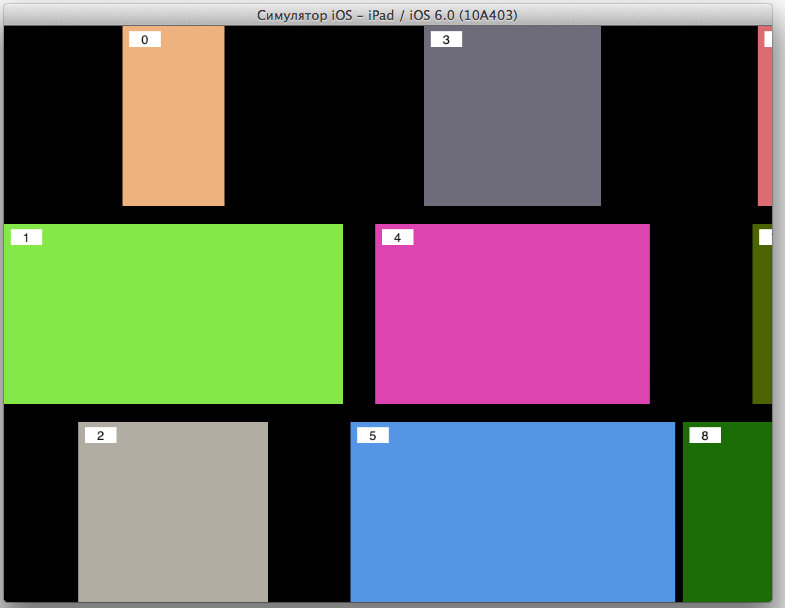
Figure # 0 - The developer assumes, and the UICollectionViewFlowLayout has
You can see two things in the screenshot.
- First: UICollectionViewFlowLayout arranges the elements so that the center of the element in the top row is above the center of the elements below. In one word, it doesn’t roll right away.
- Second: as an example, I decided to post still unwritten paintings by avant-garde artists against the background of the masterpiece of the founder of Suprematism
RFQuiltLayout
Either my googling skills are extremely weak, or RFQuiltLayout is the only turnkey solution that seems to roll in my case.
This class uses the variable blockPixels, which stores the default cell size CGSize. Delegate method
- (CGSize) blockSizeForItemAtIndexPath:(NSIndexPath *)indexPath;
returns multipliers for blockPixels of each cell. That is, if blockPixels = {100, 100}, and blockSizeForItemAtIndexPath = {2.2, 0.8}, then the cell’s size will be {220, 80}.
In my opinion, it’s a bit strange system, I want to set blockPixels to {1, 1} and return the required size for the element in the delegate method, but the placement algorithm in this case takes a very long time even for 15 elements, and it takes 100 elements to place it Computing power abrupt than iPad. I didn’t have enough time to disassemble the algorithm of patience, so I chose the value {20, 20} for blockPixels by the selection method, which, with my 15 cells, gave normal speed and good placement accuracy.
To create torn edges, I had to use a little trick - in fact, I did not touch the cell sizes themselves, because at the placement stage I could not find out which row the cell was in, but when installing the picture I checked the row and reduced the height of the rows for the first and last rows pictures. Images were slightly cropped from above and below. If the lot, the picture of which came under cropping, was a portrait, then people lost the crown and bottom of their chests, if the lot was a Chinese figurine, then the dragon was displayed without a crest, and on Persian carpets my dirty hack cut the pile. But the client was satisfied, which means that I was pleased, too, until the technical specifications were slightly corrected. Instead of the pathetic 15 elements on the main screen, all lots should have been displayed. All fifteen hundred.
More art!
Fifteen hundred images of paintings, vases, jade figurines and everything else, no less beautiful. The harsh truth was that no third-party solutions saved me. So it’s time to write your placement manager.
As one would expect, I could not find any information in Russian (I didn’t really hope), but the English teachers, where there wouldn’t be a lot of unnecessary and at least a little useful, also somehow didn’t score first ten pages of search results. As a result, my manual was, in fact, Apple's documentation and the RFQuiltLayout code mentioned above (by the way, I want to express gratitude to its author Bryce Redd).
So SKRaggyCollectionViewLayout
Immediately I apologize for the dumb name of the class.
First, I defined a protocol for its delegate.
@protocol SKRaggyCollectionViewLayoutDelegate
- (float)collectionLayout:(SKRaggyCollectionViewLayout*)layout preferredWidthForItemAtIndexPath:(NSIndexPath *)indexPath;
@optional
- (UIEdgeInsets)collectionLayout:(SKRaggyCollectionViewLayout*)layout edgeInsetsForItemAtIndexPath:(NSIndexPath *)indexPath;
@end
Since the delegate cannot influence the height of the cell in any way, he passes to the manager only the width that he would like to see for a particular cell. Well, and the method that returns UIEdgeInsets (inner margins for the cell), where without it.
And of course, the property that stores the number of rows is to walk like a walk, let the class be universal, and not just for three rows!
@property (nonatomic, assign) NSUInteger numberOfRows;
Now implementation.
Apple tells us that if we don’t want to bother with any additional elements of the UICollectionView, such as supplementary and decoration view, we need to override at least the following methods:
- (CGSize)collectionViewContentSize;
- (NSArray*)layoutAttributesForElementsInRect:(CGRect)bounds;
- (UICollectionViewLayoutAttributes*)layoutAttributesForItemAtIndexPath:(NSIndexPath *)indexPath;
- (BOOL)shouldInvalidateLayoutForBoundsChange:(CGRect)newBounds;
With the latter, everything is clear - return YES if newBounds does not match the current boundaries of the collection.
Let's leave the first method easy to implement for later, and move on to the layoutAttributesForItemAtIndexPath method. As its name makes clear, in it we must calculate the UICollectionViewLayoutAttributes for each element. The objects of the UICollectionViewLayoutAttributes class contain a lot of information about the location of the object, including even transform3D, which allows you to create all sorts of prettiness for the cells, but in our case you can do just one banal frame.
- (UICollectionViewLayoutAttributes *)layoutAttributesForItemAtIndexPath:(NSIndexPath *)indexPath {
    UIEdgeInsets insets = UIEdgeInsetsZero;
    if ([self.delegate respondsToSelector:@selector(collectionLayout:edgeInsetsForItemAtIndexPath:)]) {
        insets = [self.delegate collectionLayout:self edgeInsetsForItemAtIndexPath:indexPath];
    }
// Get saved frame and edge insets for given path and create attributes object with them
    CGRect frame = [self frameForIndexPath:indexPath];
    UICollectionViewLayoutAttributes* attributes = [UICollectionViewLayoutAttributes layoutAttributesForCellWithIndexPath:indexPath];
    attributes.frame = UIEdgeInsetsInsetRect(frame, insets);
    return attributes;
}
Actually, nothing interesting - we get the UIEdgeInsets from the delegate, if he provides them to us, we get the frame using the frameForIndexPath method, create and return the attributes with the received UIEdgeInsets and CGRect. But in the frameForIndexPath method, the main part of shamanism is hidden from me.
- (CGRect)frameForIndexPath:(NSIndexPath*)path {
// if there is saved frame for given path, return it
    NSValue *v = [self.framesByIndexPath objectForKey:path];
    if (v) return [v CGRectValue];
// Find X-coordinate and a row which are the closest to the collection left corner. A cell for this path should be placed here.
    int currentRow = 0;
    float currentX = MAXFLOAT;
    for (int i = 0; i < self.edgeXPositions.count; i++) {
        float x = [[self.edgeXPositions objectAtIndex:i] floatValue];
        if (x < currentX) {
            currentRow = i;
            currentX = x;
        }
    }
// Calculate cell frame values based on collection height, current row, currentX, the number of rows and delegate's preferredWidthForItemAtIndexPath: value
// If variableFrontierHeight is YES this value will be adjusted for the first and last rows
    float maxH = self.collectionView.frame.size.height;
    float rowMaxH = maxH / self.numberOfRows;
    float x = currentX;
    float y = rowMaxH * currentRow;
    float w = [self.delegate collectionLayout:self preferredWidthForItemAtIndexPath:path];
    float h = self.collectionView.frame.size.height / self.numberOfRows;
    float newH = h;
// Adjust height of the frame if we need raggy style
    if (self.variableFrontierHeight) {
        if (currentRow == 0) {
            float space = arc4random() % self.randomFirstRowVar;
            if (self.prevWasTallFirst) {
                space += self.fixedFirstRowVar;
            }
            self.prevWasTallFirst = !self.prevWasTallFirst;
            y += space;
            newH -= space;
        } else if (currentRow == self.numberOfRows - 1) {
            float space = arc4random() % self.randomLastRowVar;
            if (self.prevWasTallLast) {
                space += self.fixedLastRowVar;
            }
            self.prevWasTallLast = !self.prevWasTallLast;
            newH -= space;
        }
    }
// Assure that we have preferred height more than 1
    h = h <= 1 ? 1.f : h;
// Adjust frame width with new value of height to save cell's right proportions
    w = w * newH / h;
// Save new calculated data ad return
    [self.edgeXPositions replaceObjectAtIndex:currentRow withObject:[NSNumber numberWithFloat:x + w]];
    CGRect currentRect = CGRectMake(x, y, w, newH);
    NSValue *value = [NSValue valueWithCGRect:currentRect];
    [self.indexPathsByFrame setObject:path forKey:value];
    [self.framesByIndexPath setObject:value forKey:path];
    return currentRect;
}
In case my pasta code and semi-English comments are not very clear, I will try to bring more
Here he is
[look through the NSMutableDictionary, in which we saved the frames calculated by the indexPath keys earlier, if we find it is a victory, we don’t need to do anything else]
[if we can’t avoid the calculations, we figure out in which row the right border of the last frame is closest to the beginning of the table - there- then we will need to put the current element (such x coordinate for each row is stored in NSMutableArray edgeXPositions)]
[now, knowing the row and position on the X axis, knowing the width required by the delegate for the element, we can calculate its position of its upper left corner; knowing the height of the collection and the number of lines, we calculate at the same time the height of the element]
[if we need the notorious “torn edges”, and the row is the first or last, slightly reduce the calculated height]
[reinsurance in case the height is less than one, reduce the width in proportion to the decrease in height]
[save the resulting value in the dictionaries indexPathsByFrame and framesByIndexPath for quick access in the future and return from the method]
[if we can’t avoid the calculations, we figure out in which row the right border of the last frame is closest to the beginning of the table - there- then we will need to put the current element (such x coordinate for each row is stored in NSMutableArray edgeXPositions)]
[now, knowing the row and position on the X axis, knowing the width required by the delegate for the element, we can calculate its position of its upper left corner; knowing the height of the collection and the number of lines, we calculate at the same time the height of the element]
[if we need the notorious “torn edges”, and the row is the first or last, slightly reduce the calculated height]
[reinsurance in case the height is less than one, reduce the width in proportion to the decrease in height]
[save the resulting value in the dictionaries indexPathsByFrame and framesByIndexPath for quick access in the future and return from the method]
By the way, we must not forget to clear all these indexPathsByFrame, framesByIndexPath and what-else-is-cached in the invalidateLayout method. Naturally, not missing [super invalidateLayout].
Back to contentSize. Obviously, in our case with a horizontal scroll, it should look something like this:
- (CGSize)collectionViewContentSize {
    return CGSizeMake(self.edgeX, self.collectionView.frame.size.height);
}
where edgeX is the X coordinate of the farthest located cell. After all, we already know how all the cells are located. Or do not know. Or we still know ... To be sure, we need to redefine the prepareLayout method, not forgetting to call [super prepareLayout] in it, and calculate the frames for each cell
- (void)prepareLayout {
    [super prepareLayout];
// calculate and save frames for all indexPaths. Unfortunately, we must do it for all cells to know content size of the collection
    for (int i = 0; i < [self.collectionView.dataSource collectionView:self.collectionView numberOfItemsInSection:0]; i++) {
        NSIndexPath *path = [NSIndexPath indexPathForItem:i inSection:0];
        [self frameForIndexPath:path];
    }
}
Yes, if there are hundreds of thousands of cells, the collection will not be in a hurry to load, but I see no other trivial way out.
And in the end, it remains to override the last method - layoutAttributesForElementsInRect. In it, you need to return the attributes for all elements that fall into this area. It is called every time the collection is scrolled to the size of its frame. Then, it seems, all this is cached, so the method will be called just contentSize.width / frame.size.width times.
My implementation of what is called “forehead”: we look at the frames for each element, if they intersect with this area, we add it to the returned array.
- (NSArray*)layoutAttributesForElementsInRect:(CGRect)bounds {
    if (CGRectEqualToRect(bounds, self.previousLayoutRect)) {
        return self.previousLayoutAttributes;
    }
    [self.previousLayoutAttributes removeAllObjects];
    self.previousLayoutRect = bounds;
    NSArray *allFrames = self.framesByIndexPath.allValues;
    for (NSValue *frameValue in allFrames) {
        CGRect rect = [frameValue CGRectValue];
        if (CGRectIntersectsRect(rect, bounds)) {
            [self.previousLayoutAttributes addObject:[self layoutAttributesForItemAtIndexPath:[self.indexPathsByFrame objectForKey:[NSValue valueWithCGRect:rect]]]];
        }
    }
    return self.previousLayoutAttributes;
}
There should have been a picture, but it will not be
because the habr engine surprisingly insolently deletes it every time after saving changes in the edited post
Right after the euphoria about the fact that everything works as it should has passed, my internal workaholic issued a verdict: to optimize! But that inner self, which turned out to be stronger than a workaholic, got the phrase “premature optimization” from the bowels of the memory and, hiding behind the fact that even with ten thousand elements, testing on the iPad 2 did not reveal any slowdowns, decided to postpone the optimization for some time or later.
Afterword
I hope that someone was interested, someone was useful, and the rest just had the patience to read this post. Thanks for attention.
Finally, a few links:
- Guide from Apple
- Hyde from some dude - in my opinion, too much offtopic
- My github code
PS They already wrote to me that there is no picture in the last spoiler. I did the same operation three times - I edited it by inserting the missing link, saved it, saw that the changes had occurred, closed the page, opened it again and cursed - the picture disappeared again. Moreover, the link Or right here , which should lead to the same picture, has ceased to fulfill its functional duties. Trouble.
Just in case, I leave this unauthorized link here simply with the text
habr.habrastorage.org/post_images/0e1/0c7/be4/0e10c7be44690901268d5dfa9e532d0e.png