
 December 17, 2013 at 16:44
bb-mobile “GSM Eye”: electronic peephole with a 3.5-inch screen and a GSM-phone
Most of the gadgets I buy are just for the soul, and they do not bring real benefits. However, in rare cases, an electronic device is necessary for me. bb-mobile "GSM Eye" just belongs to the number of such useful gizmos.
Here is an absolutely real life situation. A month ago, my grandparents phoned the apartment of my grandparents. They looked through the peephole and saw only the silhouette of a man there - the light on the stairwell was twisted out. To the question "Who is there?" the visitor said that he was a neighbor from below and came to borrow salt. In short, the door was opened, and this same “neighbor,” who turned out to be a stranger, soon left the apartment with a thousand hryvnias (about 120 dollars, 3,000 rubles). Fortunately, there were no injuries, the money was given voluntarily.
It’s useless to look for this comrade - my old people (and they are far beyond 70) didn’t have eyesight, the thief had no bright signs, and no one really remembered what he looked like. Now is the time to return to the device called bb-mobile "GSM Eye". It is intended to avoid situations like the one described above.

For order, a little history. The first “GlazOK” (it was called that way) was introduced to the Russian market in March 2012, and since then the model has spread across the country with a circulation of 10 thousand copies. Today, there are three devices of this type in the bb-mobile lineup: Super GlazOK, GSM GlazOK and PROGLAZOK. The last two are notable for the fact that they actually have a built-in mobile phone (about its capabilities a little lower). The latest model also has a large touch screen - with a diagonal of 5 inches. The first two have screens of 2.7 and 3.5 inches, respectively. Since my grandparents don’t need GSM options, for them I took “Super Eye” - I’ll just take it to NG, and for myself I bought “GSM Eye”. I will talk about him in this post, the benefit of interesting moments is enough.
An important advantage of the “Eye” is ease of installation. Personally, I can drive a nail into the wall, but making holes in it and laying wiring is not a woman’s business, will you agree? :) GSM Eye doesn’t require any of this: it is inserted into the hole from an ordinary eye (diameter - from 12 to 58 mm), and the thickness of the door should not exceed 100 mm. Fasteners are included, so there was nothing to buy.

Installing the device took about 10 minutes, of which about 5 I was looking for a screwdriver. So far I have secured the “Eye” in the simplest way, that is, without screwing the screws into the door, but even if I had done this, it would hardly have taken more than half an hour to “install” it. The installed “GSM Eye” looks as follows:


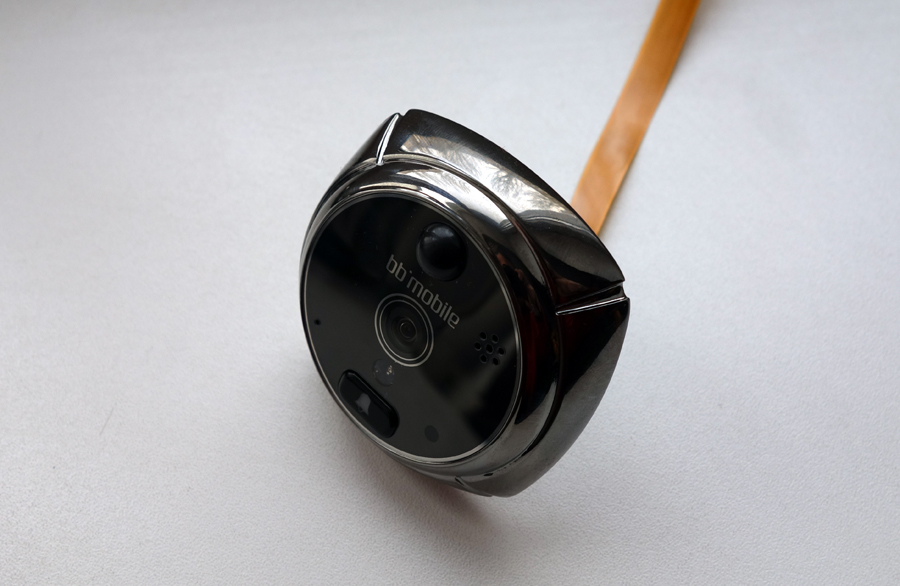
A module with a camera, infrared illumination is looking outside (this is a question of performance in the dark - for example, when some suspicious person unscrews a light on the site), a motion sensor, a photosensitive sensor, a microphone, a speaker and a call button.
The panel located on the inside of the door carries a display, a compartment for the battery, memory card and SIM card, a speaker, a microUSB port, a microphone, a Reset key and three control buttons - “on / off / back”, “screen activation” , “Call” (the latter is necessary to run the dialer).

The screen of the model, as I said above, is 3.5-inch. It is touch-sensitive and made using resistive technology. The quality of the matrix is not too high (I mean color rendition and brightness), it handles clicks in 9 out of 10 cases, but for a gadget like this it's normal - in Angry Birds you don’t play on it and don’t watch movies.

The GSM Glazka desktop

Main menu of the GSM Glazka
The interface of the Glazka is simple, it’s not difficult to figure it out. The key place in it is occupied by a virtual mode selection button. There are three of them: the first is called "Answering Machine", the second - "Home", the third - "GSM".

Menu for selecting GSM Eye mode
In the first case, after pressing the call button, the device takes a photo / video and says in a beautiful female voice something like: “To leave a message, press the call button again and speak after the tone.” After that, the visitor can either click on the call button again, or do nothing. If the visitor pressed the call button again, a beep will sound. Video recording will last 10 seconds.
The second mode - which is "Home" - is intended for use when you are in the apartment. After the visitor clicks on the bell button in this mode, a sound signal will sound on the indoor unit, then the screen will turn on automatically and the user will be able to see what is happening outside the door. At the same time, the device will take a picture or record a video, depending on the settings.
After pressing the button in the GSM mode, the device will take a photo / video and all the same beautiful female voice (sorry not male :)) will offer to contact the landlord by pressing the call button again. Further, “Peephole” will call the owner by the phone number set in the settings, and the visitor will be able to talk with the occupant of the home. To do this, first install a SIM card in GSM EyeOK and set your phone number. You can also make calls to the card installed in GlazOK (moreover, they will be accepted only from one of the three preset numbers, that is, an outsider will not get through to GSM GlazOK). The device automatically picks up the phone and you hear what is happening in the apartment. For example, didn’t the cat die of hunger while you bask on the Turkish beaches. But I hope that you don’t leave the cat alone for the holidays, right?

“GSM Eye” dials the number for the visitor to communicate with the owner of the apartment.
However, in the “GSM” mode the device can not only make calls - it also knows how to send SMS or MMS. There is a special item in the menu for entering MMS settings. True, I did not test this option - on my phone my MMS reception is not configured at all, so I still would not be able to receive a photo card. But, I think, there will be no problems with this.
A few sample photos. In my opinion, for a device of this kind, the quality is acceptable.


A zombie with a headcrab on its head is breaking into the apartment!
And yes, the user can at any time see what is happening behind the door - even if no one has called it.
The resolution of the camera in GSM Eye is 2 megapixels. True, it is recommended to set 0.3 in the settings - it is likely that the pictures are saved faster. The maximum video resolution is 640 x 480.
Immediately after the first use of the Eye, the exact time and date should be set in the settings. The fact is that photos and videos are saved in the format “20130324-151228.jpg” - this is, in particular, a picture taken at 15 hours 12 minutes 28 seconds on March 24, 2013. If the time / date is set incorrectly, then you will not receive the correct data on the time of the visit.

Settings menu
The item “Movement” stands out. You can configure the motion sensor in it - so that it automatically illuminates the bell button if someone is standing behind the door, and also takes pictures / shoots the video and turns on the alarm if someone is busy for too long (say, 20 seconds - the time is set in settings). In fact, an important point: it would be better for the owner of the apartment to find out that someone has been hanging around for a long time ...
Another point. With GSM Eye, you can manually make voice calls with a SIM card inserted in it. Perhaps this option is useful if you have lost your phone somewhere within the apartment.
Overall - the device is definitely worthy. Perhaps the location of the bell button on the door will seem somewhat strange (nevertheless, it is customary to hang up calls near the door), but this is perhaps the only serious minus of GSM Glazka. And for me personally, it is more than compensated by the lack of the need to drill holes in the walls and wiring - as mentioned above, the installation of the device, for me, a girl, took about 10 minutes. The described contraption is not cheap - about 6 thousand rubles. But there are cheaper options (and more expensive) - see table:

Here is an absolutely real life situation. A month ago, my grandparents phoned the apartment of my grandparents. They looked through the peephole and saw only the silhouette of a man there - the light on the stairwell was twisted out. To the question "Who is there?" the visitor said that he was a neighbor from below and came to borrow salt. In short, the door was opened, and this same “neighbor,” who turned out to be a stranger, soon left the apartment with a thousand hryvnias (about 120 dollars, 3,000 rubles). Fortunately, there were no injuries, the money was given voluntarily.
It’s useless to look for this comrade - my old people (and they are far beyond 70) didn’t have eyesight, the thief had no bright signs, and no one really remembered what he looked like. Now is the time to return to the device called bb-mobile "GSM Eye". It is intended to avoid situations like the one described above.
For order, a little history. The first “GlazOK” (it was called that way) was introduced to the Russian market in March 2012, and since then the model has spread across the country with a circulation of 10 thousand copies. Today, there are three devices of this type in the bb-mobile lineup: Super GlazOK, GSM GlazOK and PROGLAZOK. The last two are notable for the fact that they actually have a built-in mobile phone (about its capabilities a little lower). The latest model also has a large touch screen - with a diagonal of 5 inches. The first two have screens of 2.7 and 3.5 inches, respectively. Since my grandparents don’t need GSM options, for them I took “Super Eye” - I’ll just take it to NG, and for myself I bought “GSM Eye”. I will talk about him in this post, the benefit of interesting moments is enough.
An important advantage of the “Eye” is ease of installation. Personally, I can drive a nail into the wall, but making holes in it and laying wiring is not a woman’s business, will you agree? :) GSM Eye doesn’t require any of this: it is inserted into the hole from an ordinary eye (diameter - from 12 to 58 mm), and the thickness of the door should not exceed 100 mm. Fasteners are included, so there was nothing to buy.
Installing the device took about 10 minutes, of which about 5 I was looking for a screwdriver. So far I have secured the “Eye” in the simplest way, that is, without screwing the screws into the door, but even if I had done this, it would hardly have taken more than half an hour to “install” it. The installed “GSM Eye” looks as follows:
A module with a camera, infrared illumination is looking outside (this is a question of performance in the dark - for example, when some suspicious person unscrews a light on the site), a motion sensor, a photosensitive sensor, a microphone, a speaker and a call button.
The panel located on the inside of the door carries a display, a compartment for the battery, memory card and SIM card, a speaker, a microUSB port, a microphone, a Reset key and three control buttons - “on / off / back”, “screen activation” , “Call” (the latter is necessary to run the dialer).
The screen of the model, as I said above, is 3.5-inch. It is touch-sensitive and made using resistive technology. The quality of the matrix is not too high (I mean color rendition and brightness), it handles clicks in 9 out of 10 cases, but for a gadget like this it's normal - in Angry Birds you don’t play on it and don’t watch movies.
The GSM Glazka desktop
Main menu of the GSM Glazka
The interface of the Glazka is simple, it’s not difficult to figure it out. The key place in it is occupied by a virtual mode selection button. There are three of them: the first is called "Answering Machine", the second - "Home", the third - "GSM".
Menu for selecting GSM Eye mode
In the first case, after pressing the call button, the device takes a photo / video and says in a beautiful female voice something like: “To leave a message, press the call button again and speak after the tone.” After that, the visitor can either click on the call button again, or do nothing. If the visitor pressed the call button again, a beep will sound. Video recording will last 10 seconds.
The second mode - which is "Home" - is intended for use when you are in the apartment. After the visitor clicks on the bell button in this mode, a sound signal will sound on the indoor unit, then the screen will turn on automatically and the user will be able to see what is happening outside the door. At the same time, the device will take a picture or record a video, depending on the settings.
After pressing the button in the GSM mode, the device will take a photo / video and all the same beautiful female voice (sorry not male :)) will offer to contact the landlord by pressing the call button again. Further, “Peephole” will call the owner by the phone number set in the settings, and the visitor will be able to talk with the occupant of the home. To do this, first install a SIM card in GSM EyeOK and set your phone number. You can also make calls to the card installed in GlazOK (moreover, they will be accepted only from one of the three preset numbers, that is, an outsider will not get through to GSM GlazOK). The device automatically picks up the phone and you hear what is happening in the apartment. For example, didn’t the cat die of hunger while you bask on the Turkish beaches. But I hope that you don’t leave the cat alone for the holidays, right?
“GSM Eye” dials the number for the visitor to communicate with the owner of the apartment.
However, in the “GSM” mode the device can not only make calls - it also knows how to send SMS or MMS. There is a special item in the menu for entering MMS settings. True, I did not test this option - on my phone my MMS reception is not configured at all, so I still would not be able to receive a photo card. But, I think, there will be no problems with this.
A few sample photos. In my opinion, for a device of this kind, the quality is acceptable.
A zombie with a headcrab on its head is breaking into the apartment!
And yes, the user can at any time see what is happening behind the door - even if no one has called it.
The resolution of the camera in GSM Eye is 2 megapixels. True, it is recommended to set 0.3 in the settings - it is likely that the pictures are saved faster. The maximum video resolution is 640 x 480.
Immediately after the first use of the Eye, the exact time and date should be set in the settings. The fact is that photos and videos are saved in the format “20130324-151228.jpg” - this is, in particular, a picture taken at 15 hours 12 minutes 28 seconds on March 24, 2013. If the time / date is set incorrectly, then you will not receive the correct data on the time of the visit.
Settings menu
The item “Movement” stands out. You can configure the motion sensor in it - so that it automatically illuminates the bell button if someone is standing behind the door, and also takes pictures / shoots the video and turns on the alarm if someone is busy for too long (say, 20 seconds - the time is set in settings). In fact, an important point: it would be better for the owner of the apartment to find out that someone has been hanging around for a long time ...
Another point. With GSM Eye, you can manually make voice calls with a SIM card inserted in it. Perhaps this option is useful if you have lost your phone somewhere within the apartment.
Overall - the device is definitely worthy. Perhaps the location of the bell button on the door will seem somewhat strange (nevertheless, it is customary to hang up calls near the door), but this is perhaps the only serious minus of GSM Glazka. And for me personally, it is more than compensated by the lack of the need to drill holes in the walls and wiring - as mentioned above, the installation of the device, for me, a girl, took about 10 minutes. The described contraption is not cheap - about 6 thousand rubles. But there are cheaper options (and more expensive) - see table: