How to run the program without an operating system: part 6. Support for working with disks with the FAT file system
In the fifth part of our series of articles, we showed how you can use BIOS interrupts after switching to protected mode, and as an example we determined the size of RAM. Today we will develop this success and implement full support for working with disks with the FAT16 and FAT32 file system. Work with files on the disk can be divided into 2 parts: work with the file system and work with the disk at the read / write sectors. We can say that for this we need to write a “driver” of the file system and a “driver” of the disk.
Work with the disk at the level of reading / writing sectors
First, learn how to work with the disk.
So, we can cause BIOS interrupt. Among other features, the BIOS provides an interface for working with a disk, namely, the interrupt int 0x13. The list of services provided by the interrupt can be found on Wikipedia . We are interested in disk reading and writing services.
There are two ways to address the sector on the disk that the BIOS works with - CHS ( cylinder-head-sector ) and LBA ( logical block addressing ). CHS addressing is based on the use of disk geometry, and the sector address is a combination of three coordinates: cylinder, head, sector. The method allows you to address up to 8GB. The interrupt int0x13 provides the ability to read and writeto disk using this addressing.
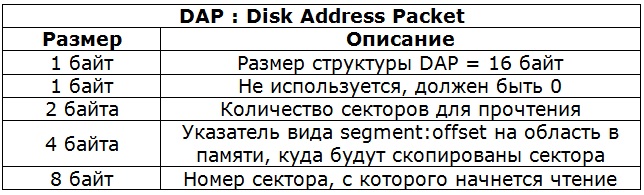
It is clear that 8GB is very small, and this method of addressing is outdated, and all modern (and not so) hard disk controllers support LBA addressing. LBA addressing abstracts from disk geometry and assigns a separate number to each sector. Sector numbering starts from scratch. LBA uses 48 bits to specify the block number, which allows addressing 128 PiB, taking into account the sector size of 512 bytes. The interrupt int0x13 provides two services for reading and writing sectors to disk using LBA. We will use them. To read a sector, the in0x13 interrupt expects the following parameters:
DAP structure: The
interrupt returns the following values:
One of the parameters is the disk number. We need to somehow find out the disk number with which we are going to work. The numbering is as follows: floppy disks (fdd), and everything that is emulated as floppy is numbered from scratch, and hard disks (hdd), and everything that is emulated like them (usb flash drives, for example) are numbered from 0x80. This number has nothing to do with the boot sequence in the BIOS settings. In our case, the disk with which we are going to work is the disk from which we booted.
When the BIOS transfers MBR control, it loads it at the address 0000h: 7C00h, and in the DL register it transfers the boot device number we need. This is part of the interface.interactions between BIOS and MBR. Thus, this number falls into GRUB, where it is further used to work with the disk. GRUB, in turn, passes this OS number as part of the Multiboot information structure .
Right after the transfer of control from GRUB to the OS, a pointer to this structure is located in the EBX register. The first field of the structure is flags, and if the 2nd bit is set in it, then the boot_device field is correct. This field also belongs to the Multiboot information structure and in its high byte (field size is 4 bytes) the disk number we need is stored, which understands the inter0x13 interrupt. Thus, using GRUB, we got the missing parameter for reading / writing sectors to disk.
We learned to read and write sectors to disk, this is certainly important. But the file system is not tied to the whole disk, but only to its part - the partition. To work with the file system, you need to find the sector from which the section on which it is located begins. Information about the sectors available on the disk is stored in the first sector of the disk, in the same place as the MBR. There are many different MBR formats , but the following structure is true for all of them:
Partition information is stored in the partition table. There can only be 4 primary partitions on a disk from which you can boot. There are 8 bytes per section entry. The first byte is the flags, if its value is 0x80, then the partition is bootable. The MBR code in the course of its work runs through these 4 sections in search of a boot partition. After its discovery, the MBR copies the contents of the first sector of this section to the address 0000h: 7C00h and transfers control there. We are interested in the LBA address of the first sector of the boot partition, since it is on it that our kernel is located, and there is a file system that we are going to read. In order to get this address, you need to read the first sector of the disk, find the partition table on it, find the boot partition in the partition table, and read the desired field from its record.
So, we have a mechanism for reading a sector from disk and knowing about the location of the partition we need on the disk. It remains to learn how to work with the file system in this section.
Work with the file system
To work with the file system, we will use the fat_io_lib library . The library is available under the GPL license. It provides an interface for working with files and directories, similar to that available in libc. Functions such as fopen (), fgets (), fputc (), fread (), fwrite (), etc. are implemented. A library for its work requires only two functions: write a sector and read a sector, the first being optional. Functions have the following prototype:
The library is written in pure C, which again is in our favor. For use in our mini-OS, we do not have to change a single line in it. The library expects sectors to read as part of a file system partition.
So, we have functions for reading / writing a sector to a section and there is a library for working with FAT16 / 32 that uses these functions. It remains to put everything together and demonstrate the result. But before moving on to the code, I would like to show that the approach that we are going to use is quite applicable in real life. Below is a small part of VBR windows 7, in which the disk sector is read by means of the int0x13 interrupt. This code is repeatedly called during the system boot process, up to the moment of rendering the boot animation.
To call this code, Windows 7, similar to how we do it, goes from protected mode to real mode, and vice versa. This is easy to verify by running Windows 7 in QEMU. QEMU should wait for the debugger to connect. After connecting the debugger (gdb) we set breakpoint to the address (0x7c00 + 0x11d). Triggering breakpoint will mean calling this function. By the way, in Windows XP this mechanism is absent; to cause BIOS interrupt, they switch to VM86 mode there.
! IMPORTANT! All further actions can be successfully carried out only after successfully completing all the steps from the fifth part of our series of articles
Step 1. Change the main logic in kernel.c
1. Add the following declarations in the kernel.c file:
// проверяем, что были загружены grub-ом
if (magic != MULTIBOOT_BOOTLOADER_MAGIC)
  {
  printf("Invalid magic number: 0x%x\n", magic);
       return;
   }
 multiboot_info_t *p_multiboot_info = (multiboot_info_t*)mbd;
 // Is boot_device valid?
 if ((p_multiboot_info->flags & 2) == 0)
 {
      printf("Error: boot_device(2) flag is clear\n");
      return;
    }
 // ищем первый сектор загрузочного раздела
 if (InitBootMedia(p_multiboot_info->boot_device >> 24) == 0)
 {
 printf("Error: InitBootMedia failed.\n");
return;
 }
// инициализируем библиотеку fat_io_lib
  fl_init();
 if (fl_attach_media(ReadBootMedia, WriteBootMedia) != FAT_INIT_OK)
 {
  printf("Error: Media attach failed.\n");
 return;
  }
 // выводим список файлов в папке /boot/grub
 fl_listdirectory("/boot/grub");
 // выводим содержимое /boot/grub/menu.lst на экран
char str[64];
void *file = fl_fopen("/boot/grub/menu.lst", "r");
if (file == 0)
{
 printf("Error: can not open file.\n");
return;
}
printf("\nConntent of the file /boot/grub/menu.lst:\n");
while (fl_fgets(str, sizeof(str), file))
 {
printf("%s", str);
}
The memory for the mbd and magic variables is reserved in the loader.s file, so that they can be used similarly to the global variables from the C code. The magic variable contains a signature confirming that the Multiboot standard was used for loading, the reference implementation of which is GRUB. The mbd variable points to the multiboot_info_t structure, which is declared in multiboot.h. The boot disk number is determined by the following expression - p_multiboot_info-> boot_device >> 24. The InitBootMedia function remembers the disk number and searches for the first sector of the file system, so that then all offsets can be read from it.
The fat_io_lib library for initialization requires calling two functions: fl_init and fl_attach_media. The first function resets the internal structures of the library, and the second receives as parameters the functions of reading and writing sectors to disk, which are then used to access files. Next is a demonstration of working with the library: a list of files in the / boot / grub folder is displayed and the contents of the menu.lst file are printed.
2. Add the multiboot.h file to the include folder. We take the contents of the file from the specification site of the previous version.
Step 2. Add functions to work with the disk
1. In the include \ callrealmode.h file, add the prototypes of the following functions:
u32 InitBootMedia(u8 bootDevice);
int ReadBootMedia(unsigned long sector, unsigned char *buffer, unsigned long sectorCount);
int WriteBootMedia(unsigned long sector, unsigned char *buffer, unsigned long sectorCount);
2. In the include \ callrealmode_asm.h file, add a new value to the enum callrealmode_Func so that the following happens:
enum callrealmode_Func
{
CALLREALMODE_FUNC_GETSYSMEMMAP = 0,
CALLREALMODE_FUNC_READ_DISK    = 1
};
Добавим структуру, которая будет использоваться для обращения к диску:

struct callrealmode_read_disk
{
u64 start_sector_lba;
u32 buff_addr;
u32 sectors_count;
 u16 disk_number;
u8 ret_code;
} __attribute__ ((packed));
Add to the union inside the callrealmode_Data structure the just-declared callrealmode_read_disk structure. You should get the following:
3. Add the strncmp and strncpy functions used in the fat_io_lib library to the include \ string.h file.
static inline int strncmp ( const char * str1, const char * str2, unsigned int num )
{
for ( ; num > 0; str1++, str2++, --num)
{
if (*str1 != *str2)
return ((*(unsigned char *)str1 < *(unsigned char *)str2) ? -1 : +1);
		else if (*str1 == '\0')
			return 0;
	}
return 0;
}
static inline char* strncpy ( char * dst, const char * src, unsigned int num )
{
	if (num != 0)
	{
		char *d = dst;
		const char *s = src;
		do
		{
		if ((*d++ = *s++) == 0)
			{
				while (--num)
					*d++ = 0;
				break;
			}
		}
		while (--num);
	}
	return dst;
}
4. Add the following declarations to the callrealmode.c file:
#include "fat_io_lib/fat_opts.h"
#include "mbr.h"
u64 g_BootPartitionStart = 0;   // номер первого сектора раздела с файловой системой
u32 g_BootDeviceInt13Num = 0;   // номер загрузочного диска
And a few functions:
// Чтение сектора с диска
int ReadBootMedia(unsigned long sector, unsigned char *buffer, unsigned long sectorCount)
{
 struct callrealmode_Data param; // структура, в которой передаются параметры
// для кода в RM, и возвращается результат
 param.func = CALLREALMODE_FUNC_READ_DISK;
 // Чтение сектора с диска происходит путем вызова прерывания int13.
 // Но таким образом можно записать прочитанный сектор только в
  // диапазон памяти ниже 1Mb, но адрес "buffer" может быть выше этой границы.
 // В качестве решения используется временная область по адресу "low_mem_buff",
// которая расположена сразу после RM кода, копируемого по адресу CALLREALMODE_OFFSET < 1Mb
   int i;
void *low_mem_buff = CALLREALMODE_OFFSET + (&callrealmode_end - &callrealmode_start);
   for (i = 0; i < sectorCount; i++)
{
 param.readdisk.start_sector_lba = sector + g_BootPartitionStart + i;
   param.readdisk.buff_addr        = (u32)low_mem_buff;
 param.readdisk.disk_number      = g_BootDeviceInt13Num;
 param.readdisk.sectors_count    = 1;
 callrealmode_Call(¶m);  // int 0x13 с параметрами из "param"
 if (param.readdisk.ret_code)
{
           return 0;   // error
       }
 memcpy(buffer + i * FAT_SECTOR_SIZE, low_mem_buff, FAT_SECTOR_SIZE);
 }
return 1;   // success
}
// Запись сектора на диск. Заглушка
int WriteBootMedia(unsigned long sector, unsigned char *buffer, unsigned long sectorCount)
{
  return 0;   // error
}
// Функция инициализации
u32 InitBootMedia(u8 bootDevice)
{
g_BootDeviceInt13Num = bootDevice;
   // Читаем первый сектор диска
   MBRSector_t mbr;
  if (ReadBootMedia(0, (u8*)&mbr, 1) == 0)
  {
        return 0;
    }
  // проверяем сигнатуру
 if (mbr.mbr_sign[0] != 0x55 ||
    mbr.mbr_sign[1] != 0xaa)
{
 return 0;
   }
 // ищем загрузочный раздел
 int i;
 for (i = 0; i < 4; i++)
 {
   if (mbr.part[i].boot_indicator == 0x80)
       break;
   }
   if (i == 4)
    {
       return 0;
  }
  // сохраняем номер первого сектора загрузочного раздела
   g_BootPartitionStart = mbr.part[i].start_lva;
 printf("start sector = %lld boot dev int13 num = 0x%x\n",
    g_BootPartitionStart, g_BootDeviceInt13Num);
   return 1;
}
The ReadBootMedia and WriteBootMedia functions are used by the fat_io_lib library to read / write sectors. The WriteBootMedia function is optional and is a stub since there is no writing to disk in this example. Its implementation would look similar to the ReadBootMedia function. The ReadBootMedia function is similar to the GetRamsize function from the previous article up to the type param.func, and param.readdisk is used instead of param.getsysmemmap. The InitBootMedia function must be called before the other two, since it initializes the values of g_BootPartitionStart and g_BootDeviceInt13Num.
5. Change callrealmode_asm.s. Add another type of CALLREALMODE_FUNC_READ_DISK called functions, the following should happen:
# это объявления из enum callrealmode_Func
CALLREALMODE_FUNC_GETSYSMEMMAP = 0x0
CALLREALMODE_FUNC_READ_DISK    = 0x1
Next, we add one more check on the type of function and directly the code reading from the disk. You should get the following:
callrealmode_switch:
OFF_FUNC = 44   # на таком смещении относительно %bp
 # находится поле func структуры callrealmode_Data
 # Which function?
 movw OFF_FUNC(%bp),%ax
cmp  $CALLREALMODE_FUNC_GETSYSMEMMAP,%ax
  je   getsysmemmap
  cmp  $CALLREALMODE_FUNC_READ_DISK,%ax
 je   readdisk
ret
readdisk:
OFF_START_SECTOR  = 50  # смещение до поля start_sector_lba структуры callrealmode_Data
 OFF_BUFFER_ADDR   = 58  # смещение до поля buff_addr структуры callrealmode_Data
  OFF_SECTORS_COUNT = 62  # смещение до поля sectors_count структуры callrealmode_Data
 OFF_DISK_NUMBER   = 66  # смещение до поля disk_number структуры callrealmode_Data
  OFF_RETURN_CODE   = 68  # смещение до поля ret_code структуры callrealmode_Data
push %bp
mov %sp,%bp
 # формируем на стеке структуру DAP
  pushl OFF_START_SECTOR+4(%bp)
  pushl OFF_START_SECTOR+0(%bp)
pushl OFF_BUFFER_ADDR(%bp)
  pushw OFF_SECTORS_COUNT(%bp)
   pushw $0x10
   mov   %sp,%si                   # ds:si указываем на вершину стека, т.е. на DAP
 mov   OFF_DISK_NUMBER(%bp),%dl  # номер диска в dl
mov   $0x42,%ah                 # EXTENDED READ
 int   $0x13                     # CALL DISK BIOS
 mov   %ah,OFF_RETURN_CODE(%bp)  # сохраняем результат
 add   $0x10,%sp                 # очищаем стек от DAP
pop %bp
 ret
The readdisk label points to the code that forms the DAP structure from the callrealmode_Data structure and calls int0x13. In the code after the callrealmode_switch label, 2 instructions were added to check whether readdisk should be called.
6. Add an include \ mbr.h file containing definitions for working with MBR. Its contents:
The MBRSector structure is used in the InitBootMedia function.
Step 3. Add the fat_io_lib library and run
1. Download the archive fat_io_lib.zip and unpack it in fat_io_lib folder in the project root.
2. Add the empty files assert.h and stdlib.h to the include folder. They are needed for the library to compile.
3. Fix the Makefile. Add files from the library to the list of goals for compilation. You should get the following:
Now the image size is 10Mb. This is to ensure that the mkdosfs command formats the partition to FAT16 instead of FAT12. FAT12 is not supported by the fat_io_lib library.
With this define, the library will not include stdio.h, but it will use a ready-made prototype of the printf function, which is the same as ours, and which is already implemented.
4. Rebuild the project
make rebuild
sudo make image
5. Run
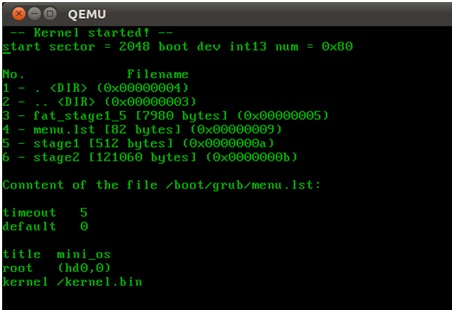
sudo qemu-system-i386 -hda hdd.img
It should turn out the following:
As in the previous parts, you can make a dd of the hdd.img image on a USB flash drive and check the code on real hardware by booting from it.
As a result, we implemented work with the FAT16 and FAT32 file systems. We cheated a little using a ready-made library, but to understand the FAT device would be less interesting, and it would be unlikely that we would fit into 1 article then. Hope you found it interesting to read. Write in the comments if you have problems in going through the steps!
 March 2, 2015 at 11:51