 November 25, 2013 at 15:20
How to generate a CREATE TABLE script for an existing table
- Tutorial
SQL Server stores information about all objects and their properties in the form of metadata, which can be accessed through system views. In addition, some of the system views hide interesting nuances that allow you to better understand how DBMS works .
To view the body of the system view, as well as any other scripted object, use the function - OBJECT_DEFINITION :
However, OBJECT_DEFINITION , as well as its counterpart sp_helptext , has a significant drawback - they cannot be used to return a script description for a table object.
When executing sp_helptext we get the error:
Msg 15197, Level 16, State 1, Procedure sp_helptext, Line 107
There is no text for object 'dbo.Table1'.
Under the same conditions, the OBJECT_DEFINITION system function will return NULL .
Also, fetching from sys.sql_modules will not solve the problem , since inside this system view the same OBJECT_DEFINITION function call is used :
This behavior is very sad, because for some scenarios it can be useful to get a script description of the table. Well, take a look at the system views and create an analogue of the OBJECT_DEFINITION function for working with table objects.
To begin with, we will create a test table so that the process of writing the script is more visual:
And let's proceed to the first step - getting a list of columns and their properties:
In principle, you can get a list of columns by simply accessing one of several system views. At the same time, it is important to make a selection from the lightest system representations so that the query execution time is minimal.
I will give a couple of examples along with plans for their implementation:
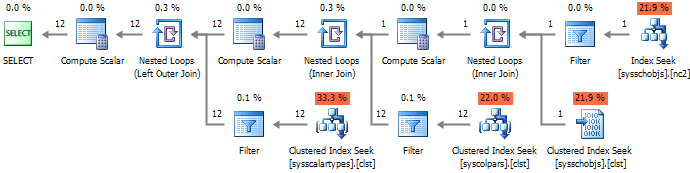
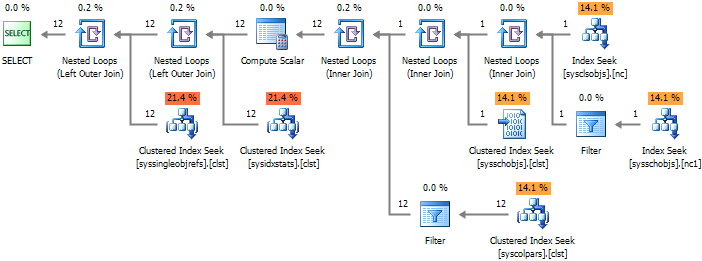
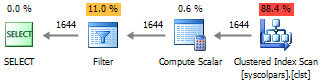
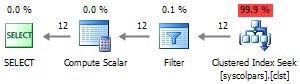
It can be seen from the presented execution plans that options # 1 and # 2 contain an excessive number of connections that increase the query execution time, while the # 3 approach leads to a full index scan, which makes it the least efficient of all.
In terms of performance, the # 4 option remains the most attractive to me.
However, the data contained in sys.columns (as well as in INFORMATION_SCHEMA.COLUMNS ) is not enough to fully describe the table structure. This forces connections to other system views:
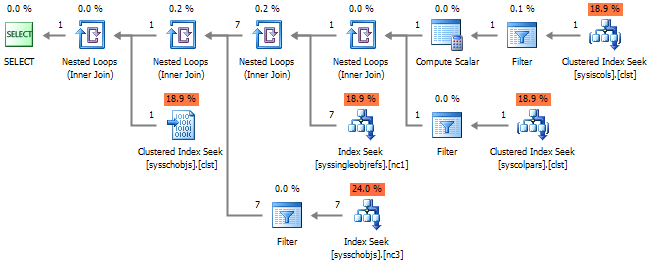
Accordingly, the implementation plan will not look as cheerful as before. If you pay attention, then we generally subtract the list of columns three times:

Let's look inside sys.default_constraints :
Inside the system view, you can see the call to OBJECT_DEFINITION , respectively, to get a description of the default constant, we do not need to make a connection.
In sys.computed_columns used all the same OBJECT_DEFINITION :
It turns out that we have already got rid of the two compounds. With sys.identity_columns, the situation is more interesting:
For information about the properties IDENTITY use an undocumented feature IDENTITYPROPERTY . As a result of the check, its unchanged behavior was established on the 2005 version of SQL Server and higher.
As a result of calling these functions directly, the request to get a list of columns is noticeably simplified:
And the execution plan will become more loyal:
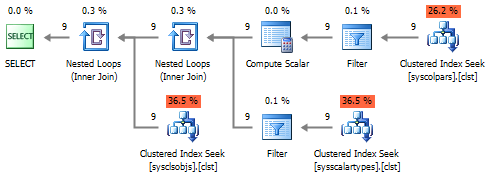
In conclusion, instead of connecting to sys.schemas, you can make a call to the system function SCHEMA_NAME , which works much faster than the connection. This statement is true, provided that the number of schemes does not exceed the number of user objects. And since such a situation is unlikely, it can be neglected.
Next, we get a list of columns included in the primary key. The most obvious option is to call sys.key_constraints :
If you recall the theory, then PRIMARY KEY is a cluster index and a Unique constraint .
At the metadata level, SQL Server sets index_id to 1 for all clustered indexes , so you can select from sys.indexes by filtering by is_primary_key = 1 .
Additionally, to get rid of the connection with sys.columns , you can use the system function COL_NAME :

Now we will combine the obtained samples into one and get the following query:
Which, when executed, will generate the following script for our table:
PS : The generation of the script description of the table is certainly not limited to the list of columns and the primary key. If it is interesting, then you can continue this topic and show the generation of indexes, foreign keys and other related constructions.
To view the body of the system view, as well as any other scripted object, use the function - OBJECT_DEFINITION :
PRINT OBJECT_DEFINITION(OBJECT_ID('sys.objects'))
However, OBJECT_DEFINITION , as well as its counterpart sp_helptext , has a significant drawback - they cannot be used to return a script description for a table object.
IF OBJECT_ID('dbo.Table1', 'U') IS NOT NULL
  DROP TABLE dbo.Table1
GO
CREATE TABLE dbo.Table1 (ColumnID INT PRIMARY KEY)
GO
EXEC sys.sp_helptext 'dbo.Table1'
SELECT OBJECT_DEFINITION(OBJECT_ID('dbo.Table1', 'U'))
When executing sp_helptext we get the error:
Msg 15197, Level 16, State 1, Procedure sp_helptext, Line 107
There is no text for object 'dbo.Table1'.
Under the same conditions, the OBJECT_DEFINITION system function will return NULL .
Also, fetching from sys.sql_modules will not solve the problem , since inside this system view the same OBJECT_DEFINITION function call is used :
CREATE VIEW sys.sql_modules AS
    SELECT object_id = o.id,
        definition = object_definition(o.id),
        ...
    FROM sys.sysschobjs o
This behavior is very sad, because for some scenarios it can be useful to get a script description of the table. Well, take a look at the system views and create an analogue of the OBJECT_DEFINITION function for working with table objects.
To begin with, we will create a test table so that the process of writing the script is more visual:
IF OBJECT_ID('dbo.WorkOut', 'U') IS NOT NULL
    DROP TABLE dbo.WorkOut
GO
CREATE TABLE dbo.WorkOut
(
    WorkOutID BIGINT IDENTITY(1,1) NOT NULL,
    TimeSheetDate AS DATEADD(DAY, -(DAY(DateOut) - 1), DateOut),
    DateOut DATETIME NOT NULL,
    EmployeeID INT NOT NULL,
    IsMainWorkPlace BIT NOT NULL DEFAULT 1,
    DepartmentUID UNIQUEIDENTIFIER NOT NULL,
    WorkShiftCD NVARCHAR(10) NULL,
    WorkHours REAL NULL,
    AbsenceCode VARCHAR(25) NULL,
    PaymentType CHAR(2) NULL,
    CONSTRAINT PK_WorkOut PRIMARY KEY CLUSTERED (WorkOutID)
)
GO
And let's proceed to the first step - getting a list of columns and their properties:
In principle, you can get a list of columns by simply accessing one of several system views. At the same time, it is important to make a selection from the lightest system representations so that the query execution time is minimal.
I will give a couple of examples along with plans for their implementation:
--#1
SELECT *
FROM INFORMATION_SCHEMA.COLUMNS c
WHERE c.TABLE_SCHEMA = 'dbo'
    AND c.TABLE_NAME = 'WorkOut'
--#2
SELECT c.*
FROM sys.columns c WITH(NOLOCK)
JOIN sys.tables t WITH(NOLOCK) ON c.[object_id] = t.[object_id]
JOIN sys.schemas s WITH(NOLOCK) ON t.[schema_id] = s.[schema_id]
WHERE t.name = 'WorkOut'
    AND s.name = 'dbo'
--#3
SELECT *
FROM sys.columns c WITH(NOLOCK)
WHERE OBJECT_NAME(c.[object_id]) = 'WorkOut'
    AND OBJECT_SCHEMA_NAME(c.[object_id]) = 'dbo'
--#4
SELECT *
FROM sys.columns c WITH(NOLOCK)
WHERE c.[object_id] = OBJECT_ID('dbo.WorkOut', 'U')
It can be seen from the presented execution plans that options # 1 and # 2 contain an excessive number of connections that increase the query execution time, while the # 3 approach leads to a full index scan, which makes it the least efficient of all.
In terms of performance, the # 4 option remains the most attractive to me.
However, the data contained in sys.columns (as well as in INFORMATION_SCHEMA.COLUMNS ) is not enough to fully describe the table structure. This forces connections to other system views:
SELECT
	  c.name
	, [type_name] = tp.name
	, type_schema_name = s.name
	, c.max_length
	, c.[precision]
	, c.scale
	, c.collation_name
	, c.is_nullable
	, c.is_identity
	, ic.seed_value
	, ic.increment_value
	, computed_definition = cc.[definition]
	, default_definition = dc.[definition]
FROM sys.columns c WITH(NOLOCK)
JOIN sys.types tp WITH(NOLOCK) ON c.user_type_id = tp.user_type_id
JOIN sys.schemas s WITH(NOLOCK) ON tp.[schema_id] = s.[schema_id]
LEFT JOIN sys.computed_columns cc WITH(NOLOCK) ON
		c.[object_id] = cc.[object_id]
	AND c.column_id = cc.column_id
LEFT JOIN sys.identity_columns ic WITH(NOLOCK) ON
		c.[object_id] = ic.[object_id]
	AND c.column_id = ic.column_id
LEFT JOIN sys.default_constraints dc WITH(NOLOCK) ON dc.[object_id] = c.default_object_id
WHERE c.[object_id] = OBJECT_ID('dbo.WorkOut', 'U')
Accordingly, the implementation plan will not look as cheerful as before. If you pay attention, then we generally subtract the list of columns three times:
Let's look inside sys.default_constraints :
ALTER VIEW sys.default_constraints AS
	SELECT name, object_id, parent_object_id,
		...
		object_definition(object_id) AS definition,
		is_system_named
	FROM sys.objects$
	WHERE type = 'D ' AND parent_object_id > 0
Inside the system view, you can see the call to OBJECT_DEFINITION , respectively, to get a description of the default constant, we do not need to make a connection.
In sys.computed_columns used all the same OBJECT_DEFINITION :
ALTER VIEW sys.computed_columns AS
	SELECT object_id = id,
		name = name,
		column_id = colid,
		system_type_id = xtype,
		user_type_id = utype,
		...
		definition = object_definition(id, colid),
		...
	FROM sys.syscolpars
	WHERE number = 0
		AND (status & 16) = 16 -- CPM_COMPUTED
		AND has_access('CO', id) = 1
It turns out that we have already got rid of the two compounds. With sys.identity_columns, the situation is more interesting:
ALTER VIEW sys.identity_columns AS
	SELECT object_id = id,
		name = name,
		column_id = colid,
		system_type_id = xtype,
		user_type_id = utype,
		...
		seed_value = IdentityProperty(id, 'SeedValue'),
		increment_value = IdentityProperty(id, 'IncrementValue'),
		last_value = IdentityProperty(id, 'LastValue'),
		...
	FROM sys.syscolpars
	WHERE number = 0 -- SOC_COLUMN
		AND (status & 4) = 4 -- CPM_IDENTCOL
		AND has_access('CO', id) = 1
For information about the properties IDENTITY use an undocumented feature IDENTITYPROPERTY . As a result of the check, its unchanged behavior was established on the 2005 version of SQL Server and higher.
As a result of calling these functions directly, the request to get a list of columns is noticeably simplified:
SELECT
      c.name
    , [type_name] = tp.name
    , type_schema_name = s.name
    , c.max_length
    , c.[precision]
    , c.scale
    , c.collation_name
    , c.is_nullable
    , c.is_identity
    , seed_value = CASE WHEN c.is_identity = 1 THEN IDENTITYPROPERTY(c.[object_id], 'SeedValue') END
    , increment_value = CASE WHEN c.is_identity = 1 THEN IDENTITYPROPERTY(c.[object_id], 'IncrementValue') END
    , computed_definition = OBJECT_DEFINITION(c.[object_id], c.column_id)
    , default_definition = OBJECT_DEFINITION(c.default_object_id)
FROM sys.columns c WITH(NOLOCK)
JOIN sys.types tp WITH(NOLOCK) ON c.user_type_id = tp.user_type_id
JOIN sys.schemas s WITH(NOLOCK) ON tp.[schema_id] = s.[schema_id]
WHERE c.[object_id] = OBJECT_ID('dbo.WorkOut', 'U')
And the execution plan will become more loyal:
In conclusion, instead of connecting to sys.schemas, you can make a call to the system function SCHEMA_NAME , which works much faster than the connection. This statement is true, provided that the number of schemes does not exceed the number of user objects. And since such a situation is unlikely, it can be neglected.
Next, we get a list of columns included in the primary key. The most obvious option is to call sys.key_constraints :
SELECT
	  pk_name = kc.name
	, column_name = c.name
	, ic.is_descending_key
FROM sys.key_constraints kc WITH(NOLOCK)
JOIN sys.index_columns ic WITH(NOLOCK) ON
		kc.parent_object_id = ic.object_id
	AND ic.index_id = kc.unique_index_id
JOIN sys.columns c WITH(NOLOCK) ON
		ic.[object_id] = c.[object_id]
	AND ic.column_id = c.column_id
WHERE kc.parent_object_id = OBJECT_ID('dbo.WorkOut', 'U')
	AND kc.[type] = 'PK'
If you recall the theory, then PRIMARY KEY is a cluster index and a Unique constraint .
At the metadata level, SQL Server sets index_id to 1 for all clustered indexes , so you can select from sys.indexes by filtering by is_primary_key = 1 .
Additionally, to get rid of the connection with sys.columns , you can use the system function COL_NAME :
SELECT
	  pk_name = i.name
	, column_name = COL_NAME(ic.[object_id], ic.column_id)
	, ic.is_descending_key
FROM sys.indexes i WITH(NOLOCK)
JOIN sys.index_columns ic WITH(NOLOCK) ON
		i.[object_id] = ic.[object_id]
	AND i.index_id = ic.index_id
WHERE i.is_primary_key = 1
	AND i.[object_id] = object_id('dbo.WorkOut', 'U')
Now we will combine the obtained samples into one and get the following query:
DECLARE
      @object_name SYSNAME
    , @object_id INT
    , @SQL NVARCHAR(MAX)
SELECT
      @object_name = '[' + OBJECT_SCHEMA_NAME(o.[object_id]) + '].[' + OBJECT_NAME([object_id]) + ']'
    , @object_id = [object_id]
FROM (SELECT [object_id] = OBJECT_ID('dbo.WorkOut', 'U')) o
SELECT @SQL = 'CREATE TABLE ' + @object_name + CHAR(13) + '(' + CHAR(13) + STUFF((
    SELECT CHAR(13) + '    , [' + c.name + '] ' +
        CASE WHEN c.is_computed = 1
            THEN 'AS ' + OBJECT_DEFINITION(c.[object_id], c.column_id)
            ELSE
                CASE WHEN c.system_type_id != c.user_type_id
                    THEN '[' + SCHEMA_NAME(tp.[schema_id]) + '].[' + tp.name + ']'
                    ELSE '[' + UPPER(tp.name) + ']'
                END  +
                CASE
                    WHEN tp.name IN ('varchar', 'char', 'varbinary', 'binary')
                        THEN '(' + CASE WHEN c.max_length = -1
                                        THEN 'MAX'
                                        ELSE CAST(c.max_length AS VARCHAR(5))
                                    END + ')'
                    WHEN tp.name IN ('nvarchar', 'nchar')
                        THEN '(' + CASE WHEN c.max_length = -1
                                        THEN 'MAX'
                                        ELSE CAST(c.max_length / 2 AS VARCHAR(5))
                                    END + ')'
                    WHEN tp.name IN ('datetime2', 'time2', 'datetimeoffset')
                        THEN '(' + CAST(c.scale AS VARCHAR(5)) + ')'
                    WHEN tp.name = 'decimal'
                        THEN '(' + CAST(c.[precision] AS VARCHAR(5)) + ',' + CAST(c.scale AS VARCHAR(5)) + ')'
                    ELSE ''
                END +
                CASE WHEN c.collation_name IS NOT NULL AND c.system_type_id = c.user_type_id
                    THEN ' COLLATE ' + c.collation_name
                    ELSE ''
                END +
                CASE WHEN c.is_nullable = 1
                    THEN ' NULL'
                    ELSE ' NOT NULL'
                END +
                CASE WHEN c.default_object_id != 0
                    THEN ' CONSTRAINT [' + OBJECT_NAME(c.default_object_id) + ']' +
						 ' DEFAULT ' + OBJECT_DEFINITION(c.default_object_id)
                    ELSE ''
                END +
				CASE WHEN cc.[object_id] IS NOT NULL
					THEN ' CONSTRAINT [' + cc.name + '] CHECK ' + cc.[definition]
					ELSE ''
				END	+
                CASE WHEN c.is_identity = 1
                    THEN ' IDENTITY(' + CAST(IDENTITYPROPERTY(c.[object_id], 'SeedValue') AS VARCHAR(5)) + ',' +
                                    CAST(IDENTITYPROPERTY(c.[object_id], 'IncrementValue') AS VARCHAR(5)) + ')'
                    ELSE ''
                END
        END
    FROM sys.columns c WITH(NOLOCK)
    JOIN sys.types tp WITH(NOLOCK) ON c.user_type_id = tp.user_type_id
	LEFT JOIN sys.check_constraints cc WITH(NOLOCK) ON c.[object_id] = cc.parent_object_id AND cc.parent_column_id = c.column_id
    WHERE c.[object_id] = @object_id
    ORDER BY c.column_id
    FOR XML PATH(''), TYPE).value('.', 'NVARCHAR(MAX)'), 1, 7, '      ') +
    ISNULL((SELECT '
    , CONSTRAINT [' + i.name + '] PRIMARY KEY ' +
	CASE WHEN i.index_id = 1
		THEN 'CLUSTERED'
		ELSE 'NONCLUSTERED'
	END +' (' + (
    SELECT STUFF(CAST((
        SELECT ', [' + COL_NAME(ic.[object_id], ic.column_id) + ']' +
                CASE WHEN ic.is_descending_key = 1
                    THEN ' DESC'
                    ELSE ''
                END
        FROM sys.index_columns ic WITH(NOLOCK)
        WHERE i.[object_id] = ic.[object_id]
            AND i.index_id = ic.index_id
        FOR XML PATH(N''), TYPE) AS NVARCHAR(MAX)), 1, 2, '')) + ')'
    FROM sys.indexes i WITH(NOLOCK)
    WHERE i.[object_id] = @object_id
        AND i.is_primary_key = 1), '') + CHAR(13) + ');'
PRINT @SQL
Which, when executed, will generate the following script for our table:
CREATE TABLE [dbo].[WorkOut]
(
      [WorkOutID] [BIGINT] NOT NULL IDENTITY(1,1)
    , [TimeSheetDate] AS (dateadd(day, -(datepart(day,[DateOut])-(1)),[DateOut]))
    , [DateOut] [DATETIME] NOT NULL
    , [EmployeeID] [INT] NOT NULL
    , [IsMainWorkPlace] [BIT] NOT NULL DEFAULT ((1))
    , [DepartmentUID] [UNIQUEIDENTIFIER] NOT NULL
    , [WorkShiftCD] [NVARCHAR](10) COLLATE Cyrillic_General_CI_AI NULL
    , [WorkHours] [REAL] NULL
    , [AbsenceCode] [VARCHAR](25) COLLATE Cyrillic_General_CI_AI NULL
    , [PaymentType] [CHAR](2) COLLATE Cyrillic_General_CI_AI NULL
    , CONSTRAINT [PK_WorkOut] PRIMARY KEY CLUSTERED ([WorkOutID])
);
PS : The generation of the script description of the table is certainly not limited to the list of columns and the primary key. If it is interesting, then you can continue this topic and show the generation of indexes, foreign keys and other related constructions.









