November 21, 2013 at 14:34
Xalan, Saxon and 8 Queens
- Tutorial
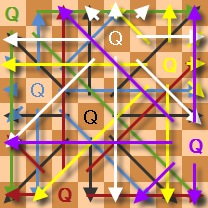
Today I want to talk about XSLT . This very peculiar language can be very useful in cases where you need to process XML data in a somewhat non-trivial way. I will talk about the two most popular (among Java developers) XSLT processor implementations, dwell on the issues of their use from Java code and try to compare their performance. As a test for comparing performance, I will use the well-known task of placing 8 queens on a chessboard.
Since the solution of such problems using XSLT can hardly be classified as normal activity, the topic is placed in the appropriate section. At the same time, I hope this article will be useful as educational material.
Xalan vs Saxon
Despite the fairly large number of existing XSLT implementations, if we are talking about development in the Java language, the choice (in my opinion) comes down to the two mentioned in the header. Indeed, the use of an implementation from Microsoft is complicated by the fact that it comes in the form of an active dll, while the implementation from Oracle is intended to be used directly in the database. Other implementations are much less known (I am really interested in this question and I will be glad to additionally consider any of the Java-compatible XSLT implementations proposed by the Habr participants).
Saxon, in my opinion, is the most advanced XSLT processor to date. MatrixThe opportunities they provide are truly impressive. Although the most interesting of these features are only supported by commercial distributions, Mozilla Public License version 1.0 Saxon HE also provides full XPath and XSLT support for both version 1.0 and version 2.0. In order to understand how XSLT 2.0 support can make life easier, it’s enough to quickly familiarize yourself with the contents of the popular XSLT Cookbook by Sal Mangano.
The main advantage of Xalan, unlike Saxon, is the use of a less restrictive Apache License Version 1.1. This implementation provides full support for XSLT version 1.0. Another trump card, both Xalan and Saxon, is their full support for the TrAX industry standard . I will tell you what it is and what it is for in the next section.
In the name of TrAX and JAXP
TrAX is an XML transformation API developed by a number of interested organizations to unify their interactions with XSLT processors. As part of the Java API, it was published by Sun as JAXP on February 6, 2001. To familiarize yourself with the possibilities of using JAXP, I recommend reading the following articles .
In short, JAXP allows you to work with XML documents in Java using both the DOM and SAX(including, implementing XSLT transformations), without binding the code to the used implementation and version of the handler. For correct operation, it is enough to ensure the presence of the jar used in the classpath and set the corresponding System Property (the latter is not necessary if there is no difference which of the handlers mentioned in the classpath should be used).
Let's see how it looks in practice. First, try loading the XML file into memory and getting some value from it using the XPath expression.
The XML file will look like this:
5 There is not much data here, but you should always start with a simple one (in the future, we will use this value to set the size of the chessboard).
Get the value using the DOM
	private void test_xpath_dom() throws Exception {
		InputSource in = new InputSource(new FileInputStream("xml/data.xml"));
		DocumentBuilderFactory df = DocumentBuilderFactory.newInstance();
		Document doc = df.newDocumentBuilder().parse(in);
		NodeIterator nl = XPathAPI.selectNodeIterator(doc, "/size");
		Node n;
	    while ((n = nl.nextNode())!= null) {
	    	if (n.getNodeType() == Node.TEXT_NODE) {
	    		System.out.println(n.getNodeValue());
	    	} else {
	    		System.out.println(n.getTextContent());
	    	}
	    }
	}
Here we get an iterator using a simple XPath query, go through a set of nodes (consisting of one node) and display its value (if it is a text node) or text content (in the case of the query used, this option will always work). As we see, everything is not at all complicated, but if we get the scalar value, we can do even easier:
Get scalar value using DOM
	private void test_xpath_dom() throws Exception {
		System.setProperty(JAVAX_TRANSFORM_FACTORY, XALAN_TRANSFORM_FACTORY);
		InputSource in = new InputSource(new FileInputStream("xml/data.xml"));
		DocumentBuilderFactory df = DocumentBuilderFactory.newInstance();
		Document doc = df.newDocumentBuilder().parse(in);
		XPathFactory xpathFactory = XPathFactory.newInstance();
		XPath xpath = xpathFactory.newXPath();
		XPathExpression xpathExpression = xpath.compile("/size");
		System.out.println(xpathExpression.evaluate(doc));
	}
Sometimes (especially when processing large XML files) they try to avoid using the DOM (since the data needs to be loaded entirely into memory). In such cases, SAX is used to parse the XML. JAXP allows you to convert one format to another (for example, SAX to DOM) using the following transformation (if a stylesheet is not specified during the transformation, an identical conversion is performed, which is often very convenient):
Using a SAX parser
	private void test_xpath_sax_file() throws Exception {
		TransformerFactory tf = TransformerFactory.newInstance();
	    if (tf.getFeature(SAXSource.FEATURE) && tf.getFeature(DOMResult.FEATURE)) {
	        SAXTransformerFactory stf = (SAXTransformerFactory)tf;
	        TransformerHandler h = stf.newTransformerHandler();
	    	XMLReader reader = XMLReaderFactory.createXMLReader();
	        reader.setContentHandler(h);
	        reader.setProperty("http://xml.org/sax/properties/lexical-handler", h);
			DocumentBuilderFactory df = DocumentBuilderFactory.newInstance();
			Document doc = df.newDocumentBuilder().newDocument();
			Result out = new DOMResult(doc);
			h.setResult(out);
			reader.parse("xml/data.xml");
	        XPathFactory xpathFactory = XPathFactory.newInstance();
	        XPath xpath = xpathFactory.newXPath();
	        XPathExpression xpathExpression = xpath.compile("/size");
	        System.out.println(xpathExpression.evaluate(doc));
	    } else {
	    	throw new Exception("Can''t support SAXSource or DOMResult");
	    }
	}
It is clear that in this way we won’t get rid of loading the XML file into RAM, because for intermediate storage we still use the DOM. How can we process large files? For example, we can get a SAX stream when parsing a large XML file and convert it in such a way that not one large, but many small files are loaded into memory in turn. Let's try to generate SAX events manually:
Download SAX stream
	private void generateData(ContentHandler h, String data) throws SAXException {
		h.startDocument();
		h.startElement("", "size", "size", new AttributesImpl());
		h.characters(data.toCharArray(), 0, data.length());
		h.endElement("", "size", "size");
		h.endDocument();
	}
	private void test_xpath_sax_stream(String size) throws Exception {
		TransformerFactory tf = TransformerFactory.newInstance();
	    if (tf.getFeature(SAXSource.FEATURE) && tf.getFeature(DOMResult.FEATURE)) {
	        SAXTransformerFactory stf = (SAXTransformerFactory)tf;
	        TransformerHandler h = stf.newTransformerHandler();
			DocumentBuilderFactory df = DocumentBuilderFactory.newInstance();
			Document doc = df.newDocumentBuilder().newDocument();
			Result out = new DOMResult(doc);
			h.setResult(out);
			generateData(h, size);
	        XPathFactory xpathFactory = XPathFactory.newInstance();
	        XPath xpath = xpathFactory.newXPath();
	        XPathExpression xpathExpression = xpath.compile("/size");
	        System.out.println(xpathExpression.evaluate(doc));
	    } else {
	    	throw new Exception("Can''t support SAXSource or DOMResult");
	    }
	}
As we can see, there is also nothing complicated. I just want to warn against the possible transfer of startElement and endElement null values to the uri parameter. For Xalan, this works fine, but Saxon throws a NullPointerException.
To complete the picture, it remains to add that the transformation can be linked in chains, forming a conveyor. At the output, the result can be saved, for example, in a file:
Conveyor
	private void test_solution(String size) throws Exception {
		TransformerFactory tf = TransformerFactory.newInstance();
	    if (tf.getFeature(SAXSource.FEATURE) && tf.getFeature(SAXResult.FEATURE)) {
	        SAXTransformerFactory stf = (SAXTransformerFactory)tf;
	        TransformerHandler solve  = stf.newTransformerHandler();
	        TransformerHandler filter = stf.newTransformerHandler();
	        TransformerHandler view   = stf.newTransformerHandler();
	        Result result = new StreamResult(new File("xml/result.xml"));
	        solve.setResult(new SAXResult(filter));
	        filter.setResult(new SAXResult(view));
	        view.setResult(result);
			generateData(solve, size);
	    } else {
	    	throw new Exception("Can''t support SAXSource or SAXResult");
	    }
	}
So far, we see here three empty handlers that perform the identity conversion. In the next section, we will begin to populate them with XSLT code.
The first approach to the shell
So, we need to place the queens on a chessboard so that they do not beat each other. To begin with, we need to generate a list of positions that satisfy the task conditions. Decide on the coding of positions. Since, according to the conditions of the problem, the figures cannot be located on the same vertical, we can use a string of decimal digits to encode the correct positions.
The position of the digit will mean the number of the vertical, and the value itself will mean the number of the horizontal on which the figure is located. Since we use decimal digits starting from one, we can solve the problem for a square board ranging in size from 1x1 to 9x9 cells. To make calculations faster, I recommend setting the size to less than 8 (5x5 cells will be just right). The XSLT code (despite its excessive verbosity) is quite understandable:
solution.xsl
0 Here we use a simplified check for the mutual battle of figures, without performing a battle check on the diagonal. By running the following program for execution:
8 rooks
	private void test_solution(String size) throws Exception {
		TransformerFactory tf = TransformerFactory.newInstance();
	    if (tf.getFeature(SAXSource.FEATURE) && tf.getFeature(SAXResult.FEATURE)) {
	        SAXTransformerFactory stf = (SAXTransformerFactory)tf;
	        TransformerHandler solve  = stf.newTransformerHandler(new StreamSource("xsl/solution.xsl"));
	        TransformerHandler filter = stf.newTransformerHandler();
	        TransformerHandler view   = stf.newTransformerHandler();
	        Result result = new StreamResult(new File("xml/result.xml"));
	        solve.setResult(new SAXResult(filter));
	        filter.setResult(new SAXResult(view));
	        view.setResult(result);
			generateData(solve, size);
	    } else {
	    	throw new Exception("Can''t support SAXSource or SAXResult");
	    }
	}
... you can get a list of possible solutions to the “8 Rooks” problem.
To exclude possible accusations of changing the conditions of the problem, we will complicate the verification of the mutual battle of the figures. To simplify code reuse, XSLT suggests using the import feature. We will use it:
queens.xsl
0 0 I note that here it is necessary to use the import statement rather than the include statement in order to ensure higher priority of the templates in the importing table compared to the imported one (this is very similar to inheritance).
For all this import to work, you need to make one more small change to the Java code. Define the URIResolver that will be called when the URI is requested during XSLT parsing:
Resolver.java
import java.io.File;
import javax.xml.transform.Source;
import javax.xml.transform.TransformerException;
import javax.xml.transform.URIResolver;
import javax.xml.transform.stream.StreamSource;
public class Resolver implements URIResolver {
	public Source resolve(String href, String base) throws TransformerException {
		return new StreamSource(new File("xsl/" + href));
	}
}
... and give it to the factory:
8 queens
	private void test_queens(String size) throws Exception {
		TransformerFactory tf = TransformerFactory.newInstance();
+	tf.setURIResolver(new Resolver());
	    if (tf.getFeature(SAXSource.FEATURE) && tf.getFeature(SAXResult.FEATURE)) {
	        SAXTransformerFactory stf = (SAXTransformerFactory)tf;
	        TransformerHandler solve  = stf.newTransformerHandler(new StreamSource("xsl/queens.xsl"));
	        TransformerHandler filter = stf.newTransformerHandler();
	        TransformerHandler view   = stf.newTransformerHandler();
	        Result result = new StreamResult(new File("xml/result.xml"));
	        solve.setResult(new SAXResult(filter));
	        filter.setResult(new SAXResult(view));
	        view.setResult(result);
			generateData(solve, size);
	    } else {
	    	throw new Exception("Can''t support SAXSource or SAXResult");
	    }
	}
Of course, in our case, when all the xsl files are downloaded from the same disk directory, the XSLT processor can figure out where to load the file from, but imagine, for example, that the XSLT code is loaded from the LOB field in the database!
Running the program for execution, we get a list of solutions to the problem.
What shall we do with it?
The list of solutions in the form in which we compiled it is not very convenient for humans. It is compact, but does not give a visual representation of the positions (without some mental effort). It is also not very convenient to count the number of solutions manually using it. Fortunately, processing such data is exactly what XSLT is for. By adding another handler to the end of the transformation chain, we can easily calculate the number of solutions:
count.xsl
... either, show them in a visual form:
boards.xsl
For example, this:

In this example, you should pay attention to the non-standard extension Xalan redirect: write, which allows you to redirect the output to another file (in XSLT 2.0, for these purposes, a standard instruction is added). Unfortunately, I was not able to redirect the result of such a redirect to an arbitrary SAX stream, which, in my opinion, somewhat reduces its value.
Reflection magic
We got solutions, but somehow there are too many of them. This is because we do not filter out repetitions, taking into account possible turns and reflections of the board. Let's get a list of unique solutions?
If you think a little, it becomes clear that there are only 8 possible rotations and reflections of the board (considering the original version). We implement auxiliary templates to reflect the position (in our internal representation) vertically (flip), horizontally (reverse) and rotate the board 90 degrees (rotate):
utils.xsl
0 Here we used implementations of the reverse and index-of functions from the wonderful book of Sal Mangano “XSLT Collection of recipes”. The filtering of unique values itself is the classic task of using the preceding-sibling axis:
distinct.xsl
Unfortunately, in XSLT 1.0, we cannot solve this problem with a single XPath expression, but in XSLT 2.0 we added the ability to “wrap” templates in user-defined functions.
That's all! We have solved the problem.
It remains to measure ...
Who is faster?
Measurements will be carried out using the following code:
Measure performance
	private final static String JAVAX_TRANSFORM_FACTORY = "javax.xml.transform.TransformerFactory";
	private final static String SAXON_TRANSFORM_FACTORY = "net.sf.saxon.TransformerFactoryImpl";
	private final static String XALAN_TRANSFORM_FACTORY = "org.apache.xalan.processor.TransformerFactoryImpl";
	private void test_full(String size) throws Exception {
		System.setProperty(JAVAX_TRANSFORM_FACTORY, SAXON_TRANSFORM_FACTORY);
		TransformerFactory tf = TransformerFactory.newInstance();
		tf.setURIResolver(new Resolver());
	    if (tf.getFeature(SAXSource.FEATURE) && tf.getFeature(SAXResult.FEATURE)) {
	        SAXTransformerFactory stf = (SAXTransformerFactory)tf;
	        TransformerHandler solve  = stf.newTransformerHandler(new StreamSource("xsl/queens.xsl"));
	        TransformerHandler filter = stf.newTransformerHandler(new StreamSource("xsl/distinct.xsl"));
	        TransformerHandler view   = stf.newTransformerHandler(new StreamSource("xsl/count.xsl"));
	        Result result = new StreamResult(new File("xml/result.xml"));
	        solve.setResult(new SAXResult(filter));
	        filter.setResult(new SAXResult(view));
	        view.setResult(result);
	        Long timestamp = System.currentTimeMillis();
			generateData(solve, size);
			System.out.println("Elapsed Time: " + Long.toString(System.currentTimeMillis() - timestamp));
	    } else {
	    	throw new Exception("Can''t support SAXSource or SAXResult");
	    }
	}
Replacing the constant SAXON_TRANSFORM_FACTORY with XALAN_TRANSFORM_FACTORY, you can switch from one XSLT processor to another.
Unfortunately (for some reason I did not understand), I was not able to get any of the versions of the Saxon-HE branch to work normally . The code works, but each call is incredibly slow. For example, the call to TransformerFactory.newInstance () worked for several minutes! In this case, one of the CPUs was completely utilized, and the code (judging by the debugger) was located most of the time somewhere in the SHA-2 implementation area.
Fortunately, an earlier version from a neighboring branch works fine. Here are the final pictures:


You may notice that, in this task, both XSLT processors work at approximately the same speed. Thus, the use of Saxon can only be justified when using the functionality of XSLT 2.0 or XSLT 3.0.
All sources, as usual, are uploaded to GitHub .
Finally, I want to thank jonic for the help they provided in preparing the article.