Collapsing apps in the Dock for the lazy using AppleScript
- From the sandbox
- Tutorial
How often do you use the options of some programs (iTerm 2, Total Finder, Adium) that allow you to show the application window by clicking on the global hotkey and hide this application when you lose focus? Personally, I am constantly. But what if a certain program does not have such functionality and constantly looms before your eyes? The same Skype, for example. Under katom option to bring your workspace in order.
Let's start with the simplest. Task: by clicking on the global hotkey from any program, transfer the Skype focus and hide it with the same action. There is a whole fleet of programs that make it very simple. However, we are not looking for simple ways and are not ready to install additional programs for these purposes. In this case, Automator comes to the rescue with the ability to create a service and put a hotkey on its call from any application.
Run Automator, select the document type Service . In the list, the service receives select no input data in the adjacent list, leave in any program . We add the Run AppleScript action to our service and paste the following code:
This code is honestly borrowed from here .
Everything is simple here: the script checks whether the application is running, if not, it launches it, otherwise it either minimizes it (if the application window is in focus) or gives it focus (if another application is currently active).
We save our service, go to System Preferences> Keyboard> Keyboard Shortcut in the list on the left, select Services , in the list on the right we find the service we just created and bind a hotkey to it. The goal is achieved, however, with no one but here will not do.
The problem is that the service call does not bind to the global hotkey. Services are called from each application locally. For example, while currently in Safari, in the program menu we will find the Services submenu (i.e. Safari> Services ), where our service will be available for us to start. Accordingly, we can start it manually from any application, and the hotkey we have assigned has a lower priority than the settings for a specific application. There are two ways out of this: either assign a key combination to call our service that is not used anywhere else in the system, in any program, or resort to the help of thosethird-party programs that will enable you to hang a global hotkey on a service call. Personally, I went the third way and took advantage of the capabilities of Alfred, which allows you not to resort to the above actions and makes it possible to show and hide the application by clicking on a given global hotkey.
So, we learned to show and hide the application by clicking on the global hotkey, but press the button before switching to another application, stressfully. We will solve this problem.
Open the AppleScript Editor and paste the following code:
Click File> Save , select the file format - Program , put a daw next to Keep open after the handler starts , save the program. After that , the Package Contents button is available in the editor by clicking on it, a window will pop up on the right where we are looking for a button with a gear, in the menu that appears, select Show in Finder :
The Info.plist file will be in the opened folder , open it in a text editor, after the fourth line, insert:
Save the file.
That's all, run our application, add it to autoload and enjoy the result. From now on, Skype's eyes are not callous.
If you are interested in the implementation features, then read on.
AppleScript turned out to be a discovery for me, so just a couple of days ago I didn’t know about the existence of this “miracle” (it really looks like a language for housewives). But it provides enough opportunities to automate the processes in your work environment. For the above actions, you did not need to install the developer tools, and given the result, you can talk about the presence of a powerful tool that is always at hand.
I’ll try to sort through the solution to the problem of auto-closing the application.
First we’ll learn to determine if a particular application is in focus or not:
It is very unusual to read such code, but it’s nice to have documented code.
If the focus of the application is lost, then hide it:
Here is the solution to the problem. It remains to wrap it in an endless cycle.
And this is a working solution. However, if we leave it in this form, the script will simply freeze, although it will work correctly. The solution is to put the loop in a separate thread. But alas, there are no threads in AppleScript. We go into the documentation and discover the idle handler . AppleScript handlers are, in essence, the procedures familiar to us. A feature of the idle handler is that it is called by the system every 30 seconds, if it does not return any value, if it returns, say 5, it will be called every 5 seconds.
You can also refuse to use idle and work with the run and quit handlers :
No problem:
It is worth noting the following point:
Open and hide the hotkey application
Let's start with the simplest. Task: by clicking on the global hotkey from any program, transfer the Skype focus and hide it with the same action. There is a whole fleet of programs that make it very simple. However, we are not looking for simple ways and are not ready to install additional programs for these purposes. In this case, Automator comes to the rescue with the ability to create a service and put a hotkey on its call from any application.
Run Automator, select the document type Service . In the list, the service receives select no input data in the adjacent list, leave in any program . We add the Run AppleScript action to our service and paste the following code:
set appName to "Skype"
set startIt to false
tell application "System Events"
    if not (exists process appName) then
        set startIt to true
    else if frontmost of process appName then
        set visible of process appName to false
    else
        set frontmost of process appName to true
    end if
end tell
if startIt then
    tell application appName to activate
end if
What does it look like
This code is honestly borrowed from here .
Everything is simple here: the script checks whether the application is running, if not, it launches it, otherwise it either minimizes it (if the application window is in focus) or gives it focus (if another application is currently active).
We save our service, go to System Preferences> Keyboard> Keyboard Shortcut in the list on the left, select Services , in the list on the right we find the service we just created and bind a hotkey to it. The goal is achieved, however, with no one but here will not do.
The problem is that the service call does not bind to the global hotkey. Services are called from each application locally. For example, while currently in Safari, in the program menu we will find the Services submenu (i.e. Safari> Services ), where our service will be available for us to start. Accordingly, we can start it manually from any application, and the hotkey we have assigned has a lower priority than the settings for a specific application. There are two ways out of this: either assign a key combination to call our service that is not used anywhere else in the system, in any program, or resort to the help of thosethird-party programs that will enable you to hang a global hotkey on a service call. Personally, I went the third way and took advantage of the capabilities of Alfred, which allows you not to resort to the above actions and makes it possible to show and hide the application by clicking on a given global hotkey.
What about auto-hiding?
So, we learned to show and hide the application by clicking on the global hotkey, but press the button before switching to another application, stressfully. We will solve this problem.
Open the AppleScript Editor and paste the following code:
property appName : "Skype"
on idle
    tell application "System Events"
        set focusedApp to (name of the first process whose frontmost is true)
        if (focusedApp is not appName) and (exists process appName) and (visible of process appName) then
            set visible of process appName to false
        end if
    end tell
    return 0.5
end idle
Click File> Save , select the file format - Program , put a daw next to Keep open after the handler starts , save the program. After that , the Package Contents button is available in the editor by clicking on it, a window will pop up on the right where we are looking for a button with a gear, in the menu that appears, select Show in Finder :
What does it look like
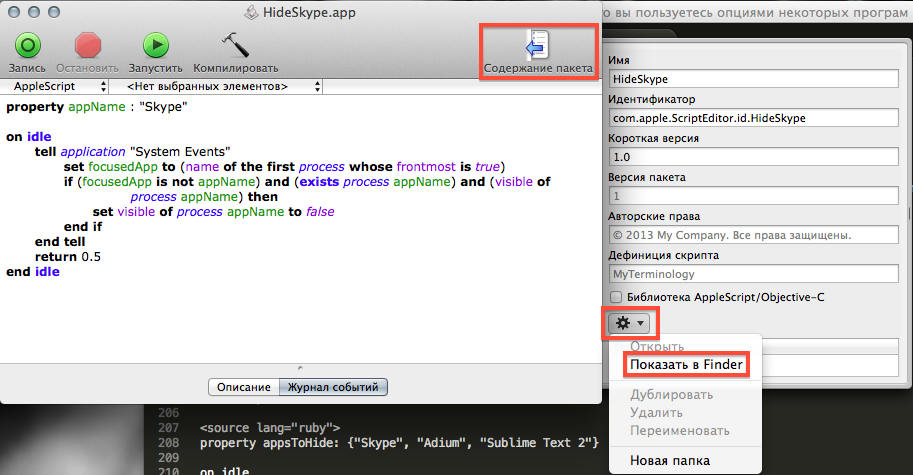
The Info.plist file will be in the opened folder , open it in a text editor, after the fourth line, insert:
LSBackgroundOnly 1 Here is what should happen
LSBackgroundOnly 1 CFBundleAllowMixedLocalizations CFBundleDevelopmentRegion English CFBundleExecutable applet CFBundleIconFile applet CFBundleIdentifier com.apple.ScriptEditor.id.HideSkype CFBundleInfoDictionaryVersion 6.0 CFBundleName HideSkype CFBundlePackageType APPL CFBundleShortVersionString 1.0 CFBundleSignature aplt LSMinimumSystemVersionByArchitecture x86_64 10.6 LSRequiresCarbon WindowState dividerCollapsed eventLogLevel 2 name ScriptWindowState positionOfDivider 333 savedFrame 55 281 602 597 0 0 1440 878 selectedTabView event log Save the file.
That's all, run our application, add it to autoload and enjoy the result. From now on, Skype's eyes are not callous.
If you are interested in the implementation features, then read on.
Debriefing
AppleScript turned out to be a discovery for me, so just a couple of days ago I didn’t know about the existence of this “miracle” (it really looks like a language for housewives). But it provides enough opportunities to automate the processes in your work environment. For the above actions, you did not need to install the developer tools, and given the result, you can talk about the presence of a powerful tool that is always at hand.
I’ll try to sort through the solution to the problem of auto-closing the application.
First we’ll learn to determine if a particular application is in focus or not:
set appName to "Skype" --думаю, комментарии не уместны
tell application "System Events" --начинаем работу с объектом application, в данном случае с программой System Events
    set focusedApp to (name of the first process whose frontmost is true) --записываем в focusedApp имя приложения, которое в данный момент в фокусе
    if focusedApp is appName then
        --вот и выяснили, что приложение с именем appName находится в фокусе
    end if
end tell
It is very unusual to read such code, but it’s nice to have documented code.
If the focus of the application is lost, then hide it:
set appName to "Skype"
tell application "System Events"
    set focusedApp to (name of the first process whose frontmost is true)
    if (focusedApp is not appName) and (exists process appName) and (visible of process appName) then
        set visible of process appName to false
    end if
end tell
Here is the solution to the problem. It remains to wrap it in an endless cycle.
set appName to "Skype"
repeat while true
    tell application "System Events"
        set focusedApp to (name of the first process whose frontmost is true)
        if (focusedApp is not appName) and (exists process appName) and (visible of process appName) then
            set visible of process appName to false
        end if
    end tell
    delay 0.5 --делаем задержку в пол секунды перед следующей итерацией
end repeat
And this is a working solution. However, if we leave it in this form, the script will simply freeze, although it will work correctly. The solution is to put the loop in a separate thread. But alas, there are no threads in AppleScript. We go into the documentation and discover the idle handler . AppleScript handlers are, in essence, the procedures familiar to us. A feature of the idle handler is that it is called by the system every 30 seconds, if it does not return any value, if it returns, say 5, it will be called every 5 seconds.
on idle
    set appName to "Skype"
    tell application "System Events"
        set focusedApp to (name of the first process whose frontmost is true)
        if (focusedApp is not appName) and (exists process appName) and (visible of process appName) then
            set visible of process appName to false
        end if
    end tell
    return 0.5
end idle
You can also refuse to use idle and work with the run and quit handlers :
property appName: "Skype"
property running: true
on run
    repeat while running
        tell application "System Events"
            set focusedApp to (name of the first process whose frontmost is true)
            if (focusedApp is not appName) and (exists process appName) and (visible of process appName) then
                set visible of process appName to false
            end if
        end tell
        delay 1
    end repeat
end run
on quit
    set running to false
end quit
I want one handler for several programs
No problem:
property appsToHide: {"Skype", "Adium", "Sublime Text 2"}
on idle
    tell application "System Events"
        set focusedApp to name of the first process whose frontmost is true
        repeat with appToHide in appsToHide
            if (focusedApp is not in appToHide) and (exists process appToHide) and (visible of process appToHide) then
                set visible of process appToHide to false
            end if
        end repeat
    end tell
    return 0.5
end idle
It is worth noting the following point:
focusedApp is not in appToHide. This checks to see if the value is focusedAppin appToHide, although it would be right to just compare strings (operators ). But in this example, the strings (data type ) did not want to be compared correctly.
That concludes my story. Many details about AppleScript can be found in the official documentation . If anyone doubts the relevance of this tool, then look in the release notes - the capabilities of the language are expanded with each release of OS X. Also, search engines are full of ready-made howto solutions to problems using AppleScript.
Thanks for attention.=, is equal, equals, [is] equal to, is not
isn't, isn't equal [to], is not equal [to], doesn't equal, does not equaltext








