Akenori DriveCam 1080 PRO review: when the registrar warns about Strelka
I had occasion to test individual recorders, as well as hybrids with radar detectors or sports orientation. But devices like the hero of this review somehow did not fall into my hands. Although this will not be a novelty, the references to the Akenori DriveCam 1080 PRO that I have found date back to at least the second half of 2012. Nevertheless, if someone (like me) once lost sight of this model, let's now get to know it together. On the box with Akenori DriveCam 1080 PRO is not too informative "Car DVR with GPS monitoring." In fact, the device can record video, monitor the speed of the machine (and report excess), and also warn about speed cameras.
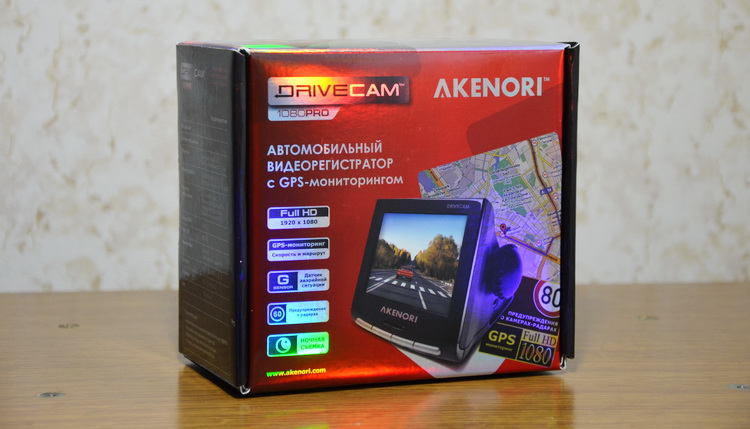
The model’s box turned out to be five points - it glitters and shimmers along the entire perimeter, and inside it completely sparkles. In general, for a gift (including oneself) it looks attractive. A modest informant on the back of the package reports that the device is made in China, but it was developed directly in Japan. I even had the thought that “Akenori” could mean something in Japanese, but from Asian languages, the ABBY Lingvo online dictionary offered me only Chinese. Looking ahead, I’ll say that the device is seriously modified “for Russia”, which is not surprising in light of the increased demand for devices such as a) prove to the court that you are not a “camel” b) deceive the speed camera.

The kit includes the recorder itself, a mount, a spare area on 3M tape, a cigarette lighter power cable, instructions, an SD memory card (I have not seen these in the recorders for a long time), class 8 with a capacity of 8 GB and a CD. The attentive habrahabrovets already noticed that the manufacturer “forgot” to put the miniUSB cable. That is, you should attach either a cable or a card reader. However, the presence of not the cheapest memory card (in my opinion) compensates for this omission.

The mount left me with an extremely mixed impression. Firstly, the holder on 3M tape is not a priori associated with registrars. It’s not worth explaining why with such a base the bracket needs to be installed “once and for all”, and trying to remove the holder becomes a very difficult task. Not surprisingly, a spare sticker is included. Actually, the concept of the bracket at Akenori DriveCam 1080 PRO is conditional. The main “rocker”, by default, is bonded to the body, it remains only with a characteristic click to set the “top” in the plastic part, which is fixed directly to the glass.


Surprising for me was the complete lack of the ability to rotate the recorder left / right - only the adjustment in a vertical plane. A reckless solution for the registrar, which can easily be "not so" installed on glass. At the same time, I have mixed feelings about how much you need to focus on 3M tape and the lack of a normal rotary holder. Because the exact same situation is observed in the entire line of expensive BlackVue brand registrars. This is probably such a “feature” of premium segment devices, which includes both BlackVue and Akenori. Only the model of the last brand is in a better position, because on the official Russian site Akenori in the "accessories" section there is a normal bracket on the suction cup and, if I see correctly, the hinge.
The cigarette lighter power cable is my respect, three meters. So Akenori subtly hints that the wire should be laid along the edges of the windshield and brought out under the glove compartment to the cigarette lighter socket. For especially gifted drivers, the installation diagram of the wire is clearly shown in the instructions. It’s only a pity that special hooks on 3M scotch tape were not included in the kit, since far from all cars the cable “drives in” under the skin without any problems.
In the instructions, I found an interesting offer in clear text, which I had not seen before in registrars. The manufacturer directly speaks (and shows) how to power the recorder from the car’s battery bypassing the cigarette lighter. I know from automobile forums that this question is more than relevant and interesting for drivers, regardless of the brand of the registrar. Well, thanks to Akenori for the careful attitude to car owners who are not afraid to independently conduct such a "tuning".

We figured out the mount, now we will study the case of the registrar. I don’t know whether it was intended by the designer, or it turned out during the design of the hardware, but the Akenori DriveCam 1080 PRO looks like a miniature CRT TV. However, the recorder will be called miniature only against the background of the TV. And so the dimensions are 82 x 77 x 104 mm. Although the main "protruding" parameters are directed not in breadth, but in the "depth". I praise the body material - matte plastic with a rough relief copes with tearing away fingerprints in the same way as soft touch type plastic should (but never does). Only the glossy frame around the screen can get dirty, but it serves as a decor element, and the effective area of pollution here is small.


On the right side of the screen are miniHDMI and miniUSB connectors.

On the opposite side is the power switch and SD card slot. Moreover, if the slider is set to the “ON” position, the slot partially overlaps and does not allow removing the memory card.

From the front is the camera eye and speaker slots.

Below - a microphone and the same holes for listening to sound.

Four buttons are located under the screen, now we will take a closer look at them. Between the screen and a row of keys there is an LED indicator that changes colors between green, yellow and red depending on the event.

“REC” - during recording, marks the file as “emergency”, excluding from the cyclic shooting a new movie with plus or minus one minute from the moment the button is pressed. One-second hold marks the current coordinates of the car as data on the location of the speed camera. Maybe I missed something, but I still could not find the button to stop shooting. It is essentially impossible to start recording manually: the device does not have its own battery, and shooting automatically starts as soon as the recorder turns on (that is, it receives power).
"Triangle" - during recording, opens a list of clips. More precisely, the menu with the items - emergency clips or displaying the latest entries.
“Inverted Triangle” - when recording, opens the settings menu. It is clear that a pair of central buttons at the same time is responsible for navigating through the menu items.
“OK” - changing the display mode: displaying a picture from the camera, displaying only time, only speed or completely turning off the screen. Long hold turns on / off sound recording.
There are a lot of menu items, almost 30 units. Fortunately, they are all more or less detailed in the instructions, so there is no need to personally "get into" each setting and find out its purpose and available features. Of the interesting things I can note: auto-synchronize time with a satellite, turn off the LED indicator, set a speed limit for triggering a warning, turn on / off camera alerts. There are no parameters like manual exposure - in this regard, the registrar is focused on automation.

The specifications indicate the models of the GPS receiver and accelerometer - U-Blox6 and ST L. About the GPS module, I even found news on 3DNews, which indicates the energy efficiency of the chip, update frequency of 5 Hz, sensitivity -147 dBm during a cold start and - 160 dBm during further work. I did not notice any noticeable shortcomings - satellites are detected quickly, communication is held depending on the location, in places with trees or dense buildings, signal attenuation is possible.
The accelerometer settings are all three: low, medium and high sensitivity. You can also “cut” the module or completely disable it. It is usually customary to complain about the overestimated sensitivity of the G-sensor (by default), but during the tests I didn’t have false positives. However, according to the obtained graphs of the module, it was clear that a more or less serious off-road would indeed lead to constant emergency markings. But I liked that only ten emergency files are stored in memory, after that a notification appears about the overflow of the allocated space.
As I understand it, speed camera data is updated regularly. In any case, the last database file on the manufacturer’s website dates from this October. For me, it is obvious that advanced drivers want to rely not only (and not so much) on the manufacturer’s information, but on the "folk" data of projects like SpeedCam.info. The good news is that this topic with respect to the Akenori DriveCam 1080 PRO worked out quite deeply. Moreover, the Russian technical support of Akenori participated in this directly.
In general, interested invite here. In a nutshell, a special converter program was created for converting the SjSDU.bin database file (for the registrar) to TXT and reverse conversion. The application is convenient because it can independently download the database of countries from SpeedCam.info. Also a lot of useful information can be found here . Talking about whether Akenori DriveCam 1080 PRO “catches” cameras is good or bad, I think it makes little sense. The warning distance depends on the type of camera and roads, the value varies from 300 m to 1 km. If the screen is on, a picture appears indicating the speed limit, the current speed of the car and the distance to the object. Also, optional warnings about approaching toll roads, recreation areas and tunnels work. I am not interested in this information, so they were disabled through the settings.
In the description, the Pentax lens with a viewing angle of 120 degrees and a 5-megapixel matrix with WDR support so desired by many drivers are strongly praised. Declared high-quality shooting at night. Optics consists of five glass lenses, which in theory a priori guarantees us a decent quality of shooting. However, this remains to be verified. Available resolution options: Full HD 30 fps and HD 60 or 30 fps. Cyclic shooting is carried out in segments of 3, 5 or 10 minutes. The video is saved end-to-end, I did not notice any time passes between files. The bitrate constant MPC showed 9 001 Kbps. A good value, rather even standard for current near-flood level recorders. An 8 GB card can hold approximately 2 hours of video, so you can calculate the time for 16 or 32 GB.
I liked the quality of shooting in the daytime. This is not ideal, in more expensive models of recorders comparable to the price you can get a clearer and “beautiful” video. Nevertheless, I do not see any reason for radical criticism - the readability of car numbers from about 15 meters is present, the image clearly does not sin with white balance errors. I can’t say that the night video impressed me - there are noises and “stars” from the headlights and lamps, and the readability of the numbers is manifested on the basis of the “do not have to happen once” principle. In the latter case, I would not sin much on optics, since in almost all registrars I observe extremely unstable behavior in matters of “readability” of license plates of cars.
Akenori made an interesting complex product in terms of functionality and characteristics. The model costs not cheap - 8 990 rubles (~ $ 280), which is commensurate with the acquisition of a good-quality registrar and extra charge for the “premium” GPS features of Akenori DriveCam 1080 PRO. It is clear that there are supporters of buying a separate registrar and receiving information about cameras through the navigator in a smartphone or a program like “Arrow”. However, it is a matter of taste, I will not begin to prove the priority of this or that option.
In Akenori DriveCam 1080 PRO, I did not like just a couple of things: the lack of a built-in battery, a strange mount and the need to read the instructions. However, the last point is inevitable, since the device turned out to be far from the simplest. The brand’s arsenal also has a more advanced model Akenori 1080 X, which has FCWS (control of the distance to the vehicle in front) and LDWS (control of the position of the car on the road relative to the dividing strips), and at the same time superimposes a map directly on the picture of the video file. The complex will cost 11,990 rubles (~ $ 374).
Equipment
The model’s box turned out to be five points - it glitters and shimmers along the entire perimeter, and inside it completely sparkles. In general, for a gift (including oneself) it looks attractive. A modest informant on the back of the package reports that the device is made in China, but it was developed directly in Japan. I even had the thought that “Akenori” could mean something in Japanese, but from Asian languages, the ABBY Lingvo online dictionary offered me only Chinese. Looking ahead, I’ll say that the device is seriously modified “for Russia”, which is not surprising in light of the increased demand for devices such as a) prove to the court that you are not a “camel” b) deceive the speed camera.
The kit includes the recorder itself, a mount, a spare area on 3M tape, a cigarette lighter power cable, instructions, an SD memory card (I have not seen these in the recorders for a long time), class 8 with a capacity of 8 GB and a CD. The attentive habrahabrovets already noticed that the manufacturer “forgot” to put the miniUSB cable. That is, you should attach either a cable or a card reader. However, the presence of not the cheapest memory card (in my opinion) compensates for this omission.
Fastening and installation
The mount left me with an extremely mixed impression. Firstly, the holder on 3M tape is not a priori associated with registrars. It’s not worth explaining why with such a base the bracket needs to be installed “once and for all”, and trying to remove the holder becomes a very difficult task. Not surprisingly, a spare sticker is included. Actually, the concept of the bracket at Akenori DriveCam 1080 PRO is conditional. The main “rocker”, by default, is bonded to the body, it remains only with a characteristic click to set the “top” in the plastic part, which is fixed directly to the glass.
Surprising for me was the complete lack of the ability to rotate the recorder left / right - only the adjustment in a vertical plane. A reckless solution for the registrar, which can easily be "not so" installed on glass. At the same time, I have mixed feelings about how much you need to focus on 3M tape and the lack of a normal rotary holder. Because the exact same situation is observed in the entire line of expensive BlackVue brand registrars. This is probably such a “feature” of premium segment devices, which includes both BlackVue and Akenori. Only the model of the last brand is in a better position, because on the official Russian site Akenori in the "accessories" section there is a normal bracket on the suction cup and, if I see correctly, the hinge.
The cigarette lighter power cable is my respect, three meters. So Akenori subtly hints that the wire should be laid along the edges of the windshield and brought out under the glove compartment to the cigarette lighter socket. For especially gifted drivers, the installation diagram of the wire is clearly shown in the instructions. It’s only a pity that special hooks on 3M scotch tape were not included in the kit, since far from all cars the cable “drives in” under the skin without any problems.
In the instructions, I found an interesting offer in clear text, which I had not seen before in registrars. The manufacturer directly speaks (and shows) how to power the recorder from the car’s battery bypassing the cigarette lighter. I know from automobile forums that this question is more than relevant and interesting for drivers, regardless of the brand of the registrar. Well, thanks to Akenori for the careful attitude to car owners who are not afraid to independently conduct such a "tuning".
Appearance and management
We figured out the mount, now we will study the case of the registrar. I don’t know whether it was intended by the designer, or it turned out during the design of the hardware, but the Akenori DriveCam 1080 PRO looks like a miniature CRT TV. However, the recorder will be called miniature only against the background of the TV. And so the dimensions are 82 x 77 x 104 mm. Although the main "protruding" parameters are directed not in breadth, but in the "depth". I praise the body material - matte plastic with a rough relief copes with tearing away fingerprints in the same way as soft touch type plastic should (but never does). Only the glossy frame around the screen can get dirty, but it serves as a decor element, and the effective area of pollution here is small.
On the right side of the screen are miniHDMI and miniUSB connectors.
On the opposite side is the power switch and SD card slot. Moreover, if the slider is set to the “ON” position, the slot partially overlaps and does not allow removing the memory card.
From the front is the camera eye and speaker slots.
Below - a microphone and the same holes for listening to sound.
Four buttons are located under the screen, now we will take a closer look at them. Between the screen and a row of keys there is an LED indicator that changes colors between green, yellow and red depending on the event.
“REC” - during recording, marks the file as “emergency”, excluding from the cyclic shooting a new movie with plus or minus one minute from the moment the button is pressed. One-second hold marks the current coordinates of the car as data on the location of the speed camera. Maybe I missed something, but I still could not find the button to stop shooting. It is essentially impossible to start recording manually: the device does not have its own battery, and shooting automatically starts as soon as the recorder turns on (that is, it receives power).
"Triangle" - during recording, opens a list of clips. More precisely, the menu with the items - emergency clips or displaying the latest entries.
“Inverted Triangle” - when recording, opens the settings menu. It is clear that a pair of central buttons at the same time is responsible for navigating through the menu items.
“OK” - changing the display mode: displaying a picture from the camera, displaying only time, only speed or completely turning off the screen. Long hold turns on / off sound recording.
Settings
There are a lot of menu items, almost 30 units. Fortunately, they are all more or less detailed in the instructions, so there is no need to personally "get into" each setting and find out its purpose and available features. Of the interesting things I can note: auto-synchronize time with a satellite, turn off the LED indicator, set a speed limit for triggering a warning, turn on / off camera alerts. There are no parameters like manual exposure - in this regard, the registrar is focused on automation.
G-sensor, GPS and cameras
The specifications indicate the models of the GPS receiver and accelerometer - U-Blox6 and ST L. About the GPS module, I even found news on 3DNews, which indicates the energy efficiency of the chip, update frequency of 5 Hz, sensitivity -147 dBm during a cold start and - 160 dBm during further work. I did not notice any noticeable shortcomings - satellites are detected quickly, communication is held depending on the location, in places with trees or dense buildings, signal attenuation is possible.
The accelerometer settings are all three: low, medium and high sensitivity. You can also “cut” the module or completely disable it. It is usually customary to complain about the overestimated sensitivity of the G-sensor (by default), but during the tests I didn’t have false positives. However, according to the obtained graphs of the module, it was clear that a more or less serious off-road would indeed lead to constant emergency markings. But I liked that only ten emergency files are stored in memory, after that a notification appears about the overflow of the allocated space.
As I understand it, speed camera data is updated regularly. In any case, the last database file on the manufacturer’s website dates from this October. For me, it is obvious that advanced drivers want to rely not only (and not so much) on the manufacturer’s information, but on the "folk" data of projects like SpeedCam.info. The good news is that this topic with respect to the Akenori DriveCam 1080 PRO worked out quite deeply. Moreover, the Russian technical support of Akenori participated in this directly.
In general, interested invite here. In a nutshell, a special converter program was created for converting the SjSDU.bin database file (for the registrar) to TXT and reverse conversion. The application is convenient because it can independently download the database of countries from SpeedCam.info. Also a lot of useful information can be found here . Talking about whether Akenori DriveCam 1080 PRO “catches” cameras is good or bad, I think it makes little sense. The warning distance depends on the type of camera and roads, the value varies from 300 m to 1 km. If the screen is on, a picture appears indicating the speed limit, the current speed of the car and the distance to the object. Also, optional warnings about approaching toll roads, recreation areas and tunnels work. I am not interested in this information, so they were disabled through the settings.
Video
In the description, the Pentax lens with a viewing angle of 120 degrees and a 5-megapixel matrix with WDR support so desired by many drivers are strongly praised. Declared high-quality shooting at night. Optics consists of five glass lenses, which in theory a priori guarantees us a decent quality of shooting. However, this remains to be verified. Available resolution options: Full HD 30 fps and HD 60 or 30 fps. Cyclic shooting is carried out in segments of 3, 5 or 10 minutes. The video is saved end-to-end, I did not notice any time passes between files. The bitrate constant MPC showed 9 001 Kbps. A good value, rather even standard for current near-flood level recorders. An 8 GB card can hold approximately 2 hours of video, so you can calculate the time for 16 or 32 GB.
I liked the quality of shooting in the daytime. This is not ideal, in more expensive models of recorders comparable to the price you can get a clearer and “beautiful” video. Nevertheless, I do not see any reason for radical criticism - the readability of car numbers from about 15 meters is present, the image clearly does not sin with white balance errors. I can’t say that the night video impressed me - there are noises and “stars” from the headlights and lamps, and the readability of the numbers is manifested on the basis of the “do not have to happen once” principle. In the latter case, I would not sin much on optics, since in almost all registrars I observe extremely unstable behavior in matters of “readability” of license plates of cars.
Output
Akenori made an interesting complex product in terms of functionality and characteristics. The model costs not cheap - 8 990 rubles (~ $ 280), which is commensurate with the acquisition of a good-quality registrar and extra charge for the “premium” GPS features of Akenori DriveCam 1080 PRO. It is clear that there are supporters of buying a separate registrar and receiving information about cameras through the navigator in a smartphone or a program like “Arrow”. However, it is a matter of taste, I will not begin to prove the priority of this or that option.
In Akenori DriveCam 1080 PRO, I did not like just a couple of things: the lack of a built-in battery, a strange mount and the need to read the instructions. However, the last point is inevitable, since the device turned out to be far from the simplest. The brand’s arsenal also has a more advanced model Akenori 1080 X, which has FCWS (control of the distance to the vehicle in front) and LDWS (control of the position of the car on the road relative to the dividing strips), and at the same time superimposes a map directly on the picture of the video file. The complex will cost 11,990 rubles (~ $ 374).









