November 13, 2013 at 13:26
Theory and Practice of EFI Byte Code
In the late 90s, Number Nine Visual Technology, the then-luminary of video card design, offered VGA BIOS on its website for its PCI devices. There is nothing remarkable in this event. Unless, Number Nine video cards could work both on IBM PC-compatible platforms, and in MAC systems using Power PC. Therefore, the same device was equipped with different BIOS files.
Most likely, then it could not be otherwise. How is the situation now with the support of devices designed to work in different hardware environments? The answer to this question is given by the UEFI specification, within the framework of which an elegant solution is proposed - EFI Byte Code or EBC. With it, you can create cross-platform applications for firmware.
Within the framework of the UEFI standard, the architecture of a virtual machine of the register type EFI Byte Code Virtual Machine is defined . The command interpreter is part of the firmware on the system board. The firmware of the expansion cards is written in the virtual machine command system, ideally, without using the instructions of the central processor. Thus, the expansion card will work on any motherboard that supports EBC, regardless of the type of CPU. Today their list does not shine with variety: as usual, there are AMD and Intel in 32-bit and 64-bit versions, Itanium, ARM.
The 64-bit EBC virtual processor contains 8 general-purpose registers (R0-R7), supports direct, indirect and direct addressing of operands. The command system includes arithmetic and logical operations, shifts, operand transfers with support for sign expansion, conditional and unconditional control transfer, subprogram calls and returns, as well as a number of auxiliary operations. A stack is supported, while the stack pointer (register R0) is classified as a general-purpose register according to the traditions of the x86 architecture. It is noteworthy that the special form of the CALL instruction allows calling subroutines written in " native " from EBC subprograms»The language of the platform, due to the fact that sometimes such a need does arise. In the same way, from EBC programs it is possible to call support procedures for UEFI protocols, using the model of transferring input and output parameters, which does not depend on the type of central processor.
Suggested Example “ Hello, EBC! "Is a UEFI application written in the EBC virtual machine command system (EFI Byte Code). As mentioned above, the EBC command interpreter, which allows you to run modules of this type, residently is part of the UEFI firmware of the motherboard. Using EBC instead of machine code allows you to create cross-platform applications and drivers, including firmware of various expansion cards, which makes these devices compatible with platforms that use central processors of architecture other than x86.
The program displays a text message using the line output procedure from the EFI_SIMPLE_TEXT_OUTPUT_PROTOCOL function set . Let's consider in more detail its source code .
To call this EFI function on the stack, you need to pass two parameters: a pointer to the interface unit of the protocol used and a pointer to a string represented in UNICODE format. These parameters are prepared in the registers R1 and R2, then pushed onto the stack by PUSHn instructions, starting with the last parameter. Then, in register R3, the address for the procedure call, read from the interface block of the protocol used, is placed and the target line output procedure is called. After returning, free the stack with POPn instructions.
To call the service procedures of UEFI protocols, applications use pointers located in the UEFI system tables and various interface units. In 32-bit UEFI implementations, pointers of 4 bytes in size are used, in 64-bit - 8 bytes in size. Therefore, the address of the pointer inside the table will depend on the capacity of the central processor. How is cross-platform provided?
Consider an example of an instruction that transfers to the register R1 the contents of a memory cell whose address is equal to the initial value of register R1 plus the offset .
The offset is given in the form of two terms: +5 and +24.
The first term +5 is the number of the addressed pointer. The EBC command interpreter multiplies this value by the size of the pointer, which is 4 for 32-bit UEFI implementations and 8 for 64-bit.
The second term +24 is a constant that does not depend on the type of platform. It is used to set the header size of the EFI_SYSTEM_TABLE table .
The PUSHn (Push Natural) instructions used in preparing the stack frame for called procedures work in a similar fashion. The capacity of the parameters written to the stack (32 or 64 bits) depends on the capacity of the central processor. This provides a gateway between the EBC code of the application and the procedures that are part of the UEFI firmware written in the command system of the central processor.
To broadcast the program and generate an EBC application, FASM 1.69.50 is used. The instructions for the EFI Byte Code virtual machine are specified as hexadecimal constants. Guided by our research interest, we deliberately abandoned the use of high-level languages and wrote our example in assembler EBC. At the same time, we had to solve several problems related to the fact that the FASM translator does not support EBC.
After the broadcast, in the header of the helloebc.efi file , at addresses 84h, 85h, bytes 64h, 86h must be replaced with BCh, 0Eh. Thus, the Machine Type field , originally containing 8664h (x86-64 machine), is replaced by 0EBCh (EBC machine). To start the editor built into the UEFI Shell, at the command prompt, type:hexedit helloebc.efi .
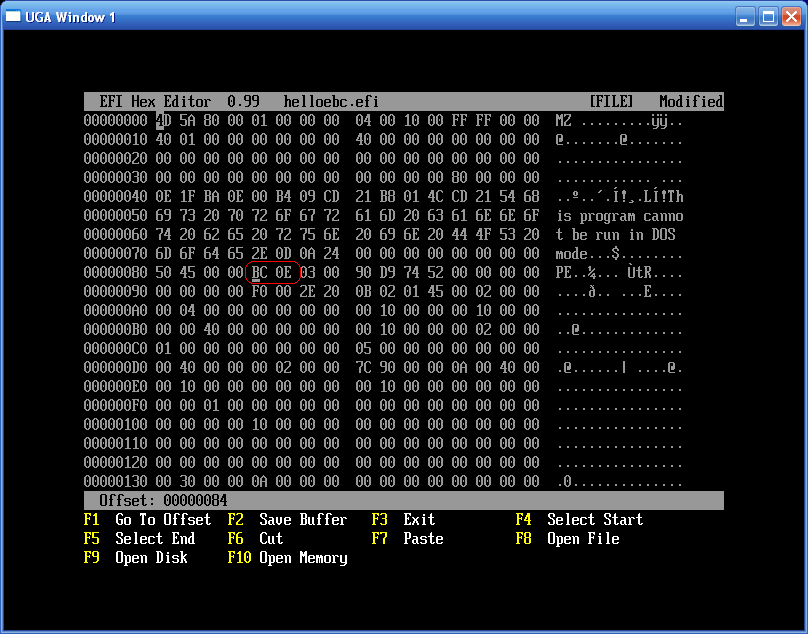
Fig 1 . Correction of the Machine Type field in the application header
After that, you can start the application.
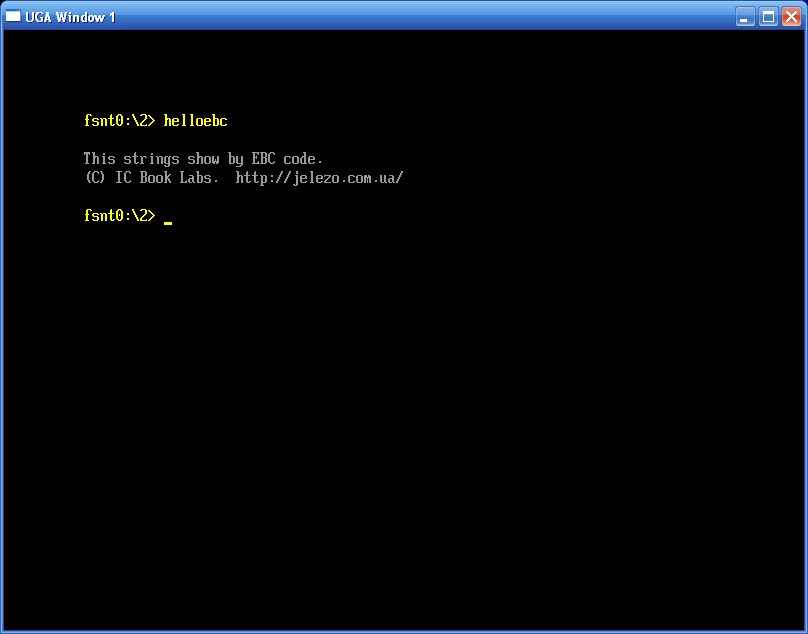
Fig 2 . Application Result The application
can also be launched under the Intel EBC Debugger.
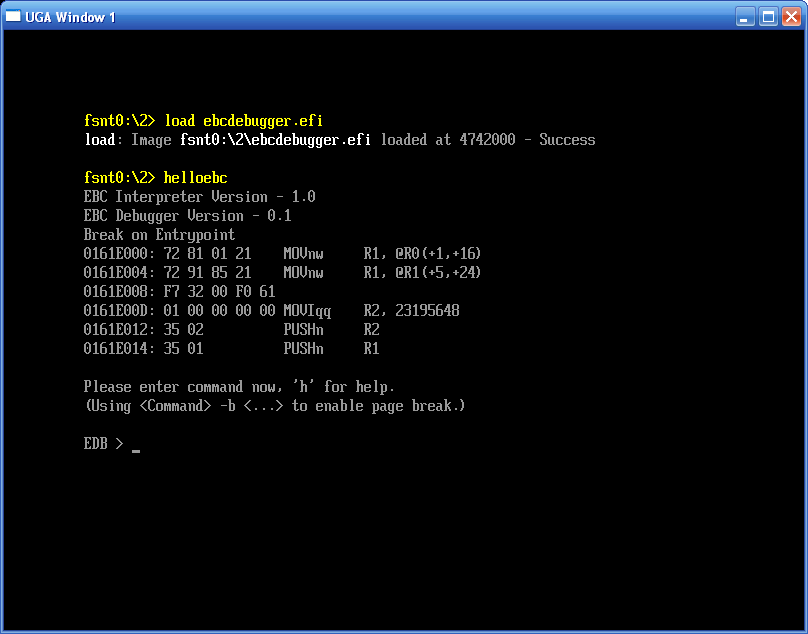
Fig 3 . Loading the debugger with the load command and launching the EBC application under the Intel EBC Debugger
We tested the test case in IA32 EFI and x64 UEFI environments. Theoretically, it should work on platforms with Itanium and ARM processors, but due to the inaccessibility of these systems, we could not verify this.
The application is broadcast in PE64 (Portable Executable 64-bit) mode. Some legacy EFI implementations (for example, the Intel EFI Version 1.10.14.59 Sample Implementation emulator launched from a bootable diskette) are not compatible with this application format. This is expressed in an incorrect interpretation of the table of relocatable elements used when configuring the module to load addresses. One solution is to do the setup programmatically.
Since the FASM translator does not support EFI Byte Code, in order to ensure efficient programming at the EBC assembler level in the FASM environment, we have to do the following:
Most likely, then it could not be otherwise. How is the situation now with the support of devices designed to work in different hardware environments? The answer to this question is given by the UEFI specification, within the framework of which an elegant solution is proposed - EFI Byte Code or EBC. With it, you can create cross-platform applications for firmware.
How does EBC work?
Within the framework of the UEFI standard, the architecture of a virtual machine of the register type EFI Byte Code Virtual Machine is defined . The command interpreter is part of the firmware on the system board. The firmware of the expansion cards is written in the virtual machine command system, ideally, without using the instructions of the central processor. Thus, the expansion card will work on any motherboard that supports EBC, regardless of the type of CPU. Today their list does not shine with variety: as usual, there are AMD and Intel in 32-bit and 64-bit versions, Itanium, ARM.
EBC Virtual Processor Architecture
The 64-bit EBC virtual processor contains 8 general-purpose registers (R0-R7), supports direct, indirect and direct addressing of operands. The command system includes arithmetic and logical operations, shifts, operand transfers with support for sign expansion, conditional and unconditional control transfer, subprogram calls and returns, as well as a number of auxiliary operations. A stack is supported, while the stack pointer (register R0) is classified as a general-purpose register according to the traditions of the x86 architecture. It is noteworthy that the special form of the CALL instruction allows calling subroutines written in " native " from EBC subprograms»The language of the platform, due to the fact that sometimes such a need does arise. In the same way, from EBC programs it is possible to call support procedures for UEFI protocols, using the model of transferring input and output parameters, which does not depend on the type of central processor.
Getting started experimenting
Suggested Example “ Hello, EBC! "Is a UEFI application written in the EBC virtual machine command system (EFI Byte Code). As mentioned above, the EBC command interpreter, which allows you to run modules of this type, residently is part of the UEFI firmware of the motherboard. Using EBC instead of machine code allows you to create cross-platform applications and drivers, including firmware of various expansion cards, which makes these devices compatible with platforms that use central processors of architecture other than x86.
Explanations for example
The program displays a text message using the line output procedure from the EFI_SIMPLE_TEXT_OUTPUT_PROTOCOL function set . Let's consider in more detail its source code .
To call this EFI function on the stack, you need to pass two parameters: a pointer to the interface unit of the protocol used and a pointer to a string represented in UNICODE format. These parameters are prepared in the registers R1 and R2, then pushed onto the stack by PUSHn instructions, starting with the last parameter. Then, in register R3, the address for the procedure call, read from the interface block of the protocol used, is placed and the target line output procedure is called. After returning, free the stack with POPn instructions.
System tables and cross-platform
To call the service procedures of UEFI protocols, applications use pointers located in the UEFI system tables and various interface units. In 32-bit UEFI implementations, pointers of 4 bytes in size are used, in 64-bit - 8 bytes in size. Therefore, the address of the pointer inside the table will depend on the capacity of the central processor. How is cross-platform provided?
Consider an example of an instruction that transfers to the register R1 the contents of a memory cell whose address is equal to the initial value of register R1 plus the offset .
MOVnw R1,@R1(+5,+24)The offset is given in the form of two terms: +5 and +24.
The first term +5 is the number of the addressed pointer. The EBC command interpreter multiplies this value by the size of the pointer, which is 4 for 32-bit UEFI implementations and 8 for 64-bit.
The second term +24 is a constant that does not depend on the type of platform. It is used to set the header size of the EFI_SYSTEM_TABLE table .
The PUSHn (Push Natural) instructions used in preparing the stack frame for called procedures work in a similar fashion. The capacity of the parameters written to the stack (32 or 64 bits) depends on the capacity of the central processor. This provides a gateway between the EBC code of the application and the procedures that are part of the UEFI firmware written in the command system of the central processor.
Broadcast and Launch
To broadcast the program and generate an EBC application, FASM 1.69.50 is used. The instructions for the EFI Byte Code virtual machine are specified as hexadecimal constants. Guided by our research interest, we deliberately abandoned the use of high-level languages and wrote our example in assembler EBC. At the same time, we had to solve several problems related to the fact that the FASM translator does not support EBC.
After the broadcast, in the header of the helloebc.efi file , at addresses 84h, 85h, bytes 64h, 86h must be replaced with BCh, 0Eh. Thus, the Machine Type field , originally containing 8664h (x86-64 machine), is replaced by 0EBCh (EBC machine). To start the editor built into the UEFI Shell, at the command prompt, type:hexedit helloebc.efi .
Fig 1 . Correction of the Machine Type field in the application header
After that, you can start the application.
Fig 2 . Application Result The application
can also be launched under the Intel EBC Debugger.
Fig 3 . Loading the debugger with the load command and launching the EBC application under the Intel EBC Debugger
Summary
We tested the test case in IA32 EFI and x64 UEFI environments. Theoretically, it should work on platforms with Itanium and ARM processors, but due to the inaccessibility of these systems, we could not verify this.
The application is broadcast in PE64 (Portable Executable 64-bit) mode. Some legacy EFI implementations (for example, the Intel EFI Version 1.10.14.59 Sample Implementation emulator launched from a bootable diskette) are not compatible with this application format. This is expressed in an incorrect interpretation of the table of relocatable elements used when configuring the module to load addresses. One solution is to do the setup programmatically.
Since the FASM translator does not support EFI Byte Code, in order to ensure efficient programming at the EBC assembler level in the FASM environment, we have to do the following:
- Write a small utility utility for automating the rewriting of the Machine Type field in the header of a UEFI application with recalculation of the module checksum.
- Prepare a set of macros for using assembler EBC mnemonics in the FASM environment.