ICMP port knocking in OpenWRT
The impressed article decided to implement a similar solution on a home router running OpenWRT (Bleeding Edge r38381). The solution is probably not as elegant as on Mikrotik, but the main thing is that it works without scripts and cron. It can also be taken as a basis for implementation on other Linux operating systems. To whom it is interesting I ask under kat.
I had to climb a lot of resources. I also thought of writing scripts to track LOG or ULOG events from iptables in the system log. I even came across a project - Specter , with which you can implement a reaction (script execution) to iptables ULOG events, which is not in ulogd. Herea large selection of old projects for implementing Port knocking, but I did not want to compile on a router or virtual machine at all. When searching for a solution, I often came up with tips about the speed and convenience of ipsets, so as not to pile up iptables with a bunch of “identical” rules. And in them the keys "--match-set" and "--add-set" were noticed, further searches led to a solution.
In general, it was decided to use ipsets, as no need to track anything and write reactions to events outside iptables.
So, the solution is implemented using purely iptables and ipset. For simplicity of perception, the combination of “knocks” will be the same as in the mentioned article. Let me remind you this - 2 ICMP packets in a row with a size of 70 bytes and after them 2 ICMP packets in a row with a size of 100 bytes.Well, do not forget about the size of the header of the ICMP parquet (28 bytes) .
In my case, after the corresponding “knocks”, a connection is allowed on port 1194 / tcp for the OpenVPN server for the IP address from which the “knocks” were made. The instructions for setting up an OpenVPN server on OpenWRT can be found on the official Wiki , as This is beyond the scope of this article.
It is worth noting that the support for the rules for creating ipsets in the OpenWRT firewall settings file appeared only with the release of Attitude Adjustment, although the revision r36349 did not work ( When applying the rules, it issued a warning that datatype was not specified for ipsets ).
But ipsets can be created with pens, it is advisable to create them at boot time, for example: register in /etc/rc.local.
If fw3 supports the creation of ipsets (fw3 is the OpenWRT firewall management tool itself, a detailed description of the settings can be found on the official Wiki ), then the following items are added to the firewall settings file / etc / config / firewall :
The outgoing ICMP packet address of 98 bytes is entered in ipset knock1, if it is not in other ipsets.
The outgoing address of the 128-byte ICMP packet is entered in ipset AllowedVPN, if it is also present in ipset knock1, knock2 and knock3.
In order for the sequence to be caught correctly, the rules in iptables must be entered in the reverse order . Otherwise, the first “knock” will be caught by the first and second rules immediately, just as the third “knock” will be caught by the third and fourth rules immediately.
Additional checks for absence in other ipsets are indicated to clearly trigger a sequence of “knocks” .
The following is a sequence of iptables commands to put in the input_rule chain (a specially created chain in the OpenWRT firewall for user rules) is added to /etc/firewall.user .
It is this rule that allows an incoming connection to port 1194 / tcp, if the IP address from which the connection is made is located in the ipset AllowedVPN.
Otherwise, it can be written in /etc/firewall.user
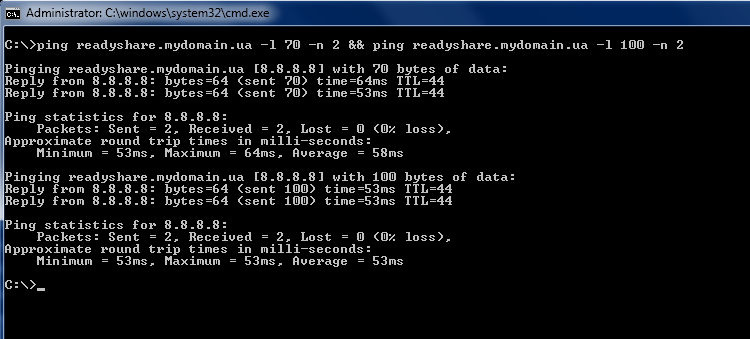
You can perform Port knocking on Windows with the command:
ping readyshare.mydomain.ua -l 70 -n 2 && ping readyshare.mydomain.ua -l 100 -n 2
I will not completely paint the logic, because it is very similar to the one described above, just the verification logic in the rules is inverted and there is a deletion from ipsets. Well, and accordingly, if the IP address is not in ipset-e AllowedVPN, then there is no access.
The sequence of “knocks” is the same as when opening access.
The following is a sequence of iptables commands to chain to input_rule, file /etc/firewall.user
I hope my experience is useful to others.
A good presentation on Chris Cooper's ipsets from QC Co-Lab, from which I started to build on the solution.
I had to climb a lot of resources. I also thought of writing scripts to track LOG or ULOG events from iptables in the system log. I even came across a project - Specter , with which you can implement a reaction (script execution) to iptables ULOG events, which is not in ulogd. Herea large selection of old projects for implementing Port knocking, but I did not want to compile on a router or virtual machine at all. When searching for a solution, I often came up with tips about the speed and convenience of ipsets, so as not to pile up iptables with a bunch of “identical” rules. And in them the keys "--match-set" and "--add-set" were noticed, further searches led to a solution.
In general, it was decided to use ipsets, as no need to track anything and write reactions to events outside iptables.
So, the solution is implemented using purely iptables and ipset. For simplicity of perception, the combination of “knocks” will be the same as in the mentioned article. Let me remind you this - 2 ICMP packets in a row with a size of 70 bytes and after them 2 ICMP packets in a row with a size of 100 bytes.Well, do not forget about the size of the header of the ICMP parquet (28 bytes) .
In my case, after the corresponding “knocks”, a connection is allowed on port 1194 / tcp for the OpenVPN server for the IP address from which the “knocks” were made. The instructions for setting up an OpenVPN server on OpenWRT can be found on the official Wiki , as This is beyond the scope of this article.
Preparing ipsets
It is worth noting that the support for the rules for creating ipsets in the OpenWRT firewall settings file appeared only with the release of Attitude Adjustment, although the revision r36349 did not work ( When applying the rules, it issued a warning that datatype was not specified for ipsets ).
But ipsets can be created with pens, it is advisable to create them at boot time, for example: register in /etc/rc.local.
ipset create knock1 hash:ip
ipset create knock2 hash:ip
ipset create knock3 hash:ip
ipset create AllowedVPN hash:ip
If fw3 supports the creation of ipsets (fw3 is the OpenWRT firewall management tool itself, a detailed description of the settings can be found on the official Wiki ), then the following items are added to the firewall settings file / etc / config / firewall :
config ipset
  option enabled 1
  option name knock1
  option storage hash
  option match src_ip
config ipset
  option enabled 1
  option name knock2
  option storage hash
  option match src_ip
config ipset
  option enabled 1
  option name knock3
  option storage hash
  option match src_ip
config ipset
  option enabled 1
  option name AllowedVPN
  option storage hash
  option match src_ip
ICMP packet sequencing logic
Catch the first knock
icmptype 8 length 98 ! match-set knock1 src ! match-set knock2 src ! match-set knock3 src ! match-set AllowedVPN src add-set knock1 srcThe outgoing ICMP packet address of 98 bytes is entered in ipset knock1, if it is not in other ipsets.
We catch the second knock
icmptype 8 length 98 match-set knock1 src ! match-set knock2 src ! match-set knock3 src ! match-set AllowedVPN src add-set knock2 src
Catch the third knock
icmptype 8 length 128 match-set knock1 src match-set knock2 src ! match-set knock3 src ! match-set AllowedVPN src add-set knock3 src
We catch the fourth knock
icmptype 8 length 128 match-set knock1 src match-set knock2 src match-set knock3 src ! match-set AllowedVPN src add-set AllowedVPN src
The outgoing address of the 128-byte ICMP packet is entered in ipset AllowedVPN, if it is also present in ipset knock1, knock2 and knock3.
In order for the sequence to be caught correctly, the rules in iptables must be entered in the reverse order . Otherwise, the first “knock” will be caught by the first and second rules immediately, just as the third “knock” will be caught by the third and fourth rules immediately.
Additional checks for absence in other ipsets are indicated to clearly trigger a sequence of “knocks” .
The following is a sequence of iptables commands to put in the input_rule chain (a specially created chain in the OpenWRT firewall for user rules) is added to /etc/firewall.user .
iptables -A input_rule -p icmp -m icmp --icmp-type echo-request -m length --length 128 -m limit --limit 10/s -m set --match-set knock1 src -m set --match-set knock2 src -m set --match-set knock3 src -m set ! --match-set AllowedVPN src -j SET --add-set AllowedVPN src
iptables -A input_rule -p icmp -m icmp --icmp-type echo-request -m length --length 128 -m limit --limit 10/s -m set --match-set knock1 src -m set --match-set knock2 src -m set ! --match-set knock3 src -m set ! --match-set AllowedVPN src -j SET --add-set knock3 src
iptables -A input_rule -p icmp -m icmp --icmp-type echo-request -m length --length 98  -m limit --limit 10/s -m set --match-set knock1 src -m set ! --match-set knock2 src -m set ! --match-set knock3 src -m set ! --match-set AllowedVPN src -j SET --add-set knock2 src
iptables -A input_rule -p icmp -m icmp --icmp-type echo-request -m length --length 98  -m limit --limit 10/s -m set ! --match-set knock1 src -m set ! --match-set knock2 src -m set ! --match-set knock3 src -m set ! --match-set AllowedVPN src -j SET --add-set knock1 src
The same rules, but with logging to the syslog
iptables -A input_rule -p icmp -m icmp --icmp-type echo-request -m length --length 128 -m limit --limit 10/s -m set --match-set knock1 src -m set --match-set knock2 src -m set --match-set knock3 src -m set ! --match-set AllowedVPN src -j LOG --log-prefix "(KNOCK4 O) "
iptables -A input_rule -p icmp -m icmp --icmp-type echo-request -m length --length 128 -m limit --limit 10/s -m set --match-set knock1 src -m set --match-set knock2 src -m set --match-set knock3 src -m set ! --match-set AllowedVPN src -j SET --add-set AllowedVPN src
iptables -A input_rule -p icmp -m icmp --icmp-type echo-request -m length --length 128 -m limit --limit 10/s -m set --match-set knock1 src -m set --match-set knock2 src -m set ! --match-set knock3 src -m set ! --match-set AllowedVPN src -j LOG --log-prefix "(KNOCK3 O) "
iptables -A input_rule -p icmp -m icmp --icmp-type echo-request -m length --length 128 -m limit --limit 10/s -m set --match-set knock1 src -m set --match-set knock2 src -m set ! --match-set knock3 src -m set ! --match-set AllowedVPN src -j SET --add-set knock3 src
iptables -A input_rule -p icmp -m icmp --icmp-type echo-request -m length --length 98  -m limit --limit 10/s -m set --match-set knock1 src -m set ! --match-set knock2 src -m set ! --match-set knock3 src -m set ! --match-set AllowedVPN src -j LOG --log-prefix "(KNOCK2 O) "
iptables -A input_rule -p icmp -m icmp --icmp-type echo-request -m length --length 98  -m limit --limit 10/s -m set --match-set knock1 src -m set ! --match-set knock2 src -m set ! --match-set knock3 src -m set ! --match-set AllowedVPN src -j SET --add-set knock2 src
iptables -A input_rule -p icmp -m icmp --icmp-type echo-request -m length --length 98  -m limit --limit 10/s -m set ! --match-set knock1 src -m set ! --match-set knock2 src -m set ! --match-set knock3 src -m set ! --match-set AllowedVPN src -j LOG --log-prefix "(KNOCK1 O) "
iptables -A input_rule -p icmp -m icmp --icmp-type echo-request -m length --length 98  -m limit --limit 10/s -m set ! --match-set knock1 src -m set ! --match-set knock2 src -m set ! --match-set knock3 src -m set ! --match-set AllowedVPN src -j SET --add-set knock1 src
The most important rule
It is this rule that allows an incoming connection to port 1194 / tcp, if the IP address from which the connection is made is located in the ipset AllowedVPN.
config 'rule'
  option enabled 1
  option 'target' 'ACCEPT'
  option 'name' 'VPN'
  option 'src' 'wan'
  option 'proto' 'tcp'
  option 'dest_port' '1194'
  option 'extra' '-m set --match-set AllowedVPN src'
Otherwise, it can be written in /etc/firewall.user
iptables -A input_rule -p tcp --dport 1194 -m set --match-set AllowedVPN src -j ACCEPT
Port knocking
You can perform Port knocking on Windows with the command:
ping readyshare.mydomain.ua -l 70 -n 2 && ping readyshare.mydomain.ua -l 100 -n 2
Close access
I will not completely paint the logic, because it is very similar to the one described above, just the verification logic in the rules is inverted and there is a deletion from ipsets. Well, and accordingly, if the IP address is not in ipset-e AllowedVPN, then there is no access.
The sequence of “knocks” is the same as when opening access.
The following is a sequence of iptables commands to chain to input_rule, file /etc/firewall.user
iptables -A input_rule -p icmp -m icmp --icmp-type echo-request -m length --length 128 -m limit --limit 10/s -m set ! --match-set knock1 src -m set ! --match-set knock2 src -m set ! --match-set knock3 src -m set --match-set AllowedVPN src -j SET --del-set AllowedVPN src
iptables -A input_rule -p icmp -m icmp --icmp-type echo-request -m length --length 128 -m limit --limit 10/s -m set ! --match-set knock1 src -m set ! --match-set knock2 src -m set --match-set knock3 src -m set --match-set AllowedVPN src -j SET --del-set knock3 src
iptables -A input_rule -p icmp -m icmp --icmp-type echo-request -m length --length 98  -m limit --limit 10/s -m set ! --match-set knock1 src -m set --match-set knock2 src -m set --match-set knock3 src -m set --match-set AllowedVPN src -j SET --del-set knock2 src
iptables -A input_rule -p icmp -m icmp --icmp-type echo-request -m length --length 98  -m limit --limit 10/s -m set --match-set knock1 src -m set --match-set knock2 src -m set --match-set knock3 src -m set --match-set AllowedVPN src -j SET --del-set knock1 src
The same rules for blocking, but with logging to the syslog
iptables -A input_rule -p icmp -m icmp --icmp-type echo-request -m length --length 128 -m limit --limit 10/s -m set ! --match-set knock1 src -m set ! --match-set knock2 src -m set ! --match-set knock3 src -m set --match-set AllowedVPN src -j LOG --log-prefix "(KNOCK4 C) "
iptables -A input_rule -p icmp -m icmp --icmp-type echo-request -m length --length 128 -m limit --limit 10/s -m set ! --match-set knock1 src -m set ! --match-set knock2 src -m set ! --match-set knock3 src -m set --match-set AllowedVPN src -j SET --del-set AllowedVPN src
iptables -A input_rule -p icmp -m icmp --icmp-type echo-request -m length --length 128 -m limit --limit 10/s -m set ! --match-set knock1 src -m set ! --match-set knock2 src -m set --match-set knock3 src -m set --match-set AllowedVPN src -j LOG --log-prefix "(KNOCK3 C) "
iptables -A input_rule -p icmp -m icmp --icmp-type echo-request -m length --length 128 -m limit --limit 10/s -m set ! --match-set knock1 src -m set ! --match-set knock2 src -m set --match-set knock3 src -m set --match-set AllowedVPN src -j SET --del-set knock3 src
iptables -A input_rule -p icmp -m icmp --icmp-type echo-request -m length --length 98  -m limit --limit 10/s -m set ! --match-set knock1 src -m set --match-set knock2 src -m set --match-set knock3 src -m set --match-set AllowedVPN src -j LOG --log-prefix "(KNOCK2 C) "
iptables -A input_rule -p icmp -m icmp --icmp-type echo-request -m length --length 98  -m limit --limit 10/s -m set ! --match-set knock1 src -m set --match-set knock2 src -m set --match-set knock3 src -m set --match-set AllowedVPN src -j SET --del-set knock2 src
iptables -A input_rule -p icmp -m icmp --icmp-type echo-request -m length --length 98  -m limit --limit 10/s -m set --match-set knock1 src -m set --match-set knock2 src -m set --match-set knock3 src -m set --match-set AllowedVPN src -j LOG --log-prefix "(KNOCK1 C) "
iptables -A input_rule -p icmp -m icmp --icmp-type echo-request -m length --length 98  -m limit --limit 10/s -m set --match-set knock1 src -m set --match-set knock2 src -m set --match-set knock3 src -m set --match-set AllowedVPN src -j SET --del-set knock1 src
I hope my experience is useful to others.
A good presentation on Chris Cooper's ipsets from QC Co-Lab, from which I started to build on the solution.









