 October 15, 2013 at 12:12
Sessions in the Yii API with the ability to store in Redis
Not so long ago, I had a need to write an API on the Yii Framework, one of the functional requirements in which is authorization. For the authorization mechanism, I decided to use sessions.
Before that, I had seen quite a few API implementations written in PHP, while I had never seen implementations where the session mechanism built into PHP would be used. What I mostly came across was the implementation of home-made sessions. In most cases, it looked like this:
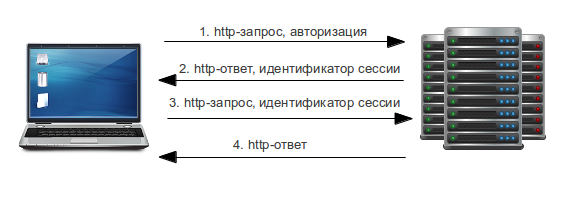
1. The client sends a request to the server with authorization data.
2. In case of successful authorization, the server generates a unique identifier (random hash), stores it in its storage (database, cache, etc.), records information about the client's membership in this identifier and puts down the time of the last call to the server. After that, it sends a response with this identifier to the client.
3. The client, having received the session identifier and saving it for further requests, sends a request to the server with the transmitted session identifier (as a parameter or header) to receive data.
4. The server, having checked the session identifier, gives the data to the client and updates the time of the last call to the server with this identifier.
The interaction between the client and the server in paragraphs 3 and 4 can occur until the session record on the server is destroyed. In the event of a session being destroyed, it is necessary to perform steps 1 and 2 again before continuing with steps 3 and 4. Periodically, you have to check the session identifiers for the last time you access the server and delete those that have exceeded their lifetime if the session store that you are using cannot delete records automatically for a given lifetime. In this method, there are quite a few actions that require implementation.
And what will we get using standard PHP sessions ?
1) Automatic generation of a unique session identifier.
2) Access to the data stored in the session, as well as their management from anywhere in the application.
3) Using standard PHP functions for working with sessions, including wrappers on them. For example, the class CHttpSession of the Yii framework.
4) Automatic restoration of previously saved environment. For example, an automatic user login when receiving the identifier of a previously created session.
5) Automatic deletion of sessions that have ended their lifetime.
Let's look at how cookie-based sessions work.
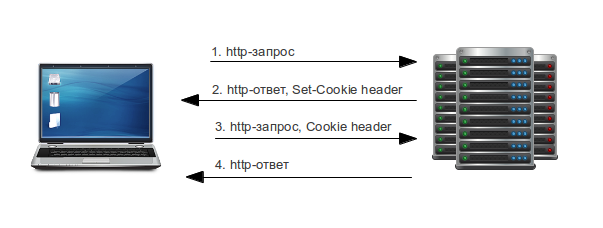
1. The browser sends a request to the server for information at the specified URL.
2. The server returns a response with the heading “Set-Cookie”, which tells the browser to write the session identifier to the cookie. Example of the “Set-Cookie” header:
3. The browser, having successfully recorded the session identifier in the cookie, sends a request for a new URL, but with the “Cookie” header:
4. The server sends the page to the browser.
All subsequent requests from the browser come with a “Cookie” header, which contains information about the session identifier. All this automatically works in the browser if cookies are not disabled. But what if cookies are disabled, or if the browser is not the client? In this case, everything will not be so simple. Of course, you can use the reception and transmission of the “Set-Cookie” and “Cookie” headers on the client side, but let's consider another solution to this problem, presented below.
Before you start using sessions, you need to pay attention to the parameters in php.ini related to sessions. Pay particular attention to the following parameters: session.use_cookies , session.use_only_cookies , session.use_trans_sid . In order to start using the PHP session mechanism for the API, you need to configure these parameters as follows:
Of course, it is not necessary to set these settings directly in php.ini, it is enough to set them through the PHP function ini_set . With these settings, we will disable the ability to use cookies to store identifiers on the client side, since it implies the use of the API not only by the browser, but also by other applications, mobile devices, etc. Enabling session.use_trans_sidwill give us the opportunity to pass the session identifier as a GET or POST parameter. If you intend to develop a REST API, then passing the identifier through the POST parameter is not the best option, since REST also uses methods such as PUT and DELETE, which will not work when passing the session identifier. Therefore, it is better to pass the identifier as a GET parameter, which will work with any of the methods in the REST API. We also set the name of the GET parameter in the session.name parameter, which is called PHPSESSID by default. The URL with the passed session identifier will look like this:
https://api.example.com/action?session=l2kkl7c9sm2dfedr767itc9966
Now let's look at how this mechanism can be used in the Yii Framework. To work with sessions, Yii provides the CHttpSession class . To use it, you need to specify the following settings in the config array in the components array:
where
'cookieMode' => 'none' sets php.ini settings to session.use_cookies = 0 and session.use_only_cookies = 0
'useTransparentSessionID' => true sets php.ini to session.use_trans_sid = 1
For APIs with not very many hits this would be enough, but by default, sessions are stored as a “Plain text” file on disk, which can become a weak link when reading and writing sessions intensively in highly loaded APIs. In this case, you can use one of the solutions:
1) replace the disk with an SSD;
2) put a raid of level 10 from SSD disks;
3) use a RAM disk. For example, the Tmpfs file system on Linux;
4) storing sessions in memcached(data storage in random access memory);
5) storing sessions in Redis (storing data in RAM).
I would like to focus on Redis, due to its diverse storage structures. I also want to note the important possibility of data recovery (sessions in our case) after a server reboot. Before using Redis as a session repository, you need to install the Redis server and PHP Extension for Redis . How to install both, can be found here . After a successful installation, you will be able to use the PHP Session handlerfrom the PHP Extension for Redis. In order to use Redis' PHP Session handler without directly changing php.ini and being able to set Redis as a session repository in the Yii config, I had to change CHttpSession a bit, inheriting from it and writing my own RedisSessionManager class .
Now the config for the session component will look like this:
Now you can use sessions to authorize users in the API. You can do this as follows:
Login method:
What's going on here? First we get the username and password that came from the request. Then we try to log in using this username and password, and in case of a successful login, return the session identifier for further use when accessing other API methods.
This is what the UserIdentity class looks like:
In case of successful authentication, the user component is entered into the user component, which will be automatically substituted at the next calls to the api with the specified session identifier.
Logout method:
Everything is simple here. Just destroy the current session with all its contents.
I also want to note some tips on using sessions in the API:
1) It is important to use an encrypted connection for communication between the client and the server, so as not to allow the attacker to intercept the session identifier for further use. For example, you can use the HTTPS protocol.
2) You can use additional session authentication algorithms in case the session was nevertheless intercepted by an attacker. For example, bind a session to the user's IP, additionally keeping the IP inside the session and checking if it has changed during the next call. If the previously saved IP does not match the current, you need to destroy the session.
3) Put a limit on the lifetime of the session. Since this time is updated automatically at the next request to the API, I would set, for example, 2 hours. Thus, if the user is inactive for 2 hours, the session is destroyed automatically. This will reduce the chance of overflowing session storage.
Finally, a short demo video on how authorization in the REST API written in Yii works with storing sessions in Redis.
Article Author: luxurydab
Homemade Session Implementation Option
Before that, I had seen quite a few API implementations written in PHP, while I had never seen implementations where the session mechanism built into PHP would be used. What I mostly came across was the implementation of home-made sessions. In most cases, it looked like this:
1. The client sends a request to the server with authorization data.
2. In case of successful authorization, the server generates a unique identifier (random hash), stores it in its storage (database, cache, etc.), records information about the client's membership in this identifier and puts down the time of the last call to the server. After that, it sends a response with this identifier to the client.
3. The client, having received the session identifier and saving it for further requests, sends a request to the server with the transmitted session identifier (as a parameter or header) to receive data.
4. The server, having checked the session identifier, gives the data to the client and updates the time of the last call to the server with this identifier.
The interaction between the client and the server in paragraphs 3 and 4 can occur until the session record on the server is destroyed. In the event of a session being destroyed, it is necessary to perform steps 1 and 2 again before continuing with steps 3 and 4. Periodically, you have to check the session identifiers for the last time you access the server and delete those that have exceeded their lifetime if the session store that you are using cannot delete records automatically for a given lifetime. In this method, there are quite a few actions that require implementation.
Option using standard PHP sessions
And what will we get using standard PHP sessions ?
1) Automatic generation of a unique session identifier.
2) Access to the data stored in the session, as well as their management from anywhere in the application.
3) Using standard PHP functions for working with sessions, including wrappers on them. For example, the class CHttpSession of the Yii framework.
4) Automatic restoration of previously saved environment. For example, an automatic user login when receiving the identifier of a previously created session.
5) Automatic deletion of sessions that have ended their lifetime.
Let's look at how cookie-based sessions work.
1. The browser sends a request to the server for information at the specified URL.
2. The server returns a response with the heading “Set-Cookie”, which tells the browser to write the session identifier to the cookie. Example of the “Set-Cookie” header:
Set-Cookie: PHPSESSID=p2799jqivvk8gnruif1lvtv5l5; path=/3. The browser, having successfully recorded the session identifier in the cookie, sends a request for a new URL, but with the “Cookie” header:
Cookie: PHPSESSID=p2799jqivvk8gnruif1lvtv5l54. The server sends the page to the browser.
All subsequent requests from the browser come with a “Cookie” header, which contains information about the session identifier. All this automatically works in the browser if cookies are not disabled. But what if cookies are disabled, or if the browser is not the client? In this case, everything will not be so simple. Of course, you can use the reception and transmission of the “Set-Cookie” and “Cookie” headers on the client side, but let's consider another solution to this problem, presented below.
Using PHP Sessions in the API
Before you start using sessions, you need to pay attention to the parameters in php.ini related to sessions. Pay particular attention to the following parameters: session.use_cookies , session.use_only_cookies , session.use_trans_sid . In order to start using the PHP session mechanism for the API, you need to configure these parameters as follows:
session.use_cookies = 0
session.use_only_cookies = 0
session.use_trans_sid = 1
session.name = session
Of course, it is not necessary to set these settings directly in php.ini, it is enough to set them through the PHP function ini_set . With these settings, we will disable the ability to use cookies to store identifiers on the client side, since it implies the use of the API not only by the browser, but also by other applications, mobile devices, etc. Enabling session.use_trans_sidwill give us the opportunity to pass the session identifier as a GET or POST parameter. If you intend to develop a REST API, then passing the identifier through the POST parameter is not the best option, since REST also uses methods such as PUT and DELETE, which will not work when passing the session identifier. Therefore, it is better to pass the identifier as a GET parameter, which will work with any of the methods in the REST API. We also set the name of the GET parameter in the session.name parameter, which is called PHPSESSID by default. The URL with the passed session identifier will look like this:
https://api.example.com/action?session=l2kkl7c9sm2dfedr767itc9966
Using PHP Sessions in Yii Framework
Now let's look at how this mechanism can be used in the Yii Framework. To work with sessions, Yii provides the CHttpSession class . To use it, you need to specify the following settings in the config array in the components array:
'session' => array(
    'autoStart' => true,
    'cookieMode'=>'none',
    'useTransparentSessionID' => true,
    'sessionName' => 'session',
    'timeout' => 28800,
),
where
'cookieMode' => 'none' sets php.ini settings to session.use_cookies = 0 and session.use_only_cookies = 0
'useTransparentSessionID' => true sets php.ini to session.use_trans_sid = 1
For APIs with not very many hits this would be enough, but by default, sessions are stored as a “Plain text” file on disk, which can become a weak link when reading and writing sessions intensively in highly loaded APIs. In this case, you can use one of the solutions:
1) replace the disk with an SSD;
2) put a raid of level 10 from SSD disks;
3) use a RAM disk. For example, the Tmpfs file system on Linux;
4) storing sessions in memcached(data storage in random access memory);
5) storing sessions in Redis (storing data in RAM).
Session Storage in Redis
I would like to focus on Redis, due to its diverse storage structures. I also want to note the important possibility of data recovery (sessions in our case) after a server reboot. Before using Redis as a session repository, you need to install the Redis server and PHP Extension for Redis . How to install both, can be found here . After a successful installation, you will be able to use the PHP Session handlerfrom the PHP Extension for Redis. In order to use Redis' PHP Session handler without directly changing php.ini and being able to set Redis as a session repository in the Yii config, I had to change CHttpSession a bit, inheriting from it and writing my own RedisSessionManager class .
Now the config for the session component will look like this:
'session' => array(
    'class' => 'application.components.RedisSessionManager',
    'autoStart' => true,
    'cookieMode'=>'none',
    'useTransparentSessionID' => true,
    'sessionName' => 'session',
    'saveHandler'=>'redis',
    'savePath' => 'tcp://localhost:6379?database=10&prefix=session::',
    'timeout' => 28800,
),
Using sessions for authorization in the API
Now you can use sessions to authorize users in the API. You can do this as follows:
Login method:
public function actionLogin()
{
    $params = $this->getRequestParams();
    $identity=new UserIdentity($params[‘username’],$params['password']);
    if($identity->authenticate()){
        $this->sendResponse(Status::OK, array(
            'session'=>Yii::app()->session->getSessionID(),
            'message'=>'Successful login',
        ));
    }else{
        $this->sendResponse(Status::UNAUTHORIZED, $identity->errorMessage);
    }
}
What's going on here? First we get the username and password that came from the request. Then we try to log in using this username and password, and in case of a successful login, return the session identifier for further use when accessing other API methods.
This is what the UserIdentity class looks like:
class UserIdentity extends CUserIdentity
{
    public function authenticate()
    {
        $account = Yii::app()->account->getByName($this->username);
        $password = Yii::app()->account->hashPassword($this->password);
        if(!$account || $this->username !== $account->username){
            $this->errorCode = self::ERROR_USERNAME_INVALID;
            $this->errorMessage = 'User with username '.$this->username.' not found';
            return false;
        } else if ($password !== $account->password) {
            $this->errorCode = self::ERROR_PASSWORD_INVALID;
            $this->errorMessage = 'Wrong password';
            return false;
        } else {
            $this->errorCode = self::ERROR_NONE;
            Yii::app()->user->login($this);
            Yii::app()->user->setId($account->id);
            Yii::app()->user->setName($account->nickname);
            return true;
        }
    }
}
In case of successful authentication, the user component is entered into the user component, which will be automatically substituted at the next calls to the api with the specified session identifier.
Logout method:
public function actionLogout()
{
    if(Yii::app()->session->destroySession()){
        $this->sendResponse(Status::OK, 'Successful logout');
    }else{
        $this->sendResponse(Status::BAD_REQUEST, 'Logout was not successful');
    }
}
Everything is simple here. Just destroy the current session with all its contents.
I also want to note some tips on using sessions in the API:
1) It is important to use an encrypted connection for communication between the client and the server, so as not to allow the attacker to intercept the session identifier for further use. For example, you can use the HTTPS protocol.
2) You can use additional session authentication algorithms in case the session was nevertheless intercepted by an attacker. For example, bind a session to the user's IP, additionally keeping the IP inside the session and checking if it has changed during the next call. If the previously saved IP does not match the current, you need to destroy the session.
3) Put a limit on the lifetime of the session. Since this time is updated automatically at the next request to the API, I would set, for example, 2 hours. Thus, if the user is inactive for 2 hours, the session is destroyed automatically. This will reduce the chance of overflowing session storage.
Finally, a short demo video on how authorization in the REST API written in Yii works with storing sessions in Redis.
Article Author: luxurydab









